

4D Toys
v1.8.2 Looping
- Secret button you hold down to slow the translation of the slice is now Tab
Gyrochoron 42,2 fix.
MegaUpdate 1.8: Rotating the 3D Slice, 2D Faces Projections, Marble scenes &more
** Full Blog Post with Videos**
1. Rotating your 3D slice arbitrarily in 4D

2. Projection of the 2D Faces of the 4D objects

3. Colored Projection of the 1D Lines of the 4D objects

4. A lot of structures made to play with “marbles” and roll them around

5. Scenes with Tesseracts that are fixed at a point but with a torque that keeps them rotating

6. The 1D line version of the 2D “Davinci” 4D Objects

7. A static Klein bottle with a sphere that you can roll inside

8. A 120 cell (faces) and a sphere together
9. Auto-Follow the last touched shape
Version 1.7: Klein Bottles!
Added the Klein Bottle!
Also added:
- The 2D Loop as a helper explanation for the Klein bottle
- The "Spherinder Klein Bottle," a higher dimensional generalization of the Klein bottle.
More notes on the website:
https://marctenbosch.com/news/2021/12/4d-toys-version-1-7-klein-bottles/
Version 1.6: Wireframe Projections!
When enabled, the edges of objects are projected onto the current slice.
That means that no matter where the slice is, the edges of the objects will always be visible.
It's an "old school" way of displaying 4D objects which you may have seen before!
Try it in the 2D Levels!
I had fun going back to every level to check it out. It lets you see the movement of the objects even if you are not in the same slice.
As with the previous update, there is a new page at the right-most end of the level select hub. After you play the relevant level there the button will be unlocked.
Bug Fixes:
- fixed a bug where the menu wouldn't scroll smoothly with certain devices.
- fixed a bug where the framerate wasn't locked to 60fps on high framerate displays.
Note: for simplicity each 4D toys update is now called 1.x, where x is the number of the update.
Update on the website, including a short video:
https://marctenbosch.com/news/2020/12/4d-toys-version-1-6-wireframe-projections/
Version 1.5: Anti-Gravity Mode, Export Mesh for 3D Printing
- Export Mesh: Exports a 3D mesh of what is currently visible on screen.
These meshes can then be 3D printed, etc... (Unfortunately 4D printing is not yet available in this universe :P).
Find the meshes in your Documents folder.
Note that Shapeways' algorithm for filling the inside of meshes sadly fails on some of the coolest meshes like the Star Polychora from the last update, since they are filled with lots of polygons on the inside (btw it's fun to poke your head inside these meshes in VR!). - Anti-Gravity: Creates an anti-gravity field that makes objects float. Besides the obvious coolness, this allows to see rotations that are unrestricted from the constraints of the collision with the ground.
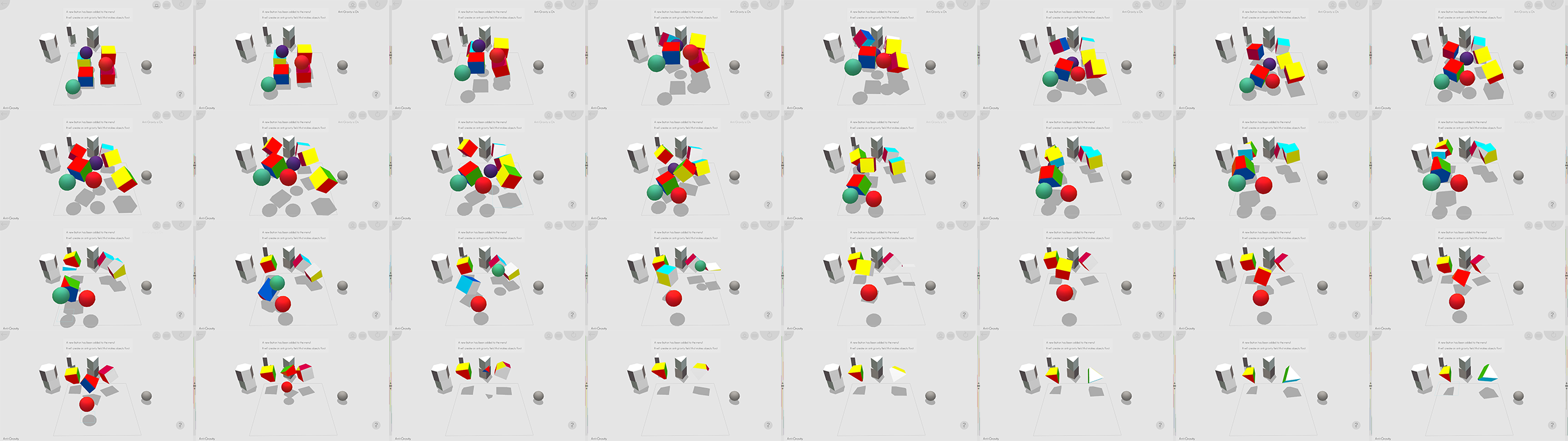
A new page of shapes has been added, with one new level for each button. Visiting each of these levels unlocks the corresponding buttons. Also, all special buttons are now gathered into a new menu button. This lays the groundwork for easily adding new features in future updates!
Blog post
Version 1.4: Happy Holydays Star Polychora Update!
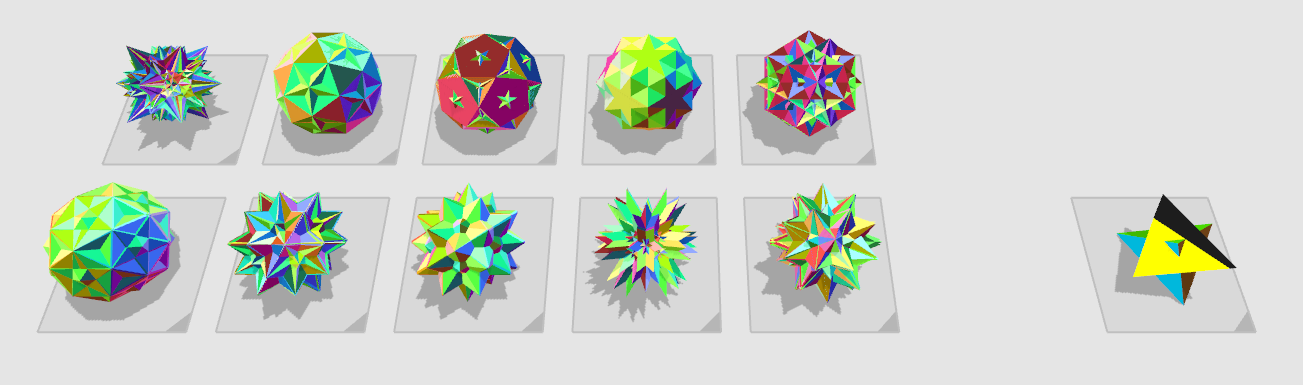
The Regular Star Polychora (or "Schläfli-Hess 4-polytopes"):
- Icosahedral 120-cell
- Small stellated 120-cell
- Great 120-cell
- Grand 120-cell
- Great stellated 120-cell
- Grand stellated 120-cell
- Great grand 120-cell
- Great icosahedral 120-cell
- Grand 600-cell
- And my *personal favorite*, the Great grand stellated 120-cell
Plus a Compound 5-Cell for good measure.
The Star Polychora are the 4D equivalent of the 2D Star Polygons.


Star polygons can be made by extending the edges of polygons, until they meet outside of the polygon.

For example this Hexagram (or "Star of David") can be made by extending the edges of a Hexagon. This process of extending edges (or faces and cells in 3D or 4D) is called Stellation.
Warmest wishes for a Happy Holiday Season and a wonderful New Year! I felt the need to take a break from updating 4D Toys for a bit, but more updates will be coming next year!
Version 1.0.3: More Uniform & CRF Polychora + Fixes
- Runcinated 120Cell
- Truncated 120Cell
- Rectified 600Cell
- Truncated 600Cell
- Omnitruncated Tesseract (Faces)
- BiTruncated 24Cell (Faces)
- Cantellated 24Cell (Faces)
- Runcinated 24Cell (Faces)
- Grand Antiprism (Faces)
- Biparabigyrated Cantellated Tesseract
- Bi-Icositetradiminished 600Cell
- Square Magnabicupolic Ring
- Castellated Rhombicosidodecahedral Prism
In Mouse+Keyboard mode you can now use the Shift key instead of the Right Mouse Button. This allows using a track pad instead of a mouse.
The Next Update will have crazy stuff in it!


Version 1.3: More Uniform & CRF Polychora + Fixes
- Runcinated 120Cell
- Truncated 120Cell
- Rectified 600Cell
- Truncated 600Cell
- Omnitruncated Tesseract (Faces)
- BiTruncated 24Cell (Faces)
- Cantellated 24Cell (Faces)
- Runcinated 24Cell (Faces)
- Grand Antiprism (Faces)
- Biparabigyrated Cantellated Tesseract
- Bi-Icositetradiminished 600Cell
- Square Magnabicupolic Ring
- Castellated Rhombicosidodecahedral Prism
In Mouse+Keyboard mode you can now use the Shift key instead of the Right Mouse Button. This allows using a track pad instead of a mouse.
The Next Update will have crazy stuff in it!
Version 1.0.2: The Gyrochoron Update!
