

Altera
CLOSED ALPHA RELEASE DATE & Gameplay Commentary
WHERE THE FUCK HAVE YOU BEEN AND WHY WAS THERE NO NEWS FOR SO LONG?!
We were very lazy doing nothing all year. We just played video games and watched Twitch streamers play I am Jesus. Please do not tell our moms. Thanks. No but jokes aside. This year was not easy at all for us. As some of you know our tiny team was directly affected by the war crimes of russian terrorists in Ukraine. And some of us also needed to relocate to a safer place. Because of that the production of the game was on hold for around 2 months at the beginning of the year. Obviously this impacted our previously announced release window for the Closed Alpha, which was originally planned for the end of 2022. But this is not something we could have foreseen, nor was it possible to plan ahead. The new release date for the Closed Alpha is the 28th of April 2023.
ALTERA? WHAT IS GOING ON?! DID YOU CANCEL GAMING!?
Alright so let's address the big elephant in the room. The game's name is ALTERA now. And yes we know this might be confusing. But to us the old name always was just a temporary project name. Even if that was not really communicated publicly. After all
Intrusion Campaign Announcement

Hey folks,
We are thrilled to announce that the first act of the Intrusion Campaign is coming this year! Exact date, more info and details will be shared as we come closer to its release. Backers as well as people who pre-ordered the game will be able to play it!
Make sure to join our Discord to not miss any of the upcoming news.
December 2021 Update!
Next year we will be very busy (even more than this year) as we will continue to work on the 1st Act of the INTRUSION CAMPAIGN and all the unified game systems that are present in both game modes. For example Player Progression, Skill Tree, Cross-Platform Features, and much more!
We plan on properly showcasing the INTRUSION CAMPAIGN next year. Until then you shouldn't expect any new devlogs on our YouTube channel (but maybe something else)🙂
Besides that, we will also have some very exciting news and announcements scattered throughout 2022. All in all 2021 was a very successful and productive year for our studio and it is very exciting to see how all the little and big pieces are coming together.
It is very fascinating to see how all game systems we designed the past two years all come together, synergize and somehow just work and feel right as they should. Well, this is a lie because sometimes things just break. But I think you know what I mean.
Since we don't wanna leave you with nothing please check out the patch notes below and some of the videos and screenshots here and there!
But that is all for now. We wish everyone great holidays and we hope you all get healthy into the new year! TIME TO FINALLY START OUR VACATION AND GO THROUGH THIS CRAZY BACKLOG OF GAMES WE STILL WANNA PLAY THIS YEAR!
CHEERS!
RECENT CHANGES:
- We implemented the intro of the 1st act of the INTRUSION CAMPAIGN. As announced previously INTRUSION is a narrative-driven CAMPAIGN that can be played solo or in co-op. It will utilize unified game mechanics as well as new mechanics and game systems only present in INTRUSION.
[previewyoutube="Fk_Bn3PAYcA;full"] - We had to do numerous changes to the game codebase so that it supports two different game modes. It's a big plus that our game modes share a lot of game mechanics. Thus we can keep the codebase compact and optimized, and avoid the need to write big parts of code that would be only specific to a certain game mode.
- We implemented a base version of the INTRUSION CAMPAIGN game loop. It takes place on the same island as TERRA CONTROL. Also, the process of capturing areas and progressing through the game will be different compared to TC. We already started testing the game loop internally so that we can improve it and balance it early on.
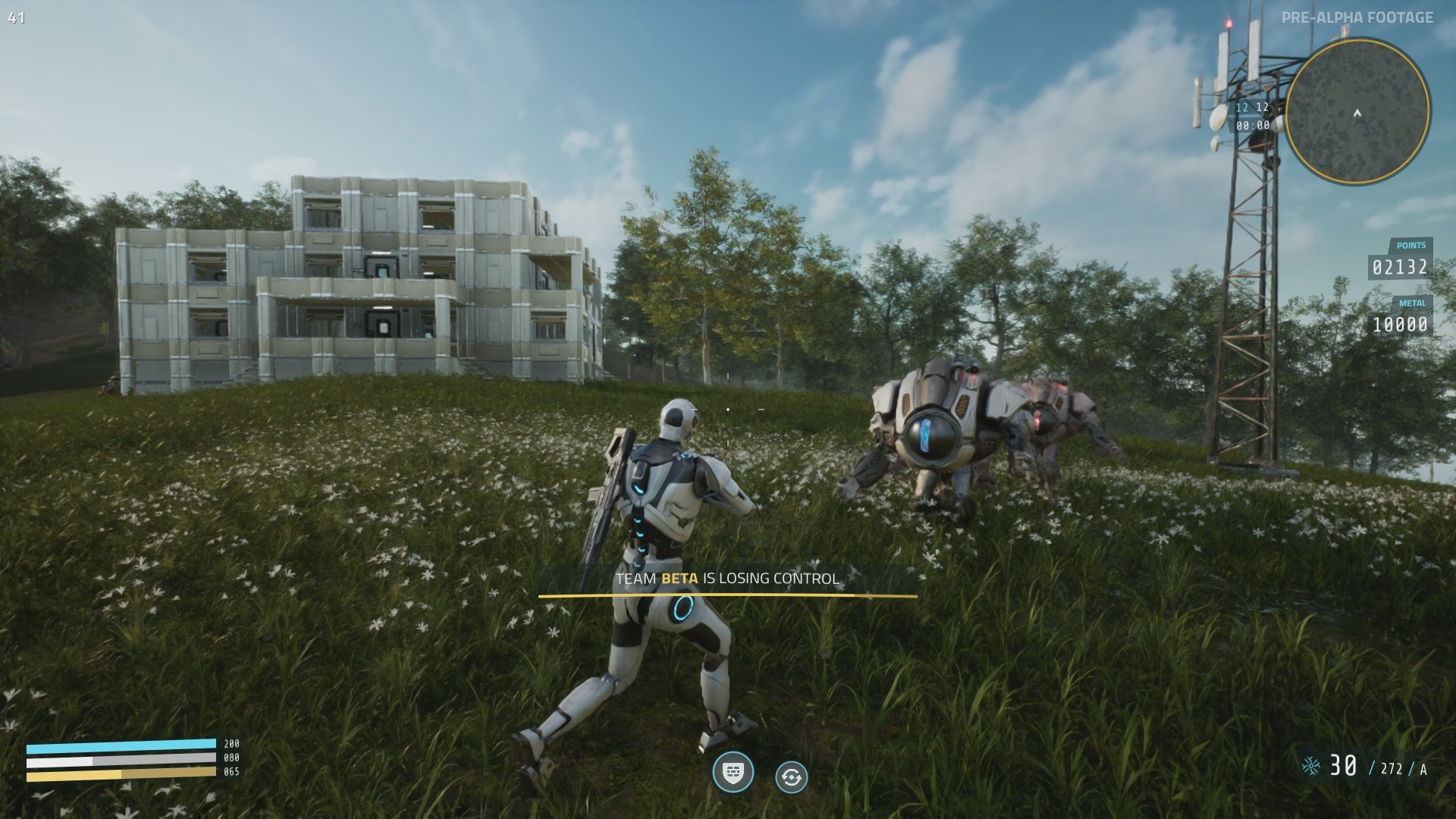

- We optimized the client-side and server-side performance of the AI enemies. Our goal is to be able to spawn massive amounts of enemies without a significant load on the hardware.
- We improved the animations another time and started working on the unarmed movement animations.

- We rewrote another part of the game blueprints into C++. This time it was basic movement capabilities such as sprinting, jumping, and crouching. We also improved server authority over the mentioned movement modes to prevent possible cheating.
Devlog #05 | Robotic Companions, Building System & Intrusion Voiceovers
Hello there. My name is Mai. Welcome to Devlog #05. Vulkanic has a lot of new cool things they want to showcase today. So please enter into your preferred state of relaxation and continue watching!
Robotic Companions
In this devlog I want to introduce to you the first robotic creature — the bull. It’s a highly developed and intelligent robotic companion which can be spawned and mounted by the players. The main advantage of the bull is its speed. By riding it you will be able to traverse the map way faster than it’s possible on foot.
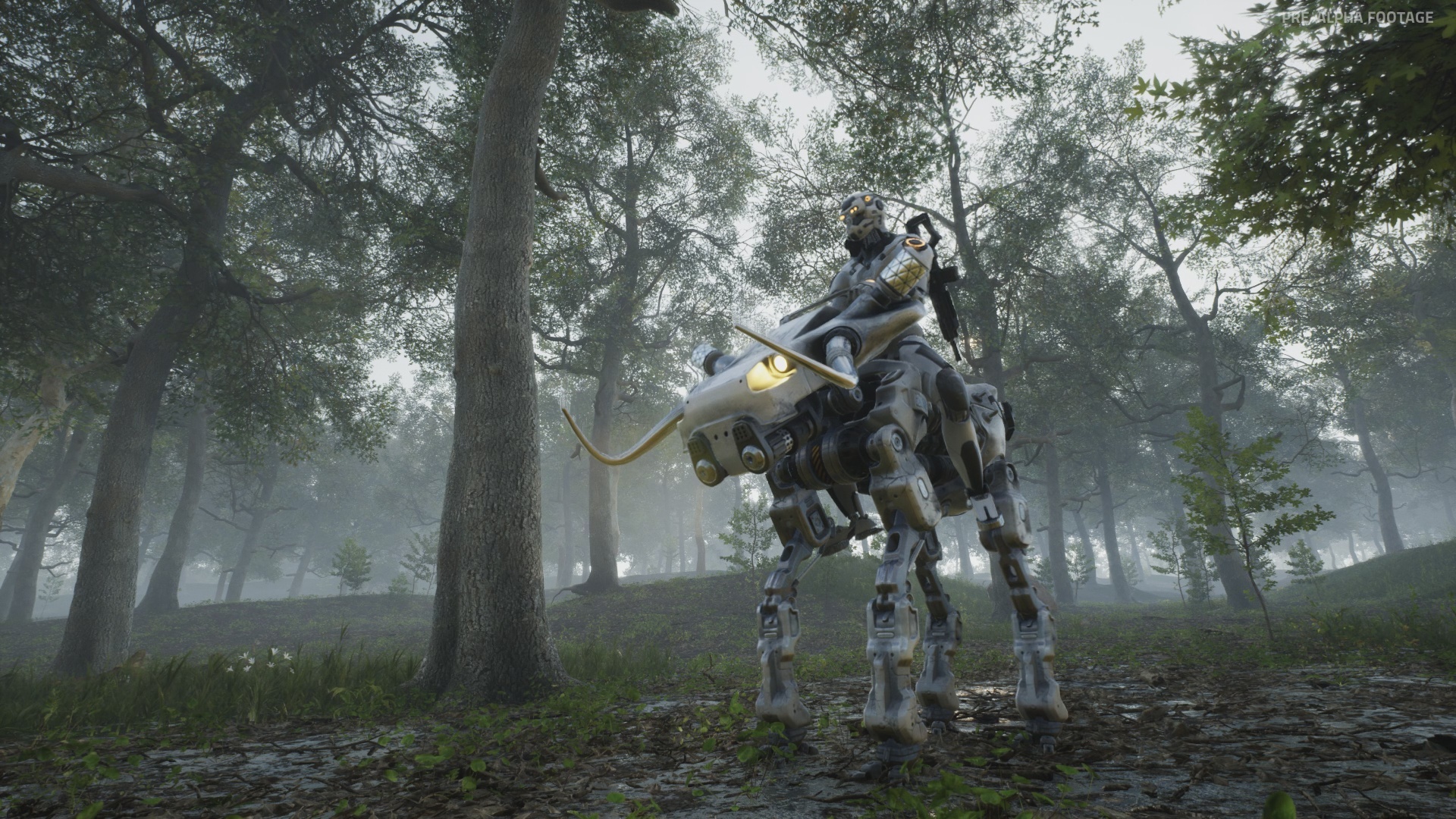
For start, let's take a deeper look at how the bull's animations work. In these terms the humanoid characters and quadrupeds are very different, which leads to the necessity of creating the animation system specifically designed for the creatures with four legs. In fact programming animations for quadrupeds is significantly harder than for a character with two legs. When the bull is walking on the unflat surface it’s body rotation has to be adjusted, the legs have to be accurately placed on the ground, and the feet have to be aligned with the surface. A system was made that traces the floor in 8 different locations and performs various calculations in order to adjust the bones movement.


You can mount the bull from 3 sides: left, right, and back. Same applies to dismounting, while riding you can tell your character to dismount the companion in a specific direction. This might be crucial in battle because this way you can quickly hide behind your companion and use it as a natural shield. The bull can turn left and right, jump and move with different speeds, such as walk, trot, and gallop. Speaking in general it was decided to make the movement responsive despite it being a separate character with a possibility of it’s own will. Have no worries, it won’t kick you down. By mounting the bull your character completely overrides its functionality and makes it a very reliable companion.
The logic that allows you to interact with the companion in order to mount or dismount was built on top of our existing interaction system which was already used for interacting with the doors. However it was improved compared to the initial version. The interaction logic was moved to the server for better security. Additionally it was encapsulated in a separate component which can be easily added whenever it’s needed. For example if a character has to be controllable by the player and needs the ability to interact with other objects we can simply connect the mentioned interaction component to the character class to quickly receive access to required functionality. The same approach will be applied to other features such as the ability system, building system, in-game shop and so on.
Just like the interaction system, each of them will be modified to work as a separate module. Since it’s planned to have a lot of different character types this approach grants a lot of flexibility and allows to endow each of them with a needed functionality. The modular way of structuring the project proves to be very useful for this purpose and becomes more and more crucial as the codebase grows.

As you probably already know there will be two simulation modes in PROXIMA: a true PVP multiplayer experience Terra Control, and a narrative driven co-op mode Intrusion, featuring a robot troop management system as well as an extensive open world with a lot of things to do. The robotic companions will be highly relied on in both of these game modes. While in Terra Control the companion will be mostly limited to traversing high distances in the simulation world, in Intrusion it will have the ability to execute your commands such as following you, protecting an area or attacking your enemies. But this is something we will show you in upcoming weeks and months.
Now as the base for the riding system is finished it can be reused to quickly iterate other types of robotic animals. The Vulkanic development team always thinks in advance, so they designed the system to also support different drivable rigs with slots for multiple characters, such as aircrafts, boats or cars. What drivable rigs would you like to see in the game? Share your ideas in the comments!
Spectator Mode
While working on robotic companions, the development team realized that every different type of character needs a different camera position and the switching always needs to be smooth and seamless. So they spent some time playing with different perspectives and controls. This provided a good opportunity to iterate the first version of the spectator mode along the way. Because if you can observe any character while you control it, why not make it spectatable at any other moment of time?

As a result Vulkanic added a feature that allows switching the perspective to another player. Thanks to the unified animation system, the appearance of the spectated character is as precise as viewing your own. This mode is commonly used to let players spectate their allies or enemies while the player character is dead. However the developers of the PROXIMA simulation plan to go further and allow players to switch to spectating their teammates at any time. This may be especially useful in battles. Because exactly seeing what your robotic allies see, can give you a tactical advantage.

But that is not all. The separate free perspective mode was implemented. It allows the spectator to freely roam around the map to see the ongoing action from any possible side. The free perspective mode was used to capture footage for this devlog and will be actively used in upcoming videos as well. It will also be available in-game to provide a tool for capturing footage for in-game events. It will be iterated upon, and features commonly used in photo modes will be added as well. So whether you wanna capture cinematic footage or create amazing looking screenshots you will have an extensive tool to do exactly that.
Building & Resource System
One of the most important game features that has been introduced to the game in the past few months is the building system. It empowers players to build impressive structures on any relatively flat space on the map which is not occupied with other objects such as trees or large rocks. Also there is another requirement for it — your team needs to control the territory where you want to build.
Building is a great way to get protection or create a good firing point. Bases will play an especially important role in Intrusion where you will often need to fight big hordes of enemies.

Each building part costs a certain amount of metal. Currently there are 8 different building parts, but this number will drastically increase in the future, also it will be possible to buy and place various props. In any case building is not cheap so you might need to cooperate with your teammates in order to construct bigger bases in shorter amounts of time. In order to build you need metal — one of the in-game resources. You will be able to collect metal by holding control over territory. Simply put, the more areas your team controls the higher the metal income will be. Additionally you can obtain a certain amount of metal by killing other players and robotic creatures. It’s planned to have other resources besides metal in the game but I will tell you more about it in the upcoming devlogs.
Intrusion Voiceovers
Before I say goodbye to you, I wanna quickly share some more progress. Vulkanic has officially started working on the first act of the Intrusion campaign. The script for the first act has been finalized. Same for the dialogs. All voice lines used for the first act are currently being recorded. Here is a small snippet of them. Don't worry there will be no story spoilers here.
Besides dialogues and voice lines for action events and cut scenes there will also be voice lines for certain events in the game. Like when the weather state is switching or Mai wants to do a special announcement. These kinds of voice overs will be used in both game modes, and add to the overall immersion of the simulation.
Check the video to hear the voiceovers.
Thank you for reading and see you in the upcoming devlogs!
— Mai
Devlog #04 | New Hostile Bot AI & Animation Updates
Hello there fellow Human and welcome to the Devlog #04!
AI System
Recently we worked a lot on the experimental AI system. At first we designed a robotic AI character called Heavy Bot or just H-Bot in short. H-bot is a hostile character ready to attack and eliminate any player it sees. Endowed with a basic perception system it can detect targets that appear at 50-meter distance in front of it. Besides that it can hear shots and impacts of the bullets around it. It also reacts to the damage by starting actively investigating for a potential enemy in a direction of the perceived stimulus. Once a bot spots its target it will run towards it and attack it with powerful melee attacks. We designed this bot to be relatively slow but very dangerous on a short range. Besides that most of its body is heavy-armored but has a weak spot which is the eye. Hitting it will result in a high damage.
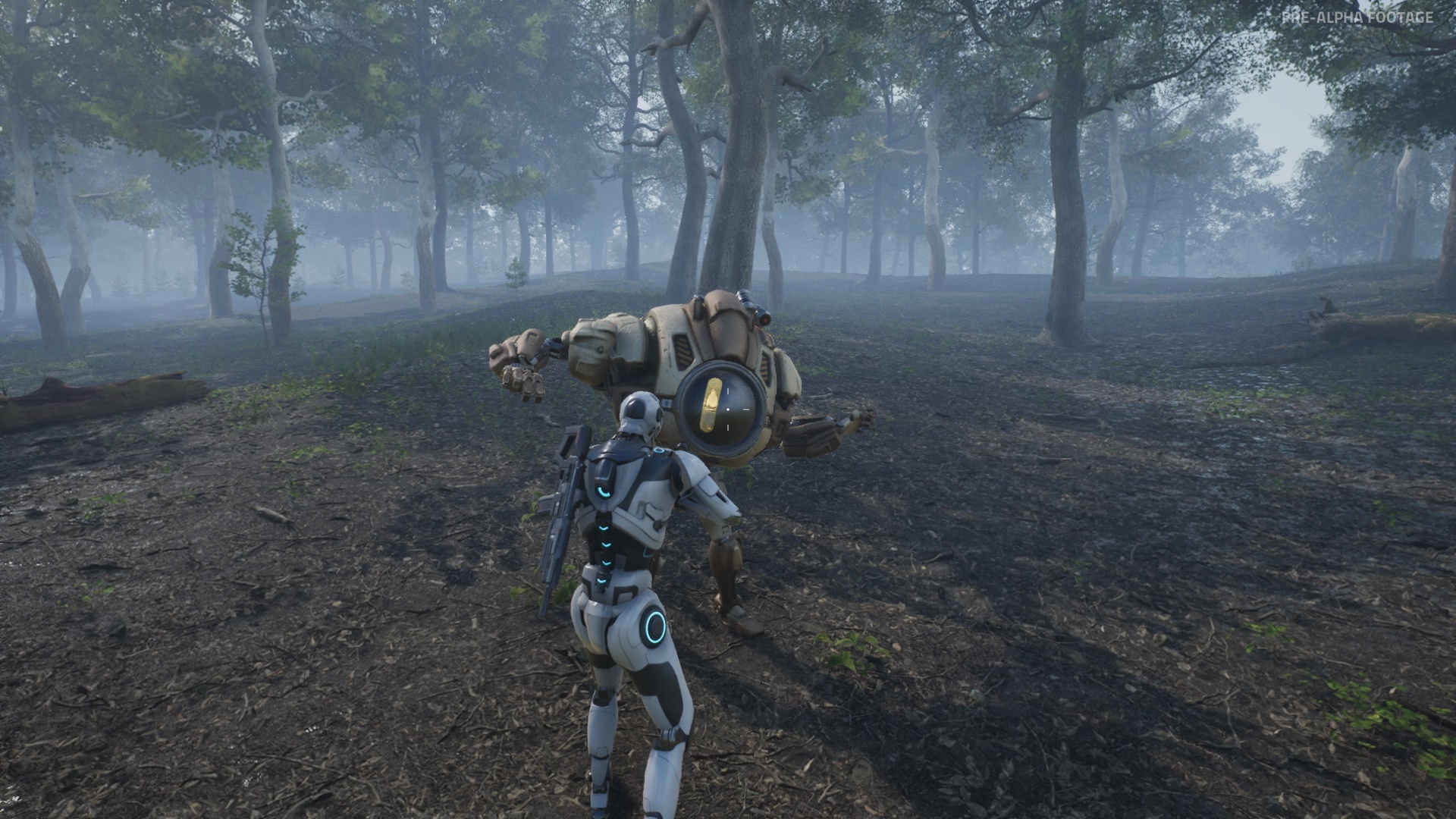
In order to spread the AI bots over the map we programmed a mechanism of spawners. Each spawner represents a circle whose radius can be adjusted to limit the area where the bots get initially started. The characters spawned within the specific spawner will explore the territory within its range looking for potential targets. Once killed they will respawn after a certain delay within the range of the mentioned spawner. In total we placed 7 spawners with approximately 10 robots in each which resulted in having 70 robots on the map at the same time.

Testing the AI system in the game gave us good results. It proved to impact the gameplay positively especially when the players face attacks of multiple robots at once. Fighting the hoards of those bots can be extremely fun and challenging.
It was also important for us to test the client-side and server-side performance with a lot of AI characters on the map. However the fact we tested adding a lot of AI doesn’t mean we want to replace all real players in Terra Control with bots. This game mode will stay a PvP-focused experience with a limited usage of AI and this won’t be necessary character-like bots.

On other hand our second game mode called Intrusion will heavily depend on AI. We will reveal more details about this game mode in upcoming devlogs.
Animation & Movement Updates
We made another big update to our animation system. The main goal of this update was to replace most of the movement animations and increase their variety. Also we wanted to add various missing features. Let’s have a quick overview of the new things we iterated.
First of all, as already mentioned we replaced the body animations for all the movement states such as idle, walking, running and crouching. The animations from the new set we used are more smooth and polished compared to the old ones. They make the character movement look and feel even more nicely, especially in TPP.

Jumping was significantly improved. Now it’s using around 40 different animations depending on the character speed and movement direction. Transition animation from the walking to jumping state is being chosen automatically based on the position of the characters legs in the moment of jumping.
Transitions from the walking state to idle were added as well. For that we have 16 new different animations.
We also animated turning left and right in the idle state. The turning looks more realistic now because the character will only move its upper body while its feet remain in the same place. Thereafter the robot will step left or right in case the turn angle is higher than a certain threshold.
That’s all for now! Thanks for reading! Write your thoughts in comments and don’t forget to wishlist the game!
See you soon!
Devlog #03 | Super-Realistic Clouds, Night Time & Terra Control Updates
Hello there human and welcome to Devlog 03. My name is Mai and I am an AI hard-coded into PROXIMA UNIVERSE – the most realistic and advanced robotic war simulation software ever created.
You will be listening to my beautiful voice from now on as Vulkanic started to transfer control over the simulation environment to me. Besides overseeing the war scenarios and regulating the ongoing economy, I will be guiding you in the world of PROXIMA and keep you updated about the process of its development by highlighting the most interesting and exciting features.
Now since you are watching this please allow me to present you a closer look at all the recent changes & additions that were made to PROXIMA UNIVERSE.
Volumetric Clouds & Lighting Revise
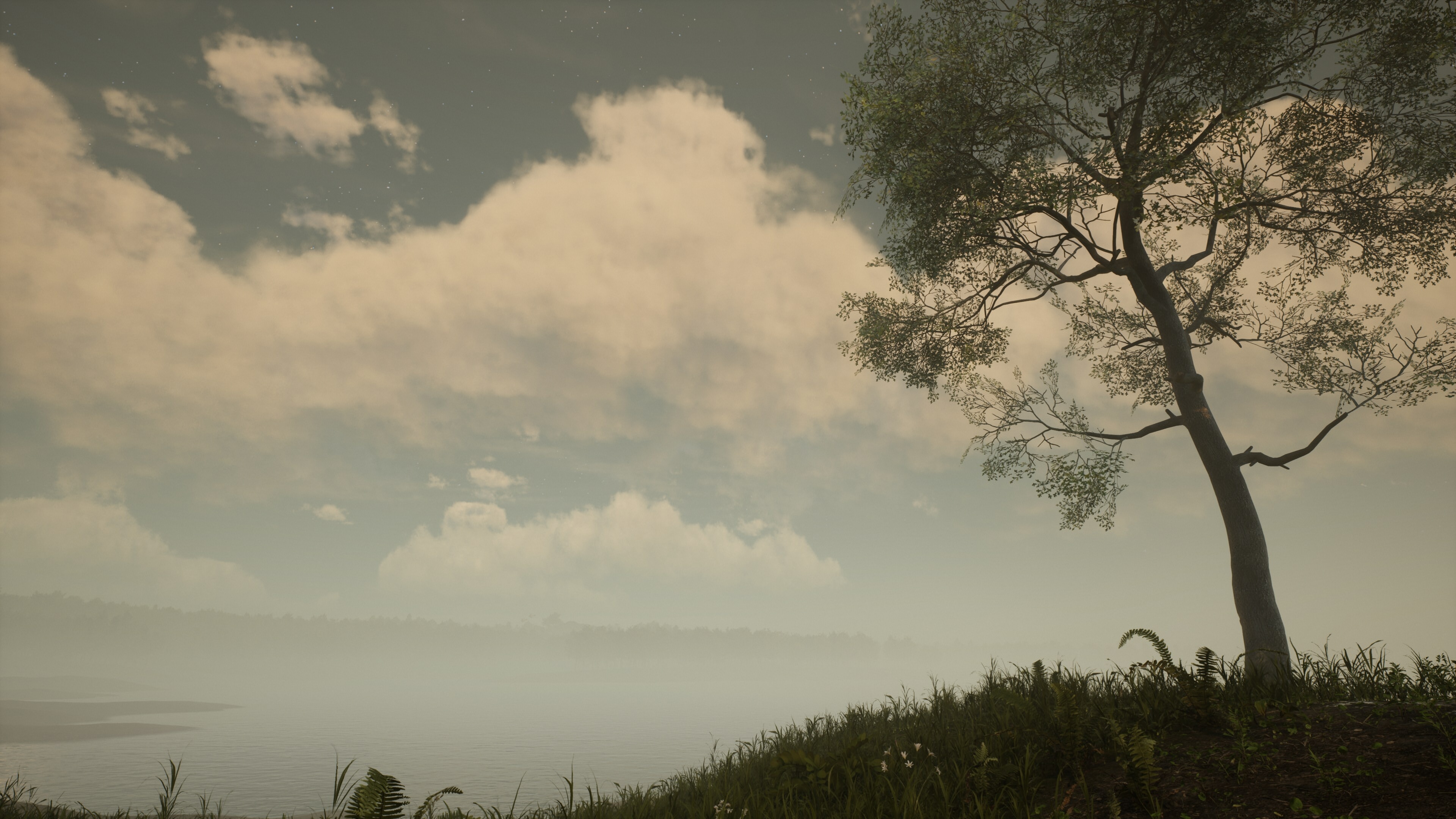
Unreal Engine now supports realistically looking dynamic clouds that react to different lighting conditions. A base version of the clouds available in the engine was used and iterated upon in order to improve the visuals and extend functionality.
First of all a feature was added that allows the clouds to continuously move on the sky. The direction and speed of clouds is based on the current wind parameters. In PROXIMA these parameters will change over time which will affect the entire game environment.

For a more realistic look it was important to not only add dynamic values to one type of clouds but to actually create different types of clouds. After all there are a dozen different cloud types in the real world.
Using real photographs as a reference, stratus, cirrus, cirrocumulus and cumulus clouds were created. The cumulus clouds can also easily transform into cumulonimbus.
Coverage, density, scale and shape can be controlled with curves. When the dynamic values change it affects the whole sky. But how to make certain types of clouds cover only a part of it? The answer to this was the creation of weather maps. By default the sky is divided into tiles which repeat seamlessly, but players don’t notice that since the tiles are very large. By creating a map which includes multiple tiles we can mask the tiles where the certain cloud types will appear. Such a map was created for huge cumulus clouds so that they will not be in sight of players all the time, but eventually they will appear on the sky since the clouds are constantly moving.

This feature is also useful for the rain simulation because rain clouds could appear randomly and after that the actual rain effect will be triggered. A function for casting cloud shadows on the ground was also added.
After adding the clouds there was a slight change in the lighting of the scenes. So it was logical to revise lighting set up in order to bring everything into accordance. Especially since now there is an updated version of the Sky Atmosphere System which allows to achieve even better results on the real atmosphere simulation.
Few scenes from the trailer were recaptured in order to demonstrate to you how the lighting improved.
Night Time
Another important feature for a realistic environment simulation is the dynamic time of day. Recently efforts have been made to improve the night phase. The night sky sphere includes the stars and the moon. As the time goes on, the stars move on the sky as the planet rotates on its axis. So does the moon although it has its own trajectory. Due to gameplay reasons it was decided to not simulate completely realistic movement of the moon. At night the moon takes the role of a light source, so it has to be present in the sky all night long. In addition its angle has to stay within a certain range to provide a good looking shading effect. By the way, it was very pleasant to see how nice the moon illuminates the clouds.

The lighting conditions at day and night time are very different. The moon light is way less bright than the sun light, but it’s still bright enough to allow players to clearly see their surroundings. It was a ground decision to not make the night too dark so it doesn’t interfere with the gameplay.
One of the biggest challenges from a technical perspective is smoothly blending the night with the day, because the main light source has to change without players noticing it. Having two lights on the scene at the same time can cause a big performance hit since the lighting and shading are very demanding features. But such issues can be managed by automatically switching certain lighting features in the right moment of time.

When the night changes with the day it affects numerous parameters related to the light sources, sky light, clouds, fog and physically-based atmosphere. All of those are controlled with curves in order to achieve a smooth and nice-looking transition. The dusks and dawns in PROXIMA need to be as beautiful as they are on Earth!
Terra Control Updates

In a recent internal play session the complete game loop was tested for the first time. In PROXIMA the game loop starts with the beginning of a round and ends when one of the 4 teams obtains a victory. As you might already know the matches in PROXIMA will be infinite and will consist of a continuous sequence of rounds where each new round starts after the end of the previous one, without resetting any progress on the map. Players will be able to join and leave freely at any time of the match.
Work on the Area System was continued as well. One new feature that was recently implemented is the Enemy Position Tracker. If a team controls an area all enemy positions in this area will be revealed to it. However for balancing purposes it was decided that an enemy position is not displayed 100% precisely. Instead it will appear as a circle which indicates that the enemy is located somewhere within its bounds. The circles will update every 10 seconds, which means if someone intrudes an area the position will be marked for any possessing team with a certain delay. The radius of a circle will grow bigger the faster the marked player is moving which will make camping a dangerous business.

Besides this feature a few more additions and changes were added. The beacons received an auto-destruction function which means that they will be destroyed when an enemy captures an area. Also it’s now only possible to spawn a beacon on controlled territory.
The status UI for capturing areas was improved in order to be more informative. Players can now clearly see the progress of any team capturing or losing an area. Also a passive income of points for the in-game economy system was added and tested.
New Website Features
The official company website vulkanic.io received an update. From now on all existing backers are able to check the info about the game package they own on their profile page. To access the profile you need to log in on the website using the email that you used for backing the game.
If you are a backer, you should have already received an email with a link leading to the page where you can set up a password for your account. If you haven’t received it for some reason you can just reset your password on the website.

After signing in you will end up on the library page displaying all of your owned packages. Just click on a package to check the info about it. The following page will be a unified place for all of your game keys, including the Alpha key, final key on release, and a key for unlocking your exclusive rewards in game. Please note that keys will not be distributed immediately, but it’s guaranteed that you will receive your Alpha key prior to the start of Closed Alpha.
By the way, you can also enter a desired name for the in-game credits on this page.
If you are not a backer, but you wish to support the development of PROXIMA UNIVERSE and get access to the upcoming Alpha, you can buy one of the game packages available on vulkanic.io.
Alright, that's it for this devlog. I hope you enjoyed it! As always stay human and see you in the next development vlog!
— Mai
Devlog #02 | Battle for Territory, 24-Hour Day/Night Cycle & Map Tools
Hello and welcome to Devlog #02. In this video we will focus on the most recent and interesting new additions and changes we made in PROXIMA.
We had some amazing feedback for the last devlog and we reached almost 6k views. It really motivated us! We saw that some of you also shared the video on Twitter and Reddit! Thank you for all the great support!
First of all we want to notify you that backers packs are not available anymore via Indiegogo. We did this because we were not satisfied with the supported payment options on there. Moving forward we’re making the backer packs now available through Patreon. Rewards are still the same and tiers too. With the only difference that you can decide how much you wanna pay upfront. So in theory you can support us with very low monthly contributions but still get rewards based on the amount you spent total. And yes Patreon also supports Paypal as a payment option.
Area System & Beacons
We continued to iterate new features for the Terra Control game mode. Our most recent additions are the beacon and area system. They define the base of the core experience of Terra Control. You can place a beacon on the ground and teammates can use it to spawn at the location where it’s deployed. Every player will have one beacon and there will be a cooldown of 1 minute after you placed it.
So make sure to plan its placement carefully and coordinate it with your team. It should be mentioned that you can only spawn the beacon on an area that you have already captured but you can’t do so on an enemy territory. If an enemy captures an area where your beacon is located then it will be destroyed. Besides that enemies can destroy it with weapons or grenades. However it will have a solid amount of HP and also a small shield around it so it can protect you and your teammates shortly after respawning.
Please don’t rely on the basic look of the beacon. The current version is temporary and meant for testing purposes only. The appropriate model will be implemented later down the road.
Going back to the area system it’s important to mention that it will be highly connected with the in-game economy. By capturing or defending areas you will earn strategy points (shortly "SP"). Further you can use them to buy gear and weapons in the shop.
You also get a passive income of points for all the time your territory is secure and in your possession. The area system will be iterated upon in the future and some things might change like the size of the independent areas or where they are located.
Map Tools
We had to develop our own tools in order to define the borders of the areas on the map. The first version was designed to run in a browser and was based on procedural generation of a cell grid using the Voronoi algorithm. After the cells are generated they can be combined into groups. Using this simple app we designed our first test version of areas.
However we were not satisfied that this method requires additional steps for exporting to the engine. So we started thinking about a way of painting areas directly in Unreal. This led us to the creation of the updated solution which uses Unreal's landscape tool for storing map data and further for determining the location of any players that are present on the map. We can edit the map using landscape brushes of any shapes and sizes and all of this is available directly in the engine to make the life of a designer much easier. This is important because we plan to make map tools available for modders so they can design territories in their own way.
After the first iteration of areas was finished we started working on the way of displaying them in game. We implemented both full-sized and mini-map to show the positions of your teammates, available beacons and of course the states of areas in real-time. So you can see the balance of forces and plan your actions accordingly.
The map also has zoom and drag features so you can navigate it better. In addition the mini-map rotates automatically for easier orientation on the battlefield.
Dynamic Time of Day & Real Weather API
For this devlog we also decided to include some rendering updates. We made the first iteration of our time of day system. Every day in the game has a length of 24 hours just like in the real world. The sun position is accurately synced with real conditions taking in account the latitude, longitude and exact date and time of any location on planet Earth. We chose the location of our studio to test how it works. The possibilities of a real-time simulation are not limited with just sun position. It’s possible to simulate real weather conditions, such as rain, fog, cloud density etc. using an online weather API and this is what we’re going to test in later iterations.
We do it because we plan on giving people the possibility to turn on region-specific time of day as well as weather settings on private servers. But of course you will be able to set any conditions you desire manually or even randomize them. You will also be able to customize the length of the day-night cycle.
By the way, we will release server files publicly so everyone will have an ability to run a private server with their own settings.
Regarding our official servers, those that will support cross-platform play as well as progression, we plan to have a dynamic weather setup with real time of day based on a locked region of the server location. We can't wait to show you more progress on these features in the future.
Thanks on behalf of our whole studio for your support and patience. We wanna make PROXIMA the most ambitious and polished game it can be. The support of all our backers and fans is nothing short but breathtaking.
We had a lot of fun preparing this devlog as the Terra Control game mode gets more and more ready for full testing. There are a lot of more features and additions we wanna showcase in the future and a lot of things we haven't even scratched the surface on. Since this is going to be the last devlog of this year we already wish you all a great holiday season!
We will have much more exciting news in the new year. So don't forget to follow us on Twitter, Reddit and Discord. Or if you like emails sub to our newsletter!
By the way, we are running weekly giveaways for Alpha keys on our Discord! Make sure to join it. Also don’t forget to wishlist Proxima on Steam.
We can't wait to return next year and prepare more videos and news for you.
As always, stay human.
Devlog #01 | Creation of Haven, Terra Control Game Mode & Huge Backend Update
Hello there, human and welcome to the PROXIMA UNIVERSE Devlog #01. This is one of many devlogs that we plan to publish over the course of upcoming months. We have handpicked the most interesting and amazing things for you and we will highlight them in this video. In this stage of the project we are focusing the most on feature and system iterations for the game.
We are also working on all the amazing rendering systems that we will need. Whether they are part of our toolset for the upcoming MOD SDK or they are used for the game itself.
Keep in mind that everything you are seeing in this video is footage from the Pre-Alpha and is not a showcase of the final version of the game. Things might change or will be highly improved during later stages of development.
What we are showing you today is only a glimpse of all the great things that we worked on the past months and we can't wait to show you all the other great things. In fact we needed to take out half of the content because otherwise the video would have been too long.
So stay tuned! The next devlog is right around the corner!
Backend Improvements & New Server Provider
While working on PROXIMA we pay a lot of attention to the quality of our codebase. We had to do a lot of work in transition from the prototype stage to Pre-Alpha and one of the most challenging things was switching our server solution which also led us to rewrite a major part of the game code in order to move to native UE4 replication, however the time we invested will turn into a lot of benefits. We had a lot of issues with our previous server provider but now they are gone. The Unreal Networking is powerful and secure, and the new server provider we got in contact with is giving us a great support and technical assistance. So from now on we expect everything to be extremely smooth on this part!
I guess you would agree: network performance, server stability and better protection from cheaters are very important for a multiplayer game. And we want our players to have the best possible experience while playing PROXIMA.
We will continue expanding and polishing our codebase which includes replacing prototype functionality which is based on Unreal Engine blueprints with a C++ code. By doing that we not only intend to improve performance, stability and security of the game but also make a solid base for our upcoming MOD SDK.
But let’s finish with the technical stuff and talk about something more interesting!
Cinematic Trailer
The cinematic trailer we have released in April this year was the result of around 3 months of work. All scenes from the trailer are made in realtime in UE4. In the trailer we wanted to highlight some of the most interesting game features. Such as:
- Dynamic time of day.
- Dynamic weather system.
- The large-scale open-world environment.
But also let you all dive into the atmosphere of the game environments, created utilizing modern rendering technologies available in the Unreal Engine. Pushing the limits of what's possible in real-time - this is what we are trying to achieve with PROXIMA. But we will talk more about this later in this video. One thing to mention: we will release a benchmark for the game in the future which is based on the scenes from this trailer, but also some additional new scenes. Stay tuned for news!
Creation of Haven
We thought it would be great to give you a small breakdown of how we used procedural generation techniques for designing our terrain. For creating the landscape of our first map Haven we used a software called Gaea which features a set of physically-accurate erosion algorithms that can be directed and combined in any way to achieve an extremely natural look. Within a relatively short time we’ve been able to create a realistic-looking terrain with mountains, hills, river channels, and a sea surrounding the island. On top of that we generated maps to define spreading of all biomes that are present on Haven. All of that can be done in a matter of hours, without any manual painting!
We think it is very important to show you this as we plan to make a complete breakdown on how people can mod PROXIMA with the tools we used internally for development which also includes terrain creation. We will release more details when the game becomes available for modding.
Besides the terrain we’re using the same approach for populating the map with the foliage and environmental assets. Trees, ground plants, rocks: all of these can be placed automatically using the combination of Unreal’s foliage tools and some additional algorithms, such as placement maps which can be easily created in Photoshop. The more complex and diverse your procedural set is, the more natural look of environments you can get. In any case this approach takes way less time than painting the foliage completely by hand, but allows to achieve nearly the same results. Here you can see what we’ve been able to do in a relatively short time. But this is just beginning. We’re planning to significantly increase the variety of foliage and add way more details to make the biomes of Haven look even more organic.
However, this doesn’t mean we want to bury the artistic approach completely and give all the work to a machine. No. It’s just a question of using all powers of procedural generation before we can add stuff manually. We still have the ability to go in by hand to paint materials and objects to make certain areas on the map look even more unique.
But what about asset modeling? Sure, we used procedural approaches here as well. We worked in a software called SpeedTree which allows us to randomly generate different variants of trees based on predefined sets of parameters. We designed multiple species of trees such as oaks, pines, maples etc. and combined them to create different woods on Haven.
Animation System
During the development of PROXIMA we invested a lot of effort into the creation of our own animation system. Our goal was to create a system that allows a smooth transition between first-person and third-person perspectives. We were not satisfied with the method that is used in many other games where they use a separate animation set for FPP and TPP view.
First of all this approach makes the animations look too simplified, led by the need to properly fit your arms and a weapon to the viewport. But we wanted the movemented to feel more natural and realistic, so we designed a system that shares the same set of animations on both perspectives, in fact the only thing that is changing is the position of the camera.
Secondly, we wanted to avoid an issue with a slight difference between how your character appears to yourself and how others see you. Imagine you hide behind a rock and you think you are fully covered but an enemy still can see the edge of your body. I think you would agree, this is crucial for multiplayer shooters. But happily, we will not have such a problem in PROXIMA.
And at last we can save a lot of time and resources creating animations because our animation system supports seamless blending of animations created for specific body parts (such as reloading the weapon) with the rest of the body. But of course, what you see is not final. We will continue working on our animation system to make it even better over time. Our next steps will be polishing and cleaning actual animations to make them combine together in a most appealing and natural way, but also improving the transitions between different movement states.
Terra Control Game Mode Features
And finally, let’s talk about gameplay! We are actively working on the first game mode called Terra Control. At this point of development we’re focusing more on developing stable and optimized in-game systems rather than on visual representation of things. Having a solid, highly polished and flexible codebase means we can iterate more features in the smaller amounts of time and minimize bugs and issues to minimum, and we achieved quite a good progress on this over the course of the past weeks and months.
One of the systems we worked on is the Ability System - one of the core pillars of PROXIMA. We will have 3 character classes: Gunner, Mechanic and Protector, and each of them will have a set multiple unique abilities, so making them working smoothly, being balanced and intuitive during the gameplay is crucial. The first ability we created to test our Ability System in action is the Barrier which will be available for the Protector class. The barrier can be spawned to protect you and your teammates from damage. It can be destroyed by the enemy fire or grenades.
Another feature we implemented is a shop where you will be able to buy weapons and other equipment while in the game. The UI is currently very basic but as I already said our main goal at this point is to assure that everything works smoothly and is properly replicated over the network.
In a tactical environment of Terra Control it will be important to know the positioning of your teammates. So we implemented the highlight effect that will outline your teammates when they are hidden from sight.
We are continuously testing the game internally with our voluntary QA team to assure that whenever we open the gates for the Alpha everything is polished and properly working. We prototyped a small test map in order to test how movement and gunplay will work in an environment where the space is limited and the number of encounters and fights are raised to the maximum. We received a lot of positive feedback during the test. By the way If you want to join our QA team you can apply here. Right now this team consists of 30 people but we will triple the size of it in the following weeks and months in order to be able to test the Terra Control game mode with full teams.
That’s it for this devlog. We hope you enjoy it! We still have a lot of stuff to show you in upcoming devlogs. Join our Discord to become a part of our community. Also support our Indiegogo crowdfunding campaign to get a guaranteed access to upcoming Closed Alpha. Stay tuned and see you in the upcoming devlog!
Trailer & Indiegogo Campaign
Hello there fellow human!
We're thrilled to finally show you our new trailer! We hope you like it!
Also our Indiegogo crowdfunding campaign is now live! We can finally share with you all the information about the game features and our future plans for PROXIMA. We updated our store page with all the new details!
Trailer Release Date & Giveaway
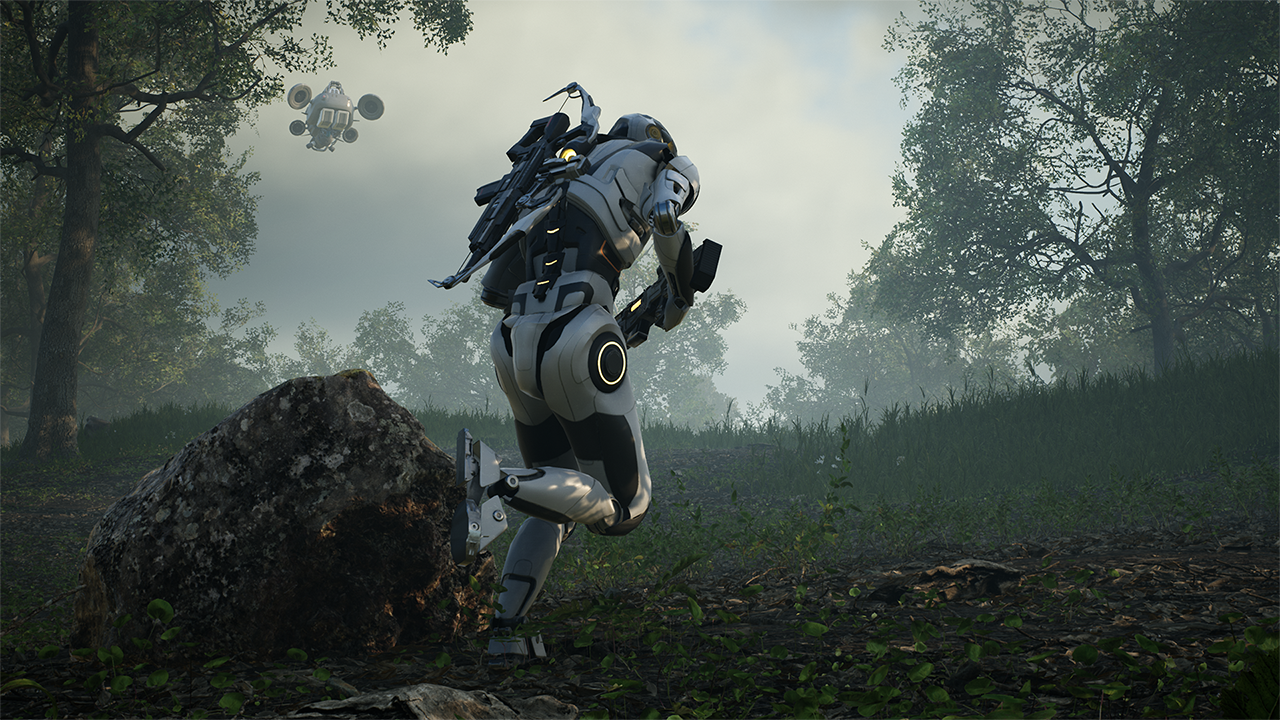
Our new trailer as well as Indiegogo crowdfunding campaign with a lot of ambitious stretch goals will officially launch on the 23rd of April! Subscribe to our mailing list to get access to secret discounted perks here.
Celebrating this announcement we are also giving away keys for the upcoming Closed Beta. Check our Twitter and Facebook for more info!