Ancient Warfare 3 is leaving early access! For those of you who want to read some of my thoughts and plans, make sure to read this post: https://store.steampowered.com/news/app/758990/view/6716622476446528467 Otherwise, I just want to say THANK YOU and enjoy the patch!
There is also a new map competition going live with this update, which you can find here: https://store.steampowered.com/news/app/758990/view/3963798375007867538
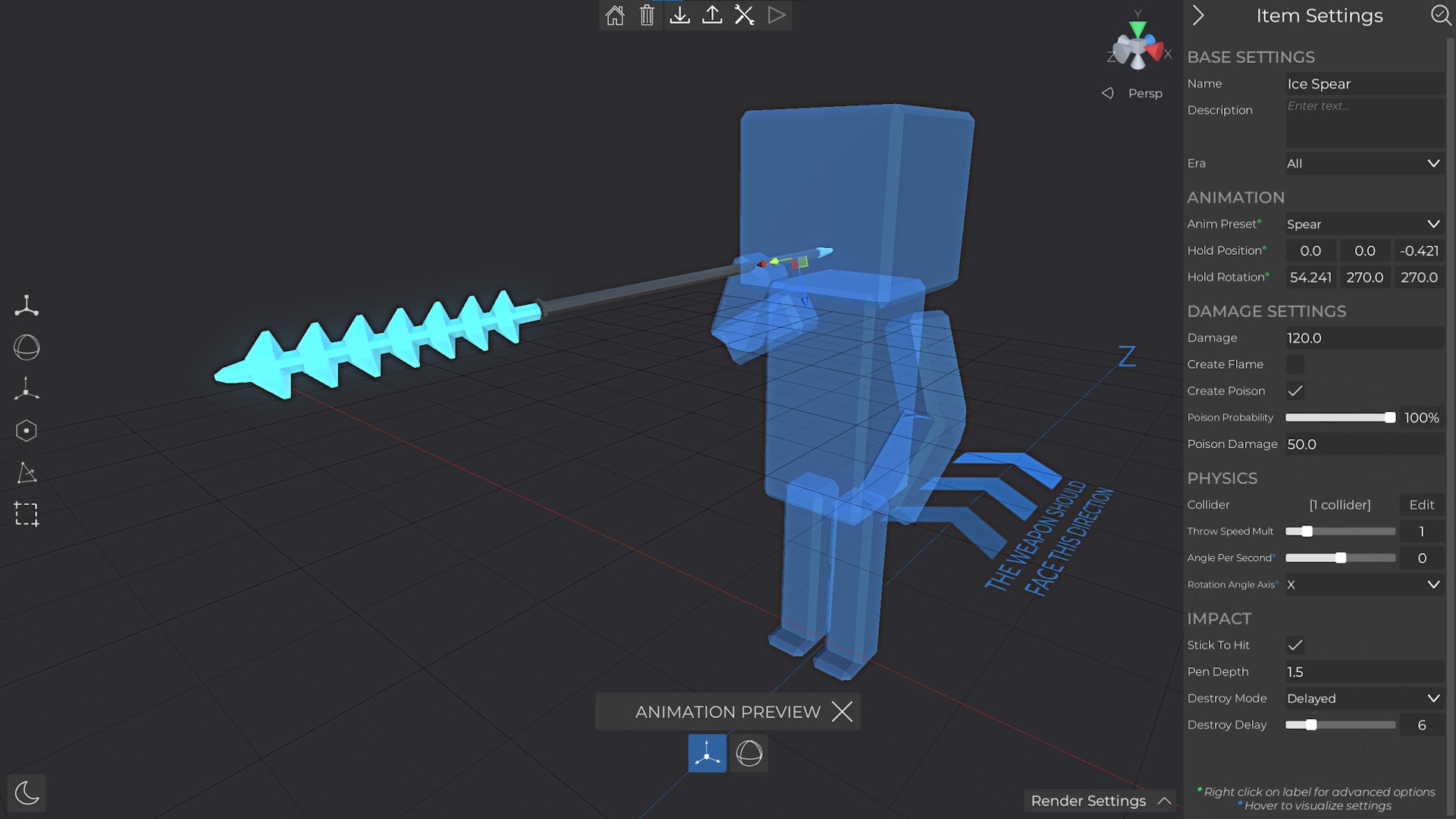
Custom Throwing Weapons
This new AI only custom equipment type can be used to create custom throwing weapons like the vanilla throwing axes, spears, rocks, ...
Edit Custom Units in Context
Instead of having to back and forth between the editors to ensure your unit's animation or style fits their surroundings, custom units can now be opened within the context of the battle editor! In addition, when creating or editing units, the correct unit color will be used to preview the unit.
Content
Added sky biome with invisible terrain while playing
The material of wires and ropes can now be adjusted.
Select similar by Id
This feature allows you to expand the current selection by selecting all objects with the same id(s).
Search for Objects
By using the new search button in the upper toolbar or pressing Ctrl + F, all placed objects and units in the battle editor can be searched and located/moved to by hovering/clicking list items.
Search in Scripts
By using the UI button or Ctrl + F you can now search for node names and jump to them to help you navigate large scripts.
New Scripting Nodes & Improvements
Scripting lights can now be spotlights
Scripting lights can now cast shadows
Increased custom ogg sound size limit to 2MB
Scripting triggers can now be named for identification in scripts
Added another small text above the name of scripting nodes which shows the node category
Tags for multiple units can now be added easily with the new settings panel in the battle editor (not scripting view)
Position in the scripting list is now kept after deleting or editing scripts
Added UI buttons to zoom in/out of scripting view
Increased RefCollection input size limit from 100 to 1000
Increased Array growth limit from 1024 to 4096
Added the following new scripting nodes
Set/GetFlame to adjust the flame of a unit
Set/GetPoison to adjust the poison of a unit
OnFlameGlobal/OnPoisonGlobal events for when any unit is set on fire or poisoned
Set/GetEquipmentHp to get or set the hp of an armor equipment
GetArmor to get the armor equipment of a certain slot (head, body, arm, ...)
Input/ArmorSlot to input an armor slot
IsRangedWeapon/IsMeleeWeapon/IsArmor to test what kind of equipment a reference is
Trigger/GetName to get the name of a trigger
Unit/OnAIBeginReload, Unit/OnAIReload (+ bind nodes) events which will run when a unit reload
Unit/OnAIBeginReloadGlobal, Unit/OnAIReloadGlobal events which will run when any unit reload
Unit/Reload forces a unit to reload
Set/Get/ToggleWeaponMod to enable/disable the flashlight/laser of a unit
Set/GetFiremode to modify the firemode (semi, full auto) of a unit
ReplaceWithPassive to replace a custom unit with a passive variant of the same unit
CustomUnit/GetPassiveAnim to get the animation of a custom unit
PassiveUnit/SetAnim to set the animation of a passive unit
Input/PassiveAnim to input passive animations from custom units
Cast/StringToFloat, Cast/StringToInt to convert a string to a number
Cast/UnitToPassive to use a unit reference as passive unit reference
Unit/CanUseSupport to test if a unit has a support equipment like a grenade and can use it
Unit/UseSupport[AtPos] to force the unit to use the support equipment [at a specific position]
Unit/GetBehaviour to get the current behaviour of a unit
Set/GetAggression to modify the aggression of a unit, which will be used for shooting aggression
Query/CountUnitsWithTag to simply count units with a tag instead of returning a list of them
Unit/EnableSearchRotation to enable/disable that units rotate randomly to find a target
Player/SetVerticalFpsLookDir to set the vertical camera direction while in first person
SpawnActiveSupport to spawn active grenades or support equipments
OnPlayerSupportThrow/OnAISupportThrow[Global] events to detect support equipment throwing
OnExplosion/OnGrenadeActivation events to detect explosions
String/Create/FromChar/ToASCIIArray to help with handling strings
Other Features & Improvements
Melee weapons will no longer stop dealing damage after cutting through or killing a unit. Instead up to 3 units can be hit with a single swing, provided that each unit hit previously has been killed.
Ranged AI improvements
Improved semi auto recoil animations
Improved full auto shooting (no more semi auto in between groups)
Increased default full auto shooting aggression
They can now use burst fire modes
The HUD will now show which grenade and projectile is currently used by the player
Added an active unit to the custom equipment testing area
Replaced the unit attack distance switch with a slider
Increase chest plate and helmet vertex limits from 1.5k to 2k
Miniguns can now be reloaded (both vanilla and custom)
Selected objects can now be saved as a prefab
The custom unit editor camera can now be both higher and lower
When uploading units to the workshop, the name and descriptions are filled out automatically
Most workshop items no longer need descriptions when uploading them
Added more UI info elements throughout the game, especially in the battle editor
Increased max bullet amount to 20 for caliber modifications
Added an option to make unit spawners invisible while playing
The flee radius of passive units is now displayed in the editor
Added more workshop sorting options to battles, units, prefabs and campaigns (90d, 180d, 1y trend, 90d, 180d, 1y upvotes)
Fist weapons no longer block projectiles and other melee weapons
Increased possible weapon offset while animating custom passive units
Added modular wall, foundation and floor as reference objects in the item creator
Message notifications in the battle editor now use colors based on the message type
Improved the functionality and visuals of tooltips
Increased max player starting health setting from 10k to 100k
Sharp/blunt damage reduction and weight/ergonomics are now displayed in the arsenal
Small UI improvements throughout the game
Improved debug console (better UI, button to open log file path)
The game's save directory can now be opened through the settings
Added an option to control which units will be run over by vehicles
Added a button to the main menu to reload all workshop content (after subscribing to content in the steam client)
Improved UI sound variation
Updated engine
Bug fixes
Spectate node will no longer cause the player to drop its equipment
Fixed global variable scripting panel error message getting stuck
Fixed that editing a custom thrower unit to another unit type would not update the animations in the battle editor
When returning from playing some editor UI settings were not up to date
Fixed that editing a dialog graph in the script editor would reactivate the whole battle editor UI
AddDialog nodes will not work without name input
Fixed that clicking while the scripting editor is being minimized for selection would break the UI
Fixed bad performance when loading main menu backgrounds from within battles
Fixed that ranged units did not target cannon turrets
Fixed accuracy of vehicle navigation blocking which prevents various issues
Fixed that controlling a unit with a siege weapon would cause various movement bugs
Fixed incorrect full screen mode while starting
Fixed issues when undoing modular placement
Fixed issues where editing placed custom units would also modify other units
Fixed that OnDamageGlobal was invoked after OnDeath events
Fixed various UI issues in the quick play panel
Animal hitboxes will no longer longer block projectiles from the rider's weapon
Fixed a bug that caused incorrect rendering orders of balaclava items
Fixed a bug that caused volume spikes when modifiying volume of music with scripts
Update 0.49
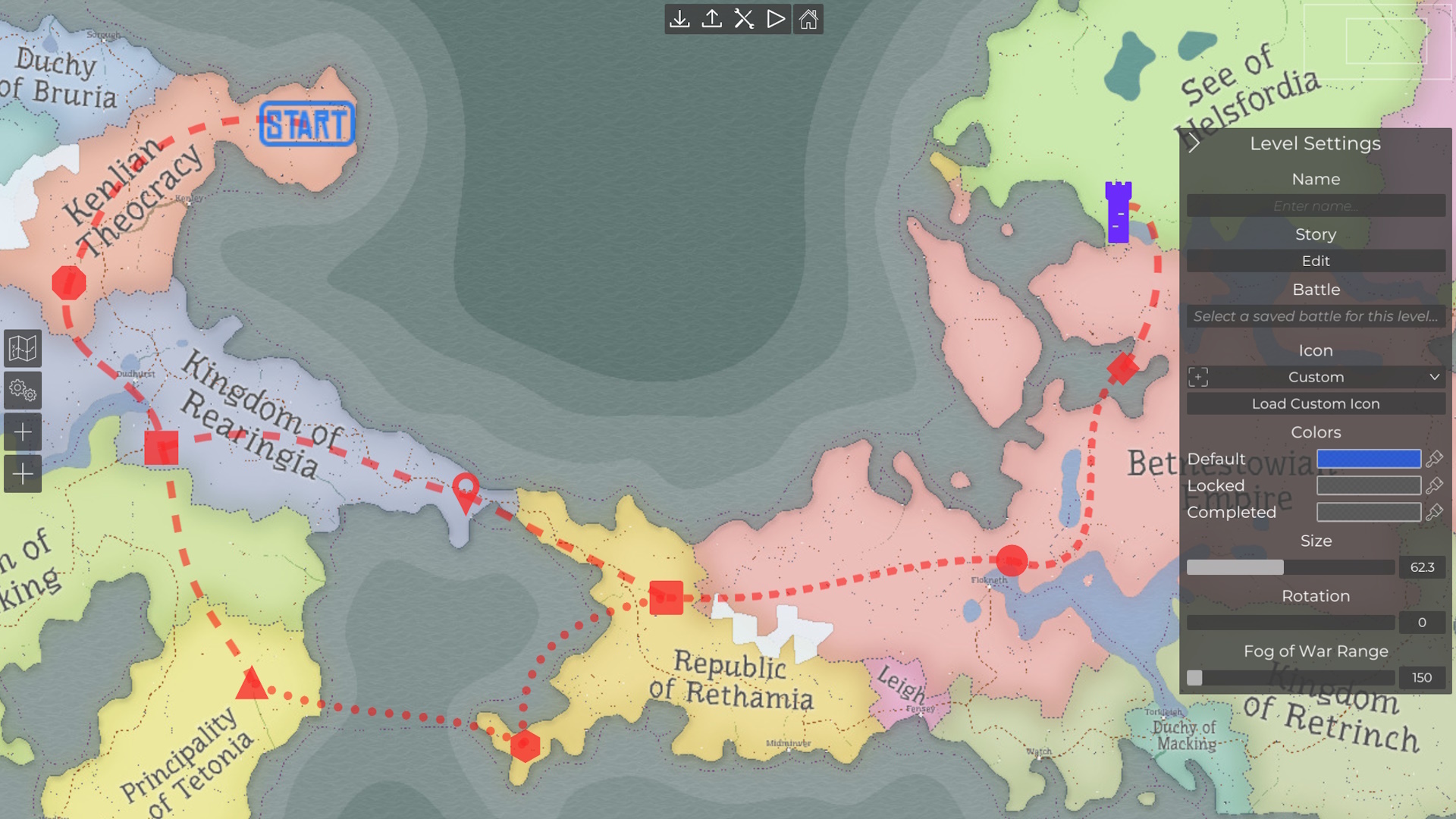
Campaign Rework
All old workshop campaigns have already been updated and everything that used to be possible is still possible with the reworked system
Campaigns have a new file format which allows faster loading of the whole campaign and individual levels
They can also be stored locally and edited in a dedicated campaign editor (similar to battles)
Campaigns now unfold on a map where you can place starting points, levels and transitions between levels
The visual elements on the map can be customized in various ways. For instance, you can import custom background images or icons for levels, modify transitions with bezier curves and adjust all colors
Users can zoom in and move around to inspect the map
There can be multiple transitions between levels, which can be selected on the map after completing a level
Transitions can also be deactivated with scripting to adjust possible paths in a campaign depending on the players decisions/results
Scripting can also be used to progress in the campaign, even if the player failed a battle
[Optional] Fog of war can be used to hide parts of the map which you didnt explore yet
Using the campaign map is optional and you can still create campaigns with direct transitions between levels like before, while still using some of the new features
You can select story settings with a narrator unit, description, voice over file and custom background to tell your story while loading the next level in your campaign.
For more information regarding campaign scripting, make sure to check out this guide: https://steamcommunity.com/sharedfiles/filedetails/?id=3111030399
Added CreateArray node to create an empty array without an input node
Added any type which can be used to represent any other type
Added AnyHint/TryAnyHint to convert any values to their actual typed value
Added battle End event node
Added FreezeMovement and MoveWithCol nodes to freeze the vanilla movement and implement custom movement
Improved initial loading lag when loading a battle into the editor
Fog areas can now be teleported with scripting
Bug fixes
Fixed that size changes of scripting nodes would not update the connections
Fixed Sin/Cos/Tan math node input to match the documentation
Fixed accuracy of some pathfinding functions to fix some edge cases
Using the ControlUnit node on the current player will no longer replace it
Fixed a bug that prevented maps from being loaded if they contained corrupted sound files
Fixed a bug that prevented the game from starting when trying to load corrupted custom units
Fixed initial testing range ammo count
Fixed inverted normals on WWI gas mask
Fixed sizing of scripting UI items with public properties
Fixed bone UI not resetting after saving a custom unit while animating
Fixed lock UI being displayed for apartment buildings
Fixed spectate camera restrictions while playing
Fixed a bug that prevented units from being generated when using invalid armbands
Fixed that some UI tooltips would still be visible while the editor UI was hidden
Fixed hoplite spear animation set (throwing/picking up weapons)
Fixed a bug that would reset the player animation when returning from the embedded unit editor
Fixed foundation stair navigation problems
Update 0.48
Armband slot + asymmetric armor
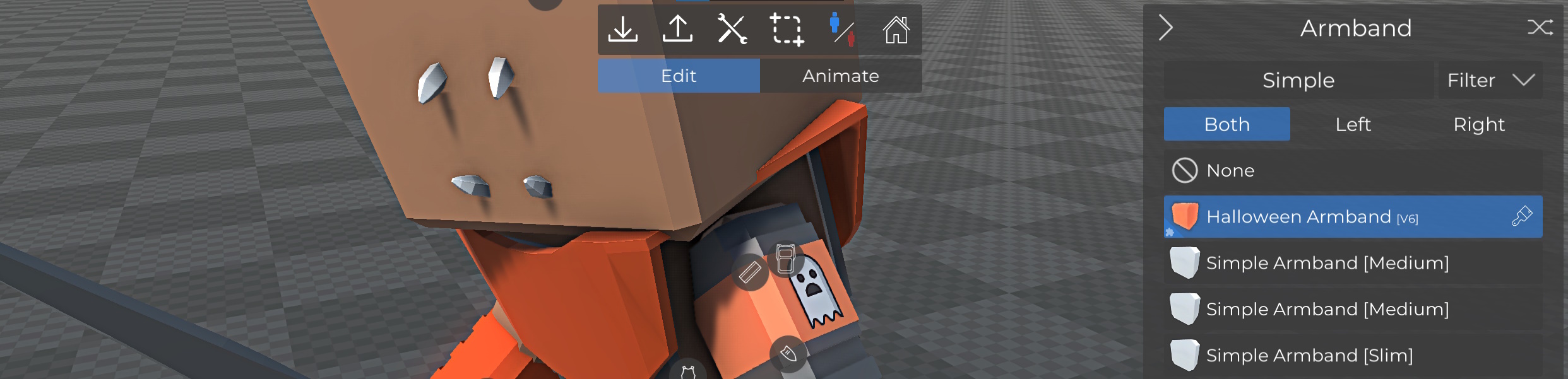
Added armbands as a new equipment slot for custom units
You can create and upload custom armbands in the custom item creator
Armbands have a feature to increase in size if the unit wears arm armor to always be visible
Individual armbands can be selected for each side of the unit
All arm and leg armor slots can now also be selected individually for each arm/leg
Added some simple single color vanilla armbands
Custom Unit Editor Improvements
Adjusted the custom unit editor UI and fixed various problems with the UI
Animation frames can be copied from one unit to another (copied frame will no longer be cleared when loading a unit)
Animation frames can be copied to corpse poses
Corpse poses can be saved/loaded as single frame animations
Bone positions/rotations in the animation/pose editor can now be set by using the UI
Changing the equipment will no longer cause snaps in the unit animation
Improvements
Reworked the equipment panel UI to match the other UI and increased the size of lists to improve item selection
Improved the resolution of all vanilla scope/red dot reticles
Added a smoke muzzle effect to vanilla muskets and flintlock weapons
Added short and long sleeve only vanilla shirts
Improved the performance of some inventory operations for units and the player
When hitting the floor above while jumping, the player will no longer glide below the floor and fall down instead
Added more modular attachments points to all stairs and floors to make it easier to construct buildings
Scripting
Added MultilineString input node which can be expanded in size
Added string Length, CharAt and Substring to get the length, ascii char code and section of strings
Added bool <-> int cast nodes
Added StartBattle node which can be used to start battles immediately after loading
Added SetAmmo node to set the amount of bullets of a caliber in the player's inventory and renamed "AddBullets" and "RemoveBullets" to "AddAmmo" and "RemoveAmmo"
Added EnumValues node to get an array of all possible values of an enumeration (for instance unit type, caliber, etc.)
The ActivateFootstep node now works properly on player units
Teleporting the player will now reset the fall velocity to avoid fall damage when teleporting the player
Bug fixes
Fixed a bug that caused targeting problems after unlocking doors or destroying blocking objects
Fixed some problems when AIs tried to targeting siege units
Fixed a bug that allowed prefab scripting data to be linked by all prefabs that were created in the same session until restarting the game
Fixed a bug that caused the unit/object replacement to not work anymore after changing the terrain in certain cases
Fixed various issues with the 'generate destruction parts' tool in the item creator
Removed outdated 'ocean' water option which only mapped to the ocean biome to avoid various problems
Fixed incorrect material preview while placing certain parts of invalid prefabs
Fixed outdated HUD information when starting to control a unit
When starting to control a unit, the current and max hp are now properly transfered to the new player
Fixed missing tags after starting to control a unit
Fixed that custom attachment input nodes would not store their custom item data in the battle file
Fixed some prefab placement problems
Fixed that the unit creator sometimes set the wrong default attack distances for a weapon
Squad marker height is now adjusted based on the unit's head equipment
Fixed that switching between ranged weapons in the unit creator would not show the settings panel
Fixed that the flak cannon was not available as an object
The flak cannon can now be controlled by the player
Fixed that clicking on a user in the workshop UI would not reset the current page, resulting in invalid query results
Fixed the model origin preview while changing the model position in the item creator
Fixed missing tooltips on the script editor snapping buttons
The squad hud can now no longer be used when no units are left in the squad
Fixed some incorrect interactions realted to physics object and dropped weapons
Fixed incorrect UI tooltip scale speed in some cases
Fixed warnings when attacking while unarmed
Fixed incorrect list display when selecting ranged weapons in the editor
Fixed targeting of the future tank
Fixed invalid vanilla pirate clothing randomization data
Adjusted position of the cannon control unit to prevent it from becoming stuck as a ragdoll
Fixed overlapped equipment slots while animating units in the unit editor
Fixed random battle panel scaling on non 16:9 aspect ratios
Fixed random battle game mode selection
Fixed a bug that displayed tooltips of the strategy mode UI even if it is deactivated
Fixed dropdown UI behaviour in the scripting editor
Fixed hit detection of melee weapons in the arsenal testing range
Fixed some minor UI sound issues
Fixed that the UI would lock up after trying to save files with an invalid file name
Update 0.47.1
Quick play changes
The steam workshop browser is now available in the quick play section to download and play battles from the main menu
The outdated integrated conquest, koth and zombie survival maps have been replaced with some featured workshop maps. Koth and zombie survival categories have been replaced with "Combat" and "Story & Horror"
Updating custom content
The game stores custom content in battles to ensure that it is available when battles are shared on the workshop or the used items become unavailable or change. There is now a new tool to update custom items in a map with the latest locally stored or installed workshop version of the same item.
Interaction sounds
Added sounds for when the cursor hovers or clicks UI elements
Added sounds for placing, selecting, deselecting and deleting units in the battle editor
The volume of both options can be adjusted or disabled in the settings
Features & improvements
Improved animations of UI tooltips and hover effects
Adjusted the look various UI panels and elements
Added IgnoreTargetZone node to use triggers to ignore targets for units in certain areas
Improved objective targeting behaviour for conquest/koth game modes
After a unit was killed, the scripting tags will now be removed automatically
Improved color picker and measurement tool performance
Subscribed workshop battles and prefabs are now updated automatically when clicking on them in the workshop browser
Bug fixes
Fixed that own custom items could not be loaded into the editor in some cases
Fixed that some UI elements would be rendered in front of the pause menu
Updating a local custom prefab will now correctly update the icon
Fixed incorrect health bar color rendering when far away from the camera
Fixed that editing attachments for the 3rd weapon slot did not work properly
Fixed workshop sorting by friends or followed
Fixed problems that caused the camera to become stuck after spectating
Fixed rendering of invisible units in workshop, scripting and local icons
Update 0.47
Melee combat improvements
Players can now hold their shield instead of having to time it. This makes it possible to block incoming projectiles and melee combat is much easier.
Attacks can be started while defending and the player will automatically defend after the attack, if the defend key is pressed.
While defending without a shield, the weapon will be held while holding the defend key. In addition, the player will choose the correct defend direction automatically while looking at a unit.
Added a visual effect when the shield or weapon is hit while defending
Hitting the environment or other objects with a melee weapon will now stop the attack and play a sound
To balance the new defending, AI units can now break the player's defense by hitting the shield/weapon
The probability depends on the weapon: 0-10% chance based on weapon weight + 5% bonus for blunt weapons
Defending will not be possible for 1.0-1.25 seconds
The hit detection of shields and melee weapons in first person has been improved
Melee weapons will no longer register double hits due to incorrect hit detection
RTS mode changes
Removed the real time strategy button from the spectate HUD
It can now be started with the SetStrategyMode scripting node to create dedicated maps for it
The scripting node also allows you to select the strategy mode options and whether you want to show the spectate UI or not
New scripting nodes
Added SetSpectateCamPos/Rot and RestrictSpectateCam nodes to create custom camera logic or cutscenes with the spectate camera
Added LerpRot and SlerpRot nodes to help with interpolating rotations
Added ViewportPosToRay node to start raycasts from the camera
Added ActivateSpectateHUD node to toggle the visiblilty of the vanilla spectate UI
Custom info UI can now be enabled and used while spectating with the new SetCustomInfoSpectate node
Added Spectate and IsSpectating nodes
Added Input/DialogGraph, SetDialog, AddDialog, SetMessageHint and ShowMessageHint to modify unit dialoges and hints through scripting
Other features/improvements
Updated battle start, spectate, respawn and end UI to match the style of the battle editor
Added support for non square custom terrain shapes
Bug fixes
Fixed various problems related to prefab placement, object deletion and height changes in the battle editor
Fixed issues when trying to update workshop icons
Fixed a crash that was caused by certain undo operations
Fixed a crash when trying to deactivate large scripting walls which block AI units
Fixed a bug that caused placement problems for some custom items
Grenade launchers will now trigger the OnProjectileImpact node
Fixed that some of the scripting node descriptions were shifted
Fixed glass door material settings
Fixed incorrect animation behaviour for units which control weapons in vehicles
Fixed that using the color picker while choosing player equipment in the scripting view would break the editor UI
Fixed that hidden scripting objects could still be selected which resulted in various problems
Fixed a bug that could lead to incorrect camera behaviour after using a vehicle
Update 0.46
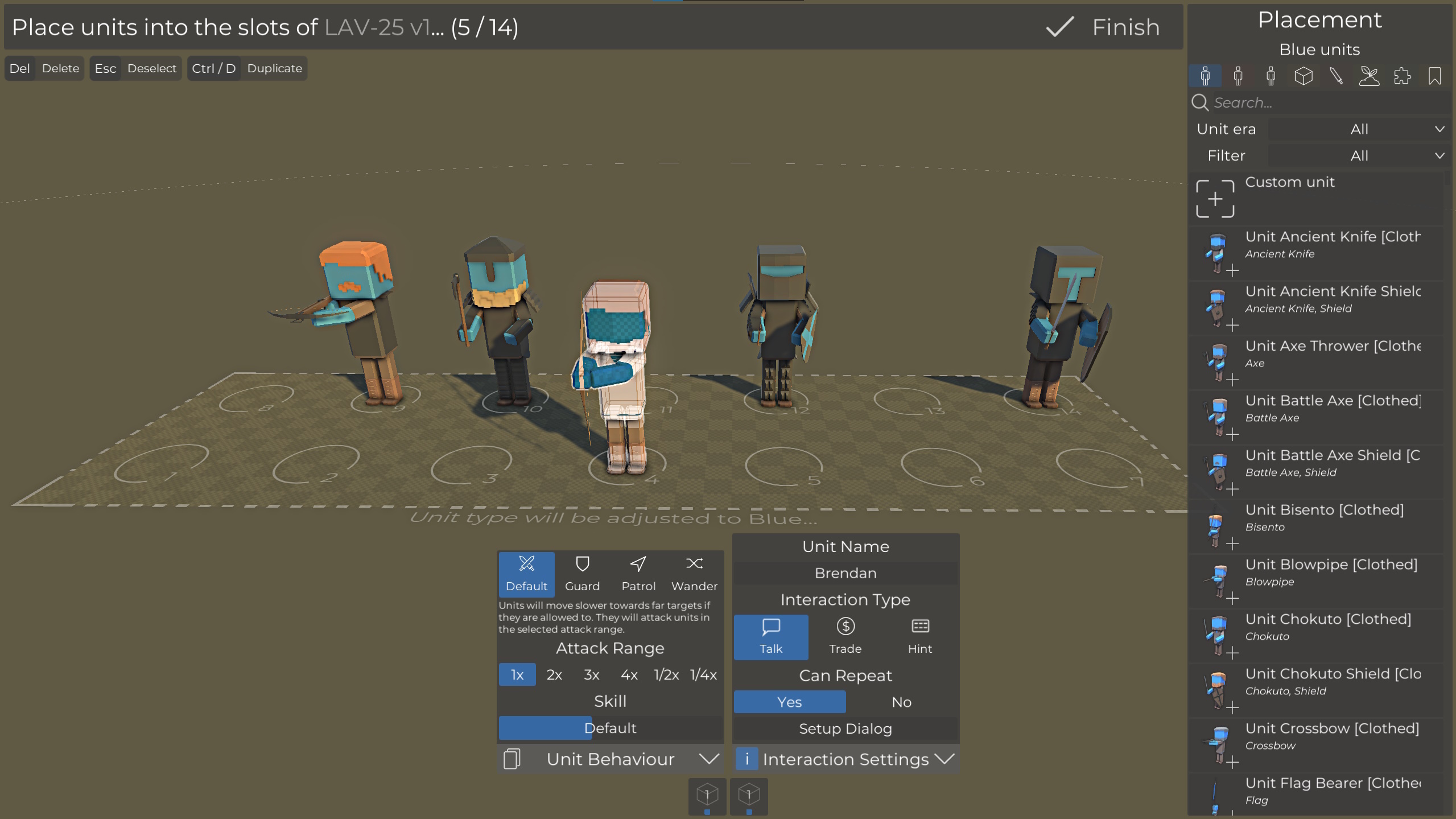
Improved spawn list editor
The new spawn list editor makes it easier to select the units you want to use in your conquest/koth battles or in ground/air transport vehicles. Instead of having to find a specific unit in a list with hundreds of entries, you can now just place them like you would usually do. In addition, you can adjust the unit's skill level and interaction settings or simply modify custom units in the embedded unit creator!
Custom modular material settings
Similar to how the materials of some vanilla modulars can be changed for each individual instance in the battle editor, this can now be set up to work with custom modular objects. You can just set up your material like usual, select which materials should be adjusted by the user and let the game figure out the best settings.
Vanilla modular material settings
The materials of wooden, framed, prison modular parts and the armored door can now be adjusted.
Measurement tool
The new measurement tool can be used in the battle and prefab editor to measure distances between two points. This can be usedful to selected grid snapping sizes or to selected sizes for custom objects.
Improved vanilla vehicle units
All units on ground/air/water vehicles will now have clothing and are randomized similar to other vanilla units, instead of being naked.
Other features/improvements
Added an option for conquest/koth/reach point flags and similar game mode objectives to make them invisible while playing
Added an option to forbit players to change equipment while waiting to respawn in conquest/koth
Object settings panels can be moved again
Changed default workshop order back to 7 days trend to help new maps to gain traction
The previewed attack distances in the battle editor now matches the actual calculated values while playing
Custom units are now highlighted in placement lists
Player crouching is much smoother and doesnt play landing animations
Players can now climb out of trenches without jumping
The battle/game mode settings UI has been adjusted. Game mode settings are now displayed in a separate panel
Updated the engine to improve stability
Bug fixes
Fixed a bug that caused descriptions to be cut off when looking at a workshop item
Fixed that loading a battle will set the conquest respawn option to a wrong value
Fixed custom unit upload stat/achievement (newly uploaded units will unlock the achievement)
Fixed that default vanilla unit had bayonets
Fixed missing default undo/redo keybinds on existing configurations
Fixed that OnDeath/OnDeathGlobal nodes did not work properly when a unit died in certain ways
Fixed incorrect/stuck character leg rotation when using animals
Fixed horse riding control glitches
Fixed incorrect player leg animation after riding a camel
Fixed undo behaviour after drag placing modular parts
Fixed render problems on placed maps
The player faction option is now adjusted automatically when placing a blue/red player
Fixed a bug that caused some weapons to trigger the OnAIShoot scripting events while reloading
Fixed that the HUD interaction notification would not be closed while riding a horse or using a siege weapon
Fixed that spear throwers would not trigger the OnAttack scripting evants
Fixed a bug that caused another object to be placed instead of the metal roof
The attack restriction node now prevents the player from using ranged weapon melee attacks
Update 0.45.0.1 bug fixing patch
Added 4 swamp trees to the environment placement list
Fixed that not implemented biomes would be displayed in the biome dropdown
Fixed missing list view highlights for face equipments
Fixed a bug that prevented thumbnails from being selected for battles
Fixed that the workshop type dropdown would show incorrect values after opening an item after a user search
Fixed that the default player animal dropdown did not match the actual value
Fixed that the PlaySound(2d) nodes could ignore volume settings by setting the volume to a high value
Fixed a bug that caused large prefab option to be visible in the battle editor
Fixed that camels would show up in the equipment panel preview
Fixed that the workshop page input would not be reset after changing filters, resulting in incorrect query results
Update 0.44.0.1 bug fixing patch
Added 4 swamp trees to the environment placement list
Fixed that not implemented biomes would be displayed in the biome dropdown
Fixed missing list view highlights for face equipments
Fixed a bug that prevented thumbnails from being selected for battles
Fixed that the workshop type dropdown would show incorrect values after opening an item after a user search
Fixed that the default player animal dropdown did not match the actual value
Fixed that the PlaySound(2d) nodes could ignore volume settings by setting the volume to a high value
Fixed a bug that caused large prefab option to be visible in the battle editor
Fixed that camels would show up in the equipment panel preview
Fixed that the workshop page input would not be reset after changing filters, resulting in incorrect query results
Update 0.45
Updated battle editor UI layout
The battle editor layout has been reworked to declutter the toolbar at the top, to which more and more buttons have been added over time. While it takes a moment to adapt to these changes, you will get used to them very quickly.
The play, load/save and workshop buttons remain at the top, alongside with the newly added undo/redo buttons
Battle/environment/scripting/... are now displayed as larger buttons on the left
Formation/line placement and the new grid settings are now in the bottom right corner
Selected object settings are now aligned at the bottom of the screen and can be toggled on/off
The placement list remains where it used to be
Improved UI elements
In addition to the layout changes, some of the UI elements have been changed as well, to make them more user-friendly. For instance, switches with many options have been replaced with dropdowns to require fewer clicks to select the desired option. And there are many other small changes to the style of some elements and UI throughout the battle editor.
Undo/redo
Undo and redo buttons have been added to the battle editor. This is the first iteration of this feature and it's planned to expand it to more areas of the battle editor (like object settings and terrain changes). In this update, the following actions can be undone and redone:
Selection
Placement
Faction swap & deletion
Transform/rotate handle
Selected rotation with Q/E
You can also use Ctrl+Z/Y or other keys if you rebind them in the settings
Improved grid snapping
The grid snapping size can now be adjusted.
Steam workshop improvements
The whole workshop control has been rewritten and the UI has been adjusted. These changes apply to the battle, prefab and unit workshop UI and you should notice that everything looks a bit cleaner and works more reliable while showing more accurate information. You can also click on the author name of workshop items to display all items of the user and the search text now works with different sort options.
Mirrored custom arm/leg plates
Custom arm/leg plates do now have an option to mirror the right part. This is useful when you have an asymmetric mesh and want it to look the same on both arms/legs.
Scripting improvements
ActivateHUDPartial can be used to show/hide individual vanilla HUD elements
GetId to get the equipment id from an equipment reference
Nodes for custom items can now load subscribed workshop content or any custom item that is currently loaded in the map
Bug fixes
Fixed invisible units causing rendering problems on some AMD GPU drivers
Fixed that dog cages would not release their dogs and could not be targeted correctly
Fixed that the player's legs would clip through clothing while crouching
Fixed a bug that caused the bolt rifle animation to break when spamming reload after shooting
Fixed guard idle pose animation looping
Fixed that spider droids and some grenade units could not be selected in scripting nodes
Fixed that static objects could be placed on dynamic boats
Fixed that testing units could not be damaged with melee weapons in the arsenal
New quick play bundle
A new quick play bundle is available in the main menu which features some of the best recent maps, so make sure to check it out!
Update 0.44.1
Added an option to rebind WASD movement keys
Added an option to rebind the rotate left/right keys which are used to rotate objects in the editor
Existing keybind settings are now properly applied throughout the game
The game will now attempt to load invalid sound files instead of just not loading the map
Fixed a bug that caused weapons to glide out of unit's hands when the game is left open for a long time
Fixed some problems that caused inaccurate melee weapon hits
Fixed that some bolt action rifles would spawn two bullet shells
Fixed that picking up armor in 1st person would cause the previous armor to become invisible
Fixed incorrect rotation of custom equipment items in the arsenal
Fixed that flashbanged enemies would still block melee attacks
Fixed M2 vanilla unit variants
Fixed that alarm objects would ring while loading the map
Fixed a rare bug that prevented some maps with custom items from being loaded
Implemented a possible workaround for graphic glitches with custom invisible units on certain GPUs/drivers