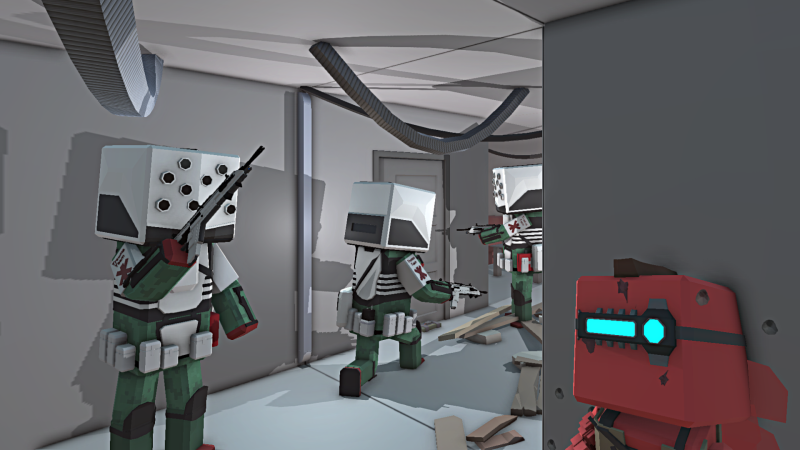
The those of you who prefer videos, the 5 minute one below contains all you need to know about this update: https://youtu.be/mbW7WVN-6_E There is also a new map competition coming up towards the end of this week, so keep and eye out for that.
New Content From AW2
Those of you who played the previous part Ancient Warfare 2 on itch.io know that there is some content which didnt make it into AW3. But this update features some remastered content from AW2:
Camels are similar to horses, but larger and slower. You can now create custom ranged or melee units on camels.
Armored horses not only look better, they are also more likely to survive a battle
Catapults are now available in two new variants: fire and poison
And siege weapons now have shoot sounds
New image effects
There are new scripting image effects that work similar to the Vignette and ColorOverlay scripting nodes, but allow you to heavily modify how the game looks and opens up many possibilities for new effects. All these effects are represented in the update video. The new effects/nodes are:
Nightvision can be used to simulate NVGs with a custom color and intensity. The effect features noise and while bright areas become white, darker areas can be seen better.
The Glitch effect enables screen shaking and distortions
The CRT/VHS effect makes the game look like it's running on an old tv with bleeding, fringing, scanlines and a fisheye effect
The Posterize effect reduces the colors per channel to simulate retro rendering like 8-bit colors
The Noise effect can be used to overlay noise with custom intensity and scale
The Invert Color effect can invert any color channel
Grayscale can be used to modify the saturation of the game
The Pixelation effect makes the game look pixelated and allows you to choose how many pixels to render to make it look more or less pixelated
If you want to try them out in game, I prepared this map with some examples https://steamcommunity.com/sharedfiles/filedetails/?id=2926010928
Custom ranged weapon damage modifications
The damage of ranged weapons in AW3 depends entirely on the projectile/caliber of the weapon. But now you can choose to modify the caliber for your custom weapons to modify stats like Damage, Armor Pen, Armor Dmg, Projectile Amount and Fire Probability to adjust the projectile stats when used with this weapon.
Custom Physics Objects
Custom physics objects are a new type of custom object. They are somewhat experimental and should be used with caution to avoid performance problems, but they also allow a lot of new stuff to be created.
Physical parameters like mass, drag, angular drag, friction and bounciness can be adjusted, to select how your object reacts to the physics simulation
Depending on the settings, these objects can be picked up and/or thrown by the player
There are various settings to select how the object is thrown like throw force modes, strength and whether you want to see a throw preview or not
Thrown or falling/moving objects can also cause damage to units or buildings
Resting physics objects can also block units from walking somewhere if set up correctly
Full scripting support for physics objects allow you to
Spawn/delete objects
Modify physical parameters
Apply force to objects
Freeze/Unfreeze objects
Force the player to pick up/drop objects or react to events when the player interacts with these objects
React to collision events to create custom behaviour
And more...
Ragdoll improvements
There are various improvements to ragdolls in terms of performance and functionality.
Ragdolls now react to the force of the kill shot or melee impact to make them more realistic
Ragdoll simulation quality is dynamically adjusted based on the amount of active ragdolls and units in an area to help with performance in dense melee battles
Inactive ragdolls are now frozen in place (this is experimental and might be changed or adjusted in the future)
Other improvements
Increased material limits of most custom object types
Weapons, shields, grenades, armor, clothing, environment, consumables, modulars, background from 8 to 16
Attachments from 6 to 12
Objects are now much easier to interact with by not having to hit it directly. This makes clicking buttons or picking up weapons much less annoying
Aim sway was reduced when using scopes. The higher the zoom of the scope, the less aim sway can be noticed
Crouching now reduces aim sway by 50%
The background grid in the scripting view can now be toggled on and off
Hovering over node connections now also highlights the connected in- and output to help while editing large scripts with many overlapping connections
The vehicle spawn nodes now output a reference to the spawned vehicle object
Added a SetRotation node to quickly set the rotation of a unit without having to calculate delta angles
Added button input node and BindPress event node
When dragging into an empty area, the available scripting nodes now show more possible options like custom events and variables
Bug fixes
Fixed that custom objects with "delete object" destruction mode are indestructible
Fixed that anti air rockets are blocked by triggers
Fixed that pausing/unpausing causes ragdolls to fly around
Fixed that the tank mgs on the WW1 tanks would shoot itself by targeting targets on the opposite side
Fixed that editing a unit in the embedded unit editor would result in all guard mode poses to be reset
Fixed that face shields would become invisible on corpses
Adjusted most L and U stair models to connect to the floors
Fixed a bug that allowed invalid placement outside of the allowed area
Fixed that newly infected zombies could not infect other units
Fixed that hiding scripting objects would result in them not being saved
Attachment settings on 3rd and 4th weapons now work correctly
Fixed a bug that allowed invalid battles (with multiple players or other problems) to be uploaded to the workshop
Fixed that passing no input to a custom event with a value type would output 'null' on the event output
Fixed that despawned units were still visible on the conquest respawn map overview
Fixed the environment/equipment bookmark filter
Map Competition Result
The map Competition is over. Thanks to everyone who participated.
The topic 'Containment' was interpreted in many different ways, which is nice to see because many different maps have emerged from it. There is a new quick play bundle available in the main menu, where you can play 9 maps that I think are worth playing. Just a discplaimer: If your map isn't mentioned in this post or the quick play bundle, that doesn't mean it is not worth playing. It was difficult to choose the 9 maps for the quick play bundle.
Winner
A very nice looking map with many different custom objects which create a believable atmosphere and original concept. The player is introduced to custom gameplay mechanics like abilities and plays a large monster that is trying to escape. The gameplay is different from your usual AW3 battle, you can just run over your enemies and use your abilities to eliminate them. Due to the complexity of the map, it is not easy to run, so having a good computer is recommended. The best looking map with the highest overall score in this competition. https://steamcommunity.com/sharedfiles/filedetails/?id=2908725954
2nd place
A really innovative map exploring topics that have never been explored before in AW3. Playing in a dream with a slightly unsettling and sterile environment with non-euclidean geometry, you try to escape. While this map is mostly straight forward to play with no real threats or enemies, it is definitely worth playing for the experience! Definitely the best map in terms of originality and technical design in this competition. https://steamcommunity.com/sharedfiles/filedetails/?id=2909075190
3rd place
Just a nice shooter map with decent performance and moderate difficulty. There are a lot of different custom weapons and some nice gameplay modifications with scripting like auto healing and a damage effect that makes it difficult to fight after taking damage. This is the best map for a more casual shooter gameplay experience in the competition. https://steamcommunity.com/sharedfiles/filedetails/?id=2907482599
4th place
This map features a nice scripted intro that can be skipped, because you will play this map many times. With a time limit of 1 minute, it is really short and very difficult to beat. But it's also nice to try again and again. The most challenging map! https://steamcommunity.com/sharedfiles/filedetails/?id=2905159721
5th place
This one is a really ... let's say interesting map. The small player spawns in a dark map and a bunch of zombies are chasing while the creator gives a short voice acted introduction to the map. The goal is to run around for 3 minutes without being caught by zombies while there is a bunch of monkey noises in the background and weapons lying around on the floor. An interesting map https://steamcommunity.com/sharedfiles/filedetails/?id=2910130971
Community Event Result
The Trauma Team Exfil event is now over! https://store.steampowered.com/news/app/758990/view/3623739004293453221 Thanks again Earthy for creating this awesome map.
Over 400 individual players attempted to complete the map and nearly 100 players successfully finished the map at least once to have a score on the leaderboard. The ~25% success rate means that the map certainly wasn't easy to beat, but the overall response was pretty good, so we will most likely have an event like this again in the future!
Just a reminder, the top 3 can choose an in game content addition or small feature. Only reasonable stuff that fits in the game and is technically possible will be added. (also no copyrighted stuff) The complexity of the stuff you can choose depends on your place on the leaderboard after two weeks. The winner can choose something which takes up to 5 hours to develop, second place chooses 2 hours and third place 1 hour. In addition to the content addition, the winner will receive 3 steam keys for AW3 to give away to their friends. 2nd to 5th place will each receive one steam key for AW3.
If you are one of the top 5, please reach out to me to tell me what addition you would like to pick and to receive your steam key(s). You can reach me by:
Adding JNI-Games as a steam friend and send a message
Map Competition
Starting today and running until the end of the year, there will be an official map competition! You can create a map based on a certain topic and if it wins you can choose the next in-game addition/feature. You can find all you need to know below.
Start: Now End: December 31 2022, 23:00 UTC
Rules
Breaking the rules will result in an exclusion from the ratings
Each participant can only submit one map
The map is created by yourself
(no collaborations in any way!)*
The map has to feature a player controlled unit
(static/spectate only maps are not allowed)*
Old maps are not allowed, you have to start creating the map after the competition started
The map has to be submitted before the competition is over, updates to the map are not allowed after the competition is completed
The scripting system, custom equipment/items/objects, custom units/prefabs can be used in any way
This includes public workshop items of other players and content that you created in the past
However, if you use content created by other players, you have to clearly state which parts of you map/content were not created by yourself
Theme: Containment
Create a containment-themed battle/map! The topic can be interpreted in many ways. Whether the player is trying to stop zombies, creatures, monsters or infected units from escaping, or is it himself who needs to break out of the containment is up to you. Your map can play in any era and could be full of action, spooky/story based, or a mixture of both.
Rating
Each map will receive a score which depends on these categories: (modified based on Desert-Mammoth's original map competition)
Appearance (0-3) Appearance is how the map looks from an aesthetics point of view - that is to say, how easy it is on the eyes
Technical Design (0-5) Technical design covers how well a map is put together; that is to say, how well it runs, the efficiency of object and unit usage, and the complexity of the map in general.
Balance (0-2) How balanced is a map, when the theme is taken into account? Is it too easy or too hard? Is one team steam rolling the other when it shouldn't be? Is the player waltzing all over the competition without breaking a sweat? Or is the player dying the moment they leave the starting area?
Originality (0-3) Has it been done before? Has it been over done? Does it use original prefabs or does it borrow from the workshop? Is there something about the map that makes it stand out from the rest?
Units (0-3) Is your map using custom units? Are they a designer brand fit for the catwalk or are they as bland as shredded wheat? Are they balanced, and do they fit the map?
Gameplay (0-3) Is the map fun to play? Is there non-stop action, or is it scary/exciting/trilling
Thumbnail (0-1) Does the map have an appealing thumbnail?
Theme (0-3) How well is the theme represented in the map
Other relevant information about the rating:
If you use custom scripting, it can positively influence categories like balancing, gameplay or technical design, but it can also negatively impact the performance! That being said, there is no need to use scripting to score the maximum points in the technical design category
Custom equipment/items/objects are not required to score the maximum points in any of the categories, but it can help. In any case, using a variety of good looking custom units with vanilla equipment is sufficient
Reward
1st, 2nd, 3rd place each receive one AW3 steam key The winner can choose a small content addition or feature similar to the old WMC competition rewards. The addition has to fit into the game, respect the technical limitations/boundaries and take no more than 1-2 hours to develop.
How to submit a map
Submitting a map is very easy, but make sure your map doesnt break any of the rules! (Make sure you have the latest update installed) 1) Upload your map to the workshop 2) The is a banner on the left side in the main menu where you can select one of your workshop maps to submit it
Update 0.41.1
In game event
Before starting with the patch notes, there is a new in game event map available for the next two weeks. Participate on the leaderboard for a chance to choose the next content or feature! [Event Information]
New siege weapons
This update includes 3 new static weapons that can be used to fortify and defend locations:
TOW anti tank missle launcher
M2 .50 cal HMG
Static LMG (5.56mm light machine gun on tripod)
New vehicles
There are also 3 new vehicles included in this update:
M113 troop carrier
M132 'Zippo' flame thrower tank
KV-2 tank
New quick play system
The new quick play system features workshop maps that are worth playing to reward uploading high quality maps. It will be updated about every two weeks with new and older maps.
Gate feature for custom objects
Custom objects which act as gates can now be created. They can have a single or double doors which can be rotated, moved or hidden. Gates work similar to doors and can be locked and opened/closed by the player, scripting or units.
Animated pose changes
When switching between guard poses (with scripting), the change is now be animated instead of snapping to the new pose immediately. In addition, there is a new pose to let units sit.
Other features & improvements
Color categories can now be deleted in the color browser
Searching for workshop items by name works much better now
Added scripting node to get the weapon id from a unit
Added 'origin' output to ProjectileImpact event nodes to get the spawn point of the projectile
Added IsRefType script node to check if a reference is of a type
Added OnInteraction possible event to detect when the player can interact with an object
Added GetRefObjectsOfType node to get all objects of a type
Added IsInVehicle node to test if a player is currently in a vehicle
Bug fixes
Fixed a bug that caused rendering problems when returning to the battle editor while driving a vehicle in 3rd person
Fixed incorrect bloom values after leaving the scripting editor
Fixed that hovering over node inputs would display the wrong description
Fixed that custom particle effects and items did not load correctly when loading a script from the workshop
Fixed a rare bug that prevented certain maps from being saved
Fixed that the OnShoot event node was triggered incorrectly in burst fire mode
Next update
The next regular update will be in January 2023. It will contain some more content and there are also some technical changes planned to make the game work more reliable with complex maps.
Community Event
For the next 2 weeks, we have a new in game event made by Earthy.
Participate in this futuristic cyberpunk themed event by pressing on it in the main menu. By completing the map, your score will be submitted to a leaderboard and you can play the map as often as you want!
In game reward
The top 3 can choose an in game content addition or small feature. Only reasonable stuff that fits in the game will be added. (also no copyrighted stuff) The complexity of the stuff you can choose depends on your place on the leaderboard after two weeks. The winner can choose something which takes up to 5 hours to develop, second place chooses 2 hours and third place 1 hour.
Steam key reward
In addition to the content addition, the winner will receive 3 steam keys for AW3 to give away to their friends. 2nd to 5th place will each receive one steam key for AW3.
Update 0.41
This update features a lot of improvements and features related to visual scripting to make it easier to use and increase its functionality!
New Menu Scene
Thanks to Mecho we now have a new fantasy themed menu scene with orcs and some ghost units. Have a look at it in game or check out the video below to see how good it looks! https://youtu.be/9GoQarJrZG4
Widescreen support
The game now supports 21:9 (widescreen) resolutions without black bars. There are also some changes to update the available/supported resolutions after moving the game to a different monitor on multi-monitor systems.
Other Improvements
When importing a model without triangulated faces, a warning is displayed to remind you to triangulate wavefront .obj models before exporting them
Increased the amount of sounds that can play at the same time to prevent issues with clipping audio effects
Scripting Features & Improvements
All the new features and improvements can be found below. There is a lot to go through, information about the next update are at the bottom of this post.
Improved object selection
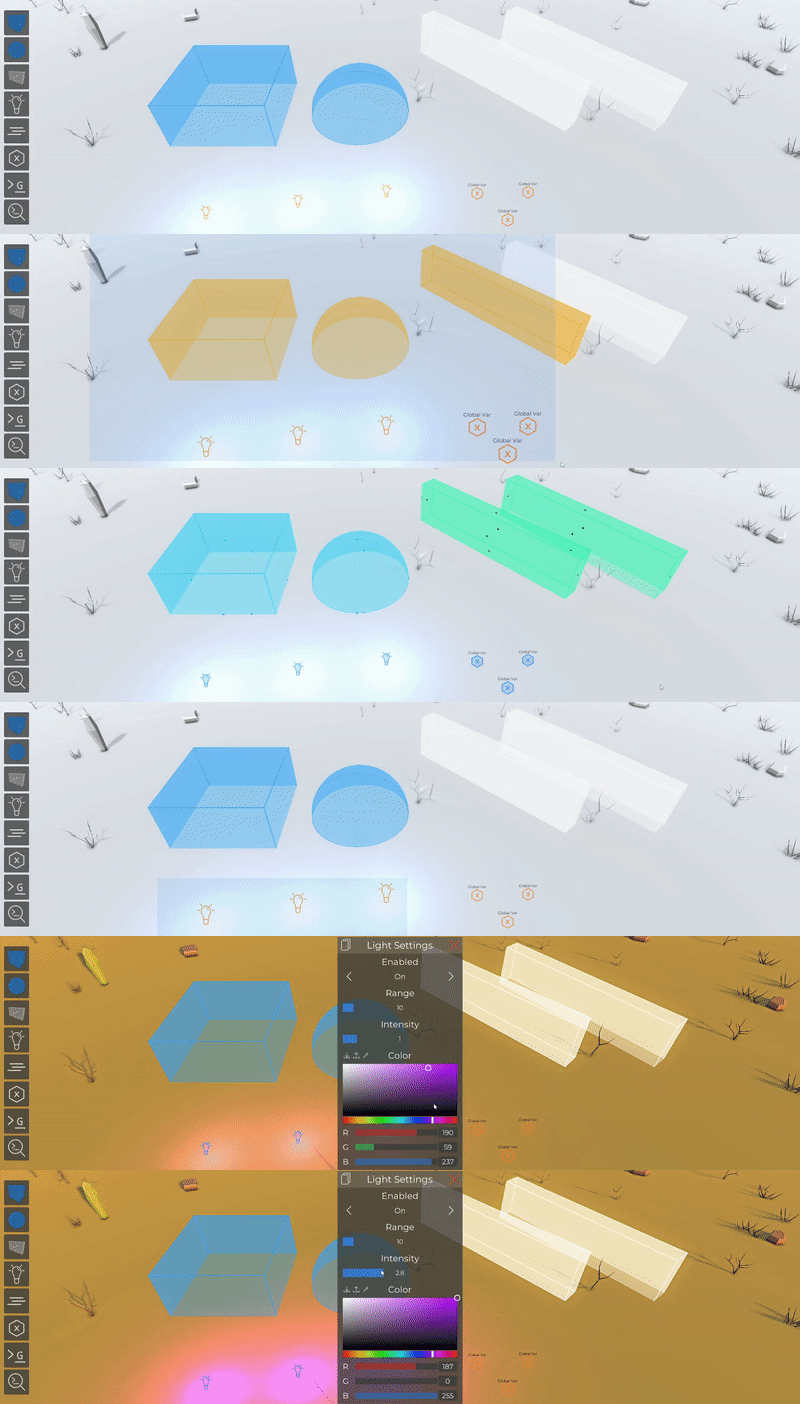
Multiple scripting objects like lights, triggers, variables, etc. can now be selected at once in the scripting view
This can be accomplished by holding shift/ctrl while selecting objects or by dragging a box over multiple objects
Scripting objects now also give visual feedback to indicate their selection status to make it easier to work with them
The scripting object settings (like light or wall settings) now also support multi object editing
Fog areas can now be selected by simply clicking on them instead of having to search the icon
Script settings
This update contains features to split logic into different scripts. To help with that
Scripts can be referenced, deactivated and enabled from other scripts
And scripts have an execution order setting to select in which order multiple scripts run
Custom events
The new custom event nodes can be used to define custom starting points for your script. This can be used to prevent repetition of nodes that do the same thing. You can also add parameters to your custom events. The event can then be executed from the same script with the Invoke node, or from other script with the InvokeExternNode.
Input UI
To help with using other player's scripts or adjusting your own large scripts, most input nodes can now be given a name and a description and will then be displayed in the scripting list. This means that these settings can be edited without having to edit and try to understand the script.
Script workshop
To make it easier to share scripts with other users, there is now Steam Workshop support for visual scripts! Script can be uploaded in the script editor or loaded when pressing the 'Add Preset' button in the script list.
Script editor improvements
There are some nice quality of life improvements which can be toggled on/off in the toolbar in the bottom left corner of the script editor:
When dragging a output point in an empty area, the panel to add nodes will show up and display all compatible nodes. After selecting a node, it will be inserted and connected automatically.
If you like clean looking scripts, you can now enable nodes to be snapped to a grid or aligned to other nodes
Runtime event binding
Events that depend on a reference like the OnDamage event can now be bound while the script is running instead of having to pick the reference in advance. With scripting the reference is often only generated when a unit is spawned for instance. The Bind event nodes can then be connected and all the nodes that are connected to the event will run when the event is happening.
Improved custom UI
Ever since the addition of the CustomInfo node, players used to create custom UI elements to replace or add more information to the vanilla HUD. To help with that, there is a new version which outputs a HUD element reference whose settings like color, text, etc. can be changed. And a new input parameter can be used to allow the cursor to interact with these hud elements. There are new events to detect hovering and clicking and a new node (UnlockCursorInteraction) to unlock the cursor of the player to actually use these events.
Custom UI transform editor
The new UITransform input node makes it easier to create custom info elements by allowing users to adjust and preview positions, sizes and anchor/stretching behaviours for their UI elements.
New scripting nodes
This update features a lot of new scripting nodes:
RunOnce and RunOnceFrame can be used to only let the connected nodes run once while playing or once per frame
The Select node can be used to select one of two values depending on a bool condition. This works similar to the if node, but a value is selected to prevent having to copy conditional branches in scripts
The Break node can be used to stop the loop from which it was executed
The new version of the EndlessLoop now works like the other timed loops and can be started multiple times (this doesnt affect old scripts)
GetAllUnits and GetUnits can be used to retrieve a list of all units (of a team)
TryGetNavPos can be used to find the closest walkable position on the AI navigation surface for a position
IsNavPos can be used to test if a position is on the walkable AI navigation surface
Set/Get MovementSpeedMult can be used to adjust the movement speed of the player (0-2x multiplier)
OnAIAttack/OnAIAttackGlobal event nodes run when an AI attacks another unit
OnAIShoot/OnAIShootGlobal event nodes run when an AI shoots at another unit
OnAIMelee/OnAIMeleeGlobal event nodes run when an AI swings their weapon at another unit
OnProjectileImpact event node runs when a projectile hits any surface and outputs information like the position, hit normal and hit object
OnProjectileBodyImpact event node runs when a projectile hits a unit body part and outputs additional information like the hit body part and damage values
OnMeleeImpact event node runs when a melee weapon hits any surface and outputs information like the position, hit normal and hit object
OnMeleeBodyImpact event node runs when a melee weapon hits a unit body part and outputs additional information like the hit body part and damage values
IsHovered node can be used to test if a custom info is hovered
OnBeginHover/OnEndHover/OnClick can be used to detect custom info interactions
UnlockCursorInteraction/LockCursorInteraction can be used to unlock the cursor for custom info interactions
Jump node can be used to let the player jump without ground checks for mechanics like double jumps
PickupWeapon/PickupSupport/PickupShield can be used to set inventory items of the player
Added various new nodes and parameters to existing nodes to drop weapons, shields, etc and to switch weapons
RestrictAll node can be used as a shortcut for all the other restrict nodes
Raycast/Linecast nodes can be used to shoot rays and detect colliders
New input nodes for body parts, types, ui transform and equipment item references
ArrayHint node can be used to hint the type of an array after it was passed as a parameter in custom events
DynamicRefCast can be used to cast any reference type to another type (for instance unit to health reference)
DebugLine node can be used to temporarily render lines in the scene
SetX/Y/Z and SetR/G/B nodes can be used to quickly set one component of a vector or color
Added nodes to get and set all parameters of an existing custom info
New runtime event bind nodes for all the reference event nodes
Script warnings
The scripting system is pretty robust in terms of error handling, but unfortunately it is difficult to detect all user errors. For instance, some players used the OnDamageGlobal event and then just added more damage to a unit, which would cause the event to run again and cause an endless loop and game crashes. With custom events it is even easier to create actual endless loops which are difficult to detect in the editor. To fix that, the game will no longer crash when a script causes an endless loop. Instead a warning is shown while playing and the script is deactivated. In addition to that, there is also a warning if a script runs really slow.
Other scripting improvements
Node warnings are now displayed for placed nodes
Nodes with serious warnings related to performance now use a red background
Added 'Tab' as a possible key in the input event nodes and key input node
Comment nodes will no longer reset their size when reloading a script
OnPickupEquipment/OnPickupObject/OnConsume nodes will now output the reference to the used object
Bug fixes
Fixed that the OnPickup scripting node did not work for door keys
Fixed that pressing continue in the pause menu resulted in a different behaviour that pressing escape to close it
The mute in background option will now correctly mute sounds instead of pausing them and causing sound desync
Custom modular doors should work more reliable now
Fixed that the rect shaped terrain paint would flip to the other side when painting borders
Fixed that the rendered color picker would not pick colors from units in the unit editor
Fixed various problems with picking up shields (duplicated shields, multiple shields on the player, etc.)
Fixed that custom bayonets did not cause any damage
Fixed that resetting the scale in the script editor would not update the scale text
Fixed a visual bug for array nodes with many values
Fixed small gap in the concrete windowframe model
Fixed that menu music would stay quiet after changing the music volume
Fixed that siege units did still control their siege weapon after being zombified
Fixed S42 scope retricle clipping
Fixed floating scopes on the future grenade launcher
Fixed +0 bullets spam when walking over some weapons
Fixed that units from spawners were missing their weapon attachments and shield backpacks didnt work correctly
Fixed floating bayonet on B1918 weapon
Next update
The next update will include a new quickplay section with curated workshop items to increase the visiblilty of workshop items and new content.
0.40 Bug fixing patch
Fixed color picker result on camo clothing items
Fixed color picker result on terrain surfaces
Fixed that the surface placement direction was not applied
Fixed wrong description for backpack shield slot setting
Fixed missing footsteps on zombie units
Fixed that randomized object (like plants) did not save their variant
Update 0.40
As mentioned in the last blog post, this is the first update of the new monthly update schedule. It features some nice quality of life features and technical improvements.
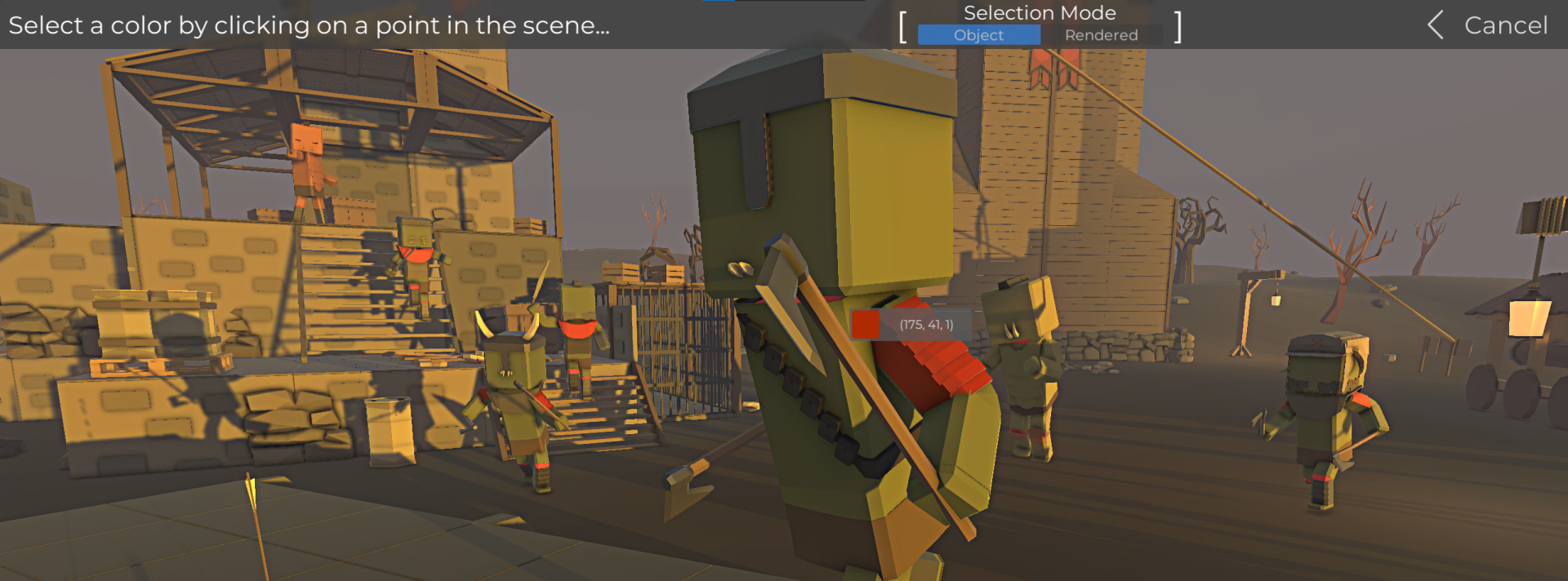
Color Picker
The new color picker can be accessed in the battle and unit editor to pick a color from the visible objects. This can be used to quickly select colors based on the colors of vanilla content or other colors you like in a scene.
File Browser Improvements
With all the different kinds of custom content, the file browser has become an essential tool when saving, loading or importing stuff. This updates adds some qol features to it:
Bookmark paths
Click on folders in the navigation bar to quickly navigate back
Rename entries
Folders are now supported for custom items
Delete/rename buttons are only visible while hovering
Invisible Units
With the addition of custom equipment items, ghost units were "abused" to create custom unit shapes by adding custom face equipments and armor items, but the semi transparent color of the ghost units was still visible. The new Invisible and Invisible With Blood options for the unit appearance in the unit creator can be used to create fully invisible units with or without blood effects. And zombie units can also be invisible!
Footstep sounds
The player and units now have footstep sounds depending on the surface they are walking on. https://youtu.be/w1pdXEpzCqU
Player/Unit Improvements
To improve the feeling while controlling a player, there are some improvements in this update (and more are planned)
The head is now slightly tilted while leaning
Replaced the landing sound which now also depends on the surface
Standing still now reduces recoil by 10%
Crouching now reduces recoil by 25%
Added some arm sway while aiming a weapon to prevent it from being perfectly still
AI units will now rotate their heads up/down while aiming at a target at a different elevation
New Scripting Nodes
The planning phase for more extensive changes to the scripting system has started to make it easier to use and also allow users to add custom logic without having to actually edit visual scripts. But for now, this update only includes some new scripting and adjusted nodes:
Added HUD/Activate node to hide the vanilla HUD elements
Added movable objectGetPosition/GetRotation nodes to prevent having to cast them to object
Added Unit/Move and Movable/Move nodes to quickly move units/objects by an offset instead of having to calculate the absolute target position
Movable objects can now be rotated with the Rotate/RotateLocal/SetRotation nodes
Added Player/IsGrounded and Player/LookDIr nodes
Added key to string cast nodes to display key bindings as string
Added GetRight/Forward/Up direction vector nodes for movable objects
Added Math3D/LookRotation and Math3D/RotateTowards nodes to help with calculating rotations
Added Unit/Activate footsteps sound to activate and deactivate footsteps for individual units
Added Unit/GetTags node to get an array with all tags that a unit has
Added additional unit output to the GetPlayer node to prevent having to cast it to unit
Added keepTags input to ReplaceUnit/ReplaceUnitCustom nodes to keep all scripting tags that are attached to the unit
Memory Improvements
With all the custom content from the latest update, some memory related problems were detected which caused crashes over time and overall reduced performance after a while. These issues mainly affected the load/save system when working with larger battles, so this update includes various improvements and fixes to make longer sessions with many save/load processes more enjoyable and stable,
Other Improvements
Modular parts will no longer snap and jitter around while placing them in overlapping placement slots. This was especially annoying when placing roofs
Impact effects for bullets (sound & particles) are now more reliable and there are some new effects for materials like glass or plastic
All lists in the game now scroll with the same speed relative to the item size
Poison and flame damage is now displayed on the HUD
The visiblility of workshop items is now loaded into the UI before updating them
Custom items from the workshop now display as "[V1_W]" in lists to identify them
Colors can now be dragged into folders in the color management UI
Transparent colors are now supported in the color management UI
Increased sound capacity of the audio system
Bug Fixes
Most bugs have already been fixed in the previous patch
Fixed a bug that caused custom objects with surface placement to be placed wrong
Fixed a bug that caused the custom container item setting to place the door at an invalid position
Update 0.39.1
Fixed some scripting node descriptions
Fixed incorrect weapon rotations in some menu backgrounds
Fixed incorrect snowman hat interaction after being dropped
Fixed that the head device (night vision) could not be toggled on/off
Custom corpses can now be referenced as movable object in scripting
Fixed preview of armor in equipment panel
Planes will now crash when their pilot died
Fixed custom item icon preview tool
Fixed a bug that caused custom items to become missing when subscribing to new units or prefabs
Fixed flipped normals on the improvised semi auto rifle
Fixed a bug that allowed invalid .obj files with NaN normal values to be imported
Fixed siege and animal filters in the placement list
Fixed that the custom particle system cone arc was limited to 90° instead of 360
Fixed that using units with unknown custom equipment from the quick play menu would result in them missing their equipment when playing
Fixed that when loading player equipment presets with unknown custom items, the items were missing on the player