

Ashi Wash
New Release: The Thing at the Window
I'm excited to announce the next release from Two Glass Hams: The Thing at the Window!
I started development in late 2018 about 8 months after we released Ashi Wash, then but shelved the project in October 2019 due to rather a rather tumultuous series of events in our personal lives. I spent the pandemic working with our artist prototyping about a half dozen different projects, but we determined that all of them were a either bit beyond what we could handle with such a small team, or just not worth developing further for one reason or another.
Fast forward almost three years, and Julian now has a totally awesome webcomic called The Nightmare Witch which is taking up most of his free time (the new chapter starts in November!), so I decided to go back and continue work on The Thing at the Window as a solo project.
Gameplay is more or less complete, with only bugfixing, art, and general polish left! I'm releasing it in Early Access to get some unbiased feedback from the Steam community.
The Thing at the Window releases October 24 at whatever time I happen to be around to press the "Release" button! So if you enjoy tense atmospheric horror then wishlist it and check it out!
Patch 1.5 (April 1st, 2021)
Please note: this update changes some controls to make them less awkward and more consistent with other games. These changes are displayed in the in-game controls manual.
PATCH 1.5 (built April 1st 2021)
- fixed certain tools breaking in VR
- a good chunk of inefficient code has been rewritten, increasing stability in VR
- slightly revised control schemes across the board
- dead flies now fly through the air when swatted in both modes, as opposed to falling straight to the ground
- menu flies added to valid aim assist targets
- gamepad look sensitivity increased by 33%
If you find any bugs I missed, please post them as new threads in the discussion forums, and I'll look into them ASAP!
~M@
Beta Update: 1.0.5 (March 26, 2021)
Windows Mixed Reality users: if this update does not work for you, please use the 1.0.3 branch in the beta options (not actually a beta, it's for legacy support)
Oculus Rift users: if this update does not work for you, please use the 1.0.4 branch (currently the 'default' branch while this update is still marked as beta)
- fixed certain tools not working in VR
- various optimizations (should result in a slightly smoother VR experience)
- slightly revised control schemes across the board (now with a dedicated 'drop' button for the base game, and VR teleport is now on the bottom face button rather than triggers)
If you find any bugs, please post them as new threads in the discussion forums, and I'll look into them ASAP!
~M@
Update 04 (Index support & some quality of life changes)
-updated game to use Unreal Engine 4.22
-fixed annoying record scratch that would play when the map loaded in VR
-added support for Valve Index (we're unfortunately unable to implement finger tracking, but we did make sure to take advantage of the new grip functionality)
-added SteamVR Input plugin
-simplified default VR control schemes across the board so that controller inputs are less convoluted
-updated controller books to show new control schemes
-made controller book & VR menu swatter more immediately visible for new players
-rewrote VR item floating functionality (comfort & accessibility feature allowing fallen tools to float up towards the player's hands, so you don't have to bend down as much; great for seated play)
-added VR float functionality to some objects that didn't already have it
-added ability to quickly quit the game by holding ESC for 3 seconds
I have not been able to test this update for Windows Mixed Reality headsets, so if you're a WMR user and you're having issues, please use the "version_1.03" branch available in the BETAS tab (right click the game in your library, click "Properties", click "BETAS", and then it will be in the drop-down list).
I'm looking into reimplementing LIV support soon (though it's still working with version 1.03 in the "livtestbranch" beta branch)!
If you run into any issues, please don't hesitate to post them in the discussion forums and I will address them ASAP!
LIV support for VR mode!
Ashi Wash now supports LIV!
That means that with a proper setup, you can capture mixed reality video of yourself playing Ashi Wash.
To enable LIV support, you'll need to download the Beta Branch of Ashi Wash from Steam. Here's how to do that:
First, find Ashi Wash in your games library. Right click on Ashi Wash, then click on "properties."
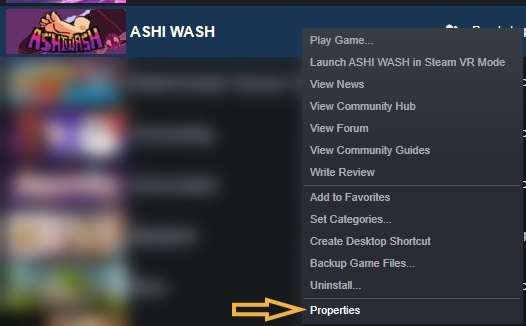
In the Properties window, select the "Betas" tab. Click the arrow on the drop-down menu, and select "livtestbranch." You should then be able to download the version of Ashi Wash that includes LIV support.

The "livtest" branch currently uses an older version of Ashi Wash - v1.03.
We can't wait to see the mixed reality videos you create! Share them with us in the
Steam Discussion forums, on Twitter, or on Facebook!
Update 03: Better Oculus Touch Controls and Easier Flies
The hitboxes of the flies have been made a little larger so that they are easier to hit.
We've also improved the overall performance of the game.
Update 02: Oculus Rift support!
If you find any issues with the game, please let us know in the Steam Discussion forums.
Update 01: Tweaks and Bug Fixes
We've released a small update to address a few bugs and made some minor tweaks to make the game better. If you find a bug, please let us know in the
Steam discussion forums.
- Fixed a bug where video settings weren't being applied properly
- Fixed an error in the control explanations for keyboard+mouse
- Fixed a bug where tools sometime fell through the floor in VR mode
- Fixed a bug where the player could not interact with the menu while holding a tool in the non-VR mode
- Fixed an issue where the gamepad jump button was unresponsive
- Made the in-game menu easier to use while using a controller by increasing the interaction zones of the options.