

Battle Worlds: Kronos
Release Notes 1.4.3
Here's the changelog:
Gameplay/UI:
- Savegames can now be deleted in the LoadGameScreen by selecting a savegame and then pressing the button that appears on the right.
- In a multiplayer online game you can now cancel ending your turn by clicking on the X in the message window
- Intro is now only shown on the first startup per default. If you want to show the intro on every startup you can enable it in the settings menu.
- Vision range is now changed immediately when diving/resurfacing submarines or choosing vision upgrades on unit level up
Bugfixes:
- fixed a Multiplayer bug that a player could do 2 turns in a row
- damaged units should now smoke correctly after loading a level
- Mission End Screen is now showed after 3 seconds delay
- fixed Manual Cam Movement so posteffects are not turned on while zooming
- fixed a graphic glitch in ProfileEditScreen
- fixed leagues showing after logout
- Remove blocking map object when first enemy is destroyed to remove game blocker
- Fixed multiple clicks on a multiplayergame opening it multiple times
- Fixed positioning of notifications
- Fixed tactical map: now appears earlier
- small changes in english tutorial texts
- fixed a bug that water settings could not be changed after changing from one level to another
- fixed some crashes/freezes
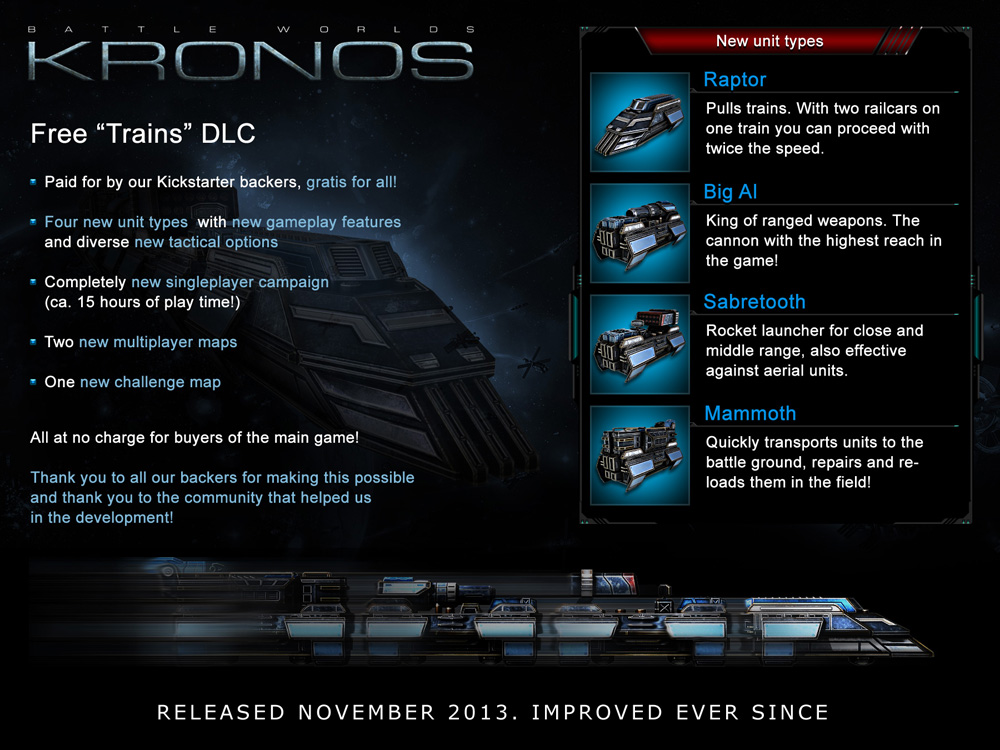
FREE "Trains" DLC Released!
It features:
- An additional single player campaign (~ 15 hours of play time!)
- Four new unit types with new gameplay features
- Two new multiplayer maps
- One new singleplayer challenge map
Free for everybody who bought the main game!
Take a look: Features & New Units
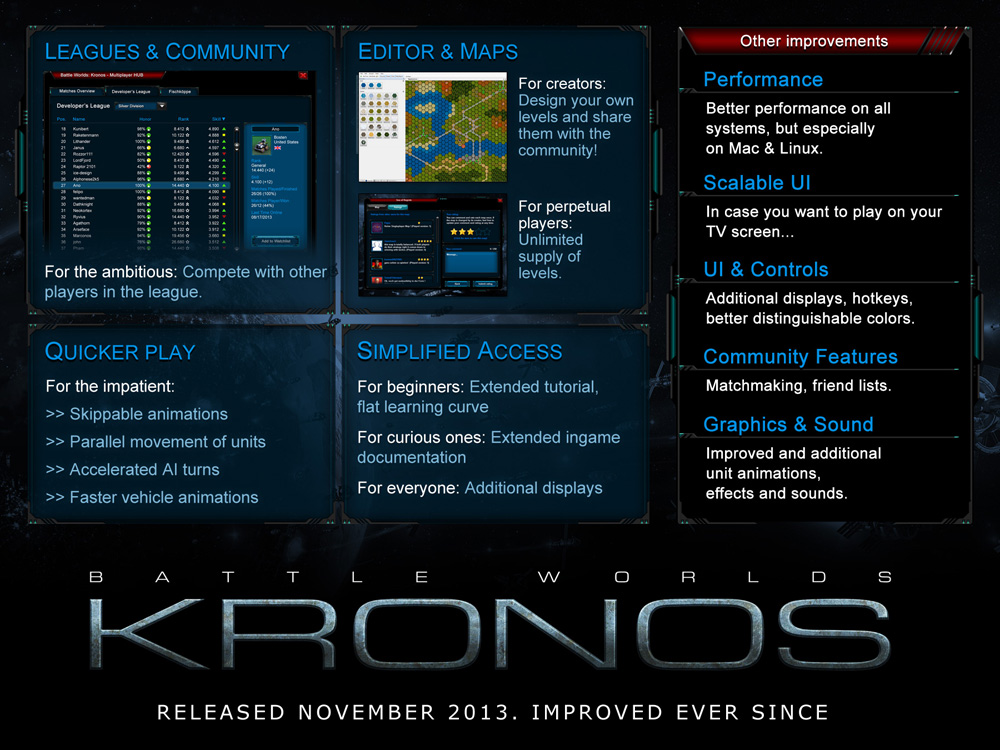
And these are the things we've benn working on in the last six month since the release of the game: Improvements since launch
Have fun!
Your KING Art Team
New Update (1.3.3)
The new update (1.3.3) is now available and contains lots of changes.
Here’s the change log:
- Technician can now carry up to 3 mines and defuse mines
- The Hurricane’s hit points have been reduced
- Several GUI bugs have been fixed
- Memory usage has been reduced by about 25-30%
- Performance is optimized
- Elite units that were loaded into buildings or other units can now be transferred over to other missions
- The Hacker can’t take over human units anymore
- Vehicles of the Residents now also heal on level 1 wrecks
- In tactical map view commands can’t be given anymore
- Diver/Meteor can be produced in the airbase
- Buildings can now be placed with PlaceUnitAction
- Aerial units will not be blocked by low map objects like barbed wire anymore
- Impassable terrain (with wrecks on it) can’t be passed anymore
- Damage preview on skip animation fixed
- Towers don’t turn on transverse axis anymore
- Upgrade "Blitz" updated: If an enemy unit attacks one of your units and dies, it won´t fire any longer before dying.
- Grid rendering fixed
- Trigger event "All units destroyed" now also triggers, when units are not destroyed but hacked by Hackers and is therefore renamed to „no unit left“
- Technicians can defuse and pick up mines of their own team
- Technicians cannot pick up mines, when the ammo-cap is reached. Deploy a mine to make room before picking up another one
- Hidden submarines are now shown correctly after passing a bridge
- Technician cannot "defuse" other units than mines any longer
Additionally we taught the editor some extra things:
- Buildings can now be placed with PlaceUnitAction
- Orbital Drop / Orbital Extract can now be executed in parallel several times
- OrbitalDropUnits can now be assigned to a squad in the builder
Your Battle Worlds team
Update 1.2.1: UI Improvements & Better Performance
Improved, scalable UI
We've updated our UI system. The biggest feature is a new option in the settings that allows you to scale the UI up to 200% of its normal size. So if you're using a very high resolution or you want to play on your television you should be fine now.
Other improvements include:
- Better text input (copy & paste, navigation in text fields)
- Hotkey for “End Turn”
- Hotkey for “Display unit info permanently”
- Option to disable the auto chat-login
Let us know if everything works!
Better Performance
We had some performance issues on OpenGL Systems (Mac & Linux). We tweaked a couple of things and the performance should be noticeably better on all systems, but especially on Mac and Linux.
- High quality settings: Only minor improvements here
- Medium quality: You should notice a substantial performance improvement here
- Low quality: Substantial performance improvements
- (New) Very low quality: This is a new, very fast set of settings
On our low specs Mac test system the performance went up from ~15-20 fps to 30-40 fps in Medium quality. Depending on your system your experience may differ. Please let us know how the performance changed.
Many small things & Bug fixes
<*>AI for air raid defense turrets and guard towers fixed
<*>Fixed tooltip hide/unhide units
<*>The unit info now shows the amount of mines a unit carries
<*>Buildings no longer hinder movement
<*>Now units turn their turrets when attacking (where applicable)
<*>The "Next Unit" and "Sleep" Buttons no longer open the transporter screen
<*>Fixed a bug when a mine was deployed next to a hidden unit
<*>Fixed a bug where hidden units had been visible for the enemy while they were moving
<*>Fixed a bug when loading savegames from the main menu
<*>Loca updates for it, fr, es, rus
Changelog: http://forum.kingart-games.com/index.php/topic,13446.0.html
Major update 1.2: User-generated maps & editor
Now you can upload your user-generated maps directly into the game and other players can rate them.
The Battle Worlds: Kronos editor is now part of the game data and can be launched via Steam (Windows only).
Have fun!
Major update: Version 1.1
Faster gameplay
- AI units now move in parallel making AI turns faster
- AI animations can now be disabled
- Units covering far distance accelerate over time
Multiplayer enhancements
- Leagues are now available for all players
- Players can collect points and gain ranks
- Players are now given a comprehensive Skill level
General fixes and optimizations
- Higher quality battle sounds for many units
- Counter-attack damage now displayed
- Revised AI algorithm for unit selection to reducing panning
- Balance tuning for numerous single-player missions
- Auto-login to multiplayer features
Demo out now!
Battle Worlds: Kronos - Editor!
You want to build your own missions and multiplayer maps? Then take a look at the Battle Worlds: Kronos editor.
You can get the editor here: Get the editor (Game required)
...and info about it here: To the forum
Launch Patch Released!
- Fixed a bug where the menu would remain unresponsive for several seconds after starting the game.
- Fixed a bug where the game would continue to scroll the view despite the right mouse button not being pressed.
- Fixed a bug where multiplayer games did no longer show up in the Multiplayer Hub.
- Fixed a bug that prevented the unlimitted shootbacks upgrade to function properly.
- Fixed a bug that caused noticeable input lag and sound stuttering when issuing a move order to a selected unit.
- Fixed a bug that allowed players to toggle through enemy units with Tab that should be concealed by the fog of war.
- Steam achievements are now granted regardless of whether the user is logged in with his KING Art account.
- The minimum supported screen resolution has been lowered to 1024 x 768.
- Fixed a number of localization bugs in several languages.
- Various smaller UI tweaks.
- Tweaks in several single player maps.