As we approach the final weeks of Season 4: Eleventh Hour, we thought it would be a good time to discuss several changes and improvements coming to Vault Weapons in Season 5.
Throughout the launch of Battlefield™ 2042, we continued to see feedback from you that you wanted more weapons to play with. As a result, we adapted Battlefield Portal weapons for use in All-Out Warfare and named them Vault Weapons.
Over time, as we continued to assess the arsenal of our Vault Weapons with your feedback, we identified areas of improvement for Vault Weapons based on the following action points:
You weren’t able to adapt Vault Weapons to your liking with 2042 attachments
You wanted the ability to customize the skins of your Vault Weapons
You felt as though Vault Weapons were not able to consistently compete in All-Out Warfare Encounters
Without any further delay, let’s hand it over to the Weapons Team to detail some of the improvements they have been working on to address your feedback!
Vault Weapons meet Attachments
You may have seen us teasing about this for some weeks now, and it is finally time to confirm that we will be adapting Vault Weapons for use with All-Out Warfare attachments, starting in Season 5.
To start, we will be focusing on Assault Rifles and Sniper Rifles with attachments for the M16A3, A-91, M416, MTAR-21, AEK-971 and the GOL Sniper Magnum.
While we encourage you to get to grips with the attachments and define your own loadout, here are two Vault Weapons with all the available attachments associated with them:
Those of you with an eye for detail will notice that in the two examples above, we have not included ammunition examples as much as we had for sights or barrels.
The reason for this is because All-Out Warfare and its attachments were not developed with Vault Weapons in mind and will require extra work.
This is something that we’ll continue to review over time, as we continue to extend attachment support towards other Vault Weapons.
Please do keep the feedback coming, and let us know what attachment and weapon combinations you'll be looking for in the future!
A Touch of Colour
We are also addressing your feedback to customize the skins of your Vault Weapons. As part of Season 5, all Universal Skins such as Forest Multi-terrain (Unlocked at Rank 0) and Desert Technical (Unlocked at Rank 19) will be extended towards all Vault Weapons. As an added bonus, Universal Skins will also be available within Battlefield Portal, allowing you to show off your flair as you venture back in time.
Coupled with the earlier news about attachments arriving to Vault Weapons, this now allows you to not only decide how your favorite weapons perform but how they look too.
A Question of Balance
We wish to acknowledge your feedback around the balancing of Vault Weapons and with these changes in mind it will now provide Vault Weapons with more versatility than ever before and allow them to consistently compete alongside and against All-Out Warfare weapons.
Attachments arriving to Vault Weapons is a substantial change that is an immediate benefit to help improve their performance and not necessarily in real power term and that is where you come in. Through your feedback we will continue to provide balance changes for both attachments and Vault Weapons as time goes on and once you’ve had time to go hands on with them.
Before we sign off, thank you for your continued support and passion for all things weapons. We know that Vault Weapons have a special place in your hearts, and we are excited to see you try these new attachment combinations and begin experimenting.
See you on the Battlefield!
This announcement may change as we listen to community feedback and continue developing and evolving our Live Service & Content. We will always strive to keep our community as informed as possible.
BATTLEFIELD 2042 UPDATE #4.2.0
Hello there,
Update 4.2.0 deploys across all platforms next week. With it comes the penultimate map rework for Discarded, alongside a wide range of Quality of Life improvements.
Here’s an overview of focus areas:
Map Rework: Discarded.
Collection & Customization Improvements such as the ability to remove Weapon Attachments from Weapons within the Collections Screen.
End of Round Improvements such as the showcasing of a new Personal Best statistic.
Lis Specialist Mastery Improvement to include Assists into the tracking of Mastery.
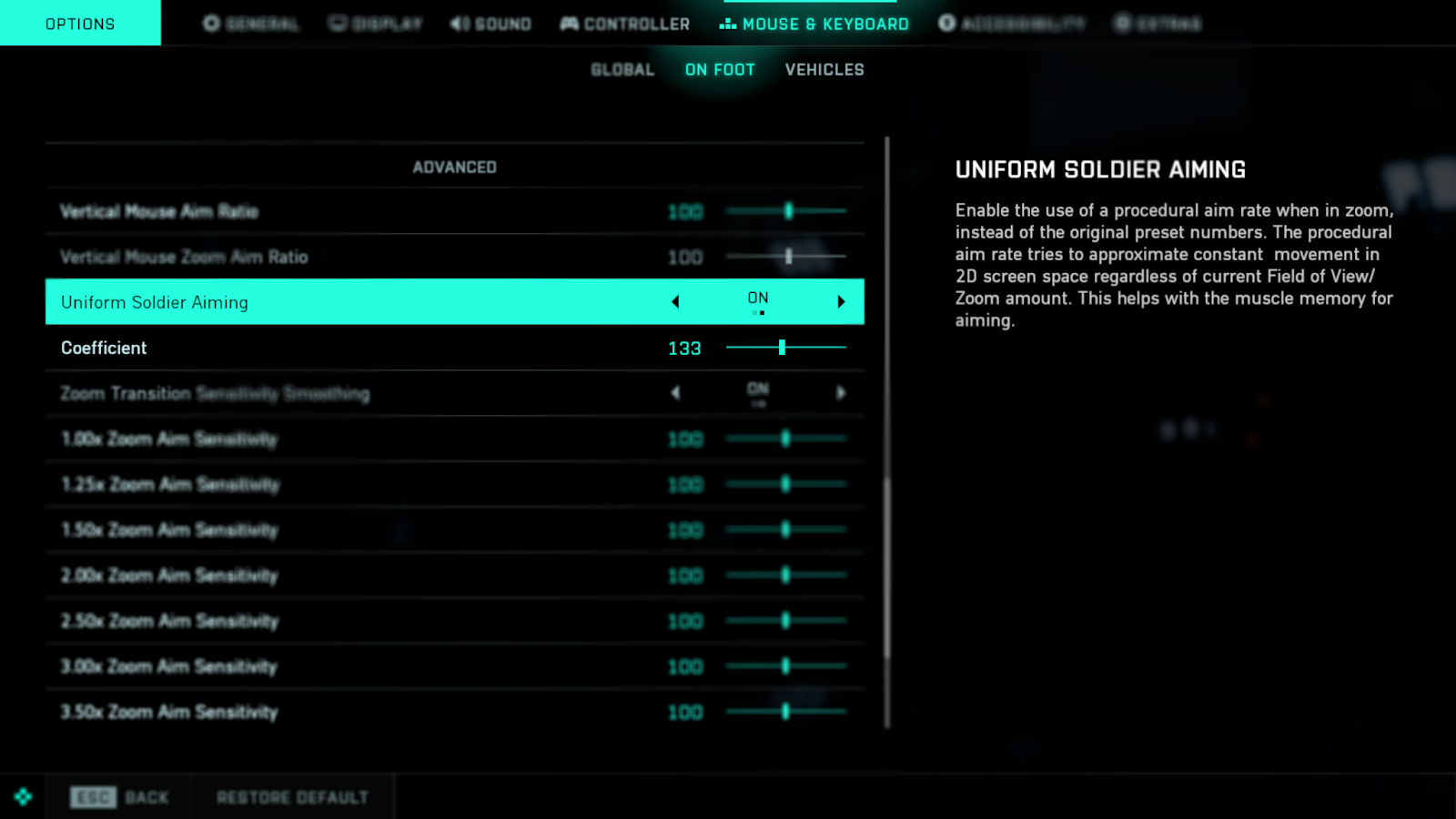
Uniform Soldier Aiming now “On” by default.
We’re excited to hear your thoughts and witness your experiences of the reworked Discarded once it deploys next week!
//The Battlefield Team
Stay Informed Follow us on the @BattlefieldComm Twitter account to stay informed on the roll out of our updates. You can also follow along with our tracking of Known Issues.
Content
Map Rework: Discarded
The focus of our Discarded rework was to make the infantry gameplay more enjoyable and accessible. New flags have been added, and others have been moved closer to the main play areas, alongside several new paths and roads across the map. Global lighting has also received improvements.
Check out our overview below for a selection of areas that we feel are going to become quite entertaining once this rework goes live!
Areas of Improvements
Salvage Yards What used to be an open field on the northwest side of the map has become the Salvage Yard. The car wrecks not only fit the theme of Discarded, but also add multiple cover opportunities for soldiers to outsmart the heavy vehicles roaming the area. There are several destructible houses on the outskirts of the flag that can serve as vantage points at the expense of being buried in their rubble.
Antenna Whilst already an existing flag, we have brought this flag point closer to the Flooded Village based in the northern region of the map. With this new location, it now provides an improved link between the north area of the map (the green area) with the south (the beach). We reinforced the thought of military occupation by adding various military assets and we have improved the layout by populating the combat space with a few extra structures. You can also climb up the antenna, and parachute or Wingsuit from here down to the Colossus or to the Village.
Dismantled Hull A destroyed convoy and rows of military cover now strengthen the frontlines of this flag. The smoke from the convoy should conceal approaching players from snipers that may be waiting on the upper floors of the Hull. The core of the flag received a few improvements with military cover as well, allowing for infantry to push in forward less difficulty. Lastly, we closed off part of the side of the hull that faces the Colossus to limit the frequent sniping from the deck of the ship into this flag.
Other Areas of Focus
Collection & Customization Improvements
Implemented the ability to remove attachments from weapons within the Customization Screen.
Increased legibility of the Plus Menu in-game by only displaying the attachment category that is being changed
Improved how attachments are moved and swapped out in the Customization Menu.
Increased the clarity of descriptive information on how suppressors function within the Collection Screen
Fixed layout in the Customization screen so that info is displayed in the same place.
Reduced the amount of steps necessary to get into changing attachments.
End of Round Improvements
Introduced a new Squad Performance screen statistic called “Personal Best”. If you’ve reached a new record for statistics such as most kills, damage dealt, revives, assists, there is a chance for this stat to display for your efforts in going above and beyond on the battlefield.
During the End of Round flow it’s now possible to skip all the way to the main menu without leaving automatic matchmaking.
Updated Ribbon progression, increasing legibility of what rank was earned.
Improved art & animations across all of End of Round.
Round-based Game Modes will now have side switching enabled, and will now have increased visual communication to indicate what happens after the end of match timer ticks down.
Specialist Mastery Improvements
Updated Lis' Mastery requirement to better fit her intended playstyle:
Old - 10 Kills when destroying Vehicles with the G-84 TGM to
New - 10 Kills and Assists when destroying Vehicles with the G-84 TGM
Uniform Soldier Aiming
We're changing the default setting of Uniform Soldier Aiming from Off, to On, for both controller and mouse & keyboard gameplay. This feature is a tool which over time helps your aiming movement to gradually become more consistent during gameplay.
Our reasoning for having Uniform Soldier Aiming turned Off by default in Battlefield 2042 was because in previous Battlefield titles we expected a slower aim rate in zoom to be a benefit in helping players learn to aim. Instead, we have since observed that for both new and experienced players this variance does not promote good muscle memory build up.
Doors that were previously controlled by the enemy team will now automatically open upon getting close to them rather than having to hold the interact button.
Updated the scoreboard to keep the Objective score in the right-most column for all objective-based game modes, for an easier overview.
Sundance Mastery now correctly tracks Assists on destroyed enemy vehicles when using the smart explosives.
Correct icon is now present for Irish and Sundance's gadgets.
Dozer's Ballistic Shield will no longer deflect/ricochet Sundance's Scatter Grenade.
Soldiers will now become spotted on the minimap upon firing or throwing the following items: Smoke Grenade Launcher, SPH Explosive Launcher, Recoilless M5, Javelin and FXM-33.
The reload prompt no longer appears while you are knocked down and awaiting a revive.
The kill log will now display Ranger as the cause of death if you are killed by one of them upon self destructing.
Blasco no longer attempts to hug the ground and her arms should remain in the correct place when switching to her gadget while prone.
Improved HUD visibility across a number of different screen settings.
The icon above Ranger now pulsates correctly when self destructing.
Auto throw grenades and throwing knives option now behaves more consistently.
Fixed an issue that would cause players to be seen with the green highlight while reviving when they shouldn't.
Fixed an issue where you couldn't throw grenades through the frame off the watering robots in Renewal.
The repair tool now displays the overheat UI element correctly.
Fixed an issue where teammates couldn't deal damage to friendly deployable shields.
Resolved an issue when landing with the parachute and the user repeatedly pressed the melee button it would sometimes cause an unintended animation.
The affected zone of Blasco’s X6-Infiltration Device will no longer display on the minimap whilst far away from the intended zone.
The name of Blasco's specialist trait now appears in the HUD after exiting a vehicle and triggering the effect.
Players can no longer hear the Signal Jammer noise while in a downed state.
A reload animation is now present in first person view after a player fires the rocket launcher, throws a grenade and swaps back
Fixed an issue where weapon overheating behaved differently across different platforms.
The EOD Bot was getting a bit too friendly with Boris' SG-36 Sentry Gun and instead of repairing it, would pick it up. Not figuratively speaking, don’t ask us how that would have looked, an EOD Bot rolling down the hills of Flashpoint with a Sentry Gun on it. Anyway, this will no longer take place and it will repair the turret instead, as intended.
Resolved an issue that allowed MCOM’s to be stuck in a state which prevented it from exploding upon using the EOD Bot on it.
Fixed an issue where you couldn't pick up C5 or Claymore placed near or inside bushes.
If you throw a grenade while holding the Repair Tool, you can no longer see and hear the Repair Tool becoming active for a brief moment.
Fixed an issue which would cause multiple grenades to be thrown in a quicker succession than expected if Quick Throw grenades were enabled.
Updated Boris' SG-36 Sentry Gun description to now mention targeting vehicles.
Battlefield Portal
Adding a CAV-Brawler to Battlefield Portal will no longer restrict you from saving the experience.
Improved consistency of the Vault Weapon attachments.
Corrected Recoil Modifiers across Bad Company 2 weapons.
MTAR-21's fire modes can be changed within Battlefield 3 experiences.
Correct stats now display within the Collection screen for the RPK.
You can now switch between fire modes on the AEK-971.
Two consecutive bullets are fired when firing intermittently on auto with the AN-94.
You can now switch between fire modes on the AN-94.
Fixed an issue that resulted in multiple Battlefield Portal weapons showing incorrect fire modes shown on the Collection Screen.
Weapons
Fixed an issue that would occur to reloads when placing a gadget then entering and exiting a vehicle.
Fixed an issue where equipping the RPK-74M while repeatedly pressing the melee function with the bipod attachment equipped would cause a broken animation.
The Gewehr 43 will no longer have its bolt open within the Collection screen.
Tracers are no longer present on Subsonic ammo when equipped on the MP28.
The Type 88 LMG and SVD will now be held correctly within the left hand on the Main Screen and Collection Screen.
The Super 500 will now display a Prompt Reload option when running low on ammo.
Fixed damage sounds not playing when taking hits from Super 500.
Super 500's crosshair is now an acceptable size while using a flechette shell.
Fixed an issue that was causing the Prompt Reload option to keep appearing despite being disabled in the options menu.
The correct RoF is now present for GOL Sniper Magnum in Collection Tab.
Weapon Attachments
MTAR-21 Suppressor no longer deals more damage than Default Suppressors.
The Extended Barrel now affects the Rate of Fire when customized on PP-29.
The K30 magazines will now display the correct Rate of Fire within the collection screen.
The ADR Bipod weapon attachment no longer breaks the melee animation.
RM68's Canted Sight no longer clips through the camera when firing in ADS with Shan 2.5X scope.
The M11 x6 Scope is no longer partially obscured while aiming down sights.
Vehicles
Increased damage of heavy projectiles towards Transport Vehicles (Including MPAT Shell, TOW Missile etc)
Radar Missiles now ignore targets that are Below Radar
Mi-240 Super Hind takes 20% more damage from all projectiles
MV-38 Condor takes 10% more damage from all projectiles
Fixed an issue that would cause the audio to intermittently cut out while repairing the MV-38 Condor.
The EMKV90-TOR no longer shakes as it sits on rugged terrain in siege mode.
Fixed an issue that would cause the wrong LOD model to display on the MAV at certain distances.
The MAV's 50mm cannon will now visibly show recoil.
The HUD no longer flickers while attempting to drive a vehicle in an elevator on Exposure.
The Fire Countermeasure reactive hint will no longer be displayed while being hacked or under the influence of an EMP.
VFX now displays correctly when Javelin projectiles are intercepted by APS.
Blue markers are now displayed in HUD for projectiles intercepted by APS.
Fixed an issue that was causing the missiles of the EBAA Wildcat to not hit enemy helicopters.
Fixed an issue where EBAA Wildcat AA missiles sometimes fail to hit helicopters
Stealth helicopters that have been hit with the Tracer Dart can now be locked onto, even in Stealth mode.
The 40mm Incendiary Grenade Launcher Visual Effects on the CAV-Brawler now matches the affected area.
The lid on the CAV-Brawler open seat no longer closes while Lis is controlling her guided missile.
Added Cyber Warfare Protection to the CAV-Brawler
Fixed an issue that would cause the icons of a neutral vehicle to disappear and reappear for a split second on map opening.
This announcement may change as we listen to community feedback and continue developing and evolving our Live Service & Content. We will always strive to keep our community as informed as possible.
Dev Notes - Uniform Soldier Aiming
Hello there,
As part of the next game update we're changing the default setting of Uniform Soldier Aiming from Off, to On, for both controller and mouse & keyboard gameplay. We’ll first explain how this feature works, and why we’re making this change.
What is Uniform Soldier Aiming?
Uniform Soldier Aiming is a feature beneficial to the process of developing good muscle memory when aiming. It calculates the amount of input it takes for your aim to move across screen space to be consistent regardless of field of view changes. As a result, it will always take the same amount of pixel distance on screen for a given physical movement of the mouse. This creates more consistency between non-zoom and zoom, as long as individual zoom aim sensitivity (e.g. 1.00x or 1.25x) has not been changed from the default.
It’s important to note that it’s not an immediate setting to improve your aim, but rather a tool which over time helps your aiming movement to gradually become more consistent during gameplay.
Uniform Soldier Aiming in Battlefield 2042
Our reasoning for having Uniform Soldier Aiming turned Off by default in Battlefield 2042 was because in previous Battlefield™ titles we expected a slower aim rate in zoom to be a benefit in helping players learn to aim. Instead, we have since observed that for both new and experienced players this variance does not promote good muscle memory build up. As this is an essential part of aiming, we’re now turning Uniform Soldier Aiming to On by default.
Improving your gameplay
If you play with a controller then you will already notice aiming variance due to Aim Assist. For example, your aim slowing down when close to a target alongside other similar helpful acceleration settings. By having Uniform Soldier Aiming On by default, we are reducing unnecessary aiming variance to help you learn the input curves on the controller sticks consistently. It should also help you aim while using higher magnification scopes to better track fast moving targets.
As a mouse and keyboard player you don’t have the same variance to account for as when using a controller. However, the same principle applies for Uniform Soldier Aiming. Over time, it helps you build muscle memory and improves your aiming skills through more consistent aim rates, regardless of magnification levels.
If you prefer to play without Uniform Soldier Aiming then you can still toggle it On/Off via Options -> Controller / Mouse & Keyboard -> On Foot -> Uniform Soldier Aiming under the Aim category.
For those of you who are not aware of Uniform Soldier Aiming functionality or unsure of how it works, we are looking forward to getting this change in your hands as we believe it will be a benefit to your long-term gameplay.
//The Battlefield Core Gameplay team
The details in this announcement may change as we listen to community feedback and continue developing and evolving our Live Service & Content. We will always strive to keep our community as informed as possible.
BATTLEFIELD 2042 UPDATE #4.1.1
Hello there,
We have a small Quality of Life Update on the way with Update 4.1.1.
The main focus of this update is to introduce All-Chat Functionality, a much-requested feature from our community, alongside further Quality of Life improvements.
We’ve enjoyed witnessing your reactions to our upcoming Mid Season Event, Leviathan Rising and cannot wait to see your clips and feedback as you go hands-on with it shortly!
//The Battlefield Team
Stay Informed Follow us on the @BattlefieldComm Twitter account to stay informed on the roll out of our updates. You can also follow along with our tracking of Known Issues.
Changelog
Chat Improvements
All-Chat functionality is now available. You can once again congratulate the other team for dancing on top of your downed body.
> All-Chat will be turned off by default when this update goes live. If you wish to partake in friendly chatter with the opposing team then you’ll need to turn this feature on via Options > Display > HUD General > Chat Section.
Resolved an issue for console players that were unable to assign an input to Chat Visibility.
> You will now be able to assign an input via Options > Controller > Edit Controller Mapping > Menu
General Improvements
Resolved an issue that resulted in the CAV-Brawler “Earthshaker” Vehicle Skin from interacting with world objects.
Resolved an issue that prevented some players from selecting equipment from the second and third Weapon Station / Pods within the Vehicles Collection Screen.
Resolved an issue that resulted in some players losing access to Irish’s APS-36 Shootdown Sentinel.
The Damage Dealt Statistic at the End-of-Round Screen was shown for players more often than intended, this has now been adjusted to its intended frequency.
This announcement may change as we listen to community feedback and continue developing and evolving our Live Service & Content. We will always strive to keep our community as informed as possible.
Leviathan Rising Event - Live Now
Think you know everything about close-quarters combat? Think again.
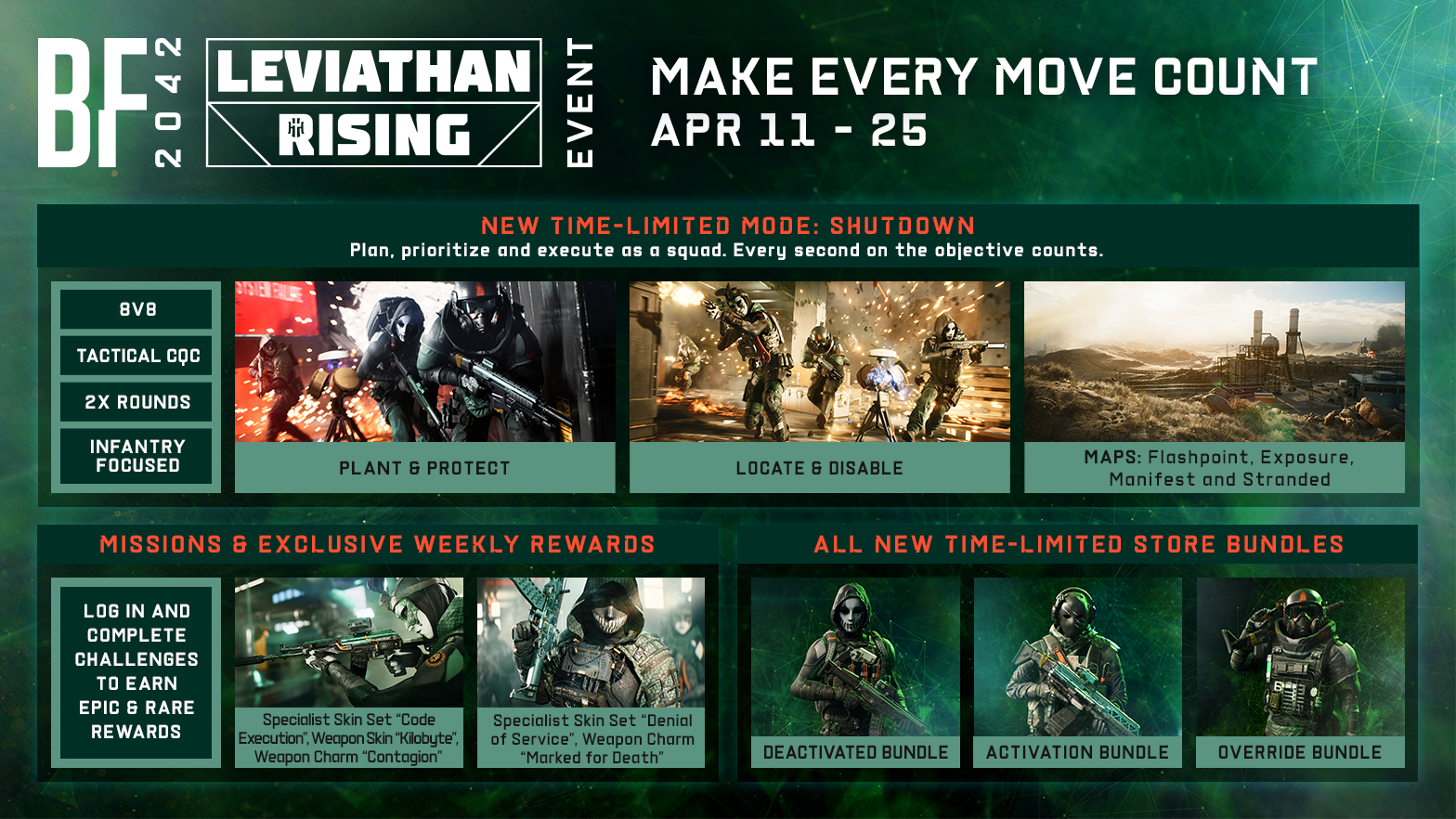
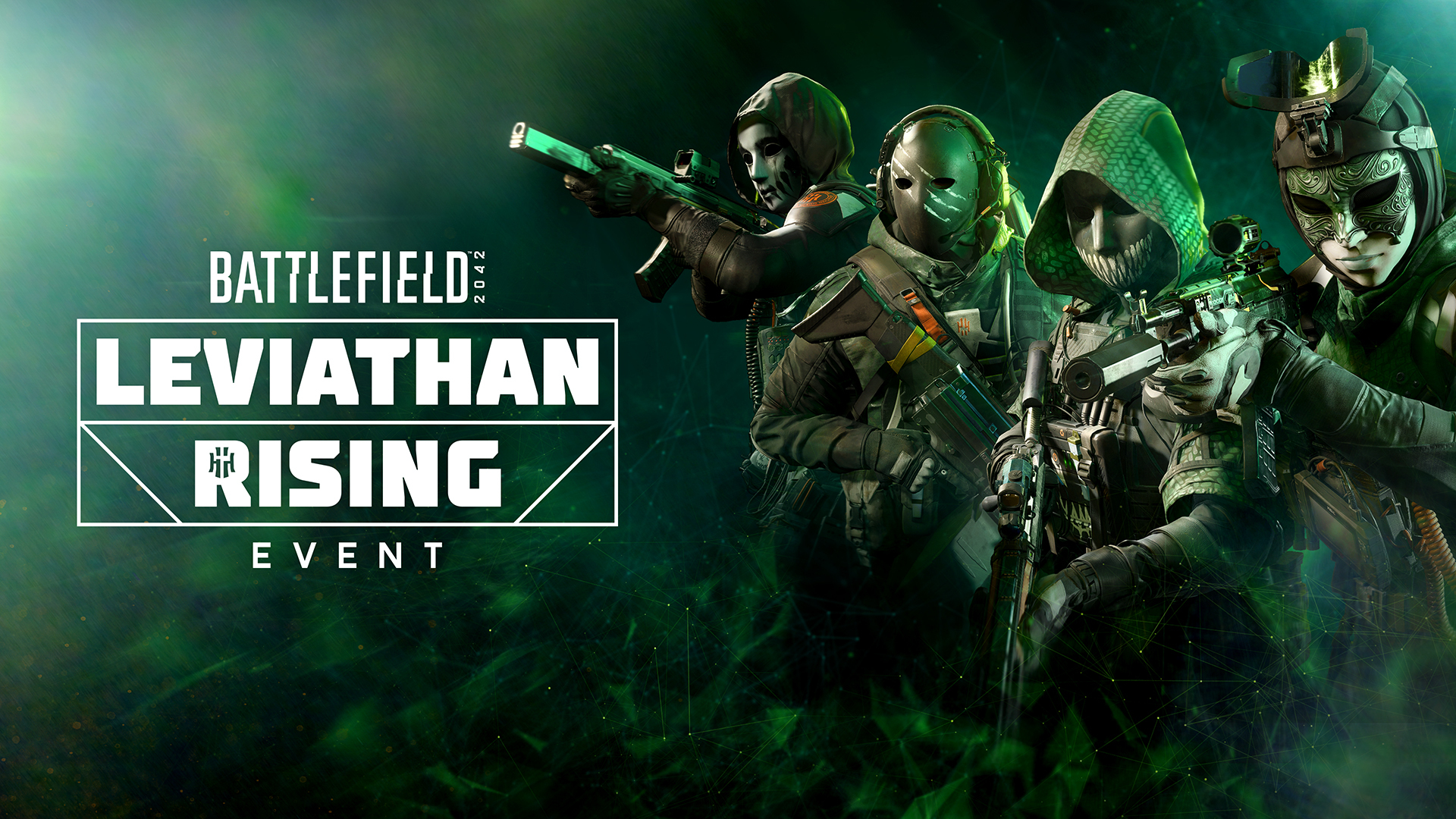
Starting April 11, join the two-week Leviathan Rising event and experience Shutdown, a new, tight 8v8 mode, where class play is imperative. See both sides of the battle and initiate – or thwart – the sabotage of key objectives, unlocking unique event rewards along the way. Make every move count.
Watch the Leviathan Rising trailer and get ready for April 11
Think you know everything about close-quarters combat? Think again.
Starting April 11, join the two-week Leviathan Rising event and experience Shutdown, a new, tight 8v8 mode, where class play is imperative. See both sides of the battle and initiate – or thwart – the sabotage of key objectives, unlocking unique event rewards along the way. Make every move count.
Watch the Leviathan Rising trailer and get ready for April 11
We invite you to join us on the Battlefield for a new special in-game event between April 11 @ 12:00 UTC until April 25 @ 12:00 UTC*.
Wherever hostile forces threaten the No-Pats' future, the dreaded Leviathan Division is there to strike them down. As a member of Blasco's elite task force, your mission is to sabotage the enemy's operation and force their retreat.
Remember what you’re fighting for, No-Pats.
This is Shutdown
Think you know everything about close-quarters combat? Think again. Welcome to Shutdown, where time is not your ally, only your squad is. Work as one unit and operate with confidence, and dominate your enemy in two rounds to claim victory:
Attack, Plant & Protect - Infiltrate enemy objectives & plant the Lances; a new mode objective in Shutdown, protect them, and score as many points as possible.
Defend, Locate & Disable - Locate and eliminate Lance Carriers, prevent their dropped Lances from being picked up, and defuse any that do get planted, with prejudice.
Master these objectives, and you’ll be unstoppable. Class-play is imperative in this 8v8 small-scale infantry focused experience. No one gets left behind. Make every move count. Your squad depends on it.
Shutdown features new mechanics allowing you new ways to experience Battlefield:
Play the Objective - The Lance: The ESA-500 Lance is a portable microwave device that fries data drives in a limited radius. Attackers can plant it where they choose inside predefined objective areas populated with crates full of said data drives, scoring points as long as the Lance stays alive, and culminating in a shutdown. Defenders on the other hand, can disable it with a short timed interaction. Playing it smart, and outwitting your enemy is key to Shutdown. Plant the Lance in the open and bait your enemy, hide it in a corner, protect it with your gadgets and throwables, or find an approach of your own, the choice is yours.
Shut it down: When a planted Lance scores enough points in an objective, it results in a shutdown of the objective and fully removes it from the map. Expect pure chaos as you start clearing more objectives and are forced closer and closer together with the enemy team.
Secure Victory: You'll play a round as both Attacker, and Defender. When the first round ends, you will switch sides and redeploy. You’ll secure victory by scoring the most points as the Attacking side while you battle it out within these fast-paced matches.
You’ll play Shutdown with smaller layouts on Manifest, Exposure, Stranded, and Flashpoint.
The Spoils
New rewards are available to earn, claim and purchase while you battle against hostile forces as the Leviathan Division.
Earn Ribbons by playing Shutdown to unlock the unique gameplay rewards available during the Leviathan Rising event. The Store will also have free bundles for you to claim, as well as 3 new bundles for purchase.
Gameplay Rewards - Week 1
15 Ribbons - Epic “Contagion” Weapon Charm
40 Ribbons - Epic “Kilobyte” Weapon Skin for the AK-24
75 Ribbons - Epic “Code Execution” Specialist Set for Paik
Gameplay Rewards - Week 2
15 Ribbons - Epic “Marked for Death” Weapon Charm
40 Ribbons - Rare “Domain Authority” Vehicle Skin for the AH-64GX Apache Warchief
75 Ribbons - Epic “Denial of Service” Specialist Set for Casper
Free Store Items
Week 1 - Rare “Leviathan Division” Weapon Charm
Week 2 - Rare “Activation” Weapon Skin for the AM40
Use smokes. They can hide Lances, Lance Carriers, and Lance defusers.
Shut down vulnerable objectives. You’ll receive a large bonus by draining them of all their points. Shift focus towards objectives with fewer points remaining.
Mirror the enemy. You’ll play each game of Shutdown as both Attacker and Defender. Any dominant strategy you see from the enemy team can be used against them in the next round.
Attackers
Get Creative. The Lance can be planted anywhere. Your creativity and the bounds of the objective area are your only limit. Use your gadgets and equipment strategically.
Play your Class. With the return to the Class System, each Class now has a distinct role to play. Your allies will need you at your best for revives, resupplies, forward spawning, information gathering, and infiltration. Adapt to the match, and try new things.
Defenders
Guard dropped Lances. When a Lance shuts down an objective, or when a Lance carrier is killed, the Lance remains in play for 60 seconds before resetting and respawning at the Attackers HQ. Prevent retrieval by any means necessary.
Learn the layouts. Attackers will use predictable paths to approach objectives. Learn these, set up ambushes, and attackers on the objective won't be a problem.
Now you’re fully briefed, we’re extremely excited to have you experience Shutdown! We’ve had a ton of fun playtesting it internally, and it offers that close-quarters chaos we know you enjoy. There are of course also new shinies to get your hands on.
Lastly: Stick to your squadmates, play your Class, adapt to the enemy, and most importantly PTFO.
GLHF,
//The Battlefield Team
*INCLUDES IN-GAME PURCHASES. REQUIRES BATTLEFIELD 2042 (SOLD SEPARATELY) AND ALL GAME UPDATES TO PLAY. YOU MUST LOG IN EACH WEEK AND PLAY TO CLAIM YOUR REWARDS. FAILURE TO LOG AND CLAIM DURING A WEEK WILL RESULT IN FORFEITING THAT WEEK’S REWARD.
NO WEAPON, MILITARY VEHICLE OR GEAR MANUFACTURER IS AFFILIATED WITH OR HAS SPONSORED OR ENDORSED THIS GAME.
This announcement may change as we listen to community feedback and continue developing and evolving our Live Service & Content. We will always strive to keep our community as informed as possible.
BATTLEFIELD 2042 UPDATE #4.1.0
Hello there,
Next week, we’ll be releasing Update 4.1.0 which is our first major update for Season 4: Eleventh Hour.
We truly hope that you’re enjoying your time on Battlefield™ 2042, whether you are new to it or a longstanding player helping guide the way for those that are just joining us.
Here’s an overview of what’s new:
New vault weapons: AEK 971, RPK-74M & MP443
IBA Armor Plate Overhaul
Chat Improvements
X6-Infiltration Device Improvements
OV-P Recon Drone Improvements
Specialist Mastery Progression Alterations
Let us know about your experience once you’ve gone hands-on with everything new in this Update.
//The Battlefield Team
Stay Informed
Follow us on the @BattlefieldComm Twitter account to stay informed on the roll out of our updates. You can also follow along with our tracking of Known Issues.
The Leviathan Wakes…
A special division has begun to stir. The next mid-season event is just around the corner.
You can expect brand-new themed cosmetics to earn alongside the ability to jump into a new mode that will task you with getting up close and personal with the enemy.
But for now, one question remains - will you be able to shut down the Leviathan in time?
Stay tuned for more details.
Content
New Vault Weapons
AEK 971 This fully automatic firing weapon has a 30-round capacity with a low spread and decent recoil. If you’re a fan of utilizing burst-fire modes on your weapons, optics are suggested for staying on target.
RPK-74M Feeding from a magazine instead of a belt affords this LMG the fastest reload speed of its class - at the cost of magazine capacity. Risk versus lethality.
MP443 This short recoil and high mobility sidearm was standard issue for a long time, but don't let its age (or size) fool you, this quick-firing weapon means business
IBA Armor Plate Overhaul
In this update we’re overhauling the protective benefits of the Armor Plate.
Armor protection benefits will now only apply to the torso area of your character, and no longer provide protection for the entire character.
This means any hit to an enemies torso while they have IBA Armor Plates applied will result in a deduction to the player’s armor first and once depleted, damage will follow through to the character's health.
The functionality of the IBA Armor Plate outside of this remains unchanged, including explosive damage to armor.
With this overhaul, we are responding to player feedback that armor plating is too effective, and we’re making steps to allow you to counter that gadget by providing a skill enhancement to gameplay, encouraging you to prioritize your shots in order to earn faster takedowns.
Chat Improvements
We added a new and improved design which leads to a less cluttered experience
Other improvements include, but are not limited to: Background Opacity decoupling, now allowing for text to remain strong while lowering the opacity of the background. Decoupled the Chat Box background opacity, if the opacity is set to below 20% your text will now glow
Color formatting changes, resulting in handles being color coded and white text for chat dialogue
Changelog
General & Gameplay Improvements
As indicated above, IBA Armor Plates will now exclusively provide protection to the chest area of your Specialist. Your limbs and head area will remain unprotected
Increased XP earned and feedback when destroying an enemy EOD Bot
You now earn Objective Fortified XP for placing Gadgets such as Ammo Crates, Claymore Mines, etc. in a friendly objective area
You now earn Objective Revive XP when reviving a teammate inside an objective area in Breakthrough
Resolved an animation issue that would break while crawling in prone with a throwable gadget in hand
Fixed an issue that prevented grenades from being able to be thrown through a window on Renewal at E2
Fixed an issue that would cause inconsistent melee damage to occur when dragging the mouse in any direction just before the hit occurred
Meleeing an enemy who is on a ladder will now deal the same damage as the standard melee attack at a rate of 50 damage
Reduced the traversal sprint delay when barging through doors
You will now be able to barge through doors whilst sliding
Fixed an issue that would cause traversal sprint to become broken upon quickly exiting a vehicle
Fixed an issue that would sometimes result in sliding to gain unintended acceleration
Fixed an issue that caused a small amount of unwanted camera shake after performing a low vault
Smoothed out the animation of vaulting to reduce a popping sensation that occurs at the end
Improved the animations of the Recoilless M5 and G-84 TGM
The default weapon for Engineer has now moved from the DM7 towards the LCMG to appropriately synergize with the Weapon Proficiency
Dev Comment: In order for this change to take place, any Engineer that had a DM7 equipped will find that their loadout has changed to the LCMG.
Specialist Mastery Improvements:
Adjusted Sundance's Mastery requirement from 30 to 20 Kills and Assists with the Smart Explosives
Adjusted Crawford's Mastery requirement from 50 to 30 Kills and Assists with the Mounted Vulcan
Adjusted Zain's Mastery requirement from 50 to 30 Kills and Assists with the XM370A
Updated Lis' Mastery requirement from 10 Vehicles Destroyed with the G-84 TGM to 10 Kills when destroying Vehicles with the G-84 TGM
Updated Dozer's Mastery requirement from 20 Kills with the SOB-8 Ballistic Shield to 40 Close-distance Kills, to allow for a more varied playstyle with Dozer, but still making sure he gets up close and personal
Audio
HDR Audio overhaul to create a higher dynamic range in the mix
We have made some gearbox tweaks to the EBLC-RAM to minimize shifting going up hills. This will help with repetitive audio being heard
Fixed an issue where a buzz sound could be heard after using a Sniper scope
Improved the audio that plays when various vehicle projectiles are flying by you, such as Air-to-Ground missiles, 40mm and 30mm cannons, Kinetic Grenade Pods and more. It is worth noting that you’ll mostly benefit from this experience if you’re dodging such projectiles, if you’re not - well, seek a Support Specialist.
The "update airburst distance" sound will now appropriately trigger in accordance to the visuals and range displayed within the UI
The Repair Tool should now be more audible whilst in the MV-38 Condor
Improved the audio feedback when you become stuck with a projectile from the SPH Explosive Launcher
Fixed an issue where Javelin's lock on sound or engine sound doesn't trigger
Fixed an issue where Javelin's projectile sound doesn't trigger
Gadgets
Updated the tutorial video of the FGM-148 Javelin
Updated EMP grenades description to more accurately reflect its updated damage mode
Tooltips have been added for the defibrillator on Battlefield Portal
Melee weapons from Battlefield 2042 will now be listed within Battlefield Portal
Smoke grenades now explode underwater, sorry Penguins
Fixed an issue that caused the BF3 SOFLAM to not be accessible after being deployed
Friendly Claymores are now displayed on the minimap
The Repair Tool animation will no longer persist when switching to another Gadget
The Tracer Dart can no longer lock-on through large environmental objects
The Tracer Dart now allows friendlies to lock onto stealth helicopters even when they are in stealth mode.
FXM-33 Stinger UI now animates when locking onto an enemy Nightbird that's designated by a friendly tracer dart
M18 Claymore sensor can no longer be triggered by enemies under its radius
M18 Claymore Icons now flash while looking at them
In some cases players were able to pick up M18 Claymores through solid objects. This should no longer happen
Players are now notified via the correct icon while a Ranger is hacked or under the effect of EMP
Fixed an issue that caused the FXM-33 Stinger to not deal damage to soldiers that had been designated by a tracer dart.
Temporarily disabled the ability to defuse Rush MCOM stations with the EOD Bot. This functionality will be re-enabled in a future update
Specialists
Angel
Angel does it again, as his loadout crate can't be called in on top of vehicles
Angel's Loadout Crate can no longer be placed on bushes, try doing that one again
Blasco
Fixed an issue that caused the X6-Infiltration Device to not show in the restrictions section of the Portal Builder
Fixed an issue that would cause Blasco to use misleading voice lines when pinging a threat at long distances
The radius on the X6-Infiltration Device should now display correctly while the Big Map is open
Casper
Casper’s OV-P Recon Drone now deals damage to Claymores, C5, Anti-Tank Grenades, and Proximity Sensors
Casper's OV-P Recon Drone can now EMP the Deployable Spawn Beacon from the EBLC-Ram
Dozer
Damage numbers will now take Dozer's 50% damage reduction against explosives into account.
Falck
It’s no longer possible to heal Ranger by the S21 Syrette Pistol
Irish
Irish’ APS-36 Shootdown Sentinel now intercepts the Ghostmaker R10’s explosive bolt
Improved the consistency of the interaction prompt on Irish's DC-2 Deployable Cover
Zain
The XM370A range counter should no longer become stuck at 0 while in a vehicle
Weapons
Fixed an issue that caused the wrong icon to appear in the Portal Web Builder for the AC9
Fixed an issue where dropped weapons would be difficult to pick up after a player died whilst they were prone
Fixed an issue where the wrong killcard information would be displayed after killing an enemy with any "Mass" underbarrel
Fixed an issue where the MTAR-21 briefly clips with the camera when aiming down sights in crouch after switching from the Smoke Grenade Launcher
Fixed an issue where players could sometimes get stuck in a melee attack loop while repeatedly pressing both melee attack and weapon fire at the same time
M240B now has the correct headshot multiplier of 2X
Fixed an issue that would cause magazines to disappear while using certain attachment combinations and sprinting
A-91 no longer has incorrect sprint settings applied
Fixed an issue that would cause a flickering dot to be visible on the AC9 Kobra sight
Fixed an issue where scopes were disabling other distortion effects even when not ADSing
Shooting with the RM68 will now display you on the minimap when using non-suppressor barrels
Kobra sight vertical crosshair no longer disappears during ADS when customized on SVD and Type 88 LMG
Fixed an issue where the reload SFX on the RPT-31 would not play as intended
Improved consistency of the VCAR weapon icon
Intended magazine size of 30 bullets is now shown for AC9 Subsonic in Collection tab
Sniper Rifles now have a dispersion penalty while moving
Vehicles
Fixed an issue which would cause open seat blast damage to be improperly applied
Fixed an issue that would cause the overheat crosshair to grow in size when swapping between primary and secondary weapons
RWS on MAV with 50mm cannons now use the correct crosshair
Grenades that have already detonated such as incendiary and smoke are no longer intercepted by vehicle AMPS systems
Fixed an issue that would result in the rotors of Battlefield 3 Air Vehicles not displaying correctly
Rocket lock-on’s will now immediately go away from a vehicle that had SOFLAM lock-on’s active and the vehicle was “Below Radar”
RWS on the LATV4 are now coloured more appropriately to its base color
CAV-Brawler
Player legs should no longer stick out of the vehicle while crouched in the open seats of the CAV-Brawler
Gadgets can no longer be deployed under the CAV-Brawler
Only disabled abilities are now grayed out in the inventory while crouching in the CAV-Brawler open seat
This announcement may change as we listen to community feedback and continue developing and evolving our Live Service & Content. We will always strive to keep our community as informed as possible.
Unlock Lis, Crawford, and Zain Specialist for Free
Log in to #Battlefield2042 now until April 4 @ 12:00 UTC and you’ll automatically unlock Lis, Crawford, and Zain within your Collection. They’re yours to keep.
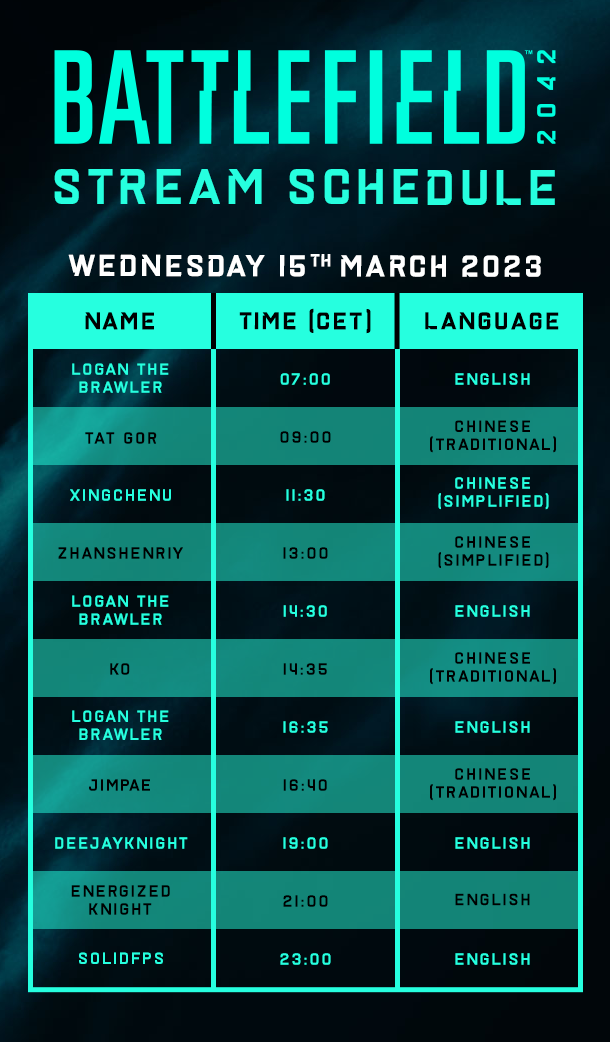
Don’t miss out! There’s one day left of the Free Access period for Battlefield 2042. Check the Free Access stream schedule below:
Try out Battlefield 2042 today and deploy into high-intensity battles, unique maps, futuristic weapons, powerful vehicles, and Specialist soldiers. The game has come a long way since launch and with Season 4: Eleventh Hour, the experience is bigger and better than ever before.
Enjoy what you're playing? Want to stay in the battle? Get 70% off Battlefield 2042 before the Free Access period ends on March 16!