We started an English localization project of this visual novel.
This is an online project where anyone can translate the game from Japanese to English. However, this project is recruiting volunteers for translation. Please note in advance.
How to
You can freely input English sentences into the following Google Spreadsheet.
*Spoiler Alert* All text in the game is written here: https://docs.google.com/spreadsheets/d/1itKaE_mSg6N3suiF5J8mDBw__WBQme2JJgMcDACzFTo/edit?usp=sharing
Please help us localize the game. Your translation is welcome even for just one sentence.
Dear English users
Yellow cells in the spreadsheet were filled by the developer. Could you please check if English in those cells are correct / natural? We are glad if you add comments in those cells, such as:
No problem (sounds natural as English)
Understandable but unnatural / incorrect
I can't understand what you mean
Of course you can rewrite (correct) sentences in those cells as you like.
When you have questions about a specific sentence, please add a comment in the corresponding cell of the above Spreadsheet.
We made a thread about this topic in the Discussions, for general information and comments: https://steamcommunity.com/app/1151060/discussions/0/1745642007155859284/
Thanks for your request for localization in the Discussions and others.
Released ver.1.1.1 and SideStory 1.1.2
Update
Fixed following bugs that could occur with some OS language settings (e.g. Russian, French, Portuguese):
The story does not start when the button of "第一話" or "SS1" is clicked in the main menu;
It takes too much time to show texts and images;
Some image positions are not as intended.
This version is now out of beta. (Please note that all text in the game is written in Japanese, even when these bugs are fixed)
Notice
If you have had the above problems in the previous version, please delete your local file "system.dat" of SideStory before playing it. Otherwise, the bugs could remain. If you delete it, the SideStory's progress status will be lost (however, save data and Steam Achievements will not be affected).
How to delete system.dat
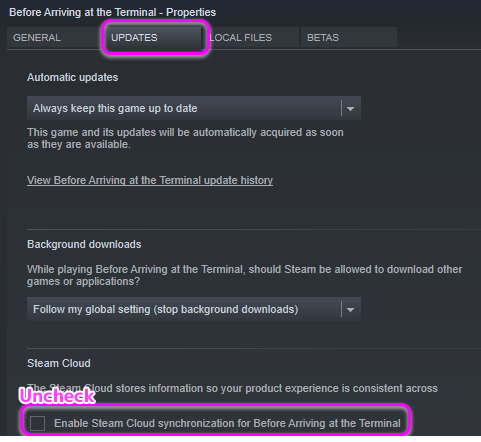
Right-click the name of the game in your LIBRARY of Steam Desktop App, and open Properties;
Uncheck the box of "Steam Cloud synchronization" on the tab UPDATES;
Click "BROWSE LOCAL FILES..." on the tab LOCAL FILES;
In the local folder "side_story/SaveData", delete (or change the location of) system.dat .
Released SideStory ver. 1.1.2 as beta
Update
Fixed the following bug occurring on some machines supporting neither Japanese nor English:
The story does not start when the button of "SS1" is clicked in the main menu, after rebooting SideStory.
Only SideStory is updated to 1.1.2. The main game of Before Arriving at the Terminal remains ver.1.1.1. If this version does not contain bugs, it will be out of beta after a while.
Notice
Please delete your local file "SaveData/system.dat" of SideStory before playing, as described in the previous news. https://steamcommunity.com/gid/103582791465340805/announcements/detail/1728750078258323675
How to get this version
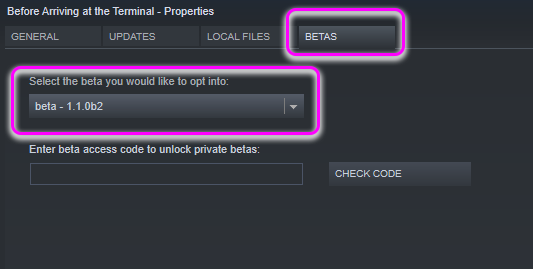
Right-click the name of the game in your LIBRARY of Steam Desktop App, and open "Properties";
Choose "beta - 1.1.1" in a drop-down list on the tab BETAS;
After downloading the beta, click PLAY in your LIBRARY. Please note that SideStory cannot be played from STORE.