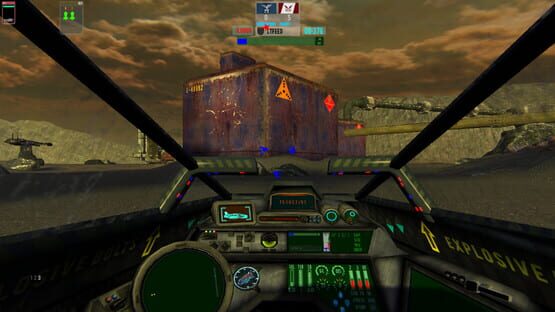

Bionite: Origins
How to Launch Game using new Main Menu
http://steamcommunity.com/sharedfiles/filedetails/?id=1188108927
Update Posted 10/31/17
The next update will include several new models, and a new map. The Biodome 24 Mission will be ready for release soon. This map will be the last map we release for singleplayer before the full release on Steam. During the time up until the full release, we will release hotfixes and patches at least once a month. The custom key map system should be ready soon and will be part of a patch coming in November.
The Full Release will have at least 4 singleplayer missions that can be played as either the IMI or Rebels. Skirmish Mode will also be working for one vs one strat against the computer. Multiplayer is currently in development and we plan on releasing it at the beginning of the 2nd quarter in 2018.
New WingCard for Recent Update Posted
Check our store page under Quick Ref for WingCard Rev 15. It is also available on our website under the 'How to Play' section.
If you are new to Bionite and havnt played Battlezone before, you might be confused by the Tool Tip #2. When selecting the wingmen in Squad One, it is the F5 key that opens the comm channel to the pilot(s).
We are working on an update now for the game that will serve as a hotfix for a couple of bugs we found since the release.
http://steamcommunity.com/sharedfiles/filedetails/?id=1149302837
First SinglePlayer Mission Posted to Steam
We also updated the trailers on our Steam Page. Including an introductory look at the new Emze Mine: Processing Plant mission on Venus. Also check out the Fly in Formation Feature for patrolling and attacking turrets video also posted. We also have a preview of the new Rhino Interior and the Modular Turret Building System we are adding to the Factory.
I will be updating Steam on a regular basis going forward, now that i have time to do stuff other than development. We have 4 new maps in the pipe that we hope to have completed by the end of January 2017. I will be posting screens and videos as development progresses. Please post your comments about the new release! we want to hear from our community and get your opinions about how we are doing to honor and respect the greatest game ever made: BattleZone.
https://youtu.be/PWhGIaUWcBc
https://youtu.be/4Zx3tx5RHSc
https://youtu.be/PTpM3aC0FfQ
https://youtu.be/mhVLw_KMQLU
https://youtu.be/b6TbAiir2wA
New Tutorial Video Posted: Using the Constructor
https://youtu.be/y2pmvnvzLQA
REV PSB-2081-N IS POSTED (updated JULY 18th, 2016)
Sorry about the wait, but we had to do ton of bug testing to get that darn Constructor to work exactly they way we want it to. We got a lot of community feedback once we posted the game on Steam. The number one request was to make the Constructor easier to use.
However, once we switched the ordering system to be closer to the BZ-style command structure, things got a bit tricky in the code. The Constructor Actor is by far the most complex in the game and requires more code to run it than some side-scrollers need to run their whole game.
We also did alot more refinements, added some new features, and redid some models. Here are the build notes for this revision:
• Changed the method for issuing commands to the constructor. First, select the constructor using either the F4 key or the spaceBar. Second, select the asset to build using the menu. Third, hold the spaceBar down and move the building decal and asset type indicator using the mouse. Once a location has been found that is suitable to build the selected asset, release the spaceBar. Then constructor will only follow the “build” command if the asset type indicator is green and not red.
• Changed the name of the IMI recycler to IMI Fabricator.
• Replaced the Select Targets for the Friendlies, Enemies, and Follow.
• Replaced the Wingman Icons.
• Added the Rebel Scavenger to Targetable Enemies list.
• New Lighting Solution on EMZE, HADLEYS, and B24 map.
• Added Volcano Eruptions on EMZE.
• Fixed non functioning AA.
• Added the DOF.
• Added the type indicators for each asset built by the constructor.
• New surfaces for the IMI Constructor, IMI Fabricator, IMI Factory (WIPs).
• Added articulating door to factory that opens ONLY when player exits the vehicle and is within 6 feet of the door. Will auto close when player exits the factory console room.
• Added the flash main screen and console screens to the factory control room (rough art).
• Replaced the constructor fabricating laser beams (incomplete).
• Moved the command menu to the right screen side.
• Fixed view jumping in Lynx when a command menu is selected.
• Fixed the Status Dash Screen in all vehicles.
• Completed the spacebar ordering system for controlling the wingmen and integrated it into the existing menu command system. Selected a vehicle using the spaceBar and mouse will display the command menu for the vehicle selected.
• Replaced the building decal used with the spaceBar.
• Replaced the goto location decal used with the spaceBar.
• Reduced the Archer strafing speed.
• Removed the MFD frame. The BioOre, power, and status screens will be integrated into the HUD
• Added the character mesh for the Bot to the Bayonet.
• Added the custom squad system. Tanks and turrets can be combined into squads of up to 6 vehicles, 14 squads.
• Fixed the missing fabricators (recyclers) in the BIODOME24 and Hadleys Hope maps.
• Restart mission or restart player using fire and alt+fire when dead.
Bug notes:
// decal needs to change from build to locate -Done
// decal needs to change back from locate to build -Done
// add new cant build decal -Done
// add new location system to all vehicles -DONE
// start adding Grizzly, Howitzer, NewTurret -DONE
// add new location system to constructor that doesn’t bork
//the existing gotobuildLoc -DONE
// icon, drawline and target ret, menu ref need destroyed
/// when vehicle destruct -DONE
// constructor menu needs to pop when selected with spacebar -WAIT
// keymap move f5 through f12 (not f11) to r,t,y,u,i,o,p keys -Done
//constructor didnt drive to spaceBar gotoloc -DONE
//scav didnt drive to spacebar loc -DONE
//scav didnt follow player -DONE
//no scav icon when spacebar pressed -DONE
//no constructor icon when spacebar pressed -DONE
// turret, repdrone wingmen icon icons -DONE
// recycler, constructor wingmen icon icons -DONE
//remove wingmen icon when vehicle destroyed -DONE
//remove wingmen icon when orders complete -DONE
//remove wingmen icon when other vehicle selected -DONE
// test the vehs with new location system for spacebar: -DONE
/// scavenger needs to stop gotoLoc after the FKey is toggled to turn it off -DONE
/// constructor, wingmen, recycler and turrets also -DONE
// recycler needs this implemented also -DONE
// test the constructor stops going to location when turret -DONE
/// or another vehicle selected with spacebar
/// turn off goto location orders when vehicle isnt in use
/// the constructor keep driving to the new gotoloc even when its not selected
/// if it had been selected before and a new vehicle is selected with the spaceBar
// vehicle command menu doesn’t pop in 1st person view -DONE
// bayo command orders menu does not come up if constructor orders are already visible, -DONE
// bayo goes dead to spacebar commands after constructor is given a follow order -DONE
// bayonet didnt attack enemy turret with spacebar -DONE
//first LYNX tank did not get added to the inventory and did not show in the menu nor -MAYBE
///have a key icon
// power is off notification not working right in gameinfo
//powerstation spawn point too low AND IS COLLIDING WITH LANDSCAPE -MAYBE
//new enemy target -DONE
// factory build mesh not same rotation as built asset -DONE
// 'power on' client message needs to not say 'power is power on' -DONE
//bayo veh pilot 1st view at low end is too low -SKIP
// No stat key for the Lynx -MAYBE
//turrets are aiming high on non tank vehs like the const -DONE
//kodiak wingman icon not showing when called with spacebar -DONE
//rhino missing wingmen icon when called with spacebar -DONE
//rep drone icon -DONE
//no wingmen icon on hammer -DONE
//no wingmen icon on lynx -DONE
//no wingmen icon on dBack -DONE
//no wingmen icon on Spyd -DONE
//archer wingman icon -DONE
//factory collision too far forward -SKIP
//factory ramps need collision -SKIP
//no collision on the factory -DONE
//factory is unselectable using the spacebar -SKIP
//factory reticle didnt auto turn off after orders selected and vehicle built -DONE
//factory screens rough -DONE
//factory needs tapped twice after fabricating -DONE
// redo const build laser, needs to end at build loc vect -DONE
//veiw moving in extended 3rd person view when a vehicle is selected for order, -DONE
///view range is much less when in command state, check LYNX
//constructor is moving when deployed -DONE
// constructor calling client message when team shot for health -DONE
//lynx hatch not surfaced -DONE
//lynx hatch not closing -DONE
//all vehicle dashs not working -DONE
// test the build Loc reticles for height -DONE
//silo
//fact
//arm
//bunk
//sat tower
//serv bay too small
//mino to small
//lanc
//mort trt too high
//all vehs have two reticules when selected to follow -SKIP
//minotaur icon not working -SKIP
//lancer icon not working -SKIP
//mortar turret icon not working -SKIP
//when two longbows are built, if one is moved to another squad, then another longbow is built, -DONE
///the existing stat icon is destroyed and only the icon for the new vehicle is visible
///(should be two, only one in slot 0 is visible)
//needs the build limit set from a hard 6 to if the default squad has any open slots -DONE
//F-keys not toggling off the wingman friendly target rets -DONE
//when a squad is selected while another squad is already selected, -DONE
///the first squad friendly targ rets go dead in place
//need numbers for vehicle slots in menu 1 - 6 -DONE
//collisions on venus rock forms -DONE
//drawlines on vehicles not lining up on icons (except bayonet) -DONE
//HUD drawlines didnt toggel off when not facing the target -DONE
//wingman icons for multiple vehtypes not working -DONE
//turret reassign using wrong Icon ID -DONE
//turret icon not functioning correctly after reassign to new squad -DONE
//selecting all vehicles in squad is issuing orders to all vehicles in all squads -DONE
//REMOVE bKill (except scav) -DONE
//REMOVE REMKEY AND REMICON FROM INVENTORY (except scav) -DONE
//constructor not building correctly when issued a build command -DONE
//enemy target not killed when vehicle destroyed if target is visible -DONE
//Level II wingman icons not showing at all -DONE
//Level II vehicle strafe torques are to high -DONE
// constructor is hesitating after build command when close to asset and wont build or gets lost -DONE
//recycler not existing on B24 and Moon -DONE
//constructor mat damage not working (mats not hooked up) -SKIP
// fix Factory surface -PART
//archer moving too fast when strafing -DONE
//recycler wingman icon Name is 'Name' -DONE
//Constructor wingman icon Name is 'Name' -DONE
//constructor vehicle selection menu kills before command menu selection -DONE
// check wingman icons are updating at runtime -DONE
//selected target and drawline kills before com men sel but wingman icon is ok -DONE
//Recycler wingman icon health bar not working -DONE
//Constructor wingman icon health bar not working -DONE
//wingman icon health number (string only) needs switched from float to int -DONE
//wingman icons need moved down so they dont cover up the stat icons -DONE
//wingman icons need vert respaced -DONE
//drawlines need matched to new wingman icon location vert -DONE
//all but bayonet wingman icons still visible after FIF command issued -DONE
//constructor building on red locations -SKIP
//view snap when turned using arrow key when command menu selected -DONE
//drawlines should not be visible in 1st person view -DONE
//when selecting between squads, the Fkeys needs tapped twice -DONE
//bayonet needs tapped twice to call command menu after a goto nav command -DONE
//MFD needs small boarder when visible -DONE
//cubemesh on fact not moving -SKIP
//death restart with fire button -DONE
Working bug list (unresolved or unverified):
//existing extractor stat icon destroyed if new scav built (scav replaces ext at slot 0)
//pilot view went black when spacebar released with build loc placed (should have been location ret)
//turret statkey icons missing first one after a scavenger is destroyed
//wingman icons in dash not working when squad selected
//recycler physics is not good for when a BOT vehicle collides with it (maybe only when undeployed)
///check that vehicle menu is closing in all command states
//LOD's on assets
//bayonet is still accepting orders with the spacebar after deselected
//rear end part sytem on constructorA tog opposite (on when should be off)
//vehilce not stopping when reaching destination to nav beac
// move buid limits of vehs to more
// redo the scrap build amounts for each vehicle
//mortar turret selected for build and a lancer was built THEN
///mino selected and mortar turret built, then mino Twr was selected and built OK
//hammerhead and archer went dead against the factory
// too close meter for build ret
// scav menu not showing in dash menu at all
// serv bay squad number is F5 on key
// change TEXTUREGROUP setting for dash sheets to renderTarget
// part switch tog on and off
// actor running timing
// bionite counter doesnt subtract (maybe its in sandbox mode?)
// attack target reticle didnt attach to minotaur
New In-Game Video of the Hadley's Hope Mission on the Moon
https://youtu.be/2DSe85GKU6s
New Game Play Video
http://steamcommunity.com/sharedfiles/filedetails/?id=627318925