Improved enemy bullets and ship selection screens (v1.33.3.0)
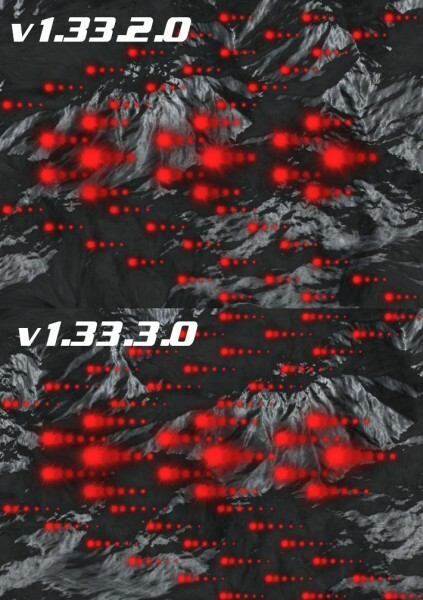
A new update has been released for BlastZone 2! (v1.33.3.0) This update completely reworks how enemy bullets are rendered, greatly improving performance. The most impact will be noticed for the final boss of mission mode, which has the most enemy bullets by far. The amount of performance gained has a wide range, based on CPU speed. The most performance is gained by very slow CPUs, such as dual core netbook-class CPUs, which can be up to 50% or higher for the final boss scene. Moderate to lower end quad core CPUs gain less performance, but still quite substantial, at about 20% or so. The least performance is gained by modern, higher end CPUs with more than 4 cores, which can be around 2-3%.
From these performance gains, enemy bullet trails are now always rendered at full quality, even when numerous bullets are on screen. Previous versions would significantly reduce bullet trail quality for the final mission boss.
This update also adds weapon icons for all ship selection screens, including the single player, local multiplayer, and online lobby screens. These screens have also been rearranged to make use of them better. This makes it much easier to see the kind of weapon loadouts and hyper loadouts each ship has at a glance as you scroll through.
Here are the full release notes for v1.33.3.0:
Greatly optimized enemy bullets -Bullets render over 10x faster now -Improves overall performance by up to 50% for specific scenes and PC hardware --Highest gain is for the final mission boss --Highest gains are for very low end dual-core CPUs (~50%) --Good gains for moderate to low end quad-core CPUs (~20%) --Small gains for modern or higher core count CPUs (~2-3%)
Enemy bullets now always render at full detail, even when many are on screen
All ship selection screens have been improved -Rearranged the layouts -Added weapon icons for every loadout
Optimized the player ship booster -Improves performance by up to 2-3%
Fixed rendering errors with the OpenGL 1.5 renderer for clouds, water, and some text -These issues were introduced in the previous v1.33.2.0 update
As usual, to make sure you have the latest update, launch the game and check the lower left corner for “v1.33.3.0” or higher. Enjoy!
Training Mission Mode improved for new players and other improvements(v1.33.2.0)
A new update has been released for BlastZone 2! (v1.33.2.0) The primary improvement in this update makes the Training Mission mode more accessible for new players by slowing down the gameplay by 25%. This includes enemy spawn timing, movement, firing rates, bullet speed, bosses, and the environment camera. Player ship movement remains the same though. Player testing has been done and this was identified as a key area to help newer players get up to speed on the game. This also helps align the experience with Training mode of other game modes, as they already have a slower gameplay speed.
This update also contains numerous small optimizations around the whole game that amount to roughly a ~1% performance boost. In addition, a lot of work has been done under the hood in the rendering system of the game engine, upgrading how it operates. This allows for the possibility of big new features to be developed in the future, but they will be announced at a later date. The updates done so far will have no noticeable impact when playing the game.
Here are the full release notes for v1.33.2.0:
Reduced the speed of Training Mission mode by 25% -This includes all aspects of mission mode, except for the player ship -This affects enemy spawn timing, enemy movement, firing rates, bullet speed, bosses, and the environment camera -This was designed to help onboard newer players into the game better -Helps newer players get ready for the more advanced difficulty levels
Optimized general performance by up to 1% -Implemented a generalized texture batching solution that affects nearly all objects in the game -Optimized menu background box rendering -General shader setup optimizations -Optimizations for background particles
Improved leaderboard score submission security
Overhauled code organization for the game engine rendering system -This lays the groundwork for potential big updates in the future -This is purely a game engine design upgrade, and doesn't change functionality for the end user yet
Fixed the connection error message for TCP multiplayer, so it now displays correctly when attempting to join a server
More time is now taken when attempting to join a TCP multiplayer serve -More reliably determines if a successful connection can be made -Retries the connection multiple times before giving up
Improved robustness when starting and stopping a TCP multiplayer game to prevent potential bugs
Fixed a small memory leak when applying new video settings
Fixed a rare crash issue when applying new video settings soon after starting the game
Renamed the "useParticleHelperThreads" config file option to "useParticleAuxThreads" -This will reset this option to "Enabled" when first starting the game after updating -If it is desired to disable this option, it can be disabled the normal way after updating
As usual, to make sure you have the latest update, launch the game and check the lower left corner for “v1.33.2.0” or higher. Enjoy!
Added mouse cursor lock and bug fixes (v1.33.1.0)
A new update has been released for BlastZone 2! (v1.33.1.0) This update adds new mouse cursor lock functionality to the A1 ship. This means if mouse controls are used for this ship, it will always be in the precise position the mouse cursor is. In the hands of a skilled player, this allows for a degree of precise movement around bullets and hazards that otherwise was not possible. The reason why only the A1 ship received this upgrade is because of difficulty balancing. The A1 ship has the weakest armor and weapons, but the fastest speed in the game, so it fits this play style. Giving any other ship this capability would break the game. All other ships will continue using their original mouse behavior, which follows the mouse cursor at the highest speed each ship is capable of moving. A new display has been added to the ship selection screen to show which ships support mouse cursor lock or not, but is only shown when mouse controls are enabled.
This update also includes a few rare crash fixes, mouse button fixes, and particle alpha value clamping fixes. Also, there is a general performance uplift of about 1%. More details are listed below in the full change log:
Added the ability to lock the player ship to the mouse cursor -This is currently only enabled for the A1 ship -This eliminates the "trailing behind" effect for the ship when quickly moving the mouse cursor around
Added a new text display in the ship selection screen to show which ship uses cursor lock or not
Fixed a few mouse button bugs that would erroneously have buttons stuck in the "down" state in menus
Fixed a rare crash bug related to player bullet deletion
Fixed a rare crash bug when attempting to parse truncated packets in online multiplayer
Fixed occasional particle alpha value clamping issues
Fixed incorrect world leaderboard display in some cases
Optimized general performance by up to 1% -Optimized areas that affect most objects in the game, providing a consistent uplift
As usual, to make sure you have the latest update, launch the game and check the lower left corner for “v1.33.1.0” or higher. Enjoy!
Full localization support added, 11 total languages now supported (v1.33.0.0)
A big new update has been released for BlastZone 2! (v1.33.0.0) This update completely reworks all text displays in the game to support localization. Alongside this update, 10 translations are being added to the game, bringing the total to 11. Localization support has been a highly requested feature for a while now, and this will make the game accessible to a much greater audience. It was a huge undertaking to upgrade the underlying engine to support this, as well as all the translation work for each language.
The languages released so far include English, Spanish, French, Italian, German, Portuguese, Polish, Japanese, Korean, Chinese, and Russian. More may be released in the future on request. Also, please let me know if errors are found in any of the translations and they will be promptly corrected. A lot of time went into checking over each translation, but it’s possible a few errors got through anyway.
The localization system uses a new discrete language data file that can be updated separately from the main game binary. Translation corrections can be done, and entirely new languages can be added to the game just by updating this file. Updates of this nature can be quickly released, without having to wait for a new stable binary update.
The text rendering system has also been upgraded to support thousands of new characters, including accented characters from European languages, as well as characters from East Asian languages, such as Japanese, or Korean. Previous versions of the game only supported the 128 baseline ASCII character set, which only supported the English language.
Here are the full release notes for v1.33.0.0:
Added localization support for all text in the game -Reworked all text displays in the game to support dynamic replacement based on the selected language -Automatically detects the default Steam language to work as the "Default" language setting in-game -Additional languages can be added in the future by updating data files without updating the main game executable -Translation errors can be quickly corrected without waiting for the next stable binary release
Upgraded the FreeType text rendering system to support UTF-8 character sets -Previous versions only supported the 128 character baseline ASCII character set for text -Now, up to 65536 unique characters are supported -This enables compatibility with translations to numerous other languages
Now supports 11 total languages -Current list of languages: --English --Spanish --French --Italian --German --Portuguese --Polish --Japanese --Korean --Chinese --Russian -Users with any of these languages set as their system language will automatically have the localization setting adjusted accordingly -Other users who wish to use any of these translations can change it from the options menu, or the external configuration program
Made numerous adjustments around the game for text positioning, sizing, and menu dimensions to fit several potential localizations -This includes centering the menu items for several menus and using two menu selector arrows, one on each side
Greatly improved VRAM usage efficiency for the text rendering system to counteract higher memory requirements for supporting more languages -Reduces text VRAM usage when using the English language by about 25% -Adding support for accented characters for western European translations only adds about 50% more memory usage for the text system --This equates to about 2mb more VRAM --Without this optimization, supporting these new characters would double text system VRAM usage (8mb total) -This saves hundreds of megabytes of VRAM when East Asian languages are used -This consists of 3 main optimizations --All non-visible glyphs are no longer loaded into VRAM at startup --Only glyphs that exist in the loaded TTF file are loaded into VRAM --Extended characters are dynamically streamed as they are used, instead of being loaded at startup ---This ensures only glyphs for the current language are loaded
Improved performance of all text rendering -Up to a 10% rendering performance boost for text -This raises overall performance by about 1% -This was done by eliminating draw calls for all space ' ' characters
Made a few HUD text adjustments when running the English language -Changed the "XX Left" enemy counter to "XX Remaining" -Changed "x mult" to "x multiplier"
Made several adjustments to the English language text around the game -This includes descriptions, dialog text, etc
Greatly improved background particle spawning performance -Has the greatest effect when spawning many background particles per frame (>100) -Internal testing shows over a 10x performance improvement in the background particle creation process in some situations -Background particles are very rare in this game, so most users won't notice a difference
Improved general particle spawning performance -Improves update thread performance by up to 20% -Reduces hitching if numerous explosions are set off at the same time, such as completing a level
General robustness improvements have been made to the sound system -Prevents a few potential sound-related bugs from occurring in the future
Updated the external config application to handle language changes
Changed the default value of "Display Switch Compatibility" from enabled to disabled -This allows display switching to work better for most users -This is only needed for one specific system setup: --Using a secondary display when connecting a laptop to an external monitor while using a hybrid passthrough display
Swapped menu item locations of "Online (TCP)" and "Online (Steam)" in the multiplayer selection menu -This makes the menu item order more intuitive; in priority order -New item order: --Local --Online (Steam) - This is the best option for most users, so it is more prominent now --Online (UDP) - This is the next best online option, should only be used if unable to connect to Steam --Online (TCP) - This is a last resort option if unable to connect to Steam and the connection quality is very poor, causing bugs in UDP
Updated the Leaderboard Submission/Download process to eliminate all drive usage -Previous versions would download sever data to local files, then read those files -Now, all server data is downloaded into system memory, then directly used from there -This improves performance of all Leaderboard-related operations
Added a countermeasure to prevent game-breaking bugs if the update thread becomes overloaded -This issue was never reproduced under normal conditions, but was technically possible
Fixed a bug in the online server lobby screen that would erroneously display only the second player ship when the second player hasn't joined yet -this would occur after previously playing a local coop game with the mouse as the second player controller
Fixed some wave intermission text not being displayed when completing wave 8 of Classic A Training mode
Fixed a rare multithreading crash bug in the particle system
As usual, to make sure you have the latest update, launch the game and check the lower left corner for “v1.33.0.0” or higher. Enjoy!
Native 64 bit support and optimizations (v1.32.7.3)
A new update has been released for BlastZone 2. (v1.32.7.3) The biggest update in this release is that the game executable is now built as a native 64 bit binary, eliminating the need for a 32 bit compatibility layer. Advantages of this include faster loading times and a much higher memory usage limit. To use the new 64 bit version, no special action is needed besides the usual Steam game update, it will auto detect which version is best suited for your setup. That means 32 bit systems are still compatible with the game, and those users will receive the 32 bit version of the latest game update.
This update also includes lower memory usage during loading screens and a 1-2% performance boost. More details are below.
Here are the full release notes for v1.32.7.3:
Added native 64bit binaries for the game -Replaced the main game executable and all DLL files with native 64bit versions -32bit versions are also available for the latest version of the game for those running a 32bit OS -Benefits of 64bit include faster loading times, and support for greater than 1.8gb of ram -This allows the game to run natively in a 64bit OS without depending on a 32bit compatibility layer
Fixed a rare case when the game speed could slow down when running on a low end CPU -This used to occur when there was a heavier load on the simulation/update thread than the render thread
Optimized matrix operations across many objects; reduces update thread workload -Eliminates unnecessary calculations for components that don't need to be updated -Improves overall performance by up to 1-2%
Reduced memory usage overhead when loading models by up to 25% -Uses 10% lower memory overall during the startup loading bar -When switching backgrounds with Extreme quality terrain, reduces memory usage while loading by 100mb --Other terrain quality settings also reduce memory usage, but the difference is proportionally less -This also slightly improves loading times
As usual, to make sure you have the latest update, launch the game and check the lower left corner for “v1.32.7.3” or higher. Enjoy!
**UPDATE** - A 64 bit compatibility issue has been reported for Windows 7, so the 64 bit version of v1.32.7.3 has been disabled while the issue is looked into. All users will use the 32 bit version for now until the issue is resolved. Apologies for any inconvenience.
**UPDATE #2** - The previously mentioned 64 bit Windows 7 compatibility issue has been fixed and update released. The native 64 bit version has been restored as well. If you have problems starting the game under Windows 7, please restart Steam to ensure you have the latest update.
Maintenance release (+Hotfix) (v1.32.7.2)
A new update has been released for BlastZone 2. (v1.32.7.2) This is a maintenance release, including reduced hitching for large particle counts, and a rare multithreading crash fix. Also, this update migrates to the latest version of the LibPNG library used for texture loading.
Here are the full release notes for v1.32.7.2:
Reduced particle update hitching when first exceeding the 20,000 particle precache size -Still hitches a little when this occurs, but much less than before
Fixed a rare multithreading crash bug in the particle system
Migrated from LibPNG 1.5.30 to 1.6.37
As usual, to make sure you have the latest update, launch the game and check the lower left corner for “v1.32.7.2” or higher. Enjoy!
*Hotfix - Fixed a small memory leak when displaying dialog boxes during cutscenes
A new update has been released for BlastZone 2. (v1.32.7.1) This update makes a few technical improvements, such as debug log output, reduced video memory usage, and adding more advanced options. This update also fixes a few multithreading bugs, including rare instances of game speed irregularities and crashes.
One point not listed below is that the multithreading bug fixes also fix stability issues when running BlastZone 2 under Linux using Wine. There is no official port for Linux and it is not a supported way to play the game, but these fixes should help alleviate some issues for those attempting that path. Specific testing hasn’t been done for Steam Proton under Linux, but there is potential for better compatibility there as well.
Here are the full release notes for v1.32.7.1:
Reduced memory usage for Medium and Low texture detail settings -This was done by building a new texture downsampler that works for more textures -Reduces vram usage by up to 5-6mb for these detail levels -High and VeryHigh texture detail settings are not affected by this change
Added debug log output for initializing the OpenGL renderer -Outputs to the "GLinit.log" file in the game directory -This can be submitted to the developer if the game crashes on launch
Reduced the multithreading stack size to the default value -Uses less memory (~1mb) -Launches new threads slightly faster
Fixed occasional erroneous multithreading behavior for some systems -Fixed rare thread timing issues that could throw off the game speed -Fixed rare crash issues related to thread synchronization -This was done by changing how thread encapsulation is handled
Added new Advanced Options menu items -Particle Multithreading -Sound Multithreading
Disabled large address support -May fix compatibility issues with some systems
Adjusted particle precaching to reduce hitching in specific cases
As usual, to make sure you have the latest update, launch the game and check the lower left corner for “v1.32.7.1” or higher. Enjoy!
*Hotfix released 6/29/21 - Fixed a startup crash for some video cards
A new update has been released for BlastZone 2. (v1.32.7.0) This update improves particle and rendering performance, has a new sound loader, improves startup loading time, and upgrades from DirectInput 7 to 8.
Improvements made to particle thread workload balancing can improve performance by up to 1%-10%, depending on the number of particles being processed and the number of CPU cores in the system. Performance gains will be closer to 1-2% in heavier load areas. Optimizations have also been made to draw call batching. This means when there are many objects on screen, such as bullets or enemies, performance will be increased by up to 5%.
A new sound loader has been built internal to the game engine, it no longer uses the “alut.dll” external library and it has been removed Also, the game startup loading time has been reduced by up to 87%. This was done by taking the heaviest area of loading, hundreds of enemy behavior script files, and loading them in the background once the main menu starts. The most important data will be ready by the time mission mode starts, so this won’t affect gameplay at all.
The DirectInput upgrade from 7 to 8 has no effect on XInput gamepads, but improves support for some devices.
Here are the full release notes for v1.32.7.0:
Improved particle system update performance by up to 1-10% -This was done by more evenly distributing the workload across CPU cores -The amount of performance gained depends on the number of particles on screen and number of CPU cores/threads --Performance gain is increased when there are more CPU cores/threads available --Performance gain has less of an impact when there are a greater number of particles on screen --For example, having a 10 core CPU running 10,000 particles, will result in up to a 1% performance gain ---The same CPU running 1,000 particles will reach up to a 10% performance gain -The amount of performance gained varies frame-to-frame, but results in more consistent performance overall --The lowest performance points received the greatest boost in performance, bringing them closer to the higher performance points
Built a new in-engine sound loader that eliminates dependencies on alut.dll -Removed the alut.dll file from the game -This slightly reduces game installation size, and uses slightly less memory -General performance of the loader is similar to the old system it replaces
Much faster game startup loading time -Startup loading time has been cut by up to 87% --Internal testing has shown loading times reduce from 8 seconds down to 1 second -Enemy behavior scripts are now loaded in the background during the main menu --By the time gameplay starts, the enemy data will be ready for use
Improved overall rendering performance by up to 5% -This was done by improving draw call batching -This performance boost has the greatest impact when there are many objects on screen, such as bullets or enemies
Migrated from DirectInput7 to DirectInput8 for non-XInput gamepads -This doesn't affect XInput gamepads at all -This improves general support for DirectInput devices, fixing potential bugs and compatibility issues
Increased the deadzone area for DirectInput devices to fix drifting issues on some gamepads -This doesn't affect XInput gamepads
Added a limit of 33 messages to the command console -Prevents using excessive memory in some circumstances -Prevents drawing offscreen messages
As usual, to make sure you have the latest update, launch the game and check the lower left corner for “v1.32.7.0” or higher. Enjoy!
Added a new Advanced Options menu (v1.32.6.0)
A new update has been released for BlastZone 2. (v1.32.6.0) This update adds a new “Advanced Options” menu to the game, reorganizing existing options and adding a few new ones. The external configuration program has been updated as well with similar changes as the main game. The release notes are pretty self explanatory for this one.
Here are the full release notes for v1.32.6.0:
Added a new "Advanced Options" menu -This is a submenu of the regular Options menu -Moved the existing "Renderer" and "Draw Call Type" options to this new menu -Added a few new options: --Game update multithreading ---Enabling this improves performance (default) ---Disabling this reduces input lag at the cost of performance --Particle helper threads ---Enabling this greatly improves particle performance (default) ---Disabling this can be used to test CPU core scaling performance --Display switch compatibility ---Enabling this fixes a bug for secondary displays for laptops with a discrete GPU ---Disabling this allows taking advantage of secondary monitors with greater than a 60hz refresh rate -Added in-game descriptions of each of the advanced options at the bottom of the screen
Added a new "Advanced Options" menu to the external configuration program -All new options and options moved mirror the same changes made to the in-game advanced options menu -Added a new "Show Advanced Options" button to show them (hidden by default)
The external configuration program now defaults to the Primary monitor when upgrading from an old version of the game
As usual, to make sure you have the latest update, launch the game and check the lower left corner for “v1.32.6.0” or higher. Enjoy!
Greatly improved particle CPU core scaling and bug fixes (v1.32.5.0) (+Hotfix)
A new update has been released for BlastZone 2. (v1.32.5.0) This update focuses on greatly improving multithreading core scaling for the particle system.
This update greatly improves particle system workload distribution to CPU cores. This improves overall particle performance for all CPUs with more than 2 cores/threads, and makes the amount of performance gained much closer to linear with the number of CPU cores/threads available. For example, a 6 core/12 thread test system has a 57% particle performance boost from this update, and now has a 5x performance boost when compared to single threaded performance. In previous versions, core scaling was closer to 3.2x for the same system. Also, a 4 core/8 thread test system now scales at 3x performance when using multithreading, compared to about 2x in previous versions.
As a measure of absolute performance, this latest release can run over 110k particles at 60fps on a 6 core/12 thread CPU, while previous versions were limited to 73k to maintain the same framerate on the same machine. Maximum particle counts seen in regular gameplay scenarios are around 20-25k at VeryHigh detail, so it will run at full performance on lower end, lower core count CPUs.
This update also includes a game-side mitigation for drifting issues that affects some XInput gamepads. This was caused by faulty gamepad hardware, and this update should fix it for most users, or at least reduce it.
This update also migrates to the latest Steam API release v1.51.(up from v1.46) This includes all the latest fixes and improvements for Steam functionality.
**A hotfix has been released for this update that fixes a critical Demo version startup softlock. This also includes a particle system precaching bug fix, saving about 30mb of memory.
For more details, here are the full release notes for v1.32.5.0:
Particle system now scales much better with more CPU cores/threads -Up to a 57% performance gain for particle system updates -This was measured using a 6 core 12 thread 4.0ghz CPU test system -Systems with more cores will scale better than this -Stress tests have shown over 110k particles running at 60fps with these optimizations -This was measured using a 6 core 12 thread 4.0ghz CPU test system -In previous versions, this same system would be limited to 73k particles to maintain 60 fps -The particle subsystem that calculates and distributes CPU thread workloads has been greatly improved -Speeds up the time it takes to calculate the workload for each CPU thread -Has the ability to launch all CPU thread workloads simultaneously -Greatly improves CPU core parallelism -Previous versions would gradually load each CPU core as the workloads were prepared, leaving some CPU cores idle some of the time -Performance now scales close to linearly with the number of CPU cores/threads available -This update does not affect machines with 1 or 2 CPU cores/threads -This requires atleast a 4 core, or a 2 core/4 thread CPU to take advantage of these improvements
Increased XInput gamepad analog stick deadzones by 25% to fix drifting issues for some gamepads
Migrated to Steam API v1.51 (from v1.46)
HotFix - Fixed a particle precaching bug -Reduces memory usage by about 30mb
HotFix - Fixed a startup soft crash for the demo version
HotFix - Fixed a text flicker when opening the final demo quit screen
HotFix #2 - Smoothed out particle emitter behavior for low framerates -Takes inter-frame time intervals into account when calculating new particles
As usual, to make sure you have the latest update, launch the game and check the lower left corner for “v1.32.5.0” or higher. Enjoy!
P.S. - You may have noticed most updates over the last year or more have focused on technical improvements and optimizations, with gameplay-related elements only getting occasional adjustments. This is because I’ve been working on a new game project that shares the same engine as BlastZone 2. All engine improvements I’ve been making for the new game have been released for BlastZone 2 so everyone can benefit from them. More information is coming soon!