A big new update has been released for BlastZone 2, (v1.32.0.0) focusing on several big technical improvements to the underlying game engine. Among these is adding UDP Direct IP multiplayer support to the game. This has much better latency, responsiveness, and smoothness than the existing TCP Direct IP option. Steamworks multiplayer already uses UDP, so it is still the best way to play online. However, UDP Direct IP helps when using offline mode, if Steam isn’t available, or when on a LAN. The TCP option is still available as a last resort when using a poor internet connection that may produce bugs with UDP, but this should be very rare. Updated descriptions of each online option has been added so it is clear which is the best option for a given situation.
The second big part of this update is huge improvements to the particle system. Previously, only a portion of particle effects were part of the highly optimized particle system. Now, it has been generalized to incorporate virtually every particle effect in the game. This cuts the draw calls per frame from an average of 500-600, to around 150-170, reducing CPU usage and graphics driver overhead. Also, much more of the particle processing pipeline now scales up to many cpu threads, greatly benefiting quad cores and above. In synthetic stress tests (with over 500k particles), the particle system can now handle up to 4-5x as many particles on screen at the same performance levels for most system configurations. Regular gameplay scenarios will see a maximum of a 100% performance gain in specific situations on older machines with slower CPUs and GPUs and allow for higher particle detail settings. Newer and faster machines will see much less of a performance improvement in game, but will see a reduction in frame hitching. A few new particle effects have been added as well, including firing effects for normal bolts, flurry shots, and wave shots.
A third big part of this update is a brand new model loader. It uses a new proprietary model format that uses half the disk space and loads up 5x faster than previous versions with no effect on quality. Loading the Extreme quality terrain models at startup is reduced from 30 seconds down to about 5-6 seconds on many systems. This reduces ram usage by about 6-7% as well.
This update also adds a few new renderer frame stats. This includes triangle count, draw call count, and particle counts. This helps illustrate how scalable the rendering options are, ranging from about 50,000 triangles at low details, to over 10,000,000 triangles at extreme details. This also shows how hard the particle system is being pushed at any given time. This info is mainly used for development and optimization, but it may be interesting for those who are curious. To access this, press the F1 key 3 times at any time in the game.
This update includes a number of bug fixes and other improvements as well. Here are the full release notes for v1.32.0.0:
Added UDP Direct IP multiplayer support -This improves online multiplayer responsiveness and smoothness from the existing TCP Direct IP code path --Internal testing has shown that devices connected via wifi or a 3G/4G connection gain the greatest benefit from UDP -However, this has the drawback of potentially introducing bugs for poor connections --Many poor connection countermeasures are in place to mitigate this, but it's not perfect -UDP should be used for most users, only use TCP to fix issues for very poor connections -Steamworks multiplayer already uses UDP --Those who use Steamworks multiplayer will be unaffected by this -This new UDP multiplayer option adds more flexibility for those who want to play over a LAN, or cannot connect to Steam -To use this, select "Online (UDP)" from the multiplayer menu -Renamed "Online (IP)", to "Online (TCP)" to eliminate ambiguity -UDP uses the same 50768 port as TCP Direct IP
Huge particle system improvements and optimizations -Greatly reduces the number of total draw calls during gameplay --Cuts the average draw call count from 500-600 down to 150-175 --Reduces CPU load and rendering overhead to render particles -Reduces frame hitching when many player bullets are on screen --This mostly affected systems that are just barely able to maintain 60fps -Brings many more particle effects into the main, highly optimized, particle system --Player bullet trails --Player charging animations --Player damage animations --Player final death explosion --Background speed particles --Explosion flares -General particle management optimizations --Improves overall performance and reduces particle thread processing time -Added CPU thread scaling above 2 threads for background particles --Foreground particles already scaled above 2 threads in previous versions --Background particles are not used in the main game, only in a test level pack -A greater portion of the particle update pipeline now scales up to 16 cpu threads if available --In previous versions, only rendering-related particle operations scaled above 2 threads --Now, particle update simulations also scale up to 16 threads, significantly improving performance on high core/thread count cpus -Greatly improved thread parallelism --Improves game responsiveness and frame rate when the particle system is heavily loaded --Particle animations can slow down independent of frame rate if the particle system is heavily loaded with a slow CPU ---The above optimizations make any kind of particle-related slow downs more rare anyway
Added new particle effects when firing the following weapons: -Normal bolt -Flurry shot -Wave shot
Added a completely new model loader -Uses a new proprietary binary model format -Uses about half the disk space for identical model data -Loads model data at startup much faster --Game startup now takes 20% of the time compared to previous versions -Converted all models in the game to the new ".bin" format -Moved all models that used to be compiled into the game executable to separate ".bin" files
Reduced the executable file size by 75% without any effect on game functionality
Reduced RAM usage by about 3-7% depending on detail levels
Updated the player ship booster charging animation during the wave intermission screen
Added an additional startup loading thread to reduce loading time -The startup loader now scales up to 9 CPU threads if available -Loading times are also reduced for lower core count cpus by more consistently loading all available cores
Added more frame stat displays -Includes the following new stats: --Triangle count --Draw Call count --Foreground particle count --Background particle count -Press F1 3 times to access this info -Shows scene complexity and allow for better comparing each detail level
Moved the frame stats display further to the right to improve game visibility
Updated the test background particle effect of test_pack_1 to use more particles
Updated the online multiplayer menu item descriptions to better describe which option to choose
Reduced renderer blocking time after failing to connect to a TCP server
Improved game process shutdown time after previously playing a TCP multiplayer game
Fixed background enemy animations not being cleared when quitting out of a level
Fixed incorrect alpha channel of background particles
Fixed a crash bug when starting a custom game with test_pack_1, then quitting out and starting a new game
Fixed a bug for an online multiplayer client that would use incorrect game settings when the server selects "Training" difficulty
Fixed a rare crash in the particle system related to multithreading and particle emitters
Fixed a broken TCP server state after creating and shutting down a server when no client was connected
Fixed enemies occasionally being stuck in a glowing state when hit
Fixed occasionally incorrect background particle Z sorting
As usual, to make sure you have the latest update, launch the game and check the lower left corner of the title screen for “v1.32.0.0” or above. Enjoy!
**UPDATE** A hotfix was released shortly after the initial patch went live with the following changes:
Fixed client ship flickering on the server side during cutscenes and flyin animations in online multiplayer
Fixed background flickering on the client side during online multiplayer
Fixed an occasional crash when opening the Steam friends list when some friends have special characters in their name
Fixed an occasional game freeze when entering Area 5 of Mission mode
Changed the rendering order of terrain blocks to improve fragment occlusion culling -Will have a <1% performance improvement for most systems
Improved gamepad analog controls (v1.31.3.1)
A new update has been released for BlastZone 2! (v1.31.3.1) This one focuses on a few gamepad improvements. Analog stick controls have been improved, allowing for continuous 360 degree movement angling. This improves movement precision and eliminates the old “snapping” directions. Previously, the analog stick would prioritize moving up, down, left, and right with only a small area of analog angling at each of the diagonals. Also, the dead-zone at the middle of the analog movement area has been shrunk, allowing for finer movements at a small scale and a greater degree of speed range in each direction.
This update also improves gamepad deinitialization when closing the game. This has the potential of fixing edge case bugs for some gamepads on some systems.
Here are the full release notes for v1.31.3.1:
Improved analog movement with a gamepad thumbstick -It is now easier to move slightly up/down while moving left/right and vice-versa while angling the thumbstick direction --Now uses continuous 360 degree angling instead of "snapping" to up, down, left, and right, with smaller analog angling zones between them -Reduced the thumbstick dead-zone from 20% to 10% to allow for more precise movement
Improved gamepad deinitialization on shutdown
Reduced the number of averaged frame times from 10 to 8 -Helps reduce game speed reaction time when the rendering workload quickly changes -Maintains enough averaged frames to smooth out frame hitches well
As usual, to make sure you have the latest update, launch the game and check the lower left corner of the title screen for “v1.31.3.1” or above. Enjoy!
Massive performance gains and greater view distances! (v1.31.3.0)
A new update has been released for BlastZone 2! (v1.31.3.0) This update makes huge performance gains, one of the biggest improvements seen in a single update. Gains range from 15-25% when using lower terrain detail levels, up to 50-60% for Extreme detail settings. This significantly lowers the hardware requirements; If anyone had performance issues with the “VeryHigh” or “Extreme” terrain settings in previous versions, I strongly suggest trying them out again with this new release. This improvement was done by adding lower detail terrain block LODs for areas far in the distance. This has a minor reduction in image quality, but won’t be noticeable in most situations.
This huge boost in performance was also used to increase the view distance for all ViewDistance detail levels. This increases detail for the VeryHigh setting by about 20%, while still having big performance gains over previous versions.
The drawback of this update is more memory usage and a greater workload during the startup loading screen. System ram usage will increase by up to 25mb and vram by 75mb, but any machine that could already run the game should have no issue with this. Also, the startup loader has been improved to scale up to more cpu cores/threads to take on the increased workload, making the increase in loading time negligible in most situations.
There are a few bug fixes as well. For more details, here are the full release notes for v1.31.3.0:
Added support for terrain model LODs to greatly improve performance -Uses lower detail models for terrain far in the distance --Has a small reduction in image quality, but in most cases it is barely noticable -Improves performance by up to 50-60% over previous versions --Lower terrain detail levels have about a 15-25% boost --Higher detail levels have the greatest boost
The startup loader now scales up to 9 cpu threads if available -These additional threads load terrain LODs in parallel -This does not reduce the overall loading time, only loads more data in the same amount of time -CPUs with 9 threads or more will see no increase in loading time -CPUs with 6-8 threads will only take slightly longer to load, and will have a higher and more consistent workload across all available threads -CPUs with 4 threads or less will take longer to load now --Previous versions already saturated all 4 threads, and there is a larger amount of data to load now --Loading times should only increase by a few seconds at most -For reference, previous versions scaled up to 6 cores/threads
Increased the view distance for all ViewDistance settings -Increased the "VeryHigh" setting by 20% --This slightly reduces performance, but overall performance is still much higher from previous versions from the LOD optimizations -Each of the other settings are equivalent to one setting higher from the previous version --"High" is equivalent to the "VeryHigh" setting from previous versions --"Normal" is equivalent to the "High" setting from previous versions --"Low" is equivalent to the "Normal" setting from previous versions
Fixed the Outer Space background not rendering correctly when using the "Low" ViewDistance setting
Fixed some screen elements and objects not rendering correctly for low/normal view distance settings on some hardware/driver combinations -Transition screen wipes and fades -Final player death red screen fade -Ship select stat bars -Distant background color for the cave environment
As usual, to make sure you have the latest update, launch the game and check the lower left corner of the title screen for “v1.31.3.0” or above. Enjoy!
Terrain Rendering and Culling Optimizations (v1.31.2.0)
A new update has been released for BlastZone 2! (v1.31.2.0) This update makes several improvements to the object culling system. This includes high precision culling, multithreading optimizations, and early cull detection. These improve performance the most for background terrain, ranging up to a 15-20% boost, depending on system specs and detail settings.
This update also fixes compatibility issues with older GPU hardware and drivers that are limited to OpenGL 3.1 or 3.2. These cases now fallback to the OpenGL 3.0 renderer. Other bug fixes include occasional incorrect sizing and fog for enemies.
A small hotfix update was recently released as well. This fixed a bug that would occasionally get the player ship stuck in a highlighted state during wave intermission and wave intro sequences.
For more details, here are the full release notes for v1.31.2.0:
Made several improvements to object frustum culling -Offloaded frustum culling calculations to the update thread is many cases --Reduces the rendering thread workload, improving overall performance -Added support for early object culling in many cases --Eliminates most setup calculations for objects that are culled out -Added a new high precision codepath --More aggressively culls out objects near the edge of the screen without affecting visible objects --Is more computationally intensive, but is usually combined with offloading from the render thread to accelerate the process --This is handled automatically without any user configuration
Big terrain rendering optimization -Uses the new high precision frustum culling code path to eliminate more offscreen terrain -Also makes use of the offloaded frustum culling calculations and early object culling detailed above -Improves performance by up to 15-20% depending on system specs and terrain detail settings
Offloaded all terrain matrix operations from the render thread to the update thread -Better balances the workload between threads, improving CPU performance
Increased the minimum requirement of the OpenGL 4.6 renderer to OpenGL 3.3 -This fixes issues with some OpenGL 3.1 and 3.2 drivers -These drivers will now fallback to the OpenGL 3.0 renderer
Player and Enemy bullet trails now smoothly move offscreen -Previous versions would remove the bullet trail too soon after the front of the bullet moves offscreen
Increased the thread priority for a few startup loading threads and the particle thread manager -Improves startup loading time by sacrificing loading bar animation smoothness -Distributes particle thread work more quickly for CPUs with more than 2 cores
Fixed the player occasionally picking up item drops after death
Fixed incorrect enemy sizing in some situations
Fixed fog not being applied to distant enemies
As usual, to make sure you have the latest update, launch the game and check the lower left corner of the title screen for “v1.31.2.0” or above. Enjoy!
Improved texture filtering and performance (v1.31.1.1)
A new update has been released for BlastZone 2! (v1.31.1.1) This update primarily improves texture filtering in a number of scenarios, fixing graininess and moire effects in HUD textures and menu borders when running resolutions below 1080p. This also improves performance at lower resolutions, matching asset pixel density to each display resolution. This doesn’t affect resolutions at or above 1080p, as those already use the highest quality assets.
This update also changes the planet edge atmosphere design in the outer space environment. The render process for this effect has been changed from 2 passes to a single pass, improving performance. This required the asset to be rebuilt, so the design was improved as well.
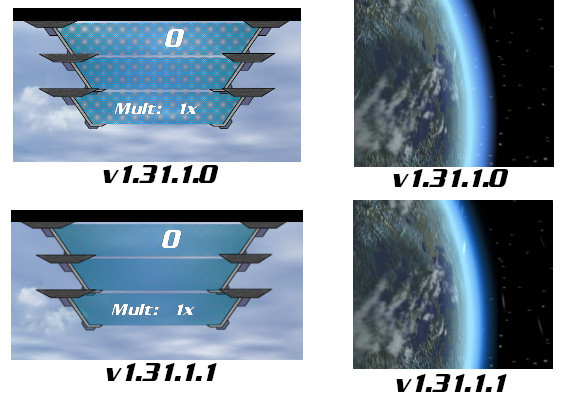
Here is an image illustrating texture improvements in this update at lower resolutions. The HUD texture takes the worst case scenario in previous versions, running at 1024x768 resolution, and the same texture at the same resolution with the latest version. It also shows the updated atmosphere effect. Take a look:
Here are the full release notes for v1.31.1.1:
Improved HUD textures when using lower resolutions -Only affects screen resolutions lower than 1080p -All HUD textures now use lower res versions when a lower screen resolution is used to match detail -Graininess and moire effects have been cleaned up for lower resolutions -Performance has been slightly improved for lower resolutions
Changed the atmosphere glow design around the planet in the outer space environment -Also changed how it is rendered to improve performance
As usual, to make sure you have the latest update, launch the game and check the lower left corner of the title screen for “v1.31.1.1” or above. Enjoy!
Improved B1/B2 main weapon, ship descriptions, and many optimizations(v1.31.1.0)
A new update has been released for BlastZone 2! (v1.31.1.0) This includes a significant improvement to the B1/B2 ship primary weapon, making it more effective in long range combat. The “Burst Shot” still has a high damage close range spread of bullets, but the center bullet now continues moving across the rest of the gameplay area, allowing it to hit long range enemies. However, the long range bullet is less effective than from other ships, moving slower and doing less damage over time. This is better than having no long range component at all and keeps the ship balance and intended gameplay style intact. This especially makes bosses more fun to play against. Previously, the only long range attack option was to rapidly tap the Fire2 button, which can be tiresome.
This update also includes descriptions for each ship in the single player ship selection screen. This helps show the play style of each ship to help newer players decide which is the most fun.
A big part of this update is optimizations across many areas of the game engine. On the GPU side, this includes vertex processing speed improvements across the board and lighting optimizations. On the CPU side, a significant chunk of rendering calculations have been offloaded from the rendering thread to the update thread, better balancing the multithreading workload. Combined, these optimizations have up to a 20% performance improvement depending on the situation and hardware used.
For more details, check out the full release notes for v1.31.1.0 below:
Updated the "Burst Shot" main weapon for the B1 and B2 ships to be more viable for long range -Now, the center bullet for each burst shot no longer disappears, allowing it to hit long range targets --This is especially useful for bosses -Previously, the only long range option was the low charge Fire2 shot, but that required rapidly tapping the Fire2 button --This is still available now, just as a secondary option -However, the B1/B2 ships still aren't as effective long range as other ships --Long range bullet DPS is lower than other ships by about 25% --Long range bullets travel slower, making it more difficult to hit fast moving targets --This is to balance out the very high short range damage they have
Added a short description for each ship for the single player ship selection screen -Helps newer players get an idea of the type of gameplay each ship has
Optimized vertex throughput on the GPU side for all shaders in the game -Results in a 10-20% performance boost in all situations
Optimized lighting calculations for all Normal Mapped and Vertex Lit objects in the game -Boosts performance by up to 5-10% when many lit objects are on screen
Built a new set of 2 light shaders to greatly improve performance in some situations -Previously, a set of shaders were built for when 1 light or 3 lights are active, and used 3 light calculations when only 2 were active -Now, when only 2 lights are active, the shader workload is reduced by 33% per object rendered -For reference, the 3 types of lights used are: --Camera light (always on) --Hyper mode glow light --Beam light
Optimized the shader management system to eliminate unnecessary shader setup in some situations
Offloaded many CPU-side rendering calculations from the render thread to the update thread to better balance the workload -Results in up to a 10% performance gain when many enemies and bullets are on screen -Client side rendering performance for online multiplayer increases by up to 15% when many objects are on screen
Fixed a shader bug that would occasionally render item drop models incorrectly for some systems
Fixed a few rare graphic glitches in enemies and the home world terrain for some systems
Maintenance update for BlastZone 2 (v1.31.0.3)
A new maintenance update has been released for BlastZone 2(v1.31.0.3). This makes a few improvements to the game startup loader, including slightly faster model loading and better progress feedback. In previous versions, when using VeryHigh/Extreme quality terrain, the loading bar would appear to “hang” while loading, but this is no longer the case.
The particle system has improved vertex streaming as well, resulting in up to 20% better performance in some situations.
Here are the full release notes for v1.31.0.3:
Optimized the startup model loader -Reduces game startup time by about 3-5% -Makes the biggest difference for VeryHigh and Extreme quality terrain settings
Frame rate and runtime statistics displays are now multithreaded, reducing the performance impact of running them
Improved terrain model loading progress feedback when starting the game -The startup loading bar no longer appears to stall when loading high detail terrain -It now continuously fills the bar for all assets
Improved particle system performance by up to 20%
Some of you may have noticed the recent focus on technical improvements for BlastZone 2. This is because a new project was started a while back that uses the same game engine. All engine improvements are brought into BlastZone 2 as well so everyone can benefit from them. An official announcement is coming soon, so watch for it!
Terrain detail and Options screen improvements for BlastZone 2 (v1.31.0.2)
A few new updates have been released for BlastZone 2! (v1.31.0.1 - v1.31.0.2) This includes a new “High” detail setting for all terrain. This serves as a balance, having more detail than normal, but without the high system requirements of VeryHigh/Extreme. Also, this is available as part of the base game, no additional DLC downloads are required.
This also replaces all Cave terrain except Normal detail. This is because Normal detail had a different cave design from the other detail levels, so now they are all consistent. Higher and lower detail levels now look more rocky and jagged, which looks better without affecting performance.
Several updates have been made to the in-game Config screen as well. This includes improving the renderer selection to detect the OpenGL versions supported by the current hardware and drivers. This previously only showed the maximum OpenGL versions supported by each renderer. Terrain Detail and DrawCallType options have been added as well, these used to only be available in the external config program. The menu has also been reorganized to fit the new options and make it easier to follow.
This update includes a few bug fixes as well. Here are the full release notes:
v1.31.0.1:
Added a new "High" detail level for all terrain -Works as a balance with higher detail than normal without the high system requirements of "VeryHigh" and "Extreme" -This has double the detail of Normal, while VeryHigh has 10x detail -This can only be changed with the external config tool, not in game -This detail level has been added to the base game, no DLC is required
Replaced all detail levels of the Cave terrain except "Normal" to maintain consistent design between them -Previously, "Normal" detail used a different cave design than the others -Now, all Cave terrain detail levels use a more rocky and jagged design that looks better without affecting performance
The config menu now shows OpenGL versions detected from the display driver -When selecting a renderer in the config menu, the max OpenGL version supported by the driver for each renderer is now displayed -Previously, it would only show the max OpenGL version supported by each renderer, regardless of the current hardware and drivers -For example, if the maximum OpenGL version supported by the driver is 4.3, the config option will correctly show 1.5, 3.0, and 4.3 renderers, not 4.6
The config menu now locks out unsupported renderers by the current driver -For example, if the current driver only supports OpenGL 2.0, the 4.X renderer will be unselectable
V1.31.0.2:
Added in game option for Terrain Detail -Has the same detail options previously only available in the external config program: -Low -Normal -High -VeryHigh -Extreme -Detects if the free DLC has been downloaded or not for VeryHigh and Extreme options -Shows warning for VeryHigh and Extreme options as having high system requirements
Added in game option and DrawCall Type -Has the same options previously only available in the external config program -VBO -DisplayList -Shows warning for DisplayList that it only works with the GL 1.5 and 3.0 renderers
Reorganized the options menu layout and spacing
Improved general stability
Fixed glitched background environment when starting a new game after previously playing through an addon pack
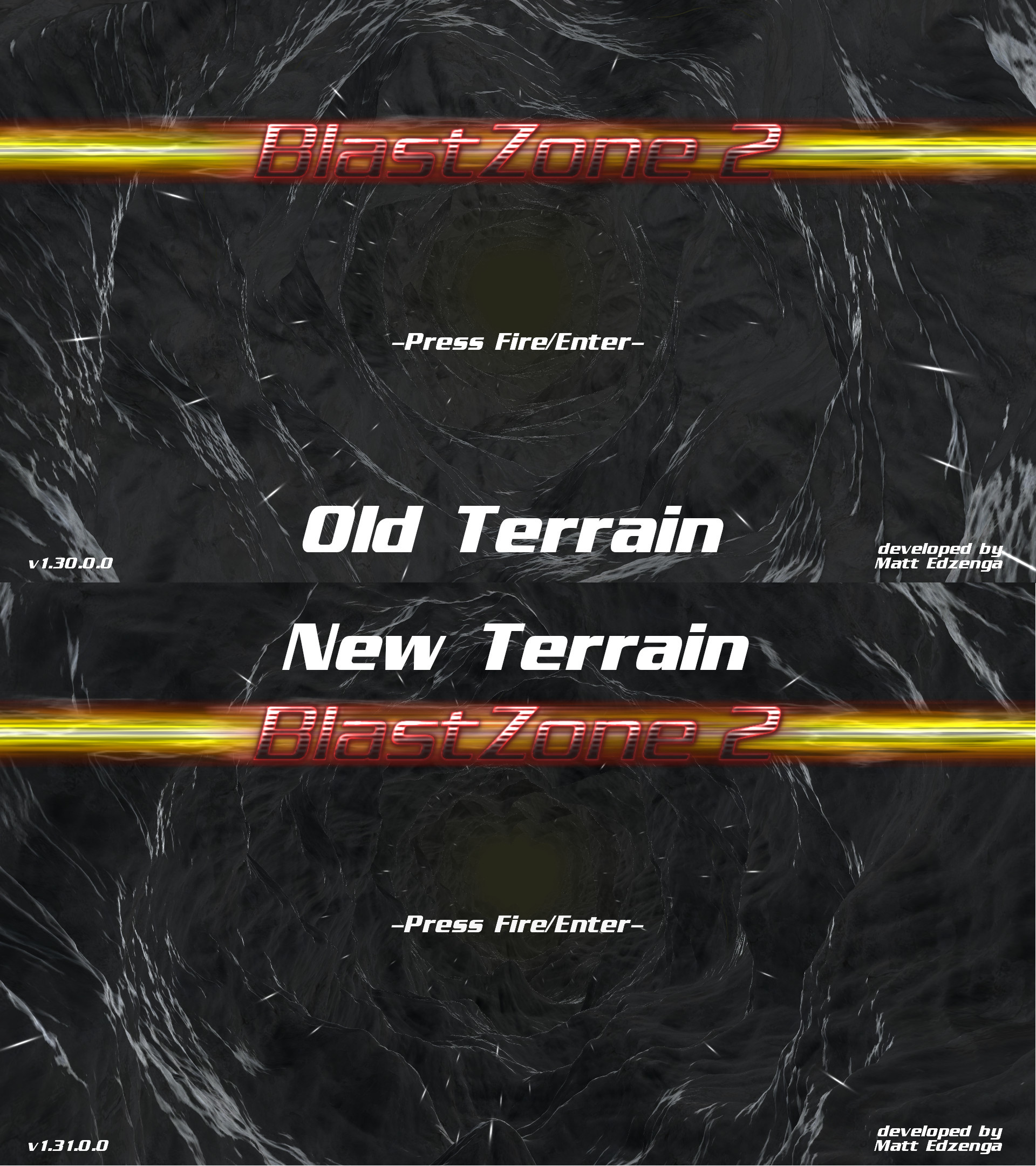
Here are some screenshots showing the updated cave design for Extreme detail. Enjoy!
New OpenGL 4.6 renderer for BlastZone 2! (v1.31.0.0)
A big new update has been released for BlastZone 2 (v1.31.0.0), adding a new OpenGL 4.6 renderer! Much of the engine was overhauled to make this possible, and it was done without breaking compatibility with the existing OpenGL 1.5 and 3.0 renderers. In fact, these engine upgrades improve performance by around 5-10% across all renderers. This new renderer doesn’t require OpenGL 4.6 hardware and drivers to work either, it is backward compatible down to OpenGL 3.1. Hardware older than that will fall back to the GL 3.0 renderer.
The GL 4.6 renderer currently doesn’t look any different from OpenGL 3.0, but it uses the latest standards and approaches for running everything under the hood. This opens the possibility of implementing new effects in the future made possible by GL 4.X without being held back by compatibility with older hardware.
The GL 4.6 renderer is the new default as well. Everyone upgrading from a previous version of the game that was set to GL 2.0/3.0 will automatically be switched to the new renderer if the hardware and drivers support it. The only drawback of the GL 4.6 renderer is the simple model set is not compatible with it. Switching back to the GL 3.0 renderer will allow them to work again if needed.
A few bug fixes have been included as well. Here are the full release notes for v1.31.0.0:
A new OpenGL 4.6 renderer has been added to the game -Uses the OpenGL 4.6 Core profile rendering context to ensure compliance with the latest OpenGL standard -Upgraded large portions of the rendering engine to use the latest OpenGL standards -Maintains backward compatibility with hardware and drivers going back to OpenGL 3.1 -Going below this will switch to the OpenGL 3.0 renderer
This new renderer does not support the "Simple" model set, or "Display List" code path -These use older technologies that can no longer be used in modern OpenGL -These options are still available when using the OpenGL 1.5 or 3.0 renderer -The "Simple" model set would require a complete rebuild from scratch to work with GL 4.6
The OpenGL 3.0 renderer now uses an explicit OpenGL 3.0 Core rendering context -This gives the graphics driver specific information on the intention of this renderer -This has the potential of improving compatibility, performance, or memory characteristics
Upgraded the VBO draw call code path so all objects in the game use VBOs -This was done to establish compliance with the OpenGL 4.6 Core context -This improves performance by up to 10% for all 3 renderers, OpenGL 1.5, 3.0, and 4.6 -Many areas of static geometry are now loaded into graphics memory instead of streamed every frame -The text system in particular has been greatly optimized for this code path
Slightly optimized the DisplayList draw call code path -More areas using static geometry are now compiled into graphics memory -This improves general performance by about 2-3%
Renamed the "OpenGL 2.0/3.0" renderer to just "OpenGL 3.0" to maintain naming consistency with the other renderers -Now, the name of each renderer represents the maximum feature level it takes advantage of, but maintains backward compatibility with lower versions
Updated the external configuration program to add the new OpenGL 4.6 renderer option
Improved the Leaderboard score uploading progress bar design
Fixed an object distance culling bug when starting the game with low view distance, then changing it to high
Fixed a blank loading screen bug when using the OpenGL 1.5 renderer with Antialiasing turned Off
Fixed changing the number of AA samples in game not taking effect for some NVidia graphics cards
People may have noticed the last few updates to BlastZone 2 have focused on technical improvements and bug fixes, not content additions. There is a very good reason for this, and a related announcement is coming soon. Stay tuned!
Major technical improvements and bug fixes for BlastZone 2 (v1.30.0.0)
A new update has been released for BlastZone 2 (v1.30.0.0), bringing major technical improvements and a few bug fixes.
The biggest part of this update is a newly overhauled VBO code path for the engine subsystem that processes geometric detail. Overall performance of this code path has increased by 35-75% depending on system hardware and settings, and triangle throughput has increased by up to 200%. This was originally exclusively used on Android for compatibility and performance reasons, but these improvements have made it the new default option on PC. It also has the most consistent performance across a wide range of hardware configurations. It addresses a performance drop issue for NVidia hardware running VeryHigh/Extreme terrain detail, and greatly increases Intel graphics performance across the board compared to previous releases. A new option was added to the external configuration program to switch back to the old DisplayList code path, as it is still the more performant choice for AMD/Radeon graphics, but only by a 10% margin.
The particle system has also seen big improvements for this release. Particle count efficiency has increased by up to 35%, depending on system specs and settings. This was achieved in part by increasing the amount of reused data between frames, and a new concurrent vertex streaming system.
Several optimizations have been done to reduce load times as well, both for game startup and switching scenes. These are a combination of serial and multicore optimizations, and running VeryHigh or Extreme quality terrain sees the most benefit.
Graphics hardware feature level checks have been added to the game as well, improving compatibility with old systems. Now, systems that don’t support OpenGL 2.0/3.0 will fallback to OpenGL 1.5. Also, systems that don’t support OpenGL 1.5 will fall back to earlier levels of 1.X, but going down too far compromises the experience. Despite the compatibility improvements, it is still highly recommended to stay within the minimum spec of the game.
The game executable and all dll’s have migrated to the VS2015+ runtime as well, so the old VS2010 runtime is no longer necessary.
A few bug fixes have been included in this update as well, detailed below.
Here are the full release notes for v1.30.0.0:
The game now defaults to a newly overhauled VBO-based draw call code path -This changes how geometric detail is managed in memory and submitted to graphics hardware, greatly affecting performance across the entire game -A new "DrawCallType" option has been added to the external configuration program to change this back to the old DisplayList code path if needed -This option can be changed independently from the version of OpenGL renderer used -There are 2 available options: "VBO" - A new draw call code path that provides the most consistent performance across the widest range of hardware configurations -This was previously only used for the Android version of the game, but is a viable option on PC now -This has been completely overhauled, including the following features: -Analyzes every model loaded and selects the most optimal rendering method for each one -When optimal, model data is transcoded to a compressed format in memory -Performance has been greatly improved compared to this same code path in previous versions of the game -Triangle throughput has increased by 100-200%, depending on how each model is built -Terrain triangle throughput in particular has increased by about 200% -General performance has increased by 30-75%, depending on the combination of hardware and settings -Scene change loading times are reduced significantly "DisplayList" - The draw call code path used for previous versions of the game -Option suggestions for each graphics card vendor: AMD/Radeon - DisplayList is preferred, being 10% faster than VBO NVidia/Geforce - VBO is preferred, it fixes a severe performance issue when using VeryHigh/Extreme quality terrain with DisplayLists Intel integrated - VBO is many times faster in all situations than DisplayList and should always be used
Added graphics hardware feature detection in several areas -If the OpenGL 2.0/3.0 renderer is used for hardware that does not support atleast OpenGL 2.0, it will automatically fallback to the OpenGL 1.5 renderer -If the graphics hardware does not support the full OpenGL 1.5 spec, the renderer will automatically fallback to the highest feature level supported -Can fallback to a minimum of OpenGL 1.1 if needed -Using these fallbacks will only occur for hardware below the minimum spec for the game, so features will be missing and graphics may not look correct -This was done to allow very old systems to atleast run the game, but in a compromised state
New optimizations for the particle system -Improved per particle efficiency by up to 35% depending on system specs and settings -More data is now reused between frames, reducing workloads on both the CPU and GPU -Dynamically switches between multiple rendering code paths to achieve the best performance depending on the number of particles on screen -Built a new concurrent streaming system for vertex data, improving frame pacing and performance
Improved game startup time and scene change loading times -Improved scene change time with multithreading optimizations -Improved startup screen loading time by improving per-thread performance for the model loader -The biggest difference is observed when using VeryHigh or Extreme quality terrain
Improved performance for VertexLit and NormalMap shaders
Added the ability to keep the command console open for multiple commands by pressing the tilde '~' button -The existing 't' single command hotkey is still available to use old behavior -Press Esc to close the command console
Added an option to turn off particles from the Configuration Program -This option was previously only available in-game
Fixed compatibility issues with the external model loader for a few model file format variations -All models currently included with the game did not cause any compatibility issues -This prevents new models from causing issues in the future
Fixed an intermission player booster not displaying when one player dies right before beating a level in a 2 player game
Fixed the player revive text occasionally flashing in a 2 player game
Fixed a startup bug that attempted to compile HUD models before OpenGL is fully initialized
Fixed a single incorrectly rendered frame after completing the startup loading screen
Fixed a potential OpenGL resource conflict in the particle system when applying new in-game video settings
Fixed particle emitters occasionally spawning too many particles when running at a low frame rate
Migrated to newer versions of a few 3rd party libraries -FreeType v2.10.1; Used for generating fonts -LibOgg v1.3.4; Used for music playback -cURL v7.66.0; Used for leaderboard uploading/downloading -SteamAPI v1.46; Used for Achievements, friends list, and Steamworks Online Multiplayer
Rebuilt a few 3rd party libraries with Visual Studio 2019 - Utilizes the latest compiler optimizations and bug fixes -LibVorbis v1.3.6 -LibPNG v1.5.30 -zLib v1.2.11
The game executable now requires a Visual Studio 2015 or higher runtime installed -This is now included with the Steam download, so it will be installed automatically
As usual, to make sure you have the latest update, launch the game and check the lower left corner of the title screen for “v1.30.0.0” or above. Enjoy!