Many technical improvement updates recently released (up to v1.25.3.1)
Over the past month, a number of technical improvements have been made to BlastZone 2, split across a few update releases. Most of these improvements focus on improving performance for the particle system and greatly improving the startup loading system.
The particle system now automatically detects the optimal number of threads based on the number of detected CPU cores. This eliminates the need for the “Particle Threads” option, which some people may not have taken advantage of anyway. Now, the particle system takes the best advantage of everyone’s system without needing to explicitly set it up. Also, there are a few general optimizations to the particle system that significantly reduce CPU load at high particle counts.
The startup loading system has been completely revamped as well. This was required to fix a “Not Responding” issue on lower end machines during the loading screen. Even though everything was working properly, Windows may have falsely detected BlastZone 2 as crashed before this update. The new loading system also significantly reduces load times, taking better advantage of CPU cores and scales up to a higher number of CPU cores. Also, there is now a progress bar and working spinner to give better feedback during this process. To further reduce load times, the startup loader now supports loading precompressed S3TC textures directly into video memory, eliminating the need to compress textures into memory at load time. This also eliminates the “Texture Compression” game option, as the precompressed textures are higher quality as well, being nearly indistinguishable from uncompressed textures in most situations. This also reduces the game filesize footprint, since S3TC textures have a higher compression ratio than the PNG textures they replaced.
V1.25.3.1 release notes
More explosion particle multithreading improvements
-Eliminated redundant calculations between threads for CPUs with 4 cores or more
-This has no effect on CPUs with 1, 2, or 3 cores
-More redundant calculations have been eliminated for CPUs with more cores
-This improves overall thread concurrency, but should only have minimal performance gains
-Reduces overall CPU usage without any negative impact on performance
Optimized the CPU load per particle when updating particle data
V1.25.3.0 release notes
Added support for loading precompressed S3TC textures instead of compressing them into memory on startup
-Greatly improves startup loading time
-Improves the quality of compressed textures
Replaced many textures in the game with offline compressed S3TC textures
-Reduces game filesize footprint
-Did not replace any HUD or sprite textures to maintain the highest quality for those
Removed the "Texture Compression" config option; now many textures are always compressed
v1.25.2.0 release notes
Added a progress bar and loading spinner to the startup loading screen
-Gives more information on loading progress
-Signifies that the loader is still working
Added a new thread to the loading process, bringing the total to 6
-Scales very well up to 6 CPU cores to improve startup loading speed
-Also reduces load times for systems with less than 6 cores by better maintaining higher core usage
Fixed the game occasionally becoming briefly unresponsive during startup
Lowered the priority of particle update threads to maintain responsive gameplay if other applications slow down the game
v1.25.1.1 release notes
The particle system now automatically sets the optimal number of CPU threads
-Eliminated the "particle threads" config option
-Now always optimizes the particle system for best performance based on the number of present CPU cores
-Converting to the new config format will disable Kiosk mode on first start, but it can be enabled again afterwards
Additional checks for model loading metadata
-Better handles a few error cases
-Better detects cases when metadata files need to be rebuilt
-Converting to the new metadata format will force a rebuild of all metadata files on first start
More explosion particle system optimizations
-Significant reduction in CPU load and higher performance at high particle counts
-Up to 25% higher performance depending on the system and situation at very high particle counts
-More commonly 5-10% performance gains for most situations
-Slightly lower overhead when no particles are on screen
Changed the startup loading logo screen to say "Loading..." as well
As always, to make sure you have the latest update, launch the game and check the lower left corner of the title screen for “v1.25.3.0” or higher. Enjoy!
New model loading system and vastly improved alien planet terrain detail (v1.25.1.0)
A new update has been released for BlastZone 2! (v1.25.1.0) The focus of this update is to take advantage of the new model loading system that was introduced in the v1.25.0.0 update, but went unused. One of the main advantages of this new system is the ability to load external model files. Previously, all models had to be compiled into the executable, so any new update required redownloading all the model data with it. This will reduce the download size of future updates, as only the updated parts will need to be downloaded again. Another big advantage of this update is that it greatly increases the triangle ceiling per model. Previously, individual models were limited to 65k triangles, but now that limit has been raised to over 2 million triangles. All models being used still adhere to the 65k triangle limit though to maintain consistent performance, but I am exploring the possibility of taking advantage of higher polygon rates in the future. Internal tests have shown that ~2 million triangle models are working quite well in game and there is a future possibility of releasing a “high polygon pack”, but I can’t guarantee anything at this point.
The new model loading system has been heavily optimized to make it ready for public use as well. The game launch loading process has been reworked to take full advantage of up to 5 CPU cores to speed up load times. Also, loading metadata is now saved out after the first startup to improve load times even more for subsequent launches of the game.
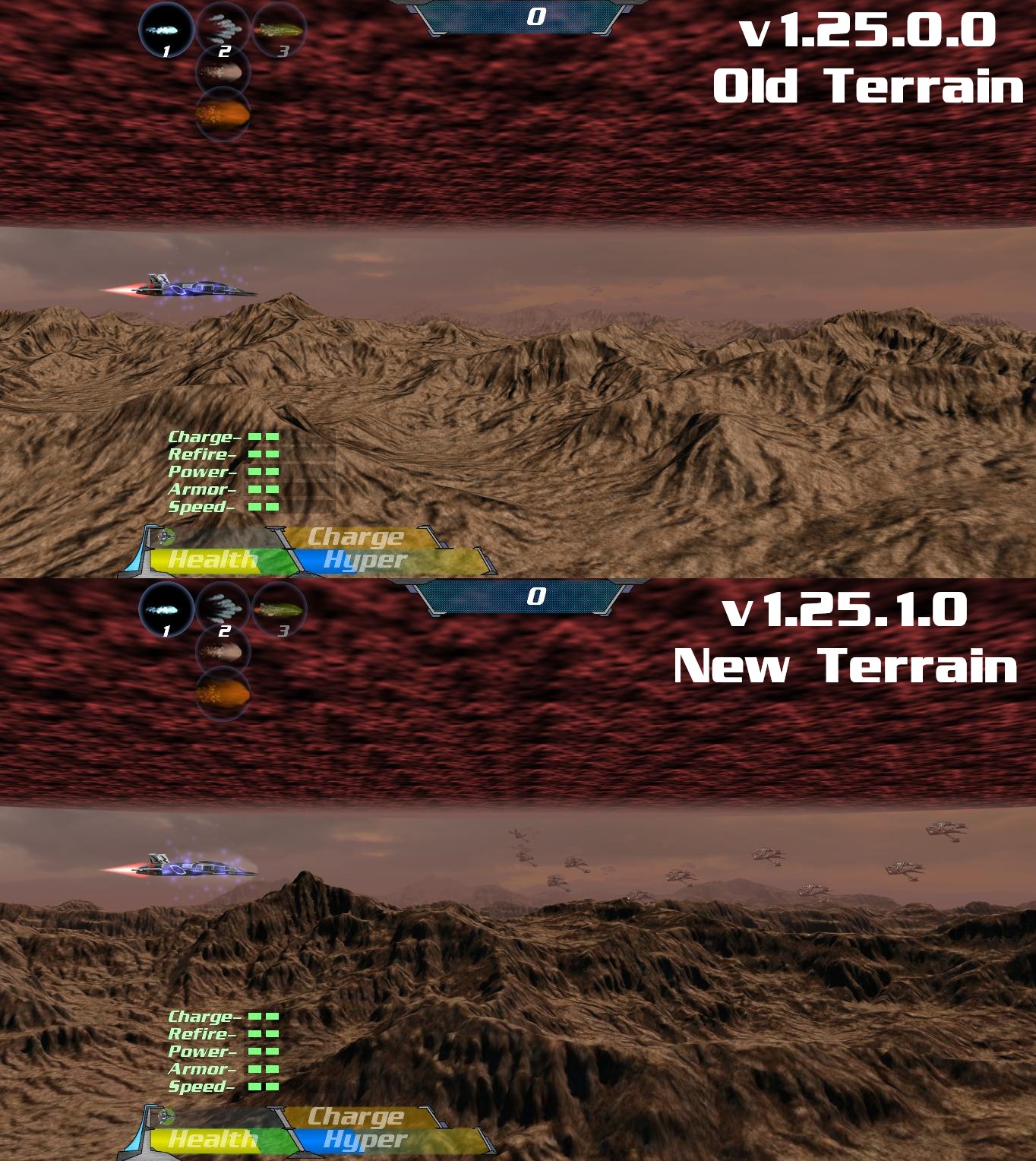
Another big portion of this update is the Alien Homeworld background terrain has been revamped to vastly increase detail. This was done by more intelligently using the 65k triangle budget for terrain blocks, so performance will be identical to other terrain backgrounds. The visual difference is quite striking though, and I encourage everyone to take a look for yourself. The sacrifice taken to achieve this comes from removing the cave entrance seen in the intermission screen before entering Area 7 of Mission mode. I think this was worth it for the amount of detail gained in the rest of the terrain. There is also a newly improved Charge item model as well. Let me know what you think in the forums!
Take a look at the newly improved terrain below:
Here are the full release notes:
Moved much of the game model data to external files
-This greatly reduces the executable file size (14mb -> 4mb)
-Reduces the size of future updates by not having to redownload all the model data each time
-Raises the 65k triangle limit per model of older versions to over 2 million, allowing for higher detailed assets in the future
-The first game startup after updating will take longer to load from caching loading data, but subsequent startups will be significantly quicker
Greatly improved detail in the background mountains terrain in the Alien World environment (Mission Area 6)
-Has a higher triangle count per block of terrain (42k -> 65k)
-More intelligently uses triangles to increase perceived detail at equivalent triangle counts
Improved the Charge item model
Increased the color palette of all background terrain textures (Home world, Alien World, and Caves)
Improved multithreading for game startup loading
-Takes full advantage of up to 5 CPU cores to reduce loading time
-Improved parallelism to more consistently use all cpu cores
The startup loading screen now appears earlier in the startup process
As usual, to make sure you have this update, launch the game and check the lower left corner of the title screen for “v1.25.1.0” or higher. Enjoy!
Level select improvements and new Kiosk mode (v1.25.0.0)
A new update has been released for BlastZone 2! (v1.25.0.0) The main improvements in this update focus on Mission Mode level select, changing the way it works. Now, only individual levels are played and the player is directed back to the level selection screen to choose another level. Also, starting stats and lives have been tweaked to better fit this new play style.
Another big update included here is a new “Kiosk Mode” that completely changes the way the game is approached. This mode was created to split the game up into small 5-10 minute gameplay sessions with a broad selection of areas to try out. This is intended for use with public showings of the game, including conventions, trade shows, and similar events; so people can walk up to play a “bite size” version to make it easier to see the many facets of the game. This mode is accessible in this release, but is not the intended way to play the standard public release of the game. There is a hidden setting in the game config file to turn on this mode, but should only be attempted by more technically adept users.
Here are the full release notes for this update:
Made a few improvements and updates to mission mode level select
-Only the individual level selected is played, then the game ends to select another level
-Starting from later levels gives a starting boost to stats to better simulate what the later levels play like in regular mission mode
-Fewer lives are given to better balance gameplay for playing a single level
A new "Kiosk Mode" has been added to the game
-This is a hidden feature and is not intended for regular end users (can only be accessed by editing the config file manually)
-This has been created for use in future conventions and other public showings
-Removes many game features and allows the player to select between several areas of the game to play with intended 5 minute play sessions
Fixed incorrect cave background lighting when entering and leaving a ship selection screen without starting a new game
Updated the underlying engine to support loading external
.OBJ model files (will be utilized in future updates, but is currently unused)
There was another update released a few weeks back (v1.24.2.3), that focused on bug fixes. Here are the release notes for that:
Particle thread count is now capped at the number of logical CPU cores, even if a higher value is selected
Fixed misaligned explosion flares for the later levels of Classic A/B game modes
Fixed a few rare crashes related to multithreading
Hotfix #1* Fixed occasional hitchy behavior for explosion animations
As usual, to make sure you have the latest update, launch the game and check the lower left corner of the title screen for “v1.25.0.0” or higher. Don’t forget to leave any feedback or questions in the forums. Enjoy!
More netcode improvements and other fixes (v1.24.2.1 + v1.24.2.2)
A few smaller updates have been released recently for BlastZone 2. The biggest updates included are improvements to the “Interp/Predict” client smoothing to work better across a wider range of network conditions. The “Interp Only” option is still the default, as it is the most reliable, but the “Interp/Predict” option is very close now and should provide a better experience for most users. This update also includes a number of other improvements and fixes listed below:
v1.24.2.1
Greatly reduced occasional object rubberbanding when using client "Interp/predict" motion smoothing with poor internet connections
Improved packet loss compensation for the "Interp/predict" motion smoothing
Improved multithreading for beam animations and hit detection
Fixed double beam animation for the client in online multiplayer
Fixed an occasional flicker for the player ship booster
Fixed player throwback at the start of the next area when completing the previous area with a power weapon
v1.24.2.2
Improved multithreading concurrency in several areas
-Thread concurrency was slightly reduced in v1.24.2.0 to fix a few crash issues, but the crash fixes have been improved so there is no concurrency sacrifice anymore
As always, to make sure you have the latest update, start the game and check the lower left corner of the title screen for “v1.24.2.2” or higher. Be sure to leave any feedback in the forms. Enjoy!
Massive particle system optimizations and other improvements (v1.24.2.0)
A new update has been released for BlastZone 2! (v1.24.2.0) This update overhauls the particle system, resulting in huge performance gains when many particles are on screen. Testing shows that roughly 20-30x more particles can be shown on screen for the same performance levels of previous versions. Not only that, but performance can be improved even more through a new Particle Thread Count option. The game defaults to dedicating 2 threads to particles to ensure the best experience for Single-Core and Dual-Core CPUs, but can easily be raised up to 8 threads in the Configuration Program to take full advantage of Quad-Core or Octo-Core CPUs. Please note that the thread count cannot be changed in game. These performance gains can be tested through the “Stress Test” and “Stress Test 2” custom addon packs for those who are curious. I strongly suggest raising the particle detail level to “High” or “Very High” now, even for lower end machines.
There are a number of other bug fixes and improvements included in this update. Here are the full release notes:
Made big improvements to the particle system
-Allows for 20x-30x more particles on screen for the same performance level of previous versions
-Takes much better advantage of multithreading to achieve this
-Now has a more even workload between threads
-Can now scale up to any amount of cpu cores (previously capped at 2 cores)
Updated the configuration program to select the amount of threads dedicated to particles (This option is not available in game)
-The minimum threads selectable is "2", which is 1 render thread and 1 update thread
-Using a higher thread count keeps the 1 render thread, but splits the update workload between multiple threads
Added a new client motion smoothing option for online multiplayer - "Interp Only"
-This option fixes potential erratic object movement for poor internet connections, but introduces hitching instead
-This is now the default option to accommodate the widest range of internet connection quality
-Renamed the original smoothing option from "On" to "Interp/Predict"
-Interp/Predict is the recommended option for mediocre and good internet connections
Added antialiasing to all HUD meter bars
Fixed several very rare crash scenarios from the recent multithreading updates
Fixed occasional oversized player ships in online multiplayer
Fixed the client player incorrectly showing a beam fire animation at the beginning of the next wave when finishing the previous wave with a beam weapon when playing online multiplayer
As always, to make sure you have the latest update, start the game and check the lower left corner of the title screen for “v1.24.2.0” or higher. Be sure to leave any feedback in the forms. Enjoy!
More netcode improvements! (v1.24.1.1)
A new update has been released for BlastZone 2! (v1.24.1.1) This update is a follow up to the recent online multiplayer improvements update and makes further improvements to the netcode. The primary improvement included is out-of-order packet detection and discarding to help reduce juttery object movement for the client player that still remained after the motion smoothing improvements. Another improvement is generalized object movement packet loss tolerance to produce more consistent behavior for the client beyond several key cases that were covered before the update. This includes covering sudden behavior for bosses and enemies in mission mode and is tuned to work well with motion smoothing as well.
Here are the full release notes:
Added packet discarding for online multiplayer when packets are detected as out of order
-Prevents old data from being displayed
-Fixes erratic object movement as well
-Object behavior from these removed packets is accounted for when using the recently added motion smoothing
Improved packet loss tolerance for object movement in online multiplayer
-This is a generalized approach that improves many areas, previous packet loss improvements targeted specific situations
-This works well for sudden movements and in tandem with the recent motion smoothing update
Fixed rapidly switching client player ship type when there is high packet loss for the online multiplayer lobby screen
To make sure you have the latest update, start the game and check the lower left corner of the title screen for “v1.24.1.1” or higher. Any feedback would be greatly appreciated in the forums. Enjoy!
Client side motion smoothing for online multiplayer and more improvements! (v1.24.1.0)
A new update has been released for BlastZone 2! (v1.24.1.0) The focus of this update is to improve the experience of the client player when playing online multiplayer games. This is primarily done by adding a new “Motion Smoothing” option for the client player that uses a combination of interpolation and prediction to generate additional object positions to what is being sent by the server. This makes the client side experience appear much closer to how the game looks for the host/server even when a lower 20hz or 30hz tickrate is used. This has a big advantage of greatly cutting down the bandwidth and send rate needed for a great experience. Also, this can fill in the gaps and account for packet loss to improve the experience for lower quality internet connections. However, the drawback is that there is some additional perceived latency on a moment-to-moment basis. The amount of latency added peaks at about 50ms when a 20hz tickrate is used, but averages at about 20-25ms or so for the same tickrate, and is lower when higher tickrates are used. During testing, this amount of latency wasn’t enough to adversely affect overall enjoyment and playability of the game. However, if a particularly laggy internet connection is being used and latency needs to be reduced as much as possible, the option exists for the client to disable motion smoothing.
Here are the full release notes for this update:
Added client-side motion smoothing to online multiplayer
-Smooths out animations for the client player, even when a low tickrate is used
-Allows for much lower bandwidth usage with a similar or better experience as earlier versions
-This uses a combination of interpolation and prediction to achieve smoother playback
-However, this slightly increases latency (10-50ms depending on the situation)
Added an option to disable client-side motion smoothing
-This eliminates the slightly higher latency of smoothing if this behavior is desired
Fixed enemies glowing on spawn for the client player in online multiplayer
Improved robustness of netcode
To make sure you have the latest update, start the game and check the lower left corner of the title screen for “v1.24.1.0” or higher. Any feedback would be greatly appreciated in the forums. Enjoy!
NOTE: Another update will be released in a few days with further improvements to netcode. This discards packets received out of order to fix juttery client behavior that still may occur in this update. More info will be released about this soon!
BlastZone 1 Released for Free! (v1.24.0.0 update)
Announcing the release of BlastZone 1! This is a completely free game release that is now bundled with both the Demo and Full versions of BlastZone 2. The purpose of this release is to address a frequent question I’ve been asked over the years of how people can play the original BlastZone game. Before now, I’ve directed such questions to the Classic A game mode of BlastZone 2, which is a greatly improved version of BlastZone 1, but that probably isn’t what people have been asking for. Now, everyone can experience the original game in its original form! Keep in mind, the original game was built for the TI-85 and TI-86 graphing calculators back in the 1990’s, so it is very crude by today’s standards. Also, this release is a faithful recreation of BlastZone 1 and not a precise emulation of the original code. There are a few improvements over the original TI-85/86 version, including higher resolution ASCII characters and improved control responsiveness. Also, a few of the menus have been consolidated and combined together to streamline the experience. Despite these changes, it still maintains a very faithful experience to the original to give everyone an idea of what the game was like back then. The final version number for the TI-85/86 is v1.1, so I incremented this release to v1.2 to differentiate it.
To play BlastZone 1, make sure you have the v1.24.0.0 BlastZone 2 update or higher, then start up BlastZone 2 and select the top “BlastZone 1” main menu option. Any questions and feedback are welcome in the forums or via email. Enjoy!
v1.23.1.0 update - More multithreading improvements and bug fixes
A new update has been released for BlastZone 2. This update is mainly a follow up to the recent big v1.23.0.0 update that had substantial improvements to the engine tech. This update addresses several areas that weren't covered by the multithreading improvements in that update. Overall performance will only get a small bump from this, but this update smooths out hitching in a few areas and improves responsiveness slightly during gameplay. Here are the full release notes:
Added multithreading support for several areas left out of the v1.23.0.0 multithreading improvements, including:
-All menus
-Loading operations after the initial startup
-Gamepad input
-Console input
-Leaderboard communication
Fixed brief discolored border of horizontal screen wipes
Fixed an internal error when uploading or downloading leaderboard data
As a side note, I have a big surprise coming for the next update of BlastZone 2! The only hint I'll give is that it's something people have been asking about for a while now. Anyway, enjoy today's update and stay tuned for the next one!
v1.23.0.0 update - Improved online lobby screen and significant engine improvements, including frame pacing, frame rate cap selection, multithreading, and net code
A big new update has been released for BlastZone 2! The most notable new feature in this update is a greatly improved online lobby screen. Now it is at the same level of information and presentation as other ship selection screens in the game.
In addition, there are many technical improvements to the underlying game engine. This includes improved frame pacing and framerate cap selection, which now allows for single frame increments and a much wider range of selection. This is ideal for a wide range of high refresh rate displays and adaptive-sync displays such as g-sync or freesync. To facilitate this, multithreading has been improved to support up to 6 cpu cores, or take better advantage of dual core and quad core cpu’s. This better sustains higher frame rates, which also helps lower end multicore machines to sustain playable framerates. In addition, the net code has been greatly improved to be more robust and tolerate much higher packet loss without causing bugs. For more information about this and the many other improvements and bug fixes, here are the full release notes:
Greatly improved the online multiplayer lobby screen
-Now shows ship previews for each player
-Reorganized the screen to present ship information better
-Added stat bars similar to other ship selection screens
Updated framerate cap selection to allow for any value of the range 20-240 or unlimited
-Previously only allowed for 4 fixed values of 20, 30, 60, and unlimited
-Allows for increments of 1 fps for the highest precision of desired framerates
-This improves support for high refresh rate and adaptive-sync displays
-Allows for high refresh rate displays to take advantage of the power saving and heat reducing properties of frame rate caps without resorting to using uncapped framerates
-This can also be used on standard 60hz displays with vsync off to reduce control response times without increasing heat and power consumption much
Multithreading improvements; Split the main game update and rendering operations into separate threads
-Can now take advantage of up to 6 CPU cores/threads if available
-Improves parallelism and core usage for dual core and quad core systems
-Improves performance for multicore systems (up to 10% depending on the system and situation)
-Doesn't adversely affect performance for single core systems
-This doesn't increase control latency, which often occurs in other implementations
-This is ideal for better maintaining high frame rates for high refresh rate displays or maintaining a smooth experience for lower end multicore systems
Improved frame pacing consistency to reduce hitching when using framerate caps
-Can now maintain constant frame times with occasional variance down to 0.02ms or lower
Greatly improved robustness of the online multiplayer netcode
-Improved packet loss tolerance in many areas, including bosses, object spawning, wave progression, and cutscene skipping
-The netcode can now tolerate up to 75% constant packet loss without causing bugs and can occasionally allow for spikes up to 80% packet loss or higher
Added the ability for gamepads to hold the left or right direction in menus to quickly scroll left or right (previously only had this behavior for up and down)
Fixed a bug when pressing Escape to leave the online multiplayer lobby screen that would internally keep the game in online mode, causing a number of other bugs
Fixed occasional model corruption after applying new video settings in game or pressing Alt+Enter
Adjusted positioning of leaderboard submission text in the game over screen
Updated the mouse cursor draw order so it doesn't appear on top of text messages or dialog boxes
Screen wipes now render behind dialog boxes so they aren't obscured during cutscenes
Fixed slight player booster misalignment during wave/area intros and outros
Eliminated all Classic A/B weapon firing during wave intermissions to prevent accidental chain resets or wasting ammo
Updated the config program to be compatible with the new Framerate options and disabled manual value entry for most options to limit them to dropdown values
Upgraded to the latest Steam SDK (v1.40)
To make sure you have this update, start the game and check the lower left corner of the title screen for “v1.23.0.0” or above. Since this is a pretty big update, I would greatly appreciate any feedback including bug reports in the forums. Thanks and enjoy!