

Borderlands: The Pre-Sequel
Borderlands: The Pre-Sequel March 10 Patch Notes
Borderlands 3 is coming to Steam!
https://store.steampowered.com/app/397540/
Borderlands: The Pre-Sequel February 27 Patch Notes
Gearbox Software PAX East 2020 Livestream
Not attending PAX East? We'll also be streaming the event live so you don't miss a thing!
Tune in live at twitch.tv/borderlands!
Gold Keys, Legendary Weapons and More Available via the Vault Insider Program!
As a VIP, you can score some sweet rewards for Borderlands 2 and Borderlands: The Pre-Sequel. Obtain Gold Keys to earn rare loot, or even unlock some of the most elusive Legendary weapons, including the Dahl Torrent, Maliwan Norfleet, or Vladof Mongol! And that’s just a taste of all the awesome loot available to VIPs!
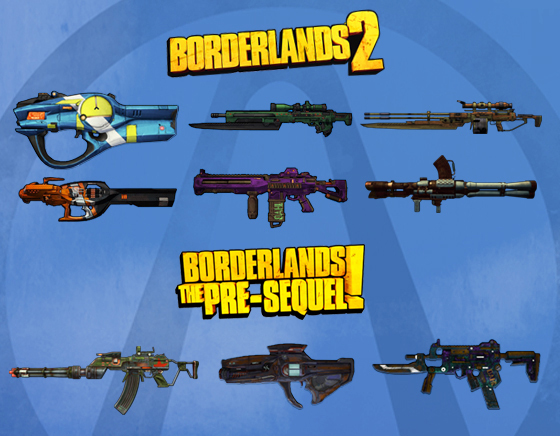
WHAT IS THE VAULT INSIDER PROGRAM?
Simply put, the Vault Insider Program, built in partnership by Gearbox and 2K, is a way for us to celebrate Borderlands fans like you. As a Vault Insider you’ll earn points and rewards for doing a lot of the fun stuff that you’d probably be doing anyway, like watching videos, reading articles, checking social media for the latest Borderlands updates, and of course, signing up for the program in the first place. Points can then be redeemed to claim rewards such as Gold Keys, wallpapers, and more in-game and out-of-game rewards!
I WANT IN! HOW DO I JOIN?
Before you can become a Vault Insider, you need a SHiFT account. If you don’t already have one, you’ll have an opportunity to create one during the VIP sign-up process.
Note that you must be at least 18 years of age to join. Be sure to review the Vault Insider Program Terms so you know all the important details.
Join at VIP.Borderlands.com
HANG ON, WHY DO I NEED A SHIFT ACCOUNT?
SHiFT is the platform that powers all in-game promotions and rewards in Gearbox games. Without SHiFT there’d be no way for you to receive all of the awesome in-game rewards that are coming your way.
OK I SIGNED UP. NOW WHAT DO I DO?
Be a Borderlands fan! You’re probably doing some of this stuff already, but in case you’re not, be sure to follow us on social media, make sure you’ve signed up for promotional updates, and check out articles and videos at borderlands.com. You can start earning points right away by referring friends and creating a 2K account to stay up-to-date on 2K’s other games. Check the hit list on your profile for up-to-date info on which activities are available for you right now.
Additional ways to earn points will be rolling out over time, including some that won’t appear on your hit list because they’re super-secret and designed to reward super-fans with super-rewards.
REMIND ME, WHAT DO I GET?
Rewards available right now include wallpapers and Gold Keys that are redeemable in current Borderlands games. With the legacy Gold Keys, there’s no need to wait – you can jump right back in to revisit your favorite Borderlands games!
The Handsome Collection Ultra HD Texture Pack is out now!
Watch the trailer!
https://www.youtube.com/watch?v=HWGP4p8u3Ig
Get it here:
https://store.steampowered.com/app/941170/Borderlands_2_Ultra_HD_Texture_Pack/
https://store.steampowered.com/app/941180/Borderlands_The_PreSequel_Ultra_HD_Texture_Pack/
What’s New?
The Ultra HD Texture Pack is a free visual upgrade available to both new and existing product owners. On PC, players will have the option to download the texture pack for Borderlands: The Pre-Sequel and Borderlands 2 separately.
The Ultra HD Texture Pack includes:
- Remastered 4K environment textures, including geometry and skyboxes
- Remastered 4K characters and vehicles
- Remastered 4K weapon meshes and textures
- Improved Anti-Aliasing, including improved edge line implementation
- -- This includes improved ink line definition and framing/outline around character models
- Higher Resolution Dynamic Shadows
- -- Improved quality and smoothness of shadows, especially during movement
- Improved Screen Space Ambient Occlusion
- --An improved SSAO method for more realistic ambient lighting
Please note that some of the above visual improvements are automatically enabled when the Texture Pack is installed. There is no need to manually enable them in the in-game Video settings menu.
Permanent Hot-Fixes
The following list contains once-live hot-fixes that have been made permanent in the game.
Borderlands: The Pre-Sequel Update
Version 1.0.7 Update
General
Borderlands: The Pre-Sequel Update
May 19, 2015
Version 1.0.6 patch notes.
General
- Various performance improvements
- Various multiplayer connectivity improvements
- Fixed visual bug with one-way fast travel stations
- Glitched (pink) items will now display properly in the UI
- DLC mission names will now show up on LAN lobby screens
- Fixed bug so that glowing portions of heads appear correctly with skins
- The Baroness’ “Custom Loads” skill will no longer erroneously apply a one-damage status effect
- Fixed Tassitron Engineers arc weld to fire properly at players
- Character customizations will now properly unlock for The Doppelganger and The Baroness
- Eghood is now on a respawn timer and is runnable without having to quit/reload
- Button highlights on the main menu friends list will no longer get stuck after a player leaves
- Gun graphics and animations added back to the Grinder UI
- Teleport effects will now display properly on Deck 13
- Players in an active Baroness contract can now duel
- Fragtraps with the “Cryogenic Exhaust Manifold” skill can now complete the “Trouble with Space Hurps” mission
- Remote and split-screen players can now receive loyalty rewards
- Players using the “Nuked” controller preset can now see the “Inspect” button prompt
- Fixed issue so that status effect visuals and damage match in length
- Fixed an issue where laser ice damage was sometimes incorrectly being dealt as shock damage
- Changed time remaining format to two-digits for minutes and two-digits for seconds during timed missions
- Dahl chests will no longer disappear and re-appear in Triton Flats
- Reflected laser beams will now properly display after ricocheting
- Nel will now spawn and aggro properly
- Players with missing backpack or bank SDU upgrade slots will automatically have additional slots added based on the number of SDU upgrades purchased
- Fixed an issue where the “Moon Mission Meister” achievement would sometimes not unlock
- Opha Superior is now a runnable boss
- Fixed the objective "Open Door" that would uncheck and cause players to get stuck when running to Regolith Range after opening the canister door in Serenity's Waste
- Fixed an issue where the Grinder would sometimes become non-functional
- The Grinder will now produce items over level 50 in playthroughs one and two
- Tony Slows will now always spawn during the “No Such Thing as a Free Lunch” mission
- Fixed a zombie audio issue during multiplayer sessions
- Fixed an exploit with EOS and legendary loot
- Players can no longer spend skill points in their own skill tree while inspecting another player’s skill tree
- Players should no longer get stuck during the “Kill Meg” mission
- The Luck Cannon’s bonus damage will no longer apply to projectiles from other weapons
- Updated cinematics to high-def versions
- [Claptastic Voyage] The HUD will no longer disappear when pausing in the on Deck 13 ½
- [Claptastic Voyage] 5H4D0W-TP’s health bar will no longer linger after its death
- [Claptastic Voyage] Denial Subroutine boss fight is now runnable without having to quit/reload and now has special loot
- [Claptastic Voyage] Killing Eclipse now grants experience and can trigger Second Wind
- [Claptastic Voyage] Players will no longer get stuck on the “The Psychology of Claptrap” mission
- [Claptastic Voyage] Added Grinder recipes for Claptastic Voyage items
- [Claptastic Voyage] Updated Loot bug drop pool
- [Claptastic Voyage] Fixed an issue with 5H4D0W-TP not functioning properly on some missions
- [Claptastic Voyage] A black sphere will no longer appear when the “Enter the Claptrap” mission is in the “TURN IN” state
- [Claptastic Voyage] Fixed and issue where the introduction cutscene did not play properly
- [Claptastic Voyage] Increased damage particle size when hitting EOS
- [Claptastic Voyage] MINAC’s doors will no longer get stuck after level transitions
- [Claptastic Voyage] Fixed jump pad issues during multiplayer sessions in Claptastic Voyage
- [Claptastic Voyage] Fixed an issue where players would get stuck after leaving the map during the “Chip’s Data Mining Adventurer” mission
- [Claptastic Voyage] Players will no longer get stuck by jumping in the recycling bin after pulling the lever during the “You Can Stop The Music” mission
- [Claptastic Voyage] Players will be able to progress when hacker bot dies during the “File Search in The Nexus” mission
- [Claptastic Voyage] The “Cult of the Vault” challenge in Motherlessboard now includes the proper number of Vault Symbols
- [Claptastic Voyage] Gates will now close when Jailbreaker dies
- [Holodome Onslaught] Enemies will now always appear on the minimap in the Holodome arena
Sale on the Borderlands franchise is extended one more day!
http://store.steampowered.com/search/?snr=1_4_4__12&term=borderlands