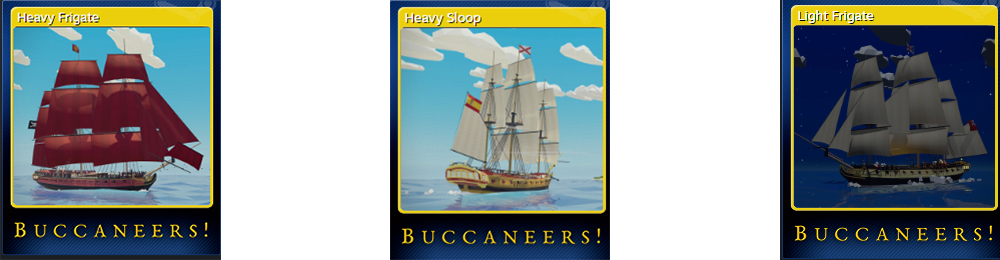
If you love collecting things, we have good news! You can now earn Steam Trading Cards by playing Buccaneers! - plundering loot doesn’t get any easier than that!
We’ve created a full set of cards and other items for you to collect, including: - 6 trading cards featuring ships from the game - 5 emoticons to give your messages some piratey flavour - 3 backgrounds to add some nautical decor to your profile
If you’re looking to expand your collection but don’t yet have the game, you can now get it for 25% off for a limited time.
We hope you have fun swapping cards and tales of your adventures with your fellow shipmates!
Happy pirating! 🏴☠️
Buccaneers! is Verified on Steam Deck
Fellow swashbucklers,
We're delighted to announce that Buccaneers! is now officially verified on Steam Deck! 🥳
This means the game runs great out of the box with no graphics tweaks required, and all the controls work as expected. We've made sure the game supports aiming with the touchpad and gyro controls as well, so you have more options to play how you want.
If any of you have a Steam Deck or are planning to get one, we'd love to hear about your experiences with the game!
Enjoy swashbuckling on the go, me hearteys! 🏴☠️
Patch 1.0.08 Released: New Achievements, Model Updates and more!
Fellow swashbucklers,
We’ve released a minor update which adds new achievements, new model details and more bug fixes! Here’s the full list of changes:
Buccaneers! Version 1.0.08
Changes - Added achievements for conquering the entire map as each faction. If you have a save in which you have already done this, loading that save will unlock the achievement for your faction. - If you go beyond the map boundaries or get stuck in an island in open world sailing and return to your cabin, your ship’s position will now be moved to the nearest point on the map. This prevents World Map travel from breaking. - Added new rigging details to the Two-Decker and Three-Decker. - Replaced the “Rogue” faction flag with a new design to make it more unique. - Crew starvation rate now gets reset when docking at any town, so you no longer lose your entire crew after one day if you set sail with no rations.
Fixes - Fixed the merchant UI not showing correctly in Saint John’s and Bridgetown. - Fixed missing/outdated Russian translations for some player abilities. - Fixed the sabotage option not working correctly after bribing tavern keepers in enemy towns. - Fixed ship notoriety not showing more than three stars in the Fleet Status menu.
Happy pirating! 🏴☠️
Patch 1.0.07 Released: Big UI Improvements, AI fixes and more!
Fellow swashbucklers,
We’ve just released our biggest update yet, with a whole host of fixes and improvements for AI, UI and more! There’s a lot to cover, so without further ado, here are the details:
Buccaneers! Version 1.0.07
Changes - The number of campaign save slots has been increased to 10. - Ships now have coloured name banners (blue for allies, red for enemies) in ship battles. - The armour points on ships and forts are now displayed with a number on a single icon (instead of showing one icon per point) in ship battles.. - Allied ships now show an icon for their current orders next to their name banner in ship battles. - Added an hourglass icon to represent “temporary” ships added to your fleet as part of a quest. - You now receive a legendary reward at the end of “The Hunt” as intended. - Legendary cannons that are pre-installed on some quest ships now show a lock icon in the shipyard if you have not unlocked those cannons for use on other ships. - When AI ships complete boarding without player intervention, they now try to transfer enough crew over to captured prizes to keep them well-manned, as long as their own ships remain well-manned. - Added a button to transfer crew between ships before the Loot screen after a ship battle. - AI ships will now attempt to put out fires over time as long as they haven’t been hit recently. This also means they are less likely to reach the highest fire severity (🔥🔥🔥), so the base chance of exploding (which only happens at max severity) has been slightly increased to compensate. - The locations and number of days remaining are now shown in the Intrigue purchase UI. - The Intrigue and Abilities tab buttons in the Captain’s Log now show red notification dots when you have unread Intrigues or unspent Ability Points, respectively. - Improved visibility from the deck of the Brig. - If you have conquered most or some of the map before completing the main story quest, the AI will now recapture towns where appropriate if you continue the quest, allowing it to progress correctly. - Moved the attacking ship spawn points further away from San Juan fort. - Fort cannon sound effects are now louder and can be heard from further away, making them consistent with ship cannons. - Disabled the land-facing gun battery on Clarence Town’s fort and added a standalone battery on the other side of the harbour to compensate. - Minor updates for Russian and Simplified Chinese translations. - [VR] Increased the size of the interaction zone for climbing the ladders on Two-Deckers and Three-Deckers to prevent you getting stuck if you climb towards the side of the ship. - [Steam] An on-screen keyboard now appears when selecting a text input field with a controller. (Please note: This only works in Steam Big Picture mode.)
Fixes - Fixed the target height of several forts’ gun batteries being set incorrectly, causing the AI to aim too high or low. - Fixed AI ships firing through land to hit forts. - Fixed AI ships sometimes trying to sink nearby ships when their orders are set to “Capture” and their closest target is a fort. - Fixed controller navigation sometimes getting stuck when using the dropdowns in the cargo transfer menus. - Fixed controller navigation not behaving as expected in the Merchant UI. - Fixed incorrect walkable area when the scaffolding is not present in a shipyard during a sabotage attempt. - Fixed minor model and lighting issues in the large shipyard. - Fixed an exploit that allowed you to install legendary cannons that you haven’t unlocked onto other ships in your fleet. - Fixed the “Wait until night/morning” interaction not updating its text immediately after using it. - Fixed the “Wait until night/morning” interaction skipping to night later that day if the current time is between midnight and 6am (which still counts as “night”). - Fixed quest markers not being removed when a quest ends or is failed while using the World Map. - Prevented some quests with a town size requirement from including factions in their search if the factions don’t own a town of the right size. - Fixed fort health and armour not resetting and defending ships not respawning when restarting a fort battle. - Fixed captured ships not appearing as prizes after a fort battle. - Fixed camera movement not being disabled during the fade to the “Defeat” screen when the player’s ship sinks. - Fixed treasure fleet encounters sometimes spawning the wrong support ships if you had multiple treasure fleet quests active. - Fixed shoreline effects not showing on the beach in some small harbours. - Fixed defending fleets not being updated when the AI conquers a town. - Armour-piercing rounds are now aligned correctly when firing. - Fixed a crash that sometimes occurs when starting a new game with the prologue quest enabled after loading a late-game save. - Fixed active Intrigues persisting when starting a new game after loading a previous save. - [VR] Fixed climbing direction not syncing up with the play area rotation setting. - [VR] Fixed the ship name button being hard to select in the shipyard menu.
Happy pirating! 🏴☠️
Patch 1.0.06 Released: Quest fixes, playable brigs and more!
Fellow swashbucklers,
We’ve released a new update with more fixes for quest progression, brigs, and more! Here are the details:
Buccaneers! Version 1.0.06
Changes - Brigs can now be purchased from any shipyard. - For those who want a challenge, the Brig is now a playable ship. (Please note: this ship was not designed with the player in mind, so the visibility on deck is not ideal. This will be addressed in a future patch.) - Crew numbers will now update in real time on ships’ health bars while AI boarding is in progress. - The Rapier now has a new visual design. - Improved the icons indicating which goods are being imported and exported.
Fixes - Fixed the target ship in “The Hunt” not appearing when going to the ambush point. - Fixed the “Steal Ship” option not working in “The Hunt” if the target ship appears in a Large harbour (such as Havana or Santo Domingo). - Fixed crew numbers sometimes dropping below zero after boarding between AI ships. - Fixed AI ships continuing to use round shot when ordered to “Capture” if their installed cannons don’t have grapeshot. - Fixed ship health bars appearing too big through the spyglass while they’re involved in AI boarding. - Fixed Brigs not being serviceable in any shipyard. - Fixed smugglers not appearing correctly in towns when you go to complete smuggling quests. - Fixed a pathing issue in the blacksmith. - Fixed merchants sticking around in some towns during land battles. - Fixed allied ships sometimes not being serviceable in shipyards due to their faction being unassigned. - [VR] Fixed “Ship’s Wheel Offset” not applying when you spawn on your ship.
Happy pirating! 🏴☠️
Patch 1.0.05 Released: Hotfix for Crashes.
Fellow swashbucklers,
We’ve released another hotfix which now stops crashes that some players were experiencing when a new in-game week started. Here are the details:
Buccaneers! Version 1.0.05
Fixes - Fixed the AI’s target towns not saving and loading correctly, causing a crash if they attempted to invade a town at the start of an in-game week. Affected saves should be fixed by this patch, and invasions should work correctly going forward.
We apologise to anyone who experienced these crashes, and thank you for your patience while we investigated the cause.
Happy pirating! 🏴☠️
Patch 1.0.04 Released: Hotfix for British new game start.
Fellow swashbucklers,
We’ve released a small hotfix for a bug introduced in yesterday’s patch, including the following changes:
Buccaneers! Version 1.0.04
Changes - Added additional failsafes to try to prevent a crash that sometimes occurs when a new in-game week begins. If you still experience crashes like this, please let us know.
Fixes - Fixed the wrong ships spawning at the start of Trial By Fire after joining the British. If you saw a friendly encounter with two British brigs and chose “Move to greet them”, you will need to start a new game for the correct encounter to spawn.
Happy pirating! 🏴☠️
Patch 1.0.03 Released: Quest fixes, conquest fixes and more!
Fellow swashbucklers,
We have another new patch for Buccaneers! with multiple fixes for quest progression, town conquest and more. Here are the details:
Buccaneers! Version 1.0.03
Changes - Added separate gun emplacements to some forts and disabled some gun batteries that were difficult to hit. - Increased the docking trigger zone outside all harbours, allowing you to enter or launch assaults without needing to get right next to them. - Replacing a ship in the shipyard UI now deducts the current ship’s sell cost from the new one’s purchase cost. Replacing a large ship with a smaller one will pay you the difference. - The AI will no longer try to capture towns that are required for an active quest. - Quest encounters such as bounties and boss fights now only complete their “go-to” quest goal once you select “Attack” in the encounter UI. This prevents the goal from disappearing if you choose to evade and come back later. - Failing a main quest goal (such as sinking a ship you were required to capture) now shows the “defeat” screen with the failure reason and lets you restart the battle. - [VR] Added a “Ship’s Wheel Offset” to Options > Controls to allow you to move your playspace closer to or further away from the helm when sailing.
Fixes - Fixed blocked entrance to Cockburn Town fort during battles. - Fixed battle objectives always appearing in some large harbours. - Fixed the info cards in the Intrigue Log not auto-selecting when using a controller. - Fixed boarding failing if the target ship has zero crew remaining. - Fixed player being able to join boarding from the same side of the target ship as their ally. - Fixed the optional “Steal Ship” quest goal in The Hunt not completing or failing if the target ship was captured or sunk during a fort assault, respectively. - Fixed an issue with the Bounty Board sometimes generating invalid bounties. - Fixed governors and shipwrights not showing their specialist UI when speaking to them immediately after a quest dialogue. - Fixed the Cargo Transfer UI using the wrong scrollbar and not working with a controller. - Fixed ship armour not being reset correctly when restarting a ship battle. - Fixed wrong ships sometimes appearing in the dropdown menu in the Loot screen after a ship battle. - Fixed the Post Battle UI freezing if activated while inside a docking trigger zone after a ship battle. - Fixed occlusion culling hiding the wrong area inside some medium forts. - Fixed a formatting error causing a line of dialogue to fail to appear in Trial By Fire when playing in Russian or Simplified Chinese.
Happy pirating! 🏴☠️
Patch 1.0.02 Released: Ship AI improvements, quest fixes and more!
Fellow swashbucklers,
The next patch for Buccaneers! is here, with notable improvements for AI ship behaviour and several other quest fixes. Check out the full details:
Buccaneers! Version 1.0.02
Changes - Your allied ships will now change their behaviour correctly if you change their orders via the Fleet Status menu while in a battle. - The “Attack” button in the enemy town UI now says “Fort and Ships” to make its purpose clearer (the menu it opens allows you to attack the fort or steal ships, if you have the required abilities). - The “Cutting Out Expedition” ability description now specifies that only ships up to Tier 4 can be stolen. - The “Steal ship” buttons now show information to explain why a ship cannot be stolen, even if you have the Cutting Out Expedition ability. - The base chance of sneaking into all enemy harbours has been increased by 20%. - Ship repair costs have been reduced slightly. - Shipyards now tell you what percentage of your hull and sails will be repaired when you select the Repair button (if your ship is too big for the shipyard, it can only be repaired to 75%).
Fixes - Fixed colliders and enemy crew spawn points for fort battles in some harbours. - Fixed battle objectives always displaying in some towns. - Fixed some “Ship Sighting” Intrigues not loading their information correctly when loading a save, causing them to display the wrong region. This fix should apply retroactively when you load an old save. - Fixed AI ships not closing in to board their target if both sides of it are reserved for boarding. - You will no longer be trapped inside the prison cell if you die and respawn at the start of “A Way Out”. - Fixed enemies not surrendering when the Notorious ability is unlocked.
Happy pirating! 🏴☠️
Patch 1.0.01 Released: Important Bug Fixes and more!
Fellow swashbucklers,
We’ve released the first patch for Buccaneers! to address a few issues based on early feedback. Here are the full details:
Buccaneers! Version 1.0.01
Changes - Bounties are now always generated at three difficulty levels (easy, medium and hard) based on the largest ship in your fleet, instead of your player level. - The sabotage goal in “Trial By Fire” now explicitly tells you to sabotage the fort’s defences “at night”. You can skip time to night via an interaction at a specific table in each tavern. - Moved the two merchants in Clarence Town harbour to avoid their UI getting cut off by the props around them.
Fixes - Fixed player spawn not working in some harbours when trying to steal a ship. - Fixed wrong objects and NPCs staying active when sneaking into enemy shipyards at night. - Fixed issues with temporary ships granted in the “Trial By Fire” quest. - Fixed extra cannons with a sabotage prompt appearing in the large shipyard. - Fixed bribe option not working in enemy taverns. - Fixed some towns using the wrong size shipyard. - Fixed Steal Ship button not working for quest ships. - Fixed ocean rendering incorrectly with holes in the mesh when using the Low quality in Graphics settings.
Thanks for all the great feedback we’ve received so far! We’ll have more patches in the coming days, so watch this space.