City Game Studio cover
City Game Studio screenshot
Linux PC Mac Steam Gog
Genre: Simulator, Strategy, Adventure, Indie

City Game Studio

Interface Revolution: City Game Studio Gets a Complete Makeover!

Hey everyone!

We're kicking off a new week with some seriously intense content updates for City Game Studio!
I've completely overhauled a major part of the game's interface, and you'll likely feel like you're playing City Game Studio 2 ahead of schedule given how much has changed!

Weekly Recap


A brand new button has just appeared in the personnel management panel! Human Resources will now help you balance your studio!
Have you been hiring like crazy and assigning employees without a second thought? Is your studio now completely unbalanced? No problem - just hire HR and tell them to balance the studio. And boom, with just two clicks, it's done! That's a pretty sweet promise I'm making here. City Game Studio is even easier to play than before, and personally, I love this new feature. In very difficult mode, it will help you achieve higher scores more easily!
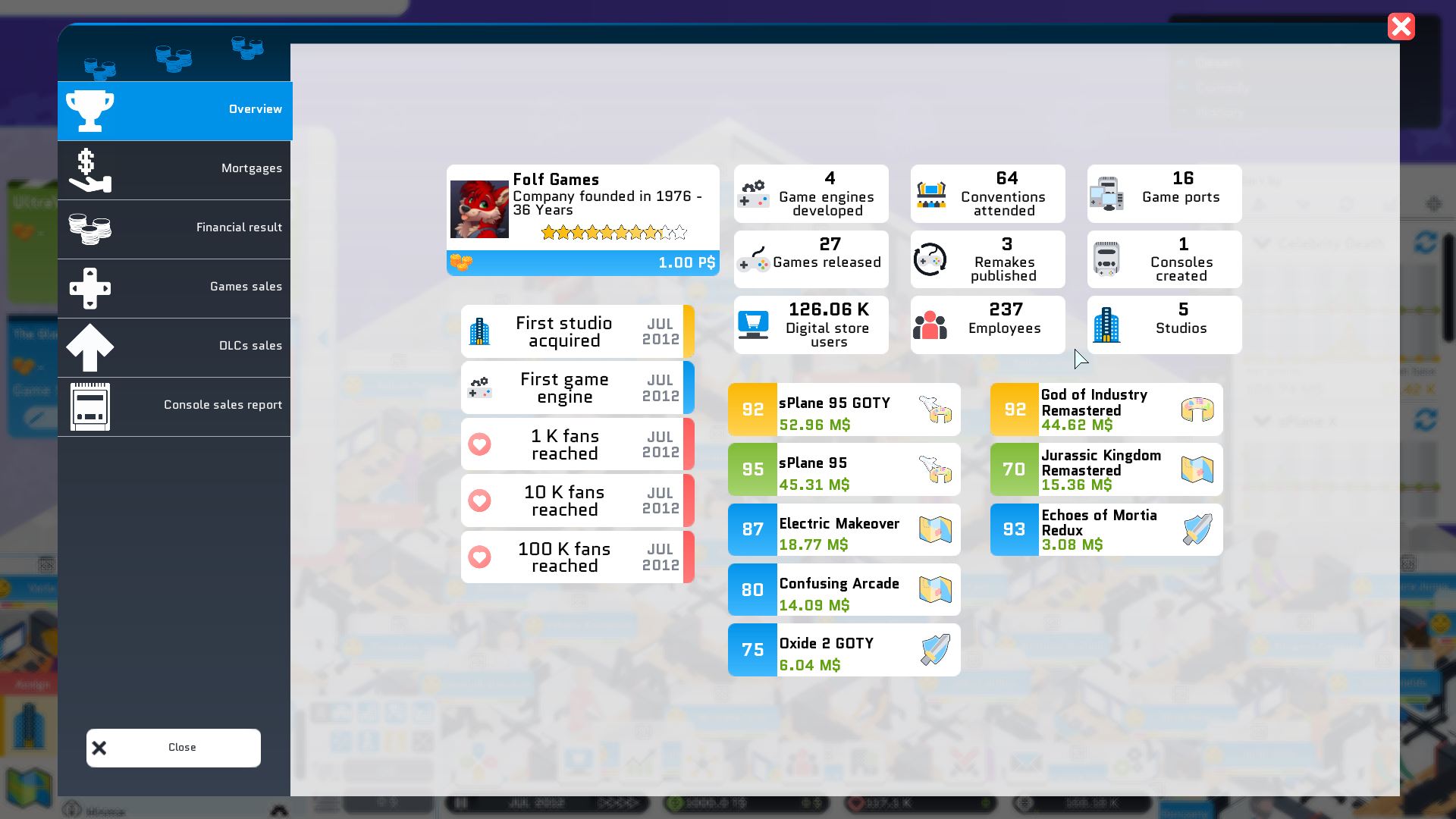
And that's just the appetizer. Let's move on to the main course. A new panel has made its appearance. This panel summarizes your company at a glance. It shows you the number of game engines you've created, the number of games you've published, and how many employees you've hired. Added to this is a list of milestones your company has achieved - the date when you reached over 1,000 fans, or when you created your own digital store. Useful and always interesting information. But that's not all - it also includes two new top charts: the top 5 games that have earned you the most money, and the top 5 remakes that have made you the richest. This panel is available when you click on your money, and I'm sure you're going to love it!
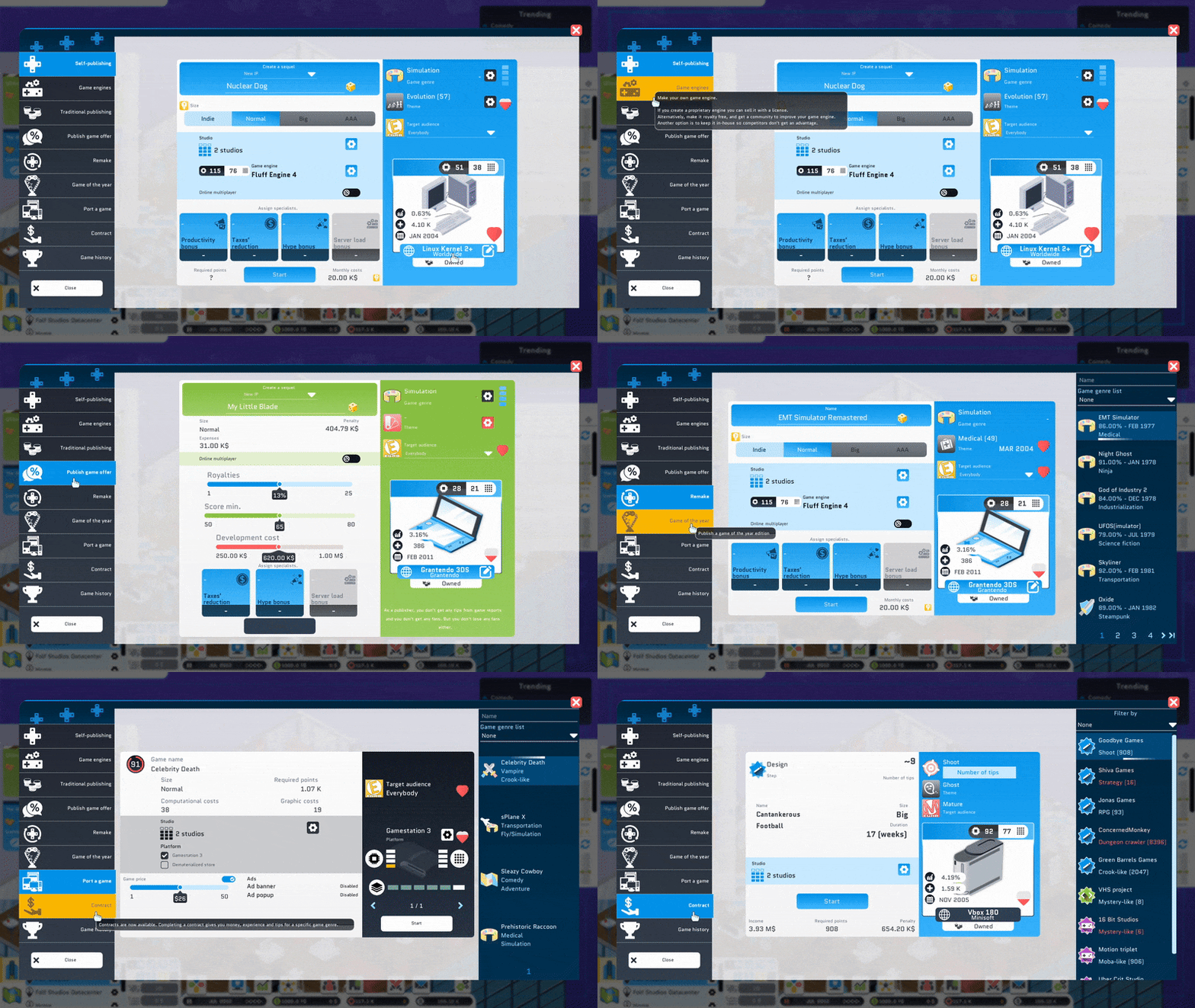
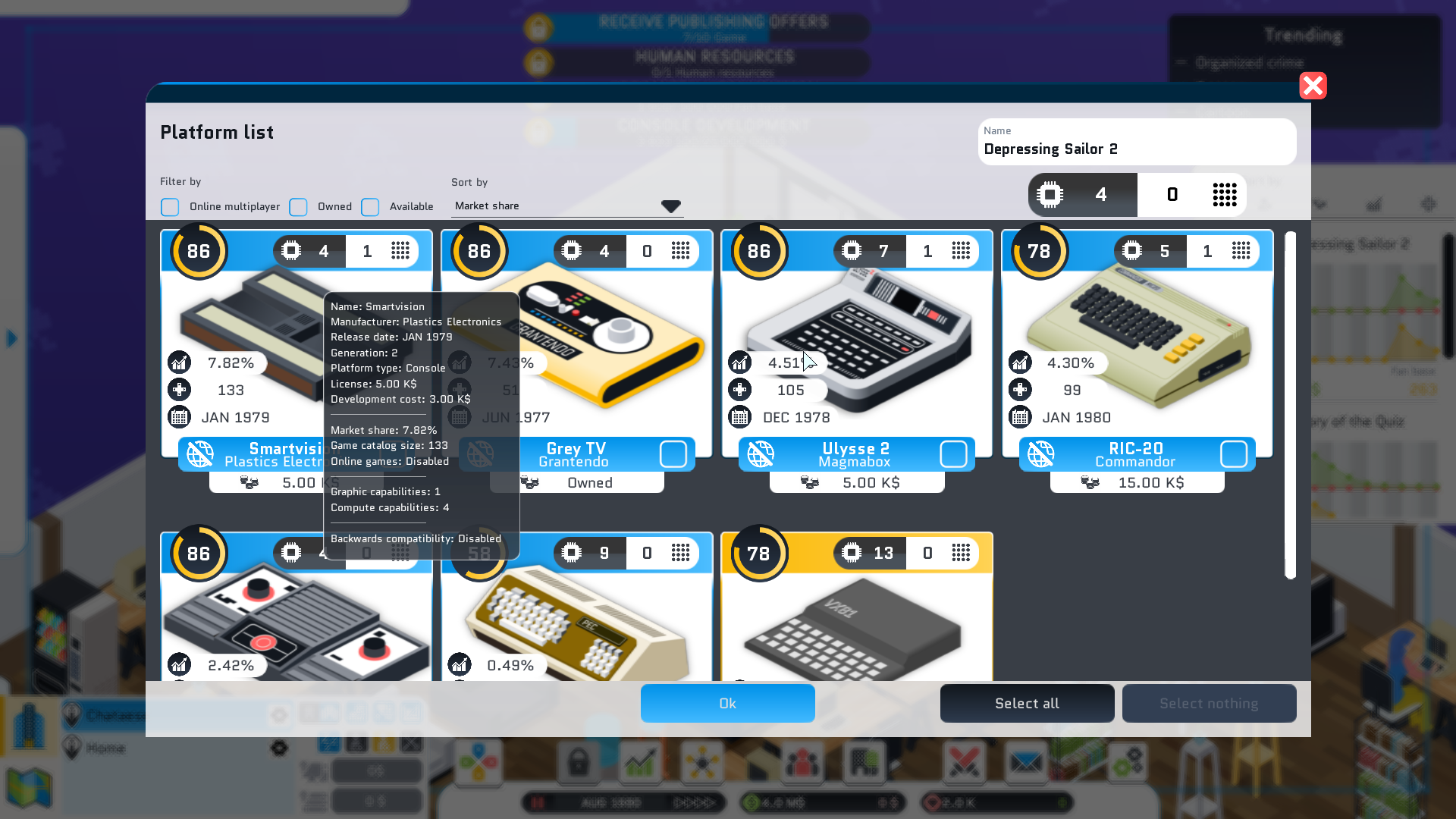
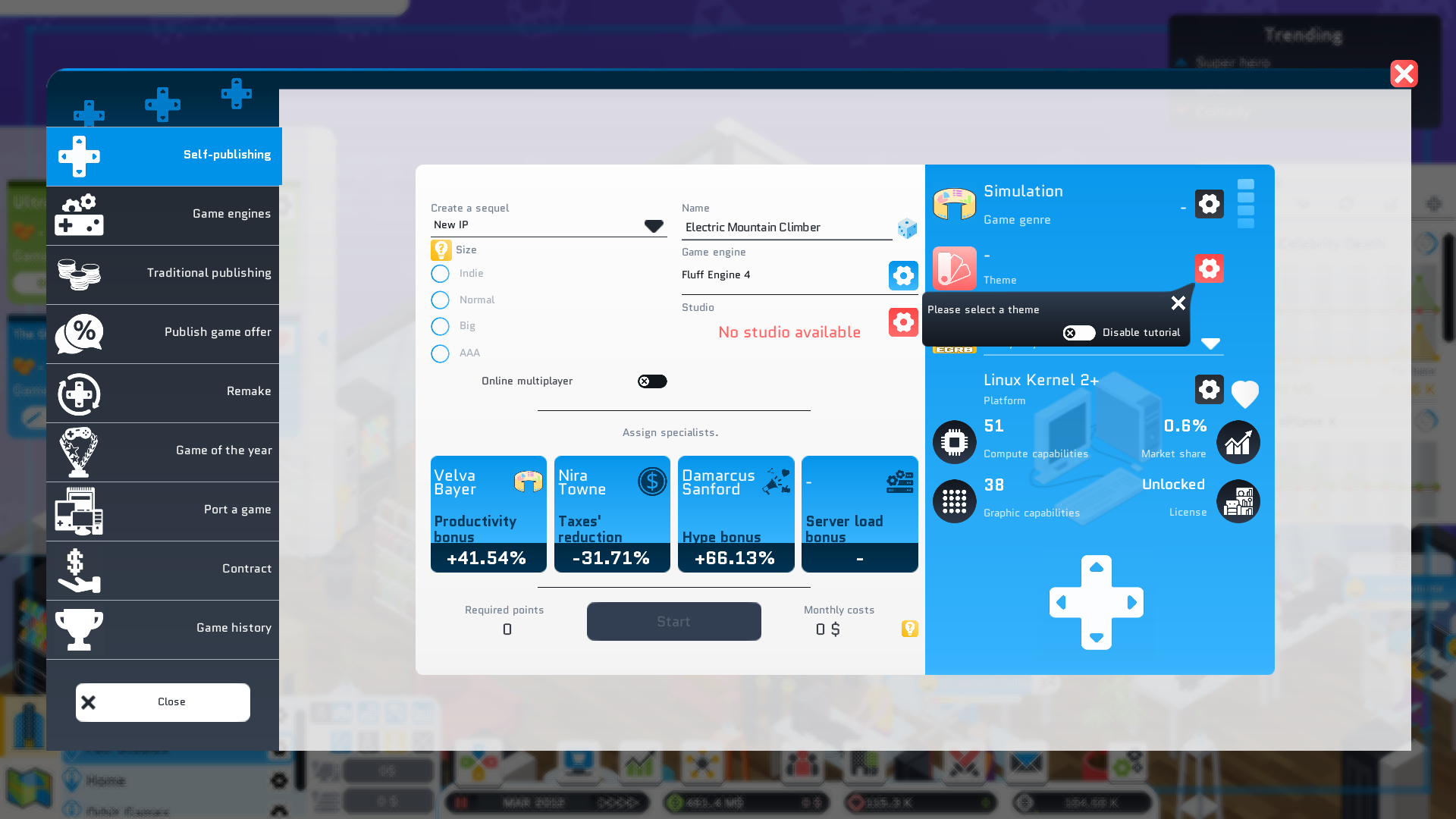
And now for dessert. And this one is a real treat. I've wanted to redesign the panels for creating games, porting games, making remakes, engines, and contracts for years, and I've finally done it. Originally, this modification was planned for September, for v1.24, but I worked hard to include it in the June version, v1.23. And honestly, the result is fantastic. You can see much more clearly what's happening on screen. The elements are colorful, and personally, I love how the consoles are highlighted. Everything is much more visible now. In short, I love this change and I'd like to know if you love it too, so please share your feedback!

What's Next


It's already the end of May, and v1.23.0 is almost ready. Normally, I would have continued working on this update for another 3 weeks. However, we're doing some renovations, and the studio will need to be "closed" during June. It won't be completely closed - I think I'll be able to work a few hours a day, but not enough to continue adding content to v1.23. That's why v1.23.0 is now in feature-freeze, meaning I'll only be making fixes based on your feedback.

I'll resume normal activities in July, beginning work on v1.24. And v1.24 already promises to have some great content, as I plan to revamp quite a few things in terms of interface and user experience!

That's all for now, thank you for reading
Wishing you a great day
Xavier aka Binogure

Patch v1.23.0-rc8


Default version of the game, we want to make sure to have a chance to discover bugs and adjust the balancing, to give you the best game experience possible.

Access the Unstable branch on Steam by right clicking City Game Studio in your Steam library, and then select ‘Properties’. In the new window, select ‘Betas’. The Unstable branch should now be available for you to choose from.

Please leave any feedback you may have in the appropriate channel in our Discord, or in the subforum on Steam.

As always, remember to be considerate towards players not partaking in the Unstable, in case they want to avoid spoilers.

Please make sure to make backups of your save files before playing.


Changelog


Staff

  • Add an auto-assignement button to the HR panel allowing the HR to balance your studio by assigning your staff to specific tasks.

Feature

  • Add a company overview panel showing:

    • Company creation date
    • Company rating
    • Company logo & name
    • Number of game engines made
    • Number of conventions attended
    • Number of game ports
    • Number of games released
    • Number of remakes released
    • Number of Digital store's users
    • Number of employees
    • Number of studios
    • Number of consoles made
    • Best 5 top selling games of all-time
    • Best 5 top selling remakes of all-time
    • Custom achievements (first engine, first studio, 1 K fans reached...)

Interface

  • Rework the game creation panel
  • Rework the gameport creation panel
  • Rework the contract creation panel
  • Rework the engine creation panel
  • Rework the remake creation panel
  • Rework the game edition/publishing panels

Major HR Panel Overhaul and Console Comparison

Hey everyone!

What an incredibly productive week just wrapped up! I managed to get everything done that I wanted to—and then some! Let me tell you all about it!

Week Recap


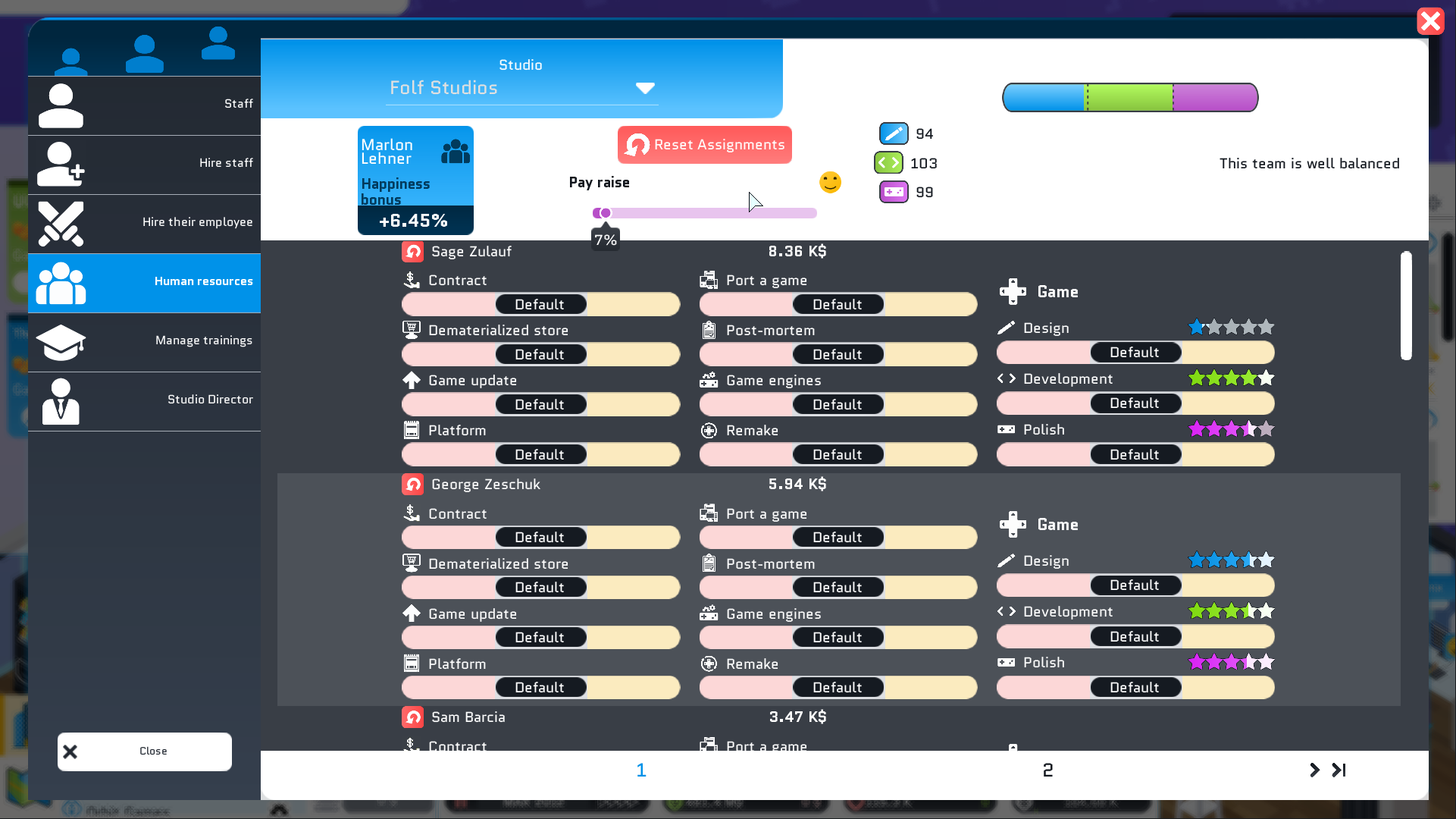
I had planned to overhaul the Human Resources panel this week, and honestly, I wasn't quite sure how to tackle it. HR has to manage so many things that revamping the interface turned into a real brain-teaser.

I actually had to create a brand new button style that doesn't exist anywhere in the game—or even in the game engine, for that matter. I spent several hours on it, but the result is pleasing. It's super readable and easy to handle.

After quite a few different attempts, I arrived at this result that I find rather satisfying. You can clearly see each assignment. You understand when an employee is working, when they're going on vacation, or when you're letting them do their own thing. But from a user experience standpoint, it's still missing a few small touches. For now, I've simply added buttons to reset assignments—I'll talk about the rest in the next section.

That's the story with the HR panel. Quite a few of you asked me to add a button that lets you compare your console with those on the market. So I did it—you can now see the consoles available on the market when you're designing your own. I also took the opportunity to completely revamp the console panel.

The old interface was getting a bit dated, and this new one is fresh and matches the rest of the game better. You'll find the same information but more condensed, allowing you to see more consoles at a glance.

On top of that, I've also redesigned the buttons that let you assign specialists. The old ones were pretty ugly, let's be honest, and now they're definitely more glamorous! This is the first part of the game creation interface overhaul that will arrive in v1.24.

What's Next


What's coming next relates directly to managing assignments through HR. I'd like the reset buttons to affect all employees, not just the ones that are visible.

I'd also love to add a button that automatically assigns high-performing employees in a category to that category. This would let you make AAA games without breaking a sweat. This feature won't automatically balance your studios—it will make your studios more efficient.

As for automatic studio balancing, that's another pretty challenging task, and I'm not sure I'll be able to implement it so easily in this version.

On top of all that, I also want to add a panel that will give you a recap of your company. The information it will include isn't set in stone yet, so drop your best ideas in the comments and they'll probably make it into the game!

Well, that's all for now. Thanks for reading!
Wishing you a great day
Xavier aka Binogure
Patch v1.23.0-rc7


Default version of the game, we want to make sure to have a chance to discover bugs and adjust the balancing, to give you the best game experience possible.

Access the Unstable branch on Steam by right clicking City Game Studio in your Steam library, and then select ‘Properties’. In the new window, select ‘Betas’. The Unstable branch should now be available for you to choose from.

Please leave any feedback you may have in the appropriate channel in our Discord, or in the subforum on Steam.

As always, remember to be considerate towards players not partaking in the Unstable, in case they want to avoid spoilers.

Please make sure to make backups of your save files before playing.


Changelog


Staff

  • Rework the human resource panel (complete rework)
  • Rework the specialist assignment button (looks better now)

Interface

  • Add a button to show the other platforms directly when making a custom platform
  • Rework the platform list panel (looks better now)
  • First part of the rework of the game creation (a bit better but it needs more work)

Poaching, Staff Transfers, and Optimizations

Hello everyone!

This week I've been sidetracked by quite a few small bugs, but I still managed to make good progress on the roadmap!
Plus, with the nice weather coming, I'm feeling super motivated!!

Weekly Recap


I've been working a lot on the interface and the user experience! First off, it's now possible to poach network administrators from competitors. This wasn't necessarily easy to add - competitors don't naturally generate network administrators, so I had to work on that aspect too. But the result is here, and now competitors can have network administrators!

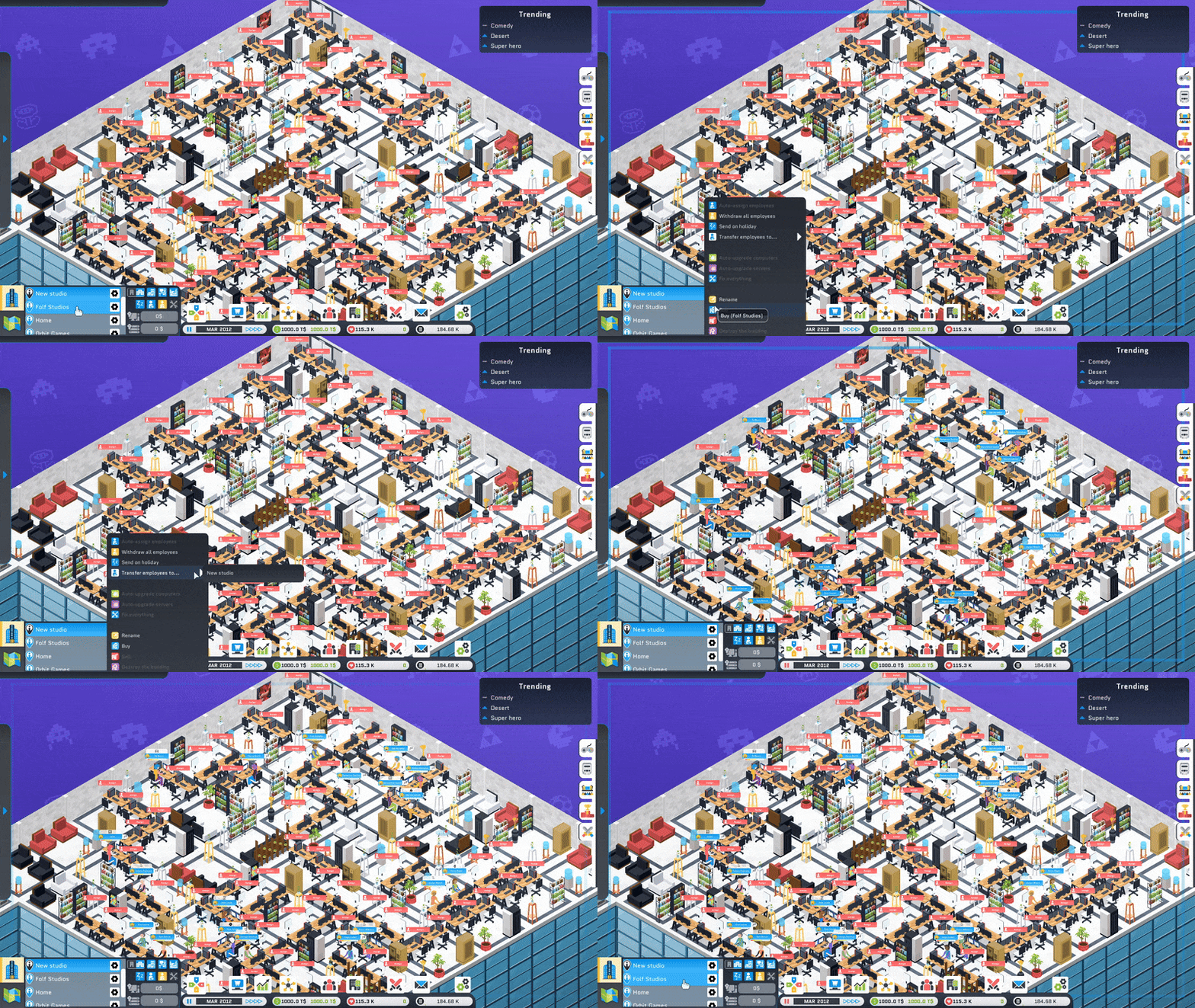
On top of that, you can now transfer employees from one studio to another! To implement this, I had to rethink how employees are assigned to studios. Otherwise, it would crash City Game Studio because there are so many signals to manage. So, I optimized the employee assignment system, and I think those of you with large companies (with more than 400 employees) will definitely notice the difference.

I also worked a bit on the particles in City Game Studio. When an employee generates design, development, or polishing points, it creates a small particle that moves across the screen. Well, I've optimized the rendering of this particle, which makes the game even smoother!

It's been a productive week, and next week should be even more so.

What's Next


Last week I mentioned redesigning the HR panel, and that's still on the agenda. I haven't had time to dive into this topic, but I plan to do it this week. It should work out fine. I've also taken a day to establish a solid roadmap, allowing me to reveal what's coming in v1.24, which will be dedicated to making City Game Studio's competitors more competitive. In addition, I plan to revise the game's interface a bit, to let you list Games of the Year or rename games created by studio directors. I won't reveal everything - I prefer to keep some surprises that I'll unveil when v1.23 is published!

I had mentioned giving competitors the ability to make consoles, and that got you all excited - proof that this idea is popular. So it will likely be part of v1.24, but again, I won't say more.

To summarize, this week I'll be working on the HR panel, but I'd also like to work on the interface to allow you to list available consoles when creating your own console. I won't have time to work on both features in a single week, but I'll do my best!

Thank you for reading, see you very soon,
In the meantime, take care

Xavier aka Binogure

Patch v1.23.0-rc6


Default version of the game, we want to make sure to have a chance to discover bugs and adjust the balancing, to give you the best game experience possible.

Access the Unstable branch on Steam by right clicking City Game Studio in your Steam library, and then select ‘Properties’. In the new window, select ‘Betas’. The Unstable branch should now be available for you to choose from.

Please leave any feedback you may have in the appropriate channel in our Discord, or in the subforum on Steam.

As always, remember to be considerate towards players not partaking in the Unstable, in case they want to avoid spoilers.

Please make sure to make backups of your save files before playing.


Changelog


Staff

  • Can poach network administrator
  • Auto-assign staff is now more stable and faster than ever
  • Can transfert staff from a studio to another with a single click

Bug

  • Price and gauges are bugged

Mods Improve, DevKits Simplify

Hello everyone!

This week has been incredibly productive - maybe it's the nice weather doing its magic, but I've got tons of stuff to show you.
So without further ado, let's dive right in.

Weekly Recap


The mod system overhaul has made great progress, and now mod creators will be able to identify which files are causing game balance issues. It was quite challenging to implement, but I believe it's worth the effort. This way, you'll be able to create mods that truly enhance the players' gaming experience!

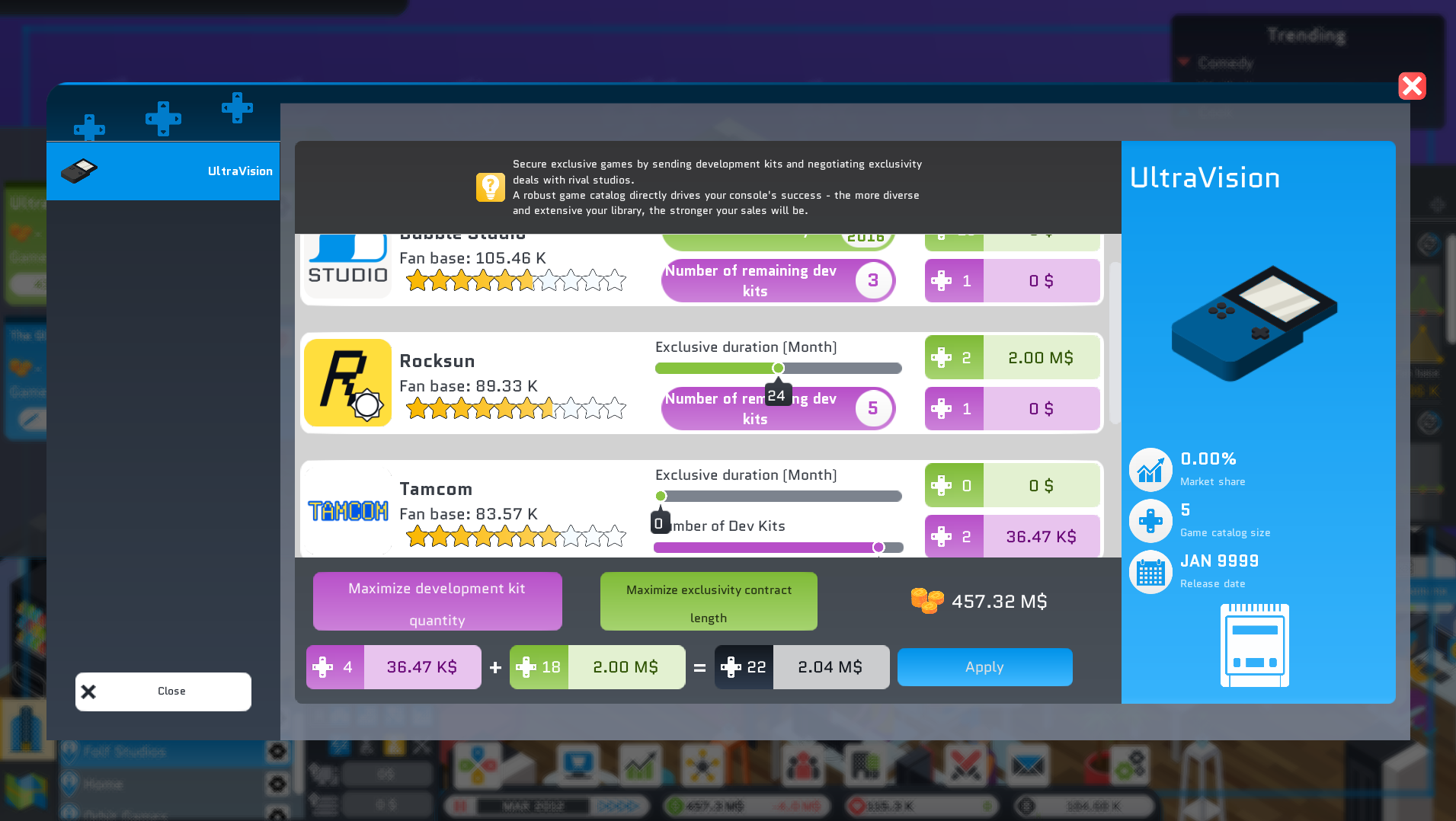
On top of that, I've made two other small changes regarding devkit distribution. When you create your own gaming console, you can send out devkits and sign exclusivity contracts with competitors. By sending devkits to competitors and getting them to sign exclusivity deals, they'll publish games on your console, which will boost your console sales. It costs money, but the return on investment is definitely worth it.

The old devkit management panel was created back in 2021, and City Game Studio has evolved quite a bit since then. What you're about to see will be a game-changer. While previously you had to click countless times to contact all competitors, now with just 3 clicks you can send devkits and sign exclusivity contracts with all competitors! It's incredibly convenient, and this panel was long overdue for a redesign.

I've also added a small fix that changes the behavior of the game sales panel so it doesn't randomly open to the console view for no reason.

What's Next


The next step is to revamp the human resources panel to make it more intuitive and less cluttered. It's going to take a fair amount of work, but I'm hopeful I can turn it into something really user-friendly!

I've been reading a lot of your feedback lately, and there's one point that comes up quite often: competitors in City Game Studio aren't powerful enough. Well, I've had a few ideas to make them a bit more formidable and therefore harder to buy out. And perhaps they could release their own gaming consoles too... what do you think of that idea? I think this could be the focus of the next major update, v1.24, centered around competitors and their complete overhaul. They would directly shake up the industry, making each playthrough even more unique!

Obviously, I still have plenty of things to do in City Game Studio - revamping the HR panel is one of them, but there are other panels that need reworking too. Every time I update City Game Studio, you come up with wonderful ideas that aren't feasible in the first installment, so I'm keeping them on the back burner - like a dragon guarding its eggs - for a potential sequel!

Thank you for reading, and I'll see you again very soon.
Until then, take care of yourselves!

Xavier aka Binogure

Patch v1.23.0-rc5


Default version of the game, we want to make sure to have a chance to discover bugs and adjust the balancing, to give you the best game experience possible.

Access the Unstable branch on Steam by right clicking City Game Studio in your Steam library, and then select ‘Properties’. In the new window, select ‘Betas’. The Unstable branch should now be available for you to choose from.

Please leave any feedback you may have in the appropriate channel in our Discord, or in the subforum on Steam.

As always, remember to be considerate towards players not partaking in the Unstable, in case they want to avoid spoilers.

Please make sure to make backups of your save files before playing.


Changelog


Interface

  • Rework the custom platforms' planel interface to send devkits and sign exclusivity deals:

    • You can use a single button to max out the number of devkits you want to send.
    • You can use a single button to max out the exclusive contract duration.
    • Better user experience

Release panel

  • When a player sets a price that's too high for their custom platform (console), the game forcibly opens the release console panel - No more.
  • When a player sets a price that's too low for their custom platform (console), the game forcibly opens the release console panel - No more.

Mod support

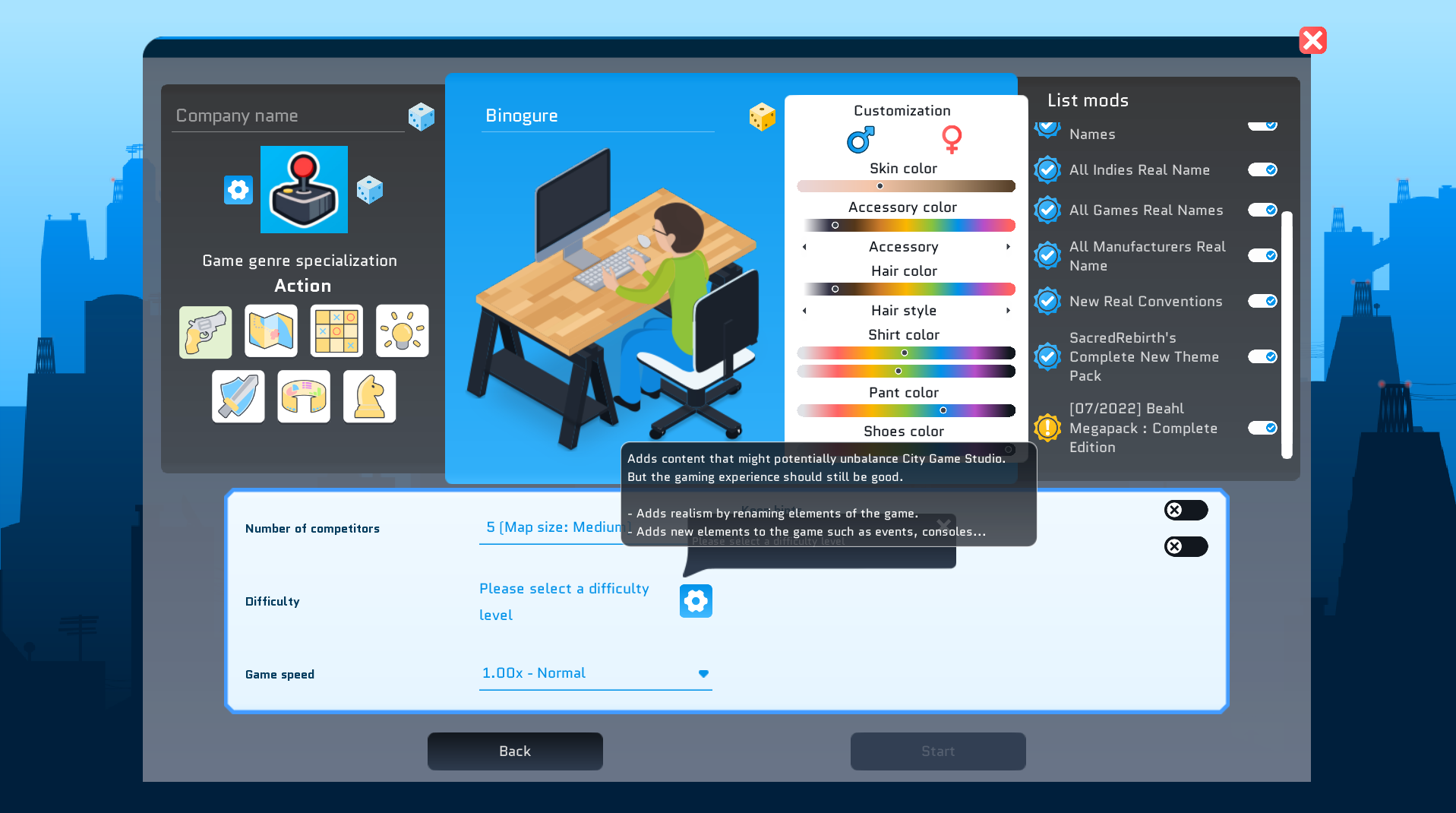
  • When creating a new mod, if the mod might make City Game Studio imba, add a warning to the output log. You can still upload your mod tho.
  • When creating a new mod, if the mod is going to make City Game Studio imba, add a red warning to the output log. You can still upload your mod tho.

v1.23 Takes Shape: The Mod System Gets a Facelift

Hello everyone!

What a huge week that's ending too quickly, perhaps too quickly? I would have liked to make more progress, but I had to take a day off to handle some personal matters, so I still have plenty on my plate!

Weekly Recap


The mod management system has been overhauled, at last! Now when you load a mod and start a new game, the game will automatically rate the mod. This way, you'll know if a mod is excellent and enhances your gaming experience. Or if a mod is good but might affect your gameplay experience. And the third rating, the lowest one, will warn you that this mod will likely harm your gaming experience.

On top of that, there are tooltips that will tell you what the mod changes. For instance, if it simply renames things - in which case, your gaming experience will only be better. Or if it adds new features, which may or may not improve your gameplay.

Basically, the algorithm is based on standard values. The more a mod deviates from these values, the lower its rating will be. So a mod that hands out tons of fans, for example, will get a poor rating, while a mod that adds elements to game engines will receive a good rating.

And for mod creators, it's really great because once you've created your mod and the game has validated it, it automatically gives you the mod's score. Super convenient, but there are still a few things missing on this front.

What's Next


So I've made great progress on mod management, but as I was saying, for mod creators there's still something important missing. When you create a mod, it would be nice to know why it got a poor rating. At the moment, the game doesn't tell you this, but I plan to add it in the next RC. This way, you'll immediately know how to improve your mod to make it flawless. And in the long run, everyone will be happy.

Well... I didn't have time to finish this part about mods, so I couldn't work on human resources or anything else for that matter. But I'm planning to tackle this part during the coming week. And if I can give you more details, I also plan to revamp the automatic devkit sending feature, so you won't need to send them manually anymore, but with just one button click. Another minor but important change is the right panel that stays on the panel you've opened by default unless there's important information to show you.

Alright, I've still got work to do. I wish you all a fantastic, sunny weekend.
Xavier aka Binogure

Patch v1.23.0-rc4


Default version of the game, we want to make sure to have a chance to discover bugs and adjust the balancing, to give you the best game experience possible.

Access the Unstable branch on Steam by right clicking City Game Studio in your Steam library, and then select ‘Properties’. In the new window, select ‘Betas’. The Unstable branch should now be available for you to choose from.

Please leave any feedback you may have in the appropriate channel in our Discord, or in the subforum on Steam.

As always, remember to be considerate towards players not partaking in the Unstable, in case they want to avoid spoilers.

Please make sure to make backups of your save files before playing.


Steam handler

  • Rework the game to work even if Steam is not detected. But mods won't get loaded

Mod support

  • Add a mod analyzer that adds meta data to the mod data to know what a mods change:

    • Platforms, custom platforms, digital store, competitor, competitor's games...
    • Add a seal of quality to all existing mods