Welcome to Build 04. This build overhauls the way ColorTool handles and generates palettes, laying the groundwork for future releases.
Curve-Settings Overhaul
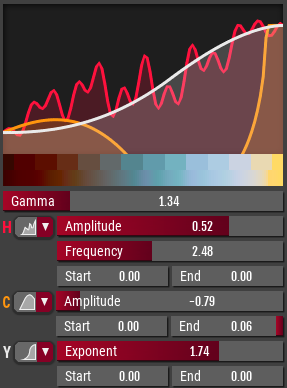
The curve settings were overhauled and are now much more powerful.
Plain palette loading and editing
You can now load plain palettes such as .gpl or .aco files. This will give you a rudimentary way of editing these files, as well as using them for remapping images.
Automatic Color Sorting
Before, the colors would be added to the palette in the same order they were created.
Build 04 instead introduces a smart sorting algorithm that makes sure that similar colors are placed closely in the resulting palette.
Palette-Arrangements
You now have full control over where each ramp in the palette will end up in.
You can also give each color and each ramp a name. These will be used when exporting to a palette file
Misc
- Fixed: "Grabbers" for creating connections between nodes disappeared after they were used once. - Fixed: Vertical Hue bar wasn't updating properly. - Fixed: It was not possible to redo the most recent color change. - Fixed: Undo steps for documents were created for every auto-save, even if the document itself wasn't changed. - Fixed: Fixed a few bugs related to how effects where handled when loading and saving files. - Improvement: There is now a limit to how many subfolders and entries the program will try to display in the directory view, which could have caused trouble when working with directories with many subfolders. - Improvement: Added an option to open the destination folder after exporting. - Wider Scrollbars: This should make it easier to navigate the UI using a Stylus. - Updated icon and splash screen. - Added a Discord button to the home screen. - Removed batch export functionality, sorry about that. It was a buggy, unreliable mess and needs to be redesigned from scratch.
ColorTool Build 03
6th Jun 2019:
- Fixed: Crash when Moving/Rotating/Scaling things when the focused object was not part of the Selection
- Fixed: Reference Image getting input even when invisible
- Fixed: Mouse Cursor not correctly updating
- Fixed: Really old .clrpal files could not be loaded properly
27th May 2019:
- Hotkeys on Mac now use Command key instead of Control key
- Color picker can now be zoomed in up to 4x (was 2x)
- HCY color picker now uses 2.4 gamma instead of 2.0
- Fixed: Changing the color sliders from HSV to HCY wouldn't update the values of said sliders.
25th May 2019:
- Experimental Mac Support
- Support for older Linux versions (Ubuntu 14.04 and up)
- Internal: Ported from Godot 3.0 to 3.1
- New color space: HCY (Hue, Chromaticity, Luminosity)
- Color picker can now be switched between using HSV and HCY
- Hotkey for Dragging Connections between colors. (c)
- Fixed: Splitting a ramp would sometimes use the wrong color.
- Fixed: Linear HSV color space wasn't working as intended.
ColorTool Build 02
- New Remapping Mode: Basic
- Overhaul of the UI theme
- Overhaul of the Reference Image UI
- Minor UI tweaks
- Internal: Effect System
- Internal: Improvements to the file format that allows for better forward compatibility
- Fixed: Typo that would save .pal as "JASK" files instead of "JASC"
- Fixed: Bug that would unexpectedly change the color when changing the color space
ColorTool Build 01
- New Feature: Ability to "Collapse" nodes by pressing Ctrl+Delete
- New Feature: Custom Dither Patterns
Beta 1 Bugfix Release
16 Nov 2018
Fixed Batch Export functionality.
12 Nov 2018
Fixed a bug which would cause changes to hotkeys not be saved properly.
8 Nov 2018
Fixed a critical bug where multiple canvases stayed active even though their tab wasn't visible, causing unexpected behavior.
Fixed a bug where trying to Move, Rotate or Scale without a selection would result in a crash.
Fixed a bug where the dither strength would be reset to the default.
Fixed a bug where changing the color space of a ramp had no effect.
Fixed a bug where using the color picker didn't work properly in Pixel Art mode.
Fixed a bug where ColorTool failed to load a file if the extension contained uppercase characters.
Fixed a bug where document data stayed in memory after the associated tab was closed.