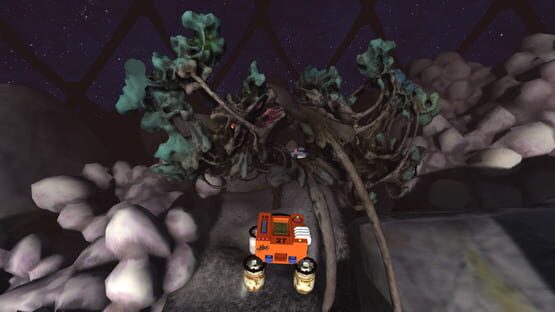
v3.1 with Achievements and Global Leaderboards is now live
I've just posted a big update with new features and lots of little bug fixes. Here's what's new:
Steam Achievements! There are 11 new goals to work for - from simple things like earning 3 stars on a level to completing all 50 levels in Hard Mode.
Global Leaderboards. Probably the most requested feature from players is finally here. The leaderboards are still empty, so now is a great time to make your mark. Also a great time to get the Number One achievement. :csdsmile:
Game progress now saved in the Cloud. You'll keep any progress you've made with the old system, and now it will also be stored on the Steam servers.
Upgraded game engine to Unity v2017.2. Faster physics and better performance in VR.
Improved the Tutorial level. More info about the controls, quieter video.
New pause menu that also shows the global/local high scores
New Ringer Runner level 23. The last one was
way* too hard.
Fixed a problem on main menu with launching a level more than once
Lander now tumbles and rolls once one of the tanks is broken.
Leaderboards and Achievements - better late than never.
Hello crashers. It's been a while since I updated Crashed Lander, but I've dusted off my project files to make a few additions. I'm (finally) adding Global Leaderboards and Steam Achievements to the game.
These have been the most requested features ever since bringing the game to Steam. I've tried several times in the past to add these features, but my coding skills were not up to the task. Guess they are now, 'cuz I finally figured it out. :csdsmile: I had to switch programming languages to get it done. Still not really comfortable in C#, but I'm getting the hang of it.
I've posted a new build to the Beta branch that has global leaderboards for all 50 levels, both Normal and Hard difficulty. Leaderboards are displayed after finishing a level, or you can peek at the leaders on the Pause screen. The local best score is displayed before you start each level. Achievements are working, but not included in the current Beta. They should be active in a few days.
Not many people actually playing the game these days, but maybe this wil spark a little renewed interest and attract some new challengers.
You can acces the Beta build by right-clicking on Crashed Lander in your Steam library, choosing properties, clicking the Betas tab, then choosing v3Beta from the dropdown menu.
I'll also be cleaning up a few bugs and re-jiggering a couple of the levels that I'm not happy with - llike the Overwatch Rings level which is WAY to hard. If you have any suggestions or bug reports, now would be a good time to let me hear 'em. I'll start a Forum Thread for anyone who wants to comment on the Beta, too.
Crashed Lander 3.0 now available!
Howdy Crashers! I've just posted the big 3.0 update. There is a long list of improvements, especially if you haven't been following along on the beta versions.
New levels - 50 in total!
Options menu. Change graphics settings, FOV, V-Synch, audio levels, and other fiddly bits.
Improved VR support. Now works easily with monitor, Rift, and Vive.
VR comfort modes. People who are prone to motion sickness can use Tunnel Vision or the Cam Cage for a less woozy experience.
New Tuitorial level. Cleaner and more informative.
First person camera mode. Lots of requests for this one.
Remastered Levels. I've improved the look and feel of many levels with updated models, better lightmaps, and sparklier particles.
This are some pretty big changes under the hood for this update. I'll be keeping my eye on the support forums and making tweaks and adjustments throughout the week. Thanks for supporting my indie gamedev efforts and have fun crashin'! ːcrashedlanderː
v3.0beta update - more options
Nearly done now with the total re-do of the sound system. Much happier with the new setup and best of all, it let's me add this feature: You can now control the volume of the music and sound in the Options menu.
Still missing a few sound effects, but they'll be back in a day or too. Closing in on the final 3.0 version. Now is the time to send any feedback or suggestions!
ːcrashedlanderː
Small update for v3.0beta
I posted a new build for the 3.0beta that should fix a problem with re-centering the view when playing in the Vive.
It should now send the proper commands via openVR to switch to Seated Mode and then re-center your view on command. You can try it out with the Middle Mouse button, Backspace, or Select on gamepad.
Still working on polishing up all of the big changes made for v3.0. Currently working on:
Making the new main menu a little more interesting - especially when playing on the monitor
New Fade effect for level loading
finish 3 new Ring Runner levels
better control of sound/music volume . Currently ripping the guts out of the old sound code and building a setup with Unity 5's new audio features.
better mouselook in monitor mode.
After that it's pretty much just tidying up a few loose ends.
ːcrashedlanderː
v3.0beta3 - Now with 100% more Option menu!
Howdy Crashers. Another update to the 3.0beta. This feature was a long time coming - an actual options menu. All the game options plus a batch of new settings for graphics quality: shadows, anti-aliasing, vsync, fov, texture resolution. VR users can also adjust render scale or try the new Tunnel Vision and CamCage comfort options.
Still a little work to do on the menus, but so far so good. Opt in to the v3 beta by right-clicking on Crashed Lander in your Steam library, choose Properties, click on Betas tab, then choose v3beta from the drop-down menu.
oops - Crashed Lander v3.0beta graphics settings
I just realised that I made a mistake in the default graphics settings for the v3 beta. If this is the first version of the game you've played, then you are most likely seeing the game with very low resolution textures and no shadows. ːcsdsickː I accidently set the default graphics quality level to Minimum.
I'll be uploading a new build soon that will fix that issue - along with a spiffy new options menu!
To change your graphics settings in the current version it is easiest to turn off your HMD and launch in monitor mode. Right after launching the game, hold down CTRL key to bring up a settings menu.
Sorry 'bout that. I hope I didn't scare off any new players because of the lo-fi first impressions. ːspazwinkyː
Crashed Lander v3beta patched
I posted a couple of quick updates to the game this weekend. Frist one to fix a few problems with the new menus, and another one with a few visual touch-ups.
Fixed menu navigation routes
D-pad now works to control menus
Toggle vertical synch with Delete key (monitor mode only)
Music should now play through level load if it is enabled.
New lightmaps on all levels that use them. Still trying to get the hang of the lightmapping tool in Unity 5, but this batch is looking better. Still some ugly jaggies on the Menger levels especially.
Today I'll be working on the new Ring Runner levels and a few other odds and ends. I have a few weeks away from my day job and I'm getting in as many game dev hours as I can.
Crashed Lander v3.0 is ready for testing.
Howdy Crashers. I've been working on another big update for Crashed Lander - version 3.0! This version includes all of the updates from the past year, plus:
<*> Spiffy new menus - the old ones were wonky. Built the new ones using Unity's UI tools and a little more planning. ːspazwinkyː Cool 360 panoramas give you a glimpse of the level before loading.
<*> Improved VR support. Now works easily on monitor, Rift, and Vive.
<*> First person camera. Often requested and quite a bit of fun. Switch cameras with the B button or C key
<*> Pause button fully pauses the game. The slow motion was neat but hard to go get a cup of coffee before you crashed and burned.
<*> New levels on the way later this week.
You can try out the v3beta for WIndows now. Just right-click on the game in your Steam Library, choose Properties, click the Betas tab, then choose v3beta from the dropdown menu. I'll start a thread in the forums for feedback and suggestions. I'd especially like to hear from VR players, and anyone playing on slower machines with integrated graphics cards.
Just a quick reminder for those of you playing in VR - you need to opt-in to one of the Crashed Lander beta versions to play on the Rift or Vive. Right-click on the game in your Steam library, choose properties, click the Betas tab, then choose either beta1.3 (for Oculus RIft), or betaopenvr (for Vive).
UPDATE: new beta with improved VR support is named v3beta
Vive support is experimental right now. I don't have a Vive, but was able to make a test version that is working for now. Full Vive support will be added when I can get my hands on one.
Still working on the new menu system and some other additions. Should be done before the end of Summer.