Major Milestone "CUSTOM RIDE" (Custom Difficulty + Change Anytime)
The CUSTOM RIDE major milestone got stuck in a traffic jam behind ENDLESS, so they piled out of the gate together in a big rush. Back-to-back Major Milestones? That's a first :D Don't let the tempo belie the size and scope of this monster update - it rivals proc-gen. CUSTOM RIDE now allows you to tailor your difficulty settings with exacting precision, changing 20 different Difficulty factors during New Game. And you can also just customize your difficulty anytime during play if you'd like to adjust how its working, made a mistake, or need a reprieve or to dial it up a bit.
Add to that new options for windowed, borderless and fullscreen in your options menu, new Auto-Dump threat in the Matrix, fixing Slashslide missing / teleport bug, 2 new helpful market filters and more ... Also, since Proc-gen was just released in ENDLESS, we have added an extra section to the change log just focused on proc-gen stuff (new map! many fixes!) as well. And of course, the traditional mountain of small fixes, typos and QoL requested from your F10s!
Let's say - we've been busy! If you like the improvements and the pace of improvement overall, we hope you'll express your thanks in the form of a review!
The roadmap has started taking some major body blows, it's going to be a photo finish for 2023's items!
So let's dive in!
Custom Difficulty
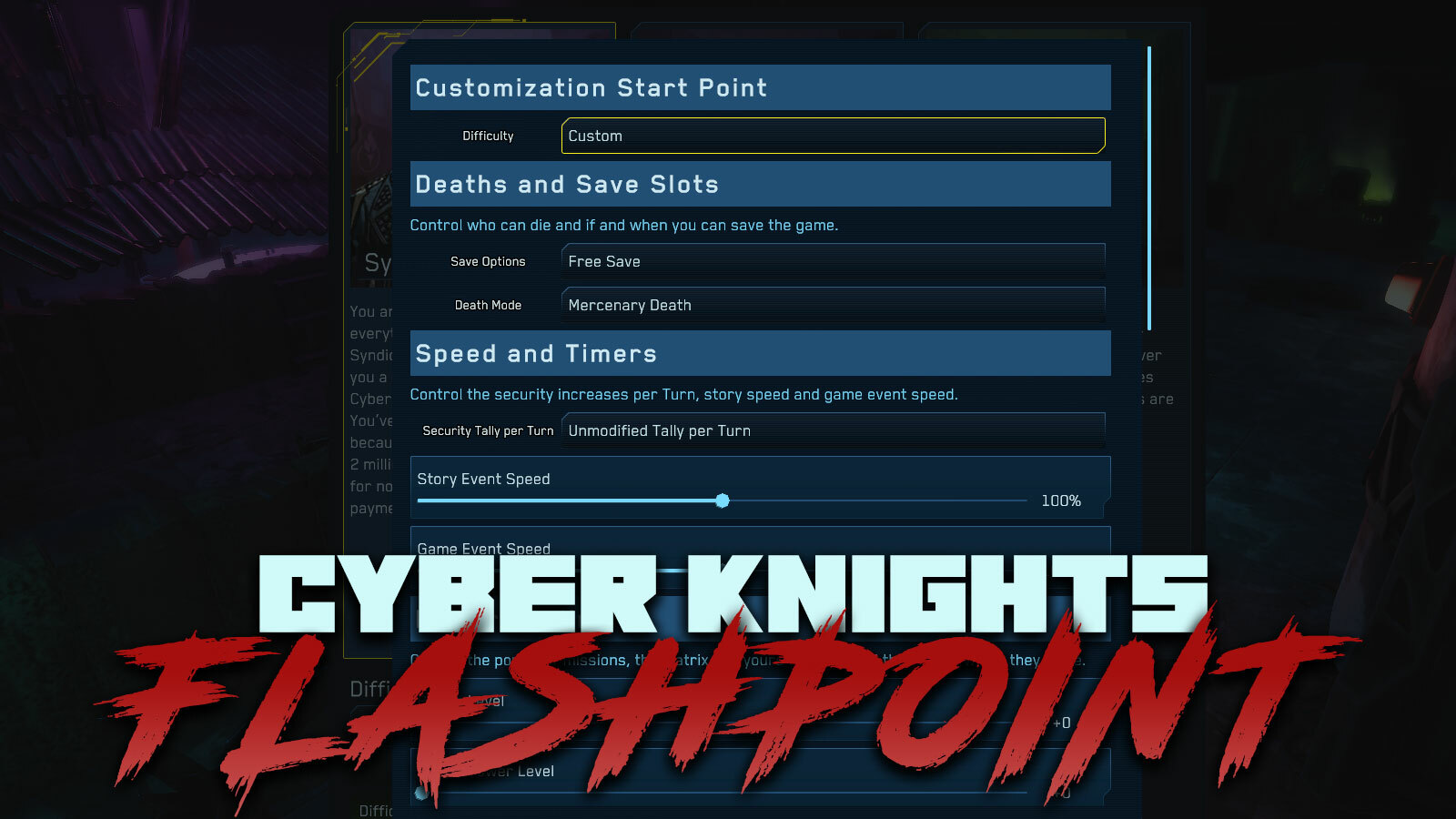
With Custom Difficulty, you can fine tune the 20 different settings that make up each default Difficulty setting. You can easily start with one -such as Hard - and then tune a few settings off Hard's baseline or you can go all out and change everything you please.
You can modify how / if the game makes automatic saves and if you can make manual saves. You can control who can die on missions (mercs, knights, no one!). You can tweak all the timers and game speeds, the power level of enemies, matrix and their HP pools. If you'd like to make more money or gain more or less XP, the Rewards section can help. You can tweak the default settings for resistances to negative traits, wounds and death. Finally, the economic difficulty settings let you adjust prices for 5 major categories in the game.
Twenty settings are a lot of settings! We recommend you lean on the major default categories and then change things where you know you want a different experience.
Remove Security Tally per Turn "Timer"
For players who do not like the pressure built into having the Sec AI increase the Security Tally every Turn, you can now remove this entirely with a new difficulty field Sec Tally Mod. With custom difficulty you can also slow the story events down massively if you're feeling overly pressured with the timing of the game's story.
If you don't want to turn of Sec Tally complete, you can set it 1 lower all the time or for the hardest difficulties, you can pop it up by +1 per Turn.
Flexible Difficulty - Change Any Time you want
Custom Difficulty is amazing during New Game but why stop there? During any point in play - from the Safehouse or during a Mission - you can now convert your game's difficulty to Flexible and then just customize it on the fly, as often as you like. Decide the timers are too much? Nuke 'em. Started on Hard but it's killing you? Fix it.
With flexible difficulty you can change any aspect of difficulty as often as you would like. Tweak this, tweak that, don't like it? Tweak it again!
We know this is also going to be very helpful from players who already started games who might want to adjust their starting difficulty. Maybe it wasn't what you expected or you dislike the security timers more than expected - tweak on, Knight.
There are some warnings that we need to post up front before you make the change.
This is a one way conversion from Hard or Custom or whatever to Flexible. You won't be able to take screenshots showing that your on Hard Difficulty anymore. That seems fair.
Not all changes can be retroactive. If you change Story Speed, story events that were already created and given deadlines will not slow down or speed up based on your change.
Difficulty is IN each individual saved game. So, if you've made previous manual saves, they will not be changed and any auto-saves like Retry Level or Restart Mission also do not have these changes (until you start a mission after the changes are committed). So, keep an eye on that!
Windowed, Borderless, Fullscreen
We've completed the work to add windowed, borderless and fullscreen options, and their paired resolution offerings, to the options menu in the game. Sorry we didn't have this before, glad to be able to add it with Update #28.
Proc-Gen: New Level, Many Fixes
There is a solid list of improvements for Proc-Gen here with Update #28. We've added a new level, using the mission map from Forward Op to the list of proc-gen missions, allowing you to Raid and Kill 3 in this new zone. More new maps are coming, but we wanted to get this online quickly to increase variation.
We've also redone how CPU Spike missions were working. Previously, the instant you spiked the CPU, the mission was over. Now, you can spike and stick around until the time runs out or you walk away to the blue glowing exit area.
From a balance standpoint, we've significantly tightened up the Max Turns you can take to complete the CPU Spike on these missions. They are 1-2 Turns shorter, putting extra pressure on your hacker to move quickly and leaving less time at the end for random looting.
Matrix Auto-Dump + Dumpshock gets Teeth
The new Auto-Dump feature of Matrix nodes puts some extra challenge and risks into sliding through the quantum networks. Incinerators, CPU and APU nodes now will all auto-dump your hacker if your Turn is ended in the node. Be careful with your AP, watching out for Traps and other IC that might prevent you from getting out quickly enough - you may end up kicked to the Hard Disconnect and end up with Dumpshock.
Speaking of Dumpshock - with Update #28 it has grown some teeth! It now nerfs Move Speed and Wound Res both at -25%. We removed its Accuracy Debuff because that's never fun.
Owned and Ready to Sell Market Filters
Update #28 adds 2 new helpful market filters - Owned and Can Sell. The Owned filter converts the market (which is really a list of what you can buy and notes about what you own in that list) to a full Invetory, just showing everything you own. Can Sell does the same but filters this list down to items which are truly ready for sale. If you have Pistol Silencers 5/5 (5 used and 5 owned) then this will not appear in your Can Sell while your RapidFire 1/2 (1 held, 2 owned) will, making Can Sell a quick way to find things to sling to your Contacts without having to look through the list yourself.
Cybersword Talents & Skill Tree
We unwound some issues with the Cybersword's Slashslide Talent that could result in an odd teleport after it was used. We've also fixed issues with Talent upgrades for Aegis and Deflection Field not lining up and making sense.
More, actually a good deal more - check out the full release notes!
v1.2.3 - 12/11/2023 - Change any aspect of your game's difficulty you want with over XX options in Custom Difficulty - Disable Timers by modifying Security Tally per Turn and Story Speed in custom difficulty - Adjust your game's Difficulty during playing from the Mission or Safehouse menu (only some changes take immediate effect) - Added options for Fullscreen, Borderless and Windowed mode and accompanying Resolution into game options - Matrix CPU, APU and Incinerators all Auto-Dump if Hacker ends turn in the node, causing an immediate Hard Disconnect - Upgraded Matrix Dumpshock Debuff to be -25% Wound Res, -25% Move Speed, -10% Evasion, -1 AP - If teleported in Matrix by a Blackhole, game now centers on and selects your new node position - Fixed bug with after-Slashslide teleport, Slashslide not hitting 2nd or 3rd enemies - Fixed issues with and improved Cybersword's Aegis Talent upgrades - more invulnerable tokens, bonus Evasion - Fixed issues with and improved Cybersword's Deflection Field Talent upgrades - adding range options - Fixing Item Class "ECM Tech" is "Hi-Tech", fixed IO-Charger to be Hi-Tech and Patch X-Kit to be Medical - Easy to spot and use "Remove" option now available for all optional appearance categories - Added new market filter "Owned" which shows everything you own not mixed in with what is being sold by contacts - Added new market filter "Can Sell" which shows only what is ready to sell to Contacts right now - For finger convenience, H now toggles pop up in class tree (close and open) - Extended duration for Forward Op mission - Fixed issues with over-aggressive graying out of Talents and prevent previewing range circles - Fixed issue in safehouse timeline that could cause a crash when starting an interaction with timeline running
- For Proc Gen: - Added additional mission map (from "Forward Op") to map rotation for proc-gen - new maps and new objectives coming soon (but not at same times as other Major Milestones lol) - Rebuilt how Spike CPU missions work so that you can hang around after spiking the CPU for extra looting - Tightened the timelines on Spike CPU missions, dropping 1-2 Turns - Fixed Raid proc-gen missions incorrectly stating they were against Warner-Braun when they are against a gang instead - Improved sewer levels high walls beyond play area and the camera bounding areas - Fixed props issues with trashbags and desks in new proc-gen mission maps - Fixed issue with desk corners you could walk through in new proc-gen mission maps - Fixed odd glowing zones appearing on the bridges when they were crossed in proc-gen missions - Fixed typos in Treaty of '31 starting Legwork ("Blur is snooping around Blur")
Major Milestone "ENDLESS" (Proc-Gen + Story Eras)
The ENDLESS major milestone rolls out the proc-gen mission feature and the first wave of content types that it can create to give you freedom to keep playing as you please. In addition, ENDLESS adds the first Story Era for Cyber Knights - a major city-wide event that sets up stories, proc-gen premises, new contacts and more. The proc-gen system also forced a lot of good updates to other guts in the game which has resulted in some exciting changes for levels like Loophole Heist, Haven Smokeout and Forward Op -- more fun, more variation. And of course, we fixed a towering mountain of small bugs and QoL issues.
We're a little behind on the roadmap timing, but it was worth the wait to get proc-gen right. You can read a full review of how we have approached proc-gen below, but here the tldr; we've released the proc-gen feature (the game can make randomized content within a set of rules) and the first set of content. The content and rules are still limited, so you'll find repetition if you play enough proc-gen missions. Our next step for proc-gen is to rapidly expand the content and rule set until you repetition fades away. We will not delay, expect more content and rules every single week.
If you're enjoying the pace of updates and improvements to the game, please remember to leave a review!
Proc-Gen Missions
Proc-gen is a pretty wide open term - while we're all talking about the same concept (RNG, rules, content blocks, combining, endless play) the implementation from game to game is always different. For Cyber Knights, proc-gen means creating unique, replayable and repeatable missions that are directly tied to your contacts and current world events in New Boston.
The major milestone ENDLESS and Update #27 complete the major task of creating a fully functioning set of rules and content that can be recombined into many different mission experiences. The Cyber Knight's system is capable of generating, randomizing and combining elements including:
Individual mission maps (currently limited to 3 maps)
Starting positions, exit options, enemy locations and patrol routes
Missions stage structure (pending, but more complex missions like Carnivore will be created)
Objectives (currently limited to raids, assassinations and CPU Spiking hacks)
Employer, Enemy and friendly factions
Matrix hosts connected to terminals
Loot from lootboxes and matrix downloads
Leverage, Special Rewards
A key point here is that we are not generating mission maps. Our goal has always been lovingly hand crafted maps and that is the path we'll continue. So our goal is to ensure that map which you played for one objective, start point, enemy, door, lootbox and terminal layout can play very differently if you play it with another objective, against a different faction set of enemies, starting somewhere else, have different exit options, different secondary objectives and as many different wrinkles as proc-gen can create.
While the catalog of options is still small today (3 maps + hacking map) and objectives are limited (2 total today), we can't wait to see the pool grow every week and the possible repetition fade out of the system as we march toward 100 maps and 15+ objective types. While the catalogs of possible options and combinations are smaller, the final resulting options are limited today. But, as any multiplier category of rules or content grows within the set, the resulting possibilities will grow very quickly. The most important areas of growth will be level maps and new objective types. Wo while we may be here (^) today, we're excited for the steady stream of updates to include constant adds to proc-gen until we get here - and then we'll go ahead an update until that looks small too.
Needing More and More
Proc-gen will put a lot of pressure on every other system in the game. We will work hard to meet that pressure but it is impossible we will keep up. For example, you're going to have money now - a steady income if you want it - but there aren't going to be enough guns to spend your money on. Your team is going to level up, and you'll find that for many factions, the enemies aren't ready for you past Power Level 4. And on and on.
The answer is clearly updates. So we will be serving that dish hot.
Story Eras
Story Eras are major events that have lasting effect on the game's story and simulation elements. Things are changing in the world of 2231 - big things - and they majorly impact the world, New Boston, the megacorps and the underworld. As these events unfold, you'll often have an opportunity to be involved in how they unfold or how you navigate the aftermath or exploit the opportunities. Such events always create situations in which Cyber Knights and their covert op teams are needed.
Update #27 opens the door to the first Story Era - the Treaty of '31. We won't go into depth or spoil it. To be honest, the feature we focused on adding here was proc-gen missions, but the Story Eras (as there can be more than one running at a time) set the context and premise of many of your proc-gen missions. So, this first Era has some of its proc-gen premises added but is light on story and missions. The job of the next few weeks will be to fill it in both regards.
New Era Content
New Eras will introduce new factions, new contact types, new weapons, story, recruit opportunities and always new proc-gen premises. The types of proc-gen missions you were encountering - including their objectives, the employer and the targets - will changes as the Eras change. Eras are key establishing the living and dynamic nature of the city in Cyber Knights, and a lot of that is in the new things each Era can bring to the table or unleash upon New Boston.
For example, with the Treaty of '31, we've added 8 new types of Contact Traits including Influential, Uninspiring, Easy to Please, Guarded, Vengeful, Detail Oriented, Hard as a Nail and Weak Organization. Contact Traits can now impact new types of things that they did not before, like speed of Influence gain for Contacts, what types of services they are interested in adding or upgrading, their ability to resist attempts on their life via Death Res and more. Also, the new event has spurred the addition of new Contact Types with unique service offerings: Corporate VP, Dockmaster, Spec Ops CO.
Haven Smokeout, Loophole Heist, Forward Op Improvements
The new proc-gen system has necessitated the creation of a number of new and exciting authoring tools for levels and their myriad of challenges. These improvements have been rolled out first to this trio of missions and we're excited to see them spreading to every mission in the game. For all 3 levels, we've improved the balance, placement and counts of enemies from play to play. Head counts are better tuned up, placement and patrol paths are tightened and (like proc-gen) you won't find that everything plays the same every time -- enemies, objectives and patrol paths are now in flux -- so keep your wits about you and don't lean on old memories to get you through.
Loophole Heist level 1 has a new starting point, making it a more exciting and dynamic level. We also fixed an issue with an enemy patrol being under the floor.
Merc Profile Access
When prepping to deploy for a mission now, you can use a newly added and very helpful button to jump directly to a Merc's Profile. From there you can fix loadout issues, double check a Wound or complete any training you need. Upon hitting ESC, you'll return to the mission deploy screen, ready to dive back in again.
Other Fixes
The memory leak in Appearance had persisted, we had fixed 50% of the leak but missed the other half. Now it should be 100% water-sealed. Aitana will no longer appear unexpectedly in the tutorial if you reload the turn or level.
The ESC button is working again from the Matrix. We've removed the floating, disconnected nodes in Carnivore hosts.
Weapon Mods like Rapidshot Mecha now correctly list that they reduce AP for reloading by -1. We've removed some unnamed and unused filters from the end of the weapon mod's filter list.
v1.2.1 - 12/9/2023
- Proc-gen system can now create missions for your team continuously - Proc-gen has limited permutations now but will continually expand through Early Access - Proc-gen missions currently include Raid (free looting), CPU Spikes (hack-only) and Kill 3 (taking out military targets) objectives (key expansion point) - Proc-gen missions draw on a pool of 3 mission maps (key expansion point) - Introducing the first Story Era - a major event and the aftermath in New Boston - Added 8 new Contact Traits: Influential, Uninspiring, Easy to Please, Guarded, Vengeful, Detail Oriented, Hard as a Nail, Weak Organization - Added 3 new Contact Types: Corporate VP, Dockmaster, Spec Ops CO - Added helpful "Merc Profile" button to mission deployment screen to make quick changes before deploy - Improved balance, enemy counts, positions and level variations for Haven Smokeout job - Fixed mission tagging on Haven Smokeout to indicate that there is a Hacking opportunities for looting - Adjusted starting position, enemy counts and positions for Loophole Heist stage 1 - Fixed bug where new Soldier Aitana could appear in the tutorial accidentally on reload - Fixed issue where game menu would not open during Matrix Hack when hitting ESC or (B) (default) - Fixed issues with weapon mods that decrease or increase Reload AP cost (like Rapidshot Mecha) - Fixed issue with display of Security Tally, not Security Level, on Save Slots - Fixed issues with disconnected nodes in Carnivore matrix hosts - Fixed issues with default host names appearing in some missions - Fixed memory leak in changing character appearance, sorry for crashes! - Fixed broken string in movement alerts for cameras and overwatch - Removed 2 unnamed Weapon Mod filters at the end of market filter - Fixed bug with enemy ending up underground in Loophole Heist level 1
Update #26: Shotclock
Update #26 rolls out the final movement alert type for Overwatch threat ("You will be shot!" -- that's pretty important!), resolves some issues with the newly updated dialog character renderer, improves marketing and inventory sorting options, fixes different bugs with 3 types of high power Matrix nodes and improves the appearance options for beards and specifically for the hacker's beard. Update #26 is a great set of fixes and improvements, getting us ready for the next big Update --
We've been circling it for a while but finally at the point we can say "Update #27 is Proc-Gen"!
If you're enjoying the pace of updates or the steady progress we're making polishing and improving Cyber Knights: Flashpoint, we hope you'll leave a review!
Overwatch Alerts
With Update #26, Overwatch alerts now joins the bevy of other useful alerts for players. "You will be shot!" will be displayed along with the Overwatch icon if you're going to run out into an enemy's Overwatch and they will be able to see you at that position. This is extra helpful as (for the moment at least, boooo!) the Overwatch onscreen display does not correctly take line of sight into account and so it can be hard to see where you are really at risk if you're able to move behind sight-blocking cover or walls. This alert will pinpoint that exact spot.
Dialog Sizing Oddities
The new dialog character updates in Update #25 were a huge step forward, fixing such a long list of bugs but they didn't escape the lab without their own bugs. There are a number of situations, characters and screen resolutions that were causing odd sizing issues with one or the other character. Sometimes one character was so big you could barely see their abdomen on screen. Other times, one characters was just 8% larger than the other one. We've resolved a big class of miscalculation math and things should now have stabilized here. If you see any issues, please do report!
Power Level and Rarity Sorting
The sorting of items for "Weak and Common" and "Rare and Powerful" was missing the correct comparison for Power Level, so the results were always a big jumble. Both sorts are now fixed, first comparing Power Level and then, if the Power Levels are the same, the Rarity is compared next to sort within the PL group. Now the results read very nicely and the sort is quickly helpful to find the best stuff to use or the worst stuff to sell, for example.
Matrix Node Fixes
A number of new Matrix node types have trickled into the game over the last 10 updates -- the Data Fortress, Manufacturing Vault and Financial Fortress. Each is a hardened version of its less cousin, such as Data Warehouse. The IC spawning there are generally more dangerous and Security Tally cost of operating in these nodes is higher. We've fixed three bugs with these node types in Update #26 - some Data Fortresses had no files; some Manufacturing Vaults had no IC and some Financial Vaults caused extreme Security Tally to be added on to the cost of every action.
We also fixed a minor bug where sometimes the IC icons over the map would not update correctly, with some IC sticking around after death or not flipping to disabled directly after the action.
Appearance Updates
For a while, Dade (or your customized version of the hacker) has been stuck with a beard that you couldn't control or remove. You can recolor or remove the beard just like any other beard. This beard isn't exactly where we want it to be in terms of texture quality, but we hope to improve it and it is the model of adding lots of short shave type beards like basic 5'oclock shadow.
To assist with this change, we also now allow you to modify beard (and therefore hair) color directly from the beard appearance options instead of always having to use the hair's color selector.
We've also fixed an issue where changing an appearance option was setting the character's rotation which was just plain annoying when you're trying to get a cool look!
Finally, more outfits have their over shiny arms and hands corrected. There are a few more to fix, and each one takes a chunk of time. We will get to full set soon.
v1.1.21 - 12/5/2023
- Improved alerts system to include "You will be show!" alerts when entering enemy Overwatch - Fixed issues with mismatched size between characters in dialogs at times - Sorting in market for "Common and Weak" or "Rare and Powerful" is now correct order (sort by Power Level > Rarity) - Fixed UI issue where you could force incorrect weapon mods onto weapons - Opening the timeline history popup correctly stops the Timeline - Fixed matrix issue where sometimes IC icons over the map would not update after action - Fixed issue where new node type Data Fortress could be without files - Fixed issue where new node type Manufacturing Vault had not IC - Fixed issue where new node type Financial Fortress had very high security tally - Can now control color of beard directly from beard selection instead of having to use hair - Fixed issues with Dade's beard, it can now be removed or changed, can be added to other characters too - Fixed issue with changing appearance resetting character rotation annoyingly - Fixed issue with new game keybindings disappearing after exiting game - Improved consistency of icon use for Program Size throughout market and Deck Mgmt - Improved some outfits with still overly shiny hands or arms - Thanks for all the story and typo F10s - tons fixed!
Update #25: New First Alert Systems!
Update #25 is here and it's a huge upgrade to the alert system (previously "You will be heard" but now majorly expanded), immediate and easy access to exactly which enemy agents will hear an attack from any give location, a revamp of the Injury Time math, a rebuild of the character dialog to address a ton of nagging issues and improve light and more more more.
This is perhaps one of the biggest QoL updates we've released yet and we hope you find it helpful!
If you're enjoying the pace of updates and improvements, please consider leaving a review and sharing the game with a friend.
We've slipped on our posted roadmap schedule, missing November with Proc-Gen but that milestone, and Custom Difficulty are both circling, very close now.
Movement Alerts
Whenever you are considering a move, you can now see a new set of alerts. Joining the previously available alert for "You will be heard" we now offer "You may be seen" and "Camera will spot you". This new layer of details - including exactly where in your move path you'll hit the issue - makes it much easier to make movement decisions without worrying about checking every guard in the area against your path. In the case where you are going to be spotted or heard by an enemy agent, a yellow icon appears under their hover now, making it clearly exactly who-will-what. This is a great upgrade for the noise system which needed this before and is just as useful for the new vision alert.
Overwatch is pending some finalized code and testing but will join the alert set soon with "You will be shot!"
Who Will Hear an Attack?
Update #25 now exposes exactly which enemies will hear your attack with a new yellow under-hover icon. The upgraded icon also appears in the bottom left of the screen with your weapon, how many enemies will hear your attack (from the current position or from your set movement destination). This exposes a very useful set of details very quickly as you play and can help you make faster and more accurate tactical decisions about when and where to make your attacks. In addition to knowing the number, you can now easily see exactly who as you drag the movement destination around and the yellow alerts come and go under specific enemies. Aitana is just around the corner from these two with her UAR primed - they're going to hear it, but not sure it is going to matter.
Better Injury Time Calculations
We've taken a moment to revamp the calculations used to determine how much Injury Time you have in the safehouse after taking hits.
First off, if a hit is less than 20% of your max HP, it now can never cause any Injury Time. This is a good starting point as grazing hits aren't going to cost you. Once you're over 20%, the Injury Time is going to scale pretty directly based on Damage and % of your max HP. This is a big help in making the injury time feel right - take a big hit, get more time. There was too much RNG in the old system, and if the dice fell the wrong way, even a small hit could end up with more Injury Time than a big hit that rolled low.
In addition, any time you get smacked with a Critical Hit or get knocked to Bleeding Out status, you'll get an elevated Injury Time roll, but it is still based on the damage caused compared to your max HP.
Spiking Requires Scan 2/2
We've improved the hover on the button for Spiking CPU and APU to include an important rules clarification. To Spike, you must have destroyed all the IC with an Attack program and the Scan Level must be 2/2. We'll keep working to improve this but the hover at least can now point you in the right direction!
Dialog Character Revamp
With Update #25, we've made some important changes to the rendering of characters during dialog. We've taken the time to tune up the lighting stage for the characters while not making any huge changes to the setup.
However, the underlying change of rendering technique resolves a lot of issues that were cropping up with the system. in short, we no longer render the characters with the main, perspective camera which fixes issues like:
No longer rendered by a perspective camera, so they no longer start to look stretched out on wider screens.
It is impossible for characters to clip into level geometry sometimes.
If the main mission camera takes on odd rotations, the characters in dialog are not negatively effected.
The characters are no longer affected by level lighting, which avoids any scenarios where their lighting was really out of band.
Improved Combat / Matrix Logs
With Update #25, we've improved the logging for regular missions and hacking. They now have a bit more space between every line and have stopped truncating log lines so that you aren't losing out on half the valuable data. Thanks to the players who F10'd this, it's a nice incremental improvement with more to come.
BioScan Field Fix
We fixed a bug with the BioScan Field security device where it would still cause a Tally increase and post security events even after you disabled it by hacking. That's a painful kick in the butt for your hacker who worked hard to silence that thing. Now fixed!
v1.1.19 - 12/1/2023
- Improved alerts system matching the "You will be heard" alerted - "You may be seen" warning when you are crossing into a guard's line of sight - "Camera will spot you" warning when you cross into a Camera or Radar Array line of sight - Enemies who will hear this attack number on weapon in bottom left now matched by alert icon in enemy hover - Updated icon for "enemies who will hear this attack" to separate from "movement will be heard" icon - Improved injury time calculation based off damage (no injury for 20% or less, less random results, critical hits and high damage yield more injury time) - Fixed issue with Covering Fire 5th upgrade node having 2 effects, added new upgrade node - Fixed issue with BioScan Field still reporting to Sec AI even when disabled by hacking - Improved placement of mercs under their UI element while planning mission deployment - Improved combat and matrix log readability - Clarified Hacking CPU / APU Spike rules - Scan Level must be 2/2 and all IC Destroyed to Spike - Removed last few placeholder icons in character appearance - Removed confusing mentions of friendly fire in combat log when it really isn't - Fixed issues with many non-English characters like umlauts - Fixed issues with some narrator dialogs being oddly aligned to the right - Fixed issues with dialog characters sometimes clipping into geometry, feeling oddly squished, having odd lighting, being at odd rotations
Update #24: Attack Mega Blaster
Update #24 comes alive in just the last days of November with some important balancing changes for Matrix, sweeping improvements to the class tree icons and upgrades for clarity, better timeline calculations for healing wounds and injuries and level fixes as well. We're still gunning to get the first iteration of proc-gen out during November, so stay tuned for more soon!
If you're enjoying the pace of updates, please drop us a review and share the game with a friend!
Matrix IC HP Drop
With Update #24, we've made adjustments to the HP totals for Matrix IC of all kinds to help improve the Attack program meta within the game. You'll find that IC have lost HP across the board and more types can be single hit by an Attack program. As the Matrix Hosts and IC power levels increase, these totals will go up but the starting IC are now better in line with the starting Attack programs, making the entire experience -- and especially spiking the CPU -- less difficult and multi-turn.
Class Tree Upgrade
With Update #24, we've done a major sweep across the class trees to simplify and fix all upgrade icons and Talent quadrants for the upgrades. The icons are a bit larger and simpler and we've also used some automation to ensure that the icon always matches the effect (if its duration, the icon is duration). We've also applied similar automation to then putting the right pip in the right quadrant around the Talent on the main class tree so you can see what you've trained and also easily share your exact class build with a single screenshot through the preview screen.
Part of this process was to fix all of the Talent upgrades that incorrectly had 2 effects. In many cases, we've split these out into a new upgrade node entirely to maintain the same options, such as in Marker Sights, Glasswalker and others. In a few other places, we've just fixed mismatches or incorrect update data.
Safehouse Medical Treatment Time
After the last update where we added medical options to recover from your Wounds, there were a few mismatches in the time offered during the purchase process and the time that appeared on the timeline in the end. We've made the necessary adjustments to be sure the right time is shown and carried all the way through to the timeline.
Healing Wounds is notably still very cheap and very fast - so, get in there and get healed now!
Comparing Full Auto Weapons
We fixed an issue when comparing the Ballistic Damage of Full Auto weapons, the second weapon's damage was not filled in correctly.
Salvage Breakout Fixes
We've fixed a number of issues with the first level of Salvage Breakout. There was an odd truck you could walk through (now you can walk on it). And there were some ghost security devices that weren't visible but showed up only when you were trying to establish a target with your Talent. All resolved now.
v1.1.19 - 11/28/2023
- Improved calculation of IC Hit Points to buff Attack program strategies - Improved duration calculations for Wound Healing and Treatment contact services in safehouse - Improved look, scaling and simplicity of Talent upgrade icons in class trees - Corrected all icons for all Talent upgrades in all class trees - now fully correct - Fixed all pips surrounding Talent nodes in the trees to match buff/duration/range/charges upgrades - now fully correct - Fixed all Talent upgrade nodes that had 2 bonuses (buff + recharge rate) - Fixed 2 bonus issue for Talents including Centering, Red Dot, Covering Fire, Marker Sights - Adjusted upgrade balance for Marker Sights, Coordinated Charge, Glasswalker added new upgrade nodes - Fixed issue in comparing 2 weapons with Full Auto firing mode, second one's damage was blank - Fixed some cover and sight lines in Forward Op mission - Added correct descriptions for a number of keybindings like / and + etc - Fixed issue with truck you could walk through in Salvage Breakout - Fixed issue with strange invisible cameras in Salvage Breakout you could target with security talents - Fixed a heaping pile of typos
Save 20% + Update #23: Wound Healing Fire Sale!
Today we're rolling out Update #23 which includes the key feature to heal longterm Wounds that your characters accrue, improving the data shown when purchasing medical services of any kind, adding contact filtering, fixing a sneaky memory leak and more.
Because Proc-Gen will let you play forever, Wounds stepped in front of Proc-Gen as a priority. You'd play forever and slowly kill your groups with more and more Wounds. This update is giving you a chance to prep, buy down any Wounds you have and be ready for the next update -- the first wave of Proc-Gen missions.
If you're enjoying the pace of updates and constant improvement, please leave a review and share the game with a friend!
Healing Wounds
You can now pay for doctors to help resolve Wounds that have developed due to injuries. These long term Wounds are Traits, which can become worse on their own if untreated, eventually reaching Level 4 with major penalties. At first, they are minor and -- in isolation -- could be ignored for a while with the merc still pulling active duty.
Because these have been sneaking up on a lot of your groups and you've had no way to deal with them, we're running a fire sale on healing them. They are healing in about 2 days for about $6K. This will not be the longterm pricing or timeline but for now, we encourage you to get them healed quickly for cheap.
Healing Injuries / Wounds Timeline
We've also added specifics about the timelines for healing services to the offers in the purchasing pop up. Each contact is not only offering a unique price based on their Traits but also a unique timeline, so some are faster than others and now you can see that data with "$6K + 1d 6hrs". For example, you can now see that Doctor Shaduke's "Hack Saw" Trait makes him a faster, if more expensive, surgeon.
Contact Filtering
You can now filter Contacts by their status and their major faction group, like Street Gang or Syndicate. For status, you can currently filter on Known Contacts, Enemy Contacts and Dead Contacts. As the Contact meta and the importance of using these screens continues to improve, we'll be adding more filters to this now useful UI.
Memory Leak in Appearance Tab
There has been a memory leak in the appearance tab for a while. A huge thank you to the players who pointed it out and logged F10s about it and especially to @Sophismata on our Discord who provided the final clue to getting it fixed.
Also, in the appearance screen, we've fixed the hotkeys (A/D or right stick by default) so that they will continue to work to rotate your character even when focused on the face.
v1.1.15 - 11/24/2023
- Added advanced Wound Treatment from the roster - currently cheap and fast, get it while it is hot - Improved details in purchase offer for healing injuries to include time / discount %s - Contact filters by Faction type (milsec, megacorporate, etc) are now working - Rebalanced Contact Traits Face-Splice 1-4, Steady Hand 1-4 and Hack-Saw 1-4 to have more impact on price - Fixed memory leak in changing character appearance, sorry for crashes! - Fixed issue where hotkeys (right stick or A/D by default) were not rotating when face was focused
Save 20% + Update 22: Harbor Sludge
It's Update #22! We've done a lot of work in this update with targeting, targeting lines, best targets first and we've also fixed the "bodies disappear on reload" issue. Now, every bone and position of your slain enemies is remembered and restored dutifully.
If you're enjoying the pace of updates and how the game is improving, please remember to leave a review!
Before Proc-gen is ready, we just need to roll out healing wounds and then it is time!
Dead Bodies Visually Restored
First -- because this perhaps our most popular F10 still standing -- dead bodies now restore! When an enemy goes down, their dead body becomes a liability. Someone is eventually going to come looking for them. Up until Update #22, if you reloaded a saved in the middle of a mission, the dead bodies (specifically, the ragdolls) would not appear. However, the bodies were there, you could hover them and other enemy agents would still see them.
With Update #22, we've finally resolved this reload issue and dead bodies are now going to appear in every game you reload. If it's a pre-Update #22 game, you might see a lot of enemies flopping around for a second at the start of your reload, but it's all expected -- we just need to get those ragdolls into their final resting place so we can remember it for the next reload.
Thanks to everyone F10ing to make this a hot issue - fixed and ready for the next step, dragging bodies.
Best Target First!
With Update #22, when you select your attack Talent we will now sort the list of targets by the highest accuracy to lowest. Previously, we were selecting the nearest target which could result in targets that were out of sight, low % accuracy or just not what you might want as your best default. Now, your best shot is always presented first, so if you like it you can take it but if you need something else for the tactical situation, it is also very clear what type of best accuracy chance you're skipping on to take the harder shot.
Melee Weapon Targeting Oddities
With melee weapons there was a situation in which the "can attack" value in the bottom right corner would report a "1" but you'd be unable to attack the target. This mismatch in calculations has been resolved.
We've also fixed the issue where melee weapons could show a large number of gray lines to enemies when considering a movement destination, even if those enemies were out of sight.
Targeting Lines Update
If you switch weapons now, the targeting lines immediately update. This is really helpful, you can now test a movement destination and swap back and forth between your weapons without having to change the destination just to get the lines to update.
Sword Only Talents Gray Out
The sword-only Talents like Aegis and Deflection Field were not correctly graying out if you had a non-sword selected. These Talents now check this correctly and will indicate that they can't be used until you switch weapons.
Switch to Sprinting
We've seen a few players recently miss the idea that you can change your movement mode to Sneaking or Sprinting altogether. This needs better coverage in the tutorial, but we've updated the UI text to try to further highlight that option.
v1.1.13 - 11/23/2023
- Improved ordering of targets when selecting attack - highest accuracy now first - Dead bodies for characters and enemies now correctly restore on reload - Fixed issue where weapon numbers in corner would report a sword could attack but it really couldn't - Targeting sight lines (gray, blue, red) update immediately when switching weapons - Fixed issue with too many gray targeting sight lines when moving with melee weapon selected - Fixed issue where Talents that require swords (Deflection Field) were not graying out when using other weapons - Improved label for "Switch to Sneaking" and "Switch to Sprinting"
Save 20% + Update #21: Welcome Aitana!
Welcome the Steam Autumn Sale! Come right in, merc - a new quantum rider in your spine is 20% off. Just be sure to meet Dr. Eckman at the Aug-Clinic after hours. Surgery starts at 2 AM, your extract from the rooftop as a newly minted Cyber Knight is scheduled for 0300.
Now with Update #21, it is possible that the new Soldier, Aitana, (or your newly personalized and created character) will be waiting on the rooftop for your Knight. With this update, we've also made a big pass upgrading the Mission requirements to be clearer in all their many cases, fixed some nagging issues with the HUD and improved controller defaults and keybinding display around the appearance tab.
If you're enjoying the pace of updates and content, please consider leaving a review!
New Game Option: Aitana
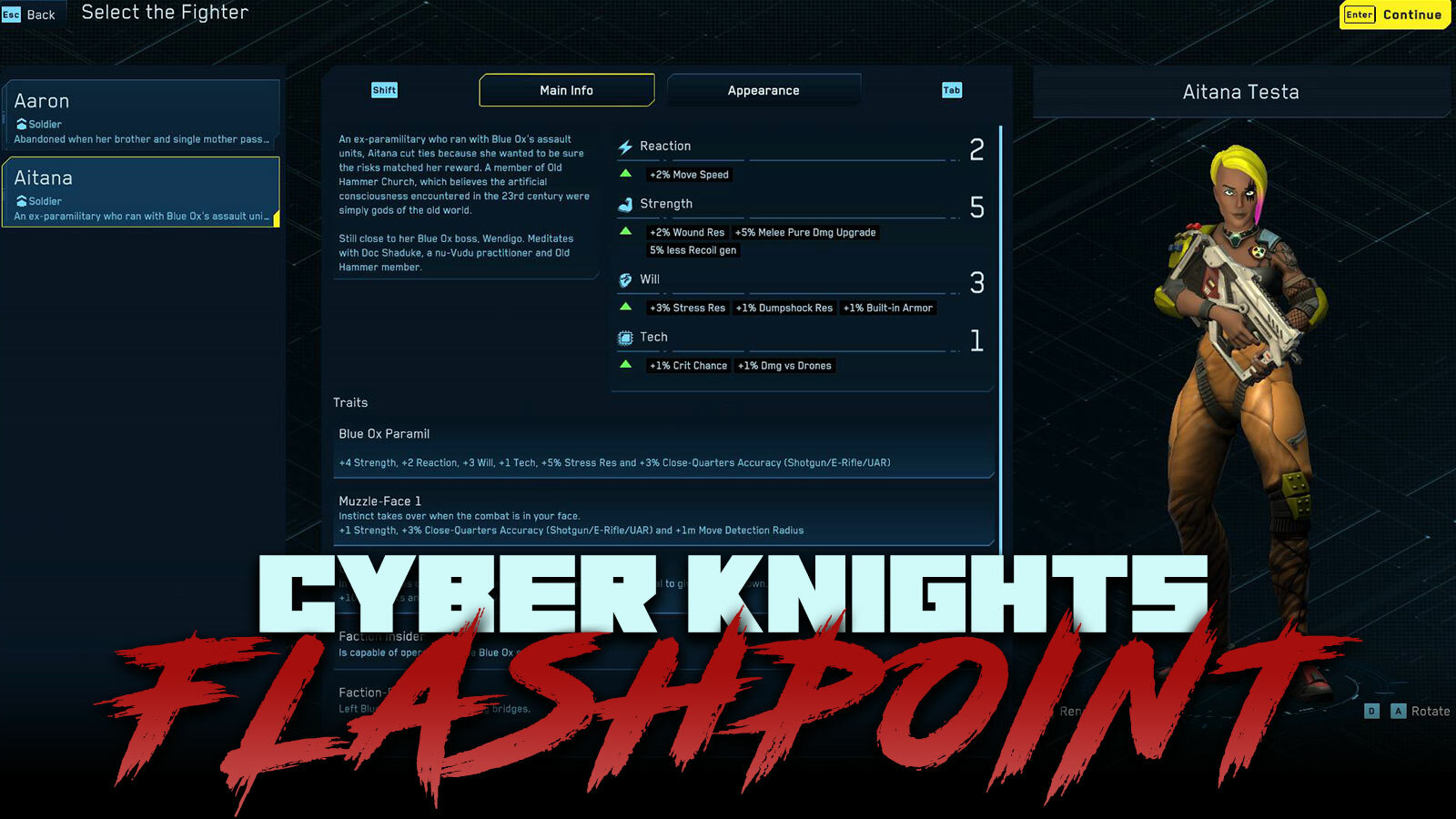
One of our goals for the new game team selection is to ensure that each class group has a number of compelling, cool and well setup characters for you to customize as your starting point. Each new character brings their own backstory (Aitana is an ex-Blue Ox striker), Traits (new Muzzle-Face Trait added here), unique tags (Aitana is a member of the Old Hammer Church, a small group of believers who recognize the entities that humans claim are the Artificial Consciousness they created in the 23rd century are actually timeless entities that humans have always known and were once named by a parade of old world civilizations as the old gods), unique Contacts (Aitana's has stayed close to her old Blue Ox Gang Boss and her beliefs have led her to be friends with Doc Shaduke, a street doc and Old Hammer Church member as well) and their own starting equipment (Aitana can lay down some devastating Full Auto punishment on the rooftop with her UAR).
So, Aitana (or whoever you create) comes from a stranger and more spiritual underside of New Boston than you've encountered with other characters. Her presence, unique Tags and Contact connections will feed into different story expressions than Aaron, with his more straightforward milsec connections and mother who might want him dead.
Down the line in the roadmap, we'll be letting you pick Traits for them as well and we are in discussions about stat buys for your Attributes too. We're going to keep working on this new game experience until it is overflowing with awesome options.
Mission Requirements Get Simpler
There are 3 prevalent types of mission requirements that show up in missions today -- having the right number of mercs for the job, bringing a merc with a specific class (such as Cyber Knight or Hacker) and bringing a specific character (such as Emille, etc).
Before, these were all a bit confusing. Sometimes the requirement (like 4/4 mercs) would disappear as soon as it was satisfied. In multiple missions, the text for the specific character required didn't have the character's name. Other times, we were just too wordy for our own good.
We've now resolved all of these cases to use simple, clear, single items. If a Knight is required, it says "Knight" and indicates if you've got one going along with a checkmark. If you need Zasha, well - it jus says "Zasha". And the merc counter now is just always there be it 0/4, 2/4, 4/4 or 7/4.
Fixing HUD / Talent Display
With Update #21, we've fixed two minor issues that crept into the HUD. First, an odd X was appearing at the center of every Talent targeting element. This wasn't needed for all sorts of Talents, so it is now correctly hidden. Those Talents that target a specific point on the floor and affect an area around that point use this X, such as Vanguard's Lure, Cyber Knight's Lookahead and Sniper's JTAC. Also, all types of grenades have a blast mark that appears in the same way - in the exact point on the floor that wlll be targeted.
Finally, there was a strange issue with the word "Button" appearing on screen after unpacking an Item like a medkit in the HUD. This is now resolved.
Rotating Character in Appearance / Mission Pop Up
For a little while, the rotation keybindings in appearance have shown "NO NO" instead of anything useful. This is now resolved (defaults to A/D) and the controller default is now nicely setup (right stick) as well. This also carries over into the character and enemy pop ups in the mission map, giving you easy access to rotation and the correct keybindings. Of course, you can also click and drag the model to spin it to your little cyber heart's content.
v1.1.11 - 11/23/2023
- Added additional Soldier character option to New Game - Aitana with Urban Assault, new Traits, Ex-Blue Ox Backstory & Contacts - Improved mission requirement display for merc count (4/4 Mercs), now always visible even when satisfied - Improved mission requirement display class requirement (Knight, Hacker) to be simpler and clearer - Fixed issues with mission requirement for specific character not correctly listing their name - Fixed odd floating text "Button" after browsing item backpack - Fixed confusing X appearing at the center of all Talent targeting - Fixed issues with unlisted keybindings in appearance customization screens for rotating character (click and drag, or use keybinds)
Save 20% on Update #20: 20 over 20
Update #20 is another big patch full of important fixes and improvements straight from the forges of your F10s! We're clearing the decks as best we can because we've got some exciting changes coming in over the weekend - more options in New Game and the next major roadmap milestone - the first wave of Proc-Gen Missions!
If you're enjoying the pace of improvements and the game itself - please leave a review and share Cyber Knights: Flashpoint with a friend.
Matrix IC Actions
We've taken a big pass through the text describing when IC take action and what the result is to help clear up lingering questions about the causes-and-effects during Matrix hacking. Programs that act whenever you take an action (such as loading a program, downloading a file, using an Attack program) state that clearly. Other programs that are triggered only by specific actions like loading a program are more clear about their trigger and resulting action. We've got a lot of work to do to increase the visibility of all the action around ICs and what they are doing as you take your actions (see the log, the details are there) but it needs to be much more visible.
Matrix Looting
For those of you hacking, the files, blueprints and accounts you've been stealing from Matrix hosts were not showing correctly in your mission victory screen. This is now resolved and they appear under a Matrix Downloads list so you can gloat over your ill-begotten riches.
In matrix land, we've further smoothed out zooming in and out on the map. And, we've fixed a bug where once you used the Show button to inspect a door or security devices in an RCU or SCU, the lines would stay on screen after you left hacking.
Splitting UARs
Urban Assault Rifles (shorter range, Full Auto focused) have slipped out of the bonus category for Assault weapons and joined the close-quarters combat bonus. Traits that used to give +3% Accuracy to Assault Rifles and Urban Assault Rifles are now only +3% Accuracy for ARS and instead, you can end up with +3% Accuracy for Close-Quarters Weapons (UAR/Shoguns/E-Rifles). This is letting us achieve a more interesting break in the weapon categories and Traits that are built around them.
Default Keybindings / Remove Controller
With this update we've fixed some issues that were plaguing customize keybindings and multiple controller support. You can now reset the defaults in each context (mission map / safehouse) nicely and get immediately back to the default settings Then tweak away!
Also, for anyone who has a controller plugged in that is giving the game a tough time like a pedal, you can now correctly remove the controllers from the registry on the keybinding screen.
Update #19: Urban Bindings
Update #19 rolls out at the end of this weekend in response to a lot of the F10s submitted by the players who are loose in the NBZ, running heists, keeping their head above the cutting line and building their legends. This quality of life and bug fix patch caps off a big weekend and preps us for the next major push - adding proc-gen missions.
If you're enjoying the pace of improvements, remember to leave a review!
New Defaults / Clear Options Button
We've been working on and testing a bundle of improvements to the keybindings and default controller setup and are excited to roll them out to players in Update #19.
For all keybindings in the safehouse, this update is going to clear and reset any custom bindings you've made and you'll need to rebind them. For the mission map set, the minor change we made will be applied unless you already customized the Toggle Mode key.
Here is a full of changes we made:
For controllers, left and right shoulder are now correctly bound to previous and next in lists, timeline and tab groups. These simply weren't bound before so they were showing as Q / E.
For keyboard, we've consolidated safehouse and mission map to work the same, and now TAB and Shift are used everywhere as next and previous (replacing Q/E in safehouse).
We've stopped using ALT as a hotkey, that was bad practice given ALT+Tab and other AL+Blah system hotkeys.
In the mission map, you now use C to Toggle Mode, such as sneak/sprint and also to toggle firing modes from full auto and back again.
In the safehouse, where ALT was used was always as the top level UI confirmation, so it has been switched to ENTER.
In New Game Appearance, this also helped remove a duplicate use of ALT (continue or remove optional cosmetic). Now continuing is ENTER by default and removing an optional cosmetic is H.
You can of course change any of these that you like through Options > Keybindings. In addition, until the Reset Default buttons in the Mission Map / Safehouse keybinding screens gets fully fixed and working, we've added a possibly helpful "Reset Preference" option at the bottom of the options screen. Clicking this and then restarting the game will clear and reset all of your keybindings as well as all other preferences.
Melee Weapon Fixes
With Update #19, we've corrected in the stat line for the Stunstick with better Damage and a new more powerful debuff for its Charged Attack. In addition, we've fixed the missing text for the E-Cutter Blade which can guarantee the shredding of one armor point with its Charged Attack.
Sorting Contacts
To help get a handle on your underworld network, we've added new sorting options. You can now see owes you the most Favors easily as well as who you have built up the most Trust with. In addition, you can check out a Contact's Power Level (their raw power) and their Influence (their power within their faction). As proc-gen comes online and more Contacts are making moves, shifting their stats and adjusting their services due to these changes, this will become even more useful.
We still need to push some of these stats (like Favors) up into the summary row so you don't have to check each Contact's detail. That'll be coming soon too.
Training Tree Upgrade
With Update #19 we've made a really nice update for mouse players, enabling you to click directly on the upgrade node of a Talent in the class tree without having to first click "Train" or "Upgrade". This may sound minor because its what you'd expect to be able to do, so now its nice and before it was frustrating with a mouse. Thanks to everyone F10'ing issues big and small and helping us improve and polish every aspect of the game.
In addition, we've fixed upgrade icons for Talents like Lure, Blend and Iron Grip to match the upgrade's effect. And finally, the issue where training an AOE boosting upgrade would break the display of the Talent's regular range is now fixed (train Lure +6m AOE would set Lure range to 6m... display only but bad!)
Edge Scroll in UI
We received enough F10s about wanting to edge scroll even when there is a UI element that we adjusted this feature to work just that way. If you're feeling like it shouldn't let us know and it's probably time for an option.
v1.1.7 - 11/19/2023
- Improved default keyboard / controller bindings for safehouse, dialog, appearance screens - remove ALT, cleaned up overlaps, better controller bindings - Added Clear Preferences button at bottom of options list - Added sorting Contacts by Favors, Power Level, Influence and Trust - Improved click-ability of class training tree - now click directly on the upgrade to focus on it - Fixed Power Level 2 Stunstick to have correct stats and unique debuff on Charged Attack - Fixed missing Charged Attack description for E-Cutter Blade - Camera Edge scrolling now works even over UI elements when enabled - Fixed bug with market or cold storage incorrectly starting as empty first time loaded - Fixed bug where sometimes checking a Talent, then canceling it could cause AP to stop flashing - Fixed issues in class tree where training an upgrade that boosted AoE range would cause regular Range to decrease (display only) - Fixed issues with class tree icons for Lure, Blend, Iron Grip










 Part of this process was to fix all of the Talent upgrades that incorrectly had 2 effects. In many cases, we've split these out into a new upgrade node entirely to maintain the same options, such as in Marker Sights, Glasswalker and others. In a few other places, we've just fixed mismatches or incorrect update data.