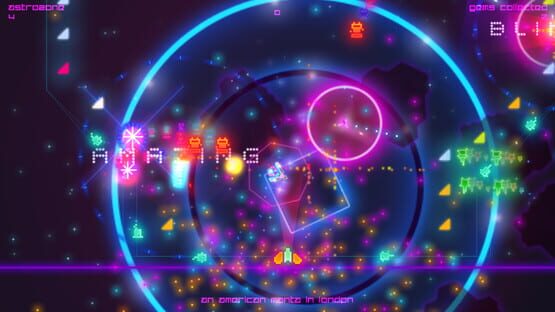

Death Ray Manta SE
Death Ray Manta: Price Drop
It's always been my intention to make good games at affordable prices, I hope this price drop makes it even more affordable to some.
Enjoy!
Small Update And Source Code
Where we're up to
Rather than just put a menu together and be done with, I've decided to move a lot of stuff into .ini files so that folks who want to tweak a bit more can do. Given how much I'm moving into those files, it's a not difficult work but definitely laborious and a fairly time consuming job so I'm pushing it out in increments as and when I get stuff done. Hopefully by the end of the week, folks should be able to tinker with everything I want to change then over the next few weeks I can put a menu together to throw some presets in there for those who just want to push a button and get on with things.
Also, as someone asked to be able to tweak keyboard controls just so they can actually play it, that's part the reason I pushed it out this way so that they can change that. I'll write a full guide up in the forum once I've got everything put together but in the meantime, there's a couple of tweaks already exposed that might benefit a couple of people. Please note that until I've rolled everything out, each update might run the risk of overwriting any changes to tweaks.ini so I wouldn't fiddle with much more at the moment.
Where are these files kept?
Anyway. If you navigate to Users/[name]/AppData/Local/ on your PC, there should be a folder labelled DRM_SteamTestVer3. Open that up and inside you'll find three files.
keyboard.ini / stuffthegamesaved.ini / tweaks.ini
If you need to change the direction keys, open up keyboard.ini and you'll find:
keyright="D"
keyleft="A"
keyup="W"
keydown="S"
Just change the letter in quotes for the one you want to move in that direction and you're set.
I wouldn't recommend playing with tweaks.ini just yet but if you need to set the game to open in a window on launch search for
windowedmode="0.000000"
and change the first zero to a 1 and save. If you need to change it back, just put a 0 in there.
Also, if you're on of the folks bothered by the big display box between stages, you can switch that off entirely by searching for
boxon=
Set it to 0 to turn the box off. Set it to 1 to turn it back on again.
If you mess anything up whilst fiddling, don't worry - you can just delete any of the .ini files and they'll regenerate when you start the game. Obviously if you remove stuffthegamesaved then you'll lose progress so try not to mess with that one, right? And yes, yes, nothing is encrypted so you can cheat and put your own score in there but why would you be such a daft head to do that? Unless you're trying to impress your mates or something then go right ahead just don't come running to me if they find out you've faked it.
Source Code
When DRM first went on sale with Humble, it was available with a snapshot of the source code. I've ummed and ahhed about how I wanted to distribute it afterwards given that things were complicated slightly by the code being in a separate tier from the game (not something I anticipated going in!).
Should it be DLC, should I charge for it, isn't that cloud nice over there? Were all questions that I mulled over. Should I even put it out there on Steam or elsewhere or...
Well, it's been 4 months now and the bundle is long gone, the source no longer available to anyone who would want to look through it and that's not really what I ever wanted. I don't have time to support the source code or guide folks through it in any way so I didn't want to charge for it. Adding it as DLC seemed like overkill and might give the idea that I can/will support it or offer advice on it. So. If you navigate to your games library, right click on DRM and browse local files, you can find the snapshot there.
It is an incomplete version of the game from a few weeks before launch and has no hooks into the music. You're welcome to use it to learn from or to make a game with. All the assets aside from the music (because I don't own that) are free for you to use in your own games as well. No credit is required if the game you make with it is free, I would appreciate one if you're trying to sell it. I'd also very much like it if you dropped me a line to let me know what you're making/what you've made with it if you do anything. That'd be nice. I'm happy to give what you're working on a kick round as well because I like showing off other folks work, y'know?
If you're worried about whether what you're doing is OK, just drop me a line and I'll happily have a chat to you. Just like I say, please don't ask me questions about how anything works because I'm snowed under!
You'll need a copy of GameMaker Studio to have a gander round it anyway and I look forward to seeing what you make.
Until next time, thanks once again for all the patience and support. It's appreciated. I'm very thankful for how nice everyone has been over the game, even when there's been things that they think could be better with it. You lot are the best.
Cheers!
--Rob
Where we're up to, then.
Right, so due to me hitting the deck with the flu for most of October and it bouncing back a few weeks back (huzzah!) I am *way* behind schedule.
I'm starting to feel a bit better so I guess whilst I'm vaguely up and on my feet, I best get some of that stuff done I'm supposed to be doing on this game then.
So to get me back into the swing of things I knocked out a small update tonight. It's nothing big or special but it was requested and a fairly easy thing to add in so why not, right? Someone asked for a way to just show the furthest room they'd gotten to rather than the high score and I figured, well, that'd help me get back looking into the code and there we go. Pressing Y on the gamepad or 1 on the keyboard whilst on the title screen switches the title screen high scores between the furthest astrozone reached or high score (that's astrozone+gems, rat fans)
Next up then is picking back up with the rest of the requests I've received. Before I can get on with them proper I need to code up a reasonable menu system so that's my next and most immediate thing to do. Once that's done, the rest sorta falls into place over a couple of afternoons of work. But as I say, I'm only *just* picking up from flu so we'll see. I was hoping to hold everything back for one update but I suspect banging out bits here and there when I can is the better option. It's not like any of this is especially difficult per se, it's just that everything is much more difficult when getting off the sofa is difficult.
So on the list to work through next:
Window/Full screen toggles that saves your preference.
Ability to change the amount of effects.
Opacity/type of text box that appears on screen. (this is the fiddliest as the box does a few other things but I've a few ideas)
SFX/Music toggles.
Better Steam Controller support (hopefully, anyway! This is a bit down the list because I haven't actually got a Steam Controller to play with yet but hopefully I can lay my mits on one soon. It's on the list, regardless.)
What I'd like to do once that's done:
Get some achievements in there.
Tweak a few effects to improve them (the player in/out could probably be a little bit better)
Possibly port to Mac/Linux. Both of these are pretty big maybes at the mo. Mac because I don't really have the money for a new Mac right now and Linux because I need the time to sit down and set up Linux and make sure everything is working ok in it. Given wonky health and the need to plough on with another game, mmmm no promises. I will see what I can do though.
Right. So once again thank you very much to everyone who's already bought a copy of the game, said nice things about it and all that jazz. It's very much appreciated and I'm glad folks have been enjoying it. I hear there's a sale on the horizon soon so if you've not taken a look, well, maybe it might be worth a gander in a small while?
Anyway! Onwards! As usual, any comments or queries please feel free to drop into the forum and leave your thoughts.
Death Ray Manta now with Steam Trading Cards and Badges
Please don't steal the duck.
As usual, if there's any problems or anything like that feel free to drop a nod in our forums and I'll have a gander.
Thanks again!
-Rob
Week One and here we are
I'll admit, I didn't expect such an overwhelmingly positive reaction to the game and that's been especially cheering, y'know? Thank you all.
Whilst I won't be expanding the game itself, there's still a fair bit of stuff around the edges that can be added in so I'm going to take a nice cruise around that. I've already put out a small update to deal with a few criticisms, it seemed a bit rubbish not to when they're faily easy fixes.
-Adjusted font to be more readable. Hopefully anyway.
-Windowed mode is now borderless (option for border/borderless in the next one if nothing goes wrong)
-Title screen now displays last session/best session scores. Needs tidying up but hey, it's there.
-slight adjustment to pause screen
The next update after this should, hopefully, add a menu in the game for folks to fiddle with window/full screen and volume stuff as well as making for a cleaner exit from the game. Not sure what's up after that, mind. We'll see how it goes.
I've had a quick chat with partner-in-crime Andy about tying the game into some Steam stuff, like achievements and that. We've got a few ideas to work through anyway.
And folks waiting for keys from old bundles, I have dropped a mail bundler way but who even knows the what and where of how long it's going to take from there, sorry.
Anyway, yeah. Thank you all for the support over the past week. It's been massively appreciated and I'm glad to see so many people enjoying my silly little videogame.
Death Ray Manta launches this week
Well, it looks like we're nearly there as after a fairly long-ish wait, Death Ray Manta launches this week. So hello!
It's only a little game but it's my game and I like it a lot. I hope you like it too. If you like what you see on this page, please feel free to add it to your wishlist and/or pop back later in the week to see what's diddling.
I've been very lucky to get to work with some talented folks as well as rope in half of the legendary Pickford Bros (Plok, Feud, Solar Jetman amongst other things) Ste Pickford to do the cover art. Thanks Ste. Thte. And with music by Mike Daw (Frutorious, Don't Die Mr Robot and more), it's been a real pleasure working on this little thing.
Top tip if you ever make a game: definitely, definitely work with people more talented than you. Totally do that.
Right, I've got a few things to do before I'm ready to launch so I'm going to go off and do them right now. If you need to get in touch for any reason, you can find all the useful links you'll ever need here:
http://futureofvideogames.co.uk/2015/09/14/death-ray-manta-se-launches-this-week/
Oh, please stop asking Ste for press stuff though He's not the droid you're looking for, I am. Thanks!
-Rob
A word about pricing and discounts for DRM:SE
Whilst we wait I've wrote up a fairly thorough explanation of both the pricing and bundling/discount plan I've got for Death Ray Manta. Hopefully it'll go some way to helping explain why I've made the choices I have and what folks can expect when the game launches and on.
In short, it’ll launch this week at an affordable price. It will be £2.79 full price and be discounted during sales when possible. I’m happy for it to appear in a Humble Bundle so that folks who want it very cheap can have it very cheap.
http://futureofvideogames.co.uk/2015/09/13/pricing-and-discount-policy/