B98 - Microshunter, DE Revamp, Vehicle Catalog, Better FPS and More Improvements
Hi everyone! We've just released build 98, our latest update bringing you a new vehicle, new features, numerous improvements and bug fixes!
BE2-260 Microshunter
The tiny, quirky new battery-electric shunter takes the spotlight! There's two practical functions to it: it's the first vehicle to utilize the all new electric powertrain simulation, and, once unlocked, it can be requested anywhere with comms radio for a small fee!
Microshunter isn't powerful enough to replace a regular locomotive, but it can still pull some load. That, combined with its size and ability to be requested, give it a unique advantage in many situations. Mind how you treat it though, as you'll need to service it, and even charge its battery occasionally.
DE Simulation Revamp
With this update we've also revamped (or rather finished) the diesel-electric powertrain simulation, now vastly more accurate when it comes to governors, generators, currents, voltages, circuitry, transitions, as well as failures from the all new traction motor overspeeding. DE locomotives have received a complete overhaul in terms of behavior and characteristics, with the highlights being:
DE2 – Increased load rating, improved cooling, heavier engine feel, rebalanced wear and tear DE6 – Completely new sounds, more accurate notch distribution, rebalanced wear and tear DE6 Slug - Now can be utilized from both ends and behaves differently
Vehicle Catalog
If you're curious what all those changes mean to the vehicles' performance, their various characteristics and even spawn locations are now listed in the new Vehicle Catalog handbook. The listing also features a series of scores designed to make easy practical comparisons. Generally, the catalog is intended to help players, whether new or experienced, decide what vehicle is best suited for a role they have in mind, with concise info.
What else is new?
Work Train Improvements
Some work trains, such as Microshunter and Slug, are now able to receive damage. The only way to repair them is manually and, being player-owned, they're not covered by insurance. Handcar and caboose are intentionally kept invincible, however, so you don't need to worry about those.
A neat new feature on the career manager allows you to see health status of the work trains you own. The machine also shows coordinates for all vehicles in the world. Additionally, handcar is now a free vehicle, available to request at all times, which is especially helpful when needing to move around in Realistic difficulty.
Adjustable Player Height on the Fly
You can now seamlessly adjust your height both in nonVR and VR. In nonVR you can do this with X+Mousewheel (adjusting your sitting position), and in VR by holding Triggers on both hands and lifting yourself up or down. Another novelty is the ability to save your favorite "cab" and "follow" camera positions.
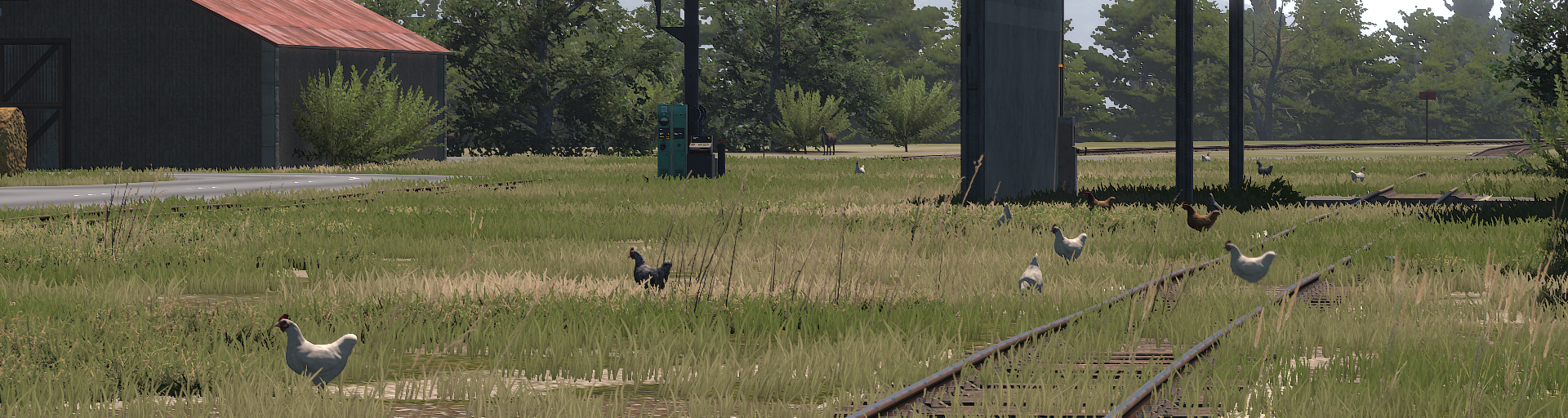
^ Open in a new tab, there's a train hiding there
Performance Improvements
We've put a lot of work into numerous CPU and GPU optimizations for this build. While the improvement may not be drastic for everyone, we've seen FPS rise up to 30% in certain conditions and hardware. Optimizations apply to both PC and VR players, and there's some more coming soon.
Revamped HTC Vive (wand) controls
We've completely reworked the Vive controls, also fixing the weird calibration angle introduced in B97. The new controls no longer block you from walking while holding an item in the left hand and are generally more consistent with all the other controller types. The exact mapping is listed in the changelog below.
Improved Tutorials
Vast improvements have been made to the career tutorial, locomotive tutorials and the manual. Whether you're a new player or a veteran, we strongly recommend you to complete the career tutorial again (in a temporary new session, if needed) – as it teaches of a lot of features and best practices that have been recently added to the game.
More
Apart from all this, numerous other improvements and bug fixes were made in this build. Manuals and various texts have also been updated too – and we'd like to say a big thank you to our dear beta testing and translation friends for being tremendously helpful with everything they do!
The work is ongoing on future updates too, such as on the new industries and cargo types coming in B99, but also further beyond.
Changelog:
Stability:
Made numerous CPU and GPU optimizations, increasing FPS up to 30% in some cases
This affects both VR and PC users
It depends on user hardware and game situation
Fixed a few game-breaking bugs involving tutorials
Fixed hovering over save slots causing jarring hiccups in VR
Fixed rare case where items or vehicles could fall through ground near tunnel entrances
Fixed save files sometimes able to appear in wrong sessions
Train Simulation:
Added BE2-260 Microshunter work train
Microshunter is a tiny locomotive with a special purpose
It’s an emergency tow vehicle, for when no proper locomotives are at hand
It needs to be unlocked before it can be used
The key costs $30k, and it’s found in Bob’s Garage (handcar is no longer there)
Once unlocked, Microshunter can be summoned via comms radio for $2500
It features the all new battery-electric powertrain, with an electric charger socket
Beware of Microshunter not being a great choice to do orders with
See vehicle catalog for more details
Revamped DE powertrain simulation
DE2 and DE6 now behave significantly closer to real-life counterparts
The change shows in notch operation, heat management, sound dynamics
TMs can now break apart if overspeeding
Simulating series and parallel circuitry, proper transitions
Improved governor simulation
TM wear now occurs from running at high temperature in addition to raw mileage
Rheostatic dynamic brake power now peaks at around 35 km/h
Slug can now share power from two locomotives, one at each end
Slug now has less of an impact on top speed
Modified DE6
All new engine sound
Reduced powertrain wear
Updated gauges to fit the new simulation
Swapped large DE6 breaker switch for electrics with a smaller one for TM
Modified DE2
Boosted DE2’s power to its former 400t glory
Reduced powertrain wear
Updated gauges to fit the new simulation
Modified DM3
Fixed DM3 getting frozen if money shifted
Added gear shifting pattern plaque next to the gear levers
Modified DH4
Dynamic brake no longer functions when the engine is off (no pump)
Added a variety of air compressor sounds
Fixed S282 loco and tender sometimes colliding at spawn, causing damage
Fixed wipers squeaking when there’s light rain, but windows are still wet
Gameplay
Added Vehicle Catalog handbook item
This item is always available and can be retrieved to inventory
It condensely lists stats of all motorized and work vehicles in the game, including:
Name, unit count, production years, license info, vehicle type and role(s)
Spawn locations and chance, ability to summon and cost
Load rating on flat, dry uphill and wet uphill track (conservative)
Dimensions, mass full and empty, pricing, wheel and coupler configuration
Vehicle power supply, transmission, brake and other features
Detailed system of scores and effects of vehicles
Turned handcar into a free vehicle
In career mode you can now spawn it for free right from the start
This helps reduce running/teleporting around in the Realistic difficulty preset
Began implementation of player-owned vehicles feature set
Work trains are now player-owned
This means insurance doesn’t cover their servicing - careful!
You can see owned vehicles listed under the “Owned Vehicles” career manager category
You can print them for cost specifics, just like with vehicle fees
Microshunter and Slug can get damaged and need servicing to stay functional
Handcar and Caboose are intentionally made to not acquire damage or need servicing
Player-owned vehicles can only be serviced manually, not adding up to copay
Added electric chargers
Located in towns’ and SM service points, for Microshunter charging
Fast travel now elapses game time, depending on distance traveled
Increased the UI window to show arrival time
Improved sleeping
Extended maximum sleeping duration option from 8 to to 10 hours
Modified the sleeping cooldown logic, now being less restrictive
Added Sleep Cooldown difficulty setting
In the Realistic preset the cooldown is 8h, in Standard 6h and in Comfort none
Added loose world map coordinates next to vehicle ID on career manager
Increased fire damage to vehicles x3
Removed work trains being available in sandbox if they're not unlocked in career
Added more day duration difficulty settings (3, 4, 6, 8 and 12 hours)
UX
Added sitting height adjustment in nonVR
Hold X and use mousewheel to adjust
Added ability to save favorite position in a vehicle
This is a position you’ll be placed into when dashing to a vehicle’s cab
First get into a comfortable position in a vehicle. Then:
In nonVR - in mouse mode (Alt) click the new “Save Camera Position” button
In VR - in inventory top-right corner, click the new “Save Camera Position” button
Favorite positions are saved per particular vehicle type, on the user level
Click the "Reset Camera Position" button to reset to default position
Improvements to mouse mode UI and external camera
Made mouse mode UI accessible by temp-holding Alt, instead of only toggle
Each camera type now has a separate button in mouse mode UI
Photo mode button now features outline when active
Same as for 1p view, you can now save/reset camera offset for the follow camera
Fixed being unable to shovel coal on S282 via driving UI, since B97
Fixed driving UI not showing amount of coal and water in tender properly
Fixed driving UI text being cut off
Increased size of non-alphabetic fonts in Driving UI, for improved clarity
Made improvements to manual and its UI
Added new articles and updated existing ones
Manual headlines now break into multiple lines when they don’t fit
Manual now displays text in tooltip area on mouseover, helps when truncated
Removed text justification for languages with long words (French, Dutch…)
Improvements to item interaction in nonVR
Prevented being able to grab items through walls and objects
Made held items adjust their position proportional to camera FOV
Improvements to nonVR input
Fixed mouse scroll not working on career manager in mouse mode with held item
Added a couple settings for inverting scrolling in Settings/Controls
Fixed “use” action being hardcoded to LMB (mouse0)
Inverted mouse-wheel interaction with loco remote coupler selector knob
Made turntable booths have a dash anchor, like locomotive cabs do
VR
Added seamless height adjustment in VR
Hold both Triggers and move hands vertically to lift/lower yourself
Revamped Vive wand controls and feel
Fixed controller calibration angle, bad since B97
It is now possible to walk while holding an item in left hand
Use Item is now done with Trigger, like on all other controllers
Item scrolling is now Trigger+Touchpad Left/Right, like on all other controllers
To drop an item press Trigger+Grip
Drastically improved hand shakiness and aiming smoothness feel
Fixed missing haptic feedback when interacting with levers in OculusVR mode
Added haptic feedback when aiming at a switch with comms radio
Fixed objects in peripheral vision popping on Oculus headsets
Fixed being unable to tele-interact with item-nested controls
Fixed a bug where item scrolling in VR could get stuck in a certain circumstance
Fixed being able to drop an item in VR with the hand still attached to it
Fixed bad interaction with some vehicle buttons/switches in VR
Improved interaction with fuel hose plug in VR
Cut number of notches on handcar hand crank to make VR haptic feedback less spammy
Shortened inventory long-press wait threshold
Graphics
Fixed sun sometimes shining through mountains when behind player at sundown
Fixed items in player’s home having bad lighting
Fixed glitched lighting on passenger car windows
Fixed rain droplets missing on High graphics setting (merged with Very High)
Fixed shadows being glitchy on the lowest quality setting
Fixed a rare visual glitch with pumpjacks being drawn behind background terrain
Fixed SteamVR loading screen being low-resolution, since B96
Misc
Fixed being able to “man vehicle” oneself into a locked military base
Fixed some short sounds not being affected by the doppler effect (e.g. horn pulse)
Fixed tunnel entrance structures not having collision with player and trains
Fixed CCUR1 license not saying that it removes rerail discount
Reduced career manager text size to fit long words in non-English languages
Fixed VR-intended inventory icons showing up in nonVR inventory, since B97
Fixed inventory hotbar being offset on ultrawide monitors
Middle mouse button is now bindable (as mouse2)
Increased size of weathercast posters
Added coal service marker to CM on world map
Fixed missing collision with harbor military base fence
Made boombox radio signal no longer getting audibly lossy in station offices already
Fixed pocketwatch ticking sound not being 3D when held in hand
Made pocketwatch alarm needle movement increment 12 min to align with minute marks
Numerous improvements to texts and translations
Many other small improvements
Tutorial
Reworked locomotive tutorials to be singular runs again, but with only a short drive
Integrated vehicle catalog, height adjustment, VR remote driving and handcar to career tutorial
No longer showing post-tutorial steps if session was started with tutorial disabled
Added all tutorial prompts to the Localization Test scene
Numerous tutorial improvements, cleanups and bug fixes
Thank you for reading, and we hope you'll enjoy this update!
Hey everyone! We've just released a massive update, bringing numerous new features and bug fixes to Derail Valley.
Domestic animals & new cars
To start off, we've added livestock, which can be found at the Farm industry. The animals are lively, moving around, making noises, and just generally contributing to the countryside atmosphere. Some of the smaller critters may even be seen crossing the tracks, but not to worry – they are immune to trains.
Along with the animals, we've added new types of cars and cargo to the game. The stock car type, pictured above, is now used to transport animals, which are visible inside and can even be heard reacting to physics forces and their health level. Another new vehicle is the short variant of the tank car, pictured below, used for milk transport.
Boxcars have been repurposed, now carrying new cargo types such as eggs, fruits and vegetables, but also wool and cotton, which now go to the Goods Factory. Hoppers too have been given a new cargo type – the sunflower seeds.
The cats' world domination has reached Derail Valley too, so naturally, you can now find strays in every city in the game. Unfortunately, you can't pick them up and carry around, although admittedly that would be very cool.
The systems developed to include these animals are the first step towards the implementation of passengers, pedestrians and wildlife to the game in the future.
Improved terrain lighting
There's now a new graphics setting called Terrain Lighting. If set to High it will notably improve the terrain shadowing with better accuracy and ambient occlusion, and it's not even significantly taxing on performance. If you still need the lighting to be the same as before, however, put the setting to Low.
VR "mouse mode"
We've added the equivalent of nonVR's mouse mode to VR. This is an accessibility feature, allowing players to aim at train controls with their hand and operate them remotely, without needing to physically reach for them. It's a substantial new way to play the game.
There is also a new difficulty setting called VR Remote Driving, which needs to be enabled for this feature to work. By default it is enabled in Comfort and Standard presets, but not in Realistic or existing custom ones.
In the future we plan to bring external camera and remote sign reading to VR too, along with the Driving UI, but that's not ready for this build yet. However, as a temporary measure, VR players do have access to the Weather Editor already, accessible via a button at the top-right corner of the inventory window.
More highlights!
The update also includes support for the new Quest 3 headset, vastly improved tutorial experience, as well as major bug fixes, such as disappearing money fix, DH4 tunnel item collision fix, objects in peripheral vision no longer disappearing on VR headsets with high FOV, and many, many more, as listed in the changelog below.
For players who have lost their in-game money due to a bug – please send us your save so we can fix it, allowing you to continue your session. You can do this either by emailing us to support@altfuture.gg or DM-ing @Manja on our Discord. The message should include:
- Your save file attached. (select your save in-game, then click the folder icon to get to it) - Amount of money you wish to have returned. (add up for the cost of lost items too)
Altfuture update – Behind the scenes
Since build 96 we were also able to focus on things other than strictly Derail Valley development, many of which were long due. Some of those involved:
- Creating a new kind of project management software, which drastically optimized our workflow. - Updating a lot of our code and management infrastructure. - Thoroughly planning out activities for the next year (more on that below). - Working on the Soundtrack remaster (roughly 75% done, currently). - Many other business activities that weren't in the spotlight. - Taking time to rest and recover.
We'd like to thank you all for your continual support and making it possible for us to take actions with Derail Valley with the long-term approach!
Entering the Foundation Part 4 era
With today's update we've entered the new era of Derail Valley development, the so called FP4, as per our roadmap. Rather than go for a single major update in the future, we have decided to introduce new industries, cargo types and cars in small batches, over the next year or so. There are currently 6 phases planned for this and today's farm update marks completion of the first!
The upcoming period is going to get quite exciting in terms of new content getting added, however note that the focus will be on the new industries, cars and cargo, but not yet on railway network updates or the industrial ecosystem gameplay. Those will come at the end of FP4, and will be announced much later.
Many more things are being in development already. Stay tuned!
Those were the most important bits, but there are many more fixes and improvements in this build. Please see the full changelog below. Next, we will also work on improving the translations of the newly added/modified text in the game along with our translation team.
Changelog:
Stability
Fixed rare bug where money, jobs and items could disappear in Realistic difficulty
If you were affected, please contact us - we can fix your save. Steps:
Email us at support@altfuture.gg with your save file attached
Tell us how much money you’d like added
Add up for the cost of lost items too, so you can repurchase them
We’ll bring back money to your save file and send it back to you
Fixed bug with items in trains hitting tunnel entrances and thus sometimes getting lost
Mainly DH4 was affected by pure luck, the issue was deep in general code
Fixed possibility of loading screen getting stuck if music ends before it finishes
Fixed loading screen freezing if “Pause minimized” is on and the game is out of focus
Fixed failing to import a save file if it has empty space in its filename
Fixed continue screen offering to continue the last career session after it’s been deleted
Potentially fixed AudioPluginOculusSpatializer.dll causing crash on load on old CPUs
Potentially fixed sessionData.json getting corrupted, with improved safeguarding
Industries & Cargo
Added new cargo types, originating in Farm
Eggs, milk, local fruits, vegetables and sunflower seeds now go to Food Factory
Cotton and Wool now go to Goods Factory
Added domestic animals
Various farm animals can now be found at the Farm industry
Cats can be found in every town
The animals move around and make sounds during the day
The small animals may cross the tracks sometimes and are immune to trains
Farm animals cargo is now visible inside stock cars
They audibly react to physics forces and health level
They lose health when underwater
Revised HAZMAT license tier ruleset
1st tier now allows flammable, asphyxiating and oxidizing cargo
2nd tier now allows explosive, corrosive and toxic cargo
3rd tier allows radioactive and biohazardous cargo, as before
Allowed different HAZMAT tiers to be combined into single orders
Fixed leaking flammable cargo not pooling the flammable liquid when burning
Rebalanced mass, price and damage sensitivity of many cargo types
Added new wooden fence type and mud pits to Farm
VR
Added “mouse mode” behavior equivalent to VR
Allows operating aimed levers and buttons remotely by holding Grip+Trigger
On HTC Vive controllers hold Trigger+TouchpadUp
Susceptible to the new “VR Remote Driving” difficulty setting (off in Realistic)
Added Weather Editor to VR
To toggle it click the cloud icon button in inventory header
Susceptible to the old “Weather Editor” difficulty setting
Fixed peripheral objects disappearing in the right eye on high FOV headsets (SteamVR)
Fixed sunshafts effect in VR sometimes showing as a vertical lines glitch
Simplified item storing; short-press stores item immediately without opening inventory
Fixed various issues with crouching in VR not working well
Improved calibration on all controller types for aim and hand alignment consistency
Fixed shakiness when aiming and holding large items (fix applies to SteamVR only)
Fixed carabiner slots being turned on by default (applies to new users only)
Graphics
Added new terrain shadow rendering system
It’s controlled by the new Terrain Lighting graphics setting. When set to High:
Terrain is lit more realistically when sun is at a shallow angle
Terrain has shadows even at a very high distance
Water surface receives terrain shadows
Sunset and sunrise shadows are smoother, more natural looking
There’s ambient occlusion, giving more depth to the air
Fixed reflections being glitched, as of B96
Fixed train headlights not having glare in daylight
Train Simulation
Added stock car
This is an old wooden cage car, used to transport livestock
It can be found in Farm and Food Factory, and comes in three colors
Added short tank car
This car is similar to the regular tanker, but shortened
It is currently used only for milk transport
It can be found in Farm and Food Factory, and has milk livery
Improvements to diesel vehicles
Fixed dynamic brake being able to get stuck when doing a DE6 + Slug combo
Improved DE6 engine bay looks when player is off-vehicle and the door is open
Fixed DH4 oil gauge warning lamp turning on too late
Fixed DH4 sand level lamp not blinking and sounding an alarm when very low
Fixed DM3 window having rain tilted opposite from air drag
Improvements to steam vehicles
Reduced S282’s abnormally high resistance to collision damage
Fixed misaligned valve gear with the S282A’s body
Fixed lubricator consumption getting multiplied twice by res. consumption setting
Improved VR interaction with some S060 and S282 locomotive controls
Made S282A cutoff position indicator lines white for improved visibility
Improved item and player collision precision on all vehicles
Made manually spawned vehicles have handbrake applied instead of cylinder pressure
Made fire from TMs cause fire damage to vehicles
Fixed wheels not turning on exploded locos
Fixed cab indicator lights not being visibly damaged on exploded locos
Fixed handcars having brakes be permanently applied in sandbox mode
Fixed caboose brake gauge not being calibrated well
Fixed the “auto-headlights” feature affecting unmanned vehicles
Fixed locomotive remote inverting headlight orientation if vehicle is in reverse
Fixed some headlight textures being mirrored on a few locomotives
Fixed brake cylinder release handle not working on autorack car, when used in VR
Increased volume of the DM3 compression brake sound
Simulation groundwork improvements:
Rewrote resource consump. propagation code (improved loco modularity)
Improved modularity for breaker configuration on locomotives
Rewrote how emission fees are calculated for steam engines (cleaner code)
Economy
Upped the fee tolerance to $100k at the upper limit (was $50k)
Fixed tender fees unable to be paid in a certain rare situation
Halved bonus time limit for shunting (was overly generous)
Misc
Tweaked rain to be a bit less common
Fixed SW turntable causing unexpected derailments if not nudged
Fixed issues with zooming and unzooming while in mouse mode
Weather editor settings are now getting saved
Fixed weather editor sliders for cloudiness and fog having wrong initial value
Fixed tutorial messages not working well in CJK languages
Fixed controls behaving weirdly when mouse-held on moving vehicles
Fixed being unable to walk through tunnel entrances in some situations
Fixed EOT Lanterns being able to become unretrievable and permanently lost
Fixed military base, player house and a few smaller props being white, as of B96
Made Within Reach controls have lower vertical range than horizontal (no roof driving)
Fixed external camera getting stuck on world boundaries
Fixed external camera not adhering to rain quality setting change
Fixed keyboard controls not working for some switches, breakers, etc. as of B96
Fixed prompt “Save changes to original [asset]?” doing opposite from chosen action
Fixed different users not being able to have different settings
Mouseovering items in inventory now shows their names and descriptions
Improved descriptions for all items, including cassettes
Fixed inventory buttons not having tooltips on mouseover
Fixed inventory hotbar being too large on ultrawide monitors
Fixed concrete steam coal tower model not fitting the coal particles position
Fixed being taken to wrong bed when going to sleep, in certain situations
Career manager license screen in sandbox mode is now listed as “unavailable”
Career shop items in sandbox mode are now listed as “unavailable” instead of “sold out”
Fixed the moon being tilted 90 degrees
Fixed the VR “Item Holding” setting missing a tooltip
Fixed held item sway not adhering to changes in mouse sensitivity
Fixed fog level changing in the mornings despite weather being set to a fixed value
Fixed some items still being collideable with other objects while held
Fixed language setting not getting saved when playing via GeForce NOW
Added backup save creation in case of another money loss incident in Realistic difficulty
Improved logging in case of potential new issues with saves or sessions
Made license items regenerate if missing from save file
Made minor cosmetic improvements to tutorial depot (ceiling light, better glass texture…)
Updated translations to various languages
More minor fixes
Tutorials
Fixed many career tutorial issues
Various improvements to the flow, steps, details, text, reliability and UI
Prevented use of some leftover features before it’s their turn in tutorial
Replaced the hopper with a gondola, as the handbrake is more accessible in VR
Added teaching steps about a few more things that were missed
Reworked locomotive tutorials
Locomotive tutorials are now split into 2 stages, “control showcase” and “driving”
Each stage asks you if it’s okay to begin before starting
There’s more improvements to come
Improved tutorial note UI layout, now including action icons
Fixed the manual missing the contextual “See Also:” links in UI
Fixed locomotive tutorial button missing from pause menu since B96
That's all for this update – See you soon with another!
-Your DV Team
Build 96 - Slug, texture streaming & many more improvements
Hi everyone! We've just released the new update, featuring the new DE6 Slug and many other improvements to the game!
Slug
What is the Slug?
In real life when a locomotive reaches its end of life, some of its components can still be reused. Slugs are an example of that. They are modified diesel-electric locomotives, in this case a DE6, in such a way that they no longer have a diesel engine or a cab. What they do still have are the traction motors, and a body filled with concrete to make them heavy.
In Derail Valley the DE6 Slug is a "work train". What this means is that in career mode there's only one on the map, in a locked garage somewhere. The key for the garage can be purchased in the Harbor shop. Once unlocked, the vehicle can be moved around freely, and summoned using the comms radio, for a fee. In sandbox mode it's always available.
What is the Slug used for?
On its own the Slug is practically useless. When coupled to a diesel-electric locomotive via MU cable, however, it starts to make sense. Instead of feeding only its own traction motors, the locomotive now powers both its own and the Slug's motors. This drastically reduces the amperage per motor, allowing applying a lot more throttle without risk of overheating or slipping.
In other words, the Slug can help drastically increase the pulling capacity of a DE locomotive by utilizing its generator better at low speeds. However, this doesn't come without cost – apart from adding extra weight, the Slug's traction motors also provide significant additional EMF, making reaching higher speeds much more difficult.
What else is new?
Texture streaming – This update should bring a significant improvement to VRAM (and on some systems RAM) usage, as the game no longer holds all textures in memory the whole time but dynamically loads and unloads them as needed, instead.
Ray tracing – We've arranged it with Nvidia to support Derail Valley in their Freestyle feature, so if you have GeForce Experience installed and run the latest drivers you can enable filters for Derail Valley. The one we find most notable is SSRTGI, which does screen-space ray tracing (pictured below). Press Alt+F3 in-game to set it up.
QoL and bug fixes – We've made various small improvements, such as the ability to aim at items while zooming in mouse mode, or that unzooming in mouse mode now brings the camera back to its original position. Touch-based interaction with buttons in VR is now back too and this time works as intended (please do try it as it works great, and if you still don't like it there's an option to use Trigger instead). There are numerous other small improvements and bug fixes made, listed in the changelog below.
What's cooking? – We have many more things currently in development. Some of those are almost done and just need more testing to be included in the next build, whereas others are rather notable and are yet to be announced in the coming months!
Changelog
Stability
Added texture streaming
Instead of holding all textures in VRAM, the game now loads them dynamically
This drastically reduces required VRAM capacity
This also indirectly helps reduce RAM usage on PCs with limited VRAM
This should help prevent crashes and stuttering induced by RAM/VRAM shortage
Added options for this in Settings/Advanced
Further reduced RAM usage (apart from texture streaming)
Fixed corrupted saves being able to make the main menu unusable
Fixed locomotive exploding being able to cause an error in driving UI
Fixed turntable sounds continuing playing when the turning stops
Fixed having a disabled right VR controller being able to break the game
Fixed error caused by spamming keyboard shortcuts while teleporting into a loco
Fixed “transform.SetParent” warning message spam in console
Fixed AudioListener warning spam in main menu, in Oculus SDK
Graphics
Added NVidia Freestyle support (Ray tracing)
Requires NVidia GPU and GeForce Experience installed, latest drivers
Press Alt+F3 to enable the Freestyle sidebar where you can add and edit filters
We recommend giving the SSRTGI filter a try, which adds ray tracing
Note that this alters game performance
Fixed smoke not blending into fog nicely
Fixed some cases of water surfaces z-fighting when viewed from above
Fixed comms radio laser not rendering well over smoke
Train Simulation
Added DE6 Slug
DE6 Slug is a stripped-down DE6 (has TMs, but no diesel engine or cab)
It’s a “work train” vehicle, located in a locked garage somewhere in the world
The garage key can be purchased in Harbor shop for $20k
The slug can be spawned freely in sandbox mode
Couple it to any DE locomotive via MU to distribute power to more motors
Doing this makes the locomotive engine better utilized at low speeds
It allows for drastically reduced overheating and wheelslip when accelerating
The slug is able to brake dynamically too
The slug is filled with concrete to retain traction, making it very heavy
EMF from its 6 TMs may drastically reduce locomotive’s top speed
The slug can only assist a single locomotive, the one that was MU’d first
Once unlocked, the slug can be moved around freely and never gets despawned
It can also be moved anywhere via comms radio work train function for $5k
The slug doesn’t receive damage and cannot be repaired
The slug model is made so that most DE6 skins work with it out of the box
Improved steam lubricator mechanics
Fixed indicator not working correctly on S060
Mechanical damage now starts when oil level gets under 50% (was 100%)
Running gear now screeches based on oil level rather than damage
Remade the running gear grinding sound to be more noticeable
Lubricator now gets reset when paying fees, sleeping or rerailing
Made accessing a fee for a single unit reset other sibling units to default state
e.g. paying a tender fee also disables the injector on the locomotive
Fixed S282A and S060 brake pads not glowing when overheated
Made loco remote “pair” button do nothing if user is not on a locomotive
Fixed locomotives sometimes despawning prematurely (S060 in particular)
Made DH4 reverser immovable when the vehicle is traveling over ~8 km/h
Made DM3 lever knobs white for improved visibility
Fixed S282B (tender) missing the wheel slide particle effects
Modified price of caboose garage key to $20k (was $25k)
Modified price of caboose summon to $5k (was $10k)
Fixed DE6 warped metal look causing strange dark blotches on the side
Minor tweaks to the S060 UV map and modeling
Misc
Reworked zoom in mouse mode
Zooming now focuses on where the mouse cursor is
Unzooming now returns the camera to the original position
Held items now can be viewed zoomed in mouse mode
Added setting “Within Reach” to Keyboard Driving difficulty parameter
This allows using the keyboard controls only in vicinity of train controls
This is now the default setting in Standard and Realistic presets
Fixed lanterns falling off of S282 (and generally items when close to the vehicle edge)
Fixed various inconsistencies with vehicle spawning
Comms radio spawner mode no longer offers locked vehicles
Comms radio spawner mode now includes work trains too
Removed the comms radio work train mode from sandbox game mode
Scenario train editor now shows locked vehicles with a locker icon
Trying to start a scenario with a locked vehicle now issues a blocker popup
Caboose is no longer missing from scenario train editor
DM3 is no longer possible to spawn or fast travel with when it’s locked
Creating a new session now defaults the difficulty preset to the last used one
Fixed train keyboard controls being able to cause issues when pressed during pause
Made sit and lean states turn off when walking away more than a couple meters
Fixed being unable to pick up items after placing them on bed/couch
Fixed boombox changing modes during game pause
Increased intensity and range of comms radio LED light
Fixed being able to dislodge doors, levers and such with the fuel hose plug
Fixes to minor missing or floating objects in stations
VR
Brought back physical touch interaction with buttons
Now works as intended, please give it a try
Can still be disabled in settings
Simplified controller calibration
Pointer beam is now relative to hand and uniform across all controllers
Please let us know if calibration feels off and needs adjusting
Fixed small items not always going to predefined position in hand, when grabbed
Fixed shop scanner laser pointing down in VR
Fixed some items being unable to be put in carabiner slots in VR
Fixed being able to walk through thin colliders (e.g. turntable rod)
Fixed UI interaction in localization test scene not working in VR
Tutorials
Fixed career tutorial able to break if one avoids the steps that teaches how to jump
Added career tutorial tutorial step teaching about the Lost & Found sheds
Added a post-tutorial step teaching how to cancel jobs (trash bin)
Added “Can’t save in tutorial” message in save manager, during career tutorial
That would be all for today's update. Thank you! We hope you'll enjoy it, and we'll see you soon with more!
-Your DV team
Build 95 - New steam loco, water towers, VRAM optimizations & more!
Hi everyone!
The new update is out, introducing a brand new steam locomotive to Derail Valley, as well as many bug fixes and improvements!
S060
Due to its small size, the new locomotive has very different characteristics from S282, making it quite a unique new experience. In terms of hauling capacity it sits somewhere between DE2 and DM3, and can sometimes be found in small industries, such as forests. The new locomotive can be accessed in sandbox mode without unlocking too.
Besides the new locomotive, there are many other notable improvements made in this update, such as updates to coal firing and economy, many new water towers, VRAM optimizations and more. Check out the changelog below for more information.
Changelog
Stability
VRAM optimization
Reduced VRAM footprint of dynamically generated textures
Reduced VRAM footprint of some large assets
We’re working on texture streaming, to drastically reduce VRAM usage
It’s currently in the testing phase. To enable it use console command:
Graphics.StreamingMipmaps.Active 1
This is still in development and may not be flawless
Fixed career progress corruption bug
Hardcore sessions were able to pull in saves from other sessions when auto-saving on game exit. It was possible for this to ruin one’s career progression
Fixed small memory leak caused by the window droplets system
Improved lag-spike optimization when printing out papers
Fixed brake sound getting stuck when stopped (introduced in #94)
Fixed shadows cast by terrain disappearing when turning around (introduced in #94)
Train Simulation
Added S060 locomotive
Small steam shunter, great visibility, high torque and medium range
Similarly to DM3, it’s more likely to spawn in smaller industries, like forests
Simulated efficient coal management during accelerated steam engine startup
Halves the amount consumed
Made partial shovel unloading possible
Reduced cost of coal by 75%
Reduced DM3 mechanical powertrain damage from engine running by 40%
Fixed cylinder cock steam particles being out of sync with the piston cycle on S282
Fixed reverser changing headlights orientation if the paired remote is off or in inventory
Made some tweaks to Auto Headlights logic when using the “Direction” setting
Removed accumulation of water in cylinders when the steam vehicle is in motion
IRL the tiny amount of condensing water gets expelled with each piston cycle
Fixed S282 fire not going out when coal is exhausted
Fixed firebox temperature not returning to boiler water temperature when fire is out
Adjusted S282 so it doesn’t go over 120 km/h
Reduced price of S282A/B subsystems (and thus repair costs)
Added a new, heavier, wheel rolling sound for locomotives
Fixed water in cylinders being audible at large distances
Lowered dynamos sound volume
Fixed exploded S282 retaining red valves and labels
Added numbers to S282 sand gauge
Allowed adding coal to firebox via the driving UI when the firebox doors are closed
Misc
Added 9 new water towers to the map
Pass-through in FF, OWC, FM, GF, MF, FRC, FRS, MB
Non-pass-through in CSW
Maps have not been updated with new tower locations yet
Made improvements to coal/water towers
Added alert sounds indicating steam vehicle alignment with chutes/faucets
Improved sound placement and volume, when using the towers
Fixed the water jet effect clipping through vehicles and taking too long to end
Reduced intensity of cab lights in locomotives
Fixed locomotives being able to despawn if coupled to an active order
Fixed steam engine controls not resetting when paying fees (fire, injector, blower, etc.)
Fixed text on comms radio sometimes getting stuck until put in inventory (introd. in #94)
Aiming at locked vehicles in sandbox now notes that they need to be unlocked in career
Tweaked audio mixing so the sound is less bassy in cabs
Fixed hotbar mousewheel scroll direction being inverted
Fixed main menu build badge button not leading to the news link on click
VR
Fixed some inconsistencies with Trigger/Grip usage (introduced in #94)
Fixed Vive wands not using Trigger to interact with buttons (introduced in #94)
Fixed held items being offset in left hand on some devices (introduced in #94)
Fixed log getting spammed on some devices (introduced in #94)
Improved interaction with rotary switches, notably the S282 exterior valves
Removed recenter button in main menu, should only appear in-game
Fixed carabiner slots resetting rotation on game load
Tutorials
Fixed “vehicle must be stationary” false-positives when auto-starting quick tutorials
Fixed vehicles attempting to start quick tutorials when the player isn’t licensed for them
Fixed multiple softlock issues around the coupling phase of career tutorial
Fixed multiple softlock points involving picking up money in the wrong moment
Fixed tutorial not recognizing movement and rotation in VR for some devices
Added the career tutorial step teaching how to crouch before coupling
We hope you'll enjoy this update. Thank you and see you soon with another!
-Your DV team
Reverb G2 Teleport Fix
We just released a quickfix making teleport work again on the Reverb G2 VR headset, which broke with the #94 update.
It's great to finally talk to you from the other side of the Simulator update!
First of all, thank you all for the enormous amount of feedback, support and help following the release date! We read all your messages, and are adjusting our plans accordingly, even if sometimes we can't reply.
The 94% rating of Derail Valley and the 2600 simultaneous players peak at launch have topped all the current train driving sims on the market. Given our very humble beginnings, this really is the dream come true. The update release has been a great success so far, and we're hyped to bring you a lot more content and features to Derail Valley in the future!
Given the size of the update, naturally it didn't come without some issues. We'll be addressing them in the next couple of months. Today, we've released the first proper patch in the series of important fixes. Due to priority shuffling no new vehicles were added just yet, but the upcoming S060 steam locomotive is receiving final touches and will be released by the end of next week.
Changelog:
Stability
RAM usage optimization
Drastically reduced the buildup of RAM usage from traveling around
Reduced RAM usage for sounds
Should help alleviate many crashes
Slight FPS improvements
Drastically optimized the rendering of lit windows at night (affects low-end PCs)
Fixed brake sound systems being active on stationary and distant trains
Simplified some checks in the audio playback system
Optimized the Doppler effect system
Fixed terrains out of view being able to cause lag
Fixed text rendering being able to cause stutter in certain situations
UX NonVR
Fixed UI receiving unwanted input from unsupported controllers
This may have affected your language selection screen, save manager, etc.
Fixed being unable to save custom key bindings in-game
Go to Settings > Advanced page
Click “Remap Keyboard Controls” to open the preferences.ini file
Make changes to key controls, save the file, close the window
Back in the game click the “Update Keyboard Controls” button
Fixed RMB zoom not working while space-to-dismiss tutorial prompts are on
Fixed a bug with the bad coupler selection when using the Coupling UI panel
Fixed escape button not working in pause menu if closed by [X] without applying first
Made inventory slots 11 and 12 mappable (default keys - and = on QWERTY)
Temporarily allowed Keyboard Driving in Realistic difficulty mode
Will be restricted to being in cab only when finished
UX VR
Fixed being unable to go past the “turn around” step in career tutorial on Reverb G2
Fixed tutorial not addressing the needed VR input actions correctly, on certain controllers
Fixed held items being offset for certain platforms/controllers, especially on Oculus SDK
Disabled automatic touch interaction with buttons
This will be vastly improved and added back as a setting in a later build
Fixed interaction with most buttons being Grip instead of Trigger
Train Simulation
Reduced S282 resource consumption (coal, water) by 20%
Reduced S282 blower power and steam consumption by 75%
Mostly noticeable with the startup time
Increased S282 coal consumption when the fire is lacking air
Indicated by dark chimney smoke
Increased S282 indicated firebox temperature at low combustion rate
Enabled body and wheels damage on S282B (Tender)
Drastically reduced startup costs on DM3 and DH4
Fixed S282 bad brake gauge needle alignment
Fixed S282 chimney smoke clipping through the model
Fixed the crown sheet sizzling sound continuing to play after boiler explosion
Misc
Refined all bird/cricket biome sounds to be more soothing rather than piercing
Added “Retrieve all items” button to Lost & Found sheds
Pressing this button will retrieve all player-owned items from around the world
It will not retrieve items that are already in your inventory
Uses temporary art, to be improved
Fixed certain cases where items would get lost when left on rail vehicles
Fixed external camera being able to break the game when reaching too high altitude
Fixed the DE2 quick tutorial turning on by default
Fixed the possible career tutorial softlock at the “Handbrake release” step
Fixed the possible career tutorial softlock at the initial “Park the locomotive” step
Fixed “Manual servi” text being cut off on career manager
Fixed Boombox audio stuck to the player while away, if locked to an inventory slot
Fixed order validator in military offices having stuck papers and a bugged name position
Changed the order of the VR category button in settings
Updated some localization texts (work-in-progress)
Have fun and see you soon with another small update!
Steel Mill Invisible Wall Fix
Quick update everyone - we've fixed the game breaking bug where trains would collide with invisible walls surrounding the tutorial depot, near the Steel Mill.
Enjoy the update and see you soon with more small updates!
-Your DV Team
Derail Valley: Simulator – Available Now!
It's finally here! Three years since development on it started, we're pleased to announce the Simulator major update has just been released – along with a brand new trailer:
If you already have Derail Valley in your Steam library, it will be automatically downloaded. When you start the game your last save from the previous version will automatically convert to the new format and location used by Simulator. You'll then be able to continue from there, or start new sessions in the main menu – up to you!
What's new?
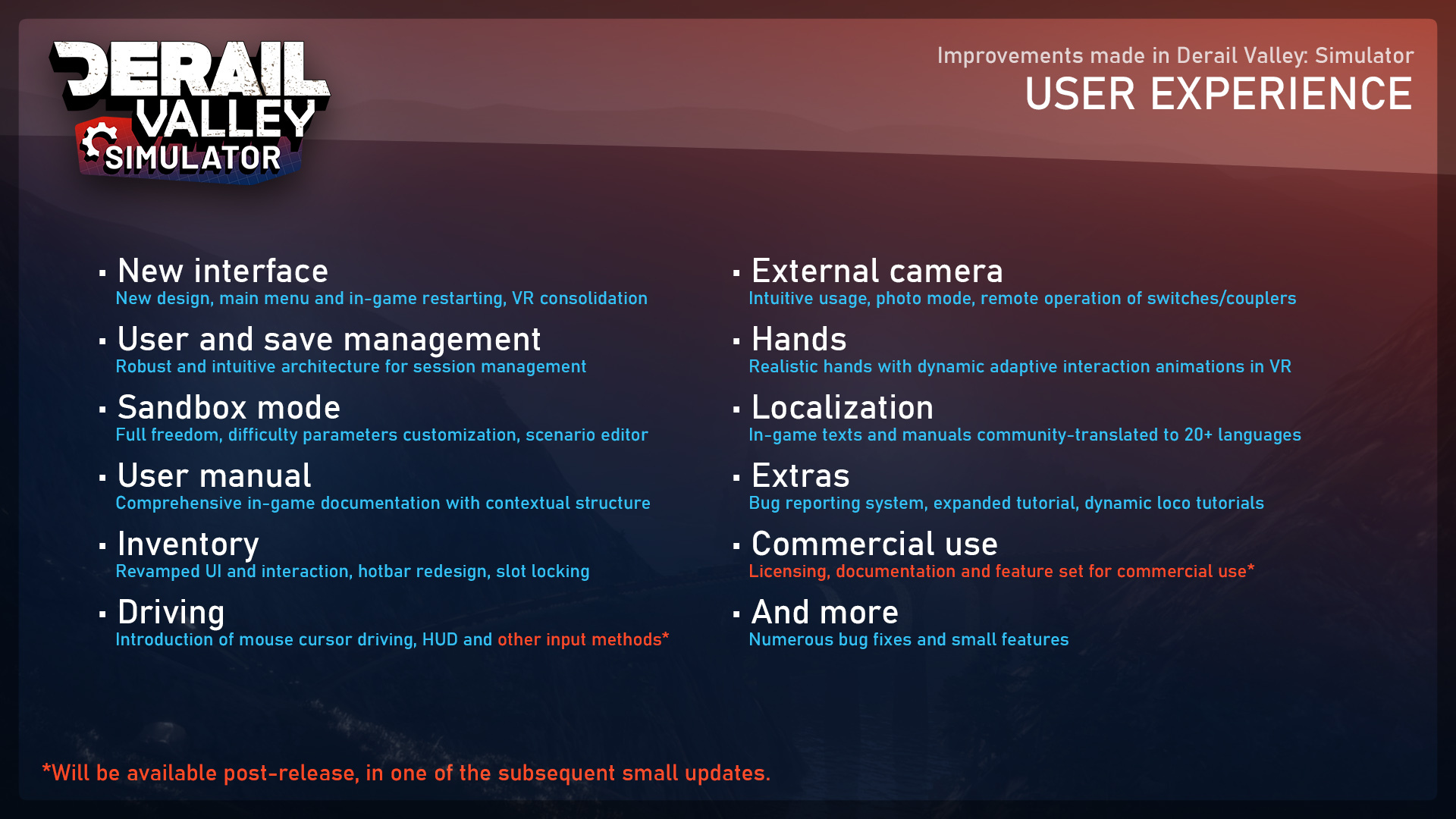
We've made this listing so you can see what's new and what's coming soon:
Being an enormous update, a few things remain to be done. These are notably the S060 locomotive, DE6 slug, Steam Deck input layout (it does work otherwise), RailDriver support, and a couple more smaller things. Rest assured that the mentioned two vehicles will be added very soon, in a couple of weeks.
Any news on the new steam engine simulation and VR?
We've been making core changes to both until recently, and are happy to say that they are finished. The update features the all new S282 steam locomotive experience, as well as dynamic VR hands that naturally interact with controls and items. Support for the Pico 4 headset has also been added.
Localization:
The update introduces 25 new languages to the game, translated by a carefully selected dedicated group of players. Apart from providing a good spirit and feedback, our translation team handled tens of thousands of words per language, and have put a lot of care into making it all fit nicely and using proper technical terms. They're absolute heroes!
We've marked the languages that we think the game is sufficiently translated to as supported on the store page itself. The rest are also available to choose from in the game, with an UI scoring element representing their completion level. Please let us know, and our translation team, how you like the translations and we'll further update the statuses.
Please bear in mind that since the tutorial translations needed to be done at the very end (today, also barring many bugs we've just resolved), they are also the least complete. Don't worry though, the translations will continue being improved after the release.
What happens with mods?
If you've been using mods, please note that you should to do a clean install of the game. If your save file was modded, it may not convert well – it depends. Most, if not all pre-Simulator mods will no longer work with Derail Valley and will have to be updated by the community in the coming weeks and months, to become functional again. Some of that effort is already ongoing.
What's next?
For the next few days and weeks we'll make frequent updates, fixing all the immediate issues as they arise, as well as finishing up the two vehicles and a few more things. Then we'll drop the pace a little and take a well deserved rest. For the more long-term plans, please see our derailvalley.com/future page.
We hope you'll enjoy the new Derail Valley and where it's headed, and we're looking forward to seeing your reactions in posts, reviews, videos and other media!
Thank you!
-Altfuture
Simulator - 30 days to go!
Hi everyone!
For posts like these, usually there's a couple days of preparation. Today's post, however, is rather improvised, as everyone on our small team has been extremely busy with the upcoming release. There's a lot going on, and we wanted to give you a very quick update.
We're 30 days away from the definitive release date of Simulator, a big free update to the game. We're doing our best to have the update as complete as possible on that day. I'm sure something will not be entirely finished (there always is), but that's okay – we'll have a number of small updates following the release, to compensate for that. It's a huge release, after all.
Due to intense involvement with the development and the business side of things, I haven't been able to work on short videos at all this month, unfortunately. However, someone outside of Altfuture but very dear to us will hopefully satisfy your needs – with an episodic long-form video coverage of Simulator coming soon. Stay tuned!
In the past month we've made big strides on finishing the VR side of things and the tutorial. They're not done yet, but are close to the final stages. We've done a lot of further work on the steam engines and preparations for the new translators. As always, we've also been fixing a load of bugs, caught by our closed beta team, who had been also doing an amazing job translating Derail Valley to nine languages.
Today we're admitting dozens more people to the closed beta. The carefully chosen group will help us do the translations for 15 more languages and help us get VR calibration right for various types of headsets and controllers out there.
As the days get increasingly hectic, this may be the last you hear from us until the release. Soon you should start seeing new marketing material on our site, store fronts and social media pages. A new trailer will be be made and shown on the release day.
That's all for now! If you have any questions, please comment on this post and I'll try to reply to all. Thank you for your time!
-Slobodan
Simulator Release Date Announcement
Very exciting news today — The long awaited Derail Valley update, Simulator, is coming out on June 30th, 2023!
After several years being in development, the update will bring massive improvements to the game in the domains of graphics, simulation dynamics, user experience, bug fixes and future development productivity! You can see a lot of what's coming previewed on our YouTube channel.
An update of this scale can always be further improved, however, we've done enough preparations and testing over the years, both internally and with the closed beta testers, to safely conclude that any further improvements can be made after the release.
Simulator is a major stepping stone towards our even more grandiose future plans, that we've just recently outlined on this new page: http://www.derailvalley.com/future/
As we've made this massive update entirely from the game's sales so far — we'd like to say thank you to everyone who has supported us over the years!
In order to help fortify our next actions, we are ending the early supporter price period. The price of Derail Valley will go up for new customers, starting May 12th, 2023 at 19:00 CET, to $39.99 USD, or a region-tailored equivalent in other currencies.
We announced this change back in 2020, and now, more than four years after the initial barebones version of the game was released, we feel the change is justified. The team is now double the original size and all that time was spent working full-time on new features and content. Derail Valley has come a long way since, and it is especially the upcoming Simulator update that is driving the sales nowadays, with even more exciting coverage as well as a new trailer coming up in the following months!
If you're in position and willing to support our team for further development, please consider buying the game at the new price. If you'd like to buy it at a lower price, however, we've kept a time window for you until the 12th.
If you're wondering about the Early Access status - the game will remain in it, potentially, for years to come. This is because we want to add more features and content going forward, despite the product being stable and well rounded in its current form already. We'll keep at it for as long as possible, in our mission to make Derail Valley the best train simulator in the world.
April Recap
April's been absolutely packed with work and we haven't had the chance to produce that many shorts this month. Next recap will, however, cover both April and May. In the meantime we've done a ton more bug fixing, finishing the UI, improving the translation workflow and have started work on the tutorial. The translation and closed beta teams have done a phenomenal job translating and finding bugs so far — thank you guys! We are about to start translating the second batch of languages soon.
That's all for today, we'll see you soon with more exciting content!