

Dust Fleet
Dust Fleet v4.7
Onto the patch notes!
FIX: Ships disappearing when fleets merging
FIX: If the console is brought up accidentally, the keyboard shortcut closes it correctly but the "hide" command does not.
FIX: Various issues with the fleet sidebar on the starmap, including with selection and scrolling.
That's all for today. Take care out there, commanders!
Dust Fleet is part of Freedom Games Publisher Sale!
The game will be 35% off from April 15th through the 22nd!
Make sure to check out Freedom Games Publisher Sale page to pick up some awesome indie games at great prices. Whether you like to play alone or with friends, there are some great deals you won't want to miss out on!
https://store.steampowered.com/app/406160/Dust_Fleet/
Dust Fleet v4.6
Here are the changes for v4.6 in full.
FIXES
- Game ends unexpectedly with message about Channar station having fallen when it has not.
- Slowdowns in some battle situations.
Dust Fleet v4.5
tl;dr: Change notes are at the end of this post!
The main purpose of this patch is to smooth over some issues with the new "set direction" modifier for move orders. With this patch, the attack command will no longer become active when you're trying to set move direction with Left Control. And ships will adopt the chosen direction at the beginning of the move instead of at the end. This makes it much easier to sneak around ships while keeping your armour facing them.
I've also added an additional speed level to the game speed control. It now runs x1 -> x2 -> x3.
Here are the change notes in full.
NEW: The game speed controller now has an additional step for x3 game speed.
CHANGE: Giving a move order with a direction will now cause ships to turn in the given direction from the beginning of the move, instead of at the end.
FIX: Unable to use Left Ctrl to apply the direction modifier to a move order.
FIX: Incorrect spelling of "Reykjavik".
The Tactics Update
If you were thinking about getting the game, now is a great time to do so as we are part of the Steam Spring Sale! From March 14th until the 21st, the game will be on sale for 35% off! Make sure to check out Freedom Games' Steam Spring Sale page to pick up some great games to play.
It's time to unveil the patch notes for Update #3, a milestone we have named The Tactics Update!
- Achievements are now available!
- Armour: Ships are now more armoured at the front, and have least armour on the back. Deal more damage by positioning your ships behind enemies or to their sides.
- Move while attacking: After giving an attack order, the next move order will keep ships aligned to the target they are attacking. Give another move order to cancel this behaviour and switch to a regular move order.
- Move backwards: ships can now be ordered to move backwards to a destination, useful for keeping their strongest armour facing an enemy. The default shortcut for this is N.
- Set direction: Hold CTRL+RMB when giving a move order to set the direction ships should face when they arrive.
- Engage at maximum range: For ships with mixed weapons, you can use this new button to tell them to engage with only their longest range weapons instead of approaching until all weapons are in range. Shorter range weapons will still engage any nearby targets that approach.
- Engage in formation: When a group of ships are given an attack order, they now arrange into a formation instead of jostling for a free space independently.
- Stances: Ships can be set to aggressive or defensive modes. Aggressive provides bonuses to weapon damage at the expense of speed and armour, with defensive providing the opposite - more speed and armour, less firepower.

Main campaign changes (available for new playthroughs started with this version):
- D-SEC now gain access to the off-map galactic power network after mission 3, so they no longer have low power warnings early in the campaign.
- The main campaign map has a few extra locations to enable both AI and player to spread out a little.
Balance changes to accommodate the new armour mechanics. Where ships have reduced hull, this is to compensate for the new frontal armour. Where ships have increased hull, this is to reduce disparity against equivalent enemy ships.
- Knight has less hull (3400 -> 2700)
- Wolf has less hull (3700 > 3000)
- Rekjavik has more hull (16000 -> 18000)
- Copenhagen has more hull (13000 -> 15000)
- Ocelot has less hull (2400 -> 1400)
- Orca has more hull (25000 -> 28000)
- Jackal has less hull (7200 -> 6400)
Helpful notes:
- On the mission info screen, if no ships are present, players are reminded that ships are required to start the mission.
- On the prelude, notifying players that the tech tree is reduced compared to the main campaign.
Other changes:
- Lots of UI improvements to the starmap.
- Fighters are now available to the AI in non-mission battles in later parts of the campaign and sector assault. These will appear in new playthroughs started with this version.
- Updates to the strategic AI, making it more of a challenge in sector assault mode and thge campaign.
- Added on-screen tips for controls while issuing move orders.
- Tutorial modified to include demonstration of the "Engage at max range" command, as well as discussing armour and moving backwards.
- Reduced how close the camera needs to be to a turret before it can be selected as a target, to reduce incidence of accidentally selecting a turret when attacking. The "attack turrets" command can still be used at any distance.
- New starmap shortcuts: Next turn, Station and fleet tabs, Reverse Engineer, Tech tree and Loadouts can now all be accessed via keyboard shortcuts.
- Auto-resolving battles now runs asynchronously, so the game can communicate that it's busy calculating the outcome instead of freezing until it's done.
- In sector assault, enemy ships guarding wormholes will now start closer to the center of the battle area, so players have more time to deploy their fleet.

- Resources don't reset when a mission is restarted more than once.
- Build menu doesn't work properly during tactical pause.
- Tactical pause ends when escape menu is toggled.
- Tactical pause doesn't work after escape menu is used during tactical pause.
- Can give tactical orders if tactical pause is enabled before opening escape menu.
- Building a ship with an unpopulated turret slot causes the turn update to run endlessly.
- Can capture Braddock's ship on last mission.
- Tokaras unable to move after being captured on some missions.
- Repair ships can keep a ship alive even if the hull reaches zero.
- Ship loadout name persists in shipyard even after changed in loadout editor.
- Ships continue being attacked after being captured.
- Capturing a station that has fighters can cause errors on subsequent turns.
- Some mission-provided ships show incorrect loadout information during battles.
- Fighters sometimes cancel their orders when the lead fighter in a squadron is destroyed.
- Braddock's fighters do not fire on Antilia in the final mission.
- Camera position judder when following fast-moving ships such as fighters.
- Flak-equipped ships close distance to the range of their flak guns when attacking capital ships, which is closer than necessary.
- Some ships temporarily stop moving during a battle if an order is given with an exploding ship selected.
- Extremely slow turn processing speeds on large sector assault maps.
- Game sometimes fails to complete turn processing on large sector assault maps.
As always, I am excited to see what suggestions come out of these updates and will use them to continue to improve the plan and direction of Dust Fleet. Don't forget to join our community Discord and share your experiences!
I would also love to see your honest thoughts of the game through a Steam review. Steam reviews can have a massive impact on indie games like Dust Fleet and I love reading your experiences in reviews.
That’s all for now, Commander - see you in space!
https://store.steampowered.com/app/406160/Dust_Fleet/
Dust Fleet v3.3 Patch Notes
- FIX: Remapped controls are not applied until the game is restarted. Remapped controls will now apply immediately.
- FIX: "Equip all" button makes module slots vanish in some circumstances.
- FIX: If settings.cfg is not present (eg new install) and if language was auto-set to a non-English language, English is still shown as selected in the menu.
- FIX: Non-native resolutions (eg using 1366×768 on a 1920x1080 display) cause the movement cursor to move to an incorrect position when applying a vertical move during a move order.
- FIX: Captured ships continue getting orders from the mission script. For example, in mission 5, captured cruisers would attack Franklin's APC at the end of the mission.
- CHANGE: APCs should have a slightly easier time docking with ships, with less circular dancing involved for smaller ships.
- CHANGE: Orca has gained a combat module slot.
- CHANGE: Wolf now has a medium weapon slot, to match it's default loadout.
- CHANGE: Tokara default loadout now uses medium lasers, to match the available weapon slots.
The Fleet Management Update
If you were thinking about getting the game, now is a great time to do so as we are part of the Steam Winter Sale through our publisher Freedom Games! From December 21st until January 8th, the game will be on sale for 20% off! Make sure to check out Freedom Games' Winter Sale 2023 page to pick up some great games to play over the holiday season.
I’m excited to unveil the patch notes for Update #2, a milestone we have named The Fleet Management Update. Let’s explore the changes and enhancements that this update brings!
NEW
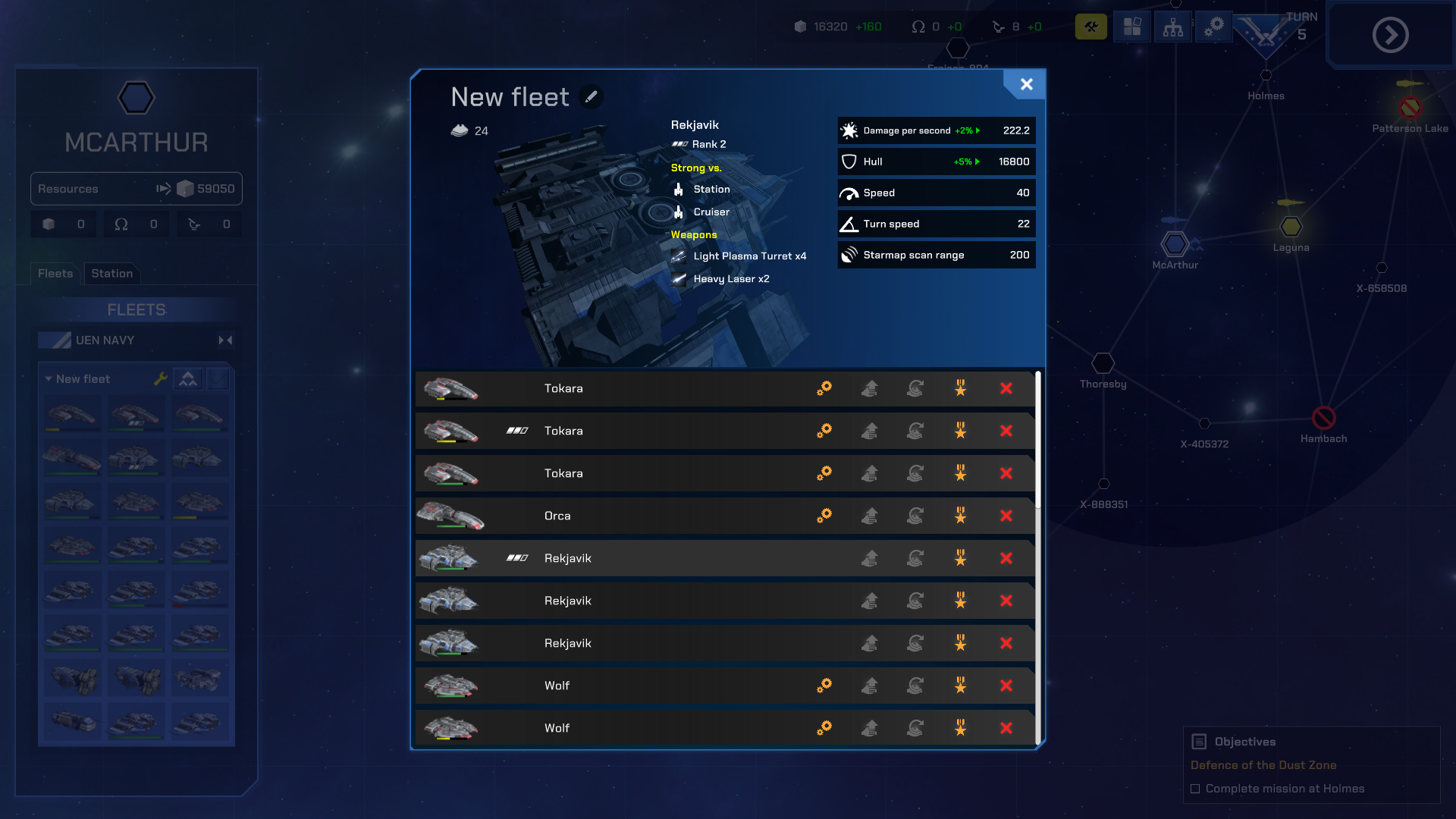
Fleet Management screen:
View and manage details of all the ships in your fleets, with several new options to give you greater control.
- Promote: if you don't want to wait for ships to earn promotion in battle, you can now pay to train the crew up to the next rank.
- Refit: change already-built ships to a different loadout.
- Scrap: no longer need a ship? Scrap it to gain back a portion of it's value.
- Upgrade: one of your ships stuck on the old version of a loadout? "Upgrade" will get it back up-to-date.
- Reverse engineering: also available in fleet management, you can now dismantle a captured ship to learn about it. Once you've done this with enough ships, you'll be able to build it yourself.

- Rally points: you can now set a rally point for each station. Any ships you build will be sent to the rally point and consolidated into one fleet.
Starmap side bar:
- Fleet multi-select: You can now select more than one fleet in a location, to make giving move orders easier.
- Remove station module: Station module slots can now be set back to empty.
- Combine fleets: a new, easy way to combine ships into one fleet - just select the fleets you want to merge and press the "Combine Fleets" button.
- Expand/collapse: click the name of any fleet to collapse it.
Starmap:
- Edge scroll: move the mouse to the edge of the screen to scroll the starmap
- Direction arrow: if you scroll away from your territory, and arrow will now guide you back.
Loadout editor:
- An "equip all" button to add a turret to every compatible slot.
- Improved UI: cleaner and clearer.
- Damage Stats: Weapon damage has now been added to turret stats.
- Enhanced ship stats panel: Ship stats popups have been expanded to show more loadout and stats details, along with any bonuses from ranks.
CHANGES
- Combat stations no longer come equipped with bombers by default. When you select a location with a combat station, there is now a hangar assignment button on the sidebar to add fighters. You must have researched the fighters in order to add them. (Does not apply to existing saved games).
- Selecting research now shows a confirmation box.
- Fleets can now be renamed in the Fleet Management screen instead of the side bar.
- Pathfinding overhaul: ships are now a little better at navigating around each other and using space.
- Ships now give a little more room to ships they're guarding.
- To build a ship, you must now have unlocked all the tech in it's loadout, or create an alternative loadout with unlocked tech. As a result of this change, default loadouts have been altered for some ships. These default loadout changes do not apply to existing saved games.
Default loadout changes:
- The Ocelot and Refinery no longer have repair beams in their default loadout.
- The Copenhagen now has light plasma turrets in it's default loadout instead of medium.
- The Rekjavik now starts with twin medium lasers instead of heavy. The medium laser still needs to be researched to build the default loadout, or you can change the default loadout. The Rekjaviks you get early in the campaign have kept their heavy lasers, however.
Balance changes and corrections
- The Lance now builds quicker (8 turns -> 6 turns)
- Rekjavik now builds slower (6 turns -> 8 turns)
- Rekjavik now costs a little more (4550 -> 5250)
- Plasma bolt range increased (900 -> 1100)
- Abandoned proton bolt range increased (600 -> 800)
- Ocelot has gained a support module slot.
- Copenhagen has gained a support module slot.
- Rekjavik has gain a combat module slot.
FIXES
- Resources don't reset when a mission is restarted more than once.
- Build menu doesn't work properly during tactical pause.
- Tactical pause ends when escape menu is toggled.
- Tactical pause doesn't work after escape menu is used during tactical pause.
- Can give tactical orders if tactical pause is enabled before opening escape menu.
- Building a ship with an unpopulated turret slot causes the turn update to run endlessly.
- Can capture Braddock's ship on last mission.
- Tokaras unable to move after being captured on some missions.
- Repair ships can keep a ship alive even if the hull reaches zero.
- Ship loadout name persists in shipyard even after changed in loadout editor.
- Ships continue being attacked after being captured.
- Capturing a station that has fighters can cause errors on subsequent turns.
- Some mission-provided ships show incorrect loadout information during battles.
- Fighters sometimes cancel their orders when the lead fighter in a squadron is destroyed.
- Braddock's fighters do not fire on Antilia in the final mission.
- Camera position judder when following fast-moving ships such as fighters.
- Flak-equipped ships close distance to the range of their flak guns when attacking capital ships, which is closer than necessary.
- Some ships temporarily stop moving during a battle if an order is given with an exploding ship selected.
As always, I am excited to see what suggestions come out of these updates, and will use them to continue to improve the plan and direction of Dust Fleet. Don't forget to join our community Discord and share your experiences!
That’s all for now, Commander - see you in space!
https://store.steampowered.com/app/406160/Dust_Fleet/
Dust Fleet is part of Turn-Based Carnival!
We're excited to announce that Dust Fleet is part of the Turn-Based Carnival event on Steam!
Turn-Based Carnival will be live from November 14th to the 21st to bring together a bunch of exciting games for a delightful experience. Check out the event page here to discover some other amazing games!
Don't forget to join our Discord community! 😀
https://store.steampowered.com/app/406160/Dust_Fleet/
Dust Fleet v2.1 Patch Notes
FIXED
- Station ability targets (eg bomber strike, nuclear strike) not being correctly set. Some commanders may have noticed that these abilities were firing on targets other than the ones being selected, or occasionally launching before a target had even been selected.
- Wormhole opening/closing constantly while bomber strike fighters were attempting to return home.
- Incorrect cooldown value for nuclear strike.
The Command Update
I am still deeply humbled by your support, and invaluable feedback you’ve given. It’s been a thrilling journey since our last announcement and we have made significant strides towards delivering on the promises laid out. I’m excited to unveil the patch notes for Update #1, a milestone we have named The Command Update. Let’s explore the changes and enhancements that this update brings.
NEW
Tactical Pause: The PAUSE key now starts tactical pause mode, where you can issue orders while the game is frozen. Hit PAUSE again to resume.
Tactical UI improvements
- Overall visual improvements: The UI in battles has been improved to take up less space, reduce visual clutter and improve readability.
- Stacked ship buttons: Ships of the same loadout are stacked onto a single button. Double click the stack, or the arrow on the stack, to expand.
- Carrier manager: A new SELECT ALL button selects all fighters for the current carrier selection. If you have multiple carriers selected the SELECT ALL button will select all the launched fighters for every selected carrier.
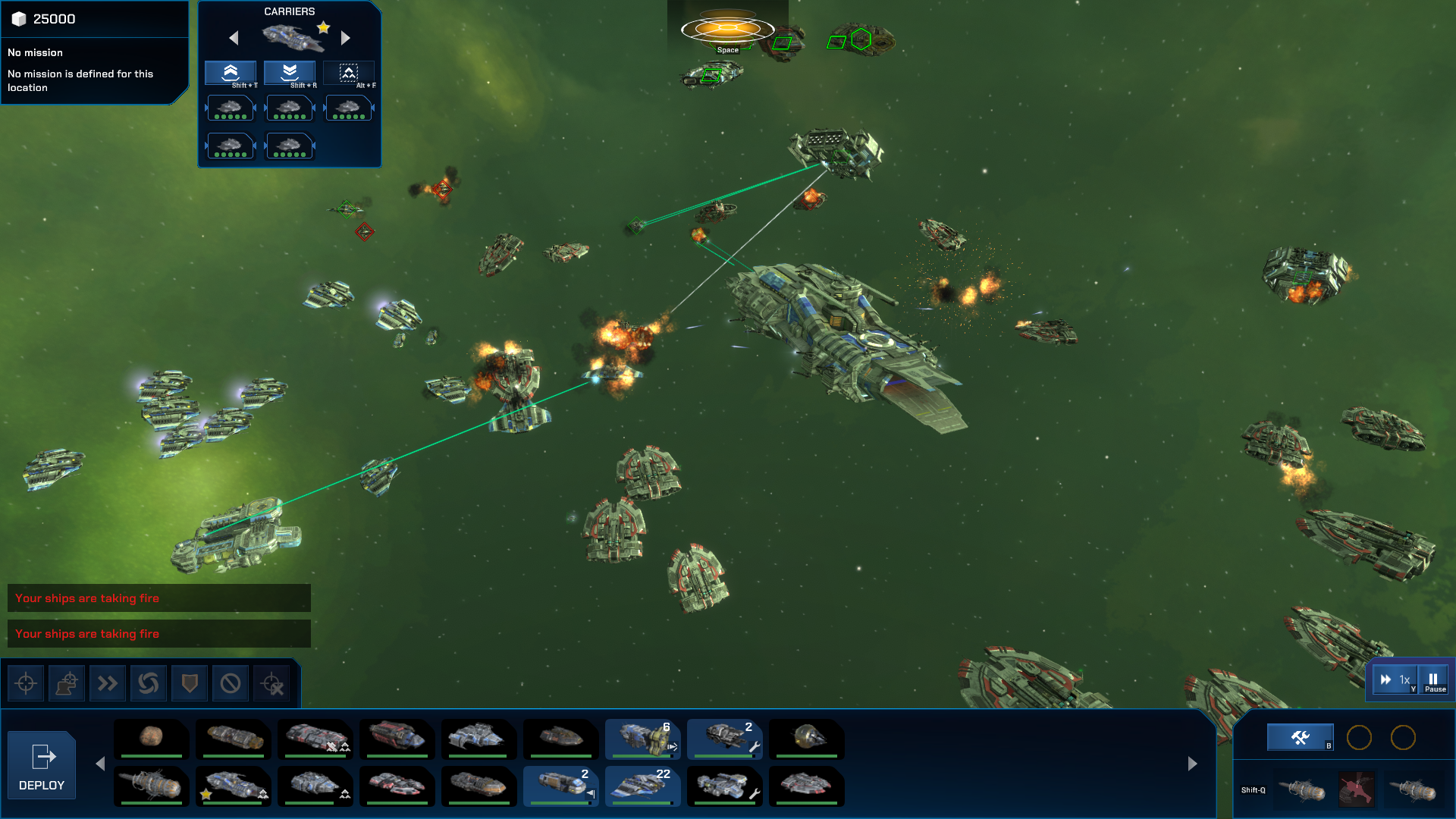
Keep what you capture: Any non-station ships you capture during a battle can now be retained after the battle instead of being scrapped.
Scrappage Display Improvements
- During battle, scrappage counts can now be seen directly on the build buttons.
- If you have less ships than you started with, this is now also displayed as a green number on the relevant build buttons.
- If you have more ships than you started with, this is displayed as an amber number on the relevant build buttons.
Tactical Overlay Toggle: The green icon overlay during a battle can now be toggled with the O key.
Tactical Overlay Colors: Allied non-player ships are now colored cyan in the tactical overlay to distinguish them from player controlled ships.
Graphics Options
- Motion blur toggle
- Bloom toggle
Starmap Scrolling: The strategic starmap can now be scrolled with the in-game camera controls - WASD and the cursor keys by default.
Rebalance to make frigates more viable, and slow down fights a little:
- Some ships have been made slightly tougher, more notably frigates and the UEN cruiser-class ships, by around 10%, except the Ocelot which has had its hull strength doubled.
- Light and medium plasma turrets are now much tougher, by around 350%. Much less chance of getting your Knight's turret blown off, but still relatively easy to destroy with fighters or sustained fire.
- Plasma projectiles fired by the light and medium plasma turrets do about 70% of the damage they did previously, generally increasing time-to-kill across most engagements
- Laser damage modifiers have been reduced by around 9%.
Save files are now compressed, so they take up approximately 5% of the disk space they did before.
Middle mouse button changes: The middle mouse button is no longer required - a key bind has been added for moving the camera vertically ([). This is now displayed in the tutorial.
FIXED
- Fighter loadouts resetting on stations and ships after restarting a mission.
- In battle, stations are sometimes repositioned when loading a saved game.
- On the starmap, player fleet icons may appear at some locations where there are no player fleets. The fix prevents the issue occurring in future, but icons may remain in existing games.
- One ship lagging behind when an order is issued.
- Custom loadout not displayed correctly during ship building.
- Deleting a loadout does not refresh the loadout editor.
- Jumping ships out of battle and then back in could cause unexpected behavior.
- Transposed dialogue on the "Spare Parts" mission.
- General ordering system improvements - the queuing system has been completely rewritten to eliminate a number of persistent smaller bugs.
NOTES FOR EXISTING SAVED GAMES
- The balance changes may mean that some of your ships may now show as slightly damaged, due to the maximum hull value being increased. The ships themselves have not taken any damage, and this will clear the next time the ships are repaired.
- The rewrite for the ordering system means that for any in-battle saved games in-progress orders will need to be re-issued.
As always, I am excited to see what suggestions come out of these updates, and will use them to continue to improve the plan and direction of Dust Fleet.
That’s all for now, Commander - see you in space!