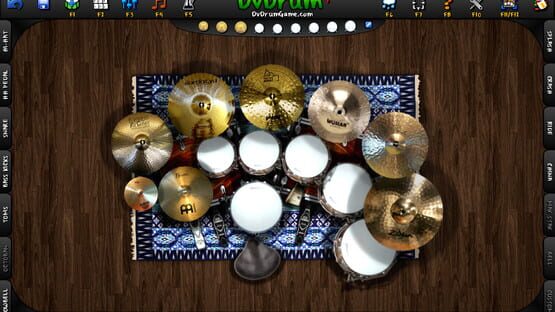
Do you like the new changes? :)
It is time for some fix after the big update!
Changelog:
Fixed a Bug with Reset Floors after Mouse Right Click
Added Component Rename InputBox Closing with Delete Key
Components are Muted If InputBox is Exists Now
Increased Checks for Double Components Names
"Medium Kit" Can't Be Removed Now
Added Some Information for Custom Files in Help Window
Improved Screenshots/Postcards Acquisition
Have Rockin' Fun!
\m/ __ (- . -) __ \m/
Update 3.6.0 Is Live! The Sandbox Drum Simulator!
Hello DvDrummers!
It’s been a while since the last update, but the Big Update is Here!
In all this time We have worked hard to rewrite and improve a lot of DvDrum features, and We are very happy to release the new version!
The new DvDrum philosophy is oriented to the best drum simulation and maximum creative freedom.
This is a big update with a lot of changes, please give us your feedback about problems or bugs found during the play, Thanks!
This new update introduce a new drumkit file format: “.dvx”
The previous Drumkit, SoundSet and KeysMap files will be removed automatically, because are no longer compatible with new system.
SEMPLIFIED DRUMKITS MANAGEMENT!
Added Auto-Assign Drumkit on Slot
The Slots Are Organized to 4 per Page Now
Removed the Limit of 4 Drumkit on Main Menu
Removed Slot Settings Section
Remove Drumkit by Pressing Mouse Right Button on Drumkit Slot
Fast Drumkit Creation by Pressing on a Empty Slot
Is Possible Duplicate the Drumkit by Presusefullsing Save Icon in Drumkit Section
Suspended the Drumkit Name Colour
NEW COMPONENTS MANAGEMENT!
Completelly Reworked the Components Management
Every Components Have a Customizable Name now!
Added New Window to Add the Components
Added Automatic Component Name Numeration
Removed the Components Number Limit!
Added a Short Description for Every Component
Added Button for Remove Components
Added Button for Rename Components
Added Key for Fast Component Modification (F5), Very Useful!
F5 to Change Image\Position\Scale\Angle\Layer on a Component!
Stands are Independent Components Now!
Carpets are Indpendent Components Now!
Added Type Indication on Component When Mouse is Enter
The “Low Gain Snare/Shading Snare” Needs to Be Linked on a Snare Now
Removed the Load Icon, It is Useless Now with Automatic Loading
The Save Icon Can Duplicate the Drumkit or Save the Current
Revamped Drumkit Interface
Removed SoundSet and KeysMap settings, All in One now!
Added HotKeys to Main Drumkit Sections
NEW COMPONENTS TYPES!
Added New Component Type: “Octoban”
Added New Component Type: “Max Stax”
Added New Component Type: “Bell”
Added New Component Type: “Custom”
The Custom Type is Useful to Add a New Type with Custom Images and Sounds
P.S. This New Types Need More Work.
SUPPORT FOR CUSTOM IMAGES AND SOUNDS!
The Custom Images and Sounds will be Loaded In DvDrum at Start
Add Your Image in “Appdata\Local\DvDrum\Workshop\Images\”
The Images Needs “.PNG” Format
Add your Sound in “Appdata\Local\DvDrum\Workshop\Sounds\”
The Sounds Needs “.OGG” and Mono (1 channel) Format
P.S. This Is the First Step for Workshop Support, Please Test It Very Well!
REVAMPED INPUTS MANAGEMENT!
Increased to 4 Keys Settable for Every Components
Added Action Hold Keys to Change the Sound Mode
Increased to 2 Keys Settable for Every “Low Gain Snare/Shading Snare”
Removed the KeysMap File Management. All in One now!
REVAMPED SOUND MANAGEMENT!
Added 2 Sound Mode: “Standard” and “Action Hold”
Sound Mode is Switchable by Pressing “Action Hold” Keys
Hi-Hat Open/Close is Switchable by Pressing “Hi-Hat Pedal” Keys
Removed the SoundSet File Management. All in One now!
OTHER CHANGES:
Increased FPS Cap from 144 to 240 (This Could Improve Reactivity)
Improved Reactivity by Some Code Optimization
Suspended Legacy/Compatibily Mode for Maximum Performance
Fixed an Audio Bug when a Sound is Double Assigned on Different Components
Improved RAM Management
Reduced DvDrum Size on Disk
Various Bugs Fixed
NEXT STEPS:
New Features to Facilitate and Improve Drumkit Building
More Realistic Sound Simulation, Every Hit Sound Slightly Different
New Components Sounds
This is a big update with a lot of changes, please give us your feedback about problems or bugs found during the play, Thanks!
Have Rockin' Fun!
\m/ __ (- . -) __ \m/
NEXT UPDATE PREVIEW: Revamped Mixer and New Action Hold Feature!
Hello DvDrummers!
From the last development update We have worked to revamp the mixer and the sound management of DvDrum, to adapt it to the new infinite drumkit system!
The new mixer is like to old, but it includes a new and important feature: "Action Hold"!
THE NEW FEATURE: ACTION HOLD!
This new feature allows to change dynamically the components sounds during the playback. It works like the Hi-Hat Pedal, by pressing the "Action Hold" Key.
Every component have two sound settings now, and the new feature allows to set the secondary component sound setting, to switch after from "STANDARD MODE" to "ACTION HOLD MODE" by pressing the action key during the playback.
The Hi-Hat component uses the Hi-Hat Pedal key to switch mode, from "OPEN" to "CLOSE".
The mixer will change visually by changing the current sound mode:
With the new "Action Hold" feature will increase the possibility to make new sound effect during the drum playback, for make a better and realistic drummer experience!
UPDATED DEVELOPMENT STATUS:
http://steamcommunity.com/app/385130/discussions/0/360670708786674071/
What are you think? ;-)
Have Rockin' Fun!
\m/ __ (- . -) __ \m/
NEXT UPDATE PREVIEW: New Inputs Map Settings!
Hello DvDrummers!
Today We annunce the New Inputs Map Settings!
The new interface can manage the new extreme drumkits system with few clicks, the interface is intuitive and simple!
The KeysMap system has been removed, everything is automatically saved now, also with accidentally closures in a single drumkit file.
ONLY ONE FILE FOR EVERYTHING!
The KeysMap system has been removed.
Every drumkits will have only one file, that includes graphics settings, inputs settings and sounds settings for an easiest management.
AUTOSAVE!
With the next DvDrum update, everything will be save automatically!
The drumkits will be always updated, also with accidentally closures.
NEW ACTIONS KEYS!
The new actions keys will serve for increase dynamics of sound during playing, by changing the components sounds setting. Every component will have more customs sound settings.
Others details of this will be explained with next New Mixer Settings notice.
Let us know what you think!
Have Rockin' Fun!
\m/ __ (- . -) __ \m/
-Daniele Franceschini-
New DvDrum Website: DvDrumGame.com
We are happy to annunce the new website of DvDrum: DvDrumGame.com
With the new website (still under construction) We want to create a flourishing
community of DvDrummers with the passion with music and drums!
Let's Rock Guys!
\m/__ (- . -) __ \m/
NEXT UPDATE PREVIEW: new components system!
Hello guys!
The next update of DvDrum will be a Big Update,
We are rewriting a lot of DvDrum features to make the best drum simulator ever!
Unfortunatelly the next update require a bit of time to be released, we are working at full power, but there is much work to do!
After this update, DvDrum will be better and more reactive!
Simultaneously We are working on new DvDrum website, darktigerdevelop.com is down now.
We are currently completing the new Drumkit Components Management,
here a pic of new components adding window:
EXTREME DRUMKIT SUPPORT!
The new components system remove the limit of drumkit components number, is possible to create extreme drumkits now!
We have added type description, customizable components name and type quantity.