

Earth Elements
update to 1.02
Thank you
main release 1.0.0
- not changed core game functions from version 0.9.2.1
bug fixes
-music label wrong path for label.....fixed
changes
- changes how game starts - side menu is hidden by default; reason for that
change is to immediate visibility of media player. Players can easily switch menu back on
by pressing top left button (hide/show side panel menu)
- added more melody lines - all together there are 30 melodies in game
-modification to music player gui - added shuffle otion
Thank you
9.2 my artistic soul
additions:
- 6 brand new song - melodies from 18 to 23. New club melody line - my favorites are: 19 and 23.
- added song tiles - new poetry titles creation
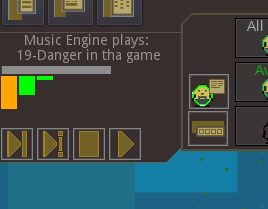
- added in game music player - with functionality to: play/stop, play next, play random next
and with synthesator graph - if thats too much you can turn off visibility of media player in quick settings ; melodies are played randomly one after another even if music player is hidden
Music player is under side main menu you need to hide that to see music player
As usually to completely turn off music check options in quick settings,

changes
- esc button - escape button will close various panels
if all panels are closed and escape will be pressed than window about exiting game will
show up.
notes:
6 new song I designed for my new game - heavy traffic - cars in city
check it out video on earth element page in RECENT EVENTS & ANNOUNCEMENTS section
under other project title
but I decided to move new songs to earth elements too.
Music done by me JG; apologies to musicians, they will notice some errors right away
but giving mine non musical ear I am happy how they sound anyway.
Thank you
9.00
-refactored pm 10,5,13 - all base class is pm10 - for not dependent on fps dig function
-error domesticated fields:milk,honey,wool,eggs - adding holds constantly - added flag tile_loaded
-gui panel mixers resizing fix
-gui panel pobj resizing fix
-gui panel epoch allowed elements - resizing fix
-pobj panel fixed correct icon for mixer, free, machine work
-build 42 rought stone flower - build underground error - fixed
changes
-all pmachines in game to start require only pTool element in amount 50 - game balancing
that way some machines will be easy accessible at the beginning of game. Just make sure you have tool
element in dropzone and you can place machines on map
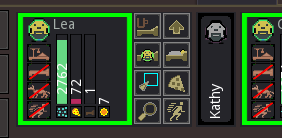
-permadeath pobj panel change to very simple black border with name
additions:
-pmachines- all pm in game have dig area squares to let you know what they will dig

other project
releasing next update soon, and after that version 1 will be available.
and after that what will I do?.... dont wont to be bored...so
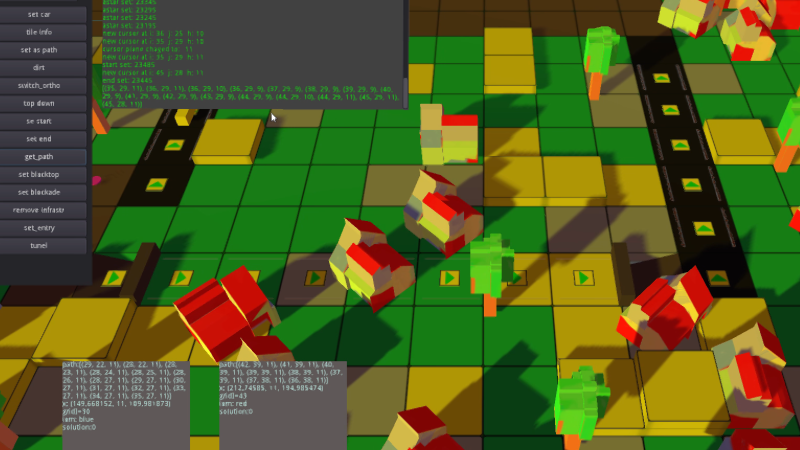
so I would like to show you my next idea, game about car traffic in city,
cars will come and go... and you will build infrastructure for them..... seems nice right
check video how project was evolving, and how it looks right now, its early stage prototyping.
that is first iteration of tiles terrain, other assets , so this will change for sure, for now i am expanding every aspect of this prototype, again doing everything by myself like for earth elements. Actually working solo is good i like it. I hope now i am more experienced and ready for other ideas....and i have plenty. need to mention also game engine here GODOT is great especially for 2d. cannot wait for version 4.0.
my day job is engineering. but hopefully i will be busy full time just with coding some day.....
wish you good gaming....
thank you
video is on official youtube page of earth elements for now. check it out
link on you tube page:
https://youtu.be/ACWXLgAk6jg
[previewyoutube="ACWXLgAk6jg;leftthumb"]
update 8.3.2
bug fixes:
-correctly saving/loading music on off from e_e config file
-remove fog of war by machines [added]
-cancell pmach if no pobj on free list error
-fixed movement on ladders
-astar remove ladders - fixed
-fixed encyclopedia to accommodate more machines - moved to builds sections
additions:
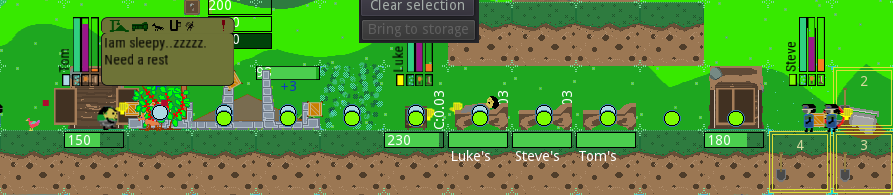
- follow path draw rework: color coded path where pobject is going. Color is indicated under pobj name.
than path is drawn, path elements are disappearing on walking. Now you can easy visualize where they are going.
Follow path is drawn for: RoundOne,Yeti,Droid
-enabled steam cloud save. Very useful feature when you log to steam on other computer you can continue playing saved game saves. Transfer game saves files is done automatically.
-new machines - 6 new extractor machines - will dig tile chosen by user. better machines have more tile to choose and bigger allowed work area. Tiles does not need to be set one after another. Tiles to dig by machine will be connected by line and dig out were yellow cursor was placed by user. Machine is static when digging.

-new machines - 5 new Path and Build machines - machines will dig path chosen by user, on that path if there is detected vertical shaft machine will build ladder. To choose path follow red cursor and place yellow cursor. Anytime you can press SET ZONE on machine to start it. Better machines will have longer path. Best for now is from com chip 10 tiles.
Below choosing path

Below machines in action

-redesigned 3 basic tool machines - new sprites


-added one more ladder build - LOG LADDER
changes:
-pmachines manager - main change is that roundones will only SET machine.(deliver necessary pElements for machine to start digging) After machine is done digging it will virtually deliver load to dropzone without roundone help. (virtual delivery like in mixers)
This will have great impact on Roundones availability for some other tasks.
-pmachine TASK from fixed menu is gone.
To set pmachine use BUILD menu - there is whole section with them there.

Sections will be unlocked if specific tool is detected in dropzone. To set machines not only tool is neccesery usually there is second ingredient needed too. Check a menu and notice smaller icon under tool - that is indication what is needed for that machine. For example in above menu sreenshot Computer chip tool and electricity will set those machines. Necessary quantities are described in button [50] tool and [50] electricity. Check game guide for more info.
To REMOVE machine from map use REMOVE on BUILD tab. That way this is more simple. In general machines are treated like BUILDS from now on.
notes:
all new builds and machines are implemented in load/save functionality. older saves will not work and will give you warning on loading.
Thank you