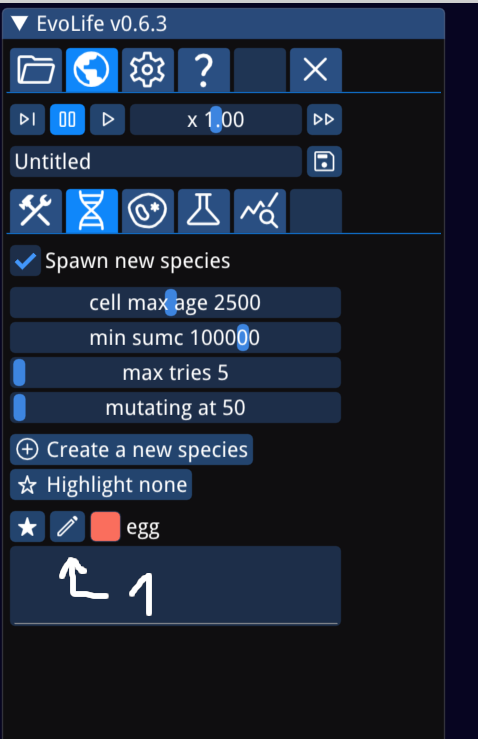
Copy the ID of the organelle over to the species (4)
Set the organelle slot to r01 (5)
Set reg0 to valid in the default outputs tab
Add the modified species to the world
Watch it thrive!
EvoLife v0.6: Multicellular update
Dear EvoLife Fans!
EvoLive v0.6 is a big step forward, making my life simulation vision reality! As the cell internals and game logic stabilizes I started to make the game more discoverable! Hover over any GUI element to get a descriptive text of what it does! I recorded EvoLife University videos to explain core concepts and features! The game is far from complete but I feel like future releases do not need to be complete overhauls but additional customization features, visualizations and expanding possibilities on a stable base!
Please feel free to comment, provide feedback here, on Reddit or YouTube comments. I would be happy to hear any feedback you have! Report a bug, suggest a feature, ask a question!
In this release:
Save files incompatible with past releases
Primitive multicellularity evolves regularly under right circumstances
Mouse hover discoverable GUI
EvoLife University YouTube videos
In future releases:
DNA tree visualization
More world specific customization of game logic
CUDA/Vulkan releases
Joints interacting with the fluid simulation (I want jellyfishes)
Performance optimizations
Organelle visualizations, better graphics
Steam Workshop integration
TIS-100 type puzzles
EvoLife v0.5 is out!
We arrived at a big milestone: the first multicellular lifeform has been evolved out of nothing. I feel like this is a very important step worth celebrating. If you want to check it out it is in the upper left corner of the built in savefile "first multicellular".
I've completed so far the biggest overhaul in the history of EvoLife.
I added a smell system. I want it to be analogous to how pheromones are in the real world.
I also added a biomineral system. I want it to represent the the bark of trees, the hard shells, the bones, the claws and the nails of the animal world.
Cell internal workings are completely redesigned to allow for more flexibility while adding simplicity. I removed the v0.4 "sense" ability which worked even trough walls. Now cells can sense touch, damage taken, smells and environmental vectors (fluid speed, cell speed). I plan to add a raycast "seeing" in the future.
The last piece of simulation code running on the CPU was the system responsible for randomly changing the DNAs during mutation. Now this last part also runs on the GPU, so fast forward is possible without CPU-GPU synchronization.
I completely rewrote the way joint constraints are handled, the system is much more stable and robust now.
I also modified how circles interact with the fluid simulation. It is now closer to the F ~ v^2 of the real world. This will need some more tuning, as there is no feedback yet for the sake of numerical stability.
I added a slight wobble to the surface of the cells, I'm not satisfied with it, but it is what it is for the time being.
Sadly for all of this to happen I had to break savefile compatibility. EvoLife v0.5 can not open savefiles created with EvoLife v0.4. So much stuff changed internally that there are no meaningful conversion between the two.
I'm just a guy coding my own dream game/simulation. My beautiful girlfriend helps with testing and branding materials but we can not catch all bugs. If you find one please do not hesitate to reach out and make a post here or on Reddit. Before I add any more features I want to prioritize bugfixes and features requested by the audience. As a sandbox game everyone plays it a little bit differently and I want to accommodate everyone's needs.
List of thing that I wanted to add but had no time to implement, coming up in a future release:
DNA evolution tree visualization
Better cell internal representation (graphics and GUI)
Graphical overhaul, fancy shaders
Steam workshop integration
Support for smaller screens
Chinese translation
First multicellular lifeform evolved!
I'm proud to announce that the first multicellular lifeform has evolved out of the single celled soup! It is a simple oscillating creature but this is a huge step forward simulating more advanced critters!
The v0.5 version showcased here is not yet out, but stay tuned, it is planned to be released in the near future. I have an itemized list of small things that I want to add/fix before the release.
EvoLife v0.4.1 is out!
Option to click on cells to get their species for the "add blob" tool
Complete GUI overhaul
New icons, simplified menus
Explanation text on mouse hover
Better in-game help
Better simulation speed control
Draw performance improvements when zoomed in
Hey EvoLife fans! I'm so excited to share the latest update with you all! I've been working hard to make your digital world building and editing experience even more fun and easy. I know you're going to love the new look of our GUI, with helpful mouse hover text and simple icons to guide you through. The only three things remaining in the old format are cell internals, organelles, and the evolution tab, but don't worry, I'm on it! I am working hard to polish the cell internal workings and then I'll update those too.
One of the best parts of this update, in my opinion, is the improved performance when you zoom in to your world. It's so seamless and immersive, it's like you're really there!
I managed to get flagellates to evolve from scratch, the saved game is available in the update as "Biggie flagellates"!
So, what are you waiting for? Download the update now and take your EvoLife experience to the next level!
Future roadmap
Reworking cell internals based on the previous video
Cell internals, organelles visualization
Reworking cell internals GUI
Reworking the organelles and evolution tab
Steamworks integration
Add biominerals so cells can build shells and bones
Add healing organelle
Add the option for cells to speed up and use a lot of energy or slow down and use only a little
Species DNA tree better visualization
Settable world constants (like gravity)
Better graphics
EvoLife v0.4 is out!
Complete GUI overhaul
New icons, simplified menus
Explanation text on mouse hover
Better in-game help
Better simulation speed control
Draw performance improvements when zoomed in
Hey EvoLife fans! I'm so excited to share the latest update with you all! I've been working hard to make your digital world building and editing experience even more fun and easy. I know you're going to love the new look of our GUI, with helpful mouse hover text and simple icons to guide you through. The only three things remaining in the old format are cell internals, organelles, and the evolution tab, but don't worry, I'm on it! I am working hard to polish the cell internal workings and then I'll update those too.
One of the best parts of this update, in my opinion, is the improved performance when you zoom in to your world. It's so seamless and immersive, it's like you're really there!
I managed to get flagellates to evolve from scratch, the saved game is available in the update as "Biggie flagellates"!
So, what are you waiting for? Download the update now and take your EvoLife experience to the next level!
Future roadmap
Reworking cell internals based on the previous video
Cell internals, organelles visualization
Reworking cell internals GUI
Reworking the organelles and evolution tab
Add biominerals so cells can build shells and bones
Add healing organelle
Add the option for cells to speed up and use a lot of energy or slow down and use only a little
Species DNA tree better visualization
Settable world constants (like gravity)
Better graphics
EvoLife v0.3 is out!
Simulation speed increase up to +60%
Drawing speed increase up to +150%
Required GPU memory size -60%
Save file size -50%
Types of organelles selected on Evolve tab now saves
Number of hormone, if table, prio table and organelle count generated now can be set
Happy holidays to everyone! The world featured in the video named "Biggie" is included in the new release as a built in saved game.
EEvol is now EvoLife
EEvol is an interesting name for my game. It conveys the concept of evolution, and it also has a unique and memorable sound. However, it is a bit hard to pronounce and spell for some people, and it is not immediately clear what the game is about. I want to choose a name that is more descriptive and easy to understand, such as EvoLife. This is my first game released on Steam and I am new to the world of online marketing. I have not realized how much goes into a good name when I uploaded the game. Please bear with me as I update all of the graphical assets to reflect the new name. I apologize for any confusion this may cause. In the meantime, I'm excited to announce that a new update will be coming out during the winter break. This update will include several new features and improvements, so stay tuned for more details. Thank you for your continued support and I look forward to sharing the updated game with you soon.
v0.2 - Better connections
New features in v0.2:
Connections can transfer hormone, energy and hitpoints between cells
Default prey/predator DNA added
Organelle details shown when hovering organelle name
More readable DNA opcodes
Saved games shipped with game and saved by user in different directories
Legacy unused hormone pump deleted
Splash screen shows OpenGL device
Some GUI cleanup
I ran the game for 11 days while writing these updates on my RX 560.
All scenes featured are shipped with the new version as saved games.
Starting guide (updated)
Updated for v0.1.1. I felt compelled to write a quickstart guide on how to play the game. There is in-game textual help in the "Help" tab about any in-game topic. There is also a write up about the cells, DNA, and organelles there.
How the game works
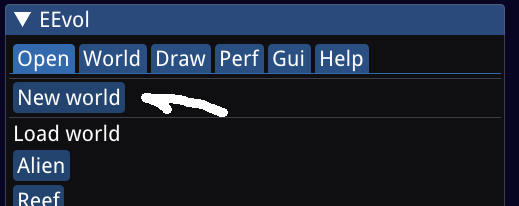
First, press the "New world" button on the "Open" tab:
Pick a size appropriate for your video card, a seed and press "Done":
Switching to "DNA tree" we can see that the first mutations already appeared:
To speed up the simulation switch over to the "Perf" tab and increase the "Sim steps per frame" count. You can even disable drawing the world with the "Draw simulation" checkbox. The goal is to maximize the "Sim steps per second" feedback counter.
After 10 minutes we can check back to the "DNA tree" tab. With the "popcnt" slider we can filter out species with low population count, and can confirm that there are mutations that better suit the environment than the original species. Their population is increasing, while the population of the original species is decreasing.
The DNA contains a bit of junk but it uses fission in addition to creating eggs, as an evolutionary advantage. You can "Mark" species to study their location/environment, then press "Mark none" to disable the highlighting.