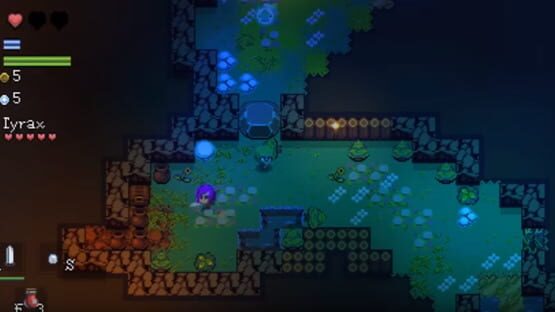

Epoch
Path 5/20/16
Essence Echoes were added. These are items you can buy from shopkeepers that allow you to leave messages on the ground that other players will see.
Entering a new area will give you a new batch of echoes to read. Currently they are completely random, but in the future I'd like to add an upvoting system.
This is an exciting new feature and I can't wait to see the bizarre or helpful messages people leave :)
This patch also features some minor map fixes.
Patch 5/19/2016
-The entire options menu was scrapped and redone into something much nicer looking.
-The escape key will now bring up this menu by default.
-You can now exit to the title screen from this fancy new options window.
-A potential fix to the graphics card issue was made.
-A potential fix to the multiplayer black screen on connecting issue was made.
It took me a while to hammer out all the stuff in this patch, despite the list not being very long. I really hope that it fixes the issues some users were encountering, and improves the experience for those that didn't have those issues.
Thanks, and continue enjoying the game :)
(now i can get some sleep)
Patch 5/18/2016
This is a small patch, but it'll serve as nice quality of life for several users.
ADDITIONS:
+Added option for camera leading. You can now toggle off the camera lead effect in the options window.
CHANGES:
-New title screen
FIXES:
-Screen now resizes on chat resize correctly
-Fixed gold ring
-Equip load and gold values are now rounded out on the screen
-Nicknames in multiplayer are now saved
FAQ for release
http://ryzalgames.com/contact.html
I will try to respond as quickly as possible.
This post covers a bunch of questions that will probably be asked on release. It will be updated as more come up:
Q: How do I play multiplayer?
A:
1. The host opens their server by clicking the "multiplayer" checkbox in the options window.
2. The host provides the ip:port now displayed in the button between the "multiplayer" checkbox and the nickname button. The host has to be port forwarded or on LAN for this to work.
3. To join the host, enter the ip:port into the "join game" option on the title screen
4. Wait until the game downloads resources, and then you're in :)
The default port for EPΘCH is 7777, but if the host clicks the IP button before checking "Multiplayer" then you can change the port to anything you want.
Q: Gamepad support?
A: The engine the game was developed with lacks native gamepad support, but the developer is planning on implementing it very soon. Until then, you can either use a steam controller or a free application such as Joy2Key to play EPΘCH with a gamepad. Setting up Joy2Key is simple and you'll only have to do it once.
Q: Fullscreen?
If you press F4 you can enter fullscreen. On win10 there is a known issue where some parts of the screen still show, this is being worked out.
Q: Options?
A: Once you enter the game, press Q and then click on the gear icon on the bottom middle of the screen access the options window. Here, you can customize your controls, music/sfx sliders, and toggle whether or not your equipped headgear is shown on your character.
Q: Steam achievements/trading cards?
A: This is another engine limitation that is still being worked out. Like with the gamepad question, it will be solved in time!
Q: The lighting system appears broken(everything is very bright) and the game is lagging
A: This means that for some reason, the game booted in the wrong rendering mode. This is really rare, and just restarting the game will solve this issue.
Q: Multiplayer black screen after connecting?
A: This occasionally happens, and fortunately the solution is to just wait until the game begins. If you get a black screen after connecting to a server, don't worry- this means that the game is just re-downloading the resources. It may take up to several minutes, but will only happen the first time you ever connect to a server running that version of the game. This is an engine-side bug that will soon be resolved.
Q: Mac/linux/steamos?
A: The engine does not support porting to non-windows OSes and there are no plans to port the game.
Q: Translations?
A: There are no plans to translate the game into non-english languages.
Q:FPS drops
A:The issue is likely that the game is assuming it wants you to use your intel HD integrated graphics cards instead of your gaming cards. You need to manually disable the I5's graphics driver or set the 980's to the default through the NVIDIA control center.
http://www.pcadvisor.co.uk/how-to/pc-components/how-set-default-graphics-card-3612668/
Q: Game crashes when trying to launch
A: Obviously, there will be a number of reasons why this might happen, but the steps below have solved issues people have had in the past:
AVAST USERS:
You need to add an exception for the steamapps/common folder. You also need to add an exception for Documents/BYOND folder.
MALWAREBYTES USERS:
Add the epoch Steamapps\common folder to the malwarebytes exception list. Then run the app. Then add the Documents\BYOND folder to the malwarebytes exception list.
STILL DOESN'T WORK?
Manually go into the Documents\BYOND\bin\yutput\epoch\directx folder and attempt to run Epoch.exe. If you receive an error message about directx, run the directx installer. Agree to the license and let it install. Then kill any epoch task, go into Steam and launch epoch.
This thread will be updated as more issues and solutions come up.
Update 5/13/16
I've been updating the build multiple times daily with small fixes here and there to improve the experience or add small drips of content.
The major focuses of this version since the last update post:
-23 new rings in the game
-Default control scheme changed to keyboard + mouse. Much nicer now. Hopefully less new players will complain about the default control scheme.
-A whole bunch of spells and items that make mage and charisma builds viable were added
-Nearly 100 changes here and there that improve the experience.
-Small soundtrack expansion and 2 new bosses
We're currently working on getting multiplayer working right and smoothly. Once that's all set up, the build will be very close to the release build.
Gamepad support is in the future, but won't make it in natively for release. Use joy2key until then.
Thanks,
Nick
Update 5/6/2016
ADDITIONS:
+ Multiplayer is now in the game. To play online with a friend, simply click the "multiplayer" checkbox in the options window and set the port. The port you are hosting on must be forwarded in order to host a game. To join a server, click "Join Game" at the title screen and enter the ip:port of the player you're trying to connect to.
+ Dood and Willow now have "sad death scenes" including their own themes for when they say their final monologues.
+ Tor has his own boss music, meaning only 1 boss is left before every single boss in the game has a unique music theme :D
CHANGES
- The way that tiles layered was altered so that they look a lot better. This is probably hard to notice.
- The game used to take about 30 seconds to start up. It now only takes 2. This is really great for both players and myself :)
FIXES
- The game now updates properly when new versions are uploaded.
- Some users that were encountering FPS issues might see those issues diminished. If your game appears to be running in about 15 FPS instead of the intended 30, please report your PC specs to http://ryzalgames.com
Lastly, a few people were asking for beta keys. Contact me on the game's website if you're interested in testing out the game before release.
TO ALL BETA TESTERS:
Here's a pretty exciting teaser:


Multiplayer has been in the game since day one, but pretty soon it will be implemented in a way that allows all users to utilize it ;)
Release: May 18, 2016
I look forward to sharing the game with you!