Misc Quality of Life additions and Community-requested Changes.
Hi folks,
Today's patch brings a few quality-of-life improvements and community-requested changes, as well as the usual bug fixes to improve your experience.
You can read more details in the patch notes below.
Patch Notes - 17/12 # 1.049.7
Bugfixes
Infused cards with Echo weren't working correctly. Ie. Shard of Rebirth.
Doom and Contract could, in some rare cases, bypass (temporarily) the Summon Limit.
Fixed some card typos.
Misc changes
In the Journal: Attuned Gateways will be marked with a Checkmark in their name and a bold text in their Journal description saying, "You are attuned to this Gateway."
The AP cost of cards while in the Deckbuilder UI will include Fatigue if any.
The Teleportation Stone charge will now get refunded if the process is canceled.
Recharge:Cardname can be used as an event reward to recharge a card fully.
Mythical Treasure improvements
Mythical Treasures will no longer offer equipment the player already has in their inventory.
From the 4 possible slots, the first will prefer items from the skills the player has at least 10 ranks, the second items from the skills the player knows and the remainder two among all skills. Once both the 'preferred' & 'biased' slots come out empty (because the player already has all the items they could offer), a 'Memoirs of a Legend' card is provided instead.
Gauntlet-related changes
Reverted the change from 1.049.5: "While in Gauntlet mode, the PC location is set to 'Gauntlet.'" Instead, the PC's current location in Gauntlet will match the "Starting Location" set by their Species.
The current location name will display instead of "Settlement" in the Town UI.
In Guilds and Secret Societies: The available NPC for the run are fixed to the NPCs living in the equivalent Sandbox town. The extra Blacksmith for the Gauntlet mode settlements will only appear if that location doesn't already have one.
The Town Tier in Gauntlets will now improve like this: S2&S3 -> Tier 1, S4&S5 -> Tier 2, S6&S7 -> Tier 3, S8&S9 -> Tier 4, ..., etc.
The Stage completion reward will improve the further down the Gauntlet. Stages 5 to 9: 2x Tome of Greater Knowledge. Stage 10 and higher: 1x Tome of Greater Knowledge and 1x Memoirs of a Hero
Skip Time, Modding Additions and Bug fixes.
Hi folks,
The last few patches contained primarily bug fixes, a few modding additions, and a minor feature that many of us will find very useful: more control on skipping time while in a town. Whether you want to play at night to meet your shady contacts or take advantage of your nocturnal nature, now you can.
Skip Time
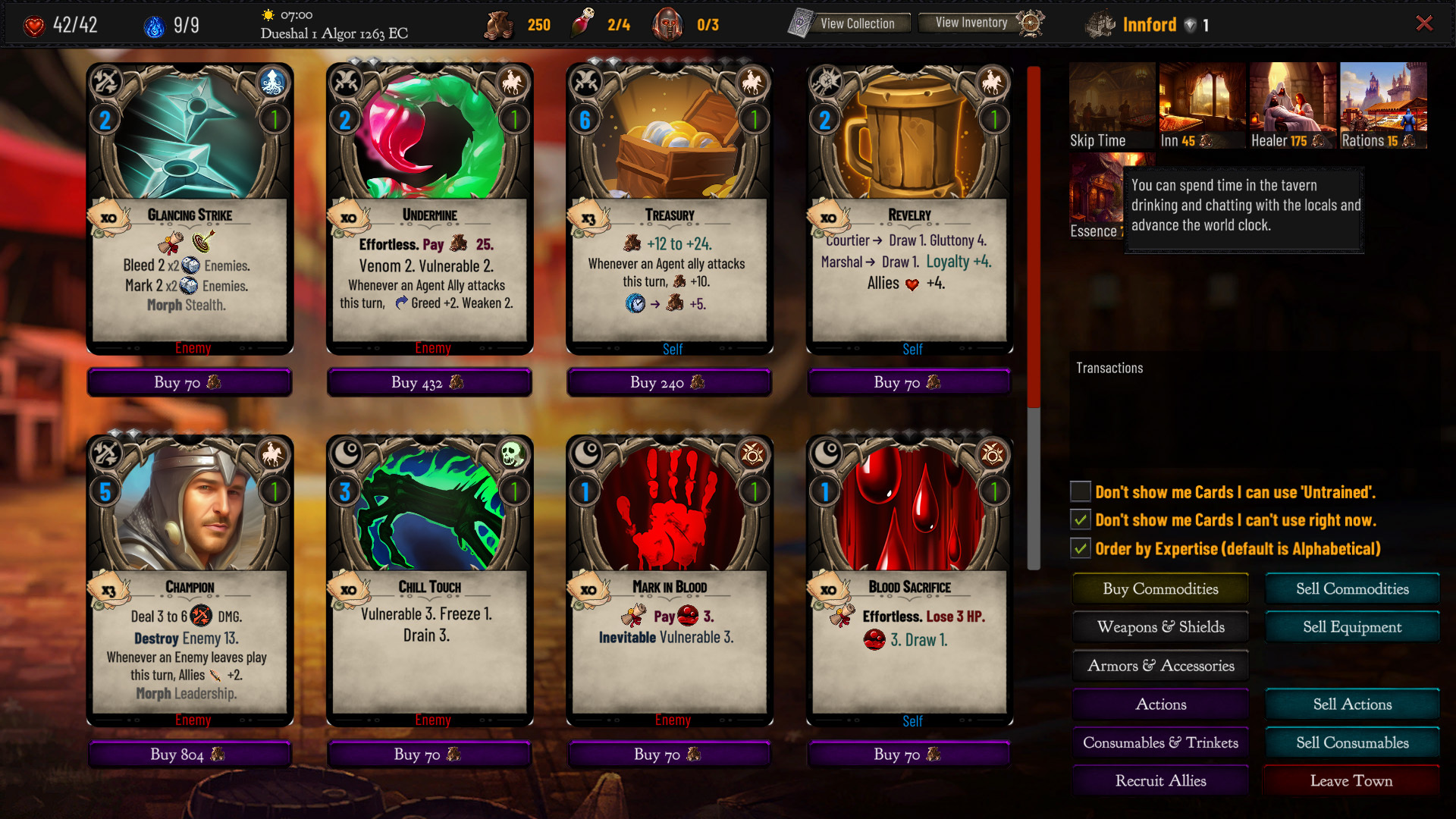
Here I am at Innford during time, and no one of my contacts is around.
I guess I can wait a bit...or a lot.
And here they are!
After clicking on the new Skip Time button, you can slide the candle to choose the amount of hours. The indicator next to hours will show you if you will end up at daytime or nightime.
Double Agent
Finally for those who'd like to play as a member of two organizations they now can using this official semi-vanilla mod.
I may one day incorporate it to the base game but for now you can find it on workshop and nexus.
That's all folks.
You can read more details in the patch notes below
Patch Notes - 12/12 # 1.049.5
Replaced the "Loiter" option in Towns with a Skip Time option. Skip Time allows the advancing of the world clock from 1 to 24 hours for the cost of 5 Farthings per hour.
While in Gauntlet mode, the PC location is set to "Gauntlet"; both Events and NPC DBs can check this. In NPCs DB files: Setting the location as "Gauntlet" will make these NPCs appear in the Gauntlet mode towns.
In "Guilds and Secret Societies" expansion: Added a Blacksmith for the Gauntlet mode settlements.
In GameMode rules: DisableWorldmapFatigue:true, it can be used to disable accumulating Fatigue while traveling through the World map. Fatigue will still be accumulated while doing camp activities like hunting and gathering herbs. Encounters in the wilderness will still occur.
Fixed a few cards and perk typos.
09/12 # 1.049.3a (Hotfix)
Fixed an issue with Alert & Ally related effects causing the turn not to advance.
08/12 # 1.049.3 (Hotfix)
Fixed a few cards and perk typos.
Fixed an issue with Multiply Status that could occur on certain rare occasions.
Misc code optimizations.
Chaos & DChaos will automatically create their ExtraRule on cards without Spell Component.
05/12 # 1.049.2 (Hotfix)
Fixed an issue with Adventure cards not getting fetched (i.e., by Adventurer's Journal).
Fixed an issue with Autosync expertise with space in their name, ie. Nature Magic rank was not calculating correctly in Ink events while trying to increase the skill in a trainer.
The following command can be used inside an ink story: >>>>Join>>{Organization} to have the PC join {Organization}. (Don't run this command multiple times for different organizations, i.e., add a check to ensure that the PC is Unaligned. Otherwise, it can keep granting other organizations to the player.)
In "Guilds and Secret Societies" Expansion:
Fixed a few typos in a few cards.
'Unaligned' characters can join an organization mid-game by talking to that organization's contact.
Contacts that can no longer teach the player will say, "You already know everything I can teach." instead of the cost to upgrade this skill.
Guilds and Secret Societies is out now!
Hi folks,
Guilds and Secret Societies expansion is out now, and while I did my best to test everything as thoroughly as possible, there may be things that will need fixing or tweaking in the coming days.
Please read the Expansion contents before pressing the buy button to ensure everything is clear on what the expansion includes. I'll start a new playthrough on my YouTube channel in the coming days, where I'll go over the new mechanics, so stay tuned! In the meantime, if you have any questions about the new mechanics feel free to ask in the comments below.
While you can safely continue your old adventure, you may want to start fresh to experience the changes in full.
DLC Contents
320+ new Cards: Recruit new Allies; take advantage of many new mechanics and high-expertise Organization cards.
100+ new NPC: NPCs serve a utility function. They can teach new skills and sell cards from that skill or their organization (if you are also a member).
50+ new Perks: To make your epic level character stronger (plus 50+ more to access the new organization contacts).
85+ new Enemies: Face unique bosses with new deadly tactic cards and survive dangerous Enemies making higher-level campaigns more lethal and more challenging.
25+ new Challenges: Discover new epic-level quest chains, each with exclusive rewards you can't get anywhere elsewhere in the world.
4 new Arenas and a new Endgame Challenge: Test your mettle in new Arenas and fight your way to the most challenging Endgame yet, suitable for epic-level characters.
New crafting Recipes & Blacksmiths: Craft the new Clockworks in your Workshop, raise the new Undead minions in your Necromantic Altar and have town Blacksmiths upgrade your equipment to the next rarity for a fee.
Guilds and Secret Societies resources, QoL improvements and Modding Additions.
Hi folks,
Guilds and Secret Societies will release on Steam soon. In the meantime, you'll need this patch to run it properly. Along with the essential resources for the new expansion, there are various improvements in the base game.
You can read more details in the patch notes below.
Patch Notes - 02/12 # 1.049.1
Misc changes and additions
Unique Rule addon: "Unique permanents are impervious to Unsummon but lose Health if targeted by such a card. Unique Soulmates lose 10 HP when targeted by an Unsummon effect, while all other permanent types 40 HP."
Updated the graphics of several older Graphic sets.
Improved the algorithm of scaling up bosses in Endless Gauntlets and Sandbox Arenas.
Temp ripple effects on cards will update to reflect eligible bonuses from [All Actions] perks. (Ripple effect doesn't receive expertise bonuses, as they no longer belong in any particular expertise after they activate, but they may benefit from perk bonuses that affect [All Actions].)
Note to modders: The second part of their ExtraRule is overwritten by automatically generated text based on the TempState effects. ie. in TempStateRippleEffectEnemy Acts>ResistPhysical=-2:1, ExtraRule:Whenever an Enemy acts this turn; Resist -2. The part "Resist -2." is now generated automatically from ">ResistPhysical=-2:1" and is redundant to include; you may want, though, to improve the card readability a bit for other modders looking at your cards. Including the ;[space] part is essential for the text to be parsed accurately.
Added new resources and graphics assets for the "Guilds and Secret Societies" expansion.
Bugfixes
Fixed a potential issue when Controlling enemies through Channel spells.
Modding Additions
AddAllyType, can now also be used in Control spells through Channel.
In Ink script:
VAR PCExpertise[Expertise] = 0 will automatically sync with the current expertise value of the player.
The following commands can be used inside an ink story:
>>>>Actions_Store>>{Organization}>>{xRank}, opens a store of {Organization} actions up to x rank.
>>>>Actions_Store>>{Expertise}>>{xRank}, opens a store of {Expertise} actions up to x rank.
>>>>Consumables_Store>>{Organization}>>{xRank}, opens a store of {Organization} consumables up to x rank.
>>>>Consumables_Store>>{Expertise}>>{xRank}, opens a store of {Expertise} consumables up to x rank.
>>>>Allies_Store>>{Organization}>>{xRank}, opens a store of {Organization} allies up to x rank.
>>>>Allies_Store>>{Expertise}>>{xRank}, opens a store of {Expertise} allies up to x rank.
>>>>Increase_Expertise>>{Expertise}, increases {Expertise} by 1
>>>>Pay>>{aFee}, pays {aFee} Farthings
Note to Modders:
These functions are for use in conjunction with Ink variables. You don't need to use the {} if you have fixed values. Ie. >>>>Actions_Store>>Pirate Coalition>>4
Rank will be capped by the Game Mode's MerchantsSellUpToExpertise:x value.
QoL improvements, Discard Pile mechanics, Modding Additions and DLC3 news.
Hi folks,
This patch adds the first part of DLC3 resources, new quality-of-life improvements, and many new mechanics and effects for our modders, including ways to interact with the Discard pile. The codex has also been updated in several places to reflect the latest additions.
You can read more details in the patch notes below.
Guilds and Secret Societies
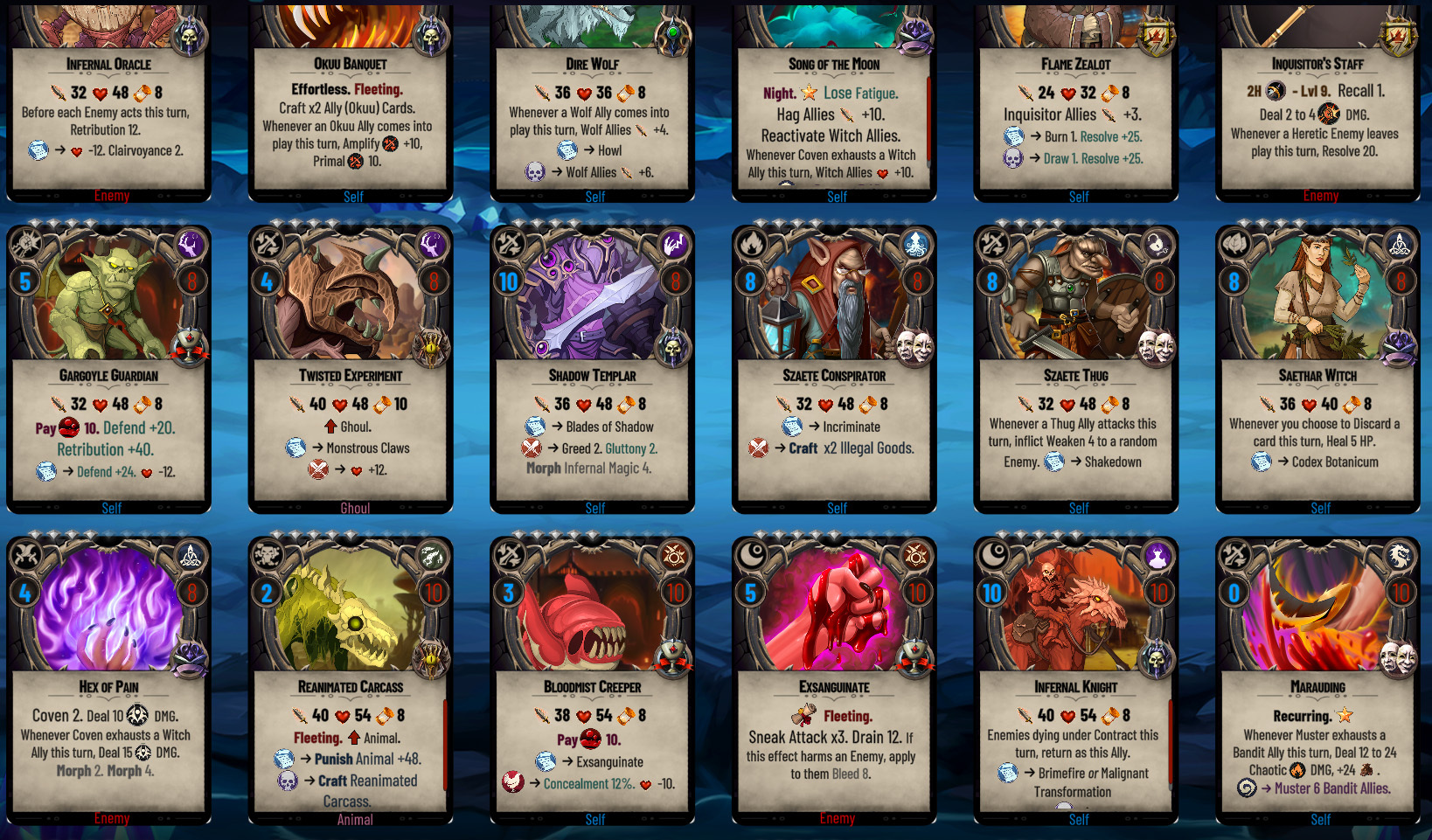
We'll be talking in detail about the new expansion mechanics once it releases (most likely in mid-late December); below, you can see a few new enemies and cards that will be included in it.
The most significant part of the card set will be cards for the various game organizations.
There are many new cards that require high rank expertise to use.
Including some high-level contacts that can be acquired after attaining the max. Organization rank.
And, of course, new high Tier enemies
That's all folks!
If you have any questions or need more clarification on any of the new mechanics, let me know!
Patch Notes - 23/11 # 1.048.5
Misc Changes and Additions
Added a button under the Specter to display the cards in the Discard pile.
Cards with no instances in the player's deck are displayed with purple names.
Discard piles for existing characters will appear empty till they start playing & discard cards on this build.
Replicate will display a combat log message on Failure. (The verbose log will additionally show the roll.)
Recurring cards Codex addendum: "Once played (or discarded), Recurring cards skip the Discard Pile but remain in your Deck."
Supplies, Clairvoyance, Rally & Recoup rule change: The unpicked cards skip the Discard Pile but remain in your Deck. Ie. The clairvoyance rule now reads: "Remove the top x Card(s) from your Draw pile. Choose & Draw one and set the rest aside (they skip the Discard Pile but remain in your Deck)."
Added a third color indicator for challenging quests in the World map activities.
Expanding the Codex entry on the World map interaction to include the difficulty color indicators.
In Journal:
Added a completed/total quests counter.
Normal filter will show Quests of equal or +1 level higher than the PC
Challenging filter will show Quests of +2, +3 levels higher than the PC
Added a filter to show hard quests (4+ levels higher than the PC)
Added colors to Journal filters matching the area difficulty indicators.
Codex Appendix will now include keyword links from Ripple Effects.
Added graphic assets and resources for the "Guilds and Secret Societies" Expansion.
Several cards updated to use Reach (Spears, Lances, Staffs, etc.)
Tweaked/Buffed the organization 'signature' cards.
Updated the graphics of all the "Contact" cards with improved versions.
Updated Unity version to LTS 2021.3.13
Modding Additions
New Card effects
Reach:1, cards with Reach ignore Spiked Armor and Counter Attack. (Difference with Ranged:1 They can't harm fliers and can harm targets in Cover, unlike Ranged.)
Presence:x, Increase the magnitude of a Control or Befriend action by x this turn. If this effect modifies an Action, you lose all Presence.
Hostile:1 can be added in cards (or bonus effects) to prevent auto-casting them if no enemies are around. This effect doesn't display on cards.
Recall:x, Return the top x card(s) of your Discard Pile to your Hand.
Rebirth:x, Remove the top x Ally Card(s) from your Discard pile. Choose & Return one in your Hand; then set the rest aside (they don't return in the Discard Pile but remain in your Deck).
Rebirth:x, LookFor[Type]:1, Remove the top x Ally Card(s) of [Type] from your Discard pile. Choose & Return one in your Hand; then set the rest aside (they don't return in the Discard Pile but remain in your Deck).
SkipDiscardPile:1, This card doesn't go into your Discard Pile.
DecayApply[Debuff]:x, can be used to apply a debuff if Decay harms the enemy, ie. DecayApplyEnvenomed:2 will also apply 2 Venom counters if Decay hurts its target, regardless of resistance.
BlessedApply[Debuff]:x, can be used to apply a debuff if Blessed harms the enemy, ie. BlessedApplyBurning:2 will also apply 2 Burn counters if Blessed harms its target, regardless of resistance.
BanishApply[Debuff]:x, can apply a debuff if Banish harms the enemy, ie. BanishApplyVulnerable:2 will also apply 2 Vulnerable counters if Banish damages its target, regardless of resistance.
SilverApply[Debuff]:x, can be used to apply a debuff if Silver harms the enemy, ie. SilverApplyMark:2 will also apply 2 Mark counters if Silver harms its target, regardless of resistance.
BaneApply[Debuff]:x, can be used to apply a debuff if Enemy Bane (Punish) harms the enemy, ie. BaneApplyVulnerable:2 will also apply 2 Vulnerable counters if Enemy Bane (Punish) hurts its target, regardless of resistance.
ShadowShiftApply[Debuff]:x, can be used to apply a debuff if Shadow Shift harms the enemy, ie. ShadowShiftApplyVulnerable:2 will also apply 2 Vulnerable counters if Shadow Shift hurts its target, regardless of resistance.
DrainApply[Debuff]:x, can be used to apply a debuff if Drain harms the enemy, ie. DrainApplyImmobilized:2 will also apply 2 Stun counters if Drain hurts its target, regardless of resistance.
Debuffs applied with DecayApply, BlessedApply & BanishApply are in addition to any debuffs that generally apply with these effects.
Ripple effects extensions
"Recall Card", this ripple effect triggers each time Recall draws a card from your Discard pile. (In contrast, the "Recall" ripple effect would trigger once per card having the Recall effect.) Recommended wording is: "Whenever you Recall a card from your Discard Pile, "
"Discard Card", this ripple effect triggers each time the player chooses and discards a card, i.e., with Ctrl+Click, pointing the card arrow to the Specter, clicking the discard button, etc. (In contrast, the "Discard" ripple effect, would trigger once per card having the random Discard effect.) Recommended wording is: "Whenever you choose to Discard a card, "
'Consecrate Harms', this ripple effect triggers each time Aura of Light harms the PC. Recommended wording is: "If Aura of Light harms you this turn, " or "Whenever Aura of Light harms you, "
'Consecrate Heals', this ripple effect triggers each time Aura of Light heals the PC. Recommended wording is: "If Aura of Light heals you this turn, " or "Whenever Aura of Light heals you, "
'Desecrate Heals', this ripple effect triggers each time Aura of Darkness heals the PC. Recommended wording is: "If Aura of Darkness heals you this turn, " or "Whenever Aura of Darkness heals you, "
'Desecrate Harms', this ripple effect triggers each time Aura of Darkness harms the PC. Recommended wording is: "If Aura of Darkness harms you this turn, " or "Whenever Aura of Darkness harms you, "
'Coven Unity', this ripple effect triggers each time Coven exhausts a Witch. Recommended wording is: "Whenever Coven exhausts a Witch Ally this turn, "
'Living Shadows', this ripple effect triggers each time Shadow Shift damages an Enemy. Recommended wording is: "Whenever Shadow Shift harms an Enemy this turn, "
Channel extensions
Channel now supports Attributes: Strength, Resilience, Agility, Intellect, Willpower, and Charisma, ie. Channel>Charisma>ControlArchetypeEnemy:100
Channel now supports the Draw Pile count or the Discard Pile count. Channel>Draw Pile>Damage:100
The magnitude of these properties (for the card) can increase by adding Property:x, i.e., to have the player's Charisma count as +10 points higher for this card: Channel>Charisma>ControlArchetypeEnemy:100, Charisma:10
These properties aren't consumed and remain unchanged. Ie. Channel>Discard Pile>Damage:100, won't empty your Discard Pile.
Added support for BloodTribute effects in Morph.
Bugfixes
Fixed an issue with FailedDebuffsFracture applying multiple instances of fracture in cards with the DChaos effect.
Added a click blocker in the Loading screen to prevent accidental clicks to the main menu while the game is loading.
You can now vote for your favorite Halloween Contests entries!
Hi folks!
Our two Halloween Contests for this year are officially concluded. I want to thank everyone who took the time to participate and contribute to our little community. Below are our Contest entries in chronological order:
Modding Contest
1, Morrowind Diversity by Alex__13 https://steamcommunity.com/sharedfiles/filedetails/?id=2866772943
2. More Elves (Dnd Inspired) by Risewild https://steamcommunity.com/sharedfiles/filedetails/?id=2882014169
3. Small Tales by harpsacord https://steamcommunity.com/sharedfiles/filedetails/?id=2882372761
YouTube Contest
A. "Short playlist of a few videos for getting started with modding in Erannorth" by Trench
* Sadly, our YouTube contest is short an entry, but I decided not to cancel it. Because both entries deserve a prize. On the bright side, all contest participants have won already; the question is, which spot?
How to vote
You can now vote for your favorite entries in the comments below till Friday, 4 November 2022.
You can vote once for each category.
Use the corresponding number 1, 2 or 3 for the Modding contest.
Use the corresponding letter A or B for the YouTube contest.
We'll be back here at 4th November for the final ranking! Good luck folks!
Community Requested Additions and Balance Tweaks.
Hi folks,
This is a small patch that implements some community-requested additions and balance tweaks. But it also opens with some personal thoughts on these changes, and you can safely skip to the patch notes.
I thought now was a perfect time to implement them before adding the more bulky resources for the upcoming DLC, which I'd like to do in the coming days.
Hopefully, there won't be any need for urgent patches, so that we can save unnecessary bandwidth. But do let me know if you come across any glaring issues.
So, the first change regards reinforcements.
I understand it can be a stressful experience for new players. Perhaps they just started to tackle more serious difficulties and haven't yet been acquainted with all the tools at their disposal, as using them in lower difficulties wasn't that crucial, or haven't analyzed in the log the patterns of how, when, and why reinforcements arrive.
With this patch, all the vanilla modes will receive reinforcements after 6 turns instead of 4.
This will give everyone more leeway and time to observe the now more consistent pattern: The very first wave can't arrive unless x or fewer enemies remain on the battlefield. That x is now 2 in all modes.
In practice: card-slinging will most likely lead to reinforcements at turn 7 (instead of 5) if 2 or fewer enemies remain. Or, reinforcements will arrive at turn 13 (instead of turn 9) if you 'rounded the enemies for mass execution' instead of killing them one by one each turn. There should be plenty of time to do both now and play the way you prefer.
For those who still dislike the reinforcements system or want a more chill experience, there is an easy solution below to customize reinforcements to their liking and play style. (see patch notes). For me, seeing reinforcements always means that I played my cards sub-optimally, and it's an excellent reminder to tweak my deck or re-evaluate my tactics.
The second regards Debuffs like Stun and Bewitch getting resisted in a row.
We may prefer to believe that we did the best we could and died from lousy luck. That can happen. But, if we didn't bother to prepare early on our Deck, Backpack, and Collection for things we knew we'd face, and we skipped on these cards to squeeze a +2 damage we didn't really need at that point. If we din't prepare for the various obstacles the game will throw at us eventually, while mistakes can be more easily forgiven, then it won't be bad luck, but lack of planning when that Stun fails and cause our character's death.
It's that death that comes out of nowhere yet could have been prevented; with more experience and by utilizing crucial tools available in all skills, i.e., Fracture, Resolve, Inevitable/Delayed, Adjust/Multiply, Effects that apply inevitable Debuffs, Switching Decks, having alternative debuffs. Etc.
Anyway, it is never fun "luck" killing our character when we still don't know how to change that luck, so with this patch, all the vanilla modes of 4 skulls and below have a "Fracture 5% upon failing to Debuff" setting. This, in practice, means that every time any Debuff fails in that turn, the lucky enemy will be +5% more susceptible to all your Debuffs for the entire turn. When the 2nd fails by another +5% (10%), stacking all the way to full Vulnerability.
This, I hope, will help prepare new players better for the need to invest in cards with Fracture, Resolve, and other methods, as they move on to more challenging difficulties without this setting, and give you some creative ideas on solving the various problems the game throws at you to solve.
Alternatively you can read in the patch notes below how you can add this setting to other modes, remove it, or change it's value to something higher or lower.
Patch Notes - 27/10 # 1.046.6
Balance Tweaks - Reinforcements changes
Enemy reinforcements will appear every 6 turns (changed EnemyReinforcementsEveryXTurns:6 in all Vanilla modes). [instead of after 4 turns].
Enemy reinforcements will appear if there are 2 or fewer enemies on the battlefield. (changed ReinforcementsIfEnemiesLessThan:2 for all Vanilla modes). If PunishingReinforcements:true, this setting is ignored after 12 turns (2 x EnemyReinforcementsEveryXTurns) [instead of after 8 turns].
If PunishingReinforcements:true, Reinforcements will progressively become increasingly deadlier than before as the player's level increases and every 12 levels.
Note: If the reinforcements are something that stresses you out, you can modify them quickly (and permanently) in the mode of your choice through the console: f10, then, i.e., for Conquest type:
ModifyGM command creates a modded copy of the vanilla mode with any flags you set through this command, so you only need to do it once. In this case, it tells Conquest mode reinforcements to arrive every 60 turns.
(If you typed the command correctly, it will return something like: "New Value Set: EnemyReinforcementsEveryXTurns => 60. (Feel free to modify a different value)".
Balance Tweaks - Fracture upon failing to Debuff
Modes of 4 skulls or lower have the "FailedDebuffsFracture":5; this means that each time an enemy resists a debuff, they automatically get 5% Fracture, which will make subsequent Debuffs easier.
Modes with 5+ skulls difficulty that are aimed at advanced players have this setting = 0 (off) and assume that the player will instead use all the tools at their disposal [i.e., Fracture, Resolve, Inevitable/Delayed, Adjust/Multiply, Effects that apply inevitable Debuffs, Switching Decks, etc. to bypass those resistances (and any need for luck) through skillful planning of their build.]
Custom modes of 4 skulls or lower created through the Custom Modes UI (from now on) will also include "FailedDebuffsFracture":5.
Note: You can further modify this setting (permanently) in the mode of your choice through the console: f10, then, i.e., for Conquest type:
ModifyGM Conquest=>FailedDebuffsFracture=>25, or whatever percentage you feel should be there.
The value of FailedDebuffsFracture will always display at the end of the mode rules, even if it's 0. (Resisted Debuffs apply x% Fracture.)
Misc Changes/Additions
Cards can craft random Maladies, using: 'Invoke:x, InvokeDiscipline:Malady'
Treasure Map, Adventurer's Journal, Knapsack, Adventurer's Knapsack, Tome of Knowledge, Tome of Greater Knowledge, Memoirs of a Hero & Schematics will now all Ignore Synergies.
Added 3 early Enemy kills progression perks at 30, 60 & 120 kills for earning fast some extra Schematics (for your Equipment upgrades)
Completing the Ironman Gauntlet will also give the 'Quest Complete!' achievement.
Bugfixes
Fixed some card and perk typos.
Blacksmith's Forge, Overworld Map Changes and New Endgame Quest for DLC1/DLC2.
Hi folks,
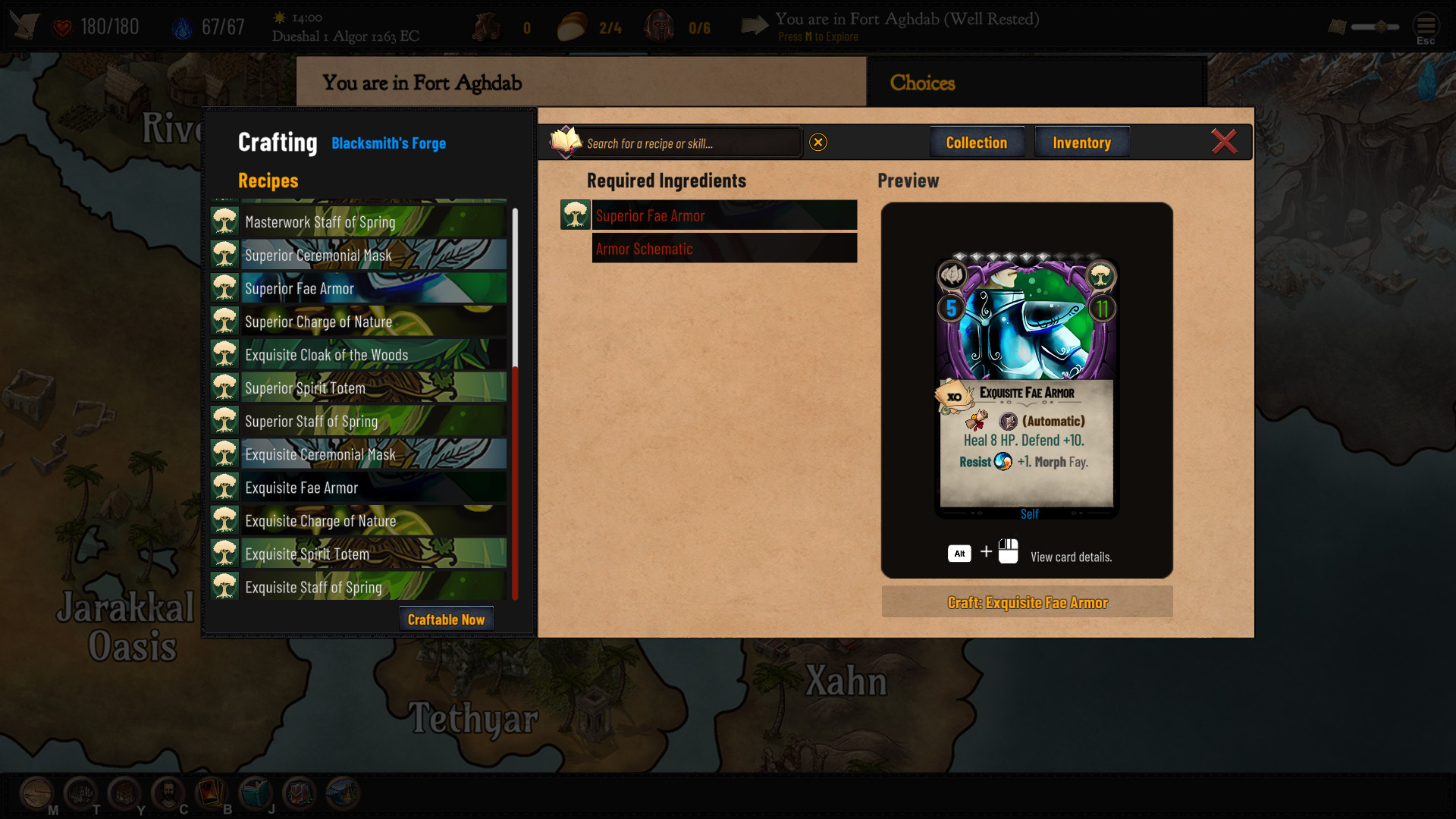
The highlight of this patch is that you can now use your Blacksmith's Forge in selected properties and upgrade your (upgradable) gear to the next quality. Are you tired of searching for an Exquisite Fae Armor all over Folkswave? Well, now you can upgrade your trusted common Fae Armor all the way to Exquisite, but any XP the Item had won't be retained.
A significant change of this patch is that the radial actions menu in the overworld map is gone. You can find all the options at the bottom part of the UI. That'll probably take some time to get used to, but it allows for more expandability, like the new icon to take you directly to your headquarters if there is any in your current location. You can also click directly on the location more easily to see its activities, as your click will now go through the character. So there is no need to click on the Explore button all the way down there, but it was left there for consistency.
Finally, for DLC1 & DLC2 specifically, two new endgame challenges will pit you against the new bosses of those DLCs and truly test your build. Like this one, and especially if you are not Aquatic.
There are, of course, more, but you can read everything in detail in the patch notes below.
Last but not least, there is a week left for our Halloween contest.
I'll re-post the contest details for those who missed it and want a chance to participate. One week is plenty of time even if you never modded or uploaded a YouTube video before ;)
There will be two separate contests—one for modders and a second for YouTubers. You can participate in either or both and even win twice.
Erannorth Chronicles - Halloween Modding Contest
Create a mod for Erannorth Chronicles.
Your mod can be in any category you like (archetypes, locations, events, etc.) except Cosmetic mods, i.e., no PC Portraits, please.
Upload your mod in Steam Workshop before Monday, October 31, 2022.
Share its workshop link in our #modding-contest Discord channel.
Small Prints:
The mod must be made specifically for this contest and must be uploaded in Steam Workshop between September 15 2022 to October 31, 2022.
You can participate only once. Only the top-voted ones will be your contest entry if you submit multiple entries.
The contest will be canceled if there are fewer than three entries after the deadline.
Erannorth Chronicles - Halloween YouTube Contest
Create a video about Erannorth Chronicles. Your video can be in any category you like (tutorial, strategy guide, tips, playthrough, etc.) but of course about Erannorth,
Upload your video to YouTube before Monday, October 31, 2022.
Share its link in our #modding-contest Discord channel.
Small Prints:
The video must be made specifically for this contest and must be uploaded in YouTube between September 15 2022 to October 31, 2022.
You can participate only once. Only the most-liked video will be your contest entry if you submit multiple videos.
The contest will be canceled if there are fewer than three entries after the deadline.
How to win
The community will vote for their favorite entries after the contest conclusion. How many have subscribed to your mod or liked your video doesn't matter; and it's of course unfair as it's heavily affected on when the entry was uploaded. So the final word belongs to our Steam community: You.
We'll discuss that in more detail when that time comes.
The grand prize
1st spot: 4x Steam keys of your choice from my following products: Erannorth Chronicles, Ancient Ruins, Relics, and Armaments, or for the upcoming DLC3 when it's ready.
2nd-3rd spot: 2x Steam key of your choice from my following products: Erannorth Chronicles, Ancient Ruins, Relics and Armaments, or for the upcoming DLC3 when it's ready.
You can request each product key multiple times, i.e., to gift them to friends.
All 3 top winners of the Modding Contest will be getting the honorary title of 'Modder' in our Discord community (if they don't have it).
All 3 top winners of the YouTube Contest will be getting the honorary title of 'Influencer' in our Discord community.
So far, there is 1 entry for the Modding contest and 2 for the YouTube contest. We need 3 in each category for the contest to be valid. Hopefully more entries will get submitted as we approach in the last days of the contests.
Patch Notes - 24/10 # 1.046.5
New Content
New Headquarters Facilities
Necromantic Altar: You can use the Necromantic Altar to create various undead minion cards.
Blacksmith's Forge (498 auto-generated recipes): You can use the Blacksmith's Forge facility to upgrade items to their next quality. normal->Masterwork->Superior->Exquisite. The old item's XP is not retained.
Upgrading Items to their next Quality
You can upgrade items in the Blacksmith's Forge facility, which is available in specific properties. To upgrade an item to the following quality, you need the previous grade and the corresponding Schematic card (Armor, Weapon, or Accessory Schematic). Ie. For the Superior Pelekus, you need a Masterwork Pelekus and a Weapon Schematic.
Headquarters Additions
You can choose to construct a Workshop in Forest Lodge, Hunter's Lodge, and Misthold Cottage instead of the Alchemy Lab. (Or an Alchemy Lab instead of the Workshop)
You can choose to construct a Necromantic Altar in Mournvale's Mausoleum instead of the Alchemy Lab. (Or an Alchemy Lab instead of the Necromantic Altar)
You can construct a Basement in Ravensburg Manor under your Wine Cellar after cleaning it up from Vermins. You can then build a Blacksmith's Forge, Necromantic Altar, and a Treasury.
You can construct a Blacksmith's Forge in Fort Aghdab & Fort Holrgardr.
Added new Recipes to craft certain Undead cards using your Necromantic Altars in Mournvale's Mausoleum & Ravensburg Manor.
New Endgame Quests (DLC1 & DLC2 only)
Added 2 new Endgame quests in Veara'acthon (DLC1) & Ship Graveyard (DLC2) for high-level characters. The 4 Endgame options in order of difficulty are now: Deimos Chasm (Easy), Jorunfjord (Normal), Veara'acthon (Challenging) & Ship Graveyard (Hard).
(You can use your Journal and search for Endgame to locate those Challenges in your Map.)
Misc Changes and Additions
In the Overworld Map: Removed the radial menu from the PC token and moved the overworld actions menu to the bottom-left part of the screen. You can "click-through" the PC token to open the location you are currently in. Additionally, you'll find a button for the locations with purchased properties to access your property faster.
Repairing, Purchasing, and Expanding Properties will now award a small to medium amount of XP related to the Farthings spent.
Increased the font size of several texts to improve legibility.
Tweaked various UI elements to improve their overall presentation.
Added a tooltip for Karma & Order in the Character Sheet.
Bugfixes
Events could close (get skipped) with X while they shouldn't.
Fixed some card and perk typos.
Modding Additions
ExecuteFunc:Blacksmith's Forge, can be used in Events to open the Crafting UI in item upgrading mode. The actual recipes to upgrade these items are generated automatically (from the card database) the first time the 'Blacksmith's Forge' function runs. If a recipe already exists, the existing recipe is used instead.
ExecuteFunc:Blacksmith, can be used in Events to open the Crafting UI in item upgrading mode, which now includes a Farthings cost. I.e., for crafting NPCs.
Modders can allow X to skip specific events by setting AllowSkipping:true in the Event JSON file. Default, if omitted, is false. The vanilla setting for all events is omitted/false.
Recipes can support a Farthings cost as an Ingredient (i.e., to be crafted by someone else). This can be declared as Farthings(amount), ie. Recipe:Farthings(125)+*=Iron Sword. A recipe can have a single Farthings cost.
Constructed, Multiclass Integration, Modding Additions and DLC3.
Hi folks,
Today's patch adds a new Constructed sandbox mode and incorporates my Multiclass mod into the base game in a much more balanced way. It also tweaks several aspects of the game to improve your experience and integrate the upcoming DLC3. You can read more details in the patch notes below.
Speaking of the upcoming DLC, which is now officially named "Guilds and Secret Societies", its focus will be new content for all existing organizations (cards, perks, new allies, crafting recipes, and NPCs), among other things. It won't include any playable archetypes, classes, or species. If any different archetypes join the game later, it'll be as usual in free content updates.
I don't have a date to give you yet, but I aim to release it near the end of December 2022. If this will be possible or not, time will tell.
But, in the meantime, you can use all the new modding additions from the past few patches for your modding projects. From easy to integrate Recipes in the Crafting UI to making your NPCs and filling up the towns. The game content files and patch notes include all the knowledge you need. And I am always here to help if you get into any roadblocks.
There is still plenty of time to participate in our Halloween Modding (or YouTube contest), maybe win early access to DLC3 and be there as it's incorporated into the game. ;)
That's all, folks! If you encounter any issues, let me know to fix them!
Patch Notes - 17/10 # 1.046.1
New Content
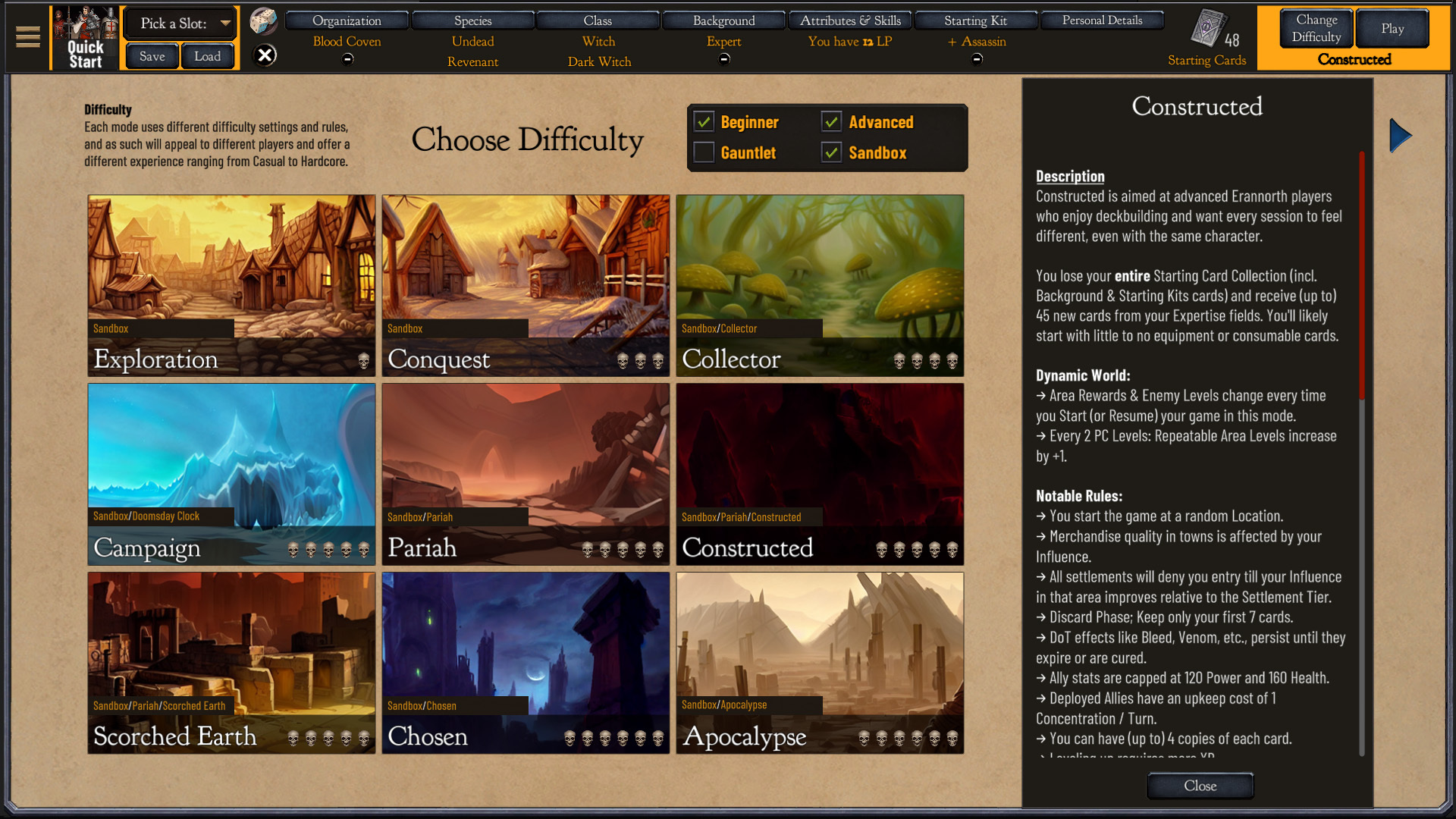
New mode: Constructed.
Constructed mode mixes Collector & Pariah with a few twists.
You lose all your Starting cards and receive (up to) 45 new cards from your Expertise fields. (Including Background-specific cards, all Starting Kit cards, etc.)
You can have (up to) 4 copies of each card.
All settlements will deny you entry till your Influence improves.
You start the game at a random location.
Leveling up requires more XP.
Negative leylines are incredibly unforgiving.
Integrated my Multiclass mod into the base game.
Picking either the perk Multiclass or Expert backgrounds will let you choose a second class and specialization instead of a Starting Kit.
Multiclass requires an Unaligned character and will increase the XP needed to level up by +25 x Level.
Expert can be used by all characters but will increase the XP required to level up by +50 x Level and offer additional bonuses.
My Workshop mod (Rs Multiclass) can still be used to overwrite the new vanilla Multiclass Background if you prefer the old version of Multiclass without requirements and the level-up nerf. It's highly recommended, though, to use the new vanilla version or the Expert background, as it is better balanced.
Misc Changes/Additions
The player's status effect panel has been divided into positive & negative effects.
You can Double-click on your Avatar to keep its status effects panel open. While open, you can click its hyperlinks to the glossary or scroll if there are too many effects.
Player status effects panel (if made sticky) can also close by clicking on it.
Modified the Town UI to support Exploration events and NPCs.
In Journal: Gateways moved from Contacts & Assets to a separate tab.
Added some extra options in the Custom Modes editor. It can also create 7 skulls difficulties.
Tweaked the algorithm of Constructed Cubes to only offer cards with 1+ Expertise requirements for archetype cards and
cards for 'non-archetype' cards.
Minor tweaks in the Mod Manager UI.
Loot cards like Knapsack, Strongbox, etc., will fall back to a broader card pool if fewer than 4 cards are in the initially stricter card pool.
Added 2 new backgrounds Unremarkable (req. Human) & Connoisseur (req. Vampire, Celestial, Avian or Aristocrat).
Decluttered the Codex entries. All additional info can be found by clicking the link in the Appendix (instead of selectively expanding some of them).
After toggling 'Fetch from Backpack' on or off, the Card options will automatically close as a visual indication that the change was stored.
Attuning to an Ancient Gateway will award 25 XP.
Bugfixes
Diplomat background gave the Diplomat's Coat in the player's Stash instead of their inventory. (Fix can apply only to new characters.)
Exploration:: & Kills:: progression perks were visible in the Active Perks section, while they shouldn't.
Updating card options through the 'Card Options' filter in Deckbuilder wasn't working correctly.
Modding Additions
Town Exploration framework
Modders can attach a unique or generic event to each town.
The Explore option appears automatically if a valid Event with ID "Explore_[Location name]" exists. Ie. Explore_Lanmerih.
The Explore option can also fall back to a generic Event with ID "Explore_Generic" if such an event exists.
(While the framework code is fully functional, there aren't any such vanilla event files at the moment).
NPC framework
Modders can now define NPCs and attach them to any town without modifying the location DB files.
NPCs are declared in their own DB files in the ModLoaderUser.conf using >> NPC & the DB name ie. NPCDB.Chronicles.tdb
To declare an NPC, you can use the following syntax:
ID:NPC ID, Name:NPC Name, Location:NPC Location, Tale:Tale Name {, Special: Requirements for the NPC to appear in Location's Town}
, ie. ID:Kaellecyn the Maleficent, Name:Kaellecyn the Maleficent, Location:Grysbog, Tale:Witch Hut
'ID' should be unique, as is the key of the DB, and is also used as the NPC portrait.
'Tale Name' is the name of a valid ink Event to attach.
'Special' is optional. Requirements should be declared using => instead of : & + instead of , ie. Special:Class=>Seelie+Level=>2
NPC special requirements will be re-checked each time anything changes in Town (time, farthings, rations, cards are purchased or sold, etc.), i.e., you may want some NPCs available only at Night (Special:Night=>1). Not meeting an NPC's special requirements removes them from the list.
Special:Daily=>1 is an exception and can be used to make certain NPCs available only once per game day. 'Daily' NPCs will remain visible in the list if all their other requirements are met but won't be interactable, and their tooltip will indicate they are 'Busy'.
Any location can be set using "Any". Ie. Location:Any
More than one location can be set using the following syntax: Location:+loc1+loc2+...+loc3+ ie. Location:+Lanmerih+Grysbog+
(While the framework code is fully functional, there aren't any NPC definitions at the moment).
Ink events / NPC Framework integration
new auto-sync variable (int) 'TownTier', will sync automatically to the current Town's Tier, after opening an Event through the Town UI.
ie. declare as VAR TownTier = 0
ie. use as {TownTier >= 3}
new autosync variables (string) 'ActiveNPC' & (string) 'ActiveNPCID', will sync automatically to the current NPC's name & ID, as long as their event triggered through the Town UI
ie. declare as VAR ActiveNPC = ""
ie. use as {ActiveNPC == "Kaellecyn"}
While not interacting with NPC, values will default to the strings "No One" & "-1" respectively.
Note to Modders: You can use this to handle multiple NPCs with the same Event and branch according to who we are interacting with.
Other Modding Additions
Events can trigger the crafting UI using a custom Facility with ExecuteFunc: Facility:[Custom Facility], ie. ExecuteFunc: Facility:Blacksmith, only crafting recipes that require this Facility will be shown.
Perks can increase (or reduce) the base XP level-up multiplier using ModifyEffectIncLevelXPMultiplier:y, The XP required to level up becomes: [ Base (50) + y] x Level.
RandomizeStartingLocation:true, can be used in Game Modes to randomize the player's starting location in Sandbox modes among the locations defined in StartingLocations:["loc","loc", etc.]
Random Encounter Changes, New Progression Rewards and Ancient Gateways
Hi folks,
This week's patch is larger than usual since it includes new and improved graphics for all the World areas. There are also some changes in the Random Encounters to make them deadlier and more rewarding, new progression rewards, and Ancient Gateways, which you can use to travel across Folkswave much faster.
Bugfixes aside, the development will now move full steam to DLC3. But we'll be talking more about it in future news posts.
Below, you can read about all the new features and changes in the patch notes.
Patch Notes - 12/10 # 1.045.4
Random Encounter changes
Random Encounters will get deadlier and include higher-level enemies (than the player) as the player's level increases.
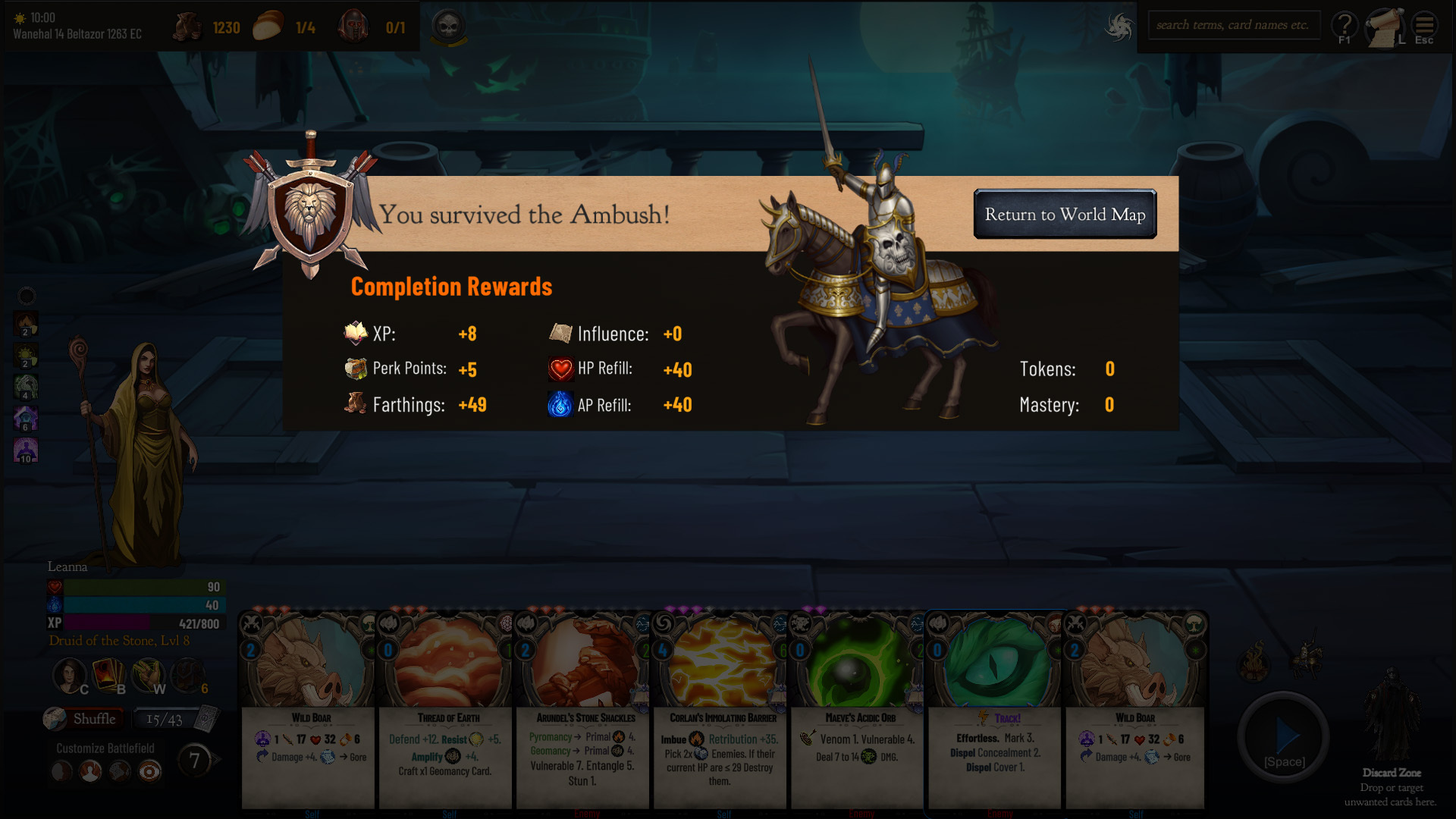
They will offer a completion reward with a few extra PP, XP & Farthings.
They now have a good chance to offer a selection of cards from which you can pick 1 or 2 cards.
New Progression Rewards
Added Progression Rewards for exploring new locations & defeated enemies. A location, ie. Lanmerih, Lucina, etc., is considered explored if the player has at least 1 Influence.
The Traveler perk tree, ie. Backpacker, Outdoors Specialist, Traveler, etc., perks are now acquired through the Exploration rewards progression. This change won't affect characters who already have any of these perks, but they won't be able to obtain additional perks from this tree, and their effects have changed slightly.
The new progression rewards can be declared as perks with ExploreLocations:x & DefeatEnemies:x, respectively.
Also revamped the Progression tab & added filters to view only Challenge, Exploration, Level, or Kills rewards.
Ancient Gateways
You can discover and attune to the 9 Ancient Gateways to teleport instantly between them.
Activating the Gateways requires an Attunement Ritual which consumes a valuable gemstone.
You can then travel freely to any attuned Gateway.
The 9 Ancient Gateways are Jorunfjord Gateway, Geirsver Gateway, Tethyar Gateway, Llanvale Gateway, Hirdwood Gateway, Roverford Valley Gateway, Deimos Chasm Gateway, Veara'ylon Gateway (Relics & Armaments DLC), Nifolhelg Gateway (Relics & Armaments DLC).
Misc Changes
Overhauled various artworks (including all the location artworks on the World map).
Changed the locations of a couple of Epic contacts to be more easily attainable.
Updated the Area Rewards algorithm: Area rewards will include all possible cards of the preferred skills (as before) and cards from the least preferred skills (but only up to the player rank + 1 in that skill).
When inspecting Areas: the Environment will also display along the leylines.
While the player is Level 1, Normal Encounter (nodes) with 4 or more enemies will always have 1 enemy less.
Improved the odds of low-level players finding lower-tier chests (unlocked or easier to unlock).
Bugfixes
In a couple of areas Graphic set was referencing the set incorrectly, causing the environment to fall back into Forest.