Deck Presets, Character Sheet Filters, Constructed and Dynamic Adventure Modes
Hi folks,
This is a major patch and adds many highly anticipated features in the game like:
Improved Deck & Collection Management
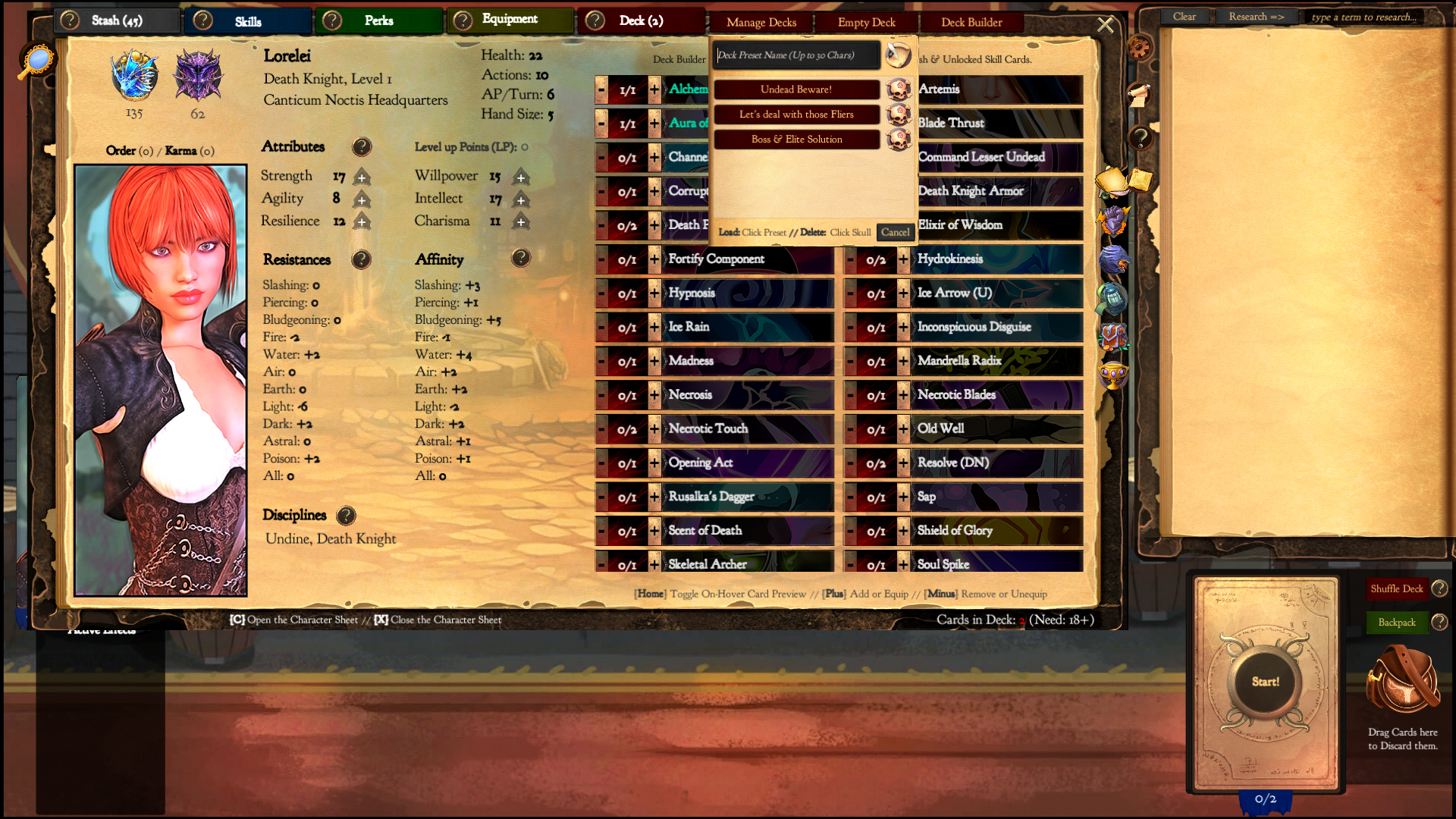
Deck Presets
Save different Decks, for different situations and switch to them instantly any time you want during your run.
Character Sheet & Player's Handbook Filters/Search field
Misplaced that 'Treasure Map'? Collected hundreds of Cards in your Stash and can't find them? Want to plan for your next Run? Or perhaps need a certain Perk. The new filters should come in handy.
New Game Mode Properties
Dynamic Adventure Modes
With the Dynamic Game Mode settings enabled, each Adventure Mode area will offer different Card rewards, Stage lengths, and Enemy Level ranges each time you Start a new Adventure or Resume from a save file.
Constructed Mode
Miss the thrill of opening packs or the challenge of constructing a deck from a limited pool of cards? The Constructed game mode should help fill that void. And it's fully compatible with the Adventure mode. ;)
New Adventure Mode: 'Drifter'
Explore the world of Erannorth and roam freely in this Sandbox/Adventure mode variant. Start with a random Card Stash of (up to) 60 Cards & without Starting Deck, Racial & Class Skill Cards. Collect more cards across all Disciplines as you go & build different decks to overcome the ever-changing leylines.
Area Rewards & Enemy Levels change each time you Start (or Resume) a game in this mode
And much more ;)
I hope you'll enjoy this patch!
For more details you can read the merged patch notes of v1.015 to v1.020 below.
Patch Notes - v1.020
Bugfixes
When loading the Game Two-Handed weapons would get Unequipped.
Replicate, Chain, Double, Triple & Quad bonuses were miscalculated (in the Card Text display) once boosted with Perks or after the Card had gained a level
Fixed a visual issue with the Card Text generator & removed any wrongly inserted double white-spaces.
The following Typo's Corrections may cause minor inconveniences in your Savefiles or Mods. If you are using any of the renamed cards as Skills in a Custom mod, a warning will appear next time you load the game that the 'x' card or perk doesn't exist. If this happens open the mod & Rename the Skill references to 'x' or contact the mod creator ;)
Fixed a Typo in the Spirit Animal (Rabit) => Spirit Animal (Rabbit)
Nymph's 'Ready your Bow' Choices was properly renamed to 'Shoot...' instead of 'Shot...'
Deck Presets
You can now save and load instantly saved Deck Presets, making switching your deck on the fly even faster.
Deck Presets are associated with the Progress savefile, so that each character can have any number of their own Deck Presets
Deck Presets containing cards the PC no longer owns will partially load. Any missing cards won't be added to the player's deck list.
You can quickly access the Deck Presets UI using the Hotkey 'F6'
When you Load a Deck Preset your hand cards are discarded, your current deck is emptied and the new deck is loaded. You don't draw any cards.
Character Sheet Filters
You can filter the various Card Sections and show/hide any combination of Actions, Summoning Cards, Trinkets, Consumable or Commodities.
i.e In the Deck Builder turn off showing Commodities, Trinket & Consumables. Or in your Stash turn off showing Actions & Commodities.
You can fiter the Equipment section and show/hide any combination of Weapons, Offhands, Armors & Accessories
i.e You can turn off showing everything except Accessories, to better take a look in them.
Advanced Filter
Along with the basic filters, there is also an advanced Filter where you can type & hit enter to search for specific cards that match (contains) the Keyword, Card Name or Discipline you typed (within the selected View).
You can click the Advanced Filter icon (first filter) to show/hide its query field or press the 'F' key if its query field is hidden to show it.
ie. searching in your Deck for a 'Treasure Card' that's in your Stash won't yield any results. But searching in your Stash would. Similarly Deck Builder won't show you Locked Skills that have the selected Keyword etc.
i.e searching for Bewitch [will show only cards that have references to Bewitch (i.e Bewitched)], or Healing [will show only cards related to Healing]
i.e searching for Death Knight [assuming you have any such cards, will show you them and any cards that have this in their name or description]
i.e Intimidate [will show you the card named 'Intimidate' if you own it and its somewhere within your current 'View' and any other cards that are associated with it perhaps because they Blood Tribute it or Spell craft it?]
You can type 'done' to reactivate all filters and show again all the cards of the current 'View'
Advanced filter can also check how
base* values of certain effects compare with a value x. (Base values don't include any bonuses or perks, is based solely on the card definition so this is a functionality (mostly) intended for modders). The exact or partial effect will be match but needs to be Case sensitive.
Syntax is [Effect]<=x or [Effect>] or [Effect] (no spaces) i.e ExpendBuffJudgement<=3 will show you cards that their base ExpendBuffJudgement is <=3 while ExpendBuffJudgement>=3 will show you cards with base ExpendBuffJudgement >=3. etc. While Judgement<=3 would show both cards that boost, expend or have a conditional check that involves Judgement etc. as long as the base value is less equal to 3. [And that because it will match CustomBuffJudgement, ExpendBuffJudgement, OnCasterStatusJudgement and basically every composite effect you can imagine that has the 'Judgement' word in it]
However players can still benefit by this feature too. Querying for Action (AP Cost), Tier & Evolved (Card Level) may prove useful in many cases. i.e Tier>=3 will show Cards that have Tier >= 3 & Actions<=1 will show Cards with AP cost <= 1. Evolved=2 will show cards that have exactly two upgrades. etc.
You can use && to search for result containing [Effect AND Effect] or [Effect AND Discipline]
ie Vulnerable&&Fury will show cards with both Vulnerable and Fury
i.e Vulnerable&&Vampire will show only Vampire Cards with Vulnerable. (The order in this case matters: Effect first then Discipline. For example Vampire&&Vulnerable query won't yield any results. As 'Vampire' is not an Effect & there is no Discipline 'Vulnerable')
You can't combine modifiers this way. For example Vulnerable=3&&Damage>=4 won't work.
Player's Handbook Search field
All of the Advanced Filter functionality can be used to search through the entire Card Database (Vanilla Cards & Mods) in the Player's Handbook
i.e Unique&&Vampire will show all the Unique Vampire cards
i.e Hideouts will show all the Hideouts
i.e Echo>=2 will show all the Cards with base Echo value >= 2
i.e Tier=6 will show all the Tier 6 cards
Perks Search field
You can search through your Character's Perks & display only those that their name or description contains the keyword you typed.
While a filter is active, the Search box placeholder text will change to the active filter as a reminder.
ie. typing Charisma, will show all perks that affect Charisma
ie. typing Focus, will show all perks that affect the Focus effect etc.
ie. typing Slashing, will show all perks that affect Slashing Damage or Resistance etc.
You can click on any of the buttons Show All, Racial Perks or Class Perks to cancel this filter, or search for something else.
Perks search doesn't support the Advanced Filter Modifiers
Misc QoL Additions
Whenever the Player's health drops below 40% a reminder that they need healing will appear above their portraits
Added 2 Additional Slots for Saving Character progress
Manage & Empty Decks buttons are now toggles (you can click on them to open/hide)\
Opening your Character Sheet in Draft & Constructed will use the 'Deck Builder' as the Default view
Modding Additions
New Action Keyword: Discovery
Discovery[Perkname]:1, Player Permanently gets the [Perkname] Perk
i.e DiscoveryRealistic Illusions:1 will grant to the Player the Perk Realistic Illusions if they don't have it already
Once the Player uses the Discovery Card & Claim the Perk (or if the player already has this Perk) the Discovery effect is removed from future instances of this card, but all other effects remain intact.
New Game Mode Properties
"AdventureModeDynamicRewards":false or true, "AdventureModeDynamicEnemyLevels":false or true & "AdventureModeDynamicAreaLength":false or true
These three options can be used separately, or together (recommended). If true, each time you start, restart or resume the Adventure mode, all in-game Areas will slightly change their Encounter levels, stage Lengths and offer each time a randomly generated set of Rewards from all the Cards in your Collection (Vanilla+Mods)
"ConstructedMode":false or true, Upon starting the game you lose your Starting Deck & Skills
You open 3x Card packs containing up to 60 Cards (40 Archetype Cards & 20 non-Archetype Cards (36 Tier 1, 18 Tier 2 & 6 Tier 3))
Excess Cards (Cards opened but you can't get i.e already have max copies, too many or duplicate equipment/consumables etc.) are converted to Farthings at a Rate of 25/Card not Received
non-Archetype Cards include Cards from all the Cards in your Collection (Vanilla+Mods)
Before start playing you need to Construct a valid Deck of at least 18 Cards among the Cards you opened.
The Adventure mode doesn't include any of these changes. Instead there is a New Adventure Mode variant 'Drifter', that uses all the new Game Mode properties listed above. So play which ever you prefer or make a custom one.
Game Mode Editor Additions/Changes
This changes have no impact in your current game modes
'Choose Stage Length' category renamed to 'Gaunlet, Draft, Endless or Adventure?'
Added 3 Adventure variant choices: (Persistent) Adventure Mode (Persistent Rewards), (Dynamic) Adventure Mode (Dynamic Rewards) which activates AdventureModeDynamicRewards, AdventureModeDynamicEnemyLevels & AdventureModeDynamicAreaLength & (Constructed+Dynamic) Adventure Mode, which activates all new Game Mode options.
Modder Shell Addition: LexLootor tool
(new) Tool 'LexLootor [Tier]', quickly generates random reward strings for your custom areas in (persistent) Adventure modes or as a fallback if the player decides to play your Areas addon mod in a persistent world.
i.e LexLootor 3, will generate a reward string with 18 cards of Tiers 3 & 2 & the card preview window will open to inspect them. You can then copy-paste it into your Area rewards or re-roll by repeating the command.
New Event Rewards/Requirements
(New) Event/Tale Requirements
Tokens:x, returns true if the Player's Tokens are >= x
(New) Event/Tale Rewards:
TacticalRetreat:Map, (Usable only in Adventure Mode) Abandon Exploration and return back to the World Map
LootOne can now fetch random Commodities
Commodities can be looted with LootOne effects using LootOne:Commodity#Commodity in events & LootOneCommodity#Commodity:1 in Actions. You can't use PickFromCommodities for the simple reason that all are Excluded from Random Loot (except when invoked with the technique above).
In Adventure mode, the Commodities loot table is 'rigged' and contains each Area Export twice, while there is a 50% chance for an Import to even show up there.
Deck Presets and Character Sheet Filters (Preview)
Hi folks,
v1.015 adds (in the Development branch) Deck Presets & Filters to show/hide Cards in the various Character sheet sections.
Deck Presets let you Save Decks (in your Character's Progress save-file). Then instantly Load them (or switch to them if you prefer) any time you want during that run. You can have any (reasonable) amount of Deck Presets saved along with the rest Character data.
So you can perhaps have a Partial Blueprint, then load it and fill it up with encounter specific cards, or a Deck optimized for immune-to-most-things enemies like Undead, a Deck for Fliers and pesky-counter-attackers-et-al-spiked-armored-nuisances, and anything you like really.
The various card Filters in Stash, Deck, Equipment & Deck Builder sections, will help you keep your card collection neatly organized & locate the cards you need faster.
If you are eager to try it out these features, just switch to the development branch. Otherwise stay tuned! If all goes well, this patch along with some additional goodies will hit main branch this Friday.
You can read the detailed patch notes below.
Patch Notes - v1.015 (Developement Branch)
Bugfixes
Nymph's Ready your Bow Cards was properly renamed to 'Shoot...' instead of 'Shot...', while this change won't cause any issues in the Vanilla Nymphs in your savefiles, if you are using any of the renamed cards as Skills in a Custom mod, a warning will appear next time you load the game that the 'Shot...' cards don't exist. If this happens open the mod & Rename the Skill references to 'Shoot...' or contact the mod creator.
When loading the Game Two-Handed weapons would get Unequipped.
Misc QoL Additions
Whenever the Player's health drops below 40% a reminder that they need healing will appear above their portraits
Added 2 Additional Slots for Saving Character progress
Deck Presets
You can now save and load instantly saved Deck Presets, making switching your deck on the fly even faster.
Deck Presets are associated with the Progress savefile, so that each character can have any number of their own Deck Presets
Deck Presets containing cards the PC no longer owns will partially load. Any missing cards won't be added to the player's deck list.
You can quickly access the Deck Presets UI using the Hotkey 'F6'
When you Load a Deck Preset your hand cards are discarded, your current deck is emptied and the new deck is loaded. You don't draw any cards.
Character Sheet Filters
You can filter the various Card Sections and show/hide any combination of Actions, Summoning Cards, Trinkets, Consumable or Commodities.
i.e In the Deck Builder turn off showing Commodities, Trinket & Consumables. Or in your Stash turn off showing Actions & Commodities.
You can fiter the Equipment section and show/hide any combination of Weapons, Offhands, Armors & Accessories
i.e You can turn off showing everything except Accessories, to better take a look in them.
Advanced Filter
Along with the basic filters, there is also an advanced Filter where you can type & hit enter to search for specific cards that match (contains) the Keyword, Card Name or Discipline you typed (within the selected View).
You can click the Advanced Filter icon (first filter) to show/hide its query field or press the 'F' key if its query field is hidden to show it.
ie. searching in your Deck for a 'Treasure Card' that's in your Stash won't yield any results. But searching in your Stash would. Similarly Deck Builder won't show you Locked Skills that have the selected Keyword etc.
i.e searching for Bewitch [will show only cards that have references to Bewitch (i.e Bewitched)], or Healing [will show only cards related to Healing]
i.e searching for Death Knight [assuming you have any such cards, will show you them and any cards that have this in their name or description]
i.e Intimidate [will show you the card named 'Intimidate' if you own it and its somewhere within your current 'View' and any other cards that are associated with it perhaps because they Blood Tribute it or Spell craft it?]
You can type 'done' to reactivate all filters and show again all the cards of the current 'View'
Advanced filter can also check how
base* values of certain effects compare with a value x. (Base values don't include any bonuses or perks, is based solely on the card definition so this is a functionality (mostly) intended for modders). The exact or partial effect will be match but needs to be Case sensitive.
Syntax is [Effect]<=x or [Effect>] or [Effect] (no spaces) i.e ExpendBuffJudgement<=3 will show you cards that their base ExpendBuffJudgement is <=3 while ExpendBuffJudgement>=3 will show you cards with base ExpendBuffJudgement >=3. etc. While Judgement<=3 would show both cards that boost, expend or have a conditional check that involves Judgement etc. as long as the base value is less equal to 3. [And that because it will match CustomBuffJudgement, ExpendBuffJudgement, OnCasterStatusJudgement and basically every composite effect you can imagine that has the 'Judgement' word in it]
However players can still benefit by this feature too. Querying for Action (AP Cost), Tier & Evolved (Card Level) may prove useful in many cases. i.e Tier>=3 will show Cards that have Tier >= 3 & Actions<=1 will show Cards with AP cost <= 1. Evolved=2 will show cards that have exactly two upgrades. etc.
Ally Info Button, Card Rules Refinements and New Actions Effects
Hi folks,
Aside from several under the hood improvements, card rule refinements and bug fixes, the major part of the last three updates are additions of new Action Effects for our modding community. So feel free to skip that section if you aren't into modding Erannorth yet ;)
You can read the merged patch notes below.
Patch Notes - v1.012 to v1.014
Misc Additions
Added Info button in summoned Allies. It will display their various details in the combat log and any ability or associated cards in the Card Previewer.
Bugfixes
Fixed the definitions of Occult Ritual, Infernal Shepherd & Infernal Seduction cards. They now have the correct Blood Tribute of 'Infernal Essence'.
In some cases the Combat log would wrongly state that the next action is getting a synergy, even though that synergy had been used up i.e in a bonus effect, blood tribute following it etc.
Heightened Reflexes perk was missing from the Nephilim perks even though a requirement
Added extra failsafes to prevent cards (actions, allies & enemies) from getting stuck outside their zones when faulty mouse buttons interrupt prematurely the drag & drop sequence. Additionally clicking in the battlefield or dragging another card will readjust any misplaced cards and return them back to their zones.
'ChangeAllySpecial' effect wasn't triggering, if that was the only Ally changing effect in the card
ExtendAllies, FortifyAllies & Strengthen allies was only triggering in 'Ally' Cards
Fixed a typo in the 'Rescue Mission' event
Fixed some issues introduced in Card Previewer in v1.013 while implementing support for previewing the Scripted Effects
Fixed a definition mistake in Swift Slash (action) & Survivor (perk) that was preventing them from working properly
Card Rules text changes
Replaced text references of less, greater than etc. with the corresponding mathematical symbols to reduce the card text
Echo (detailed rule) changed to: "This Action is played for free at every EoT for the next x Turns, or till its original Target dies."
All Blood Tribute texts have been expanded for more clarity:
If the Target Dies, Create & Play x [Card] Cards.
If the Target Dies, Create & Play a Card with ([Effect x]).
If the Target Dies, The Card played next gets ([Effect x).
If the Target Dies, Craft x [Card] Cards.
If the Target Dies, Your [CustomBuff] gets x.
Modding Additions
Blood Tribute Additions
Originally Blood Tribute could only Create & Play cards ie. BloodTribute[Card]:x, i.e BloodTributePummel:1, (If the target dies you play a pummel card on the optimal target). BloodTribute can now trigger Effects, Synergies, Spellcraft & CustomBuffs using the following syntax:
BloodTribute[Effect]:x, ie. BloodTributeFocus:2 (If the target dies you draw 2 cards)
BloodTribute[Effect*]:x, ie. BloodTributeFocus*:2 (If the target dies the next action gets the focus 2 effect)
BloodTribute[Card@]:x or BloodTribute[Card#]:x, ie. BloodTributePummel@:1 (If the target dies Create & Draw a Pummel card)
BloodTribute[CustomBuff++]:x i.e BloodTributeBlood Surge++:2, (if the target dies you get +2 Blood Surge)
As a reminder a card can have any number of blood tribute effects and they'll trigger in the listed order ie.
BloodTributeConcealment:5, BloodTributeSneak Attack*:3, BloodTributePummel:1, You get Concealment 5, You get Synergy Sneak Attack, Pummel triggers and deals Sneak Attack damage to the 'optimal' target. (the first enemy or you if there is none around). You may want to use a custom text description however, as way too many blood tributes effects won't fit the description box.
BloodTribute can also use the new Scripted Effects (see section below)
Swift Actions
New Action Keyword Swift:1, Upon Draw: Discard this Card & Play a free Copy.
Swift cards are discarded and smart-casted instantly the moment you draw them (they auto-target the first enemy, first ally or you)
Swift cards can harm the player if they deal damage and no enemies are around. ie when entering a new node (so use this keyword with caution).
All On Draw effects in the Swift cards trigger normally
Choose & Play One Actions
New Composite Keyword PlayOne[Card#Card#Card...etc]:1, Choose One Card and Smart Cast it (play it) on the optimal Target (which won't necessarily match the parent card's target)
PlayOne effect is a Bonus effect & it triggers after the parent card resolves. So any synergies granted from a play one card, will affect the next card played not the parent card.
Player must pay all casting costs normally for the chosen card to get played. (Both AP & Expend Costs)
i.e etc..., PlayOnePummel#Beat Down:1, etc... will use Pummel or Beatdown on the First Enemy.
Can use the same keywords with ChooseOne ie. PlayOnePickFromMercenary#PickFromShadow#Random Card:1
PlayOne was created to be used mainly as an Ally Ability. The syntax is similar with ChooseOne: ie. AllyAbilityPlayOnePummel#Beat Down:1
Scripted effects allow to create a sequence of effects and use it when the supported keyword triggers
To create a Scripted Effect you can use this syntax: effect=value;effect=value;effect=value;...;effect=value
This produces a (temporary) card containing all the scripted effects and counts as a 'Spell Component', additionally its Action Points are set to 0 & Element equal to the parent Element.
It's recommended to only use non-composite effects in Scripted effects & those that are explicitly supported through symbols (Synergy
, CustomBuff ++ & Spellcraft @). Otherwise the parent card might not behave as intended.
Usage: if your Scripted Effect is Discard=1;Focus=1;Damage*=3. To add it use [Supported Composite Keyword][Scripted Effect]:1.
ie. BloodTributeDiscard=1;Focus=1;Damage*=3:1, which basically upon enemy death will create and play a card with all these effects. You can also combine multiple BloodTribute statements into 1 ie. BloodTributeConcealment:5, BloodTributeSneak Attack*:3, BloodTributePummel:1 into this: BloodTributeConcealment=5;Sneak Attack*=3;Pummel@:1. In both cases you'll probably end up providing a custom Description override.
ie. in PlayOne we can break down its x Effects into Scripted Effects [Discard] & [Concealment] and we have the definition: PlayOneDiscard=1;Focus=1;Damage*=3#Concealment=5;Sneak Attack=3;Silver=2;Damage=1:1, which lets you choose among those two temporary Scripted Effect cards and play one.
i.e OnCasterStatusDark:5, ContingencyEffectDrain=3;Damage*=2:1 etc. Bonus effect card has Drain 3 & Damage Synergy 2
i.e OnEnemyStatusShield:5, AddEffectPummel@=1;Double*=100;Intense*=5:1 etc. Bonus effect card crafts a Pummel card and gives Double & Intense Synergy
Gambit Effect
Gambit[Card#Card#Card...etc], One Card is chosen (randomly), and is Played (for free) on the Optimal target.
Gambit supports the exact same features and syntax as PlayOne. But instead of picking a card to play (& pay the AP cost), a card is chosen randomly & played for free.
i.e GambitDamage=3;Defend=-3#Drain=4;Amplify*=-3:1, First card will give Damage +3 & Defend -3 & the second card Drain 4 & Synergy Amplify -3
AllyAbility Additions
AllyAbility can use Scripted Effects ie. AllyAbilityDamage=3;Focus*=1:1
Gambit & PlayOne can be used as ally abilities: AllyAbilityGambit[Sequence]:1, which can contain or not scripted effects. i.e AllyAbilityGambitDamage=4;Defend=-2#Amplify=-4;Judgement++=1:1
(When crafting complex/composite ally abilities or when using scripted effects, it will save you lot of headaches to try live the card using the ReClone command in the modder shell. Restarting ModManager will reset any changes to vanilla cards made this way.)
DebuffAll Additions
You can use DebuffAll without specifying a status to debuff all statuses (both positive & negative)
i.e DebuffAll:1, will debuff everything.
You can still specify effects like before ie. DebuffAllDefend:1, will debuff the Defend/Vulnerability Status
Ongoing Actions & Dissipate
Ongoing:1, This Action is played for free at every EoT, till it Dissipates or its original Target dies.
Ongoing:1, is a modifier of the Echo effect. To define an action as 'Ongoing' you need to use both: i.e Ongoing:1, Echo:1, etc...
Limitations: Ongoing actions will persist till the player quits the game (Echo & Ongoing Actions aren't saved in Progress to prevent getting stuck in suicidal echo chains.)
You can also break an Ongoing action before its target dies by including a Conditional or Contingency statement, that triggers 'Dissipate' on success.
i.e Echo:1, Ongoing:1, Vulnerable:3, OnEnemyStatusVulnerable:5, AddEffectDissipate:1, etc. Action will dissipate after it triggers, performs the check & finds that the enemy has 5+ vulnerable. Otherwise it will stay ongoing (keep echoing) till enemy dies or player exits/reloads the game.
i.e Echo:1, Ongoing, Healing:5, OnCasterStatusHPMore:10, ContingencyEffectDissipate:1, etc. Action will dissipate after it triggers, performs the check & finds that the PC has over 10 hp. As long as the PC has less, action will stay ongoing (keep echoing) till the PC dies or exits/reloads the game.
Dissipate can only be invoked as part of a Contingency/Conditional Statement in the Ongoing Action like the examples above (not as a part of a Scripted effect and not as a Synergy). i.e SynergyDissipate won't work, neither something along the lines of ContingencyEffectDrain=3;Dissipate=1:1
Hex Ward
Hex Ward:x, Your Hex Ward gets +x. (Absorb the next {0} points of Bleeding, Feeblemind, Envenomed, Burning & Frostbite Damage.)
Hex Ward doesn't remove those effects, just mitigates their results when they trigger.
i.e Hex Ward of 4 won't remove a Bleeding of 3. 1st Turn/Bleeding 3: You Lose 3 Hex Ward instead of 3 HP. 2nd Turn/Bleeding 2: You Lose 1 Hex Ward & 1 HP instead of 2 HP. Hex Ward is now gone. 3rd Turn/Bleeding 1: You lose 1 HP etc. You Mitigated 4 out of 6 Bleeding Damage.
i.e 'Burning' the deadliest DoT deals 5 damage per status. Player needs 30 points Hex Ward to fully mitigate a Burning Status of 3: 1st Turn 15, 2nd Turn 10, 3rd Turn 5. 'Bleeding' is the weakest DoT and deals 1 damage per status. Player needs 10 Hex Ward to fully mitigate a Bleeding Status of 4: (1st Turn 4, 2nd Turn 3, 3rd Turn 2, 4th Turn 1). However if the Player is both Burning and Bleeding, they'll need the Sum of 40 Hex Ward to fully mitigate both effects etc.
Hex Ward will persist during the same Encounter & will DeBuff when changing node similar to 'Defend'
Happy Halloween!
Hi folks and have a great Halloween tomorrow!
For those who wonder, no: There isn't any seasonal or time-locked content to announce for the occasion. For one, Erannorth is a single-player game and it's my humble belief that time-locked content has no place in single-player games, despite the emerging trend.
But most importantly it would be hilarious; I mean why would anyone add pumpkins, ghosts, witches, vampires, lycanthropes and all the assorted creatures of the night in a game...
...that has them all from day one? :P
So this pre-Halloween patch is quite unrelated to the occasion. And mostly focused on fixing several practical issues and to add some more QoL improvements.
There are also a few balance changes and some slight adjustments on how the Flank response works, to make the zombie horde in the dungeon room a bit less despised.
You can read the detailed patch notes below.
Have fun and let me know if you encounter any issues!
Patch Notes - v1.011
Misc Changes & Additions
Random Event picker will now attempt a couple more times to find a more suitable event (in case the one picked is unique & already played or its requirements aren't met) before falling back to the loot opportunities.
Regardless of the 'AddToStashInsteadOfDeck' game mode setting, Commodities & (most) Consumables will now always get added to Stash (instead of the deck). Consumables that grant XP will still go into deck when picked. You can always press 'B' key to move staff to deck/stash when/if needed. The same destinations also apply when these items are bought. In either case the Combat log will display where a card you picked ended up. (You can still enable 'AddToStashInsteadOfDeck' game mode setting, to send everything in your stash instead)
'DebuffAllDefend' text changed to 'Lose all Defend/Vulnerability' to make it clearer that it debuffs both positive & negative defend.
Replaced the forced 'Add-to-deck situations' ie. through 'Loot:Cardname' in several Events with 'LootOne:Cardname#' (player gets to choose whether they'll pick that one card or not i.e the Hunting Dog)
Updated Hideout Abilities: All Hideouts now have a Choose-one-between-two ability. In your savefiles, all already established hideouts should remain unchanged till you replay their summoning cards.
Adjusted the level certain events appear and improved the rewards they drop.
Balance
Ambush penalties/Enemy benefits (Flank, Poison & Concealment) will get less counters at lower player levels (are slightly milder)
Flank ability efficiency (how many counters the enemy will get) is related to the Player's Defend value, the higher the player's defense the more effort enemies will make to flank them.
Unless dictated by a Benefactor ability, Enemies will not bother flanking players with a Defend below certain level-based thresholds.
When Enemies with Flanking attack, they'll immediately benefit from their own Flanking Status (Reduce player's defend before their own attack to deal more damage). This will hurt but won't let vulnerability stack up to unmanageable levels.
Enemies already Flanking the player won't trigger their 'Benefactor Flanking' (this should make the Zombie Horde a little less deadlier but still a pain to deal with).
Ready Allies: Allies will now activate in the Player's Main Phase. It is still legal and you can have your allies to quickly counter-attack enemies before or after those enemies act with a melee attack. That is as long as they are already active (didn't act in their previous turn)]. As long as their melee attack occurs before your main phase arrives they'll reactivate normally along with your rest exhausted allies.
Bugfixes
Spamming 'End Turn' should no longer allow skipping fights.
Added a fail-safe to ensure that Custom Events will always overwrite the vanilla ones (or each other depending the mod load order)
Card Preview was showing all previewed cards with the 'Locked' overlay text enabled
Fixed all cases were Actions outside player's hand were treated as part of it (i.e Saving the game while a Chest or Town UI was open was saving those actions as part of the hand, Sloth & Greed would count open Grimoire Cards etc.)
Benefactor ability wasn't displaying any feedback in the combat log.
Modding Additions
LootOne & ChooseOne (Event Rewards) will use the 'Stages Cleared' + 1 value as Tier/Evolution level when determining the eligible Tiers of 'Random Card' or 'PickFrom[Discipline]' rewards they can fetch
ChooseOne keyword can now be used as an Ally Ability. The syntax is AllyAbility[ChooseOne Statement]:1
i.e etc..., AllyAbilityChooseOneFrolic#Bedazzle:1
A summoning card can have both a ChooseOne statement and a ChooseOne ally ability and they can be different. The first [choose one] will be used once as part of the summoning card & the ally ability [choose one] each time the ally special is used.
This build adds a new 'Deck Builder' view and other minor QoL improvements which I found quite helpful dealing with the much larger quantity of Cards & Perks of a hybrid combo. As well as addressing a couple of bugs I encountered.
The 'Deck Builder' features a merged view of your Current Deck, Stash and only the Skill Cards you can use right now. You can access it through your Deck / Deck Builder button or simply by pressing the 'B' Shortcut key.
You can read the detailed patch notes below.
Patch Notes - v1.010
UI & QoL Changes/Additions
Equipped items will always appear in the first 2 rows of the Equipment tab, the rest are sorted by type
Added scrolling to the Starting Deck text frame in Character Creation (text size will no longer scale down to fit)
Afterimage Summon Cards can now also use the Ally zone as their Casting Target. This is similar to right-click activation and will automatically re-target the most optimal target (Self, First Enemy or First Ally)
Clicking on a Perk will now display its description in the combat log (ie. to compare multiple perks)
'Remove All Cards from Deck' button renamed to 'Empty Deck' & will now move any non-Skill Actions into the Stash instead of destroying them
Added new 'Deck Builder' button, which displays a combined list of Current Deck, Stash & Unlocked/Active Skill Cards to quickly build the deck from
Emptying the Deck will automatically switch now to the 'Deck Builder'
Shortcut 'B' will open the 'Deck Builder'
Both 'Empty Deck' & 'Deck Builder' Buttons are now located next to the 'Deck' tab
Deck and Deck Builder cards are sorted first depending if they are Stash or Skill cards & then alphabetically.
Active Synergy Text will now display: "The next Action played (this turn) gets: x" instead of "Active Card Modifications: x"
Balance
Reduced Hideout costs to 750. Inn Room remains unchanged at 250.
Equipment Level Requirements reduced across all tiers:
T2 -> Level 1 (from 3)
T3 -> Level 3 (from 5)
T4 -> Level 5 (from 7)
T5 -> Level 7 (from 9)
T6 -> Level 9 (from 11)
Bugfixes
Fallback Icon wasn't displaying in Player's Handbook
Stash was keeping one card copy less than the actual allowance limit
Stash cards will no longer rearrange when moving cards from a stash stack into the deck
After picking a card from a chest, its on hover details in the bottom-right corner was staying open
Equipment cards wasn't displaying their level requirements outside the Equipment tab
Modding Additions
(New) Modder Shell command: 'Restart', will restart the Mod Manager (similar to the Mod Manager UI button)
The Hybrid Archetype Tool
Hi folks,
v1.009 introduces a new tool for modders and players alike, that let's you create playable Hybrid Races (or Classes) [or molds to mod further] in less than 20 seconds.
If you have played with my Rs Multiclass Addon you'd be familiar with the idea. But this takes it one million steps further. As you can create your very own combinations and keep your classes & races sections neat and uncluttered.
Let's say you wanted to play with an Undine/Nymph/Shadow/Illusionist. Ok let's rename it as Nereid/Nightblade. Sounds better. But can you do that?
Well yes, but you'd have to create these class & races mashups. Which depending your modding experience would take some time. And after all might not end up such a good combination anyway.
What if you could do it like instantly?
Let me demonstrate ;)
[previewyoutube="50vQg6qSA1U;full"]
(You can read more details about this new tool in the patch notes below)
Patch Notes - v1.009
Modding Additions
Fallback Archetype Icon: If no custom icon is provided for a custom archetype, a fallback icon will be used instead
New Modding Tool [Experimental]: HybridArchetype
HybridArchetype can be invoked in the Console when no character is active ie. Main Menu or Character Creation screen
Using this syntax: [Archetype] + [Archetype] = [Hybrid] > [Path]
i.e HybridArchetype Human + Vampire = Dhampyr > C:\My Mods
This will create a Dhampyr.json file in C:\My Mods that is the hybrid archetype of the two parent archetypes.
Parent can be either a vanilla or a custom archetype as long as it has been initiliazed & cached ie is playable or enemies in the vanilla DB are using it
Attributes are summed & divided by 2 then rounded down. (-)
Perk & Skill lists are merged. If the same perk is available in different levels, the hybrid gets the one that unlocks first. (+)
For SummonLimit, Max & Min Deck the hybrid archetype receives the min value among the two parent archetypes (-)
Any resistances or affinities are summed (+)
Using this syntax: [Archetype] + [Archetype] = [Hybrid] > AsCustomRace [or AsCustomClass] will instead create a Mod collection [Custom Races or Classes] and add the new archetype there as a playable class or race. The fallback icon will be used.
Even though the archetypes created with this tool should be fully playable, the purpose of this tool is to let you quickly create mold mods for your custom archetypes.
Misc
Ally on hover description will now explicitly mention if the Ally's Special triggers the active synergy with this text -> "Triggers Active Synergies"
Bugfixes
Overriding Enemy Artwork (with just the artwork method) was displaying the old image while inspecting the enemy in the gallery view
So what's coming next?
Hi folks!
Being a Steam user myself, I am quite familiar with the life-cycle of games in Early Access:
At first everyone is worried if the game will ever leave Early Access to begin with.
And then after it does leave EA, if that was the last update they'll ever see aside for announcements that the game is on sale or coming on Switch or whatever other platform/language. It's sad but true.
So before we get to the actual Roadmap for the next three months, let's first address the elephant in the room.
Additional OS Support, Store Platforms & Localization
Yes, see the Roadmap below for the order of things.
I know that the game works in Proton quite well, but I will see if I can also add a Native Linux version.
For those who prefer the GOG Store over Steam, will also be trying to add the game there as well. (Speaking of which, currently I sell this game only on Steam, so if you bought it elsewhere, someone profiteered on both yours and my expense.)
I would love to see the game translated in every language in the world, and will try to eventually at least support the most commonly used. But any help by the community on this front is more than welcome. As you can guess the resources in my disposal are limited.
On the other hand all the game resources are already 95% localize-able by modders so at the very least I will be ensuring that everything missing from there can also be localized.
I don't think I'll be adding a Switch or a MacOS version. (Sorry. Maintaining dozens of different versions and in the end failing everyone, is something I certainly don't want to do and I have absolutely zero experience in both platforms.)
Roadmap - November, December & January
Hall of Heroes: Records of your previous runs, along with details on the characters that completed them.
Support for additional Equipment Types & Slots.
Deck Presets: Option to save up several Deck presets during your run. Switch to them instantly as long as you have the necessary cards.
Modding Support & Additions: Once again over 80% of the development time will go to expand modding support: add new Action effects, new Enemy AI Responses, new Game Mode options, Expansion of the Events system with new features etc.
DLC1: New Races, Classes, Enemies, Events & Cards using mostly the new modding additions. I have some new classes and races in mind, but would love to hear your thoughts.
GOG & Linux versions.
Improved Localization Support.
Development vs Main Branch
Development Branch: All builds will be heading at the development branch as soon as they seem stable for further testing. In other words probably every day or every 2-3 days.
Main Branch: Unless there are urgent bugs that need addressing, I'll be updating the main branch only as soon as each feature is ready and as fully tested as possible.
And of course there will be a new Roadmap for 2020, but let's not rush ahead. I think that's enough information about the future for now. Let's get back to the present!
Below you can find the Patch Notes for the most recent version.
Have fun & let me know if you encounter any issues!
Patch Notes - v1.008
Combat Loop Changes/Additions
Added a slight delay (based on animation speed setting) & a card disolve effect before enemy cards are destroyed to prevent layout miscalculations and to also make more clear the outcome of the spells, if they died from retribution while acting etc.
Dead enemies still in the battlefield will count as Corpses instead of Enemies (ie. while they exist using cards on them won't activate them and won't expend ally attacks)
You can advance node if all that remains in the battlefield are Corpses
Clearer Combat log display when earning XP/Farthings
There is a 10% chance after defeating each Enemy (who dropped Farthings) to also get a Knapsack Card (Contains 2 Loot items you get to Pick one). Knapsack's loot will improve with each Card Level.
Misc Changes
Clicking 'Sell Commodities' in Town will now automatically move all Commodities from Stash to Deck to sell them faster
When using the LootOne effect (in Actions) as Invoke (Random Card or PickFrom[Discipline]) it can now fetch cards of Tier up to [Invoker Card Tier + Invoker Card Level] instead of [Invoker Card Level + 1]. Most restrictions other than Tier & explicit exclusion has also been removed.
Balance
'Zombie Horde' can now be found only in the 'Dungeon' Environment. Changed its +2 Piercing Resistance into a -2 Piercing Weakness.
Bugfixes
Fixed several outdated perks that were crafting additional copies of cards that had been converted into 'Reactions'
Using 'ReUseArtwork' in a Summoning Card could lead to a Summon with blank Artwork, should work properly now
Overriding Enemy Artwork (with just the artwork method) had an issue and was only working for Bosses
The Archetype error detector will now only look for errors once you open the various Character Sheet sections and not during import to avoid false warnings due to the Card Database initializing after certain mods load.
Minor Balance Changes, Card Definition fixes & Bugfixes
Misc Additions
'Retain Progress' button will now mention the cost to retain progress if there is a cost involved
Modding Console will now catch several Errors caused by mistyping card names in various Archetype.json fields
Bugfixes
Fixed some errors occurring when the player uses their cards to kill themselves or trying to retain a save file that doesn't exist
SFX channels weren't properly emptying causing in certain cases cached (wrong) SFXs to play
Fixed a couple of card definitions using incompatible/redundant keywords together (Multicast + Echo), (Fury + Echo), (Multicast + SynergyMulticast)
Balance
Changed some cards effects to be less OP or more useful or slightly better
Card Changes
Overall the following card definitions changed for Balance + Bugfixing reasons:
Animist: Invigorate, Earthquake, Bee Swarm, Spider Swarm, Animate Tree
Blood Mage: Bloodstone Orb, Blood Lash, Blood Over Death
Minor QoL Improvements, Town changes and Bugfixes
Hi folks!
I hope you are enjoying Erannorth so far! And if you are struggling with anything at all, need help or tips, remember: I am just one text away in the Discord server or the Steam forums.
Also you may be interested to know that I have started planning for the post-release Roadmap and for the first DLC. So if you want to influence these decisions you can. Hop in the Discord server and let me know of your thoughts.
Either way will be announcing the new Roadmap this Friday. ;)
Today's is a minor patch and includes some bugfixes of issues I encountered in my playthroughs as well as various community requests. You can read the detailed patch notes below.
Patch Notes - v1.006
Misc Changes & Additions
Added tooltips for the stage nodes.
Added the enemy element in codex entries & in their on-hover details.
Loitering in Towns will advance the clock by 4 hours (instead of 2 hours)
'Mercenaries & Pets' section was renamed to 'Allies & Hideouts' and now also includes 'Unique' Allies (unless they are explicitly excluded from loot tables with ExcludeFromRandomLoot:1 property. Such ally cards can only be granted as an event or adventure reward)
Bugfixes
In Card Preview, while displaying the synergized card of an ally ability with 'ReUseArtwork' the Artwork was displaying blank
After v1.000 Invoke effect was only working as an Ally Ability
Erannorth Reborn is out of Early Access!
Hi folks!
Erannorth Reborn is now officially out of Early Access!
So what are you waiting for? Go grab a copy before they run out!
No seriously. Wait. I am just kidding. In fact I would like to urge you to first watch a couple of videos and see if this is the game for you.
For everyone who already have Erannorth in your library: I want to take this moment and thank you for your support and for helping shape Erannorth into the game it is today (directly or indirectly).
What a journey it was! But our work my friends is far from done!
I'll be talking to you about my post-EA plans and posting the new Roadmap in a future post.
In the meantime have fun! And drop by the forum or the game Discord server if you have any questions!