
- Overclock can now be applied to Coop Drones: makes them invulnerable to damage, increases the rate of fire, reduces recoil, increases turret turn speed, triples the stomp attack area of effect. After the overclocking ends, the Drone will catch fire. Overclocking a drone that is already overclocked/on fire will deal heavy damage to it.
- Overclock can now be applied to Sentry Turrets: makes them invulnerable to damage, increases the rate of fire. After the overclocking ends, the turret will go into "jammed" status. Overclocking a turret while its already overclocked will destroy it.
- Overclock no longer explodes Mandrillians; it will just set them on fire
- Overclock now sets Insectoids on fire
- Drones appear on the Multitool, Robot appears on the Drones' minimap
- Halved the time the Fire Extinguisher takes to start self-reloading
- Doubled the speed at which the Fire Extinguisher self-reloads
- Coop Challenge 1 now also gives you the "extra" inventory slots modifier
- Increased Drone's weakpoint welding spot hitbox size
- Reduced maximum amount of simultaneous Drone Weakpoints from 6 to 4 (and you will rarely see more than 3 - the drone will need to take some heavy damage after being already messed up to get in a 4-weakpoint situation)
- Added QoL tweak for the Drone's camera so it does not clip into the Drone when backing up to a wall: it will slightly rise above the Drone
- Added endgame stat stuff for Coop mode: Mandrillians killed, Insectoids stomped, per-player accuracy, per-player "friendly fire incidents"
- Slightly increased the volume of Mandrillian Bot footsteps for the Drones' listeners
- Fixed bug preventing the "extra" inventory slots from accepting the LMG box magazine
- Fixed bug that made the Flamethrower tank from the item spawner to spawn with physics disabled

Escape from Mandrillia
0.4.0.3 - Drone Overclock and tweaks
0.4.0.2
- Fixed Starting Longarm setting getting stuck when cycling around the full list
- Fixed Repair Kit not reparing structural damage on the Drones
- Fixed green ammo boxes not spawning Drone ammo (outside of the Coop Challenges) when playing in Coop Mode
The iconic mandatory hotfix
- Fixed some tiny oversights on the initial refresh for the display of some match settings on the Main Menu
- Fixed Mandrillian Bot 3 Map Station blip staying frozen in place after a Map Station Scan finished instead of disappearing
0.4.0 - THE COOP UPDATE
Introducing the Coop mode, conveniently in time for Steam's Couch Coop Fest.
COOP MODE
Sometimes you don't want your friends to smash your head in. Or maybe you find the Mandrillian bots too scary to face alone. With coop, your friends will take the role of helpful Drones, in a mission to help the Robot escape.
You can enable this mode at any time by switching VERSUS To COOP on the Main Menu.
Coop is a feature I started thinking about after the second round of improvements for the Mandrillian Bots. At a point, I considered adding it as post-release content, or even as DLC, but in the end I thought having it be part of the base game would be the best way to do it.
I liked the idea of taking advantage of the fun interactivity you can get with VR and bringing it to the asymmetric field. I did experiment with a "coop" mode back at the Murderbot Halloween Event, where PC players took the role of helpful Mandrillians. In the end, the Mandrillians were never meant to be something you interacted with for too long, and the only thing you could do for them was giving them a Repair Kit to heal them. That's why for this mode I wanted to ramp up the PC-VR player interactions.
THE COOP DRONES
These funky little dudes are not as sophisticated as the Robot, but they pack a punch and are pretty tanky.
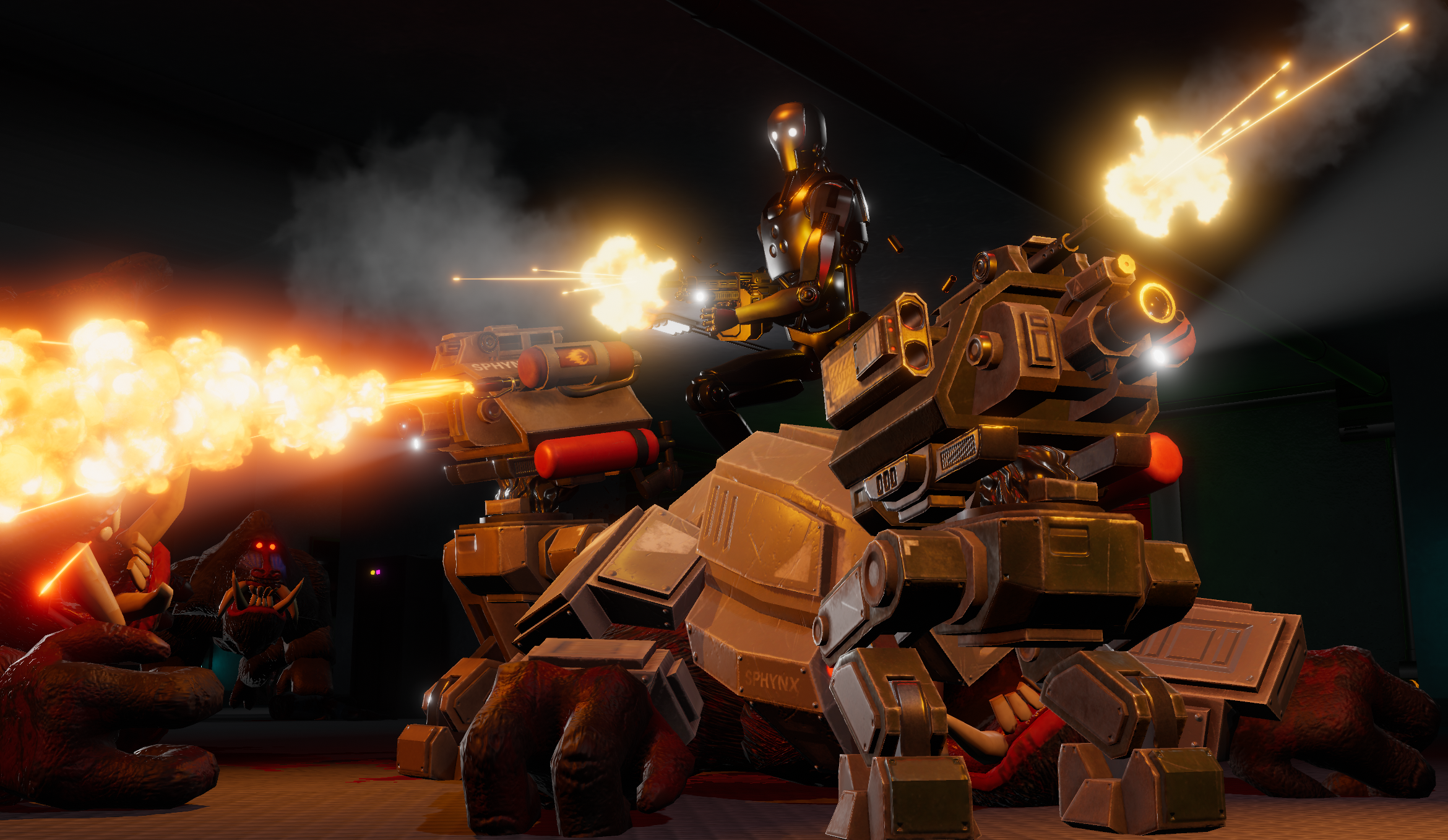
And they come equipped with quite the versatile arsenal! (switch weapons by using the d-pad/number keys) Drones can't rearm themselves, so the communication is vital between the VR and PC side; the Robot player will need to find extra ammo and reload the Drones when they're running on empty.
You can also use RB/E key to stomp nearby insectoids.
MACHINE GUN
A portable version of the Turret Sentry gun, using a higher capacity version of the Sentry's magazines (which are cross compatible). A Drone can equip 2 separate magazines at the same time, switching between them with the O button / R key.
To improve accuracy and rate of fire, crouch (LB/Right Mouse Click), which will put the Drone into Sentry Mode.
FLAMETHROWER
A similar device to the Robot's own portable flamethrower (with its tank also being a cross-compatible, higher capacity version). Excellent to fend off angry Mandrillians and/or swarms of insectoids, but careful not to step on the flames! O button / R key will switch the pilot off, for situations where you want to be extra sneaky.
ROCKET POD
A two-tube rocket launcher that takes different kinds of ammunition. Use O button / R key to switch between the upper and lower tube. When active, a laser reticle will activate for rocket guidance.
Microrockets come in packs of 9, and they offer great stopping power against armored targets, with a very small and weak blast radius.
Poison rockets come in packs of 3, and offer you the functionality of poison grenades. Remember that, as always, poison gas clouds are flammable, so use that to your advantage with your flamethrower or even with the exhaust of your microrockets!
You might find other rocket munition around the facility. Use at your own risk!
DRONE REPAIRS
Drones can be quickly fixed with a good ol Repair Kit, just like the Robot -a Repair Kit will fully heal a damaged Drone, and even overheal it up to 130% if it's not too banged up. However, you might want to save those for yourself (or for an emergency fix).
Drones are built for war, so they can be quickly repaired in the field. Open the Maintenance Hatch and you will be given instructions in how to get your Drones back to working order.
CALIBRATION
If your Drone's Hull is below 90%, it will be unable to self-repair. Re-calibrate it to fix it. Be aware that calibrating a Drone won't fix whatever accumulated stress it might have been subjected to; at some point the Drone will start breaking apart even after small hits.
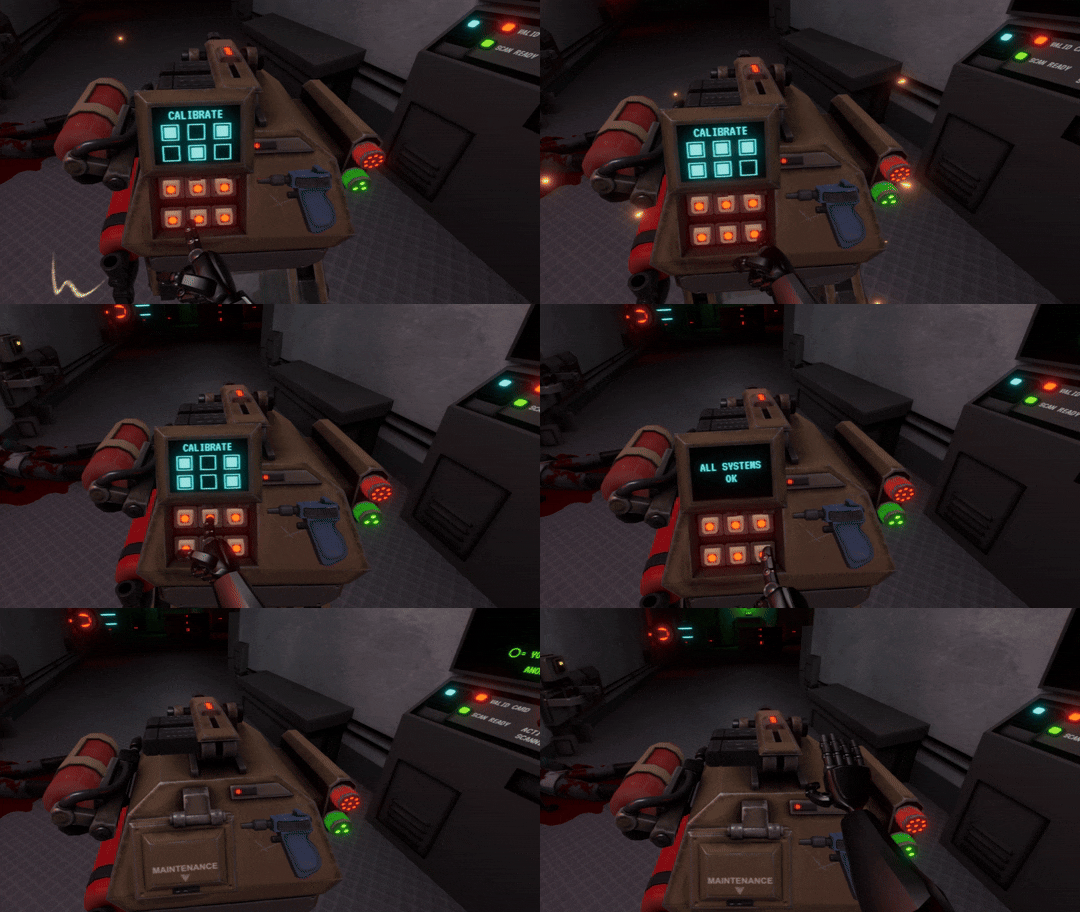
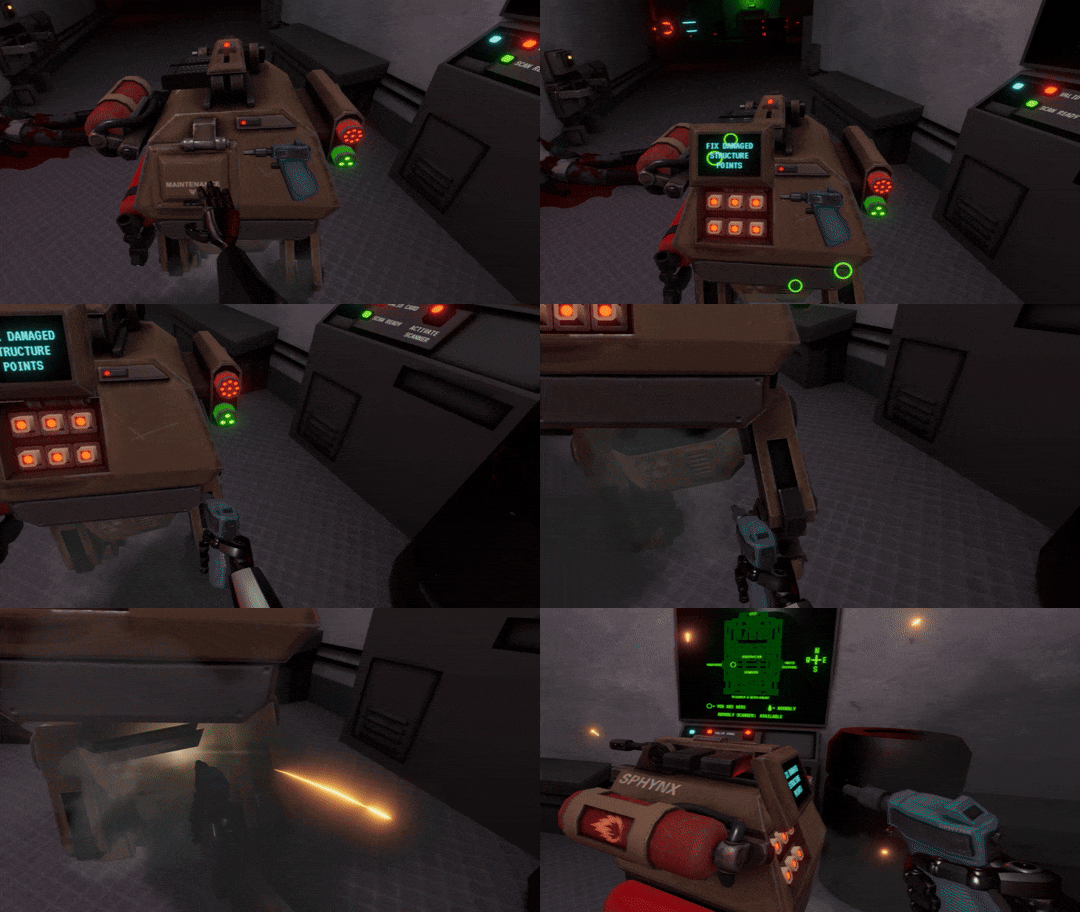
STRUCTURAL DAMAGE
If your drone has taken a beating, it will start suffering structural damage after being hit. Structural damage prevents you from calibrating, so you will need to fix this first. You'll know if a Drone has structural damage when the red warning light starts blinking.
The Drone Diagnostics System will point you to the areas that need to be reinforced. Pick the Drone's Portable Welder and get to work! After fixing all the weakened points, you'll be able to run calibrations to repair the Drone's hull.
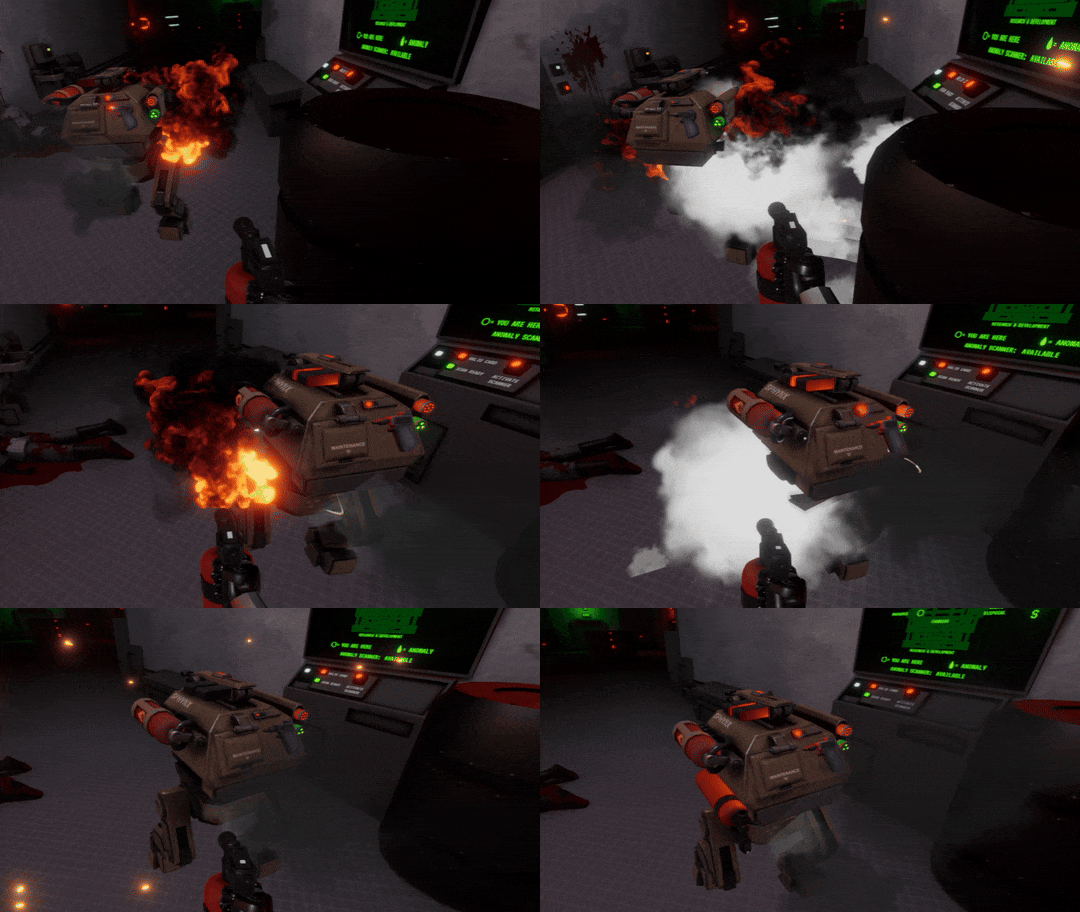
FIRE
Extinguishing a fire should be your main priority. Pick the Drone's fire extinguisher and aim at the base of the fire (or fires!). You will need to do this before being able to proceed with further repairs. A drone will take steady damage while it's on fire.
COOP CHALLENGES
With the addition of Coop Mode, there's now also Coop Challenges, accessible through the same screen you'd access the Solo Challenges. While all Solo Challenges tried to emulate regular matches against humans, Coop Challenges are more action-oriented. So far there's 2 of these challenges: Coop Challenge 1 is limited to 1 Drone, and unlocks the Light Machine Gun. Coop Challenge 2 is an intense fight that is recommended to be played with 2 Drones, and rewards you with the Soldier Helmet.
To go with the trigger happy theme of Coop Mode, I've added a weapon I've always wanted to have in Mandrillia that would be too annoying to have in the regular weapon pool: the Light Machine Gun! It's on the spotlight for both the Challenges, and you can unlock it as a selectable Starter Longarm if you complete the Coop Challenge 1.
Besides being a good introduction to the Coop Mode, I've used them as a testbed for some Mandrillian Bot settings...
MANDRILLIAN BOT ADDITIONS
The Mandrillian Bot behaviors keep improving! This update includes some neat addiitons for them, and the groundwork for some tasty mechanics for the near future.
EXTRA MANDRILLIAN
Coop mode allows for up to 2 friends to help you. This means that for the first time you can outnumber the Mandrillians... unless they call for backup, that is.
I've added the option to increase the maximum concurrent Mandrillian Bots to 3 instead of 2. And yes, this means you can combine this with human Mandrillians to get a whooping 5 total Mandrillians roaming around. If you're into that sort of thing. I'm pretty sure it will feel like a traffic jam though.
The third Mandrillian Bot is mostly meant to balance Coop mode, especially when playing with 2 friends.
WAVE MODE
By default, Mandrillian Bots use the same rules as human-controlled Mandrillians in order to spawn. That is, they will spawn as soon as their respawn timer allows them.
This is great for more stealth-oriented gameplay, but for coop it proved to be a bit difficult to balance. If the respawn timers were too high, it ended up with a drip-feed of Mandrillians quickly dispatched by the Robot and Drone combined firepower. Too low, and it became extremely opressive, with no time to repair the Drones.
With the new Wave Mode setting, I took a more "videogamey" approach to Mandrillian spawn. Their respawn times will be quite long, but certains actions (or sometimes randomly) will trigger "waves" that will put some pressure. I'm pretty proud of this one!
COMING SOON: MANDRILLIAN BOT UPGRADES
Right now, the only upgrade Mandrillian Bots have had access to is the Armor -after all, the Armor started as a crutch to make the OG Mandrillian Bots challenging. Still, until now it has been a simple on/off switch. You either played against armored Mandrillian Bots, or unarmored Mandrillian Bots.
In preparation for me making more upgrades avaliable to the Mandrillian Bots, I've added a couple new settings to their upgrade style. RANDOM will be a weighted roll (which means right now roughly 1 in 10 mandrillians will appear with armor). DYNAMIC is where the juice is at -it simulates earning (and spending) points on upgrades, just like against human players. I included "fake" spending to offset the bots not having anything else to spend their points on other than the armor, and the result is quite similar to the frequency you'd see real Mandrillians with armor. DYNAMIC mode will also play along with the new wave mode, so you might get some surprises!
FULL CHANGELOG
- Added COOP MODE
- New (unlockable) weapon: Light Machine Gun (win Coop Challenge 1)
- Added two coop mode challenges
- Soldier Helmet now unlockable by playing Coop Challenge 2
- Increased maximum concurrent Mandrillian Bots from 2 to 3 (not recommended outside of coop)
- New Mandrillian Bot setting: spawn style. By default, they will use the same respawn timer as their human counterparts. The new "wave" settings will have them spawn more slowly, with increasing "waves", both random and triggered by critical events.
- New Mandrillian Bot settings for Upgrade Type: instead of being just OFF and ARMOR ONLY, it can now be set to RANDOM and DYNAMIC, with the latter emulating the Mandrillian Bots gaining points -yes, this means Mandrillian Bots will have access to upgrades other than the Armor in the near future
- Fixed long-standing bug regarding Mandrillian Bots not getting poisoned by gas
- Improved Mandrillian Bot behavior and added failsafes to avoid them getting stuck when running into each other in narrow spaces.
- Fixed a series of hilarious bugs related to the Mandrillian Bot number / max number
- If Mandrillian Bot's max number is higher than the Mandrillian Bot total number, the Mandrillian Bot total number will be automatically set to the selected max number
- Increased Sentry Turret magazine capacity
- Flashlight starter item now also counts as a "weapon", so you can use it to toggle sprint (lowering/aiming it)
0.3.4 - FINAL STRETCH OF MONKEY QOL FEATURES
During all these years of development, I managed to balance the game around the idea of "close call situations" (say, getting a killshot on the Mandrillian right as it was about to connect a hit). While this is pretty exciting for the VR player, turns out "getting shot in the face repeatedly" was not as engaging for PC players, especially newcomers going against a more experienced friend.
The problem with tweaking this is that just making the Mandrillians have more health would turn these situations into the VR player getting outright killed, so I had to find something that could keep things tense for both sides without turning it into a slugfest of the Robot and the Mandrillians trading blows.
After some iteration (and there's probably some more iteration needed), this is what I've ended up with.
STAMINA-BASED DAMAGE REDUCTION
Mandrillian's 6 stamina points now act as a sort of regenerative shield that reduces damage taken by a little bit; at full stamina there's up to 30% protection, and then a sharp falloff. This means it's smarter to wait until you have full stamina before charging against the Robot.
To play around with this, the Robot has a chance to take away stamina points from the Mandrillians by dealing damage: there's a high chance of stamina loss when hitting limbs (guaranteed with harder hitting weapons), and a lower chance when hitting the face, all of it also multiplied by the projectile's own damage value. Until now, limb shots were basically wasted bullets (at least until limbs go critical), so hopefully this will bring up some tactical plays in some situations.
UPGRADE SWAPPING
Mandrillians can now swap upgrades without needing to die. Until now, there were especially jarring endgame situations where players had enough points to buy beefy upgrades but did not have the means to buy them unless the Robot killed them.
To swap your upgrades, go back to the Vents and get away from the vent entrance; you will get a text popup telling you the Upgrade menu is available (A on controller, SPACE on keyboard). You won't be allowed to swap upgrades if you don't have full stamina, if you are burning/poisoned, or don't have enough points to buy the cheapest available upgrade. You don't need to be at full health, but you won't get any health back from it.
This one is quite the game-changer, letting Mandrillians be way more reactive with their strats, like quickly swapping to a jammer to defuse mines, smoke to obstruct a sentry turret's targeting, a healer to bypass poison clouds, etc.
BACKING OUT OF UPGRADES
This one is a very small QoL feature. After buying an upgrade, you used to be locked into it while you selected your spawn. Now you can simply back out of it (B on controller, R on keyboard) before spawning, getting a full refund.
FULL CHANGELOG
- Mandrillian stamina now acts as damage reduction (up to 30% at 6 points and then a steep falloff)
- Mandrillians can now lose stamina when taking limb damage or heavy head damage
- Getting shocked now takes away all stamina points from a Mandrillian, but shock duration decreases depending on how many stamina points you had when you got shocked
- Increased base stamina recharge initial delay by a couple seconds across all modes
- Upgrades can now be swapped on live Mandrillians by going into the vents; you will get a little text popup telling you if it's available (A on controller, SPACE on keyboard)
- You can "back out" of upgrades by pressing B on controller, R on keyboard at the spawn selection screen
- Sentry Turret magazine back to 20 bullets from the previous 15, as Mandrillians now have many ways to counter it
- Adjusted shrapnel effective distance for c4 and grenade launcher explosions, as it was too easy to get domed by a single fragment
- Standard Mandrillian respawns reduced to 10, to account for increased survivability
- Infestation Challenge time limit increased from 20 to 30 minutes
- Fixed sneaky bug that caused stamina to not recharge if you quickly tapped the attack button without actually starting the charge
- Made Main Menu stamina recharge speed the same as the "fast" recharge speed for Mandrillians
- Improved the feel of WASD menu operation on Mandrillian upgrade/spawn selection screens
0.3.3.4 - LOTS OF TWEAKS
- Robot's cloak (from the VR player's perspective) now has an actual transparent shader instead of being a glowy blue hue
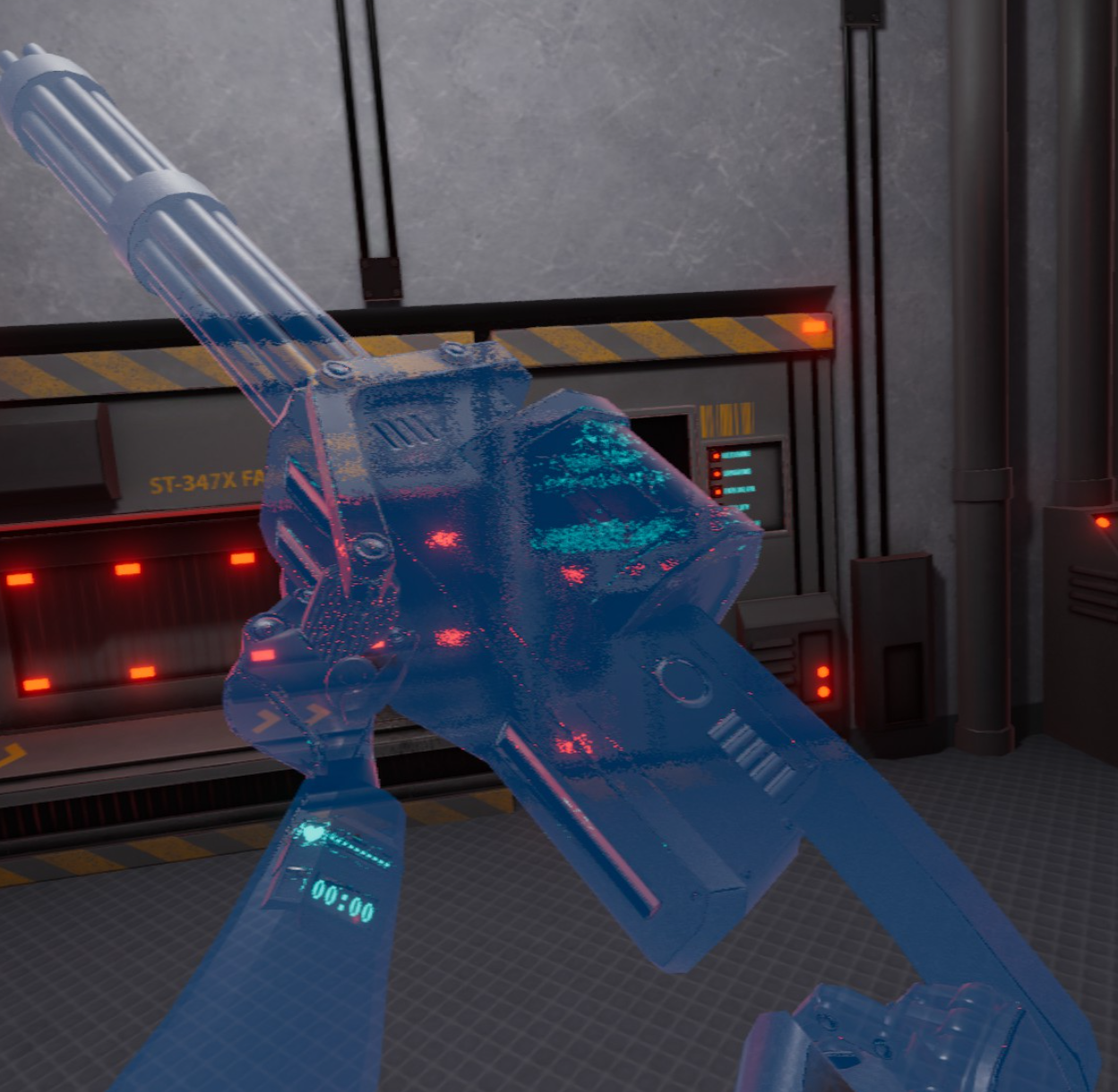
- Robot's cloak now has a subtle "distortion" effect instead of being fully invisible
- Mandrillians no longer appear on the motion sensor when they use the sneaking walk
- Mandrillians appear less often on the motion sensor when walking at normal speed (not sprinting)
- Added a little dodge improvement for the Mandrillians that give a bit more flexibility to the dodging direction (taking the camera direction into account while looking forwards)
- 3-point attack now holds for 3 seconds longer when charging it
- When charging an attack while having less than 3 stamina points, the full charge will hold for a shorter time
- Massive price reduction to Mandrillian upgrades:
- Plasma Gun: from 400 to 300
- Healer: from 600 to 400
- Self-Destruct: from 750 to 500
- Armor: from 800 to 600
- Price multiplier match setting top value increased from 2x to 4x
- After opening the elevator gate, if the Robot leaves the exit zone for longer than 10-15 seconds (it builds up), the gate will close, forcing the Robot to do the gate-opening minigame again. The timer won't go up if there are Mandrillians camping inside the elevator
- Increased Mandrillian scent tracking lingering effect by 10 seconds
- Decreased slow, medium and fast scent tracking recharge speed by 5 seconds each, making them a neat 25, 50, 75 seconds
- Default weakpoint type is now "critical only" (damage dealt on the head/critically injured limbs deal 2x damage) instead of "critical + brain" (theres also a tiny hitbox around the eyes with its own HP that kills the Mandrillian if hit)
- Fixed Mandrillians being more nimble at higher framerates. As a side-effect, Mandrillians are now like 0.01% more nimble
- Fixed bug that was causing Mandrillian's armor to not be as effective as intended against armor piercing rounds
- Fixed right hand pose for the Menu's Multitool not applying
- Fixed Robot's gibs not applying the Defusal Unit skin
0.3.3.3 - MANDRILLIAN STEALTH BUFF AGAINST MOTION SENSOR
0.3.3.2 - HMG TWEAKS
- Slightly decreased HMG rate of fire (from 8 shots per second -480 rpm- to 6,25 shots per seond -375 rpm-)
- HMG damage reduced from 50 armor piercing to 45 armor piercing (this makes 1-shot kills harder to pull off)
- HMG recoil substantially increased
- HMG magazine capacity reduced from 50 to 41, just enough to overheat as you shoot the last shot like the minigun does (overheating becoming a thing to worry about in infinite ammo modes)
- Fixed a sneaky bug in the armor code that was causing armor to not be as effective as intended against armor piercing rounds
- Fixed SMG laser sight not turning back on pickup after holsterin it with an active laser sight
HEADS UP ABOUT REMOTE PLAY CLIENT SOUND / BUSY HOST
As with everything related to Remote Play Together, remember you can check on the official Steam Discussions to see if other users also have similar problems, and of course you can send Valve a support ticket if you have an easy to reproduce bug report. I've been dealing with Remote Play being a pain in the behind for a bunch of years now, so you can also join the Escape from Mandrillia Discord and we might help you troubleshoot.
CLIENT IS GETTING NO SOUND: Fixed by host going into Steam Client Beta (Steam > Settings > Interface > Beta Client Participation). The fact that this is fixed on the beta means that this will be probably fixed for everyone soon on the main branch.
CLIENT IS GETTING "HOST IS BUSY" MESSAGE, CAN'T CONTROL THE GAME: Fixed by making sure Steam Overlay is enabled (Steam > Settings > In Game > Enable the Steam Overlay while in-game).
Finally, this is a long-running one, but I'm throwing this here just in case:
CLIENT WANTS TO USE KEYBOARD AND MOUSE: This one Valve is aware of, and seems to be caused by the fact they might be in the process of unify Big Screen, Steam Deck, and Steam VR dashboard UI. When playing with someone over Remote Play in VR, the host does not get the "assign controller" window, and remote play defaults to controller, so if the client wants to use keyboard they're out of luck. TEMPORARY FIX: activate Big Screen, then go to the "Quick Access Menu" (Ctrl + 2), and the control assign will be present there. I want to think that Valve intends to have the quick access menu be a thing inside the VR dashboard at some point in the future.
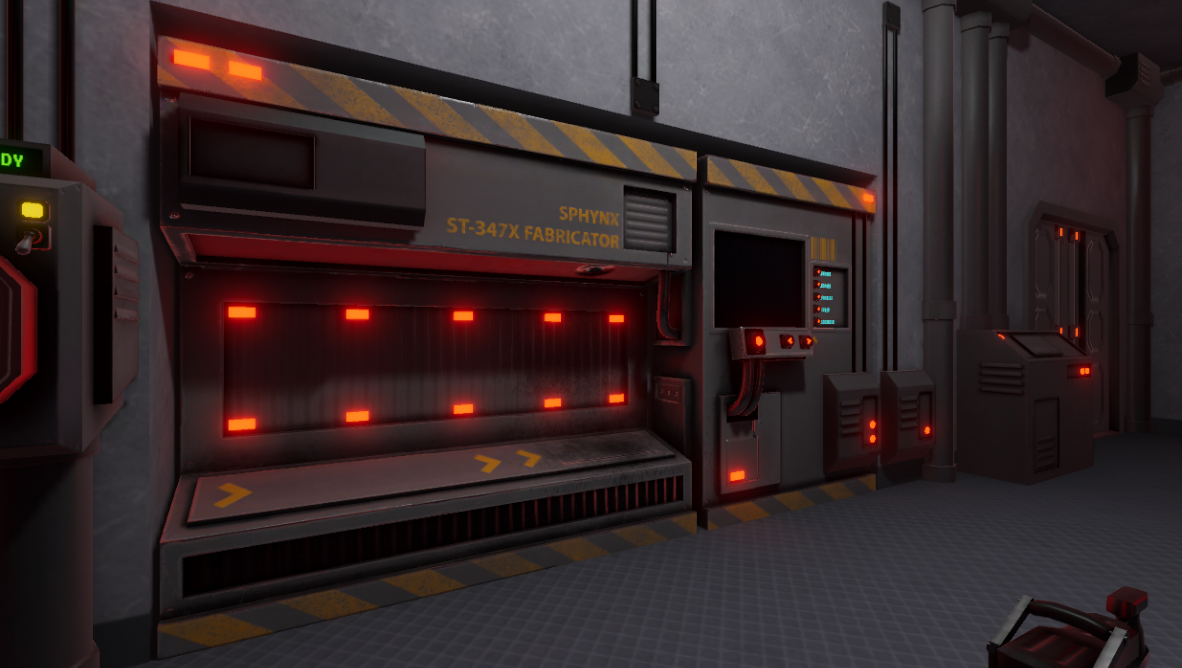
That's all for now! As a little sneak peek, here's how the new, chunky Item Spawner looks like in the upcoming Firing Range scene:
0.3.3.1 - BRRRT
- Added a laser pointer to the SMG; activated with the front grip like with the Carbine and Plasma Rifle
- Both HMG and Minigun now have to be two-handed if you want to properly use them: if you shoot them one-handed they will fly out of your hand
- Very, very slightly increased minigun rate of fire
- Changed the minigun firing sound to a more BRRT-y one