
- Added dead zone to controller input, to resolve an issue that the camera sometimes got stuck in rotation mode even when joysticks released
- Resolved bug that would cause constant camera movement for some players. Background: To support the Steam Deck, the game was simultaneously accepting keyboard and gamepad input. But this caused the game to interpret noisy data from peripheral devices to force the game into controller mode even when player was intending to play the game in desktop mode. Now, the game only allows gamepad inputs if the player actively switches into it by pressing the OK, Cancel, or Start buttons on the gamepad. Note that on the Steam Deck, simultaneous inputs are still allowed.
- When using controller, or steam deck, player zoom is additive with camera elevation zoom. This allows players to map the extra back-facing buttons to Scroll Wheel Up or Down, which then allows them to control the zoom even when using joystick camera control. Note that the default controller configuration was updated to include this mapping, but players with a custom or existing configuration may need to update this manually.
Factory Town
2.1.1 Patch Notes
2.1 Patch Notes
Added 'Primary Storage' flag to Town Center
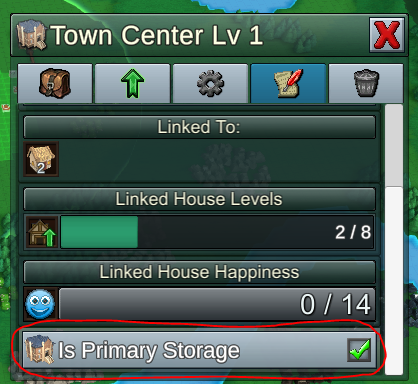
When you remove buildings, blocks, or items, all of the items are refunded to the Town Center. But if players have multiple Town Centers, it can be confusing to know which one will receive the items. This patch introduces a new flag called 'Is Primary Storage' to Town Centers. This building will receive all refunded items.
Only one Town Center can be the Primary Storage, so if you check it on another Town Center, the original one will lose the flag. If you delete your Primary Storage, the next Town Center (in order of when they were built) will automatically be assigned.
Legacy maps will have this automatically checked on whichever Town Center was built first.
Reworked UI for inventory input / output options

Previously, if you clicked on a storage building's inventory slot you were presented with an option that cycled between 'Storage', 'Input', 'Output', and 'Disabled'. This was a bit confusing.
The purpose of this option is to let the player decide if the inventory slot should accept new items (say, you want to stop receiving a specific item), and if it outputs items it is holding (if you want the item to be preserved in shared storage for construction, and not taken away by workers/belts/trains/etc).
In the example above, the building will not receive any more Pears, but workers/belts/trains can remove them. Planks can be input into the building, but can only be removed by the player during construction, not by any in-game workers or gadgets.
Note, this can be very helpful if you want to create a buffer of construction items midway through a production chain! Route your production chain through a Barn, then set its top few slots to 'Input' only. Those slots will fill up first and retain their items. Any additional items will be added to the Input+Output slots, allowing them to be removed by workers & belts for further production.
All legacy assignments map over like this, and actual behavior is unchanged:
Storage = Input & Output
Input = Input only
Output = Output only
Disabled = Neither
Misc Changes & Improvements
- Item Slot detail panel can be resized
- Fixed bug: Secondary Action Delete was not working on structures like Scaffold Blocks that occupy the entire block
- Fixed bug: Research Cost Multiplier was not having any effect
- Fixed bug: Research Panel not always updating to display newly unlocked recipes
- Fixed bug: changing ‘Auto Configure’ checkbox on a pipe connector would not immediately re-draw the connector’s configuration panel to reflect the new options
- Removed obsolete ‘Research Speed Modifier’ option from Global rules
Some recent minor patches:
2.0.1 2.0.2 2.0.3
Also, if you're enjoying the game & like these updates, don't forget to leave a review! : )
- Erik
2.0.3 Patch Notes
- Fixed bug: modifying settings related to map generation biomes could result in a blank, water-filled start territory
- Added back steam/mana/coin booster display to hovered object status panel
- Added back ‘progress bar’-style inventory display for hovered objects status panel
- Fixed bug: controller mode was not correctly ignoring ‘secondary targeting mode’, which only applies to mouse input. This was resulting in the inability to select task targets.
- Fixed bug: In ‘secondary targeting mode’, player was unable to left-click on UI elements in order to assign task targets. In this mode, both left- and right-click should select the target.
2.0.2 Patch Notes
- Fixed label wrapping on Upgrade buttons and Active Recipe buttons
- Can select an Active Recipe button to open the Recipe Selection panel
- Selecting a rail unit will now default to showing the Rail Controls tab
- Added admin command “disable gamepad” which will force the game to ignore all inputs besides keyboard and mouse. Useful if game was interpreting some unknown device as controller input. Can be reversed with command “enable gamepad”. To enter admin commands, hit the backquote / tilde key, type in a command, and hit enter.
- Inventory-related upgrades are displayed on the Inventory tab, and production upgrades (like Omnistone upgrade, Pasture upgrade, Steam booster) are shown on the Production Tab.
2.0.1 Patch Notes
This is a small change, but it seems like many players wanted more information on a single Status menu tab, instead of having to click through. Looking for any other feedback on this new menu - things that should be moved, combined, added, etc.
2.0 Update!
Steam Deck & Gamepad Support
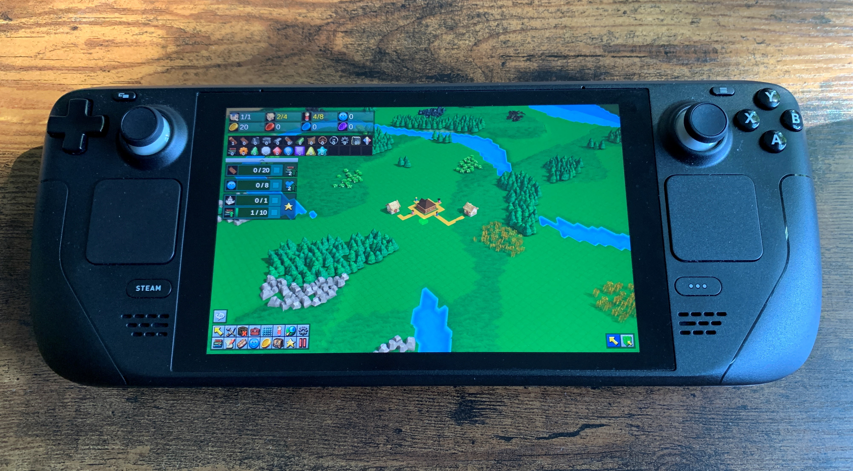
Factory Town can now has official gamepad support! Move around the menus with the D-Pad or left joystick, using shoulder buttons to jump left and right between menu regions or tabs. The world cursor can be controlled by moving the main camera (right joystick), or for more precise movement, navigated in single units with the D-Pad and shoulder triggers to change elevation. (This also works for keyboard users, with arrow keys + Page Up + Page Down.)
The main reason for adding this was so that the game could be played more comfortably on the Steam Deck. As a nice bonus, you can seamlessly switch between mouse mode & gamepad mode, so that Steam Deck users can use the touchscreen or right touchpad when they want to select something with a mouse click, but still use controller joysticks & D-Pad for other navigation purposes.
UI Rework

In order to allow effective menu navigation with a controller, many changes needed to be done to the UI. But a lot of these changes were also needed for better organization anyways.
The biggest change is the window that appears when you select an object. Previously, an overcrowded menu would appear in the bottom-right which also overlapped with the top-right menu showing inventory and various configuration options.
Now, the selected object's status menu is movable, re-sizeable, scrollable, and has tabs across the top to navigate different features. Tabbed groupings include production state, recipes, logic connections, inventory, upgrades, labels, water intake, etc. There's also dedicated buttons for rotation, context help, and object deletion, which previously were not included due to space constraints.
Fishery Changes

To prevent players from spamming Fisheries, they used a calculation that linked production speed to the number of connected water tiles. But that wound up being more convoluted than necessary, wasn't totally logical, and still allowed semi-arbitrary placement on any water tile. Fish tiles themselves confusingly didn't have much functionality for this building.
Now, Fisheries act more like other natural resource production buildings (i.e. farms, foresters, mines). For a Fishery to produce fish, it needs a Fish tile within its harvesting radius - just like a Farm needs a crop within harvesting radius. The Fishery will harvest fish from those tiles fairly rapidly, but the Fish tile can deplete. It will slowly regenerate, but players will need to have several fish tiles near a Fishery to sustain rapid production. Fortunately, the player can also place Fish tiles in the same way they can plant crop tiles, so it's possible to expand your fish production over time.
Linked water tiles will no longer have any effect in Fishery performance. However, more water tiles give you more places to place Fish, and placing new Fish tiles is relatively expensive (100 red coins), so it's in your interest to use naturally occurring Fish whenever possible and build near open water.
Legacy maps will contain Fisheries with no nearby Fish tiles, so to prevent immediate halting to production, the game scans for this scenario and automatically adds a few Fish tiles near these Fisheries.
Misc Improvements
- Added ability to adjust Steam boosters (0-2) and Elemental Boosters (0-5)
- When issuing a command to a worker, item selection panel will appear over a storage building even if it has no items
- Selecting a Computational Block, then clicking on blank terrain, will de-select the computational block
- A building’s progress towards absorbing another unit of nearby water is saved with the game file, to prevent lost progress
- Reduced memory usage for natural resources
- The Pipette tool, when used repeatedly on the same block, will cycle between Farm Tile and the crop planted on it (same with Tree Planters and OmniPlanters)
- Player can use larger cursor sizes when placing Fish
- When a popup option list is shown, entire rest of screen is slightly greyed out to show focus. Clicking anywhere on the background will dismiss the popup menu.
- Connecting Computational Blocks now defaults to most common trigger & action types. Further edits can be made by selecting the Computational Block and editing the Inbound or Outbound links.
- If a recipe is unable to complete because output storage is full, the associated output item icon is flagged with red text (similar to how missing ingredients are flagged)
- Added more intuitive highlights on panel that allows workers to pick up specific items
- Changed caption for picking up items from 'deliver' to 'pick up'
- Player can specify transfer item at the destination, if they chose 'everything' at the source
- Changed ‘Exit to Desktop’ to ‘Quit’
- Got rid of Controls sidebar, as it is redundant with action button panel - all actions that previously required hotkeys are now visible buttons
- When planting crops, the cursor is no longer blocked by buildings
- Invert Camera X & Y are now in the Controls menu, not Interface. They can be set independently for controller vs keyboard/mouse control
- Improved display of terrain purchase button
- Controls menu now shows icons for controller buttons instead of a text label
- Can use Page Up / Page Down to change the height at which a pipe is being placed
- Added command “Alt Cursor: Reverse” (default: Shift+Tab) to cycle backwards through alternate cursor options (pipe axis, block type, etc)
- Increased opacity of Tutorial panel
- Improved reliability of issuing multiple commands to workers
Bug Fixes
- Infinite maps would display seams between terrain chunks (i.e. when file saved and re-loaded) due to not storing correct terrain generator settings within the file. Note: previously created maps will still have this bug, due to missing data. But newly created infinite maps will work correctly
- Workers would fail to find new harvest target in some cases after their initial target was depleted
- Fixed Work Units calculation displaying the wrong value for Workers (was including the Happiness + Global Production Bonus values, when they should have been split out separately)
- ‘No Path’ alert was not shown for Grabbers that were missing a Chute or Belt path, if there was some other path type under the Grabber block
- Clicking the ‘Randomize’ button when editing map seed would not fully update seed display
- Fixed hangs/crashes resulting from logic connections missing a target
- Splitters with Overflow setting will no longer output items for a direction with a specified output ratio of zero
- Fixed campaign maps loading with non-localized / non-standardized names for Trading Post recipes
- Fixed extraneous buildings being highlighted as possible targets when specifying worker dropoff behavior
- When moving multiple items, the cursor icon now shows inventory bag instead of the arrow historically used for ‘move’ commands
- Fixed unexpected Research Menu scrolling when research completed
- Fixed some erroneous labels for the biome generation terrain types
- Players unable to assign worker harvesting tasks by highlighting depleted (but growing) crops & fish
- Buildings with many items to Pick Up would have its item targeting UI overlap the Drop Off items section
- Fixed incorrect text resizing on recipe selection buttons
- Fixed water clipping through bottom of boat
- Fixed production buildings not displaying linked resources if they were also linked to a Town
- Copy/paste on rail stops was not causing the copied item filter to be effectively applied immediately
- Priority Sorter was not showing its icon on the 2D underground views
1.12 Patch Notes
New Features
- Can place multiple Farm Tiles, Tree Planters, and OmniPlanters at once by using click & drag to select a region, and/or use the Cursor Tool Size options (PageUp and PageDown)
Balance Changes
- Infinite Air Temple Speed research cost increased from 10K Yellow Coins to 100K Yellow Coins
- ‘Flat’ map preset now has Additional Biome setting for ‘Flat With Desert’ so maps using this preset can have access to desert resources
Bug Fixes
- Fixed some roads & foot paths being displayed at extremely high elevation if they were copied & pasted from hilly terrain onto flat terrain
- Copying a Biome would unintentionally apply edits to the source preset biome
- Farming / Mining actions (like placing ores) were visible even if the required technology was disabled via game rules
- Pipes and Mine Shafts that should have been hidden or locked due to research were available via buttons on the underground views
- Creating a custom map with > 4 starting terrain chunks would not create Temples or Trading Posts on those chunks
- Selecting a category in the Build menu would not preserve its visual highlight
- Fixed some missing localizations in the Biome Editor menus
- Some pop-up menus when editing a Biome would appear underneath the previous menu
- Roads & foot paths were not being evaluated for correct support / terrain requirements during copy/paste
1.11 Patch Notes
Bug Fixes
- Splitters wouldn't output to chutes
- Splitters wouldn’t output to adjacent buildings
- Splitter ratio would act inconsistently in some cases
1.10 Patch Notes
Features
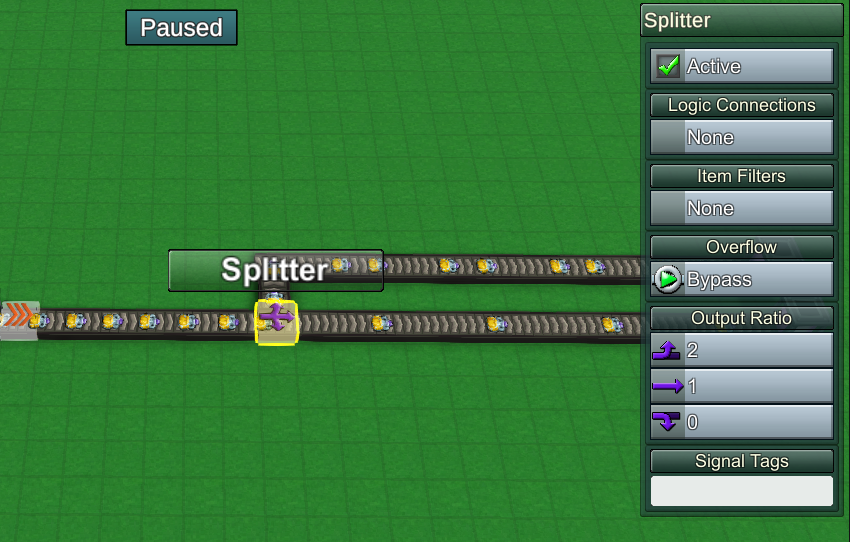
- Splitters now have an Output Ratio that can be assigned for each direction. When cycling through output directions they will attempt to output the specified number before moving on to the next output direction.
- Splitters have a “Overflow” attribute that you can set to Hold or Bypass. “Hold” will strictly enforce the output ratio, disallowing items from exiting other directions if the specified direction is blocked. “Bypass” will allow items to continue through if the first attempt fails
- Can assign names to all buildings, worker units, and railway cars
Bug Fixes
- Context Commands window was not visible
- Inventory Sensors would ignore signal tag filters when processing inventory changes for units stopped at a target block
- Fixed bug: Many logistic blocks that had “On Entered” function triggers that would not activate (e.g. Grabber, Splitter, Filter)
- Fixed bug: Unexpected behavior could occur after removing pipe items within an Agent Trigger
1.9 Patch Notes
Improvements to Create Game Menu
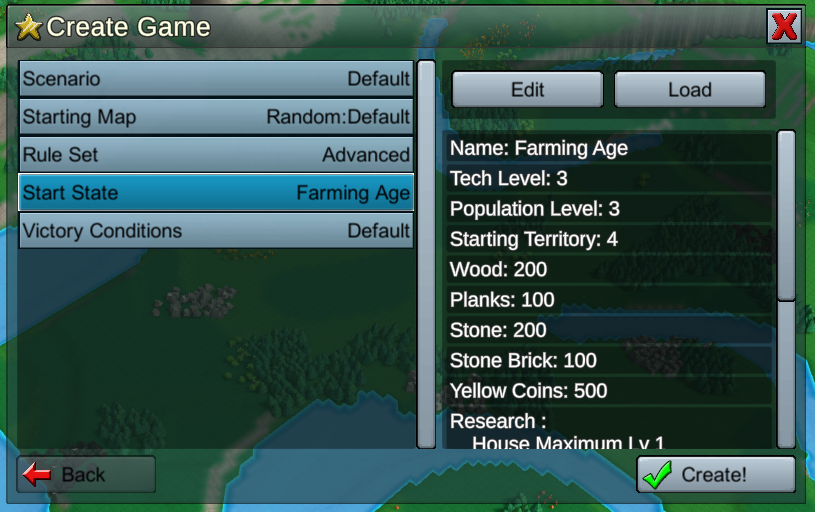
Many improvements were made to this menu and the custom game setup process:
- Details are now shown in the right-hand panel for the selected setting
- Clicking the Edit button lets you edit the selected file or preset setting
- Clicking the Load button lets you load a new file or preset setting
- Map Generation settings (such as Starting Biome, Map Size, Resources, etc) can now be loaded as a file or preset independently of other settings
- Numeric values in the Create Game Menu screen are validated to conform to specific ranges, and the text field updates with the validated value
- Trading Posts now spawn based on a % probability per chunk, not a fixed amount per map. This fixes the issue where trading posts were always limited on an infinite map. Legacy infinite maps will have a % Trading Post spawn probability assigned based on the previous fixed ‘number of trading posts’ parameter
- Starting Territory setting is no longer a giant list of chunk coordinates, but a simple area selector (4 chunks, 16 chunks, 36 chunks, etc.)
- Can now duplicate and edit Biomes by right-clicking on them. This replaces the misleading 'Edit Map' button that only edited the starting biome
- Added new ‘Flat’ preset for Starting Map setting, which is almost entirely level except for lakes
- Fixed outer edge water tiles not displaying on large map previews
- Fixed large maps having odd square corners where they should be rounded
- Non-infinite maps have all terrain tiles visible, even if distant from purchased chunks. Resources are still invisible though
- Fixed odd square edges on terrain texturing & improved biome blending generally (in newly created maps)
Misc Improvements
- Alert bubbles over buildings and workers will not block cursor when performing an action like building or deleting
- Made camera movement less restrictive over unpurchased terrain
Bug Fixes
- Fixed Required Worker Count being unable to successfully edit in Victory Conditions
- Fixed Required Worker Count not displaying correctly on Victory Conditions panel
- Fixed Right-click popup menu would not dismiss if you clicked outside the popup menu, but over some other menu element
- Fixed Map Editor screen not enforcing camera bounds