(While we know these are the Steam forums, we include notes on changes to all platforms, for the sake of completeness.)
This month, we have lots of bug fixes for you, all aimed at making things work even more smoothly. There is a new feature for music that allows you to sit in silence in the menus while waiting for an online match, but then still have music when you actually play. Also, Setsuki has one balance change, that fixes an accidentally-too-good thing about her air C (Flying Fox) that she’s had for the last few months.
ONLINE
--If your Master Rank changes when the tournament ends, the score screen now shows the change correctly. It used to wrongly show your same rank on this screen only (and update everywhere else) if your rank changed.
--After spectating a ranked match, you now correctly see your own player data on various UI screens such as the rank shown in the online play menu. Before, you’d wrongly see the data of the player you previously spectated.
--Now we actually show the correct player names on the character roulette screen when spectating a friend match involving a team battle.
--In the rematch menu for casual online matches, if you choose “Next opponent,” your opponent now immediately moves on, rather than waiting for the full 10 second countdown to finish. We now realize this bug has been happening for the last 10 months. Now fixed.
--[Switch] Fixed a serious bug accidentally introduced last patch that occurred when playing a second (or more) ranked match per session. When you did, the character roulette screen would sometimes suddenly send you to the main menu, ending the match, or perhaps send you to a black screen forever if your opponent suffered the “sent to main menu” bug. (Note, this was hotfixed already on Steam/PS4, but Nintendo Switch patches take up to 20 days for approval so for that period of time, the Switch version had this serious problem. Thankfully Valve and Sony allow for immediate patches.)
--When your previously-sent challenge gets accepted *right after* you would start a casual online or ranked online game, during the short "Here comes a new challenger" animation, we now drop the challenge and continue with your queued online match. The queued match got there first. This fixes you getting stuck in a black screen, your casual online opponent having their online match interrupted as it starts, and your friend match opponent being set in a silent bad state where mysterious bad things happen.
MISC
--New music option. In addition to music on or off, there is now “gameplay only”. When this is set, there will not be music in the menus, but there will be music in gameplay. An example use of this is idling (in silence) in the menus while you wait for an online match, while getting to hear music during your actual match.
--Setsuki’s air C (Flying Fox) has a little more upward force. This fixes an issue accidentally introduced many months ago that allowed Setsuki to do air C towards the opponent, let it finish, then do it again (the same direction) and be so low that she cancelled the rest of the move by landing and ended up at +12 on block. In much older builds, she would pull up at the end which made her unsafe, rather than land instantly. This change restores it to more like it was meant to be. Note that if you want to make the opponent block air C, then have a lot of frame advantage, you still can. Just do air C -> A (divekick). But this sequence triggers only one point of flashing block damage (from the air C), rather than two (from air C x 2). Alternatively, you can STILL do air C -> air C and end up at frame advantage, but only if you do it from a precise, far away distance or if you do it from close on the way down from a jump. Either way, you can no longer repeat that sequence as a lockdown.
--Fixed a bug with the tutorial dummies in the section about combos. When you press B to combo a projectile into them, if you happened to hold B for a certain number of frames, the dummy would have no hitbox and the projectile would pass through. Rare because of the specific timing involved, but now fixed.
--Fixed buggy controls for the top-right menu when on the 1p character select screen (e.g. Arcade Mode’s character select).
--[Steam] Fixed a bug on the friends list screen where dropdown menus could appear partially off screen at certain resolution settings.
--[Switch] When using detached joycons, pressing the analog stick in no longer calls the Friends screen.
--[Steam] Fixed a category of bad states when you use a secondary monitor and attempt to use a fullscreen resolution that's not supported for that monitor. (Instead of getting stuck in a loop of either refreshing the list of resolutions every frame (merely breaks the resolution dropdown UI), or remembering an incorrect resolution for next launch, or actually setting an incorrect resolution every frame (disaster!), the game now accepts the resulting lower resolution than what it attempted to set.)
--Fixed a memory leak with arcade mode. This particular issue also caused the game to crash if the leak happened, then you later entered arcade mode again.
--Fixed a crash that could happen when DeGrey’s ghost deals block damage that wins the round (meaning, when the opponent loses their last hit point to this block damage).
--Fixed a camera bug introduced last patch where the camera would not scroll up enough when both characters jumped. Now reverted to how it always was.
--Fixed a camera bug introduced last patch having to do with moves that briefly lock the camera in place. This issue was barely noticeable in most cases, except for Setsuki’s B ninjaport kick/throw, where the camera issue was very noticeable and buggy (too jerky).
Fantasy Strike Update: August 2019
This update is live on all platforms right now.
(While we know these are the Steam forums, we include notes on changes to all platforms, for the sake of completeness.)
We’ve been busy fixing as many issues as possible that came to light after our launch last month. We fixed a lot of problems that could cause either crashes or hangs during online play, fixed lots of little user interface things, and improved controller support on Steam. We also set the - (minus) button on Switch to instantly bring up the friends list (very useful, but Steam players can already access this with the Tab key) and did a small balance change to Rook’s Thunderclap.
MISC
--Rook’s back+A Thunderclap can cancel to specials in the case where the Thunderclap destroys a projectile. It could always cancel to specials on hit or block, and for about a year we wanted it to also cancel to specials when he claps a projectile, but we had technical problems with that until now. The point of this slight balance adjustment is to help him get in just a bit more against projectile characters. He can clap and if it destroy a projectile, then he can use B landslide to approach. In this case he now gets to skip the recovery frames of the Thunderclap.
--Fixed two memory leaks. In each case, playing the game would, over time, slowly take up more RAM until you restarted the game. These two memory leaks could each eventually cause crashes, especially on Switch and PlayStation 4. Now fixed.
--When you throw a dummy in the tutorial, all the dummies on screen no longer flicker briefly for no reason.
--Fixed a minor bug with armor (blue) highlighting in Boss Rush mode that affected throw confirms and moves that trigger a cinematic sequence. An example of what this fixes is Rook taking "All special moves gain +1 armor", then getting his C-throw hit twice (down to 0 armor, losing the blue outline), then confirming the throw and regaining the armored blue outline for no reason.
CONTROLLERS
--[Steam] Added several more controllers to the game’s auto-detect database. (Controllers that auto-detect “just work” when you plug them in; controllers that aren’t in the database still work but require an extra step where you’re prompted to press each button in sequence the first time you try to use them.)
--[Steam] The popular Logitech F310 and F710 gamepads now auto-detect as Xbox brand. These controllers already auto-detected before, meaning you didn’t have to do any kind of manual setup to tell the game which button is which. The new thing is specifically that the game’s help text will be set to Xbox button graphics when using these controllers without you having to manually set the help text type in the game options.
--[Steam] Fixed a bug that would sometimes cause “double inputs” on a controller (do one input, but the game registers that you did two). This bug could happen the first time you set up a new controller and would fix itself after restarting the game. Should be fixed all the time now.
--[Steam] Fixed ANOTHER bug that would sometimes cause “double inputs” on a controller. This happened when the game auto-detected a controller but didn’t have information for the controller’s analog stick. Not having that info is fine, the controller should still work, but this bug caused the profile to fill in the “missing” data with whatever the previously loaded controller profile had for analog sticks. This bad data caused the double inputs to happen.
--[Steam] Fixed a bug that could corrupt your controller and keyboard settings. When you got into this bad state, some of your buttons could mysteriously seem to not work. On Windows, this required that you edit the registry to fix.
--[Steam] Fixed a bug that made the game not recognize controllers anymore (usually until restarting the game) after you plugged in and unplugged a series of 5 or more controllers.
USER INTERFACE
--[Switch] The '-' button (minus button) now brings up the friends screen, just like the Tab key does in the Steam version.
--You are now able to access the friends list screen during all team battle UI screens: character roulette, tournament bracket screen, and score screen. This lets you more easily check who is spectating you during team battles online.
--[Switch] The help text for “cancel online matchmaking” is no longer in the wrong place on the screen.
--[Steam] The matchmaking search box and cancel search box now show the correct platform of button help. Before, for example, it was possible to have your overall UI showing PlayStation buttons but this one place in the UI to accidentally show Xbox buttons.
--[Steam] When the option "Help text icons" is set to "PlayStation", "Xbox" or "Switch", all images will show that brand’s icons, not just button help (so now this includes the Moves List and Button Config screen too).
--[PS4] When you try to add a friend in-game, the pop-up with text entry is no longer auto-filled with YOUR FantasyTag by default. This made you have to delete the text there before entering the name of your friend, but now correctly defaults to a blank text entry field.
--Fixed a visual bug with button highlights on the rematch screen and score screens. On these screens, if you chose some option (for example “leave queue”) then later went to that screen again, the thing you picked last time (such as “leave queue”) would wrongly appear highlighted. This means it was possible to see two highlights at once: the real one and a phantom one from your last visit to that screen. Now fixed.
--Fixed "best boss rush run" in the player profile wrongly showing the sum of your previous boss rush attempts. Now really shows the best run’s stats.
--[Steam] The "Return" keyboard key now actually works in the rematch screen when playing as player 2 online.
--Fixed the Boss Rush powerup screen's powerup cards incorrectly displaying on top of overlays like the friends screen or the "here comes a new challenger" overlay.
--The "Show FPS" and "Ping Display" options now get correctly saved.
--Fixed some navigation issues on the friends list screen.
ONLINE PLAY
--The matchmaking server sometimes broke and stopped actually doing matchmaking, but gave players no indication that this was happening (there could just appear to be no opponents sometimes, even if there were lots of people attempting to play). The main problem there is now fixed and in addition, a new process on the server automatically restarts the server to fix matchmaking just in case it somehow silently breaks in the future.
--Starting a Daily Challenge removes player from casual and ranked matchmaking queues. (You can only do it once per day, and you were always intended to do that run without being interrupted by an online match.)
--When you play Boss Rush while in the online queue, if you get an online match then get returned to Boss Rush afterwards, your Boss Rush run is no longer broken. Before, this situation would allow you to pick an extra powerup, which broke the UI and caused other problems.
--When playing any single player mode, then playing an online match via a friend challenge, you now correctly resume to the single player mode afterwards. Before, the ability to resume your single player mode broke depending on how many times you entered "Standard" or "Team Battle" modes in the friend match UI. (It only worked if you entered a mode exactly once, but broke if you entered zero, or more than once.)
--When playing any single player mode, then playing online in a casual or ranked match and choosing "Change character", you’re now able to actually resume your single player mode’s progress.
--Fixed a crash that could happen when you quit an online game on the character select screen.
--Fixed a crash caused by characters ground shadows(!) that could happen when interrupting gameplay to start an online game.
--Fixed a crash on the team battle character roulette screen that happened if you lost connection to the opponent while on this screen.
--Disconnect timeout for online games increased 10s -> 15s. This applies to all platforms but is mostly to fix some edge cases in the Nintendo Switch version.
--If you create a new online account, then immediately go into online ranked mode and happen to get a bye before your first opponent, the tournament bracket UI no longer breaks.
--Fixed a crash that could happen when returning to the main menu after a match ended from an online desync. (There shouldn’t be desyncs anyway; a “desync” specifically means a problem in our game, as opposed to “lost connection with the opponent” which means a problem with your flaky internet connection. That said, if a desync does somehow happen, it no longer can crash the main menu.)
--Grave’s wind summon (air C) has been optimized to use far less CPU. While this affects all platforms, including offline and online play, we list it in the “online play” section because the biggest problem the wind summon caused was a framerate drop during online play in the Nintendo Switch version. So while all modes and platforms benefit from this, online play in the Switch version benefits the most.
--When the friend you're spectating disconnects from the server, you now correctly stop trying to watch them.
--Fixed a spectating issue when watching ranked matches of bronze players specifically that could glitch out the spectator.
--Fixed a crash that could occur when spectating any ranked match.
--When spectating a ranked match, if there’s a connection problem on or just before the character roulette screen, you’ll now time out after 15 seconds and return to the main menu. Before in this case, you’d be stuck on the roulette screen forever.
--When spectating any match, there is a more lenient disconnect timer (2 seconds -> 5 seconds). This makes spectators less likely to disconnect whenever the slightest thing goes wrong with the connection.
Fantasy Strike Launch!
Fantasy Strike has now launched on Nintendo Switch, PlayStation 4, and Steam (Windows, Mac, and Linux)! Thank you to our Patreon patrons for supporting us for so long as well as everyone who played the game during Steam Early Access.
In celebration of our launch, here is a cinematic trailer featuring the Fantasy Strike characters:
https://www.youtube.com/watch?v=yK2sx6Z1hsI
You can read the patch notes for the launch version here.***
Join our Discord chat at discord.gg/FantasyStrike to find opponents, discuss strategy, or just hang out.
Check out our media page for, screenshots, video, gifs, logos, even a printable handout that’s great to use at events.
We’d like to call attention to some exciting and innovative features. Our lead designer has a long, complete rundown here, but here’s the bullet points.
Depth vs Complexity — Preserving depth with only a fraction of the complexity
User Interface for Friend Matches — One-click challenge / spectating, rare or unique in fighting games
Netcode — Pushing the technical envelope
Frame Advantage Visual Effects — The first fighting game in history to do this
Frame Step Mode — Possibly unique in its implementation, high value feature
Instructional Videos — Rare inclusion within the game itself
Ranked Mode Builds Tournaments On-the-fly — pushing the envelope on this rare feature
Team Battle Format — Unique implementation in the history of fighting games and has very good properties
Yomi counter mechanic — A new form of throw-escape
Single Player Content — Just a few notes
Again, check out the whole article about these features here.
We’re super excited to finally launch. We’ll see you online!
Game Update and Launch Patch: July 2019
After over four years of development, Fantasy Strike launches today on Nintendo Switch, PlayStation 4, and Steam (Mac / Windows / Linux)!
This update brings out of Steam Early Access to full release, and is live right now.
BOSS RUSH MODE
Our new, biggest single player mode is now available.
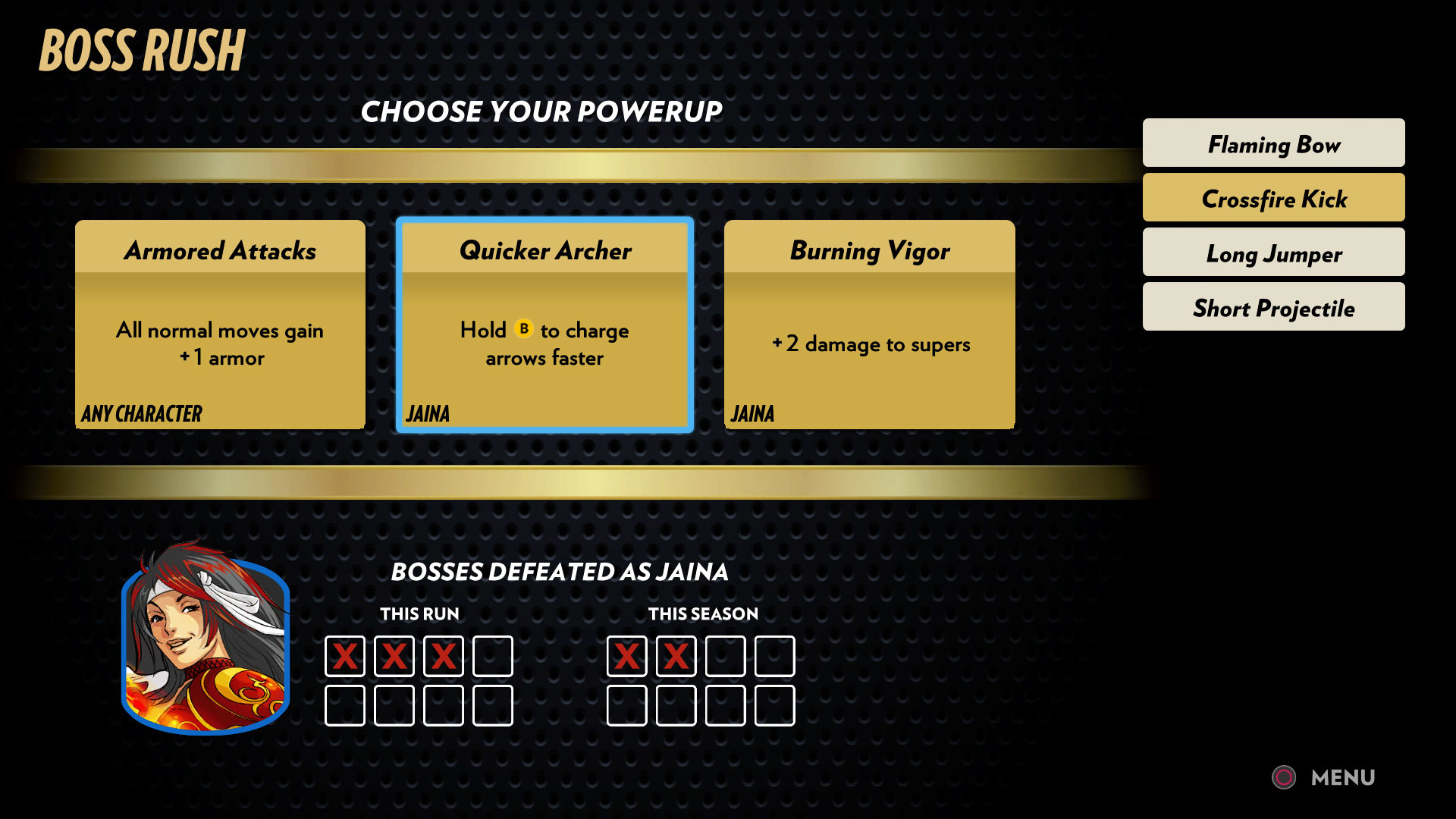
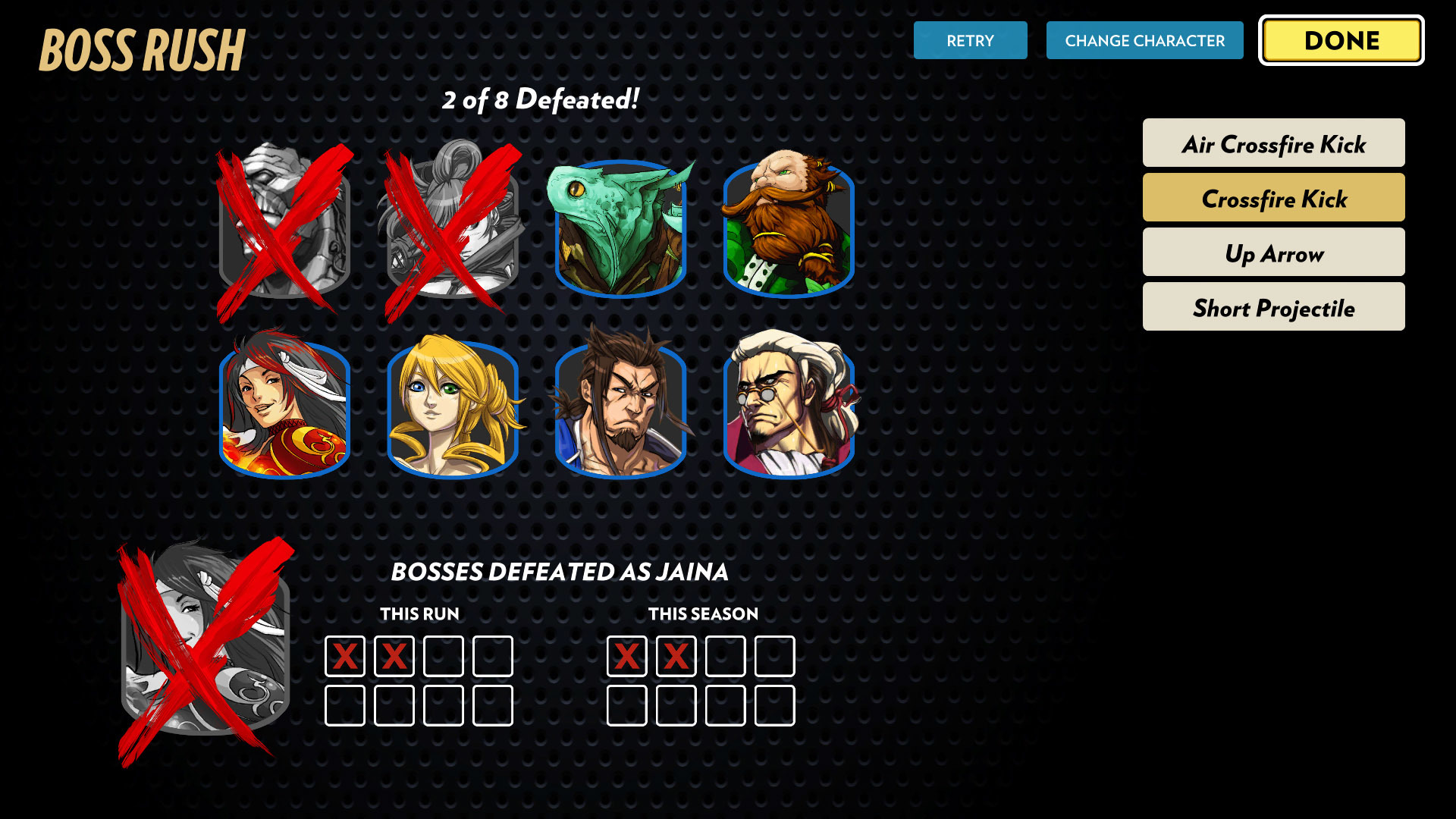
Boss Rush is where we can stop worrying about making things competitively fair and just let you do ridiculous things that are fun. You fight a series of eight (CPU-controlled) boss characters, and they get increasingly difficult. Part of that is their AI becomes smarter, but they also get crazy powerups like bombs dropping from the sky, dragons flying by, rivers with dangerous fish washing across the screen, and so on.
In order to deal with all that, you get powerups too. Before each fight, you pick one of three powerups. And before half the fights you get to pick a second, really powerful gold powerup from a random set of three. All of these are cumulative over the course of your run. So you’re building a “deck” of powerups and you get to think about synergies and combos amongst them.
The mode is like a rogue-like in that you keep your deck until you lose. If you lose, we throw your deck away and you have to start over with a new run. Can you make it through all eight bosses? Playing as every character?
In testing this mode, we found that it was more fun when your super moves still mattered against later bosses even though they have a lot of hit points. Some powerups give you bonus damage to supers, but in order to keep super moves more relevant for everyone as you gain various other wild powerups, you always get +1 damage on supers starting at the 4th boss. And then +2 damage on super for the next boss, and +3 for the next, etc. This stacks with any powerups that might also increase the damage of your super moves.
Some super moves don’t deal damage in Fantasy Strike, such as Geiger’s Time Stop or Midori’s Dragon Form transformation. For these, we added new properties to these supers that just happen in Boss Rush. Midori’s Dragon transform roar now sends out a damaging shockwave in addition to him taking on the new form. And Geiger throws out a series of Time Spiral projectiles in addition to the usual powers of Time Stop whenever he has bonus super damage.
New AI
AI opponents in all single player moves are greatly improved. Rather than playing almost totally randomly, they ramp up in sophistication as you progress through arcade / survival / daily challenge / boss rush modes. In addition, you can pick if you want generally Easy / Medium / Hard AI in arcade mode and in single match mode.
RANK RESET
As part of the game’s launch, everyone’s ranked play stats have been reset. Profile data of pre-release has also been reset so everyone has a fresh start.
This marks the beginning of Season 1 of ranked play. Seasons will last 3 months, after which ranks are reset, but starting with Season 2 you’ll get an initial boost after the reset based on how well you did the previous season.
CINEMATIC TRAILER
The Fantasy Strike cinematic trailer now plays automatically the first time you launch the game. The trailer is also available to watch any time in the “Learn” tab on main menu.
CONTROLLERS
There are now several new convenience features for game controllers in the Steam version.
--The first time you do any input on a plugged in controller, now one of two things will happen:
1) Fantasy Strike looks up in our database if it knows about your specific controller in your specific operating system. If it does, then your controller will “just work” without you doing anything, or even knowing that anything had to happen.
2) If your controller is not auto-detected in this way, then you will be shown a setup screen with a picture of a PS4 controller (but ANY type of controller will work, not just PS4). Here, you press each button on your controller in the sequence prompted so the game knows what’s what. Note that this is unrelated to “button config” where you set if you want X to be jump and so on. Rather, this step tells the game which physical button on your controller is X.
--If you have to do step 2 above, you’ll only have to do it once for that controller. After that, the game remembers your previous setup. Also, in future patches, we’ll add your controller to the database that all players benefit from. So over time, more and more controllers will just magically work with no setup step at all.
--Improved hot-swapping of controllers. Before, if you plugged in a controller, then unplugged it, then plugged in a second controller, that second controller could wrongly be set to player2. Now, it will be set to player1 when it’s the only controller that’s plugged in. Furthermore, this problem also sometimes caused controllers to be assigned to nonsense, non-functional slots such as “player 3” or “player 4” at which point you controller would no longer work until you restarted the game. This only affected players who plugged and unplugged several controllers per session, but is now fixed for everyone.
--In-game help text now supports keyboard, PlayStation 4 button icons, Xbox One button icons, and Nintendo Switch button icons. The in-game help text automatically displays the correct kind of icons based on the controls you’re using at the moment. There is also a new feature in game options that lets you lock the help text to a particular type. An example use-case of this is that perhaps you have a 3rd party Xbox One controller that is not auto-detected, so you do the manual setup step. It works fine, but you would like the game to display Xbox One help text to match the buttons on your controller. Now you can set that.
PERFORMANCE IMPROVEMENTS
Improved CPU performance by yet another 12-14%, plus an additional 6% in practice mode specifically. This comes from about 8 different cases of improving efficiency in facial animation, hit reactions, particle systems, and more. You’ll see higher fps and less strain from rollbacks online because of this optimization.
ONLINE PLAY
--Fixed a multiple black screen crashes when resuming a single-player mode after an online match.
--Fixed a black screen crash at the start of a ranked online game when you lose connection to the opponent.
--Fixed a crash during online play (a GGPO assertion) having to do with incorrect handling of particle some effects.
--When you quit an online match voluntarily (pause -> Disconnect), you no longer get disconnected from the server a few seconds later.
--Fixed a spectator issue during ranked games that could cause spectators to kick each other out, or disconnect the players’ game.
--Fixed spectators seeing three characters for one player (!) when they join spectating from the ranked score screen, or after they let the ranked score screen countdown run out. This would of course immediately desync the spectator.
--Fixed a visual bug when ranking up from Diamond league to Master league. The score screen would wrongly show you an infinite loop of increasing ranks, but now correctly handles the transition to Master league.
--Fixed a UI bug in the following sequence: play online, have someone spectate you, go to your friends list (which defaults to showing you who is watching you), then resume play and have them stop watching you, then go to your friends list again. In this case, your friends list wrongly defaulted to showing you a blank screen of who is watching you. In the case where no one is watching you, going to your friends list now correctly defaults to showing your actual friends rather than the blank who’s-watching-you tab.
--Profile screen: When selecting "All Seasons", Daily Challenge shows your best run rather than the nonsensical value of the sum of all your runs.
CHARACTERS
GRAVE
--Fixed a bug that caused Grave’s super to do 3 damage, rather than 2 damage, in the case when it was done exactly 1 frame before Rook inputs his own ground super.
--Corrected Grave's air super to be highlighted green for f1-21, which is the correct parry window, rather than f1-23 which included 2 green frames for no reason.
VALERIE
--Fixed a small animation error in Valerie’s knockdown that caused her to slide too far away, then pop to a closer position. This was visual only and didn’t affect gameplay.
SETSUKI
--Fixed a visual bug at the end of Setsuki’s forward throw which caused her wrists to rotate 360 degrees nonsensically.
--Setsuki’s B teleport kick now has a white highlight during the frames where you can see her on screen, but she is invulnerable. There is no change to gameplay here, the highlight was just missing before.
GEIGER
--Fixed Geiger's watch sometimes being desynced from Geiger's "selected" animation in the VS screen.
MIDORI
--Dragon B and Dragon air B (the body torpedo moves) have slightly worse hitboxes. It’s a very small nerf from the front. Also, ground B is more vulnerable to being attacked from above, but is still very good. And air B has 14f landing recovery on hit or block. This change is to encourage a wider variety of moves in Dragon Form than just using B over and over.
LUM
--The mini-lum item used to appear with Lum’s default costume colors for a few frames, then it took on the correct colors of Lum’s costume. Now, mini-Lum has the correct colors that match Lum’s current colors on all frames.
--Lum’s animation smear colors now reflect the color of his paws rather than his fingernails.
--Air B’s smears now match the yellow highlights on his paws. Those yellow highlights are also now a brighter yellow.
FRAME DATA DISPLAY
The following fixes do not affect gameplay. They are all fixes to the information display of frame stats in practice mode, and to the information display of “frame advantage visual effects” in all modes.
--Fixed a bug that was causing incorrect frame data to display for active frames of these moves: Jaina S, Grave S, Setsuki S, Rook air S.
--Fixed an error in the frames-to-landing prediction code, which had a wrong order of operations within a frame when forces on the character changed. This could cause frame stats for jumping moves to display errors in frame data sometimes. For instance, if Grave jumped straight up, then pressed B at a certain time, the display would wrongly show 0 active frames but now correctly shows 4 active frames in that case.
--Fixed an off-by-one-frame error in the frame advantage display code for airborne moves. This caused most airborne moves to have -1 displayed frame advantage relative to the truth, and also caused the display 1f of landing recovery rather than correct 2f of landing recovery.
--Fixed an error in the landing recovery prediction code, which still thought that default airborne moves had a landing recovery of 1f, rather than 2f. This caused most airborne moves to have +1 displayed frame advantage, basically canceling the previous problem's effect on displayed frame advantage. Though these two errors cancelled each other out, how about having no errors instead.
--Fixed frame advantage visual effects for all knockdown moves. The previous patch introduced a problem where knockdown moves would wrongly show a circle of the same size as whatever the LAST frame advantage effect you did was. Now it correctly shows the largest sized circle (most frame advantage) for knockdown moves such as Grave’s C, etc.
--Dragon Midori’s neutral A now shows frame advantage effects at all. They were accidentally omitted before.
--Human Midori now shows frame advantage effects at all in the case where he does neutral jump A, then steers it left or right. The steered version of the move used to wrongly omit them.
MISC
--In the Linux version, the videos in the “Learn” screen (character spotlight videos) now work at all.
--On the character select screen, selecting, then deselecting a character now correctly destroys the particles that the “selected” animation might create. This fixes the issue where you could make Valerie's paintbrush glow super brightly if you kept selecting and deselecting her, and same for Jaina's bow.
--Fixed a lighting issue on main menu characters where the seeing a win pose after a match then returning to main menu could cause the main menu character to be lit too dark and from the side.
--Fixed the Survival score screen always wrongly showing default costume color. Now it shows the costume color you actually played Survival with.
--The announcer now says “Congratulations!” after winning a team battle.
--The team battle roulette screen has minor audio improvements. The shuffling sound effect transitions better to the “character locked in” sound effect. Also, in the case where there’s only one character left on each side, so no shuffling happens, it no longer wrongly plays a shuffling sound effect.
--Pausing the game is now disallowed during the 30 frame fade in from black. This saves you from being in black or way too dark state if you mash pause as a match starts.
Game Update: May 2019
This update to Fantasy Strike is live right now.
This month has lots of bug fixes as we polish things up during this beta period. The biggest fix is to a problem we had with spectating online matches. Sometimes, spectating a match would cause a disconnect for the players actually playing the match. That should be fixed now. Also, there’s a spiffy new energy background on the two-player character select screen now.
ONLINE
We have great UI for watching a match online. Just click the eyeball icon next to any friend in your in-game friends list to watch them play. (You even automatically follow them as they play online games across casual, ranked, and friend-match modes.) This is great for streamers because you can easily do commentary on other people’s matches.
Unfortunately this feature has been somewhat crippled by a technical problem that sometimes blew up the match you were trying to spectate. We believe this is fixed. Please give us feedback if you still encounter this problem.
--Fixed an occasional crash when clicking "Leave Queue" on the ranked score screen.
--When you get an online match while in the “local versus” mode character select screen, we now show the correct characters for your match in the VS screen, not the two characters you happened to have selected on the character select screen.
--Fixed incorrect handling of facial animation during rollbacks in online play. This would notably leave DeGrey's win pose with a bad facial state after doing a Yomi Counter, then winning.
UI
--There’s a new purplish energy background behind the two-player character select screen. It has neato colors and a bit of oomph once you pick the characters. This replaces the old orange lights background.
--On the Daily Challenge score screen, "Retry" and "Change Character" buttons were invisible, but they were still accessible by navigating with a keyboard’s arrow keys. The buttons are now correctly deleted from that screen.
--You can no longer call the gamepad setup overlay (hold 2 buttons) on the “versus screen” (which is for loading the match) or the "roulette" team battle screen. In each case, we’re just moments from starting a match and it causes too many problems to setup a controller right at that moment. Even worse, players often accidentally summoned this screen just before their matches started.
--After playing Survival Mode, then returning to the mode select screen, “back” would wrongly take you “back” to the score screen from your previous survival run. Now it correctly takes you “back” to the main menu.
--Fixed an issue where the character on the main menu would sometimes have accidentally too-dark lighting after playing an online match.
CHARACTERS
JAINA
--Fixed alignment on her ground super’s hit reaction. Some characters appeared much too high or too low during the cinematic, but now are at the correct heights. (This probably looks simple but it was a lot of work to fix these alignments.)
VALERIE
--Fixed a slight checkerboard pattern on her skin that was happening on some computer hardware.
--Valerie’s practice routine animation (where she does pushups) no longer wrongly shows the shadow of her paintbrush going through the floor.
MIDORI
--In Dragon Form, you can no longer "reversal jump" out of the human form revert when getting up from a knockdown while your dragon meter is empty. You’re now forced to revert before you can jump.
--The Dragon’s Yomi Counter no longer has the graphics for the acid spit going the wrong direction.
ARGAGARG
--Argagarg's C -> back+C goldfish now correctly deals block damage.
--Argagarg’s practice routine animation (where he does pushups) no longer wrongly shows the shadow of his staff. He doesn’t even have a staff during that, so it was pretty weird to show the shadow.
MISC
--Fixed a bug that incorrectly showed blue armor highlights starting on the first frame of any move with armor, even if the armor only actually started on some later frame. (For example, Rook’s C throw.)
--Fixed a bug where 0-damage hits of multi-hitting moves could "break your armor" when you're at 1 hp. For instance, this could cause your Dragon C's armor to fail against multi-hitting Lum Slots, Midori flurry punches, or Lum cartwheel, when you start your Dragon C at 2 hp. The first hit would bring you to 1 hp, then the second hit for 0 dmg would cause your armor to fail.
Game Update: April 2019
This update to Fantasy Strike is live right now.
This month we really tightened up Fantasy Strike from a software development standpoint. The gameplay is already in place, but we want everything about it as a piece of software to be as smooth and polished as possible. We massively reduced the game’s file size, reduced loading times (they were already fast!), fixed some bugs with online play that we accidentally introduced last patch, as well as fixed several other bugs.
Also of note, in order to make Jaina run well enough on the upcoming Nintendo Switch version, we had to completely redo the graphics for her flame arrows as well as the cloth system used by her skirt. In both cases, I think we pulled off the same kind of trade-off as last month’s performance improvements: in order to make it run faster, we also had to make it look better.
FILE SIZE
The game now uses 3GB less disk space. There has been no change to the size of the character spotlight videos, so if we exclude those and just look at the file size of the rest of the game, it’s now 34% the size it used to be.
A little of this improvement is from deleting assets that weren’t actually used in the game. A little was from reducing the size of some textures that were enormously too big for no reason (e.g. a small rock you can barely see having huge textures that don’t even improve that rock’s visuals.) Most of the improvement is from additional compression applied to all textures. Textures were already compressed in a way friendly to video cards, and now they are also compressed in a second way that’s friendly to your hard drive.
LOADING TIMES
If you have a fast computer, you already had very fast loading times in Fantasy Strike. Consoles have SIGNIFICANTLY slower loading in general, so in preparation for launching on consoles, we have sped up loading times even more.
--Launching the game is maybe twice as fast as before. We really want you to reach the main menu as fast as we possibly can get you there.
--Hovering over a character on character select has that character appear on the screen faster than before. For example, on the Survival character select screen, hovering over Jaina should have her appear something like 10 times faster than before.
--We have a background loading system speeds up character loads even more. After you load a character in menus once (that is, see that character at all in menus), that same character will load even faster every subsequent time in menus. Furthermore, even the FIRST time you encounter them in menus will be the very fast version as long as you wait a bit after launching. For example, if you idle on the main menu, or set your buttons, or poke around menu screens, etc, we pre-load characters behind-the-scenes so that the first time you load them in menus will be the extra fast version.
--Loading of characters on the “versus screen” (the one with the orange background) is greatly sped up. For example, if you select Jaina in Survival mode, once the versus screen is shown, her character slides onto the screen something like 100 times faster than before. (Yes, really.)
--When playing Arcade mode, the wait time before the first story scene is shown is much faster, probably 5 or 6 times faster than before.
--All stages load slightly faster too.
ONLINE
Last month’s patch unfortunately introduced several desync problems with online matches. That means matches would suddenly end because you’d get out of sync with your opponents. These problems were caused by some speed optimizations we did that didn’t work well with online play. We’ve fixed the problems without reverting the speed changes.
--Fixed a desync related to projectile positions.
--Fixed a desync that frequently happened after a character was hit out of the air and landed on their feet.
—Fixed a desync related to DeGrey’s ghost. Actually, it’s more like an intersection of three desyncs in one. Our March performance update accidentally hit the online workings of the ghost pretty hard. Sorry, fixed now.
--Fixed a rare bug that could sometimes cause the game to hang for multiple minutes on launch while trying to connect to the server and failing. Possibly more likely on Mac.
MEMORY MANAGEMENT
--Fixed lots of cases where character assets were not getting unloaded when we no longer needed them, which meant that they stayed in memory for much too long.
--Fixed lots of cases of assets being double loaded. That is, two copies of the asset being loaded for no reason.
Together, these changes somewhat reduce the RAM requirements of the game, which is especially helpful to the upcoming console release.
CHARACTERS
JAINA
--The animation on her skirt is now controlled by a completely different system. The reason for this change is so that it can work on the Nintendo Switch at all. The skirt’s motion is generally more deliberate now, and this new system also prevents the bad states the skirt could get into before, such as being stuck crumpled up or folded in on itself.
--When on the p2 side (facing left), Jaina’s costume now correctly mirrors. It was always supposed to do this because her armor protects her front side as she shoots her bow, but for the last 3.5 years we’ve been unable to do this mirroring specifically because of how her skirt worked. The above change to her skirt tech now allows us to mirror the whole costume on the p2 side as it was always supposed to be.
--Jaina now has new graphics for her flame arrows. They now look a bit better, more like they were originally intended, and they require much less processing power than the old arrows so they will work better on the upcoming Nintendo Switch version. Also, the graphics for the new arrows make the visual difference between level 1, 2, and 3 ground B shots even more clear than before.
VALERIE
--Skin shading is smoother now.
SETSUKI
--Skin shading is smoother now. Palms are no longer kind of dark for no reason. Lips are no longer really huge.
--Fixed a bug with the last 3 frames of her air super’s parry attempt. Those frames didn’t correctly parry attacks, but now they work the same as all the other active frames of the move.
DEGREY
--Fixed a visual bug with DeGrey’s ghost, introduced last patch. After using the ghost once, her animation would no longer update. She would only pop between static poses as she moved around the screen. Now works correctly again.
ARGAGARG
--Fixed a glitch with his ground shadow when jumping over some characters.
--Improved collision of his whiskers to no longer penetrate his body, especially during main menu idle and gameplay idle (does not affect gameplay).
MISC
--Character spotlight videos have been updated. Fixed several references to moves that had changed function over the course of development.
--Fixed a bug where the where the main menu stage would render with the wrong lighting when you returned to main menu from various modes.
--Numerous fixes to the animations of characters doing pushups after online and survival matches. They no longer clip through the ground in various ways (Midori’s beard, Jaina’s hand and skirt, Lum’s belly, etc.) and they have ground shadows again, too.
--Fixed a lighting issue on defeated survival opponents. When they are laying on the ground before disappearing, they now have correct lighting, rather than sometimes appearing dark, other times not.
--The “loading time” between survival opponents was already instantaneous on good computers. On lower end computers, there might be a slight pause (fraction of a second). We’ve sped this up, maybe twice as fast as before.
--The “blocking” section of the tutorial has an extra sentence in the yellow text box telling you that you have to hit back the dummies after you block their attacks.
--Single Match mode now actually gives you a random stage when launching the match, rather than keeping the menu stage. It was always supposed to be random, but a last-minute bug before last patch caused you to get the same stage every time.
--The notification box that slides in on the upper left saying “You have 2 friend requests” or whatever is now correctly sized so that the text always fits inside.
Fantasy Strike Update: March 2019 -- 250% Frame Rate and Prettier Graphics
This update to Fantasy Strike is live right now.
PERFORMANCE IMPROVEMENTS
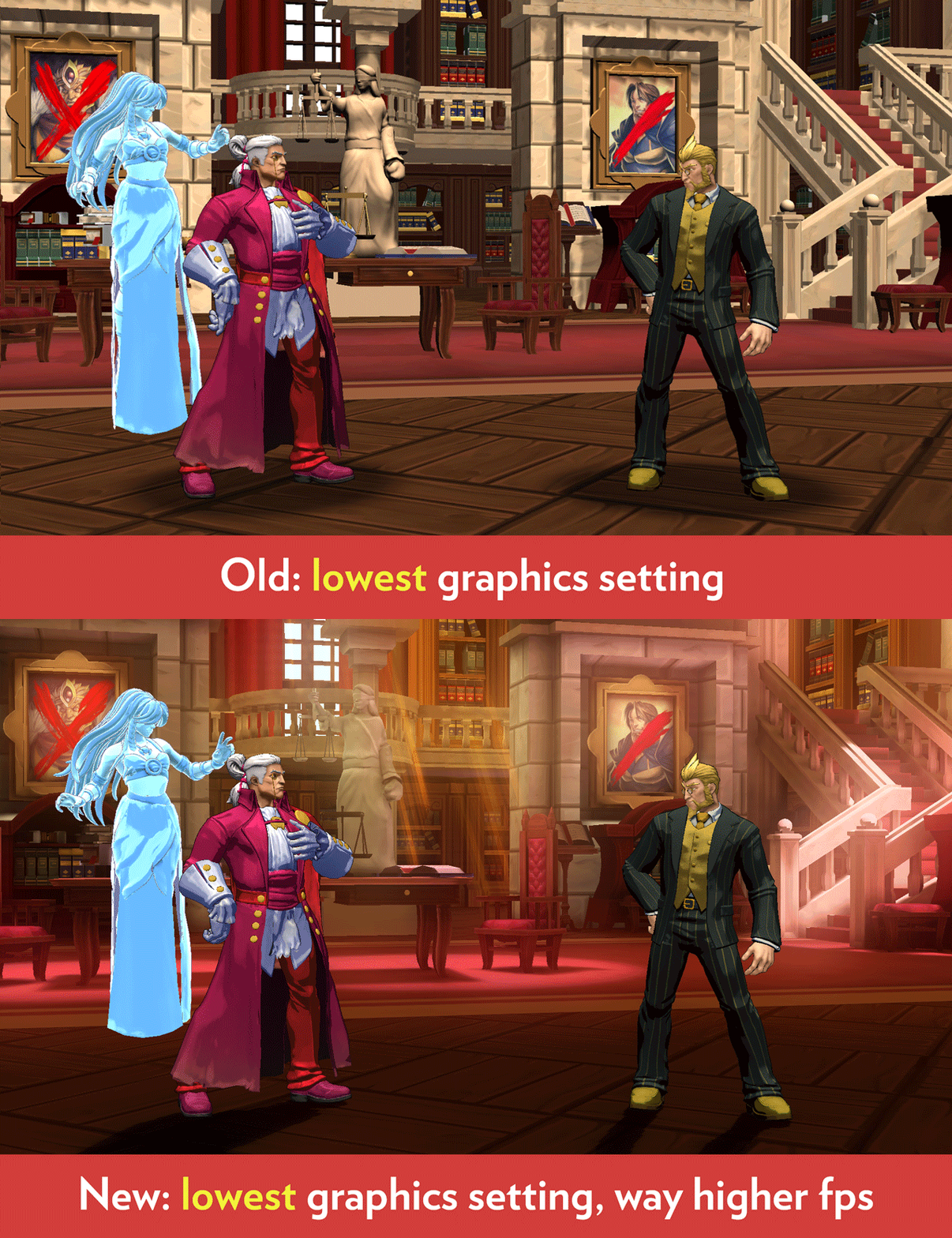
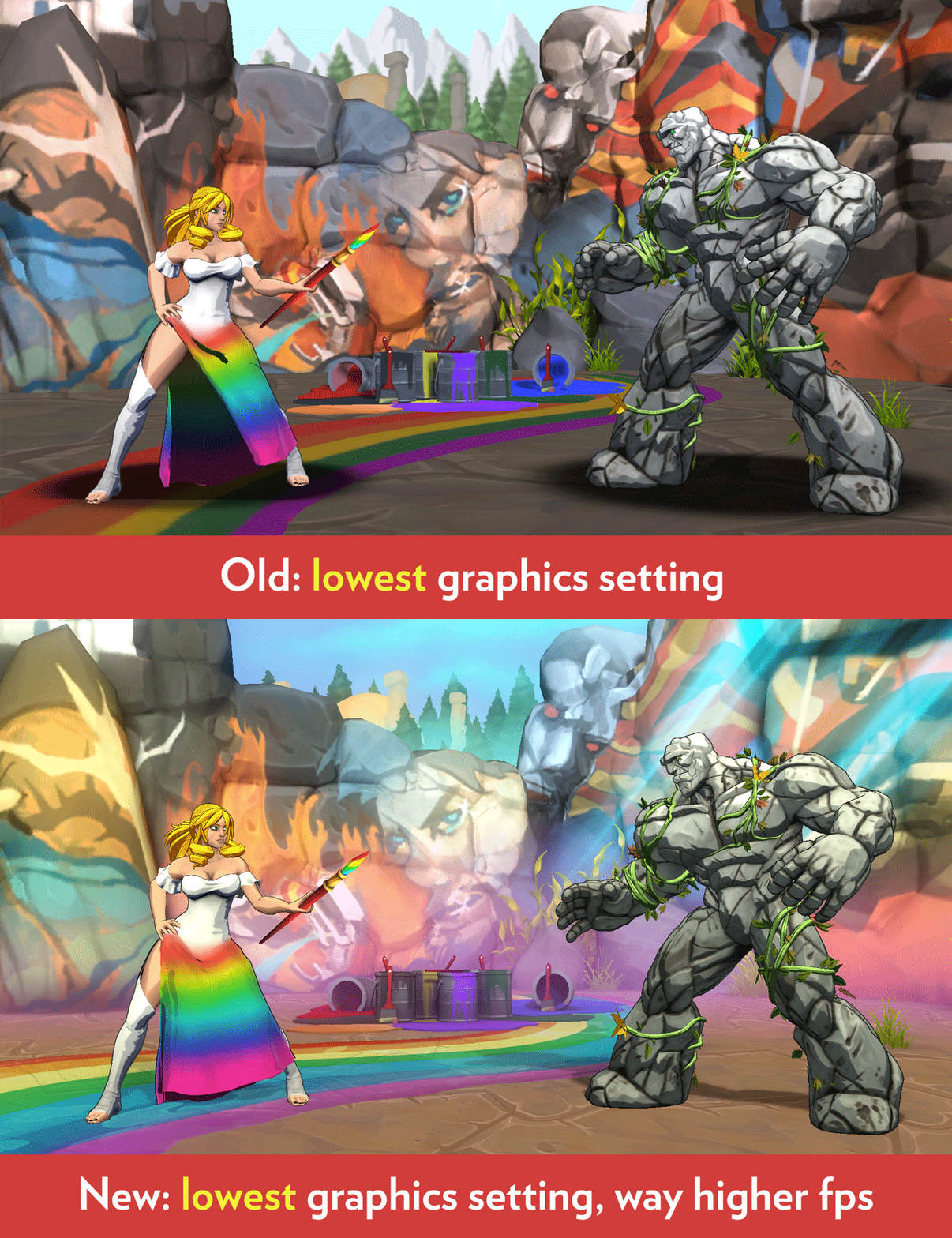
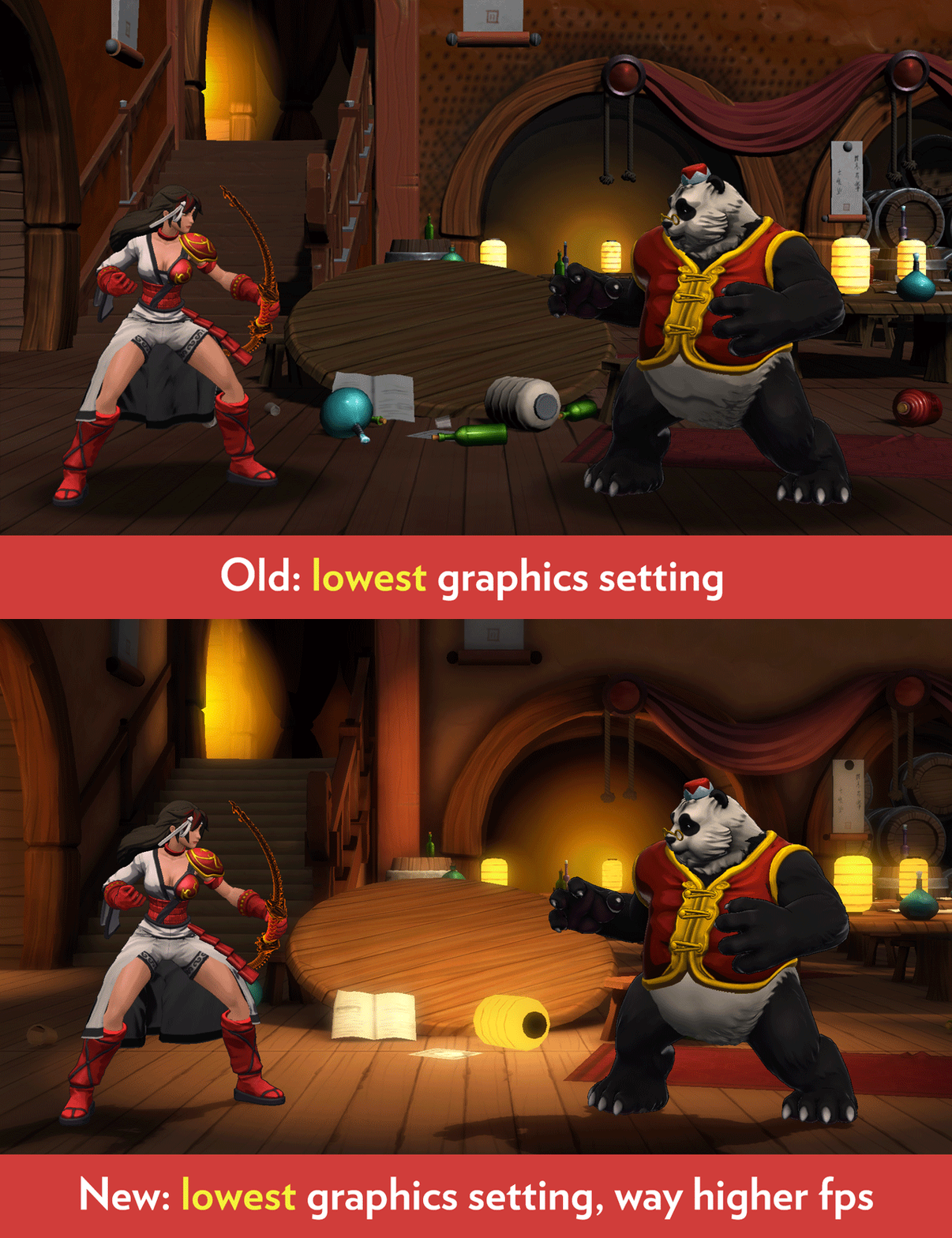
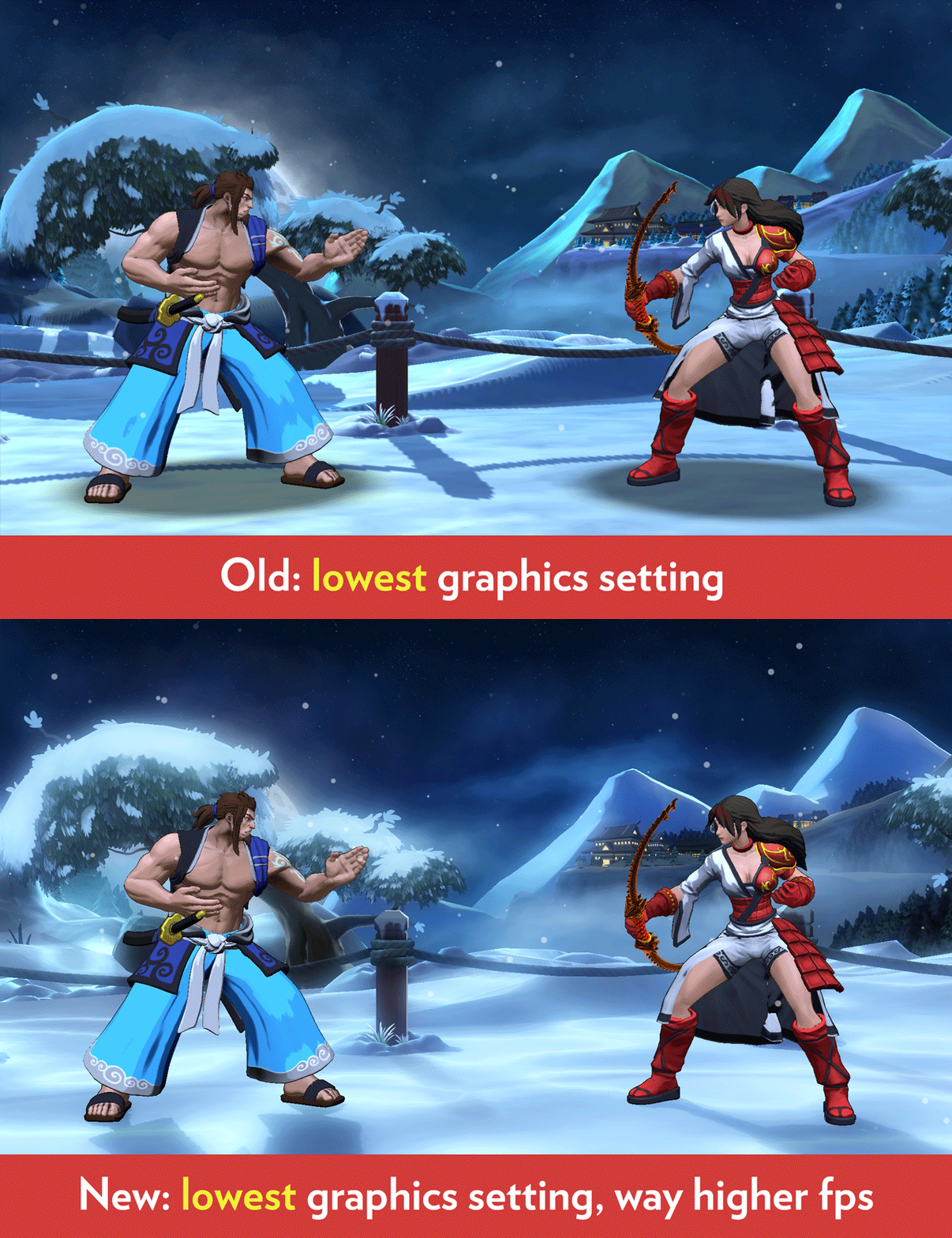
We’ve done massive performance improvements. In order to make the game run faster, we had to make the tradeoff of...also making the graphics look better. The game runs about 250% the fps it used to--yes really. About 2.5x as fast. This is totally insane and we hope you tell someone about it.
There are now only two graphics quality settings (standard and high) rather than four settings, and the new lowest setting looks better than the old highest setting...while running faster than the old lowest setting.
Here are some graphics comparisons, showing the old lowest setting compared to the new one:
In order to achieve this, we replaced the game’s lighting system with a new one that runs much faster and looks much better. We hand-tuned every stage to look as good as possible with this new system. In addition, we use a new method to draw character shadows on the ground. These shadows are now more accurate and run 600% faster than before.
In addition we further optimized CPU usage to reduce occasional frame rate spikes where the CPU suddenly has to do a large task on certain frames. Last patch we reduced this as well and we did even more optimization on that in this patch.
NEW MODE
There’s now a new 1p mode called “Single Match.” You pick your character, the CPU character, then play one game against their AI, then automatically return to character select afterwards.
SEASON RESET
The second pre-launch season has ended. It lasted about 3 months. Your rank is now reset to the lowest possible (bronze E), but you get bonus stars based on your best rank last season. You get one bonus star for each RANK up you achieved. For example, if your best rank last season was Silver C, then you’ll get 7 bonus stars immediately at the start of this new season (the 7 rank ups you achieved were to Bronze D, then C, then B, then A, then Silver E, then Silver D, then Silver C). Also, the crown markers showing which survival modes you beat are reset for this new season.
CHARACTERS
GRAVE
--New sound effects when the air parry super successfully parries, so that’s sounds more exciting. Also, the sounds at the end of this move when the lightning dragon is shown now work better in the case where the move causes a KO.
--Grave’s projectile clouds no longer get too dark on some stages.
JAINA
--Jaina’s back+A kick has 4f less recovery. (Still slightly minus on hit or block.)
--The sounds at the end of a successful ground super now work better in the case where the move causes a KO.
ROOK
--Rook’s C throw armor highlight now correctly turns off when he gets hit during the attempt.
--Added armor to rook’s combo C throw (back+A -> C) to match his regular C throw.
SETSUKI
--Slightly improved shading on several alt colors. The shadows are less dark on bright costumes.
LUM
--Changed the shading on Lum’s fur to remove (possibly weird) shadows on his face. This also much improves the shading on his belly during gameplay, which used to have a large horizontal shading artifact.
--Lum’s walk-in intro no longer has an animation pop at the end where his feet are suddenly in a different place.
--Improved graphics on Lum’s cloud, more cartoony and matches Grave’s clouds.
--When Lum’s coin hits an opponent or the ground, it now blinks as it disappears. (No gameplay change.)
--Fixed a visual bug where Lum’s slot machine would wrongly appear at the top of the screen during the startup cinematic for his ground super.
--Replaced the slot 2 costume with a more interesting looking color set.
MIDORI
--While in dragon form on the 2p side, we think(?) we fixed the issue where sometimes his wings vibrate rapidly for no reason. (This is just a graphic fix, does not affect gameplay.)
ARGAGARG
The following are bug fixes for bugs accidentally introduced in the last update:
--Argagarg's fA can once again punch under an Argagarg blue fish, rather than always lose to it at any range.
--Argagarg's fA can once again punch under a Geiger gear, rather than always lose to it at any range.
--Argagarg's water wave will once again NOT negate Geiger's gear.
MISC
--Fixed the profile screen not showing the "time played" section correctly for a master-ranked player.
--Fixed master rank computation and display, to fix the bug that sometimes multiple master rank players could appear to have exactly the same rank (e.g. two different players each displaying as the 2nd best player overall).
--Player levels over 100 now display a star for each 100 levels, plus a number. For example, 234 now shows two stars + 34.
--Better handling of networking checks when players try to get into the online matchmaking queue. In cases where the server is missing some information from the player, rather than silently fail, as if your button press to get in the queue did nothing, it now tries to get the necessary information to put you in the queue. If it can’t, it now shows a popup error message about what happened.
--Fixed "ghost spectators" that could stick around in your spectator list even after they stopped spectating.
--Raised volume of "Shadow Boss" and "Metal Boss" voice lines in Survival Mode. Also raised the volume of the announcer saying "Draw" a little bit.
--Armor moves (the ones with a blue highlight) now have a special sound effect for the armor.
--Menu sounds now have subtle “whooshes” on the main menu, mode select screen, character select screen, and ladder screen. These are especially for players who have the music off, so that the sound effects are a bit “fuller”.
--Fixed the friends screen showing incorrect dropdown options for a friend that you just added through a friend invite during this session (screen was accessing the "sent request" for the friend request by accident, thinking it was a challenge or watch request).
--Fixed a crash that could happen when very rapidly going back and forth between the main menu and practice mode character select. (Why are you very rapidly doing that over and over?)
--Fixed a crash that triggered when you voluntarily disconnected from an online ranked match.
--There’s now a fade from black when gameplay starts as you enter practice mode and at the beginning of round 1 in all modes. (There already was a fade from black for rounds after round 1.)
--When quitting gameplay and returning to the main menu, the main menu background stage is now the same one as the gameplay stage you were just on, rather than a random one. This allows menu graphics to load faster any time you quit from gameplay to main menu.
--When choosing “change character” and returning to the character select screen, the characters load even faster than before.
--Reduced loading time of the tutorial.
--The story sequences in arcade mode load 10x faster than before.
--In all stages with grass, leaves, plants, etc, those things now slightly sway over time, rather than always being frozen in place.
--New spiffy images for all stages during stage select. (The previous ones were looking pretty old!)
Save 20% off on Fantasy Strike until February 11th on the Lunar New Year Sale
Time for another Steam Sale! Starting today and ending on February 11th, you can save 20% on Fantasy Strike, Yomi and Puzzle Strike, as well as their respective DLCs.
This time around, Steam is taking an additional $5 off of your first order of $30 or more, so be sure to toss one (or all!) of our games into your first shopping cart.
Take advantage of these great deals and we’ll see you online!
Game Update: January 2019
This update to Fantasy Strike is live right now.
Disastrous Matchmaking Problem — Now Fixed
For the last year and half, an insidious matchmaking bug has killed our online population, and we have only recently discovered this and deployed a fix. The problem is that if you would be matched against certain kinds of bad connections, the match would not be made (that’s good, you wouldn’t want to matched then anyway) but you would be secretly removed from the matchmaking queue, while appearing to still be in it on your screen (oh no!) and you were given no indication that any of this happened.
In other words, a single player with a bad connection could “poison the well” by causing more and more currently online players to no longer be able to find matches (until they restart the game). Those players would all think they are waiting for matches, but actually they weren’t. They would then wrongly believe no one else was even online. This belief would cause them to give up, which then ACTUALLY caused fewer people to play online. It seems that this didn’t happen all the time (hence it being so hard for us to pin down), but enough that it really tanked our online population.
This issue is NOW FIXED.
Separate from the matchmaking situation, the underlying netcode for online play is extremely good in Fantasy Strike, and has been for a long time. So it’s extra heart-breaking that this matchmaking issue may have prevented some people from even realizing that. Please invite your friends back to the game and try some casual or ranked matches this week, in honor of us now having fixed this matchmaking bug.
Facial Reactions
Last patch, we said that we added facial reactions to the game, meaning when a character is hit by something such as Grave’s super or Jaina’s yomi counter, etc, that the victim’s face is actually animated. There was a problem with this tech and we quickly disabled it via a hotfix immediately following last month’s patch. This time, the facial reactions really are in the game.
CHARACTERS
VALERIE
--Valerie’s yellow attack (both neutral and forward versions) have 1f faster startup. This is the attack you get by pressing either B or forward+B after you do the B,B (cyan -> magenta) sequence.
--Valerie’s neutral yellow attack is -6 on block instead of -12; the forward version is -13 instead of -12.
--Valerie C’s first hit now hits 5 frames later than before, though the 2nd and 3rd hit and total move duration are unchanged.
Developer’s note: the purpose of the above changes is give more of a reason to do the neutral (non-crossup) yellow attack after doing the B,B (cyan, magenta) sequence. After doing B, B, you can end with either a C or a third B, but the C choice was very fast and only -1 on block, which is pretty good. The C is still -1 and still good, but doing it now gives the opponent more time to attack before the C reaches them. Meanwhile, doing the B (yellow) ender is still fast, and actually 1 frame faster than before. That is just barely fast enough to beat throws now during its startup, like the C already does anyway (the C beats throws because it’s off the ground).
If the opponent blocks the neutral yellow C mentioned above, you’ll be at -6, which is better than the -12 you used to be. You’re probably safe because of the pushback. There’s a tradeoff now in that the rainbow ender ends at -1 on block (good), but its slower startup means more things can possibly beat it. The neutral yellow ender is fast enough to beat all normal attacks and normal throws when done after B,B, but it’s -6 on block. That’s worse than -1 on block, but better than before this patch when it used to be -12.
This leaves the crossup yellow ender. It’s 1f faster so that it’s startup matches the non-crossup version, and it has 1f more recovery so that it can be hit back a bit more easily when blocked correctly (for example, Lum’s forward+A punch can now hit it back after he blocks, but barely couldn’t before).
SETSUKI
--Fixed a bug that could cause the kick ender in Setsuki’s B attack to “auto-correct” when it shouldn’t (turn around suddenly to face an opponent who got on the other side of it). This same fix might also make her hold-B throw face the direction it should in rare cases where it might have thrown the wrong way.
--Setsuki's B teleport kick no longer completes the dash part for no reason while time is stopped from Geiger’s Time Stop.
GEIGER
--Slightly improved the shading on his face, and changed his overall skin tone to not be so shiny, which used to result in his hands looking too plasticy.
DEGREY
--Fixed graphical issues when DeGrey appears in menus where his clothes intersected his body at the waist and shoulders.
--Fixed DeGrey's ghost suddenly popping to a different position on the final frame of his winpose.
MIDORI
--Removed a stray 1f of invulnerability when Midori reverts to humanform on the ground, at the very start of the vulnerable recovery.
LUM
--Fixed a graphical tech issue that made his eyeballs sunken too far into his head.
MISC
--Performance improvement. Depending on the speed of your computer, you might have experienced intermittent framerate spikes. For example, even if you can maintain 60fps, every so often it might drop to 40fps or something for a fraction of a second, then back to 60. We’ve greatly reduced this issue, such that these framerate spikes are less frequent and less severe if they do occur.
--Fixed a crash that could happen in survival mode if you beat an opponent really fast after they enter the playfield.
--Slightly improved the load time of the score screen at the end of survival mode (it’s fast anyway).
--Fixed Survival Results screen to be a blue background instead of accidentally being white.
--Updates for text in the in-game move list:
DeGrey's f+A "Overhead kick" -> "Elbow lunge"
Grave's air B "Hurricane" -> "Whirlwind"
--The voice over in survival for the announcer saying “Metal Boss” and “Shadow Boss” is now the same voice actor as the rest of the game. Also, a more dramatic take of him saying "sudden death round" is in. (Sudden death round happens in ranked and team battle when both players need one more round to win and they then have a draw round.)
--Adjusted the sound mix. Story voice over is louder now (was getting lost against the music before), the versus screen fanfare music is a littler quieter so it matches the rest of the game, and the announcer’s various lines also better match the loudness of the rest of the sounds.
--The CPU opponents now have a better idea what their own thrown ranges are and will not attempt to whiff normal throws outside of that range. It was especially egregious for Argagarg, Rook, Midori, and Dragon who often whiffed their throws over and over from far away for no reason. Also, the CPU will no longer try to throw airborne opponents or mash the throw button while airborne.
--Fixed an issue where pressing accept to start watching a character spotlight video had a short window of time where pressing accept again would put you in a buggy state.
--Deleted the tiny squirrels from Midori's stage because it gives +2fps on Dojo (the worst fps stage) on both medium and high graphics on computers roughly the strength of a PS4.
--During the tutorial, you can no longer enter frame step mode.
--When exactly two controllers are plugged in, the help text throughout the game no longer constantly reverts to keyboard mode for no reason.
--Fixed a bug where victory poses (such as Jaina’s, Grave’s, Rook’s) could sometimes show their secondary objects (sword, bow, birds) moving around in the wrong place, disconnected from the character.
--The profile screen was wrongly showing NUMBER of Daily Challenges attempted, but now correctly shows the best result you’ve achieved this season.
--On the move list, fixed the position of the word "Super" when the resolution is different than 1920x1080. The lower the resolution, the lower this word would accidentally appear on the screen.
--When selecting "Online" in Main Menu while trying to connect to server, if the connection fails, a pop-up now appears (instead of nothing).
Sirlin Games on the Steam Winter Sale
'Tis the season to save 40% on all of our digital titles, including Fantasy Strike, Yomi, and Puzzle Strike! The Steam Winter Sale lasts from now until January 3rd, so be sure to grab one of our games for yourself (or a loved one) this holiday season.
We're also selling Yomi and Puzzle Strike on iOS for a massive discount as well.
Take advantage of these great deals and we'll see you online!