FINAL FANTASY XIV celebrates its 11th anniversary! Join us for the Rising as the realm commemorates another year of grand adventure!
Event Duration
From Tuesday, August 27, 2024 at 12:00 a.m. (PDT) / 7:00 (GMT) / 8:00 (BST) / 17:00 (AEST) to Wednesday, September 11, 2024 at 7:59 a.m. (PDT) / 14:59 (GMT) / 15:59 (BST) / 12 September at 0:59 (AEST)
How to Participate
Begin the quest "Rising to the Call" by speaking to the wandering minstrel in Limsa Lominsa, Upper Decks (X:11.3 Y:13.7).
* Players must be level 15 and above to start the quest.
Rewards
* Certain items available during previous iterations of the event can be obtained via the Rising vendor.
With fireworks in the air and festive decorations on every street corner, the season of summer is in full swing. So long as the sun shines bright, there is time yet for further merriment, and Costa del Sol's sandy beaches beckon... Bring your friends, family, and pets to revel and rampage at this year's Moonfire Faire!
Event Duration
From Thursday, August 8, 2024 at 1:00 a.m. (PDT) / 8:00 (GMT) / 9:00 (BST) / 18:00 (AEST) to Monday, August 26, 2024 at 7:59 a.m. (PDT) / 14:59 (GMT) / 15:59 (BST) / Tuesday, 27 August at 0:59 (AEST)
How to Participate
Begin the quest "Fire Red, Beast Green" by speaking to Mayaru Moyaru in Limsa Lominsa, Upper Decks (X:11.5 Y:13.8).
* Players must be level 30 and above to start the quest.
Rewards
* Certain items available during previous iterations of the event can be purchased via Moonfire Faire vendors.
Patch 7.05 brings a multitude of additions and refinements to the realm, including the Savage version of AAC Light-heavyweight Tier, the new Cenote Ja Ja Gural treasure dungeon, and the introduction of Allagan tomestones of heliometry.
* Dawntrail registration codes are now redeemable. Windows®/Steam/Mac users (including early access participants) must redeem their registration code to play the Dawntrail expansion.
Please be sure to register your full Dawntrail registration code. The full registration code is distinct from the Early Access code, and must be registered separately. Please compare the first four digits of your 20-digit code against the table below:
Registration steps:
Log in to the Mog Station with your Square Enix account.
If you have multiple service accounts, select the service account you want to register the code on.
Select "Additional Expansions" and follow the instructions on-screen. (Note that you must have A Realm Reborn registered for the platform you are trying to redeem Dawntrail on.)
Start the FINAL FANTASY XIV: Online launcher and log in with your Square Enix account.
Dawntrail will be downloaded automatically.
* Dawntrail registration codes can be redeemed on Mog Station starting from Monday, July 1, 2024 at 8:05 a.m. (PDT) / 15:05 (GMT) / 16:05 (BST) / Tuesday, 2 July 2024 at 1:05 (AEST). * Please note that if you have a character logged out in an expansion area that you do not have registered to your account after early access ends then you will not be able to log in with that character until you redeem your full registration code. * Early access will end on Friday, July 5, 2024 at 11:59 p.m. with the region of your Square Enix account determining the time zone. North American accounts will adhere to (PDT), European accounts will adhere to (GMT), and Japanese accounts will adhere to (JST).
Steam Users
Windows PC and Steam are treated as separate platforms. Please note that if you own the Steam version of FINAL FANTASY XIV, you will have to start the client from Steam as well. It is not possible to log into a Steam Service Account using the regular Windows client.
Steam users can find their 20-digit Dawntrail registration code by navigating to their Steam game library. Right-click on "FINAL FANTASY XIV Online", select "Manage" and then "CD keys". All your FINAL FANTASY XIV codes will be listed there, including the Dawntrail expansion code. Once you have your Dawntrail registration code, proceed to the Mog Station to redeem it.
Please view this article if you accidentally registered your expansion to the wrong Square Enix Account or Service Account.
Early Access for FINAL FANTASY XIV: Dawntrail Begins!
It is our pleasure to announce the start of early access for FINAL FANTASY XIV: Dawntrail! As of today, those who pre-ordered Dawntrail can set sail for Tural ahead of the official launch on Tuesday, July 2.
We hope you enjoy the new adventures that await in Tural!
Please Be Mindful About Spoilers
During the early access period, there will be no restrictions on what content you can discuss, post, or stream while following the Material Usage License Agreement. However, we ask that early access players please be considerate and do their best to avoid posting spoiler-related content as there are those players who may start at the official launch or play at their own pace.
This doesn’t mean that players cannot stream or share the content they’re playing, we just ask everyone to be mindful about what they’re sharing publicly as they explore the new adventures in Dawntrail!
* Please be advised that data mining is a violation of the FINAL FANTASY XIV User Agreement.
Pre-order Bonus Code Registration
During early access, players who have registered a pre-order bonus code and met the requirements to enter Dawntrail areas will be able to begin playing as soon as maintenance concludes. Read the instructions for registering your bonus code and participating in early access.
* Those who do not fulfill the requirements to enter Dawntrail areas can still enjoy Dawntrail-related content outside of the main scenario if they have registered their pre-order bonus code.
Regarding Congestion During Early Access and Launch
With the launch of a new expansion, we are expecting far more simultaneous logins compared to usual. Learn more about the congestion that may occur during the early access period and release of Dawntrail in our recent announcement.
Patch 7.0 Notes (Preliminary)
It is with great pleasure that we present the preliminary patch notes for FINAL FANTASY XIV: Dawntrail. Pack your bags and ready your gear─a grand new journey awaits!
* Additional features will be implemented in future updates:
The new raid, the Arcadion, is scheduled to release in Patch 7.01.
The new raid, the Arcadion (Savage), and the treasure hunt instance Cenote Ja Ja Gural are scheduled to release in Patch 7.05.
Due to the start of early access for FINAL FANTASY XIV: Dawntrail and the release of Patch 7.0, we will be performing maintenance on all Worlds at the time below, during which FINAL FANTASY XIV will be unavailable.
Maintenance Period
From Wednesday, June 26, 2024 at 2:00 a.m. (PDT) / 9:00 (GMT) / 10:00 (BST) / 19:00 (AEST) to Friday, June 28, 2024 at 2:00 a.m. (PDT) / 9:00 (GMT) / 10:00 (BST) / 19:00 (AEST)
* Completion time is subject to change.
Regarding Congestion During Dawntrail's Launch
We would like to share information regarding the congestion that may occur during the early access period and release of Dawntrail.
With the launch of a new expansion, we are expecting far more simultaneous logins compared to usual. In light of the congestion that occurred during the launch of Endwalker, we have taken precautionary measures such as expanding our data centers and adding new Worlds.
However, our player base has continued to grow since then, and a large number of players will be playing for extended periods during the launch of the new expansion, which could result in Worlds reaching their login caps and therefore longer login queues.
To alleviate our players' concerns, we would like to share some details regarding situations that may arise during early access and the launch of Dawntrail, as well as our countermeasures against congestion.
Login Queues
When a World reaches the maximum number of players that can log in, it will result in a login queue for that particular World.
Even if the queue does not appear to be counting down, the queueing process is still functioning and will admit players in the order in which they queued. We apologize for the inconvenience, but ask that you patiently remain in the queue should you encounter a wait. Note that upon canceling the queue, you will be moved to the back of the queue when reattempting to log in.
When a login queue is in place, players on the full version of the game will be prioritized for logging in. Free Trial characters will be able to log in after the login queue has been cleared. This allows us to prioritize our paying customers and will mean longer wait times for Free Trial users, but we would like to ask for your understanding on this matter.
Restrictions on Data Center Travel & World Visit Systems
As existing data centers and Worlds are expected to become especially congested, the following restrictions will be in place starting in Patch 7.0 until Patch 7.01 (or Patch 7.05 at the latest, depending on the situation) to alleviate congestion and prioritize logins for Home World residents.
Data Center Travel within the Same Physical Data Center
Japanese Data Center
The number of non-Home World characters that can log in will be limited. * When a World has reached the maximum number of visiting characters, non-Home World characters that are logged out on that World will be unable to log in, and the World will be unavailable for visitation via Data Center Travel.
North American Data Center
Aether/Primal/Crystal: Will be unavailable for travel.
Dynamis: Will remain available for travel, and the maximum number of traveling characters will be increased compared to usual. The newly added Worlds in the Dynamis Data Center are still relatively unpopulated and may be helpful login destinations when other Worlds are experiencing high congestion.
European Data Center
Chaos/Light: Will be unavailable for travel.
Shadow: Will be open to travel, with probationary Worlds which may be helpful login destinations when other Worlds are experiencing high congestion.
Visiting the Oceanian Data Center via Cross-Region Data Center Travel
The cross-region Data Center Travel functionality, which has been in public testing for some time and appears to be stable, will be usable in Patch 7.0 onward.
The traveling limitations on cross-region will remain as follows:
Japanese Data Center → Oceanian Data Center
North American Data Center → Oceanian Data Center
European Data Center → Oceanian Data Center
World Visit System
Japanese Data Center
The number of non-Home World characters that can log in will be limited. * When a World has reached the maximum number of visiting characters, non-Home World characters that are logged out on that World will be unable to log in, and the World will be unavailable for visitation via the World Visit system.
North American Data Center
Aether/Primal/Crystal: The World Visit System will be unavailable.
Dynamis: The World Visit System will remain available, and the maximum number of characters that can visit via the system will be increased.
European Data Center
Chaos/Light: The World Visit System will be unavailable.
The World Visit System will remain available on the Shadow Data Center. Furthermore, the maximum number of characters that can visit via the system will be increased.
Oceanian Data Center
The World Visit System will remain available as usual.
Additionally, characters that were visiting another World prior to Patch 7.0 will still be able to return to their Home World regardless of traveling restrictions, but their ability to return may be temporarily impeded by periods of server congestion. As such, if your character is currently visiting a World that will have traveling restrictions, we advise returning them to their Home World before Patch 7.0 maintenance begins, as the restrictions will lower your login priority.
Playing on Other Worlds During Congestion
High congestion is expected on all Worlds, especially those on the Japanese/North American/European Data Centers.
Although Data Center Travel and World Visit will be limited as mentioned above, during periods of high congestion, you may want to consider playing on Worlds with relatively lower populations, new Worlds (NA/EU/OC), probationary Worlds (EU), and those on the Oceanian Data Center.
Players on the Japanese Data Center
Traveling to a less-crowded World via Data Center Travel, using the World Visit System, or traveling to the Oceanian Data Center via Data Center Travel is recommended during periods of high congestion.
Players on the North American Data Center
Traveling to the Dynamis Data Center or Oceanian Data Center via Data Center Travel is recommended during periods of high congestion. The Dynamis Data Center also has New Worlds which offer certain bonuses when selected as a Home World.
Players on the European Data Center
Traveling to the probationary Shadow Data Center or Oceanian Data Center via Data Center Travel is recommended during periods of high congestion.
How to Travel
Open the Character Selection menu
Select the character you wish to log in with, and open the subcommand
Select "Visit Another World Server" or "Visit Another Data Center" to log in
While there will be restrictions based on the World Visit System or Data Center Travel, you will still be able to progress in main scenario quests, as well as find parties and participate in duties through the Duty Finder, so we recommend considering this method depending on your situation.
Read on to learn more about the World Visit System and its restrictions. Read on to learn more about Data Center Travel and its restrictions.
* "Visit Another World Server" will automatically choose a less-crowded World within the same Data Center as your character's Home World. Note that during peak congestion times, such as the early access period, you may experience login queues even when using this feature.
Returning a Character to their Home World
Open the Character Selection menu
Select the character you wish to log in with, and open the subcommand
Select "Return to Home World"
Character Creation
New characters cannot be created on a World that is experiencing congestion. This is because new characters must be logged in to the World in order to be added to the database and complete other character creation processes.
For this reason, we ask players to create new characters outside of peak congestion times when the World is less crowded. In the case of the North American and Oceanian Data Centers, the newly added Worlds are relatively less crowded and recommended for creating new characters.
* The character creation availability of each World can be viewed on the Server Status page.
Error 2002 When Logging In
"Error 2002" may be displayed when selecting a character in the Character Selection menu.
This error is displayed when the login server is experiencing high amounts of traffic or when the number of characters waiting in a login queue for a logical Data Center exceeds its maximum capacity.
This is a measure to prevent the server from crashing due to extreme traffic loads. Should you encounter Error 2002 when attempting to log in, we apologize for the inconvenience, but ask that you wait a while before trying again. Furthermore, the aforementioned maximum capacity has been increased by roughly 50% compared to the launch of Endwalker.
Error 2002 may also occur when you are waiting in the login queue. Longer wait times mean an increased likelihood of being interrupted by connection issues due to packet loss, unstable Wi-Fi connections, and other network environment factors.
In the event of a disconnect due to Error 2002, the lobby server will hold your place in the queue for roughly a minute. If your connection returns and you manage to re-enter the lobby server relatively quickly, you will be able to return to your place in the login queue. However, if a certain amount of time passes before you return to the lobby server, your place in the queue will be lost and you will need to re-enter the login queue from the beginning.
Error 90002/90006 During Gameplay
These errors are general network connection errors caused by network disconnections. In the event of these errors being displayed, please check the status of your network environment.
As general troubleshooting tips, we advise using a wired internet connection instead of Wi-Fi, and PlayStation 4/PlayStation 5 users are recommended to review their console’s Power Save Settings.
Automatic Logout
In order to ease congestion, players who are inactive for 30 minutes will be automatically logged out.
As we would like to give priority to those who would like to actively play the game, we apologize for the inconvenience, but we ask for you to log out when you are not actively playing.
Peak Congestion Times
Congestion statuses vary with each logical data center, but based on typical activity, the following times are expected to be especially congested.
Japanese Data Center: From 2:00 a.m. (PDT) / 9:00 (GMT) / 10:00 (BST) / 19:00 (AEST) to 8:00 a.m. (PDT) / 15:00 (GMT) / 16:00 (BST) / 1:00 (AEST)
North American Data Center: From 1:00 p.m. (PDT) / 20:00 (GMT) / 21:00 (BST) / 6:00 (AEST) to 11:00 p.m. (PDT) / 6:00 (GMT) / 7:00 (BST) / 16:00 (AEST)
European Data Center: From 4:00 a.m. (PDT) / 11:00 (GMT) / 12:00 (BST) / 21:00 (AEST) to 4:00 p.m. (PDT) / 23:00 (GMT) / 0:00 (BST) / 9:00 (AEST)
Oceanian Data Center: From 12:00 a.m. (PDT) / 7:00 (GMT) / 8:00 (BST) / 17:00 (AEST) to 6:00 a.m. (PDT) / 13:00 (GMT) / 14:00 (BST) / 23:00 (AEST)
Considering early access will be taking place during the weekend, there may be congestion outside of these hours as well. The above times are simply meant to be a reference for when login queues may be especially long.
Preventative Measures Against Server Crashes
To prevent World servers from crashing, the number of characters that can move between in-game areas within a certain timeframe will be limited. As such, the game may display "Unable to move areas due to congestion" when attempting to enter a different area. If this error is displayed, we ask that you try to change areas again or wait a while before attempting again. We apologize for the inconvenience and appreciate your cooperation as we strive to provide a stable gameplay experience.
Wait Times for Instanced Content
There is a possibility that certain instanced content, such as duties required to progress through quests, may experience congestion. For instanced duties required to progress a quest, we have devised methods to stagger player traffic during main scenario progression, and have also implemented a queue system in case of congestion. Should congestion occur, your number in the queue will be displayed upon attempting to enter the instance. We ask that you patiently remain in the queue as players are admitted into the instance in the order that they joined the queue.
Instances of the New Areas
During the periods immediately after Dawntrail's early access and launch, areas added in Dawntrail or visited during the Dawntrail main scenario will be heavily trafficked. In order to allow more players to enter these areas, we will be implementing several instances of the same area.
Instanced areas will have their area names followed by their instance number at the end, such as Urqopacha 1, Urqopacha 2, Urqopacha 3, and so on. While each of them share the same map, they will be treated as separate areas, and you will be moved to one of these instanced areas when visiting these destinations.
Selecting and Confirming the Instanced Area
You may choose to enter a specific instance of an area either by traveling to your destination through an entrance from a neighboring area or by interacting with an aetheryte in the area.
When moving to these areas via teleport or Return, an instance will be automatically selected. Players can confirm which instance they are currently in through a log message in the chat or by using the “/instance” text command.
Restrictions in Instanced Areas
Players in different instances of the same area can communicate with Tell messages as normal. However, there are some restrictions such as being unable to see each other's character in the overworld.
Entering the Same Instanced Area As Your Party
Party members will generally be moved to the same instanced area when using teleport or Return. However, party members may be split between different instances if the destination instance has reached the player cap. As such, players may not always end up in the same instance, and may need to select their desired instance either by traveling through an entrance from a neighboring area or by interacting with an aetheryte in their desired area.
Support Services During Early Access and Immediately After Launch
The Development and Operations teams will be providing our utmost in live support in order for our players to be able to enjoy the new adventures that await in Dawntrail. World and server statuses, as well as any issues that may arise, will be announced through our Lodestone announcements or our official X channels (@FF_XIV_EN and @FFXIV_NEWS_EN), which we hope will be helpful in keeping you up to date with the latest developments.
We once again apologize for inconveniences that may arise from congestion-related matters, and thank you for your understanding and support.
Letter from the Producer LIVE Part LXXXII Set for June 14
With Early Access on the horizon, the next Letter from the Producer LIVE will be bringing you the latest updates on Dawntrail, featuring some live gameplay!
Date & Time
Friday, June 14, 2024 at 4:00 a.m. (PDT) / 11:00 (GMT) / 12:00 (BST) / 21:00 (AEST) * Starting time is subject to change.
* Includes live interpretation from Japanese to English.
Show Details
Patch 7.0 Updates
Miscellaneous Updates
Breaking Brick Mountains Returns on June 5!
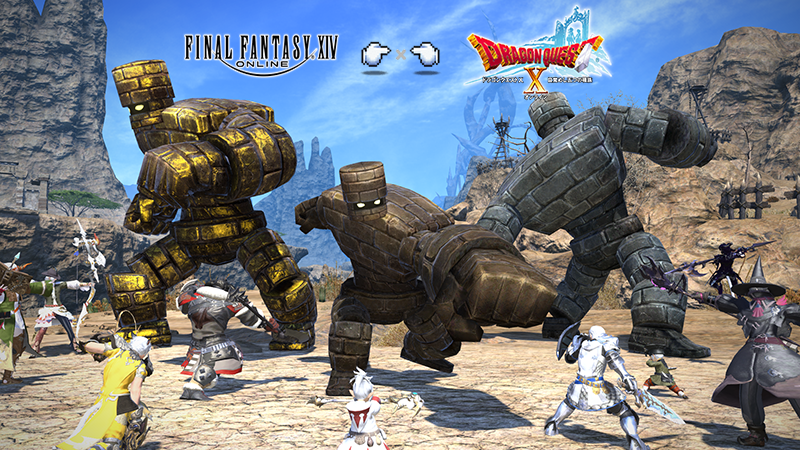
The collaboration event with Dragon Quest X, Breaking Brick Mountains, is returning to Eorzea on Wednesday, June 5!
Battle against gargantuan golems from the Dragon Quest series and earn rich rewards! If you've previously completed the event, you can replay the quests via the seasonal event replay feature*!
* This event is identical to the one previously held. * We highly recommend learning more about the seasonal event replay feature on the collaboration special site.
Event Duration
From Wednesday, June 5, 2024 at 1:00 a.m. (PDT) / 8:00 (GMT) / 18:00 (AEST) to Thursday, June 20, 2024 at 7:59 a.m. (PDT) / 14:59 (GMT) / 1 June at 0:59 (AEST)
How to Participate
Begin the quest "Breaking Brick Mountains" by speaking to Havak Alvak of the Mythril Eye in Ul'dah – Steps of Nald (X:12.1 Y:8.2).
During this event, players can purchase a King Slime Crown by speaking with the Toughie in Ul'dah – Steps of Nald (X:8.2 Y:12.2).