

Fireworks Mania
v2025.6.1-4th
4th of July + Summer Sale 2025
Happy 4th of July!
[p]Fireworks Mania joined the Summer Sale this year so you can enjoy virtual fireworks, either by yourself or with friends during 4th of July 🎆🥳🎇 [/p][p][dynamiclink href="https://store.steampowered.com/app/1079260/Fireworks_Mania__An_Explosive_Simulator/"][TAG-10][/p][p]If you do not live in USA, I'm sure you can find another reason to celebrate something and enjoy virtual fireworks. [/p][p][img src="https://clan.akamai.steamstatic.com/images/36145520/31afc4558fb8ae43258b64e2bf84cbe592ef9943.png"][/p]Temporary 4th of July update
[p]I just pushed an small temporary update, v2025.6.1-4th, to enable the 4th of July decorations in Town, Ranch and City. These will be enabled for a few weeks of July.[/p][p] [img src="https://clan.akamai.steamstatic.com/images/36145520/eaa3b08456e1db1cb366ee4da1cadc20a097300f.jpg"] [/p][p] YouTube | Twitch | Twitter | Discord [/p][p][/p][p]- Enjoy![/p][p][dynamiclink href="https://store.steampowered.com/app/1079260/Fireworks_Mania__An_Explosive_Simulator/"][/p] Developer News - June 2025
Its been another month and time for an update from the developer - aka me 🤓
[/p][p]Good progress this month! Not on what I was originally planning, but good progress anyway 😂
[/p]
FuseConnection visibility distance setting
[p]Sometime ago, while working on the firing system, I realized that the new feature I added some time ago, where the fuse connections completely disappears when are not holding the FuseConnection Tool - could be a bit confusing.For players that have played the game for a long time, it might not be that big of a deal, because you knew the fuses where still there, even though you couldn't see then, when switching away from the FuseConnection Tool.
[/p][p]However, for newer players or players that don't play that often, I saw some videos/streams where it seemed to confuse people, that they just created a lot of fuse connection and then they disappeared. [/p][p][img src="https://clan.akamai.steamstatic.com/images/36145520/23bbc13405ec8e36776b5cf743350133d6629274.gif"][/p][p]Therefore, I implemented a setting so you can decide how far you wanna see fuse connections. Setting it to 0, basically gives you the same behavior as before, but increasing it, will make fuse connections within that range show up, no matter what tool you have selected. [/p][p]I think it works better and is a bit more intuitive. As said, this was originally something I made as part of the new firing system, however, as its not really related to the firing system, I took this particular feature out so I could push it into an update already now, so you don't have to wait for the firing system update for it.[/p][p][/p][p][dynamiclink href="https://store.steampowered.com/news/app/1079260/view/539982417315758989"][/p][p]I explain in some more details in a live stream, in case you are interested for more details (NERD ALERT!)
Starts around 05:30 in.[/p]
Refactor and optimize mortars
[p]Since I originally created the native shell and mortar support, there have been some weird issues.First of, Amnestey tried creating an angled mortar rack long time ago, but ended up never releasing it because it performed really bad. He didn't do anything wrong, it was something in the game.[/p][p]As all the other mortars were working fine, back then I didn't looked more into it as there were tons of other things to do.[/p][p]As I was anyway looking into the mortar as part of something related to the firing system, Amnestey asked me again if I could look into it, now that I was away from firing system anyway.[/p][p][img src="https://clan.akamai.steamstatic.com/images/36145520/8de6e79ddd948e839a06c8a883631c19285cd288.jpg"][/p][p]I took the time and tried figuring out why it was not working properly. After some digging, I figured out there was actually something in the mortar scripts that in some cases would end up with a lot of physics calculations, which in turn result in bad performance on your CPU and send a lot of unnecessary data over the network in a multiplayer session.[/p][p]I'll spare you the technical details, as nobody cares, but if you want more info on the topic, watch my livestream here from around 08:25, where I try to explain it in a bit more:[/p]
In general everything should feel like it work as it use to, which is the whole point, however, you thing is a lot different.[/p][p]You use to be able to put stuff into the mortar, physically placing it inside the mortar, and then it will shoot out when you ignite the shell beneath all the "other stuff". [/p][p]This part have changed a bit. You can still put things into a mortar, if it's small enough, but now it's "sucked into" the mortar if you place it at the opening, but only if you have already loaded the mortar with a shell.[/p][p][img src="https://clan.akamai.steamstatic.com/images/36145520/1f59ae7d3a473e30e6e55f32772ed07c62e23d01.gif"][/p][p]Hard to explain, but I expect you can soon try it out on EXPERIMENTAL where I would love to hear your feedback on it in the Experimental channel on my Discord.[/p][p]The performance difference can be seen around 36:45[/p]
Back to firing system
[p]I know I say it all the time, but I really do need and soon will, get back to work on the firing system - as we need to have time to figure out the features and perfect them, so they are ready for New Years 🤞[/p][p][/p][p]I'll finish off the mortar changes as soon as I can and get back on that freaking firing system! 🥳 [/p][p]I'll present you with the same screenshot as in the last two posts, as the status is more or less the same:[img src="https://clan.akamai.steamstatic.com/images/36145520/be7e6d3fde7fc7ae6179038657c202ea649655ba.png"][/p][p]That's all for now 🤓[/p][p][/p]Change log
[p]I have pushed the following updates since last Developer News.[dynamiclink href="https://store.steampowered.com/news/app/1079260/view/539982417315758989"][/p][p] YouTube | Twitch | Twitter | Discord [/p][p][/p][p]- Enjoy![/p][p][dynamiclink href="https://store.steampowered.com/app/1079260/Fireworks_Mania__An_Explosive_Simulator/"][/p][p][/p]
v2025.6.1
As they are not related to the firing system I can push these out already, so you don't have to wait for them until the firing system is ready. [/p][p][/p][p]### Added[/p][p]- Added "Fuse connection visibility distance" setting to decide how far away you wanna be able to see fuse connections[/p][p][/p][p] ### Changed[/p][p]- Performance improvements to Mortar scripts[/p][p]- Changed the "Create mods" button in the Workshop, so it now goes to the Mod Tools playerlist on my YouTube channel, instead of going to the github page[/p][p][/p][p]### Fixed[/p][p]- Fixed missing shot from the big middle tube on OxWannaGo cake, so it now have a finale shot from that too[/p][p][/p][p]### Known Issue - Some mods have items that writes an warning like: "The referenced script on this Behaviour (Game Object '') is missing!" in the console. This is due to some changed in NGO Unity made. Luckily its easy to fix. The mod creator just need to upgrade the mod project to latest Mod Tools (Unity 6) and rebuild the mod. Should fix this particular issue
YouTube | Twitch | Twitter | Discord [/p][p][/p][p]- Enjoy![/p][p] [/p][p][dynamiclink href="https://store.steampowered.com/app/1079260/Fireworks_Mania__An_Explosive_Simulator/"][/p][p][/p]
[EXPERIMENTAL] v2025.6.1
Right Click on Fireworks Mania -> Properties -> Betas -> "Experimental" in dropdown. To go back to the normal version, change it to "None".[/p][p][/p][p]While working on the new firing system, I managed to fix and add some other things as shown below. They are not related to the firing system I can push these out already, so you don't have to wait for them until the firing system is ready.
So I now put these changes below to the EXPERIMENTAL branch/betas so you guys can help test it out. Let me know what you think and if you find any issues so I know all is good until we push this version out to all other players.[/p][p][/p][p][/p][p]### Added[/p][p]- Added "Fuse connection visibility distance" setting to decide how far away you wanna be able to see fuse connections[/p][p][/p][p] ### Changed[/p][p]- Performance improvements to Mortar scripts[/p][p]- Changed the "Create mods" button in the Workshop, so it now goes to the Mod Tools playerlist on my YouTube channel, instead of going to the github page[/p][p][/p][p]### Fixed[/p][p]- Fixed missing shot from the big middle tube on OxWannaGo cake, so it now have a finale shot from that too[/p][p][/p][p]### Known Issue - Some mods have items that writes an warning like: "The referenced script on this Behaviour (Game Object '') is missing!" in the console. This is due to some changed in NGO Unity made. Luckily its easy to fix. The mod creator just need to upgrade the mod project to latest Mod Tools (Unity 6) and rebuild the mod. Should fix this particular issue[/p][p][/p][p] YouTube | Twitch | Twitter | Discord [/p][p]- Enjoy! [/p][p][/p][p][dynamiclink href="https://store.steampowered.com/app/1079260/Fireworks_Mania__An_Explosive_Simulator/"][/p]
Developer News - May 2025
Its been another month and time for an update from the developer - aka me 🤓
I'm gonna do it short this time as there really isn't much to tell. I have been super busy with private stuff and at my day job.
Therefore, the small amount of "game dev time" I have had this month, was spend on the minor fixes mentioned in the changelog below.
The main focus is still the new "Firing System" (and related tasks) but nothing major have happened, so nothing to show or tell really.
So I give you the same screenshot as last month :D
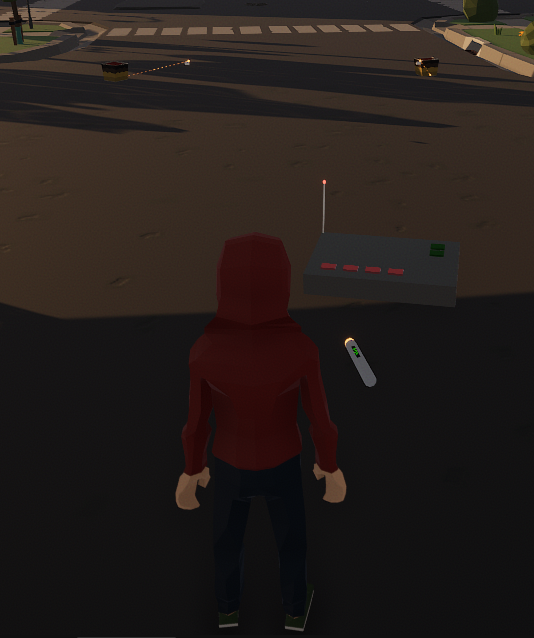
That's all for now - hope to bring some more interesting stuff next month 🤞
Change log
I have pushed the following updates since last Developer News.
https://store.steampowered.com/news/app/1079260/view/547861177540018591
https://store.steampowered.com/news/app/1079260/view/508454046376394906
https://store.steampowered.com/news/app/1079260/view/508453412573021077
YouTube | Twitch | Twitter | Discord
- Enjoy!
https://store.steampowered.com/app/1079260/Fireworks_Mania__An_Explosive_Simulator/
v2025.5.2
- Added support for Hindi language
### Changed
- Tweaked the lighting in maps to avoid the blue tint happening when switching from night to day, less intense now
- Updated translations from https://crowdin.com/project/fireworks-mania
### Known Issue
- Some mods have items that writes an warning like: "The referenced script on this Behaviour (Game Object '') is missing!" in the console. This is due to some changed in NGO Unity made. Luckily its easy to fix. The mod creator just need to upgrade the mod project to latest Mod Tools (Unity 6) and rebuild the mod. Should fix this particular issue
YouTube | Twitch | Twitter | Discord
- Enjoy!
https://store.steampowered.com/app/1079260/Fireworks_Mania__An_Explosive_Simulator/
v2025.5.1
- Updated translations from crowdin.com
### Fixed
- Fixed issue where grass in some modded maps where not showing
### Known Issue
- Some mods have items that writes an warning like: "The referenced script on this Behaviour (Game Object '') is missing!" in the console. This is due to some changed in NGO Unity made. Luckily its easy to fix. The mod creator just need to upgrade the mod project to latest Mod Tools (Unity 6) and rebuild the mod. Should fix this particular issue
YouTube | Twitch | Twitter | Discord
- Enjoy!
https://store.steampowered.com/app/1079260/Fireworks_Mania__An_Explosive_Simulator/
v2025.4.3
- Added a "Weather" dropdown in the Host tab so its easier for the host to change weather from UI instead of console commands (console command still works too)
### Changed
- Upgraded to EnviroSky 3.2.1a
- Updated translations from https://crowdin.com/project/fireworks-mania
### Fixed
- Fixed the snow particles looking all weird
- Fixed error when multiple sounds with same name was being loaded
- Fixed networkobject on Xmas stuff in Town, Ranch and City
- Fixed bug where some items, even build in fireworks, spawned wrongly at position 0,0,0
### Known Issue
- Some mods have items that writes an warning like: "The referenced script on this Behaviour (Game Object '') is missing!" in the console. This is due to some changed in NGO Unity made. Luckily its easy to fix. The mod creator just need to upgrade the mod project to latest Mod Tools (Unity 6) and rebuild the mod. Should fix this particular issue
YouTube | Twitch | Twitter | Discord
- Enjoy!
https://store.steampowered.com/app/1079260/Fireworks_Mania__An_Explosive_Simulator/
Developer News - April 2025
Its been another month and time for an update from the developer - aka me 🤓
Upgraded to Unity 6
For a long time (too long!) I have been working on upgrading the game to Unity 6.
Finally this version is out.
https://store.steampowered.com/news/app/1079260/view/508452143947055309
This upgrade is in itself not that interesting for you guys, as it's mainly a technical upgrade.
However, it is necessarily to be able to continue the development.
Anyway, this is out now, which means I have had time to start on the "Firing System" - Yiihaa!
Starting on Firing System
I started out with a live stream talking with Keltusar, Amnestey and Guanaco to get an basic idea about what a firing system needed to be able to do.
Sorry that the other guys voices are too low, I didn't discover that until after the live stream :(
Anyway, I got a basic idea to start from which I did the next day.
However, I didn't get further than the above, as I then started seeing reports of some bugs in the new Unity 6 version, so had to focus on that for some time.
Bugs and features
Turns out there was a bug when loading a blueprint, even for build in fireworks. So I needed to investigate and fix that quickly as it was kind of a big deal.
While working on that I also ended up fixing some more things and add a feature that have been on the todo for a while - a Weather dropdown for the host to change the weather!
Its been possible to change the weather by the host for a long time, however, you needed to do it via console commands, which isn't intuitive for all people.
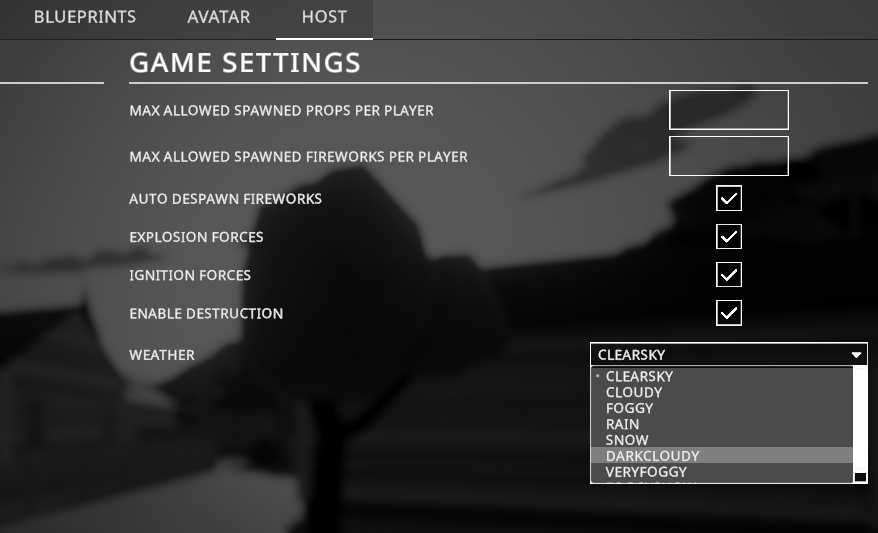
All of these fixes and features (not the firing system of cause) are, as of wring, on the EXPERIMENTAL branch:
https://store.steampowered.com/news/app/1079260/view/508452792038327072
I expect to push these out to all later this week.
That's all for now - I will continue on the firing system stuff now 🤓
Change log
I have pushed the following updates since last Developer News.
https://store.steampowered.com/news/app/1079260/view/508452792038327072
https://store.steampowered.com/news/app/1079260/view/508452143947055309
https://store.steampowered.com/news/app/1079260/view/816948163726280349
https://store.steampowered.com/news/app/1079260/view/508450875985888303
YouTube | Twitch | Twitter | Discord
- Enjoy!
https://store.steampowered.com/app/1079260/Fireworks_Mania__An_Explosive_Simulator/