Fixes 'Junkyard Deals' perk from causing save issues.
Fixes ship navigation going wonky when selling/upgrading a spaceport.
Fixes tutorial state messing up when switching between a save file with tutorial enabled and one with tutorial disabled.
Fixes perk tiles not live updating affordability when viewed.
Fixes UI pointer getting stuck when a port or supplier gets sold/destroyed.
Fixes a case where you can accidentally sell a storage facility by holding the trigger button while hovering over the Sell Button and closing the panel.
Tweaks:
Smooths out UI pointer.
Lowers max render scale to 1.25.
Flat Worlds Dev Diary #12 - Unleashing Titan
Titan has finally arrived as a new world for you to colonize.
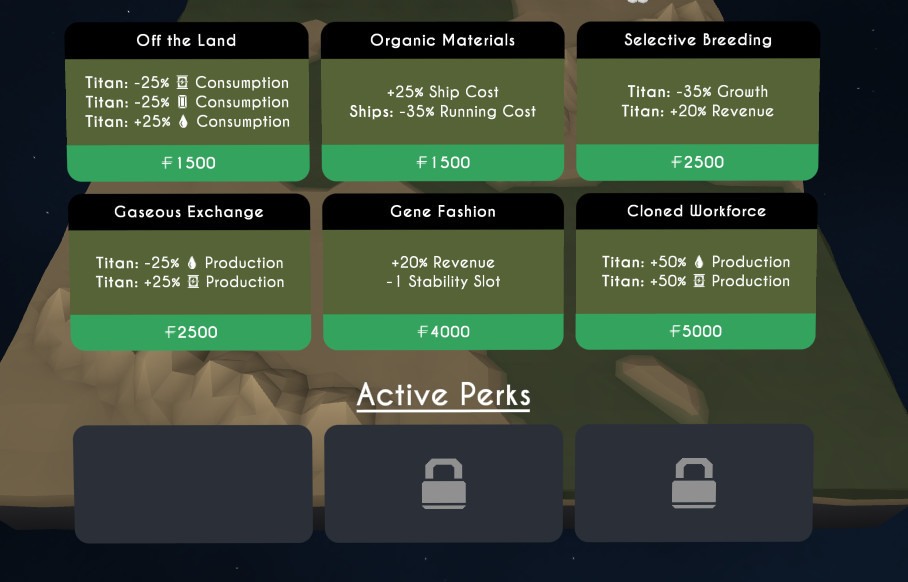
Like before, this comes with a new ship and a new set of perks to work with.
Additionally, there is another new ship, a new set of buildings, and two new music tracks in the coinciding patch.
New Perks
Titan is covered in seas of liquid methane. Underneath the crust however, there are pools of water. This makes Titan an adequate provider of Energy and Water. Another harsh environment, humanity explores another route for survival - Biology.
New Ship
Introducing, 'Twig', another hybrid ship that deals with Energy and Water. A little on the expensive side, it makes up for its cost with its superior capacity and speed.
And Another
Also introducing, 'Sea Lion', our first late game ship that represents Earth's attempt at a low cost bulk passenger carrier. Compared to an Orca, it boasts superior capacity, higher top speed, but lower acceleration and slightly lower reliability.
Storage Facilities
A new addition that might mix things up in terms of gameplay, storage facilities allow you to hoard up excess resources in anticipation of a rainy day. It will be interesting to see how players use this to their advantage.
New Music
Two new music tracks have been added (composed by Scott Houghton). Each music track is now associated with (and named after) a world.
More tracks will be added later, and as you colonize new worlds, your pool of music will increase (right now only the Venus track is locked as you start with Earth and Mars).
Finally
Feedback I've received consistently mentions the crippling effect of water consumption. It has been reduced significantly in the recent patch and with the addition of storage facilities, I look forward to seeing how many players can make it to Titan.
I'm going to go back over the previous worlds now and work more on the late game content while polishing up stuff and adding little details.
See you soon.
Patch Notes 0.1.9a
New Stuff:
Titan now unlocks at Europa level 4.
New set of perks for Titan.
New ship - Sea Lion (Earth, Passengers).
New ship - Twig (Titan, Water/Energy).
Storage Facilities - a new set of buildings you can use to store Water/Metal/Energy to tackle future resource shortages.
New music - two new tracks added (composed by Scott Houghton). As you colonise new worlds, new music is added to the pool (currently only Venus adds the third track).
Tweaks:
Significant reduction in Water consumption.
Technical:
Added Adaptive Quality - game will now adjust render scale between 1.2 and 1.5, depending on performance.
Unity Engine updated.
Patch Notes 0.1.8a
New Stuff:
Now displays a cursor when pointing controller at world.
Management menu briefly covered in tutorial.
Tweaks:
Suppliers now take into account resources in transit when calculating if a receiver is full. This stops some oversupplying/wasting of resources.
Random interval added to Ancient Mine animations to stop them looking like synchronized swimmers.
Controller interactions with buildings cleaned up.
Adds route icon to management menu.
Fixes:
Ancient mines now selectable.
Trees/rocks no longer overlapping.
Oculus:
Controller menu now matches rotation with controller.
Internal:
Unity engine updated.
Lightmaps updated.
Flat Worlds Dev Diary #11 - Trailing Behind
So sales are down and my dreams of having a community feedback engine to drive my development are being diminished.
What do I need to do? Get better at marketing. As a solo developer, I need to be an all-rounded, jack-of-all-trades person, I can't just stick my nose into my keyboard and hope good things will come about of it (but that's what marketing involves nowadays, ah nvm, you get the point).
One of the weak points of the current marketing setup is a lack of a decent trailer. The old one was made in a day, rushed post-release and was treated as more of an afterthought.
So we make a new trailer. Let's get to it then.
Make a story
We need to map out the flow of a game of Flat Worlds. How does it start? Where does it lead? What are the core gameplay elements? Is there any candy?
Thinking out loud we get the following:
Build spaceports on different worlds
Build ships to transport resources around
Build more ships and develop the worlds
Manage your ships
Upgrade your worlds with perks
Expand to other worlds
Ride around on ships in your spare time
Fight against resource starvation
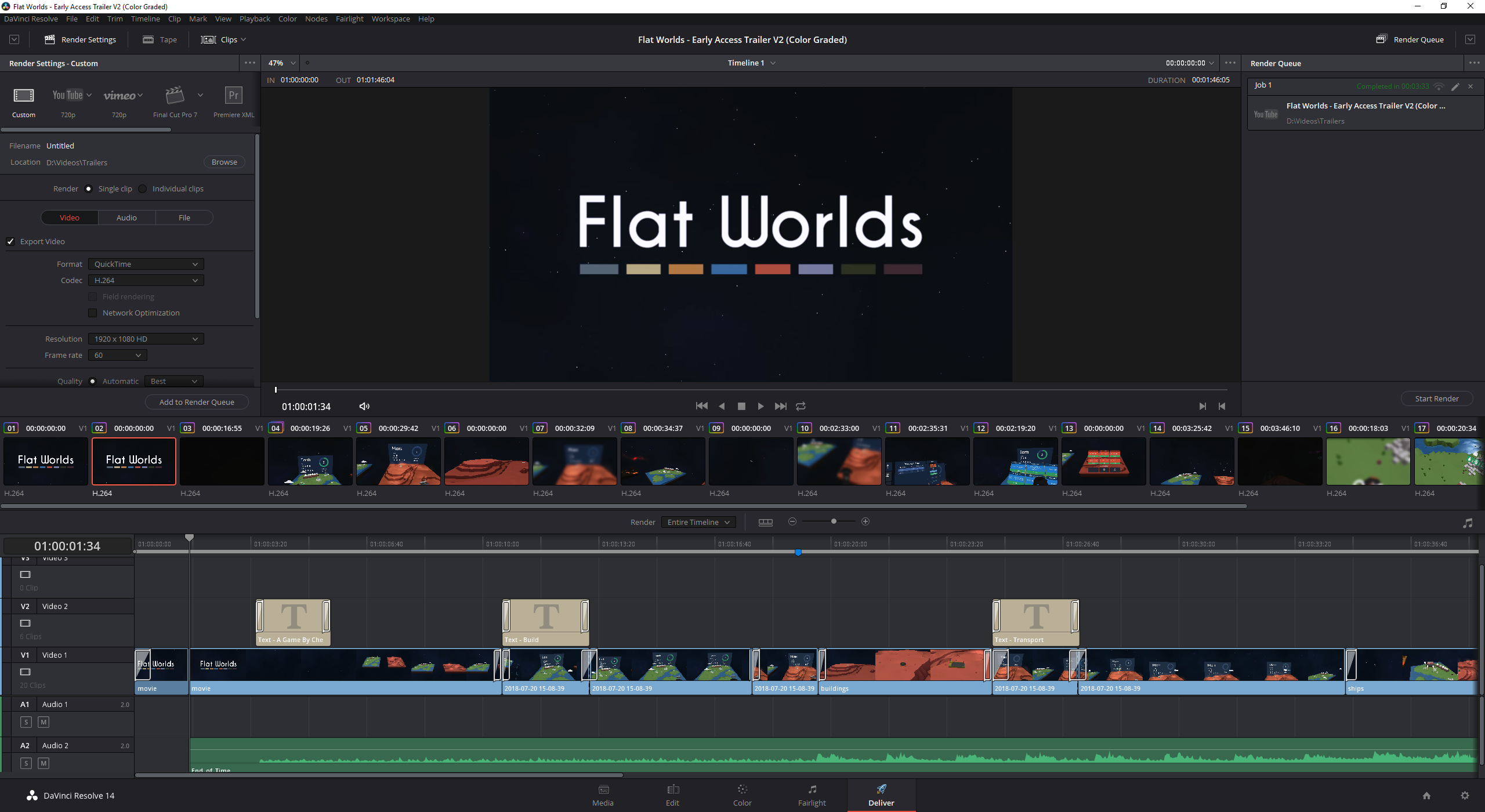
From this we can distill a few titles that the trailer will be based around.
The 'Expand' title got removed to streamline the trailer
Picking Music
Now this took a while and listening to music constantly with a certain level of scrutiny... gives me a damn headache.
The old track seemed to fit the whole space theme and with a low tempo, tried to instill the idea that this was a relaxing game. The track was even called 'Relaxer' (by The Grand Affair). Yet it didn't grab peoples attention.
That's when I realised it. It didn't matter so much if the music matched the style of the game (within reason). The focus of the trailer was to feed viewers enough information to gauge interest, and within a short space of time. Flat Worlds isn't a game that performs parkour, but its trailer needed to.
So I scoured the internet looking for music, paid or free, it didn't matter. What was needed was a genre suitable track that had a high enough tempo to keep viewers interested and enough variation for us to change scenes around.
After a few headaches I went to the YouTube audio library and dug up a nice little track under the Cinematic|Dramatic genre.
End of Time by Ugonna Onyekwe
Make a Plan
After listening to the selected track numerous times. It was time to make a plan.
This is where we would decide step-by-step what happens and what is shown in the video. It was at this point that I would start marking different points of the audio track at which transitions would occur.
Now I'll bring up an issue here. As a solo dev with limited human contact, it has been suprisingly difficult to capture decent VR footage. The reason for this being that it doesn't exactly line up with what is displayed on the headset. Not being able to see what is being recorded makes things quite difficult. As a result, I've used the VR footage from the previous trailer.
To really make things different to the old trailer, I decided I would splice up the footage with non-VR, in-game footage. Now won't this be fun.
Non-VR Footage
Moving out of captured VR gameplay footage and into non-VR in-engine footage brings power back into our hands. We are now gods that can create anything we desire.
These clips don't represent normal gameplay - they are there to help create a more cinematic experience.
Another objective of these clips is to show off content in the game - quickly and efficiently.
This doesn't mean that we can just scatter them anywhere, we have to pick points in the existing footage where it makes sense to transition.
I used a combination of Unity's Timeline, Cinemachine, and Recorder to capture this footage.
Colors
Color grading has been on my list for a while now. While there are premade solutions that color correct your game and allow you to select a certain look. I wanted to achieve this myself to give the game a more personal touch. The idea behind this is that it would give the game an overall more professional look.
There's a problem here. I don't know how to color grade. Using DaVinci Resolve, I had no idea what all these dials and graphs did.
<------ Time Passes ------------ Che is learning --------------->
I learned a lot. Granted some of the stuff was about making real-life footage look natural and then applying an artistic style to it. Here we already had something artificial and artistic that we wanted to bring under control.
I realised at this stage that Flat Worlds already had a style and a lot of the colors had already been selected based on color theory. What was left was tweaking the colors to be slightly more pleasing and bringing them into more acceptable ranges. Like the tutor said - if a color doesn't seem out of place, you've done your job.
I would like to add that this color grading journey not only benefits the trailer but will be fed back into the game (via a LUT) in an update coming soonish.
The Trailer
The final result:
https://www.youtube.com/embed/9q_dRJJOEhg (or viewable on Steam Store page)
Let me know what you think on YouTube, Reddit, Steam or wherever you've come from and seen this post. Oh and on Twitter now, because I've finally twittered up in this marketing effort (https://twitter.com/che_jami).
Flat Worlds Dev Diary #10 - Fleet-footed Mercury
Huzzah! Mercury has finally been added to the pool of colonizable worlds. With a new world comes a new set of perks, suppliers, and a new ship.
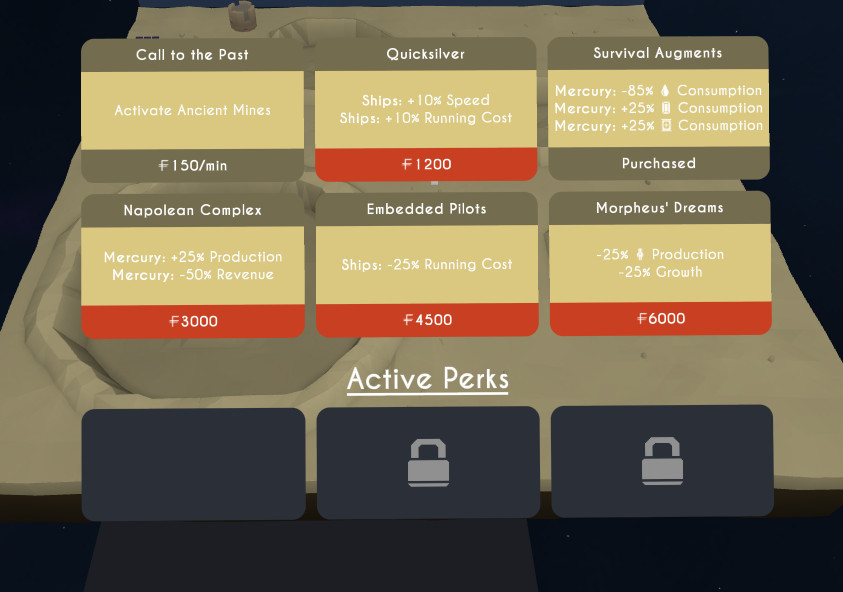
New Perks
Activate the mysterious Ancient Mines, turning Mercury into a metal powerhouse. Use Survival Augments to reduce Mercury's water consumption drastically at the expense of increased demand of energy and metal. These perks show how harsh and desolate Mercury is and how its colonists have turned to machinery to survive.
New Suppliers
We have two new suppliers, Ancient Mines and Solar Plants (okay Solar Panels). These both will add a big injection of Metal and Energy into the economy. However, running the Ancient Mines comes at a significant running cost - so be sure your income can handle it.
New Ship
We have a new ship, 'Scoop'. Scoop is a more streamlined version of Pebble, faster, more reliable but with a lower capacity and higher running cost.
Discord Server
Can you make it to Mercury?
Join the Flat Worlds' Discord Server and let me know!
Come over to discuss strategies, report issues, or just check in on current development.
Invite Link: https://discord.gg/8Db5bM2
Patch Notes 0.1.7a
New Stuff:
Mercury unlocks at Venus Level 4.
Mercury Perks.
Mercury Ship - Scoop.
Mercury Buildings - Ancient Mines and Solar Plants.
Tweaks:
Ships no longer prevent remaining passenger/cargo decay on pick up.
Changes to world level ups - new cities show up more at lower levels.
Earth starting XP is higher to balance out changes in last patch (reduced pop growth/supply).
Fixes:
Expanding cities now clear out rocks/trees properly.
Locked worlds no longer show rocks/trees incorrectly (now just hidden).
Resource counters no longer clip on Earth's water.
Optimizations:
Disables certain UI elements when not in use.
Reduces load of UI elements facing player.
Candy:
Port configurer now bounces supply node icon on select.
Patch Notes 0.1.6a
New Stuff:
Statistics page after a game ends.
Achievements for colonizing each planet.
More tutorial steps (Cargo ports + World perks).
Tweaks:
Reduces pop growth/supply.
Reduces general water consumption.
Building deployment uses radius of final upgraded building.
World perks menu moved further back.
Bonus $1000 at end of Tutorial (to balance out expanding so early).
Fixes:
An issue with perks not triggering properly.
An issue where city panels where not displaying at correct height.
Oculus Rift:
Reduced thumbstick sensitivity for touch controllers.
Controller menu only rotates towards headset on x-axis now.
Flat Worlds Dev Diary #9 - Touching Oculus
Finally got my hands on an Oculus Rift a few days ago and have now added more appropriate support in the 0.1.5a patch.
When I first fired up Flat Worlds, everything was a mess.
The controls were really off. Even the simple things; to click a button you had to hold the trigger for 2-3 seconds.
Any actions that translated from the Vive touchpad to the thumbstick were also awkward. Vive touchpad presses translated into pushing in the thumbstick, which requires significantly more force/energy/(i'vegotrsiithurts).
It works, and it makes sense, but for a game like Flat Worlds where each session can last potentially hours - this can cause serious User Fatigue. Pushing in a thumbstick just to move around takes its toll.
The controls needed to be smoother.
What I thought would take a day to do turned into a 2-3 day job as I unearthed more and more issues.
Movement
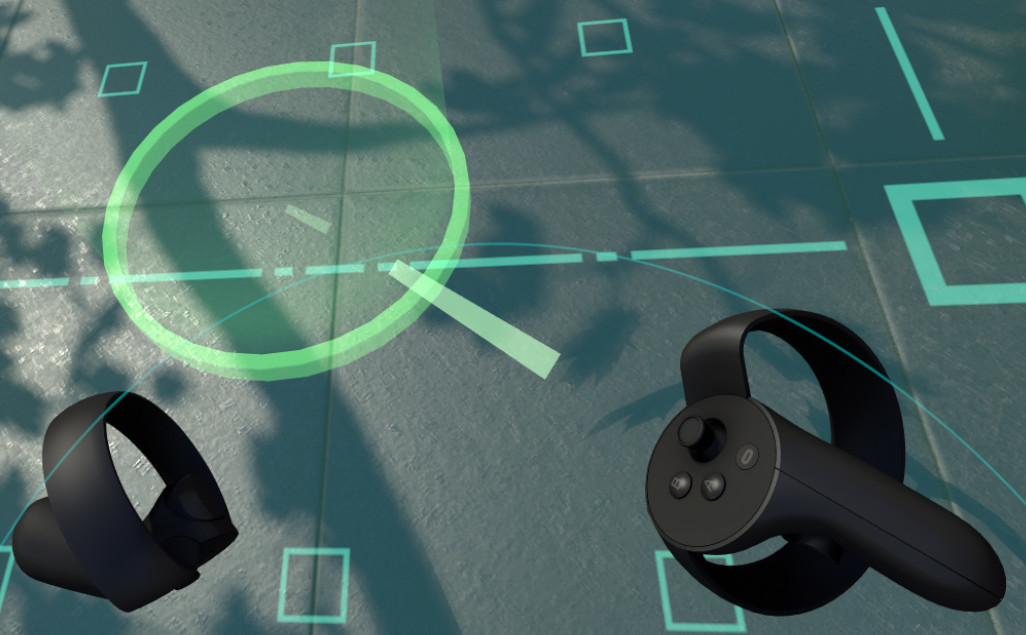
Don't reinvent the wheel. I fired up SteamVR Home to see how they handled movement.
Push the thumbstick forward and a cursor appears. Release the thumbstick and you teleport to the cursor. Feels good.
Push the thumbstick left and bam - you're suddenly facing 90 degrees to the left. Wait, what? Pushing it to the right obviously does the same but in the other direction. Okay.
I completely forgot about this, the Oculus Rift was geared to a more 180 degree experience. It was even in the Oculus setup - place both sensors on either side of your desk and face them forward. Hence, this kind of angle switching feature was a neccessity.
So I took what I learned and mimicked this behaviour in Flat Worlds. Unoriginal? Yes but the idea of this was to give users something they were probably already familiar with.
Controller Indicators
Placing game information around or on the controllers is cool (and hopefully practical), but from a development perspective this was probably a bad design choice. With every new controller (or shape) supported, these graphical elements have to be repositioned.
However, the game has already committed itself to this style. So I painstakingly had to reposition everything for the touch controllers.
One thing that couldn't really be repositioned was the controller menu. There just wasn't any space on the controller to put it.
Controller Menu
The solution I had was this, hide the controller and show a large menu when the thumbstick is moved. It felt fine for me, but the players will have to let me know if this was a good idea or not.
Also, learning from before with movement, menu selection is now done with a simple flick of the thumbstick (in the direction of the menu you want).
And so we have it, Flat Worlds now supports Oculus Touch controllers. The Oculus Rift and the HTC Vive hold a roughly 50/50 split of the majority of the PC VR market - so this was a step in the right direction. WMR? Maybe, but not soon.
Welcome Rift players.
Patch Notes 0.1.5a
- Adds Oculus Touch support
- Fixes UI pointer flickering
- Rewords some tutorial prompts