Today’s blog post covers three topics, first we are sharing more details and pictures about our decorative object system to provide a better understanding of how creative gameplay will work. Then we look at a new feature we call “Creative Mode”. And finally we have some exciting news for our itch.io alpha preview community.
Decorative Object System
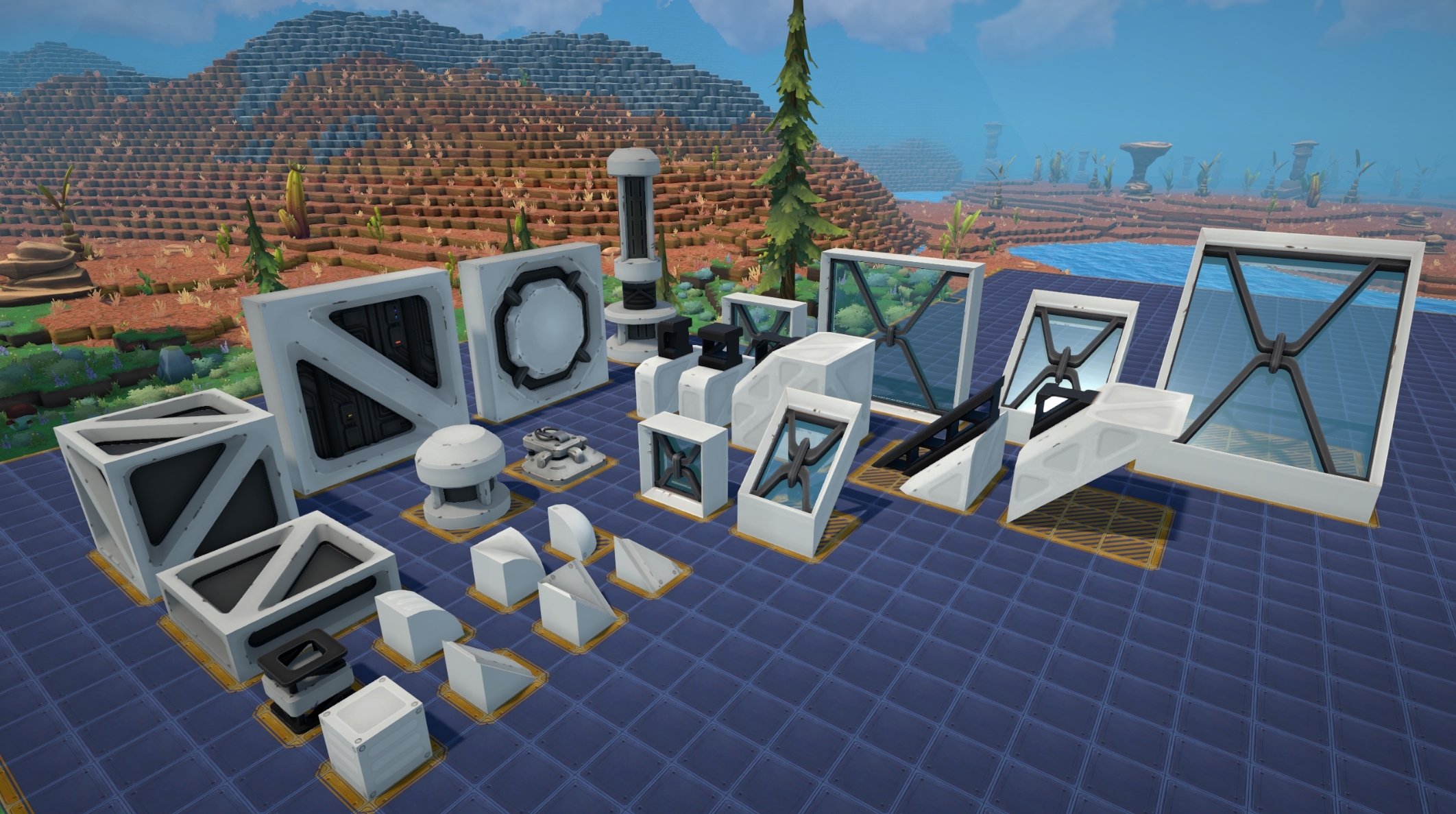
Last week we provided a sneak peek into our new decorative object system. It provides various blocks you can use to build more impressive factories with. Today we’re going to share screenshots of the blocks we have created so far:
The elements above should provide you with a wide range of possibilities, and as time goes on we will add more shapes and objects. All of them can be rotated around any axis to provide the utmost freedom.
By default they are white / light gray and they can be colorized through our new paint roller handheld object:
The paint roller comes with multiple preset colors, but also provides the option to create custom colors to apply to those decorative objects. For now you can only colorize the objects above, but we’re looking into giving more objects support for colorization.
You may ask what about getting creative with voxel blocks? Our decorative blocks are designed to be complementary to the voxel system, and we are still working on adding more regular voxel blocks with different textures to allow for more creative gameplay.
Creative Mode
In future when you start a new game, you will be asked if you want to start the game in “Creative Mode”. If you enable it, you will have access to a new menu which allows you to spawn any item you want - regardless if it is already unlocked through research or not. This is for people who want to focus on creative building or just experiment with different mechanics.
Except the ability to spawn items everything is the same, so you can still conduct research and progress through the science tree with research servers. Some of you may already know our debug menu which allowed for a similar experience. The main reason we decided to make this into a new feature is that the debug menu lets you spawn items or do things which easily can break the game. The Creative Mode UI provides a safe and risk free experience with a better user interface for those who love to tinker.
Next Preview Version + Release Date Trailer Event
For everyone who has previously bought our alpha preview version on itch.io we have exciting news: On Monday (15th of January 2024) at 11:00 AM Pacific Time (20:00 CEST) we will release the next preview version, containing the two features above and the majority of the Science Pack 3 content.
We have decided to launch an event until the end of this month: Use the regular or the creative mode to build good looking factories and send us the savegames. We are going to make a trailer that announces the Steam Early Access launch date, and we are going to use your provided savegames for that. More details on the event and how to provide savegames can be found in our Discord once the event starts.
We’re looking forward to your feedback and your factories!
DevBlog #44 | Foundry Fridays: Year Recap & Decorative Objects
Hello everyone!
I hope you had enjoyable holiday celebrations! The FOUNDRY-Team is on a two week company-wide vacation to recharge our batteries and get ready for the upcoming year. For that reason I’ll keep today's blog a bit shorter, I’m going to start off with a recap of 2023, look ahead into 2024 and finally show off a new feature.
Recap and Outlook
This past year was the most transformative year for our studio. Partnering up with Paradox Interactive provided us with the ability to scale up to a development studio worthy of the name. Development progress is now going faster, our art has improved and in general the quality we can deliver to our community has increased. On top of that we have received a far greater visibility and our community has grown significantly.
Over the past year we were able to revamp the gameplay experience when progressing through FOUNDRY. Additionally we have added and improved countless features. A process that culminated in our Steam Next Fest participation where over a hundred thousand people played our game. It showed us that we’re on a good track and also made us aware of where we need to spend some additional time.
Our focus for the upcoming year will be the long-anticipated Steam Early Access launch - an event we’re looking forward to as much as you do. We initially assumed we would get there a bit sooner, but game development done right takes some time and we felt it was necessary to spend more time on our game to provide the quality and scope we think the game should have for an Early Access launch. We still don’t have a set date for you, but we will let you know as soon as we can. There will also be additional alpha preview versions for our itch audience - more information on that soon in our Discord.
Decorative Object System Sneak Peek
Before we close today's episode of FOUNDRY Fridays I’m going to share a few insights about our newest feature: A decorative object system that allows you to get even more creative about your factories. We always had a couple decorative objects and while you can build anything out of voxels, we wanted to provide you with additional objects to create good looking buildings and structures.
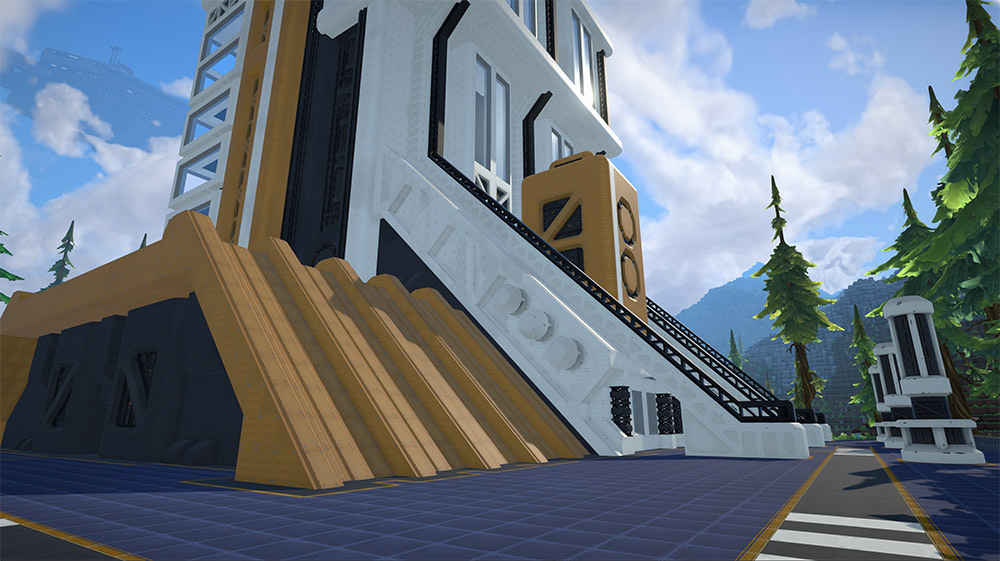
The building above is made out of several smaller objects which are highly customizable and tile well together. They can be rotated around any axis to provide the most possible freedom. Our art director Jason has created a pretty large amount of objects for you and there are almost certainly more to follow. To achieve more creative diversity the system provides an option to select different colors for all of those objects. Please note that the screenshots are work in progress and models and textures are not final.
As this is just a sneak peek, this is all for today. The system will most likely get its own blog post at some point, but I wanted to show you something new for the final blog of 2023.
I’m glad you asked. Shaders are tiny little programs that run on your computer's GPU, running a massive number of operations in parallel to create many of the wonderful effects you see in modern computer games. We use shaders all over Foundry, and since I spend a lot of time thinking and working on them I wanted to share a bit of the work I’ve been doing on our new unified object shader.
If you want to catch up, in previous Foundry Fridays I talked a bit about our first person rendering solution and touched on our lighting system. Before we delve into our new Foundry shader I think a little background on shaders is in order.
Vertex Shaders
First you need to understand that almost everything you see in a video game is made out of triangles, and each triangle has three points that define it, which we call vertices.
These vertices are often spaced out more than each pixel on your screen. We frequently perform operations that move, animate or color each vertex.
A simple Vertex program will transform the object space position of each vertex into clip position, and perform some operations on the texture mapping. The really cool thing about vertex programs is that they only define the data at each vertex point in a triangle, and then the data is “interpolated” (blended) between each point when you sample the data later at the fragment (pixel) level. Imagine one vertex is blue, the other is green, then the middle point between the two will be teal.
Fragment Programs
The interpolated data from the vertex data is then transferred to a fragment shader (one fragment shader per pixel of the shader being drawn on screen). The fragment program then decides what will be drawn on screen. Here we sample a texture, given a uv coordinate to output a simple texture without any lighting information. If you want lighting or any fancy features from here you need to add a ton more code.
Surface Shaders
Unity has a really nifty feature called surface shaders. These shaders let you create consistent and powerful shaders with relatively little code. That’s because instead of defining the final “output” in a fragment program, you write a surface description in a special surface shader. This includes descriptive things like the color of the object and the reflectivity of the surface. Because we are just describing a surface we are not responsible for how the final pixel looks, and instead another shader operates on this data all at once at the end to create a consistent look with all other surface shaders.
Multi-Compiled Shaders
Shader programs are designed to be as small and efficient as possible, but at the same time we ask them to do so many different things. A solution to this is to make each “feature” you have in your shader optional by compiling two versions- one with the feature and one without. Key shaders often have many different options and for each option, O, we have a total of 2 to the power of O shader variants.
Default Foundry Shader
Ok so now that we have that out of the way, lets talk about the new Foundry shader that we are moving towards using across most buildings, and characters. This shader utilizes surface shading and multi-compiled shader features. The “Default Foundry Shader” has numerous features we are experimenting with that can be mixed and matched and may one day find their way into the game.
Rim Lighting
Rim lighting takes the normal and view direction of the fragment and determines if it’s looking at a glancing angle for highlighting. You are probably most familiar with this effect in Mario games like Galaxy. This can add definition to the edges and silhouette of a building or character. Here I apply an extremely obnoxious amount of rim light to the drop pod to help visualize how the light is applied.
Wear Mask
Factories in Foundry are pretty and clean, but what if they were dirty? Using a tri-planar “noise” texture I can selectively apply smudges on buildings (or entire factories) using the wear mask feature. You could imagine how this might play into a gameplay system in the future, but for right now it’s just an experiment.
An old screenshot test of what a “dirty” base might look like.
Color Tinting
Buildings and characters can have selective tinting at runtime. Areas on the model are masked out to receive tinting and then this shader feature modifies the HSV value of the fragment to a new tint. We are already using this tinting system for the player “skin” selection option from the Next Fest demo, but here you can see that it’s not limited to predefined colors- it could even be animated or applied to buildings.
Conclusion
Shaders allow you to dramatically change the way your game looks and feels, but it’s easy to go overboard and create a performance nightmare. Surface shaders help keep things consistent and shader features let us optimize the amount of code actually run per surface to just what is needed. Foundry’s visuals and shaders are constantly evolving and I'm excited to see where we improve them next!
DevBlog #42 | Foundry Fridays: Long Distance Transportation
Hello everyone!
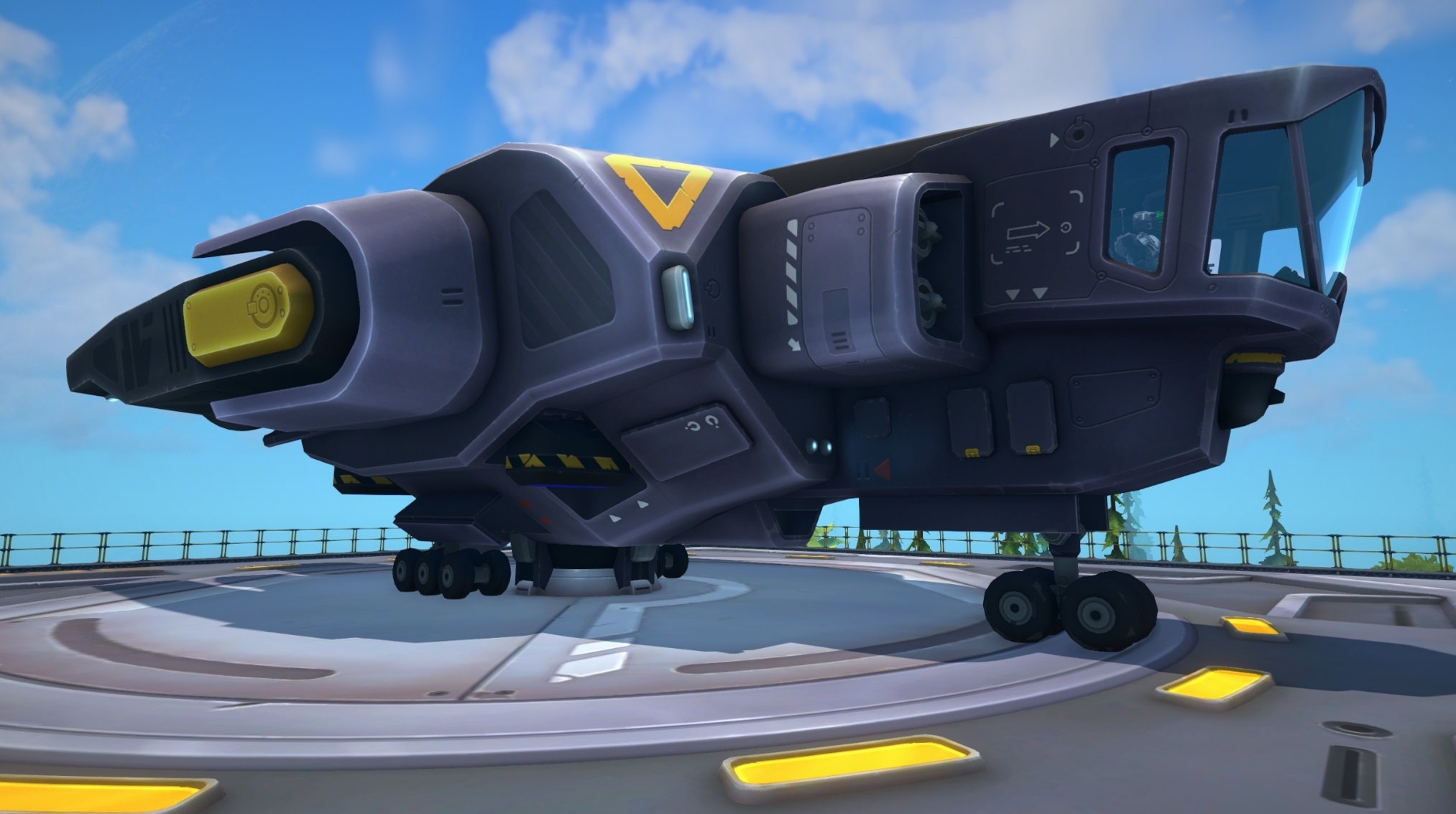
Today it is time for an update on an often requested gameplay feature: Long distance transportation. Our ore patches can be quite far out, especially once you made it to the mid or end-game. Many of you brought up that it is not very feasible - and neither fun - to build so-called “conveyor highways” to bring in your ore to the main base. We always planned for mechanics which allow movement of goods over a long distance in a simplified way, and today we show you the first of those technologies: Transport Ships.
With them you can move all sorts of goods from one landing platform to another. The platforms are very large, so the technology isn't made for moving goods from one place inside your factory to another, it is for when greater distances need to be covered.
I will go into detail on how they work further below, first I want to talk about long distance transportation in general. Although this isn’t a guarantee, we ultimately plan to have multiple long distance transportation methods. Our transport ships are the first type. The other ones aren’t as time-critical now that the gameplay issue of moving large amounts of items to a different spot is solved, so don’t expect others to arrive quickly. But we do know that you all want trains and we’re going to look into it after we have launched into Early Access.
Transport Ships
Let’s have a look on how to set them up and how they work. It all starts with two platforms, the target (drop-off) and the origin (pick-up) platform/station.
You set a name for the target station, let’s say “Xenoferrite Smeltery”, and assign it at the origin station so that it knows where to move the items. Multiple origin stations can have the same target station assigned. That means multiple ore mines could deliver to the same central pad if you want to set it up like that.
After that you need to configure the conditions on when the ship should start, you get detailed control on how they should behave. You can select either a percentage of the inventory or a certain amount of time passed. You can also combine them to create something like “both need to be true” or “just one of those needs to be true”.
Once the configured conditions are fulfilled, your ship will take off and fly to the target station. There it will unload and then fly back home. The way flying works is that they ascend upwards in a straight path, until they are outside of the buildable area and then they will fly straight to the point above the target station, where they will descend down again. That means both platforms must have an empty path upwards (must not be blocked by terrain, buildings, …). Their screen panels warn you if that is not the case.
There is no distance limitation, but the further they fly, the more they need to recharge once they are back home.
Here’s a video of them flying: Please keep in mind, this is work in progress. Animations, balancing and other things may change a bit and/or will receive more polishing.
Wait, you can go inside?
Yep, you can. There’s an interior and a pilot and you can jump on and ride from one station to another. Currently you need to guess the time it will take off (depending on the conditions set), but we’re thinking about adding some option to tell the robot pilot to just go now if you need a ride. Although we might also create a second system for that. Using cargo ships for personal travel seems slightly wasteful.
I hope you have enjoyed today's FOUNDRY Friday and I hope to see you next time! -mrmcd
DevBlog #41 | Foundry Fridays: Regrowable Plants & Trees
Welcome everyone to another episode of FOUNDRY Fridays! My name is Michael aka Lxi and I’m the “oldest” member of the team. I joined MrMcDuck roughly six to twelve months after he started this awesome project and it has been a fun ride ever since! It’s exciting to see how the game has developed so far and your feedback has been a crucial part of the journey. Therefore today’s topic is about an often requested feature I’m currently implementing, the possibility to regrow plants and trees.
If you want to design a factory surrounded by nature you won’t have to design it around the existing plants and trees anymore. We’ll provide you with the tools necessary to plant trees and plants wherever you like from seeds.
How does it work in detail?
When you mine a plant or tree there is a possibility that it drops a seed beside the biomass you normally get. Currently it’s planned that each biome has two types of seeds: one for plants and one for trees.
Once you have obtained a seed you can use it like a building to place a plant/tree from the seed family. Use the radial menu which plant/tree you want to plant. Your plant or tree won’t spawn at its full height once placed, but will need time to grow. If you mine it shortly after placing it, you will get the seed back, so you don’t waste any seeds by accidentally misplacing it. As it’s growing larger it will yield a percentage of the biomass you would receive when it’s fully grown once mined, depending on the growth percentage.
Growth speed is accelerated for demonstration purposes.
I don’t want to mine 1000 trees to grow my own forest!
Great! We don’t want you to either! That’s where our new building, the Greenhouse, comes into play. The Greenhouse will be able to duplicate a certain type of seed by inserting a seed alongside with some other items/liquids. However duplicating the seed won’t work every time, there is only a percent chance that the Greenhouse will do so. This way we introduce a new kind of production cycle/gameplay: You will need to build “seed loops” and only extract the overproduced seeds to keep it going. Hint: The balancers provide a great way to help you achieve this by using the output priority setting. Unfortunately I can’t show images of the Greenhouse yet, since the model isn’t yet finished.
Keep in mind that all of this is work in progress and might change in some ways, but it feels like this is the right amount of depth we currently want for this feature. Looking forward to your feedback!
DevBlog #40 | Foundry Fridays: Localization System
Hello! Hallo! ¡Hola! こんにちは! 안녕하세요!
Greetings, everyone! I'm Roman, also known as Zirus, and I've joined the FOUNDRY team back in April. Though I'm new to Foundry Fridays, I'm eager to share some exciting improvements we've been making to our Localization System.
Why the Upgrade to our Localization System?
Previously, our Localization was based on simple key-value pairs. But, as we and FOUNDRY's codebase have grown, we've seen the need for a more robust system - especially when a tiny typo could lead to a big headache:
[table] [tr] [th]Key[/th] [th]Value[/th] [/tr] [tr] [td]Welcme to Foundry![/td] [td]Willkommen in Foundry![/td] [/tr] [/table] Noticed the typo in "Welcome"? Fixing it leads to a lost translation as it ends up being a new key:
[table] [tr] [th]Key[/th] [th]Value[/th] [/tr] [tr] [td]Welcome to Foundry![/td] [td] [/tr] [/table] To address this, we have implemented improvements to the System using unique identifiers for each phrase, which ensures consistency of translations across all languages. We'll look into this more in depth a bit later, but let's take a look at the things that actually need Localization first.
The Three Pillars of Localization in FOUNDRY
Localization in Foundry stands on three pillars:
Static Localization
Upon starting the game, static elements like information messages and headers are set in your chosen language. This content remains constant throughout your experience.
Dynamic Localization
Your in-game actions prompt real-time Localization changes. For instance, the plumber tool adjusts its messages based on singular or plural contexts, ensuring an immersive and accurate gaming experience.
Templates are the backbone of FOUNDRY's content - every machine, crafting recipe or item has its own template. Such templates may have translate-able variables, for instance their display name.
Enhancing Consistency by Introducing Unique IDs
To bolster the integrity and consistency of our Localization System, we've introduced a unique identifier for each translatable phrase. Picture these identifiers as serial numbers assigned to each snippet of text, ensuring that every translation is anchored to a stable reference point. This means that even when the English source text is altered - whether to correct a typo or to update a phrase - the corresponding translations remain reliably linked.
Here's a practical illustration of this system at work:
[table] [tr] [th]ID[/th] [th]English[/th] [th]Translation[/th] [/tr] [tr] [td]WELCOME_MESSAGE [/td] [td]Welcome to Foundry![/td] [td] Willkommen in Foundry![/td] [/tr] [/table] With this structure, we can address any textual errors without disrupting the existing translations across different languages. This new approach provides a safeguard against the common issue of 'lost' translations that occurred under our previous system when making corrections or updates to the source text.
Certain scenarios may still necessitate a reevaluation of the translation themselves though. For example, if the original English text is updated to the extent that it alters the context or meaning, the translations would need to be revisited to ensure they still convey the intended message accurately.
The Big Export: Optimizing the Translation Workflow
In our pursuit to optimize the translation process, we have developed a specialized parser. This tool is designed to automatically generate Localization files in a format called "portable object". This change streamlines our workflow, making it easier to update our project on CrowdIn.
Validation: Ensuring Precision in Localization
In the complex landscape of Localization, maintaining a clear overview of existing unique identifiers is crucial. To manage this, we've integrated a robust Validation System, designed to be a steadfast ally in the Localization process. This system automatically flags any discrepancies such as overlapping IDs or absent context comments. Here's a glimpse into the kinds of issues it helps us avoid:
Preventing Duplicate IDs from Causing Confusion
[table] [tr] [th]ID[/th] [th]Value[/th] [/tr] [tr] [td]MACHINE_EMPTY[/td] [td]Machine is empty[/td] [/tr] [tr] [td]MACHINE_EMPTY[/td] [td]Machine is currently empty[/td] [/tr] [/table] Encountering duplicate IDs with different assigned values can create conflicts within the Localization System, as it relies on IDs to determine the correct text to display in-game. This scenario can lead to inconsistencies, which our Validation System is adept at identifying.
Avoiding Redundancy with Different IDs for Identical Values
[table] [tr] [th]ID[/th] [th]Value[/th] [/tr] [tr] [td]MACHINE_EMPTY[/td] [td]Machine is empty[/td] [/tr] [tr] [td]SELECTED_MACHINE_EMPTY[/td] [td]Machine is empty[/td] [/tr] [/table] It's possible to inadvertently create different IDs for the same value. Our system detects such redundancies, alerting us to streamline our Localizations and prevent unnecessary complexity.
Context Comments for Clear Translation
Context is king in translation. To aid our translators, we embed comments within each Localization call, providing them with the necessary background to deliver accurate translations. These comments are essential, especially when viewed in tools such as CrowdIn, where they guide the translation process. This is why the Validation System informs us about calls where these context comments are missing. Here is an example how these comments look in CrowdIn:
Modding: Empowering Community Creativity
Our new Localization System is crafted with the modding community at heart, streamlining the way modders integrate translations into their creations. This modder-centric design allows for seamless utilization of the existing Localization framework during the development phase, ensuring that mods are as language-accessible as the core game itself.
From the initial coding stages to the final touches, modders should be able to:
Employ the system to handle in-game text, providing a consistent experience for mod users.
Export their content into "portable object" files, which are standardized for easy translation management.
Utilize the Validation System to preemptively catch and correct any potential issues with duplicate IDs or missing context, which is crucial for maintaining the integrity of the mod's Localization.
Load these translations during the game's startup, making sure that no matter where a player is from, they can enjoy mods in their native tongue.
Our goal is a robust and accessible environment that empowers modders to share their work with a global audience, removing language barriers that could previously hinder the full enjoyment and reach their creative efforts.
In Closing
We strive to make Localization intuitive for everyone involved - gamers, translators, and modders. Should you have any feedback or suggestions, please feel free to reach out to us on Discord.
I hope you enjoyed this little sneak peek into how we handle Localization. Thanks for reading!
Take the survey about Foundry and Check out the screenshot contest results!
Hello everyone!
Thank you so much for playing our Demo during the last two weeks! We received a lot of positive feedback from you that gave us a lot of energy to work even harder on the upcoming Early Access.
We would love to learn more about your motivation and interests in general, so we invite you to participate in a survey and answer a few questions. We’ll read through every reply so it will be very helpful for us!
Moreover, we are happy to announce the winners of the screenshot contest. Check out our Discord to know who won Paradox merch or a reference in FOUNDRY!
Our team is very happy that so many of you played our demo during Steam Next Fest. For that we want to thank you wholeheartedly and it will be today's topic for our FOUNDRY Friday blog.
Next Fest Recap
Let us begin with a look into some numbers, around 100.000 people played our demo during the past week. You sent us around 5.000 messages of feedback through our ingame feedback tool (and we read them all!). There were several hundreds of Steam forum posts, many thousands of Discord messages and hundreds of Reddit & Twitter(X) posts and comments. Our community has always been a key focus for us and we could not be any happier to see it so active. Your feedback is invaluable and will help us make a better game.
Additionally we have been constantly ranking high on the top lists of “Trending” and “Daily Active Demo Users'' which secured us frontpage exposure. This helped to get the game more prominent and made us more confident that there is great interest in FOUNDRY.
What’s next?
The feedback you sent was overall very positive, yet you provided us with lots of suggestions on how to improve the game further. We are currently working towards our Steam Early Access launch and we will try to incorporate as many of your suggestions as possible into the game - many of them will only be possible to add after our Steam launch though. We are not ready to reveal exact release dates yet, but keep an eye on our socials and steam page as something is always going on there. We'll keep you posted! While most suggestions were smaller features like usability improvements, there were two big topics that were heavily requested:
The goal
Many of you expressed that you need more reason to play the game than to unlock all of the research tree. We have good news here: This was always planned, and to a certain degree that will be part of our Early Access launch. We cannot reveal too much yet, but FOUNDRY will provide you with certain narrative milestones to work towards. However there is not going to be a story, quests or other things like that, as at its heart the game will remain a sandbox. But there will be some background lore to discover.
A pressure mechanic
A sort of pressure (be it enemies or other sources of danger) was always heavily requested and kept being the most asked feature after receiving your demo feedback. And before we get into the topic: If we ever add a pressure mechanic, it will always be optional and you can turn it off - we know that many of you do not want any sort of pressure and FOUNDRY will always allow for that sort of gameplay. That being said I agree that the game could be improved by some sort of pressure mechanic. One reason is that it helps with the goal mentioned before. Another reason is that for many players the source of motivation is to achieve something in time (meaning they played “well enough”). In its core a pressure mechanic means you need to produce a sufficient number of items or reach certain buildings in time, fulfilling that motivation. It also provides additional content and mechanics, resulting in more gameplay variety. We are not giving any guarantees about it, but will definitely be looking into what sorts of pressure mechanics could fit FOUNDRY and its narrative.
This concludes today's episode and we will keep you up to date on how our game develops towards the anticipated Steam Early Access launch. In case you missed the Demo, it’s still available until Monday!
Thank you all for reading and see you soon! -mrmcd
We are extending the Demo and starting a screenshot contest!
Hello everyone!
We have some happy news to share! Even though the initial plan was to close the Demo when the Steam Next Fest is over, we’ve got so many requests to extend it that we simply couldn’t resist! We decided to keep the Demo running for another week — until 23rd of October 10 AM PT (19:00 CEST) and celebrate it with a contest!
Contest Rules
Post the screenshot of your factory in a dedicated channel on our Discord server;
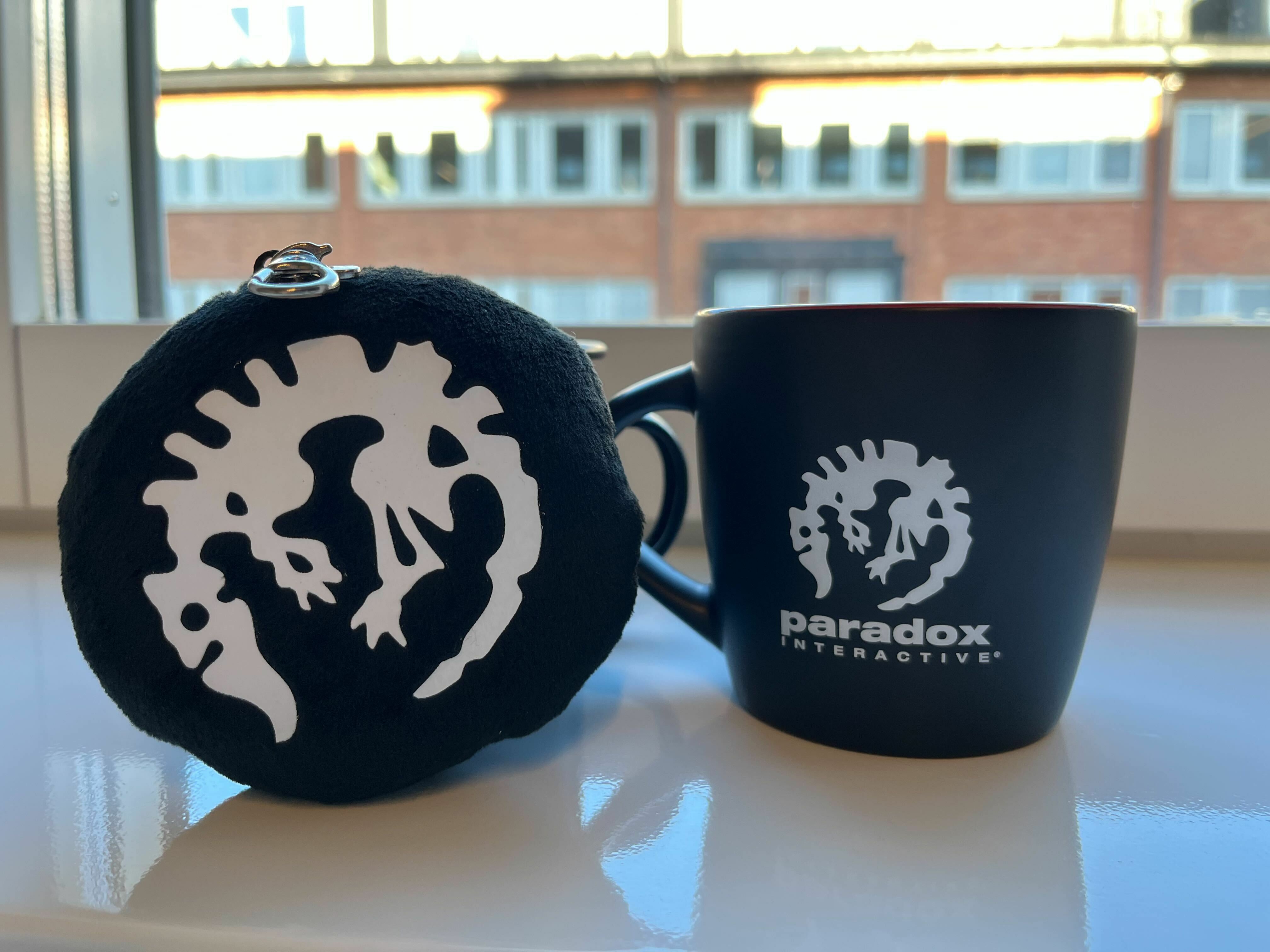
5 random submissions get exclusive Paradox Merch: PDX Cup or a plush keychain;
Moreover, we will choose two screenshots that we liked most and their creators will get a reference in the game!
On October 25th we will choose the winners:
We will be super happy to see every participant on our Discord server this week. Good luck!
We also uploaded one of the Dev Streams we had before to our YouTube channel so make sure to check it out if you haven't done it yet!
🏭 Chat with the Devs! Part 2 [October 13th, 2PM PDT]
Hello everyone,
We hope you enjoy the FOUNDRY demo and have a lot of fun! As part of the Steam Next Fest campaign our development team will livestream the game and answer questions!
Make sure to tune in to our livestream on October 13th 2PM PDT (23:00 CEST) — right here on our Steam page!