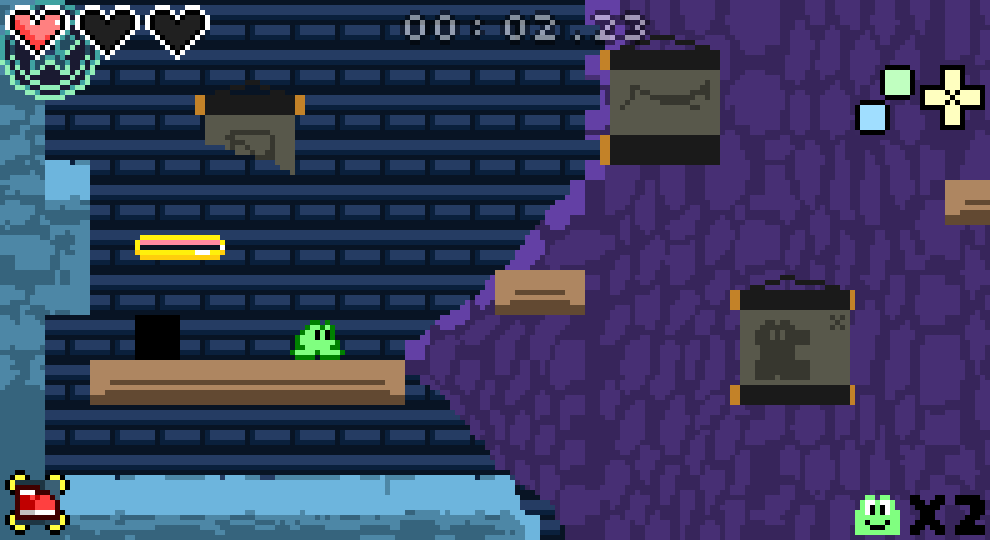
It has been over 2 years since the Frog Hop level editor was released, and we have been polishing it steadily over time. Today, we have another fairly major feature, and I think it's enough to justify version 2.5.0!
This update brings custom art as a feature to the level editor. Fans will be able to get more creative with the aesthetic of their levels, as you can now create your own backgrounds and tilesets.
To import a tileset with custom graphics, first move the image into your level folder. Then navigate to "File -> New -> New Tileset..." Select "Based on Tileset Image" and browse out to the image. Save the tileset underneath your level folder as well. (You may use subfolders to organize assets as you choose, but it's easiest to do this before from the get-go.)
Frog Hop also works with Image Layers now as well. These layers are best used for background/foreground images, as they allow adding a single image, and can be used to tile an image repeatedly across the map.
Here are a few tips to steer you on the right path for how to use custom graphics for Frog Hop in the Tiled editor:
Custom art loading is supported for both image layers and tilesets "Based on Tileset Image". A "Collection of Images" tileset is not supported; you can instead combine your objects together into a tileset image.
While not required, it is recommended to use a 9x9 grid for tilesets. This matches the internal grid size for Frog Hop, and will help your tiles line up neatly with the map grid in Tiled so you can place them easily.
Custom tilesets do not create collision boxes on their own! You can either use a built-in tileset to lay your ground and then create a new layer for your custom tileset to be overlayed on top of it, or you can manually create walls/floor in an object layer using the black square with the smaller inner square. (Third from the top on built-in tilesets.)
When packaging up your level, be sure to include any custom tilesets - both the .tsx file and the image. It is recommended that you place these files within your level folder, or at least the author folder (That is, "LevelEditor/Levels/") if you plan to share the tileset across multiple levels. This ensures that your assets are easily packaged, players can identify where they came from, and that they are synced properly to Steam Cloud.
Lest you think this is the only change in this update, here is a list of additional changes included with 2.5.0:
Added controller binding for reset button.
Fixed issues when flipping spikes, springs, and other objects in custom levels.
Fixed music overlap when changing music with trigger zones and switching maps.
2.4.7 - Minor localization and level editor updates
In case you missed it, Frog Hop launched on consoles back in February! We hope you have been enjoying Frog Hop on-the-go with the Nintendo Switch, or maybe you have shared the love of Frog Hop with one of your console gamer friends. ːJumpyCuteː It has been great seeing a new wave of players enjoying the game, but we haven't forgotten our PC fans! This patch is specifically for desktop operating systems - the only place where you can create and play your own Frog Hop levels.
Changes included in this update:
Fixed an issue preventing Tiled from launching through Steam when selecting "Launch Game Editor" on Windows.
Custom levels can now display a custom title on the menu instead of using the world filename. See the "metadata.json" file in the included levels for an example.
Arrow platforms now have a property to customize their speed in custom levels.
Support for Tiled 1.10.1, which is now the version prebundled with the Level Editor DLC. Please update Tiled from the official site if you are using an older version.
Updated some localization text for Arabic and Swedish.
2.4.7 - Minor localization and level editor updates
In case you missed it, Frog Hop launched on consoles back in February! We hope you have been enjoying Frog Hop on-the-go with the Nintendo Switch, or maybe you have shared the love of Frog Hop with one of your console gamer friends. ːJumpyCuteː It has been great seeing a new wave of players enjoying the game, but we haven't forgotten our PC fans! This patch is specifically for desktop operating systems - the only place where you can create and play your own Frog Hop levels.
Changes included in this update:
Fixed an issue preventing Tiled from launching through Steam when selecting "Launch Game Editor" on Windows.
Custom levels can now display a custom title on the menu instead of using the world filename. See the "metadata.json" file in the included levels for an example.
Arrow platforms now have a property to customize their speed in custom levels.
Updated some localization text for Arabic and Swedish.
2.4.4 - Achievement fix and more
Just a small update today, but some notable fixes nonetheless:
Fixed an issue which prevented the "Normal Cleared" achievement from triggering. ːJumpyAGHː
Fixed an issue where switches could sometimes be triggered twice from a single tongue usage.
Improvements to buttons and switches in custom levels so they can be stretched and rotated.
Improved some button prompts when using a DualShock 4 controller.
2.4.3 - More bug fixes? Yes
Just a small update this time, but 2.4.3 fixes some longstanding bugs and some new ones discovered through custom levels. Here are some of the changes you can expect:
You can now ride Lilly pads up and down without falling off.
Fixed an issue that could soft-lock the game when pausing on the same frame that you die.
Fixed an issue where the first_map property in custom levels wasn't being processed correctly.
Fixed minor display issues on the menu for Mac and Linux.
Health display now properly limits to a maximum of 5 hearts without flickering as you pick up additional hearts/health containers.
2.4.2 - More Custom Level Fixes
We're keeping the ball rolling with some more fixes and tweaks in 2.4.2!
Fixed a crash when collecting an extra life on the same frame as it spawns in custom levels.
Fixed issue with trigger zones activating random target zones.
Fixed boosters and checkpoints not fully despawning when min/max difficulty set.
Fixed a bug where the player could take damage or die while moving through a door.
Fixed moving spikes not dealing damage when they should.
Fixed treadmills animating while game is paused.
Improved push block physics so they can now be carried by mechanical blocks and platforms in custom levels. (A new property "ignore_mechanical_blocks" added to use old behavior. This is useful if you have a push block that activates a button, then mechanical blocks cover it up.)
2.4.1 - Custom Level bug fixes
The last update had some big changes, and with all major patches, some bugs inevitably cropped up. Fear not, though; they were dealt with in swift fashion! This update includes:
Fixed game crashing when using a target zone on conveyers.
Fixed clockwise red bird being invincible.
Fixed Gophers spawning on difficulties they should not.
Toggle switches and target zones will now activate mechanical blocks which point to them with the "switch" property.
Objects attached to a "platform" will now be destroyed if the platform is also destroyed.
Added trigger type "EnemiesDefeated" to trigger zone. If enabled, the zone will track all enemies inside of it on map start. Once all those enemies have been defeated, the zone will activate its target.
Huge Level Editor Update - 2.4.0
Level Editor Highlights
Frog Hop 2.4.0 is here, and with it comes some very significant updates for the Level Editor DLC! Within the editor itself, you can expect the following changes:
Various objects can now be attached to moving platforms so they move along with them.
Spike blocks and deflector blocks now have switch-activated versions.
Red bird that rotates clockwise has been added.
Fixed several enemies that did not spawn at the same position as they appeared in the editor.
Toggle switches have been added which can be activated with the tongue attack and trigger other switches.
Major Feature for Level Creators
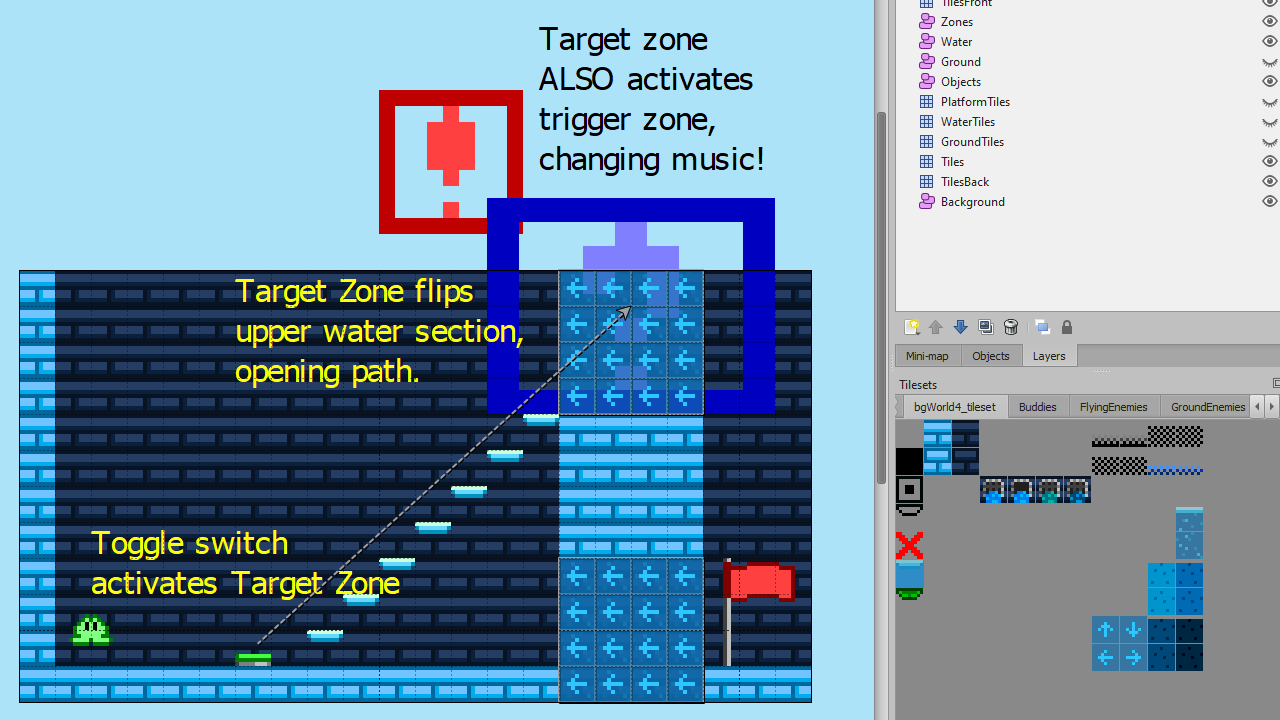
That's not all that is included with this update, though... There is a one new feature which is a total game changer for making dynamic levels. Introducing trigger zones and target zones! Trigger zones can be activated either by the player walking into them or from a toggle switch. When triggered, they can activate another switch, or even change the music mid-level.
But the real magic comes from using both trigger zones and target zones together. A target zone allows activating multiple switches/blocks at once. Simply resize the target zone in the level to cover the area you want it to impact, set the target_types, and connect a toggle switch or Trigger zone to activate it. You may want to reverse flowing water in a certain section of the level, without affecting water elsewhere - target zones allow you to do just that. They also open up tons more possibilities, including triggering multiple switches at once, or even chaining multiple trigger/target zones together.
These new features give creators lots of new ways to let their creativity run wild, but we know that it can be a little daunting to learn all the ins-and-outs. Consider joining our Discord server if you need help with anything or have any feature ideas!
Menu Changes
Alongside these changes, the in-game menu for Custom Levels received a complete overhaul. Previously, the game relied on extensions to open a file dialog for selecting a level to play. This had several drawbacks, like not being accessible with a controller, inconsistency with Linux distributions, and incompatibility with older versions of MacOS. (In addition to increasing the difficulty of building new releases.)
The new menu allows you to select levels to play from a list. This list is populated from .world files located with your LevelEditor/Levels folder. While this does require players to keep there levels at a specific location, it is worth the trade-off in order to support more control schemes and platforms.
Launching the Editor
As part of this change, the level editor can no longer be launched from the game directly. However, if you have the DLC installed, Steam will prompt you when launching to choose whether you want to play the game or launch the Level Editor.
You can also open the editing tool (Tiled) manually outside of Steam (and in fact, this is recommended if you intend to test changes as you build levels!)
Because the level editor uses a third-party tool, it is possible that your installation is not at the same location as another user. In order to make the "Launch Editor" option in Steam work, you may need to do additional setup, particularly on MacOS and Linux. The first time you launch the game after installing the Level Editor DLC, a "config.ini" file will be created in the LevelEditor folder next to your Frog Hop install. Open this open and edit the "path" value to where you have Tiled installed. (On Windows this should install automatically, but for other operating systems you will need to download it for free from mapeditor.org).
Misc Notes
Thanks to all the changes mentioned above, Frog Hop now fully supports Steam Deck. ːHoppyHappyː If you have trouble launching the game on Deck, try setting the compatibility to "Steam Linux Runtime".
This update brings all versions back up-to-date, so check out the patch notes for 2.3.0 if you are running MacOS or Linux/Steam OS, as those changes are included now as well.
Join our Discord if you would like to share your thoughts (or levels) with our community!
2.3.0 - Custom Level Bug Fixes & More
Update 2.3.0 - Windows only
A new update is out for Frog Hop, focusing mainly on some bug fixes regarding the custom level editor. At the moment, this update is only available on Windows - there are some additional issues and considerations with how custom levels work on MacOS and Linux. We would like to release a future patch to address these and bring all platforms up to the same version, but did not want to hold back the Windows update which is ready now, since that is what the majority of users are playing on.
Bug Fixes
Fixed an issue with backgrounds being offset incorrectly in official levels after loading a custom level.
Fixed death triggering "game over" and restarting level one life too soon in some circumstances.
Fixed "game over" not always resetting gems correctly.
† Fixed issue with tongue simultaneously hitting on Sling Node and some other nodes locking the player.
† This issue did not present itself in official levels because the arrangement of nodes never makes this possible. It is, however, relevant for custom levels.
IMPORTANT: Level Editor Update
If you have installed the Level Editor DLC, you must update to Tiled 1.9.0 (or newer) after this update. This new update is bundled with 1.9.0 and players installing the DLC for the first time should receive the correct version, but if you already had it you may need to update manually by downloading from mapeditor.org.
Tiled is the open source software used for custom levels. The recent 1.9.0 update introduced some changes which were not fully compatible with the existing Frog Hop tooling, which prompted this update. Left with the choice of staying on the old version and instructing users not to update or forcing an update, we opted for the latter, as the latest version has some useful new features that will benefit level creators.
Now I am sure you are curious what those new features are. Here are a few of the changes in this update related to the level editor:
A new property on maps is available for selecting official music from Frog Hop, instead of needing to bundle your own .ogg. (The existing "music" property is still available if you do want custom music.)
Map properties and some of the commonly used tile properties are now grouped together, which makes them easier to add and remove for customization.
Loading a custom level now displays a progress bar while you wait. It's not very granular, but useful for levels that have multiple maps as they can take a while to load.
Challenge Pack is included with the level editor - this set of 12 maps test your Frog Hop knowledge focusing on niche mechanics for your puzzle-platforming enjoyment.
That's all for now! If you haven't tried the Level Editor DLC yet, remember, it's free. ːJumpyCuteː Get out there and make some neat stuff! Feel free to share your creations on Steam or in our Discord server.
Mac and Linux Release
Frog Hop is now available on Linux and MacOS!
MacOS
Both M1 and Intel CPUs are compatible on MacOS. The recommended MacOS version is 11 (Monterey) or above. The minimum version supported is 10.9, however, there are limitations which mean the Level Editor DLC functionality is not available on 10.9. Due to the difference in compatibility, there is a separate beta branch for MacOS 10 compatibility. If you are running OSX 10 and Frog Hop won't run, open the game properties from your library, navigate to the "Betas" tab, and enter the password "FrogHopOSX10"
Linux
The game's engine (GameMaker Studio 2) only officially supports Ubuntu 18.04 and 20.04. As such, Frog Hop only officially supports Ubuntu as well. That said, it should generally work on most Linux distributions, but may require additional steps and workarounds.
Level Editor
The Level Editor DLC is supported on MacOS and Linux, except for the MacOS 10 exclusion mentioned above. The 3rd party program to create levels (Tiled) is also available on MacOS and Linux, so you can create your own levels regardless of platform. To do so, you need to install the application manually yourself. (Download from mapeditor.org)
Last but not least, Hoppy holidays everyone! ːHoppyHappyː ːJumpyCuteː