

From the Depths
Beta 3.5.5
Our Alpha test branch has now moved to the Beta stage and after further testing for a few days shall move on to the main stable build :)
Unfortunately there as there are too many pics for Reddit and too many characters for Steam you can check out the Beta notes here :
https://fromthedepthsgame.com/beta-3-5-5/
Thanks
Alpha Test 3.5.4
Another dose of bug fixing :)
Changelog
Additions
Controls
- Added a dead zone slider for control pads and set the default dead zone to 20% (up from 0%).
GBS
- Laser Targetter data can now be controller with the Generic Block Setter
- Particle cannon reload time (charge time) can now be adjusted with the Generic Block Setter
- Steam valve can now be controller with the Generic Block Setter
- [BUGS-3897] added power creation priority to the Generic Block Setter and added a slider for fuel engine generator power user priority to the fuel engine UI sliders section.
Propulsion
- The auto-balance default for new propulsion will change as you press the 'Turn [ON/OFF] automatic control for all propulsion' button
Fixes
Blocks
- Light-block now uses the same shader as glass blocks and thus renders damage, can be cut-away and painted.
Drones
- Subvehicle spawners on turrets should now work more reliably (spawn the vehicle in the correct place and more robustly link to the correct drone).
- The 'force position' of a drone in a fleet is now set, which can help to reduce the chance of collision for drones (they'll try to stay where the SVS puts them).
Regression
- Fixed a threading issue that caused the creation of chunk meshes to slow down the game
- Map now correctly changes when loading another planet
- Remote missile guidance module no longer causes issues
Translation
- Saving of vehicles using custom tags in non-english languages now works
Damage
- [BUGS-3862] Missiles, CRAM shells and APS shells now adjust their health based on the configurable damage factor of the session, in the same way that blocks do
Diplomacy
- [BUGS-3818] Fixed a serious issue with the late game diplomacy calculations that lead to a crash when trying to get the council to meet
Game
- [BUGS-3892] Fixed a gridcasting issue that affected turret blocks and caused issues for mouse based build mode (interaction with turret bases) and perhaps damage calculations as well
Multiplayer
- Fixed an issue where the 'head' is on at a 90° angle when first spawning in multiplayer
Wheels
- [BUGS-3893] wheels should now respond correctly when first placed (auto-balancing bug).
Alpha Test 3.5.2
While this update does focus more on a number of bug fixes and tweaks, we also have a new feature that is still a WIP.
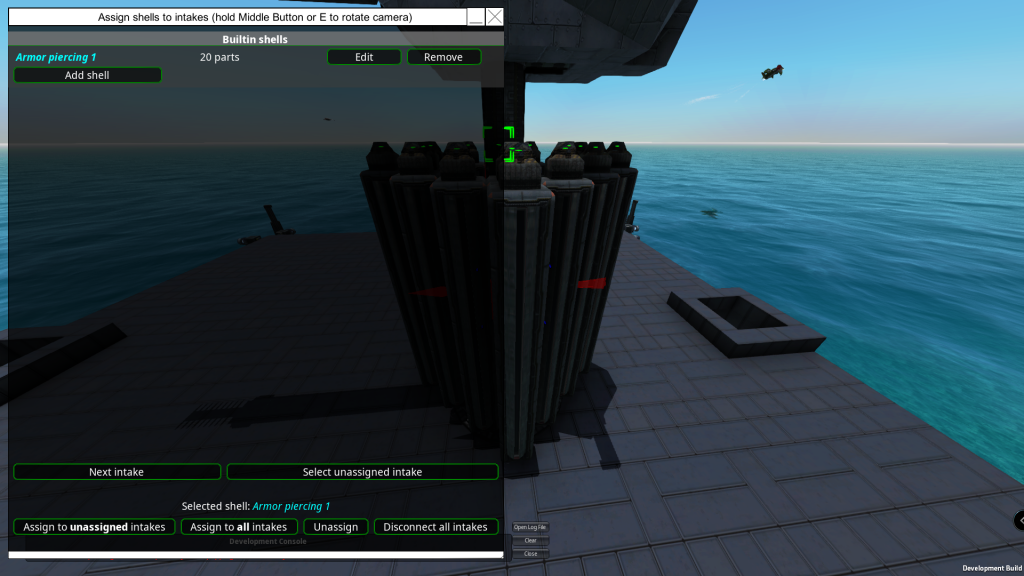
We will be setting up the APS system to allow users to create inbuilt shells without placing cusomisers.
You can access the new APS shell setup by pressing Q on a turret, APS tab and then clicking on Access intakes. Please note this is a WIP so for now there is no need to create bug reports for this system.

Changelog
Additions
Applique
- Side drag is now the same as slopes, full drag instead of half.
APS
- All constructs can have shells that do not need any ammo customiser blocks to use
Breadboard
Alpha Test 3.5.0!
Another sweet update being propelled to you epic people! Numerous changes, tweaks, bug fixes and new features!
Before we get into the changes we need to point something out for you good peeps that have been running the Alpha test. Positive/Negative force axis code has changed for custom rudders so if you made anything in alpha using them you should check their yaw/roll/pitch inputs.
Vehicle stability
Acceleration and evasion being very cheap, and having basically no downside is a very old FtD problem. It makes cannons unreliable, ships relatively weak and kiting disproportionately strong. The new stability mechanic adds a benefit for having a stable platform.
Overview
- New stat: stability. Possible range is 0-100%, it's based on the movement of the main construct in the last 3 seconds
- Added a slider to the target prioritisation AI card, from -1000 to +1000 value for each 1% stability
- Munition warner range is now a function of stability, instead of rotation rate. Varies between 20-110%, for 0-100% stability
- All direct fire weapons gain 0.004° inaccuracy for each 1% stability below 100%
- Missile laser target inaccuracy is rerolled every second, and the actual inaccuracy of the beam is interpolated to the new value over 1s Remote and lua missile error is increased by 0.1m for each 1%
4 values are tracked
- Average velocity magnitude
- Velocity magnitude change
- Velocity rotation rate * velocity magnitude
- Construct rotation rate
Example vehicles
- Ships generally have 95-100% stability
- Flyer moving in a straight line, at 220 m/s (~CJE practical limit) ~90%
- Flyer circling at 2000m distance, 220 m/s speed ~75%
- Flyer circling at 1000m distance, 220 m/s speed ~65%
The changes mean stable vehicles and fortresses gain a slight boost against projectile weapons. Faster, and especially more evasive vehicles have a harder time shooting down projectiles, and at long distances their weapon efficiency is noticeably reduced. Makes slow vehicles, cannons and IR/radar/sonar missiles more useful in general.
Custom Propellers
One of the first big changes is custom propellers.
We have created a very in-depth system for customising the look of the custom propellers and we also suggest updating your builds to the new custom propellers, as power usage and thrust have been tweaked.
You can remove blades and rotate any blade around the hub if you wanted to go for a 3 blade Y shape setup, yet keep the functionality of all 4 blades! The sliders are purely aesthetic only and will not change the performance of the custom propellers.
As you can see from the screenshot below, this is the default look until you start adjusting the overall shape via the sliders and also material type from the texture dropdown list.


After spending a little time getting used to the controls you can create something that may fit the style of your craft more.
To give a general overview of this UI, the top screenshot is where you set the general shape, blade orientation, size of the blade and material type.
The second screenshot above shows current nodes and where they are on the blade 0%, 25%, 75%, and 100% you can also insert nodes and set how far down the blade you want the node to be.

This propeller was created using a linear node setup. What that means is that the preset removed 3 nodes along the blade, unchecked one of the blades in the bottom section of the list and setting +/- 35 degrees to the side blades. Adding nodes along the blade gives you more points to adjust the blade thickness, rotation, width and shaping.
However, if you still want more customisation, you can always use the decoration system with Ctrl X on one of the blade segments and create something from multiple parts. (yellow decorated custom rudders)

While we are discussing propulsion, we do have a few new changes.

What you are seeing in the above screenshot has been added to all propulsion methods, auto-balancing and manual. Manual is the usual means of setting up a propulsion block to be strafe/forward/yaw/pitch... Auto-balancing on the other hand (imagine a thruster placed dedicated to looking after roll) auto-balancing can add a few points of thrust to assist in pitch or hover. Auto-balancing will automatically calculate the combination of propulsion required for smooth roll/pitch/yaw/strafe/hover/forwards motion.
Auto-balancing does not change the manual settings you have already stored, so you can turn it on and off without affecting things permanently.
Lastly, on the subject of propulsion, we have set up a function very similar to what was removed previously, which was the "always up" function and added a new method that will also assist the thrust pointing horizontal. You can choose manual control of pitch/yaw and set the two sliders up as needed as a permanent angle or, via the new breadboard component which we shall discuss next.

Generic block setter. (GBS)
This new component in breadboard allows you to interact with any block on the construct that can be manipulated. I'll try to show a very basic example with a neon light.
The basic neon light has 6 attributes we can tweak within its UI: R,G,B, the intensity, the range and if it casts shadows on/off.
If we place down a number of neon lights we can tweak all of them at the same time via the GBS, however for this example we will name the neon light (Example1). If you keep the build cursor on the light and hit shift N, this will bring up the naming UI. You should see the tooltip of your light now has "? Name changed to "Example1" ".
Place down your mainframe and attach the AI breadboard to it. Scroll down to the GBS and click on the new component. You will see that the GBS has something already selected by default that it would interact with.
With the new module selected type the name we gave our neon light Example1 in the block name filter text box, check the dropdown list under block name filter and select neon light. You will know if everything is linked as you can see in the GBS module "LightFitting (#1) " If it still reads #0 then you may have a typo in the filter text box or when you named the neon light.
You will also see the left side notches turn from white (requires input) to grey (not used). This indicates that the attributes tied to LightData: Intensity, requires one type of input and in this case it requires a number from 0 to 10. The other notches correspond to different input types which will be used for other settings if that block type and the attribute selected from the dropdown list allow it.

In order to keep things simple, let us insert a timer and give it a max of 5 seconds. We shall plug that into the topmost notch. (Don't forget to mouse over each notch for a description as to what they require/do) If everything is working correctly your neon light should start to slowly get brighter and turn off once the timer resets and repeat.

In order to access the other attributes, we need a new GBS linked with the same name. This time we will check the dropdown list under the neon light label. Other block types can have quite the long list depending on the complexity of the block, you may also see (LOCKED) and this indicates that currently we have not enabled GBS to access these attributes. So please feel free to poke us and tell us what you need unlocked and why with hopefully some sort of example.

Select LightData: The colour, now you will see that all the notches are white. Mouse over these again and you will notice that each one represents the colour red, green and blue as well as other parameters. Drop 3 "Constant" components into the breadboard UI and attach one to the first notch. Set the constant component to something from 0.00 to 1 and as soon as you plug in your constant the light should be red if left with the default value of 1. Repeat this for the last two notches green and blue and set the colours as you wish. Try doing the same things again and setting up a method to turn on or off Lightshowdows :)

This was just a poor and easy example as you can use GBS with every block that has some tweakable options from spin blocks to turret blocks, from jets to engines, APS components, CRAMS etc... and the usual infinite amounts of trigger types that you can create via breadboard and more so now as we have created a logic gate component :D .
Changelog
Additions
AI
- Projectiles avoidance fake-missiles now have velocity and lateral distance configuration
Animation Block
- Added emotion control for the animation block (the droid model does not support this as it is aimed at a future character pack DLC)
- Added IK control for the limbs of the avatars of the animation block. Added breadboard support for this.
APS
- Added an option to the APS menu to disable barrel retraction on firing
Auto-balancing
- Added an auto-balancing option to jet/huge jet/ion/huge ion/propeller/huge propeller/custom jet engine/propeller hub. Auto-balancing will automatically calculate the combination of propulsion required for smooth roll/pitch/yaw/strafe/hover/forwards motion.
- Auto-balancing does not change the manual settings you have already stored, so you can turn it on and off without affecting things permanently
- Auto-balancing updates when propulsion systems rotate, or when they become inoperable (i.e a submerged jet or a dead propeller)
Breadboard
- Added a new breadboard component that can theoretically 'set' any (whitelisted) setting on any block. It is called the 'Generic block setter'
- Whitelisted propulsion block, light bulb, animation block, adv cannon firing piece, cram firing piece, cram fusing box, boiler controller, fuel engine values for the 'Generic block setter'
- Added logic gates as a new breadboard component, with all standard gate types available.
Custom Control
- Custom control surface tooltips have visualisations showing their pivot axis and force direction for positive/negative input
Custom Rudders
- Mirror meshes added for all rudder parts.
Fuel Engines
- Pressing Q while looking at fuel engine parts now also brings up the overview menu of the main block
Propeller Hub
- Mesh and material customisation for propeller hub added
Propulsion
- Added automatic adjustment of yaw and pitch orientation adjustments to point the propulsion system directly up, or keep it horizontal. This is the successor to the 'always up' value of the now obsoleted dediblades. It works for jets, ions, propellers,crank propellers, steam jets, CJE and propeller hubs. The maximum angle for yaw and pitch is still 15°.
Stability
- Ships generally have 95-100% stability. 220 m/s (~CJE practical) limit flyer moving in a straight line ~90%. 220 m/s flyer circling at 2000m ~75%, circling at 1000m ~65%
- Stability components: velocity magnitude change, velocity magnitude, velocity rotation rate * velocity, construct rotation
- Weapons gain 0.004° inaccuracy for each 1% below 100% stability. Remote missile error is increased by 0.1m. Missile lasers roll a new inaccuracy error each second and interpolate from the old one over 1s
Changes
ACB
- Propulsion block yaw/picth angle change triggered through ACB takes 0.25s for a full 0-15° rotation
Aero Elevator
- Now has an AC of 20 and health of 300 and a cost of 15.
Aero Rudder
- Now has an AC of 20 and health of 300 and a cost of 15.
Aileron
- Now has an AC of 20 and health of 300 and a cost of 15.
APS
- Effective impact angle for sabot head is reduced to 75% of the actual impact angle (affects ricochet and damage reduction calculations)
Breadboard
- Modules on the breadboard expand to fit the text being displayed within them
Control surfaces
- Control/flight surfaces only add 0.75 drag for each 1 unit of force generated
Custom Control Surfaces
- Custom control surface force direction is now always normal to the placement plane. Local velocity only affects the magnitude of the force
- Pivots now have an AC of 40 and health of 400 with a cost of 50 other parts have an AC of 35 and health of 350 with a cost of 40.
Custom Rudders
- Positive/Negative force axis code has changed so anything made in alpha using them should check their yaw/roll/pitch inputs.
Custom Wings
- Wing parts now have an AC of 20 and health of 300 and a cost of 15.
Debug Tools
- Explosive, EMP and impact debug tool minimum damage down to 10
Interceptors
- Improved behaviour for thruster+secondary torpedo propeller interceptors
- Interceptor hit rate is now also tracked on the controller
- Interceptor missiles reverted to the old behaviour of trying to get as close as possible before exploding. Got a fallback to make sure they always hit the main target (if possible)
Particle Cannon
- Beam coherence for the same focus value improved by 25%
Shades
- Flags, sails and balloons now have opaque shaders.
Spinners
- Precision spinblock max turn rate in rotate to angle mode scales with MASS^0.2, instead of MASS^0.25 (faster, especially for spinners with lots of mass on them)
Steam
- Stable pressure of steam containers isn't affected by the number of vent outputs
Tailplane
- Now has an AC of 20 and health of 300 and a cost of 15.
UI
- Propeller clearance visualizations aren't displayed when the hud is turned off
- V menu now also shows how many cells are occupied by subconstructs, not just the total
Wing
- The old 1x1x1 wing is now removed from the build menu to encourage more performance-friendly usage with custom wings.
Fixes
AI
- Enemy simulator can no longer be activated when in campaign mode, other than in battle.
Breadboard
- An exception in a breadboard doesn't get up to the surface now and stops that breadboard for ~40 frames
Bugs
- [BUGS-3709] A sign evaluator with NaN input also outputs NaN (doesn't stop physics now)
- [BUGS-3546] Physics breaking sometimes when copy/pasting a breadboard
- [BUGS-2905] The game configuration slider for damage factor, and the campaign "damage difficulty" now affect block health rather than affecting damage output. It was discovered that many damage types were not properly adjusting for these values and this is a more reliable way of making sure everything works. The higher the damage factor, the lower the block health will be. The higher the campaign damage difficulty the lower player block health will be and higher enemy block health will be.
- [BUGS-3726] Repaired control surface pivots now work as expected
- [BUGS-3702] Steam crank wheel connections cannot be copy-pasted to bypass restrictions
- [BUGS-3705] Transmissions and crank motors with relative RPM other than 1 can be connected now
- [BUGS-3768] Blocks placed as decoration have a slight rotation error due to float precision
- [BUGS-3768] Hiding an original mesh, and then applying mirroring makes the original mesh re-appear
- [BUGS-3768] Some decoration wireframe aren't displayed when there are too many of them (can still happen but should happen a lot less often, it's a limitation due to an optimization)
- [BUGS-3774] Priority given to hit structural blocks first when several blocks are projected into the same mainConstruct cell
- [BUGS-3666] Placement offsets for blocks larger than 1x1x1 are now wiped on switching to prefab mode
- [BUGS-3667] Fixed a multithreading issue causing erratic flight. Mostly affected control surfaces, with multiple vehicles in play
- [BUGS-3695] Fixed stable pressure for some setups being affected by game speed
- [BUGS-3700] Fixed steam stat page reporting gearbox power output instead of turbine energy/s
- [BUGS-3778] Some map markers disappearing in campaign after changing language
- [BUGS-3738] Projectiles avoidance priority evaluation not displayed correctly
Crank Wheels
- A steam crank wheel can not be added to a group if it's already part of another group
Custom Control Surfaces
- Issue with 3m inverted CS corner mirror fixed.
EMP
- Fixed EMP potentially spreading in the wrong construct for some setups
Interceptors
- Interceptors without any propulsion can target projectiles above 5m
Missiles
- Added EMP susceptibility to missile wireless transmitter and receiver.
Multithreading
- Fixed various threading problems causing aim for all weapons to be ~1-2 frames behind the current position of the target
Physics
- Changed multi-threading code to ensure the main physics calculation chain finishes in time to apply the force to the vehicle rigid body on the correct frame
- Moved buoyancy force application, sail force application, wing force application, steam calculations and all propulsion force application into the same thread that handles the bulk of force applications and the calculation and application of the rigid body force. This should improve the stability of the physics simulation.
Shaders
- Some issues with particles/VFX not playing nicely with glass have been fixed.
UI
- Force lines in build mode (toggled with backspace) now show in the correct position (previously they were showing the forces calculated on the previous frame)
Unity
- Updated to unity 2021.2.18 from 2021.2.3. This is to fix a Linux UI issue where the mouse is never properly hidden and made inactive
Vehicle Controller Small
- Fixed sub mesh misalignment on small vehicle controller.
Stable Hotfix 3.4.3.10
A quick little hotfix for the 3×3 separator block.
The 3×3 separator attachment was incorrectly designated to be a separator block (not an attachment block). “The 3×3 separator block had a bug meaning it would not properly separate if it had multiple blocks attached to it.
Beta 3.4.3 Hotfix
This little hotfix addresses a few issues with the new camera movement as well as changes to the way ducts work. Ducts will no longer be watertight or airtight unless a propulsion block is directly behind them leaving no gaps to the hull, or "roomed off" if you wish to have your propulsion further behind the duct.
Changelog
Additions
Camera movement
Changes
Decorations
Ducts
Fixes
Camera movement
Stable 3.4.3 Hotfix.
A quick little hotfix.
Throughput pipe fix and localisation fixes to inventory name overrides.
Beta 3.4.3.6 Hotfix.
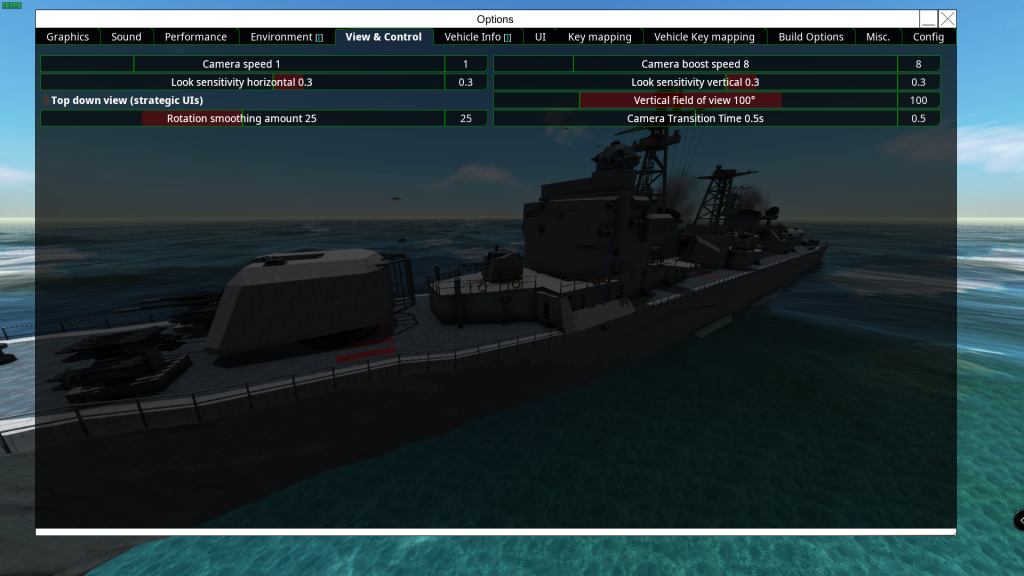
A quick little hotfix that addresses some small issues with the new camera system, we also added nicer transitions when swapping camera views.
If you do not like the transitions you can set the camera transition time to 0 from View & Control.
In the current stable update, we have incremental garbage collection turned off. This may have affected some PC builds differently due to different configurations of hardware (GPU/CPU).
We are trying to find out which method will be best for the player base by having IGC off or on.
In this current beta build we will reinstate IGC, as we are interested in whether the game is more stable with IGC off or on. For example: Is the game crashing more often with IGC on? Is the game freezing less with IGC on compared to the current stable?
If you see more crashes, firstly please ensure you are not running any mods no matter how insignificant you think it may be. You can then create a bug ticket here attach the log file from your FTD profile to the ticket:
Default is: C:\Users\yourprofile\Documents\From The Depths\Logs
Your player.log file from:
C:\Users\yourprofile\AppData\LocalLow\Brilliant Skies\From_The_Depths
The crash dump from:
C:\Users\yourprofile\AppData\local\CrashDumps
Please also include a description of what you were doing when it crashed thanks!
Changelog
Changes
IGC
Refinery junction pipe
Fixes
Camera movement
Russian localisation update.
Stable 3.4.3
This build has a number of tweaks, fixes and some new additions.
We are also pleased to say that the game now fully supports Russian localisation, however, if you feel that something is incorrect please let us know.
With the update to the Unity engine in 2021 and after reviewing a number of crash reports, we decided to turn off incremental garbage collection. This should resolve some from games crashing.
The Animation block has had a few new additions as well as breadboard. This will allow you more customisation and animation via any triggers that you wish to use with the Droid model.
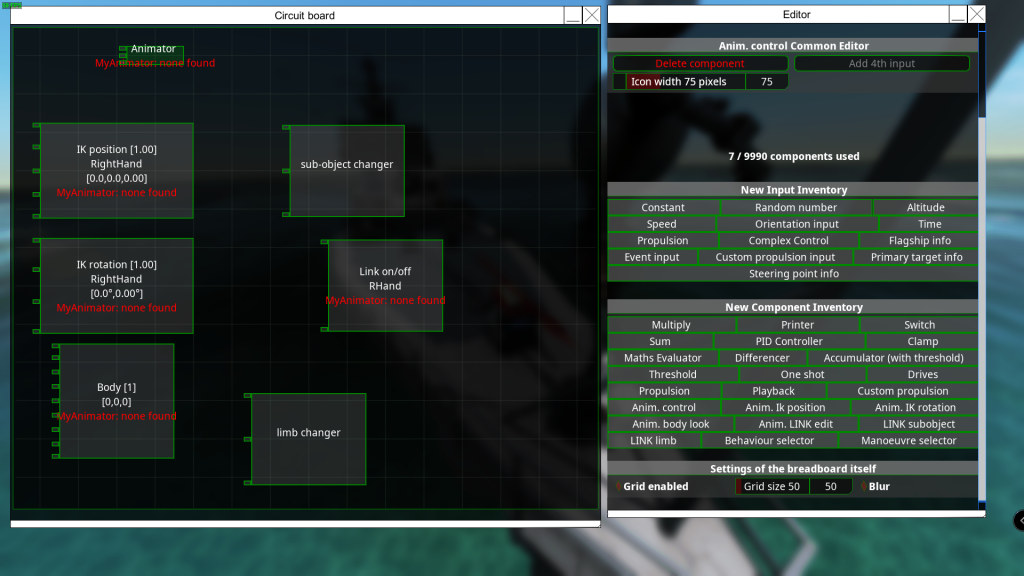
These functions will allow you to manipulate bipedal model limbs that use IK, as well as choosing one of the preset animations.

You can also adjust the size of the model via the animation block UI, choose a pose / preset animation from the large selection via the dropdown list.
The standard droid is fully functional with the animation block and breadboard. We will be releasing more models as DLC in future, which will also allow you to use custom bipedal models that have a propper IK setup.
If you feel that something in the changelog needs explaining further let us know in the comment section or DM me Jon in Discord.