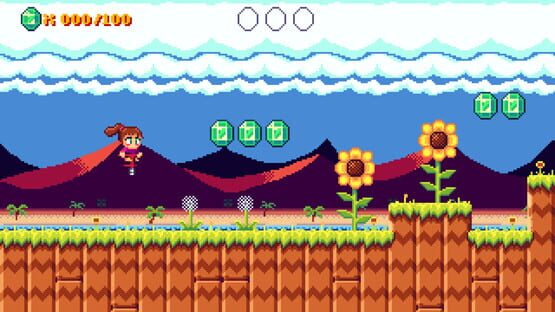
Here's a small update! Mainly some under-the-hood changes, but there are two things you might notice.
If using a controller, the tutorial bird will now spit out button graphics instead of letters.
I've added a new achievement.
The achievement is actually the main reason for this update, as it's a birthday present to my best childhood friend. Feel free to try and unlock it on your own, but since it's easier to stumble upon for new players, here's what you need to do: At the start of a level, press left before you press right. Do this in three levels, and you'll unlock the achievement! This is in reference to my buddy, who religiously always checks the left side of the screen before actually proceeding through the levels...and honestly, so do I most of the time. I mean, one game once hid a secret there, so there might be another one!
If you haven't read the spoiler, here's a at least a hint: Be curious, suspicious, and think of a place where 2D platformer designers like to hide stuff, then check that place in multiple levels.
Anyway, happy birthday Greg!
-Ando
I Have a Developer Page!
Yo, just a quick note that I have now set up a developer page here on Steam! It's an easy way to check out all the games I have on here, and you can even follow me to get notified whenever I release something new!
Which might be kinda soon...
So if you want to get notified, check it out and hit that follow button. If you don't want to get notified then don't do that, I guess.
Go! Go! Version 1.0.5
Time for another update! This time it's just a bug fix, but it's a pretty big one.
Fixed a memory leak related to the timer
Turns out, for some reason the new timer was leaking memory, meaning it kept using more and more memory but it didn't release any. This, of course, isn't a good thing, because it could cause the game to lag or even crash if you kept it running for long enough.
While I wasn't able to entirely figure out why it happens (it's something buried deep within the HaxeFlixel/OpenFL/Lime libs) I found a way around it. And hey, in gamedev, that's usually good enough...
Thanks for all the support, everybody!
-Ando
Go! Go! Version 1.0.4
I've once again fiddled with the game. Here's what changed:
An issue with disappearing sound has (hopefully) been fixed
The game should now start in fullscreen when using Big Picture mode
Added three new achievements
Thanks as always for your support, and let me know if anything else breaks!
-Ando
Go! Go! Version 1.0.3
Time for another update! One thing many people have asked me about is some sort of timer functionality in the game, so that they could try to speedrun it a little easier. So that's what I added! I also fixed a bug where an achievement wouldn't unlock. Those things are tricky.
New features
A timer now tracks and saves your times for every level, so get speedrunning! Don't want to feel pressured? Just turn it off in the options!
Bugfixes
Fixed an issue where the Humanitarian Pogo achievement couldn't be unlocked. If you have beaten the game already, this achievement should now automatically unlock when you enter the level select screen.
Thank you for the continued support, you guys rock! -Ando
Go! Go! Version 1.0.2
Hey there, I've been working around the clock since release to fix the remaining bugs found by you. I hope I succeeded!
Fixed an issue where PogoGirl and other sprites would be invisible for some users
Fixed an issue where the CRT filter would turn the screen black for some users
Fixed an issue where some achievements didn't unlock
The issue with the invisible PogoGirl was obviously the most pressing one. It took me a while to find the cause, but I managed to track it down to the shaders. PogoGirl has a shader applied to her to make her flash in certain instances. However, the way I wrote the shader wasn't 100% compatible with all graphics cards, and it seems like especially integrated Intel cards just weren't having it and outright refused to render the sprite at all (instead of, you know, giving an error message one might use to debug *cough*). This also meant that the screen-wide CRT shader would basically prevent the rendering of...well, anything.
So I dug through the shaders and cleaned them up, and it should be working now! If you are still having this issue, please let me know and post your graphics card details along with it. I'll see what I can do.
Sorry about this issue, I'm a solo dev and sometimes feel like I don't know what I'm doing. Hope you enjoy the game!
Many thanks to CheekyLions, half, Nathan Altice and Carls493 for helping me track down and fix the shader bug!
-Ando
Update Notes Ver. 1.0.1
Hey everyone, first of all thank you for the phenomenal reception of Go! Go! PogoGirl! So far the game has received nothing but love, and that makes me really happy.
Of course, a few bugs were bound to pop up, so today I uploaded version 1.0.1 of the game. It contains the following fixes:
Fixed an issue where the pause menu would disappear immediately after opening when using a controller
The explicit tutorial messages now show the input depending on what input device was most recently used
There have also been reports by a small number of users that PogoGirl and/or other sprites are invisible during gameplay. If you have encountered this issue, please reach out to me! I'm currently gathering data so that I can start figuring out what's causing it and how to fix it. I'll keep you posted.
Thanks for your support, and happy bouncing! -Ando