One of the features that will come in the next update is player-triggered events. Up until now, all of the events that occurred in Going Medieval were reactive. Meaning, you would just wait for them to happen. We want to change that, and we'll introduce three events (for now) to test this system. Say hello to Feasts, Sermons and Rituals.
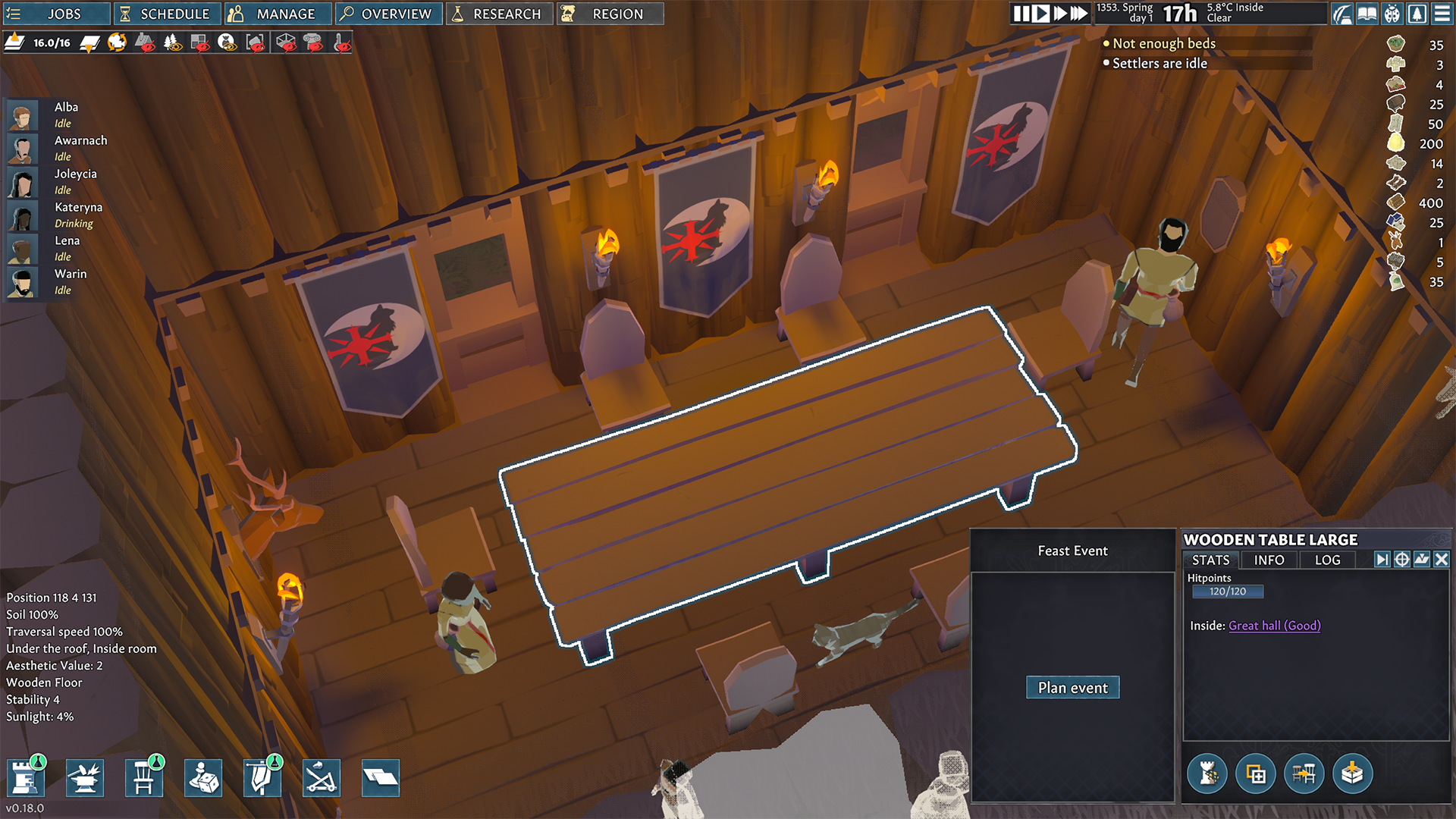
For Feasts, in the upcoming update, when you click on one of the tables in the room marked as a "Great Hall", the option "Plan event" will appear.
There, you'll be able to choose its participants, food and beverages they'll consume, roles (more on that in the upcoming MMTs) along with the event outcome. You can make a feast for your settlers, but you'll probably want to do it for merchants and other NPCs that will come to your settlement. This will help you boost your relationship with them and maybe influence better deals during the trade. Or you can go full dark mode and give them rotten meat and human meat thus poisoning them in the process and starting an ambush. But you do you.
This event can be scheduled so you can plan it upfront, but for the feast to happen, it needs to have more than 3 settlers involved in it. Once the feast starts, settlers will abandon their current jobs, go to the great hall and spend their time there eating and drinking. When the feast ends, you'll get a summary of the feast outcome - number of guests, food variety, the look of the room, mood outcome, impressions, etc. Those that were not on the feast may be bummed by missing it. You can schedule the next one immediately, but it might not be as effective. Ideally, for feasts to be thoroughly enjoyed, you'll want to space them out properly. Treasure those special moments. Something that repeats too frequently loses its magic a bit, right?
Sermons and Rituals are events where you’ll be able to solidify the faith of Oak Brethren/Restitution folks. But for that to happen, you’ll need people with different roles. More on that soon.
So where does this leave us? It opens the door for more events depending on the situations and participants. Over time we'll introduce stuff like Market day (trading celebration), Duel (fight between two participants), Funeral (honoring the dead the right way), Execution (self-explanatory), etc. Some of these will not clash with the regular event cooldown, but we'll do a deep dive for each event once we introduce them to the game.
Next time we'll talk about the new settlers' roles and how they tie to this feature and the other ones. See you in two weeks. Until then, stay medieval.
Greetings players! The newest patch (0.18.8) is now live on all platforms on the experimental branch. Please save your progress and restart your game client to update. You should be able to load normally and continue playing. If you have any problems, please let us know.
Bugs and Fixes
Fixed a lot of crash occurrences.
Quality of life improvements
Legacy camera behavior is turned off by default for the new players. Old players will still have to unlock Coyote time and all of the associated options with it by going into Options > Camera settings.
Camera visual indicator is changed to a clearer visual when the indicator is located behind an object.
Underwater terrain will keep the wet effects, but not the look that accompanied it (thus removing ripple effects on the lake bottom).
Known issues:
We are aware of many crashes players are experiencing due to the memory optimization fix and will continue looking into them first thing on Monday.
If settlers end up stuck, ignoring jobs (that are properly set and scheduled), and not behaving as intended, consider saving & reloading the game as there is a big chance that it may fix the issue.
Settlers will not choose the closest production building (if there are more of the same type), but the one that has a production set first in the global list of productions.
Settlers will not refuel torches if there is no floor/ground beneath them.
If your settlers are experiencing weird animations with some actions, be sure to turn off V-sync and cap the game's FPS in the game's options. Cap it to 60fps. If the issue persists, cap it at 30.
DISCLAIMERS: ⚠️ We decided to keep Dev version of the game on the experimental branch, and that means that a Dev log with red text will appear from time to time. This will help us get more info from your side when crashes and bug reports occur. ⚠️ Also, at the moment, the experimental and the main branch are very different. You will not be able to play saves from the experimental branch on the main one as the experimental has the new save system - please avoid doing this.
As always, use F10 and/or the experimental bug subforum for reporting experimental issues. Thank you!
Greetings players! The newest patch (0.18.7) is now live on all platforms on the experimental branch. Please save your progress and restart your game client to update. You should be able to load normally and continue playing. If you have any problems, please let us know.
Bugs and Fixes
Fixed several crash occurrences.
New camera navigation system
Some players found old camera movement jarring as the camera was tied to the ground level and once you reach different ground levels, the camera would jump accordingly and adjust. You can learn why this happened and how we tried to approach the solution in our last Medieval Monday Talk. It will give you insight into our development process, but also show how some problems might appear as easily solvable, when they are anything but. Anyways…
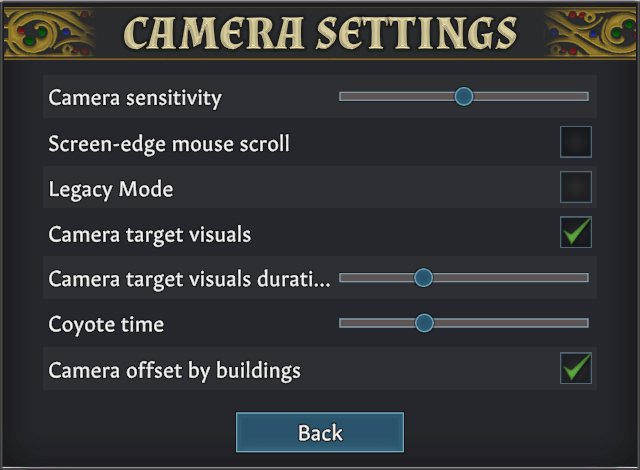
To “Unlock” this new camera system, go to the Options and select “Camera settings”. This will open another window that looks like this:
Camera sensitivity and Screen-edge mouse scroll are options from before and pretty self explanatory.
Legacy Mode represents the current (old) camera navigation mode. Turning that off will enable the rest of the options.
Camera target visuals toggles visuals that represent the camera’s target, the screen’s centre. These visuals will appear only while the camera is moving/zooming/orbiting.
Camera target visual duration represents the time that camera target visuals will linger on screen after the camera stops moving. The maximum length is 2 seconds combined with coyote time.
Coyote time represents the amount of time that the camera will remain in place before readjusting itself according to the terrain layout. If camera target visuals are enabled this is represented by a white line from the target visuals to the next layer the camera target will move to. The maximum length can be 3 seconds when the camera is not moving.
Camera offset by buildings represents the camera’s ability to take walls and floors into camera adjustment. Up until now the game’s camera was offset only by ground and water.
Let us know in the comment how the new camera feels. Hope you like it!
DISCLAIMERS: ⚠️ We decided to keep Dev version of the game on the experimental branch, and that means that a Dev log with red text will appear from time to time. This will help us get more info from your side when crashes and bug reports occur. ⚠️ Also, at the moment, the experimental and the main branch are very different. You will not be able to play saves from the experimental branch on the main one as the experimental has the new save system - please avoid doing this.
As always, use F10 and/or the experimental bug subforum for reporting experimental issues. Thank you!
Greetings players! The newest patch (0.18.6) is now live on all platforms on the experimental branch. Please save your progress and restart your game client to update. You should be able to load normally and continue playing. If you have any problems, please let us know.
Bugs and Fixes
Fixed several crash occurrences.
Fixed the issue where there was no animal present upon starting the new game. If you are playing these saves, new animals should appear over time.
Known issues:
We are aware of many crashes players are experiencing due to the memory optimization fix and will continue looking into them first thing on Monday.
If settlers end up stuck, ignoring jobs (that are properly set and scheduled), and not behaving as intended, consider saving & reloading the game as there is a big chance that it may fix the issue.
Settlers will not choose the closest production building (if there are more of the same type), but the one that has a production set first in the global list of productions.
Settlers will not refuel torches if there is no floor/ground beneath them.
If your settlers are experiencing weird animations with some actions, be sure to turn off V-sync and cap the game's FPS in the game's options. Cap it to 60fps. If the issue persists, cap it at 30.
DISCLAIMERS: ⚠️ We decided to keep Dev version of the game on the experimental branch, and that means that a Dev log with red text will appear from time to time. This will help us get more info from your side when crashes and bug reports occur. ⚠️ Also, at the moment, the experimental and the main branch are very different. You will not be able to play saves from the experimental branch on the main one as the experimental has the new save system - please avoid doing this.
As always, use F10 and/or the experimental bug subforum for reporting experimental issues. Thank you!
Greetings, medievalists! The newest patch (0.16.21) is now live on all platforms. Please save your progress and restart your game client to update. You should be able to load normally and continue playing. If you have any problems, please let us know.
Bugs and Fixes
Fixed the issue that caused animals and settlers to be stuck in water after formation of caravan or upon its return.
Fixed the issue where settlers would ignore fishing, even if it is reachable and properly prioritized.
Fixed the issue that caused resources to float in the air sometimes.
Fixed the issue where settlers would not produce gambeson armor in some cases.
Present frustrating issues:
Some of you reported an issue where settlers don’t want to tend to other settlers in certain situations. This is very hard to reproduce on our side and loading your reports solves the issue (as reloading the save fixes the issue). It would be very helpful if you notice any particular details on how to trigger this issue - do they ignore all of the settlers that require tending, is self tending working, did anything special happen before this issue appeared? Maybe settlers hunted something, maybe something was allowed/forbidden? Any repro steps on how to trigger the bug is greatly appreciated.
It seems that the situation where you try to build a soil voxel and it crumbles upon completed construction still happens. As with the issue above, it’s close to impossible to reproduce this issue on our side. We’re working on a potential memory fix that may, in turn, solve this issue and some other stuff. In the meantime, if you encounter this bug, please provide as much info/context as possible. Quitting the game and starting the save will solve the issue.
Known issues:
Snow appears on roofs/stairs/slopes even past winter season. This is not that simple an issue to solve but we are aware of its annoyance.
Settlers will not choose the closest production building (if there are more of the same type), but the one that has a production set first in the global list of productions.
Some issues that are reported via F10, but are easily solvable:
We get some reports that already have a solution, but since we can’t reply to your F10 report, the best we can do is write those solutions here and hope that players that are experiencing those issues can see this:
All of the selections in-game are offset. Can this be fixed? This is a resolution issue that is easily fixable. Go to the game's Options > Graphics, change to another resolution, and apply it. After that, revert to the original resolution that you wanted to play with, and you should be good to go.
It seems that the game's color scheme is broken. How did this happen? This is not a bug. You probably pressed the “Heatmap Overlay” button by accident. It’s located in the upper left corner of the screen and looks like this: More info about this button and what it all means can be found here.
My game graphics are corrupted. I am seeing purple polygons here and there and the visuals are obviously wrong. Is this the same issue? This issue is caused sometimes by Unity engine and how it parses visuals during the game updates. Go here:
delete all of the files there and start the game. This will not delete your save files.
My game is stuck at the game’s startup load screen. Can something be done? One of two issues might be responsible for this:
Your graphic card drivers are out of date. Please check for their latest version.
The same folder as the issue above. Go here: %userprofile%\AppData\LocalLow\Unity\Foxy Voxel_Going Medieval\ delete all of the files there and start the game. This will not delete your save files.
I am experiencing a connection error when starting the game and can't continue to play it. What is happening? This is most likely due to the use of unofficial mods. Fear not, it's easily fixable: 1. Go to Steam Library > Right-click on Going Medieval > Properties > Local Files > Browse
This should open a new folder and you should delete all of the files located in there. After you do that:
2. Go to Steam Library > Right-click on Going Medieval > Properties > Local Files > Verify integrity...
Wait for it to finish and start the game. Don't worry, this will not delete your save files. If this doesn't work, try deleting Unity folder mentioned above.
Animation is not synced with settler’s action. For example, a settler will walk while praying. Why? The ever present known issue of buggy animations is linked to Unity's Animator system tied to certain hardware combinations. We'll work on fixing this as we get closer to the official release. For now, be sure to turn off V-sync and cap the game's FPS in the game's options. Cap it to 60fps. If the issue persists, cap it at 30. This usually solves the issue but it is not a solution that works for all, unfortunately. If you experience the problem even after that, we suggest that you ask for a refund (if possible) and have patience.
I don't have audio in the game, but everything is turned on. Is this a bug? It seems that some of our engine changes clash with your hardware. If you are willing to experiment - please try disabling all audio devices, uninstall the audio driver, and then run a newer driver setup (downloaded from your motherboard drivers website preferably).
Now, what worked for some players is - one disabled audio drivers of the monitors (that had audio output). Other disabled 'BlasterX Acoustic Engine'. By simply disabling it on the 'Device Manager' page under 'Sound, video and game controllers' and then relaunching the game; they got the sound back.
The best way to solve this is with a bit of trial and error.
Here is what they wrote:
"Disabled the drivers one by one. Then launch the game and check for audio I initially thought it was my Nvidia drivers that caused the issue. I disabled both the HD Audio Device and NVIDIA virtual audio The sound didn't come out. Then I disabled Nvidia and enabled HD Audio Device. No sound. Then I disabled that and re-enabled back Nvidia. Sound works."
I am having sound and music but it stutters/disappears when I change the game’s speed. Is this the same issue? Honestly, we’re not sure. Only recently did one of our devs experience the same issue and we are actively looking into it to see if it’s a hardware thing, a code thing or something third. We’ll let you know when we have something.
I'm experiencing major framerate drops/performance issues despite having recommended system requirements. Can this be improved? This could be a real bug, but if it's not - you can try a couple of things to solve this issue. In the game's Options > Graphics: - Turn off V-sync - Limit Framerate cap to 60 or - Limit Framerate cap to 30 This should provide a better gameplay experience for you.
All of these technical issues (and more) can be found in our technical FAQ here.
The reason we are writing all of these notes is because, by the looks of it, the water update has been patched and is stable. This means that the whole team is working on the upcoming updates. This also means that you can expect new Medieval Monday Talks in the upcoming weeks. Just give us some time to see how to approach all of that and what to write about.
In the meantime, do continue reporting issues via F10, Steam subforums or our Discord server. Our support (and the support of our wonderful community) is always there trying to make sure that you have the best game experience possible.
DISCLAIMER: The experimental and the main branch have the same version of the game. However, on the experimental branch, we decided to keep the Dev version of the game, and that means that a Dev log with red text will appear from time to time. This will help us get more info from your side when crashes and bug reports occur. If you are annoyed by this, please switch to the main branch to experience the game without the red text.
Hello, everyone. The newest hotfix (0.16.19) is now live on all platforms. Please save your progress and restart your game client to update. You should be able to load normally and continue playing. If you have any problems, please let us know.
Bugs and Fixes
Fixed crash occurrence caused by usage of allow/forbid tool.
Fixed the issue where settlers would sometimes tend to animals that they were hunting. Pretty nice of them, but not intended behavior.
Fixed the issue that prevented the “Forbid” order from working properly when selecting multiple buildings.
Fixed the bug that detected some buildings as unreachable, when in reality they were just forbidden.
Fixed some issues with voxel reachability, where settlers would ignore the mining of voxels if that voxel had a floor on it before.
Known issues:
Settlers/animals still get stuck upon caravan return or during caravan formation and going out. Save & Load fixes it.
Settlers will not choose the closest production building (if there are more of the same type), but the one that has a production set first in the global list of productions.
If your settlers are experiencing weird animations with some actions, be sure to turn off V-sync and cap the game's FPS in the game's options. Cap it to 60fps. If the issue persists, cap it at 30.
DISCLAIMER: The experimental and the main branch have the same version of the game. However, on the experimental branch, we decided to keep the Dev version of the game, and that means that a Dev log with red text will appear from time to time. This will help us get more info from your side when crashes and bug reports occur. If you are annoyed by this, please switch to the main branch to experience the game without the red text.
Hotfix Notes (0.16.17)
Hello, everyone. The newest hotfix (0.16.17) is now live on all platforms. Please save your progress and restart your game client to update. You should be able to load normally and continue playing. If you have any problems, please let us know.
Bugs and Fixes
Fixed several crash occurrences.
Fixed the issue that caused the underground temperature to be 0 degrees Celsius/Fahrenheit in certain areas. It would stay 0 even when there was no reason to be that way.
Known issues:
Settlers/animals still get stuck upon caravan return or during the forming caravan and going out. Save & Load fixes it.
Settlers will not choose the closest production building (if there are more of the same type), but the one that has a production set first in the global list of productions.
If your settlers are experiencing weird animations with some actions, be sure to turn off V-sync and cap the game's FPS in the game's options. Cap it to 60fps. If the issue persists, cap it at 30.
DISCLAIMER: The experimental and the main branch have the same version of the game. However, on the experimental branch, we decided to keep the Dev version of the game, and that means that a Dev log with red text will appear from time to time. This will help us get more info from your side when crashes and bug reports occur. If you are annoyed by this, please switch to the main branch to experience the game without the red text.
Hotfix Notes (0.16.16)
Hello, everyone. The newest hotfix (0.16.16) is now live on all platforms. Please save your progress and restart your game client to update. You should be able to load normally and continue playing. If you have any problems, please let us know.
Bugs and Fixes
Fixed crash occurrence caused by usage of allow/forbid tool.
Known issues:
Settlers/animals still get stuck upon caravan return or during the forming caravan and going out. Save & Load fixes it.
Settlers will not choose the closest production building (if there are more of the same type), but the one that has a production set first in the global list of productions.
If your settlers are experiencing weird animations with some actions, be sure to turn off V-sync and cap the game's FPS in the game's options. Cap it to 60fps. If the issue persists, cap it at 30.
DISCLAIMER: The experimental and the main branch have the same version of the game. However, on the experimental branch, we decided to keep Dev version of the game, and that means that a Dev log with red text will appear from time to time. This will help us get more info from your side when crashes and bug reports occur. If you are annoyed by this, please switch to the main branch to experience the game without the red text.
Patch Notes (0.16.15)
Hello, everyone. The newest patch (0.16.15) is now live on all platforms. Please save your progress and restart your game client to update. You should be able to load normally and continue playing. If you have any problems, please let us know.
Bugs and Fixes
Fixed several crash occurrences.
Fixed some lag/fps drop issues.
Fixed the issue where settlers would be able to traverse stairs upwards and downwards diagonally and break pathfinding in the process.
Fixed the issue that caused the appearance of very high/low temperature values across the whole map on some saves.
Fixed the issue where the whole river would disappear if you tried to split it in two parts.
Quality of life improvements
Piles that are located under two (or more) layers of water may bug out the AI, but now if a settler tries to get them, they’ll forbid themselves.
Forbidding blueprints is in the game. Players can pause a construction by forbidding it.
“Forbid” order tool is updated to apply only to blueprints or building phases or just piles, like before.
Treated wounds time has been readjusted so it lasts 24h. Before it was 920 in-game minutes.
Known issues:
Settlers/animals still get stuck upon caravan return or during the forming caravan and going out. Save & Load fixes it.
Settlers will not choose the closest production building (if there are more of the same type), but the one that has a production set first in the global list of productions.
If your settlers are experiencing weird animations with some actions, be sure to turn off V-sync and cap the game's FPS in the game's options. Cap it to 60fps. If the issue persists, cap it at 30.
DISCLAIMER: The experimental and the main branch have the same version of the game. However, on the experimental branch, we decided to keep Dev version of the game, and that means that a Dev log with red text will appear from time to time. This will help us get more info from your side when crashes and bug reports occur. If you are annoyed by this, please switch to the main branch to experience the game without the red text.
Patch Notes (0.16.14)
Hello, everyone. The newest patch (0.16.14) is now live on all platforms. Please save your progress and restart your game client to update. You should be able to load normally and continue playing. If you have any problems, please let us know.
Bugs and Fixes
Fixed several crash occurrences.
Fixed the issue where the room’s impressiveness would be higher if the room didn’t have floors.
Fixed the issue where a settler would drop a meal from a pouch in order to carry fish that they caught. This issue occurred even on other types of productions.
Fixed the issue that caused the appearance of motion blur on hover voxels, which in turn, created weird blurry spots whenever the mouse was quickly moved.
Fixed the issue where refilling empty braziers would not reset emission range and thus appearing as the brazier didn’t emit the heat.
Fixed the issue where the settler would bug out if they tried to refuel brazier in some cases, despite proper resources, schedule and resources available.
Fixed the issue that prevented “Deconstruction” shortcut (X) from working on stockpiles and crops.
Fixed the issue with where the water behaved weird - it wouldn’t be removed when blocked, it would appear as flowing despite not having a clear source, etc.
Quality of life improvements
Water has aesthetic value now.
Water’s temperature changes throughout the year, from season to season. It will be coldest during winter and spring.
Fixed a UX complaint from players who observed that the settler panel scrolled too slowly and that it would jump from scroll to zoom camera all the time.
Known issues
Settlers/animals still get stuck upon caravan return or during the forming caravan and going out. Save & Load fixes it.
If you have a wall in water and you deconstruct that wall, the resulting pile will stay in that place. However, if another layer of water goes over the existing (water) one, this will cause settlers to bug out and be stuck in the construction/hauling/production loop since they’ll try to acquire the pile but fail all the time. Such piles should be forbidden to avoid this.
Settlers will not choose the closest production building (if there are more of the same type), but the one that has a production set first in the global list of productions.
If your settlers are experiencing weird animations with some actions, be sure to turn off V-sync and cap the game's FPS in the game's options. Cap it to 60fps. If the issue persists, cap it at 30.
DISCLAIMER: The experimental and the main branch have the same version of the game. However, on the experimental branch, we decided to keep Dev version of the game, and that means that a Dev log with red text will appear from time to time. This will help us get more info from your side when crashes and bug reports occur. If you are annoyed by this, please switch to the main branch to experience the game without the red text.