If you have been experiencing suspiciously low framerates in GROUND BRANCH, these findings might help you.
Razer Cortex
A lot of players have been reporting massive FPS drops after a recent Razer Cortex update. If you use that application, try disabling it — more specifically the CPU booster, as it may be forcing GB to use a single core.
The Steam Overlay is another common FPS offender, so try turning it off (default shortcut: Shift + Tab) to possibly get a small boost.
You can also turn off the overlay per game — more information here: https://help.steampowered.com/en/faqs/view/3978-072C-18DF-FBF9
I still have poor performance!
If these fixes don't apply to you and/or you're unhappy with performance, keep in mind GROUND BRANCH will be receiving optimizations in the future, as well as NVIDIA DLSS and AMD FSR options.
🆘 Need help with either of these fixes? Get support from our community in the forums or our Discord!
💡 Have you experienced performance gains in GB by taking any actions not listed here? Share them in the comments!
Intel Update #010: First V1033 Previews + SALE: 40% OFF
What's up, everyone?
It's been a hot minute since our last Intel Update, and although we have been patching V1032 for a while now, work on upcoming release V1033 has been ongoing for several months behind the curtains. Before we start teasing the goods, however, we need to talk about a couple things:
Summer Sale: GROUND BRANCH is 40% OFF until July 7th! 🔥
That's right! GROUND BRANCH is currently a whole 40% OFF, which we think is a pretty dang good deal and our highest discount yet.
You can grab your discount copy directly on Steam, or you can…
❤️ CONSIDER BUYING DIRECTLY FROM OUR STORE
Buying the game from our Store ensures that we get the full cut of the purchase, as opposed to Valve taking 30%.
💰 Use code GBSUMMER at the checkout to apply the 40% discount.
Please note the GB Store has no regional pricing — it can only use the base USD price tag!
You have exactly 2 weeks (until July 7th) to think about it or get that one friend (you know the one) to pull the trigger on this fantastic opportunity. Let's get the word out and make sure to welcome the new players in!
We're hiring: VFX Artist wanted for particle effects
This one is for any industry pros that might be lurking: BlackFoot Studios is looking for a VFX Artist to create awesome, realistic particle effects in GROUND BRANCH. For more details, click here.
Also, the Senior Gameplay Engineer/Developer position is still open. So if you know any Unreal Engine & C++ wizards out there (or happen to be one yourself), get in touch! Full job details right here.
So how's V1033 coming along?
That's what most of you are here for, so let's move on to those sneak peeks we promised. Here are some of the exciting things currently under development.
New sky and weather system
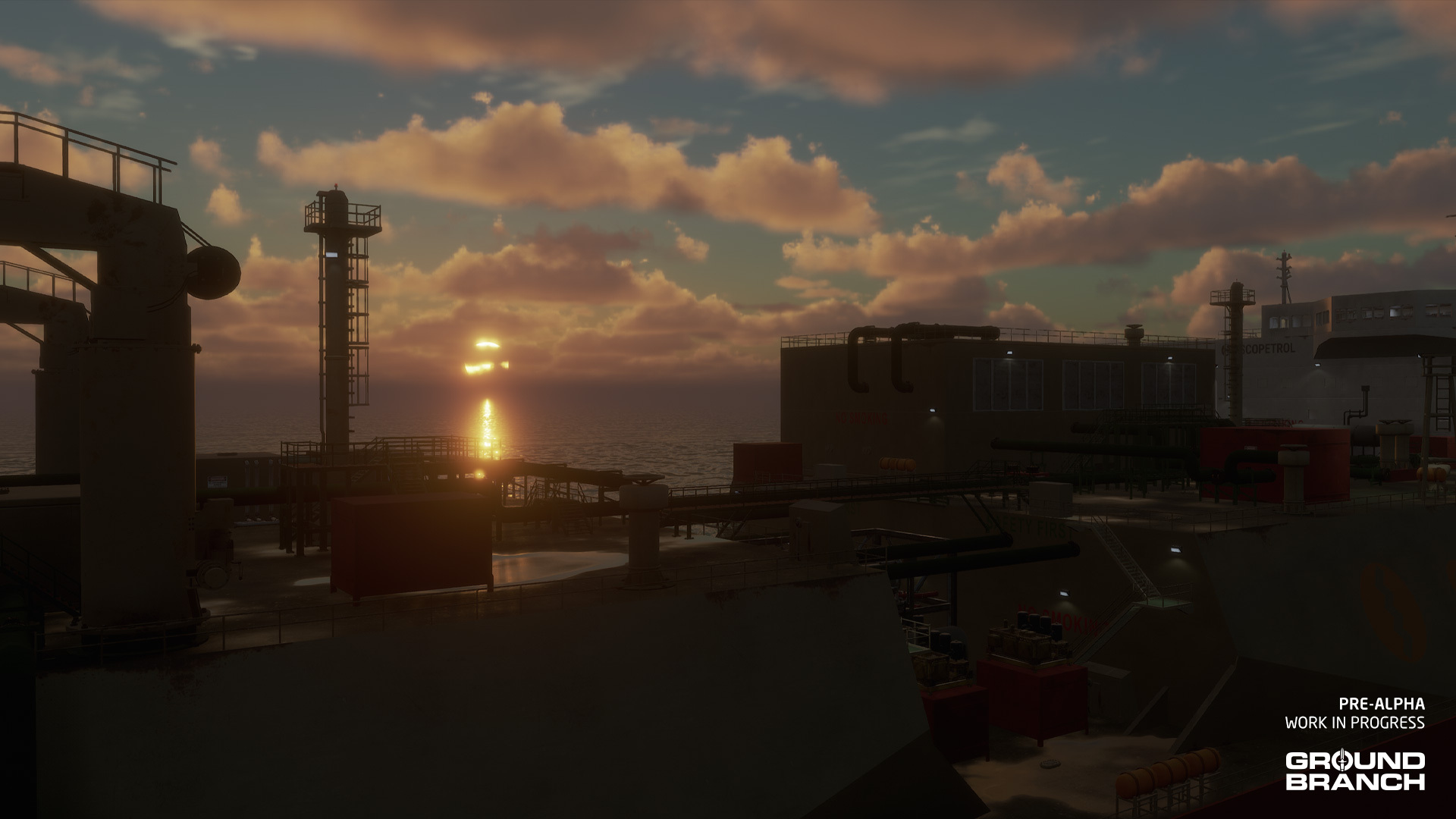
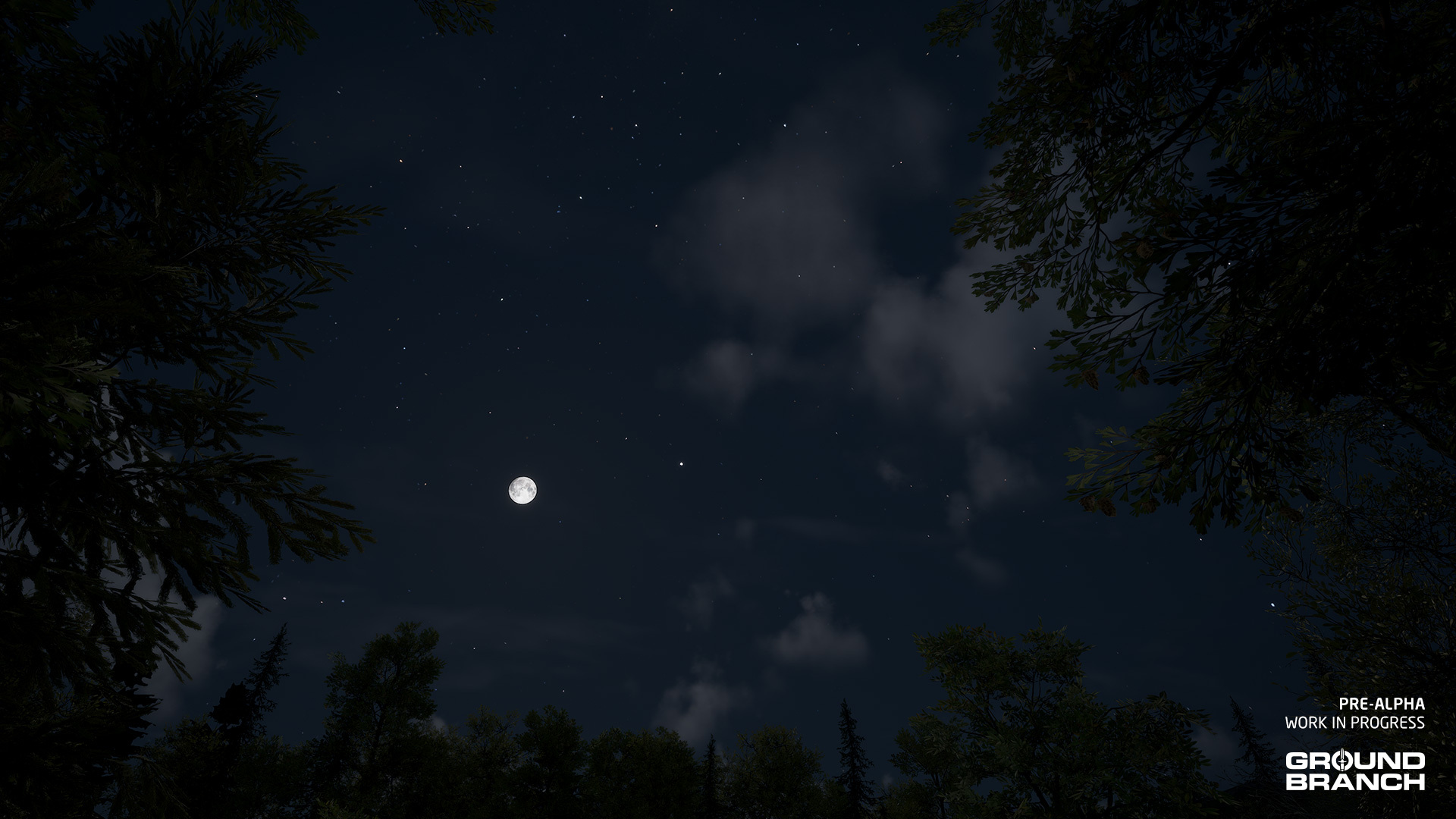
GROUND BRANCH V1033 is being setup with a new system that allows for dynamic sky and weather effects, which means clouds, the moon and stars will be making a return.
You like this sky? Kinda makes you feel like operating. I kinda feel like operating right now *tears away civilian clothes*
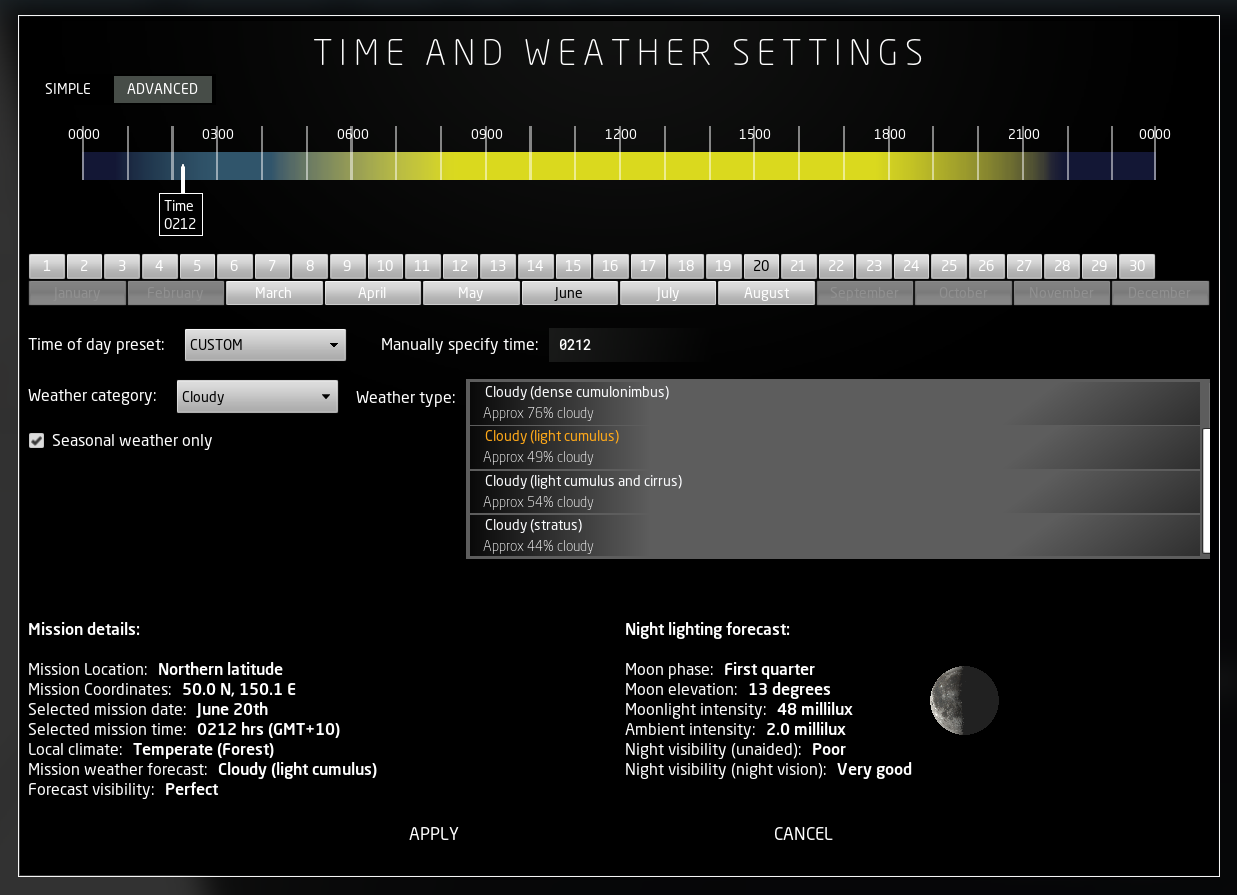
We're still assessing performance, but if it proves to work well, we may soon also be able to choose not just the time of day, but also whether the sky is clear, cloudy or overcast; whether there's a moon out at night or not; and even if it's rainy or foggy. The whole system is also being rigged up to inform the player of lighting and visibility conditions, as well as to allow a specific mission date to be set in order to emulate the real-life weather conditions of a certain area (where the map is set) at a given time.
This early prototype for the more advanced settings should give you an idea of the depth of the new system:
Although we are not yet sure how many of these options will be available to players (at least initially) nor exactly how it will all be displayed, the back-end to support it is already in place. Just keep in mind that it's early days, and if the plugin's performance hit during regular gameplay is too big, then we might need to pull it until we can make it all play nice.
Updated night vision effects + incoming GPNVG-18
One of the most requested items in GROUND BRANCH history — the famous (and sometimes infamous, particularly if you ask a GB dev) GPNVG-18 "quad NODs" panoramic night vision goggles — is finally making its way into the game, along with a number of enhancements to the overall night vision and IR laser effects.
Among the improvements, you may notice how the goggles take up a larger portion of the screen. Instead of simply expanding the NVG overlay mask, which would grant players an unrealistically wide field of view, this was done by switching the FOV (that is, by "zooming in") in order to make the realistic field of view display at a larger size. This effect will likely be made optional as it might disorient some players.
Have a quick demo video (remember it's all WIP!) from Fatmarrow to see it in action:
As you may be able to spot in the video: the noise speckle effect has being reworked; mask movement and lens shading have been added to give the camera a more natural feel; and the goggles now appear to bounce when running/sprinting (this will definitely be tweaked/toned down). The goggles are also using a white phosphor overlay, which will be available on the dual-tube NVG too (as will green be available on the GPNVG-18), and the IR laser has also received an update.
What do you think of these updates so far? Let us know in the comments!
Patches, but not the kind we had a bunch of for V1032
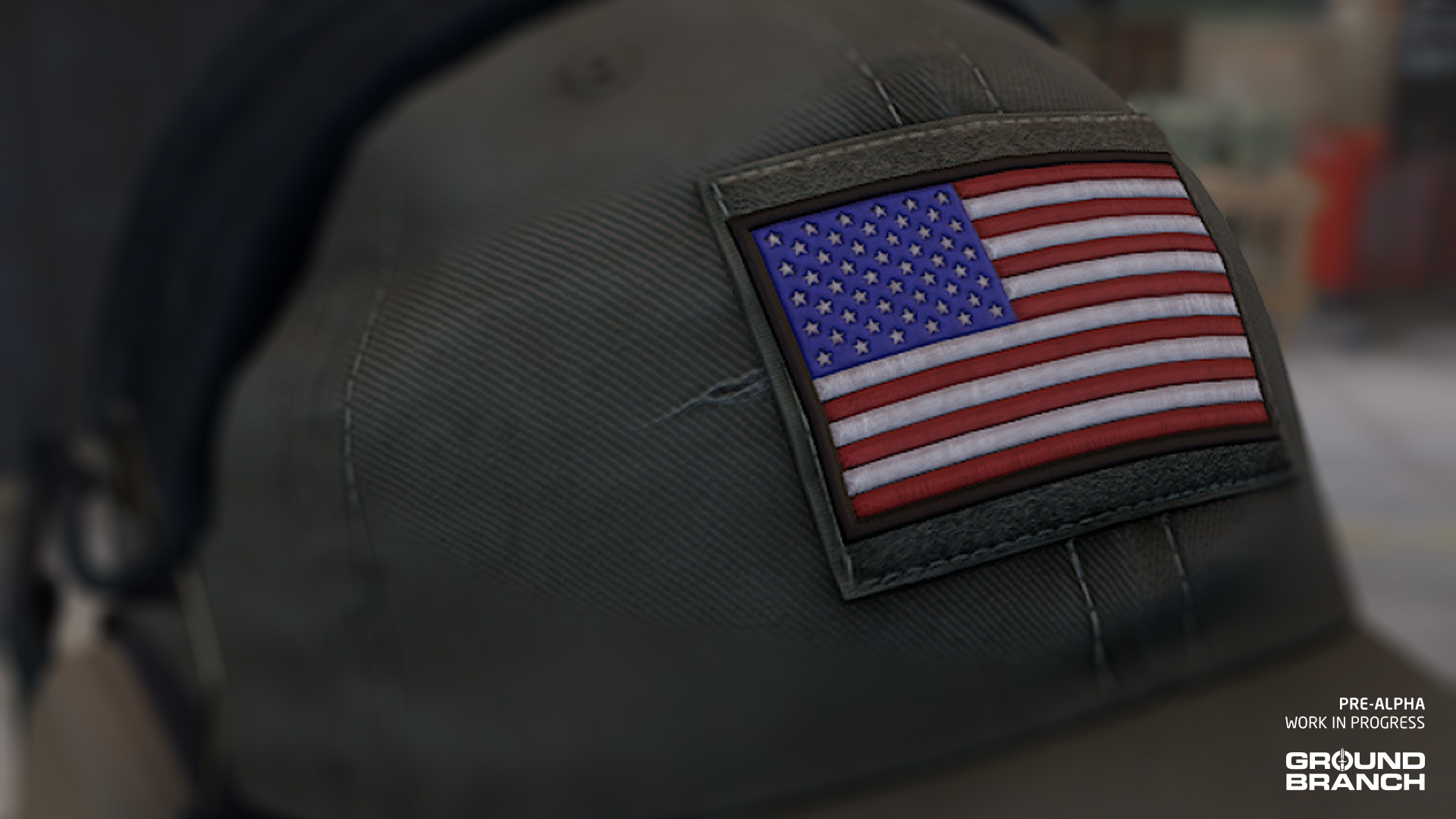
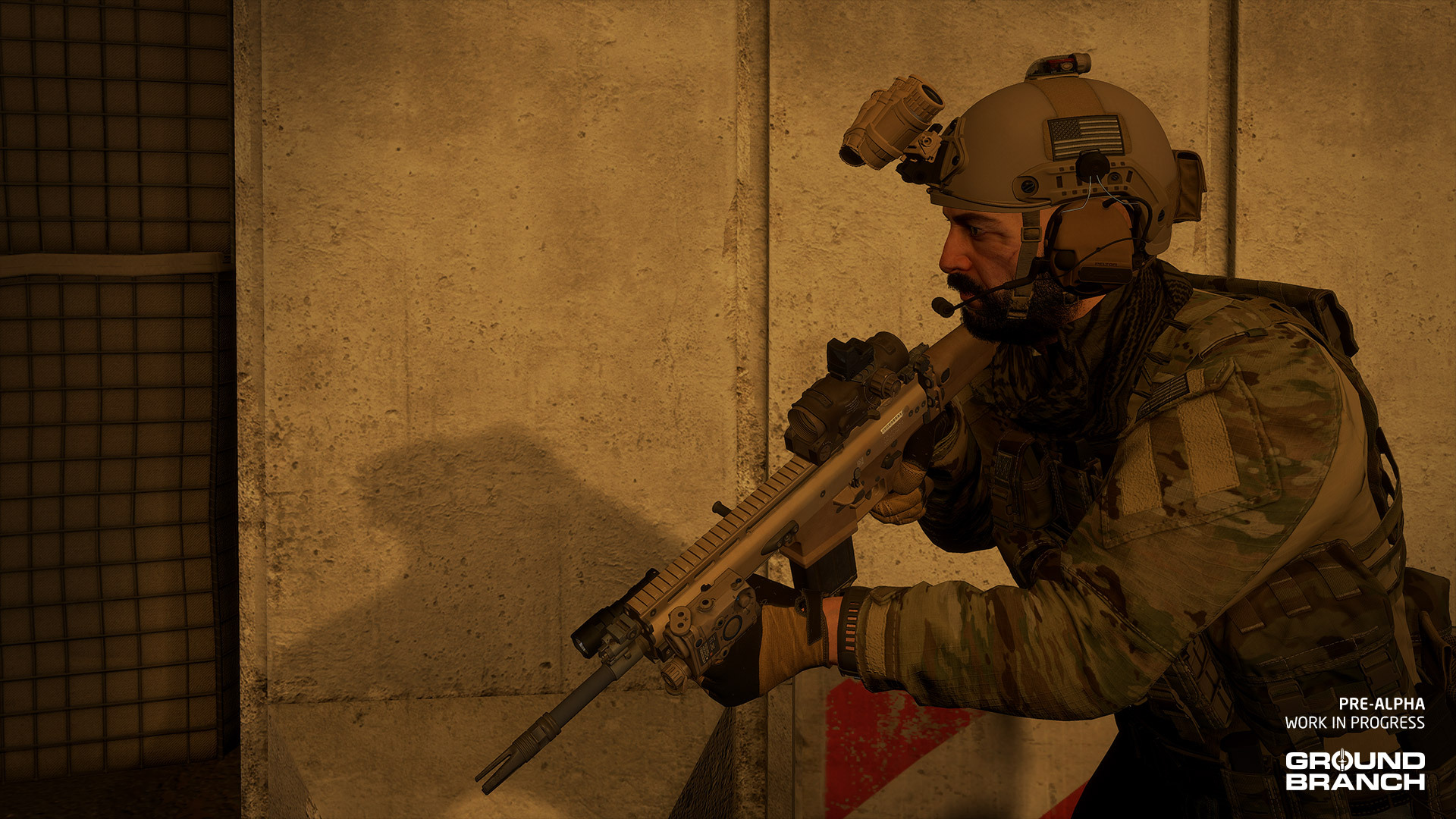
We're talking velcro patches that you can place on your character's shoulders, headgear and (eventually) vests. Like so:
Full-color US flag patch on ball cap
Patches will be making a comeback from the pre-Early Access days, and they should not only make customization more fun and authentic, but also start making IFF a little easier.
Another cool feature of patches will be a tint selection: in addition to the full-color version of each patch, 3 types of subdued tints — tan, green and grayscale — will also be available for those who don't want no flashy colors spoiling their drip. Or their camo, sure.
Patches may not be the only new stuff in this image; note the subdued (grayscale) US flag patch on the helmet and left shoulder
Weapons
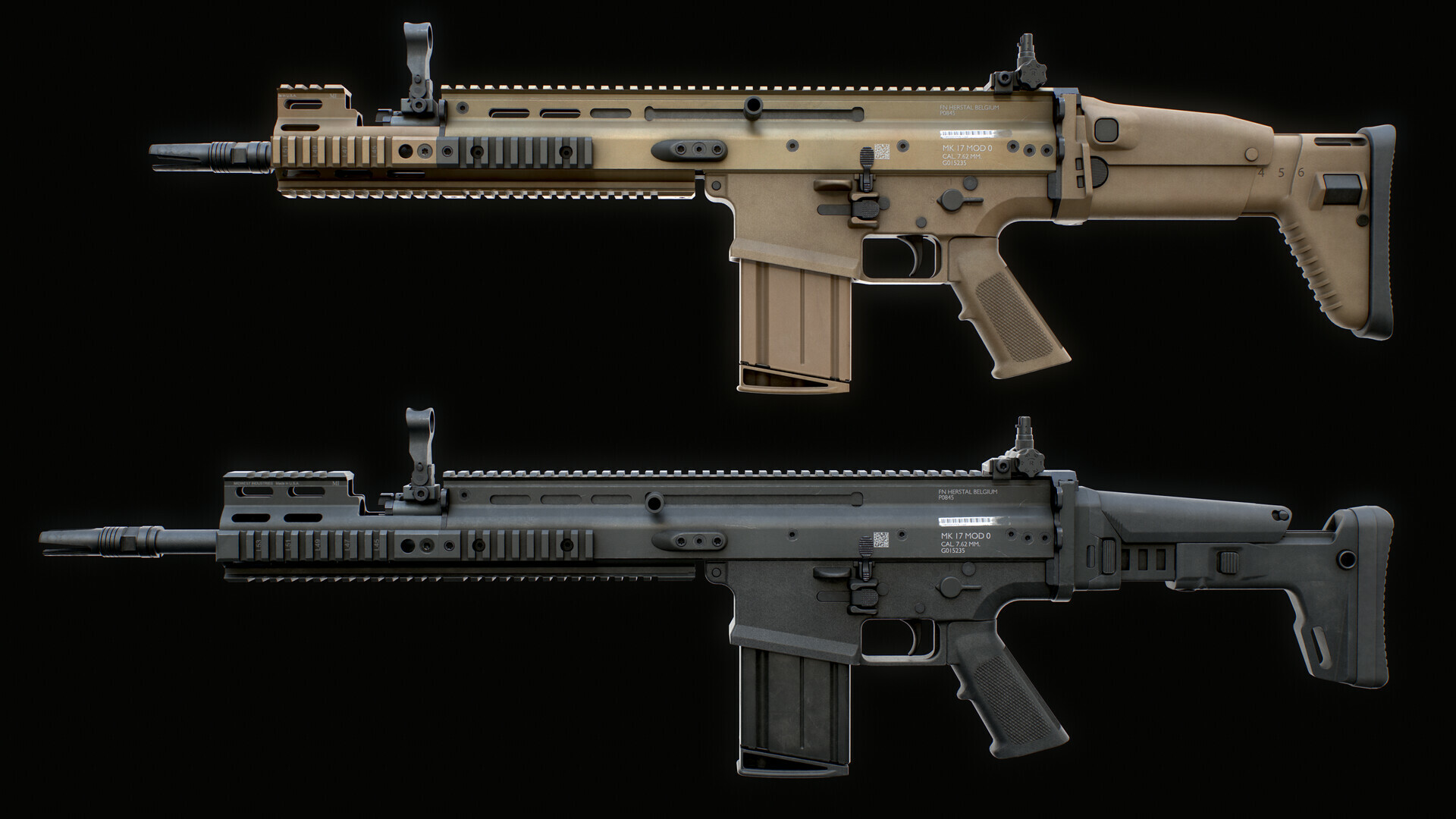
You have probably already spotted the MK17 SCAR-H in one of the screenshots above, so that cat is out of the bag. Modeled by the talented Cody Cudmore (aka ParallaxGameStudios), the MK17 will initially come in two versions: "CQC" (with the shorter 13-inch barrel) and "DMR" (with the standard 16-inch barrel and Midwest Industries handguard rail extension).
Cody has modelled several extra parts, however, that will be available when the ability to swap stocks, handguards and barrels is implemented. You can see most of the parts (along with some beautiful renders of the new MK17) in his ArtStation page.
Other upcoming weapon updates
Several of Cody's models are being continually upgraded, so expect remasters of various attachments (including the AN/PEQ-15 and optics like the PRO, RMR, AccuPower and more) to have made their way into the game by the time V1033 hits.
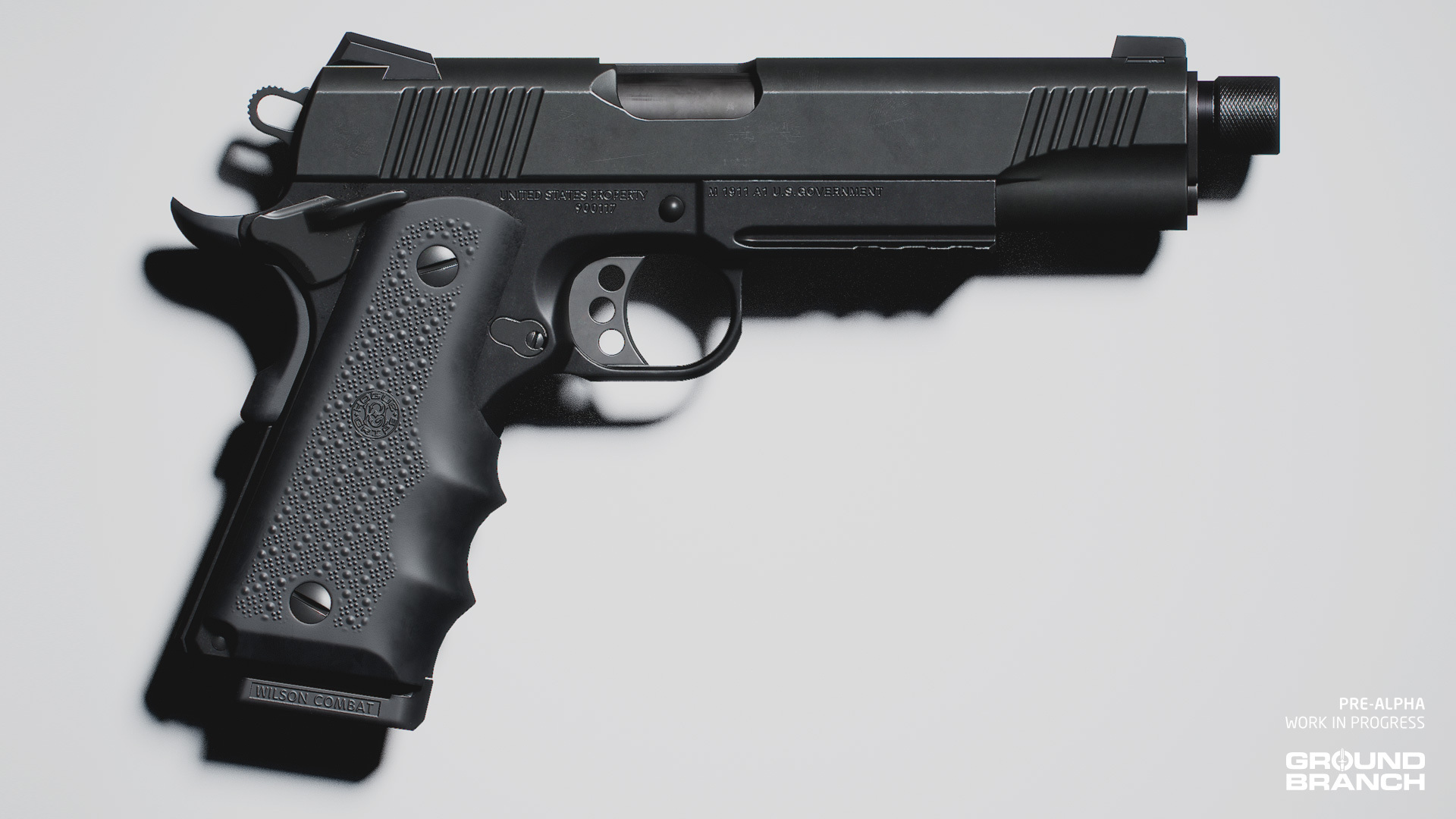
Another new asset you may have spotted earlier is the new M1911A1 by Bakr Asaad aka Raider3D:
This modernized M1911A1 features a Picatinny rail for lights and lasers and a threaded barrel for suppressors, as well as 8-round and 10-round magazines. Aesthetically, it combines elements of various iconic 1911-style pistols used by American SOF over the last couple decades, retaining much of its classic look.
The update will also include plenty of AK-74 and AK-105 platforms (both with and without Zenitco parts), new SVDs, a PMM pistol, the suppressor for the MK46 machine gun… But hang in there, we'll be unveiling more of these in the future.
Characters
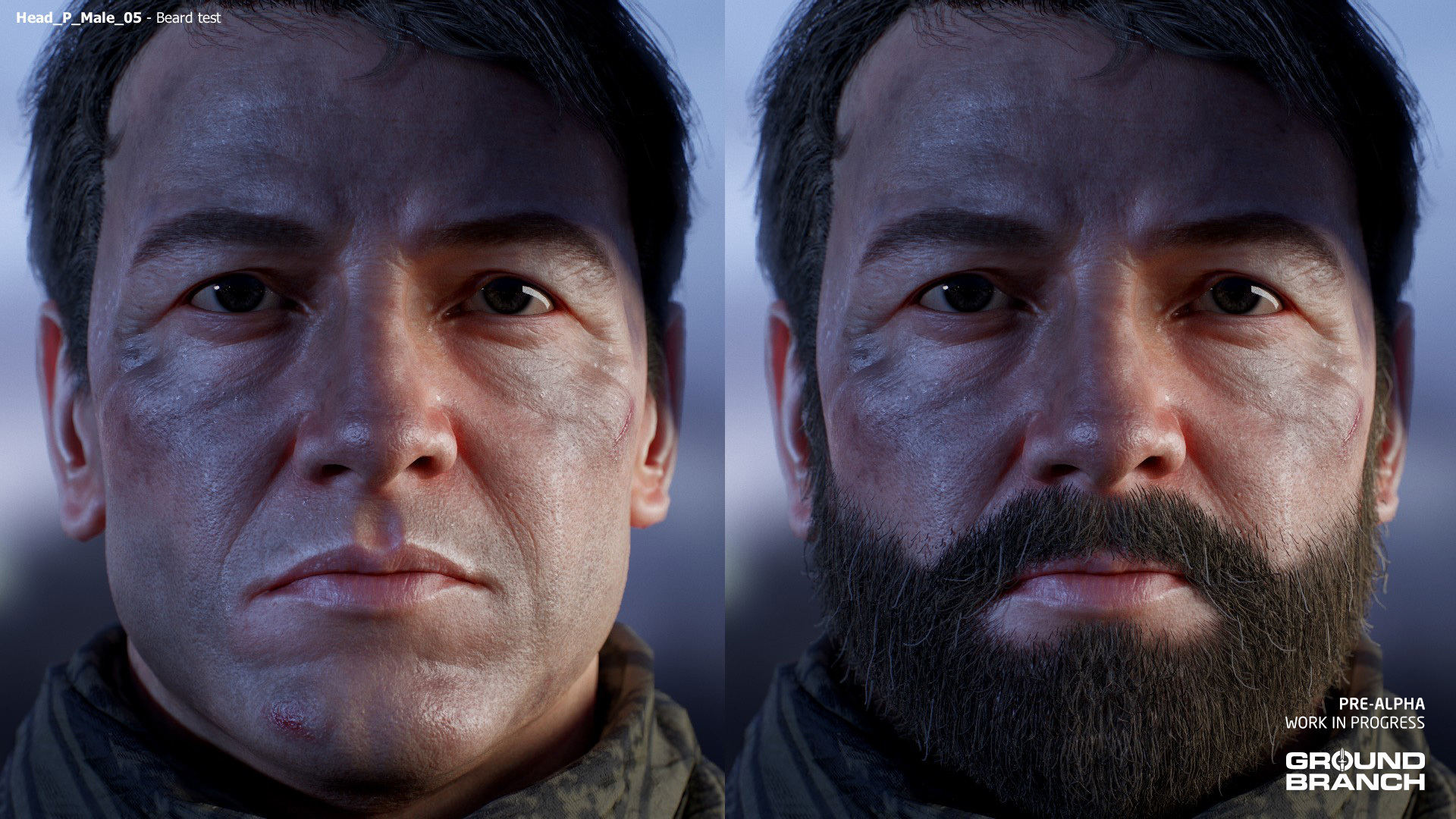
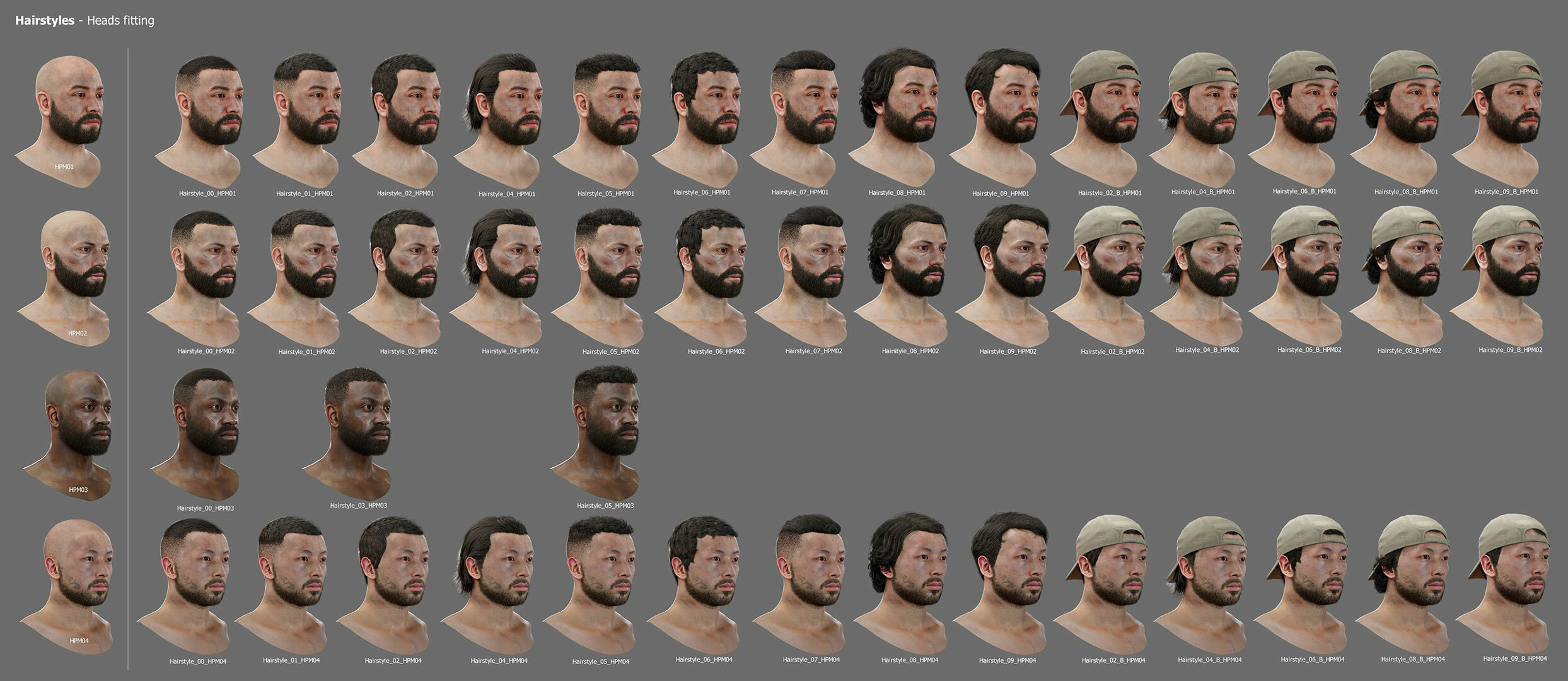
As those spoilery screenshots earlier showed, character assets will be getting some new additions as well. Namely, we'll be adding a new character head, and beards will finally make their comeback. That's not all, but since we're not sure at this time just how much will make it to V1033, we kindly request that all readers exercise caution with their hype levels.
Let's take a look:
Male 05 render, with and without beard
Hairstyles fit for each character, including headwear versions of the longer styles (to reduce clipping)
Hair color selection may not make it to V1033, but the assets have all been created to allow it once we get the functionality in.
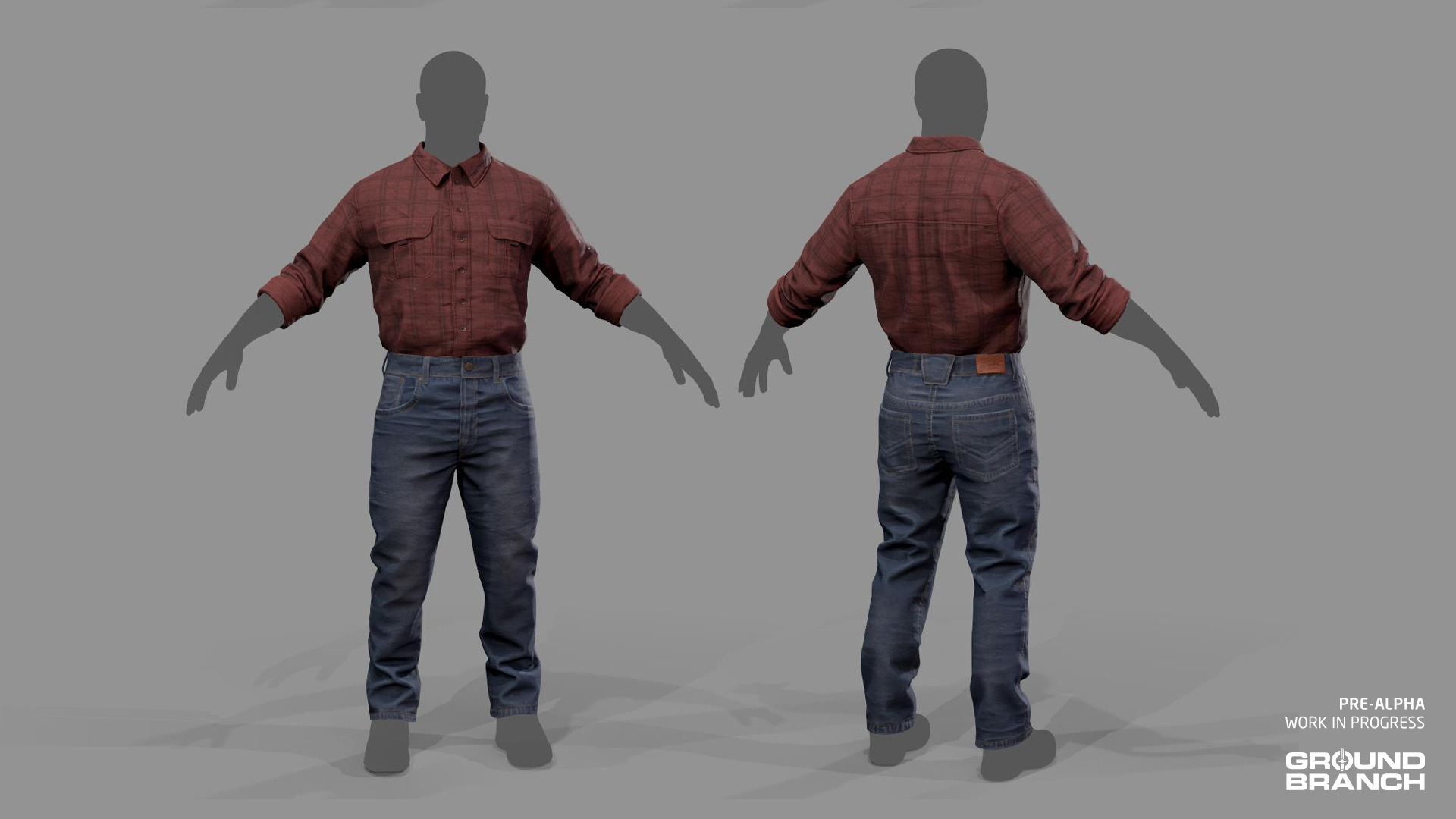
Lastly for the character art department, another commonly requested item since V1032 has been tucked-in tops. Pau Peñalver is making the adjustments, and we'll see how they end up in the game as far as selection goes.
Some shirts just look a little off when untucked, so we're working on tucked-in versions
Audio and animations
Among other things that we'll be discussing in a later update, Mikson and Mike have been busy getting the new weapons to sound and move nicely, respectively.
Mik has also been working on environment-specific "tails", which refers to how the gunshot sounds reverberate differently depending on the type of environment. So in addition to sounding different depending on whether you're outdoors, in a small room or a larger room, shots in V1033 will have distinctive tails for urban, marine and generic outdoors, with the possibility of a woodland-area tail in the future too. Here's a little demo:
New unsuppressed gunshot SFX for the MPX, 5.45 mm AK platforms and other weapons will also be in the update.
Other developments
This is it for today's Intel Update, but before we sign off: we are also working on AI features, modding, map updates, a new map and game modes for V1033 that we'll be showcasing at a later date.
Another small patch for V1032 is out — and unless a game-breaking issue comes up, we're officially moving on to work exclusively on future release V1033, which we hope to start showcasing soon!
Here's the list of fixes and changes:
Fixed a couple of potential crashes
Fixed untextured door debris (from grenades and breaching charges)
Fixed issues relating to item pick-ups between multiple clients[
Fixed Rangefinder crash due to it getting into a weird back/forth infinite loop when aimed at characters
Several under-the-hood changes to better support the fixes above
1032.2 Hotfix #2
We have released another hotfix for the main install of Ground Branch as we try to take care of some annoying and game breaking issues.
Main items being attempts to squash the looping firing sound bug and various issues with attachments and iron sights. There will be no blog post, so here are the details...
- various attempted fixes of lingering issues with looping sounds/particle systems
- changed weapon validation to remove an iron sight blocked by another non-iron sight (or its parent adapter) from validation check (any remaining iron sights will be ones meant to be functional and non-cosmetic / overriding)
- updated physics assets on firearms with built-in front sights posts to ensure appropriate rear sight can find them (note: FN FAL Tactical front sight post is so low it, BUIS' won't find it)
- updated no sight post message to mention rear sight may just be too high to find matching front sight post
- cleaned up front sight post physics mesh to allow better sight placement (affects FN Tactical, M16, M4A1 and M4 FSP)
⚠️ Not doing so may cause various asset and input issues in your game.
Patch V1032.2 is now available!
This is expected to be the last patch for V1032, after which — if nothing game-breaking comes up — we will be fully shifting to work on the V1033 release.
Here's the full change list with all of the fixes and tweaks:
DevTest changes
If you have played the latest DevTest build (shared about a week ago with our Discord community), these changes will not be new for you:
Updated stride length calculation to fix "dip" when moving
Big restructuring of inventory item system (in particular replication) with the aim of fixing a wide range of online kit bugs
Lots of changes behind the scenes as a consequence of the above
Miscellaneous bug fixes identified during the course of the restructuring
Dragging-and-dropping attachments will now copy the skin for the attaching item from whatever you are dragging it onto, if possible
Updated inventory bar to equip a rifle on single press if hands are empty and there is a rifle on left/right shoulder, but not slung from chest
Updated platform system to make sure a single dump pouch is added to the players inventory (attaches to belt or platform, whichever is found first)
Made sure newly spawned mag/round for AI is added to their inventory
Fixed right elbow while sprinting with tablet/grenade
Fixed skin not being applied when selecting item without customizing it
Fixed magnifier having no sight picture when swapping from offset sight back to it
Fixed zoom in/out input staying active even when not looking down sightline with magnifier
Restructured night vision handling (local and spectator)
Tablet (map) now fills screen fully when equipped — the camera automatically adjusts and zooms in on it
Small update to ladder handling code so ladders should work a bit better
Server Browser now obscures passwords in the text input dialog
Fixed item not being brought up upon entering play unless it was already equipped in the Ready Room prior to leaving it
Tweaked position of display mag info notifier in mag check widget
Fixed iron sights validity check
Fixed issues related to the input sensitivity value not being set back to zero
Fixed cheap wooden doors on Compound having no collision
Post-DevTest changes
This is the list of changes made after DevTest was released, based on reports and feedback:
G33 Magnifier collision fixed to allow flipping up/down when in use or when not ADS
The magnifier is now also flipped up in the weapon customization screen to make it more intuitive to interface with other attachments
Updated weapon attachment placement to allow shape components to be used as well as static or skeletal meshes
Updated tan G33 to use the correct skin
Hopefully fixed issue with server details going out of scope
Fixed (new) issue with trigger not firing correctly and not being able to shoot when crouched
Updated platform to add/remove/reattach dump pouch as required
Changed iron sights handling to deactivate all front sight posts by default and do some general fixes
Corrected box collision used on some dropped mags
Fixed PIP scopes not having screen space ambient occlusion (SSAO) and screen space reflections (SSR)
Set all exterior lights in City to only be on at night (was causing slowdown at dawn/dusk due to to many lights being active)
Tweaked Tablet to not fully fill screen when zoomed, for a bit of peripheral vision
Fixed ammo check and fire selector HUD elements showing up for listen server host as well as client
📢 This has been Build Update #036!
Thanks to all of the public DevTesters for helping us get this patch squared away!
Provided this patch holds up, development will soon fully shift to V1033, and we'll soon start gathering some very exciting previews to showcase. Stay tuned!
We have just pushed out another hotfix, this time for the leaning vs. running issue introduced in the V1032.1 patch.
Leaning will now (once again) take priority when activated during a run, and slow your character down to a walk while maintaining the lean.
When leaning while stationary or walking, starting a run will still cancel the lean.
This issue was most noticeable for players that use the "Always Run" option, as the default movement speed in that case — running — would prevent leaning unless the Run key was pressed in order to walk first.
While we wanted to include more fixes for the big remaining issues, those will still take a while for various reasons. As a result, we thought it was better to release this specific fix now rather than sit on it.
Hotfix for Patch V1032.1
Hotfix for Patch V1032.1 to address some of the critical issues that are keeping some from playing the game.
We've had to restructure a few things internally, and we haven't been able to fix all the bugs just yet, so we expect to be putting out another, smaller patch soon to tie up the work on 1032. Thank you for your patience, and please do continue to submit bug reports via the in-game bug reporter or in the #bugreports channel on discord.
Client - Build ID : 8410326 60MB DS - Build ID : 8410339 30.4MB
Without going into too much detail, we've done the following things: - fixed lighting not being reset if you were AFK kicked - added fly/walk/ghost options for cheats-enabled servers - SloMo, Ghost/Fly & Camera and other cheats are now reset when transitioning to new sessions - added FreezeFrame() override to ensure pause is only called on server - updated ABP_Character to fix crouching with grenade, tablet & breaching charges etc - updated BP_Tablet & BP_BreachingCharge to revert to previous DesiredEngagedAlpha when unequipped - BIG overhaul of night vision (NVG, rangefinder NV mode) to try to fix unreliable replication/behaviour with lasers and other issues - rangefinder different magnification level for NV mode re-enabled - updated ABP_Character to blend between left hand overlay and non-left overlay elbow pole target based on high/low position (for better grip position) - moved grenade trigger used for alpha shooting range area in ReadyRoom. - updated UGBCharacterMovement::CanMantle() to check that initial traced object blocks pawn and actually has collision enabled - fixed collision issue with Ural truck flatbed - fixed crash caused by shooting windows - updated placement of sound components on doors to move with door and not be static
Known Issues - there is a 'gun dip' when you move with weapon in ready position - known and will be fixed in the next patch - the overhaul to the NVG systems probably left a few bugs - please report in the usual way - rangefinder spectate mode does not work properly
If you are coming from V1031 or have not updated your game since CTE, you need to delete all contents in the following locations (copy-paste these into your File Explorer address bar and hit Enter):
⚠️ Not doing so will cause various asset and input issues in your game.
If you are coming from a recent CTE version, clear them anyway to be sure.
Patch V1032.1 has been released!
This patch focuses on fixing issues with the original V1032 release that came out earlier this year. But in typical BlackFoot Studio fashion, in some cases we couldn’t help ourselves and added some new content.
Some quick notes
Please note that we didn’t manage to squish every bug — and likely created some new ones — so we anticipate that there will be a much smaller and hopefully quicker V1032.2 patch in the near future.
Things we didn’t manage to get enough testing or flashes of inspiration to pin down include floating pistols and floating smoke grenades, among other things. So please continue to file bug reports (using the in-game bug reporter, if possible) and make sure to provide all relevant details, including any interesting things you did before the bug happened, as well as the game mode played, server type (self-hosted vs. dedicated server), player count, map and so on. Your reports are greatly appreciated!
Some issues we’re just leaving for now (e.g. a few AI problems) as the relevant systems are being overhauled in the next update, and it’s not a very good use of our time to fix up difficult-to-find bugs in code we’re about to throw out.
So thank you for your patience, please bear with us on the stuff we didn’t fix, and we hope you enjoy this little update!
Change list
Animations
A great deal of small and large tweaks and fixes were made to the animation work that had been put into the game in V1032.
When you fix a lot of things, you tend to break a few things in the process, and these fixes are no exception. There is going to be a further overhaul on the animations in V1033, so we’ll probably live with the small number of animation issues that remain and focus on the V1033 work now. In more detail, here's what was done:
Back-ported the UE5 animation warping code to improve walk/run/sprint transitions and handling
Reworked much of the blending layer, removing superfluous logic while trying to maintain as much of the original underlying animation as possible
Improved checks against switching items/reloading while sprinting
Changed the default mesh space movement additive to use smoother "first person" torso additives to create smoother movement, sightline, and so on
Improved the IK elbow pole targets to fix the "chicken wing" elbows
Varied the magnitude of the finger pull animation when dry-firing
Toned down the dry-fire animations on a range of weapons
Refined fire selector animations
Tweaked fire selector animations to have better blend and dampen when in ADS
Improved the handling of held items while sprinting
Fixed the head transform clamp offsetting the head when pitching up/down; or, in plain English: fixed wonky neck when aiming or looking up and down
Removed the head transform change when aiming with a handgun
Reduced head movement when using an offset or elevated ("piggybacked") secondary sight
Improved the blending of upper body montages to fix/remove jitters
Reduced weapon shifting when crouching
Added a tweak to prevent the "pants hiking up" issue with some recoil animations
Tweaked sections and blend-out times of the handgun reload animation to stop the first section playing part of the second
Fixed the flicker that happens at end of reload animations
Fixed weapon position transitions being cut off when switched quickly
Updated the aim and head IK code to ensure the correct item transform when using dynamic IK targets
Rearranged the sightline bone handling in the character blending layer to detach sightline from item bone movement/rotation while moving
Fixed the left elbow when using right-hand overlay and crouching
Tweaked animations at low and high speeds to match up better without leg splits when going from idle to moving
Updated idle rifle animations on the Main Menu backdrop
Character assets and customization
New default builds have been provided for all weapons, with an emphasis on practical builds with a variety of attachments and grip placements — special thanks to Prowlaz and Trav for taking the time to make these! (In some cases, you will have to lower the weapon and use freelook (default [Tab]) to see the Wristwatch face)
Fixed Chest Rig (JCR) placement in the Customize Operator screen
M9A3 now has recoil
SDASS sights should now line up correctly
The NVG Head Mount is updated to asynchronously load Night Vision Goggles when the headset is attached to character and not to encode it
Reloading will now eventually cycle through different compatible magazine types (e.g. from Primary Ammo to a 20-round STANAG or 35-round PMAG) once you run out of ammo for the current magazine type
Fixed bug where going into locker with NVG enabled would leave lasers in NV mode after you unequipped NVG and left locker
MK4 3.5–10x scope now has the magnification adjustment ring set up to move according to current magnification level
Entering the Customize Operator screen (e.g. interacting with locker or workbench) will now hide the HUD, including the stance indicator
Gameplay and mechanics
The Rangefinder now uses a different trace channel so it will not hit blockplayer actors any more (such as the invisible walls on The Farm's outdoor shooting range)
Fixed the Rangefinder's night vision mode
Night vision spectate mode generally fixed up, but some issues remain (for example with Rangefinder NV mode)
Physics collision handling updated
Graphics, UI and settings
Added icon for Shemagh (Head)
Shemagh (Head) skins "Mint Green" and "Mint Tan" changed to "Foliage Green" and "Tan" respectively
Added advanced effects setting to turn volumetric fog on/off
Turned off volumetric fog in all but Epic setting
Adjusted default TAA settings for more stable image (less flickering) and to be a little sharper
New advanced settings added to help tune TAA and overall color/contrast of the game
Left and right analog stick sensitivity now customizable via "Left Gamepad Sensitivity" and "Right Gamepad Sensitivity" settings
Changed a few setting names/tags to avoid confusion between mouse and controller inputs
Fixed eyelashes showing through eyewear lenses
Lighting tweaked and old fog removed from Arena and Arena II (should fix Ready Room fog issue on those maps)
Redundant entries cleaned up in DefaultScalability.ini and DefaultEngine.ini
The After Action Report (AAR) screen can now be closed by tapping [Esc] or [Spacebar]
Audio
More complex audio stuff hooked up again in the Rig map, though acoustics on Rig are still overall simplified a bit to prevent excessive performance loss
Reverb send levels of footsteps modified to improve directionality
Distance at which gunshot tails transition to mono was lowered to improve directionality
Increased interior ambience level on Rig
Modified mix presets:
Increased gear movement sounds level when walking/running
Low Dynamic Range: slightly increased difference between loud and quiet sounds, reduced sprinting level, reduced difference between different weapon types
Medium Dynamic Range: increased difference between loud and quiet sounds
Big pass on VOIP and Commo Rose to fix bug where everyone hears Commo Rose audio and sees it in their own name
PhysMats added to stair actors to improve footstep sounds on metal stairs
Max footstep sounds distance clamped to 80 meters — footsteps further from local player than that will not be posted
Metal deck surface assigned to concrete footsteps for diversity (e.g. on Rig)
Missing spatial volume tags added to Rig
Addded G3A3 and MK14 charging handle sounds
Hooked up glass shatter sounds to Wwise and temporarily removed glass impact sounds until we can set them up to work with Wwise (for performance gain)
Miscellaneous VOIP fixes
AI bark manager created to prevent excessive reuse of AI barks in a short space of time
Missions, maps and mission editor
Team insertion points for the Team Elimination game mode have had a bit of an overhaul, and we’ve provided some new missions to thank you for your patience as we worked on this patch and the next main release. In more detail:
The Team Elimination game mode and validator were changed to add mutual exclusion spawn groups, and tweaked to improve the randomization of spawn points each round
A pass was done on all current Team Elimination missions to adapt to the new system, setting up mutual exclusion spawn groups as needed
Tentative fix for players being auto-balanced in DTAS (Dynamic Take and Secure) after spawning in with the (now) enemy team; one consequence is that late joining during PreRoundWait is disabled if auto-balance is on
The confusingly named "747 (Plane Only)" Terrorist Hunt mission was renamed to "747 (Plane and Nearby)" and supplemented by a new "747 (Plane Interior)" TH mission which really does do what it says on the tin
Added new 747 (Plane Interior) Deathmatch mission for (much) lower player counts
Added new Rig (Decks 1 and 2) DTAS mission to complement existing Decks 3 and 4 DTAS mission
Added new "Storage Facility (Storage Cavern)" DM map
Added new "Storage Facility (Underground)" DM map
Added new "Storage Facility (Underground)" TH map
Fixed an off-screen insertion point for Storage Facility TH map
Bad laptop fixed in Depot's Intel Retrieval mission
Wobbly tree on Compound fixed
New NavmeshBlocker actor added in the mission editor as a temporary fix (until we get the new AI in the next big update) to keep AI within specific parts of the map
747 (Plane Interior) TH, 747 (Plane and Nearby) TH, Compound (Compound Only) TH, Small Town TH, Run Down TH and possibly 1 or 2 other missions were updated to include the new NavmeshBlocker feature to partition the map and keep AI within the mission area
Admin
Updated Server Browser to ensure it stops refreshing the server list if you try to connect
Added -RandomMapStart=N server command line option to start from first map (if N=0) rather than random pick (if N≠0), as was previously always done
A basic anti-cheat function was added to stop players playing when it is detected that specific files are missing (e.g. flashbang FX) — we can’t completely prevent players from cheating, but we reserve the right to prevent the easiest/laziest methods!
Today, we’re taking a little break from working on the V1032.1 patch for a special announcement.
It is no secret that bots in GROUND BRANCH are still very bare-bones and have a long way to go, which is why AI will be one of the main focuses of our upcoming major releases. As many players are aware, developing human-like tactical AI is, to say the least, extremely tricky even for large triple-A studios — let alone a small team like BlackFoot Studios — and capable AI developers willing to take on a niche project like ours are not easy to come by.
While game development can be an infinitely deep can of worms, it is made a little bit easier today by solutions such as Epic’s Unreal Engine and the ecosystem of plugins that support it. Enter Kythera AI: a middleware toolset that greatly enhances and facilitates AI development with features like their 2D navigation system (which includes formations, contextual pathfinding and character avoidance), automatic markup (to help generate cover and vaulting points, for example), spatial query system (which will help with combat maneuvering, among other things) and advanced behavior trees.
With that introduction, and as you have probably guessed by now, we are excited to announce that the Kythera AI toolset is now fully licensed for GROUND BRANCH! We very much look forward to resume AI development from V1033 onwards, as well as start giving players a more realistic and immersive PvE experience with Kythera’s partnership as we move forward. In John’s own words:
“
Great AI is crucial for us, and as a smaller studio without dedicated AI engineers, Kythera AI is the perfect solution. Their toolset easily integrates with our existing work in Unreal and lets us provide comprehensive, intelligent AI that we can maintain and continually improve. We can’t wait to roll out the first of these updates in the near future!
”
So there you have it, folks. Our AI has gone bare-bones for long enough, and as promised, we’re picking it back up very soon — with a leading industry solution to boot. While this will not mean state-of-the-art tangos and squad AI at the press of a button, we are confident that in addition to giving us the technical support we need, Kythera will offer a better foundation for our AI and generally make our lives much easier while developing it.
We’d like to thank Kythera AI for their partnership, and we can’t wait to start putting their tools to good use. To find out more about Kythera AI, check out their website here.