
- Setting match time or respawn time from your tablet will now actually affect the game mode instead of silently failing
- Fixed a bug where setting health to 0% effectively made the game think everyone was dead and wouldn't let them shoot guns or take damage. 0% health now effectively acts as an instakill mode, as one would expect.
- Fixed a bug where default supersampling was wrong on Oculus headsets, which would cause the whole game to go black when the smart scope was enabled.

Hailstorm
Update 1.2.0.9 - A few bugfixes
Update 1.2.0 - New content, proper Oculus Touch support, full button mapping, a menu overhaul, and more
New Training Content
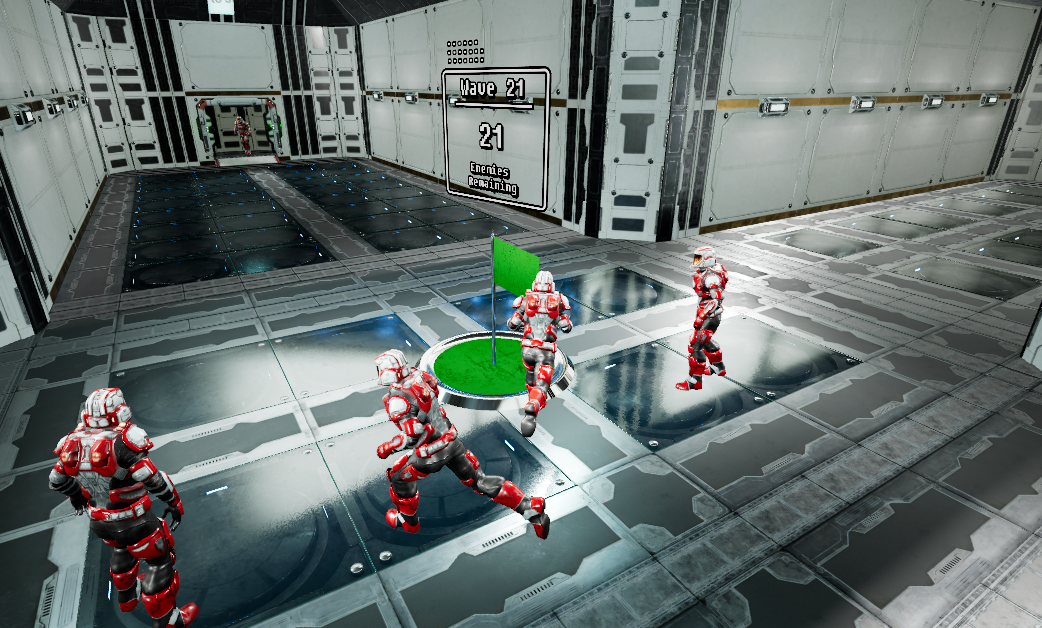
The old tutorial has been replaced by 2 new levels, "Combat Training" and "Flight School". Not only do they contain updated learning materials for noobs, they also contain minigames.
In combat training, you'll be defending a flag from increasingly difficult waves of enemies.
In flight school, you'll be sliding down a rocky half pipe trying to jump through hoops.

Both of these minigames get progressively harder forever and have leaderboards, so I'd highly recommend trying them out even if you already know how to play.
Grenade Effects
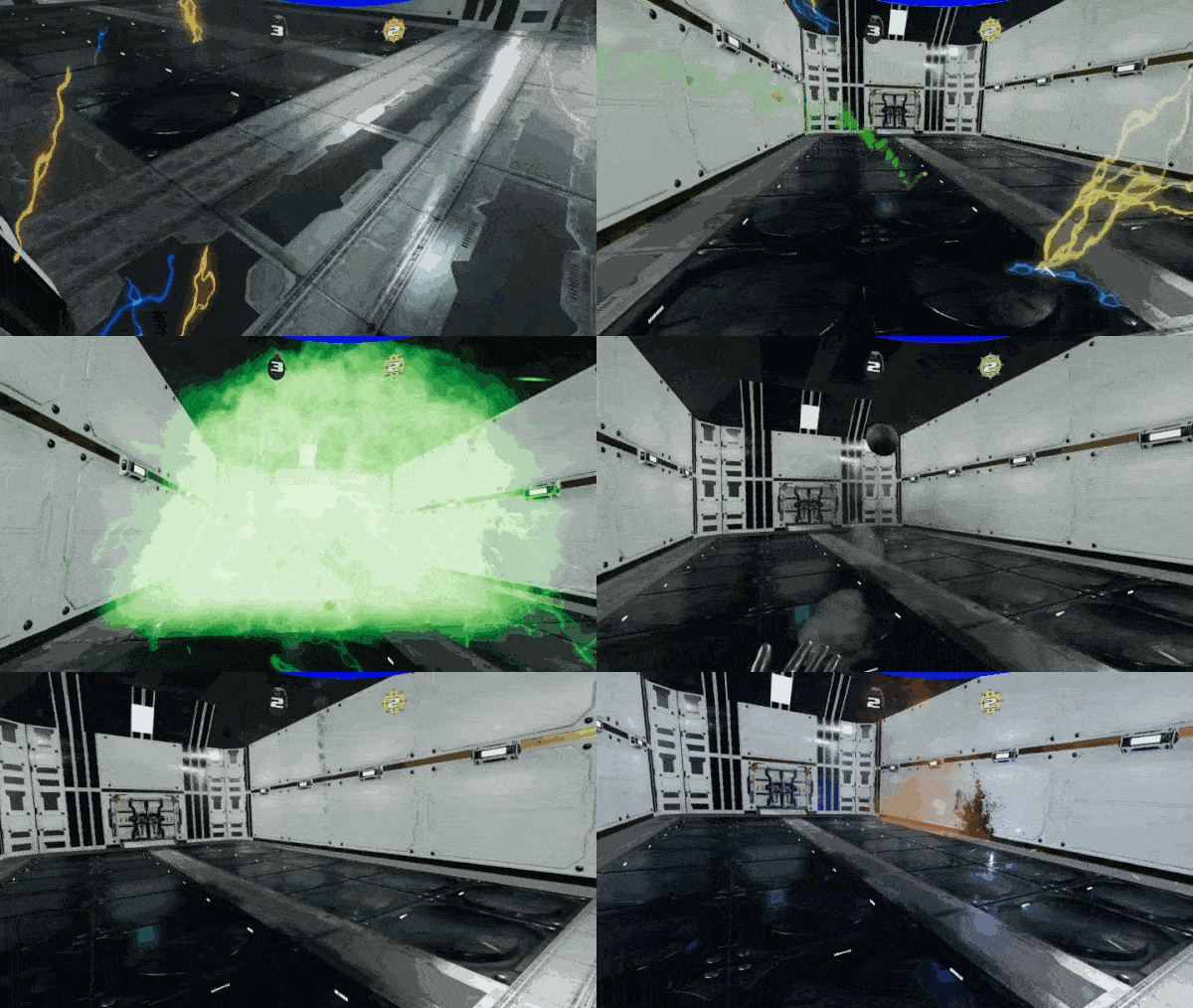
Grenades now have a number of audio/visual effects to let you know when they're dangerous.
Graphical Menu Overhaul
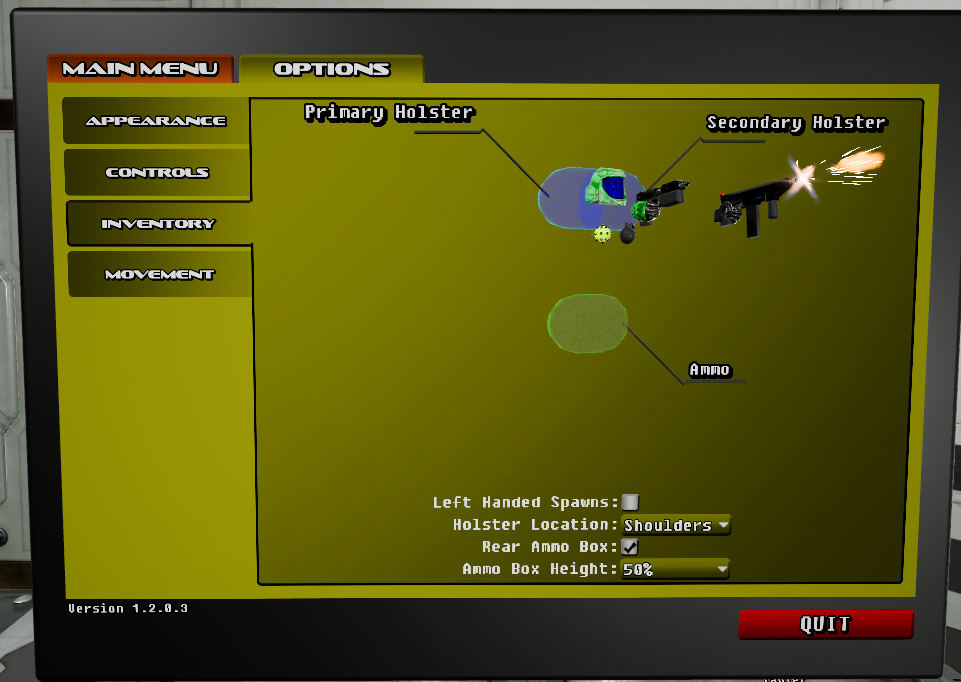
The menu has received a nice paint job and the options tab has been heavily upgraded. There are now little 3D models that pop up on various tabs to show you what you're actually changing.
Full Button Mapping
Buttons can now be freely configured to suit whatever needs you may have.

Oculus Touch Support
Oculus Touch controllers are now properly supported! There is a sensible default control scheme and your hands/guns will be adjusted to match your controller location. All references to buttons will be switched out according to your HMD type and button mapping settings.
Default Player Options Changes
Default player options have been changed to what I believe to be the optimal way to play. This will not affect existing settings, only new users.
- Players now default to white to differentiate noobs from bots
- Ammo location now defaults to rear instead of front, to prevent obscuring your vision when looking down
- Holster location now defaults to "Shoulders" to prevent issues when grabbing weapons off the ground
Equip Logic Upgrade
In the default "overloaded grip" control scheme, a quick tap of the grip button would pick up weapons or eject a magazine depending on the context. Holding the grip for 1 second would cause you to drop a weapon.
With this improvement, pickups will now happen on button press rather than on release. Holding the grip for 1 second will prime the weapon to be dropped, but it won't actually happen until you release the button. Additionally, there's visual and haptic feedback to let you know when you're ready to drop your weapon.
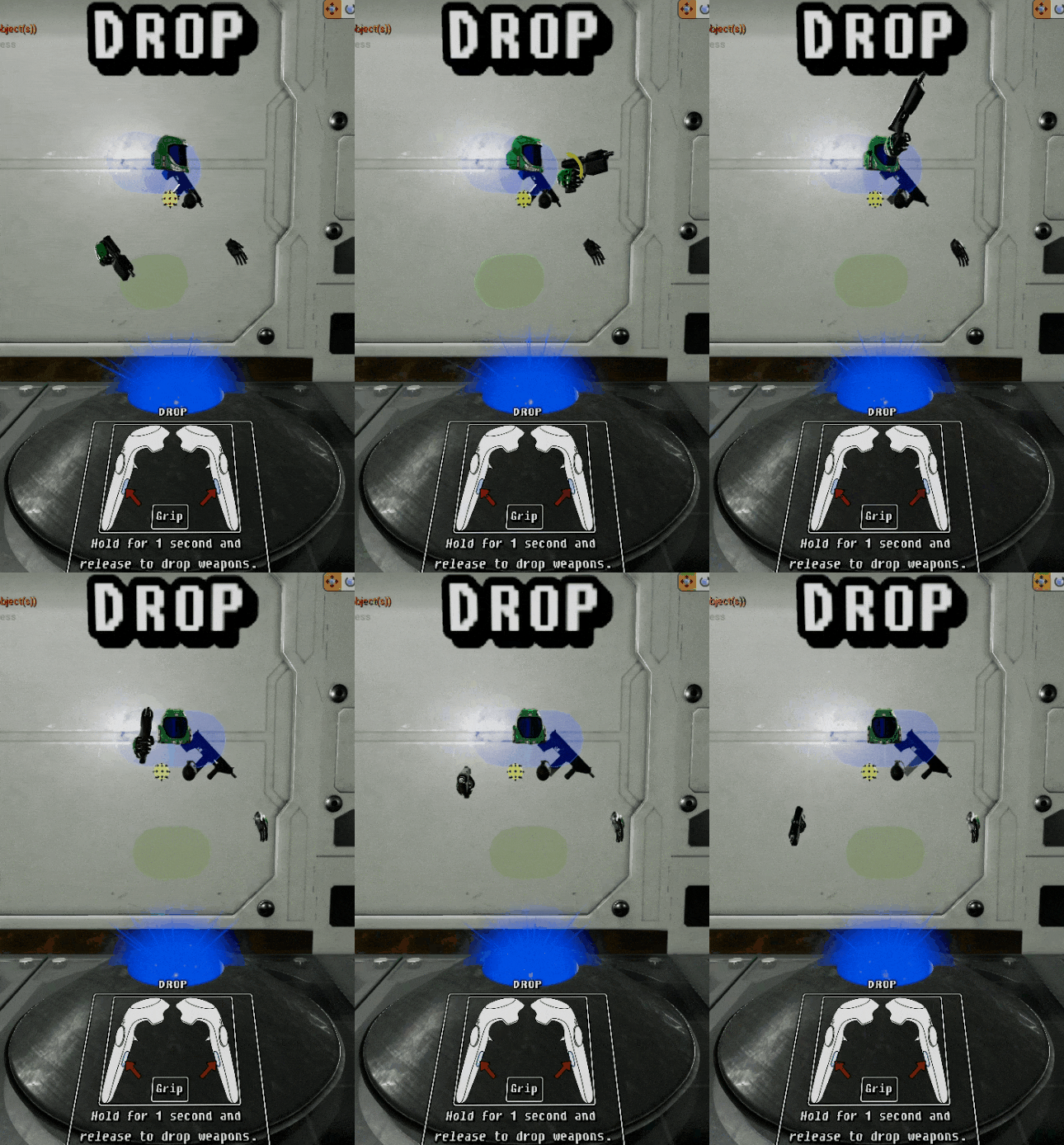
This setup feels much better and allows you to throw weapons if you want to.
Bugfixes and Improvements
- Equip/Drop/Reload netcode has been significantly streamlined to decrease lag
- Attempting to grab a new magazine when you don't have any now plays a little sound
- Equip logic now favors foreign weapons over holstered ones, to prevent conflicts when using hip holsters
- Wall jumps no longer cancel your fall, instead simply adding to your current velocity
- Fixed a bug where "Superhero" sprint players would gain altitude instead of diving
Update 1.1.5 - Death log, bullet flyby sounds, controller support, and a spectator mode
Death Log
There is now a little death logger which displays recent deaths for about 5 seconds in the bottom left corner of your vision.

As an added bonus, the death log plays a little ding sound when you get a kill.
https://youtu.be/QOqtV6ePs90
Bullet Flyby Sounds
Bullets now make a distinct and spatialized whizzing sound when they fly past your head. This allows you to more easily perceive where a threat is when you're under fire, particularly when you are too far away to actually hear the enemy's weapon.
https://youtu.be/gX0Utk2UQ1c
Better non-VR support
Keyboard/mouse support has always been technically in the game for the purpose of testing, but hidden behind a hotkey. The game will now auto-detect that you don't have a headset and press the hotkey for you when you spawn.
Additionally, an Xbox gamepad can now be used to control your character. The controls are as follows:
- A - Jump
- X - Reload
- Y - Swap weapon with holster
- L/R Shoulder - Grip with hand
- D-pad Up/Down - Raise/lower head
- Left Trigger - Aim down sights
- Right Trigger - Fire
- Select - Open tablet
- Left Stick Click - Sprint
It is really hard to play this way and I do not really expect anyone to want to do it, but it will come in handy for the following feature.
Spectator Mode
This feature only shows up in non-VR mode at this time because there's no proper VR controls, but it basically removes you from the game and allows you to fly around the map while it's happening. My intended use for this is for shooting videos for a new trailer, though there is no reason why it couldn't also be used for streaming competitive matches.
To do it, open the game without a headset plugged in. Press Tab or gamepad Start to open the menu. Join a match and go to your options tab, then check the option "Only Spectate". Next time you spawn you will not get a player and you'll be able to fly around.
- WASD/Left thumbstick - Move
- Mouse/Right thumbstick - Look
- Q/E or Thumbstick clicks - Move up/down
- Scroll wheel or D-Pad up/down - Adjust movement speed
This is currently a one-way process since you can't use your tablet, so I would not suggest doing it unless you are very serious about spectating a match.
Bugfixes
- (Hopefully) fixed an issue where very high latency players could sometimes walk through a wall to their death
- Audio now plays while the game window is out of focus
- Teams will be re-muted whenever a new player enters a match to prevent unwanted chatter
- Weapons/grenades/pickups now get cleaned up more consistently between matches to help prevent the notorious floating gun bug
- Active camo now gets disabled on death
Update 1.1.4 - Blood splatters, bullet holes, scorch marks, and a bunch of bugfixes
Decals
The main new feature in this update is decal support, which for the layman means that I can add fun visual effects like blood splatters, bullet holes, and scorch marks.
So now, all bullet weapons leave bullet holes on things:
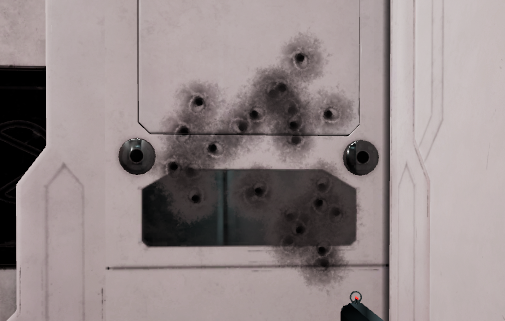
Explosions leave scorch marks on things:

Blood falls out of unshielded opponents and splashes on the ground (complete with audio cue):

And headsplosions are now infinitely more satisfying:
https://youtu.be/_7Td_gVamJY
Active Camo Tweaks
During the playtests last week I found a couple of glaring issues with active camo, the main one being that it was nowhere near invisible enough to actually hide from other players. The "invisibility" factor has now been cranked up considerably to make the powerup more effective.
It's also been scaled up by 150% to make it a bit less tricky to walk over during battle.
Custom Map Downloading Lock
As part of a general push towards making custom maps more usable, I've added a system which forces the host to wait for everyone to download a map before starting the match. This should prevent most accidental kicks when using custom maps.
Virtual Keyboard
The tablet now has a keyboard attached that will pop into existence when it's time to save a game mode variant. Previously you were forced to use dumb random names like "Barbarous Blade", but now it can be anything you'd like.

Bugfixes
- Fixed a bug that was causing the active camo pickup to be unreliable for non-host players.
- Fixed a bug where clients would fail to download custom maps when starting from the lobby
- Fixed a bug where active camo was rendering on top of the smart scope display, causing a double image
- Fixed a bug where grabbing a freshly spawned weapon by its magazine doesn't work
- Saving a game variant with Thruster Duration set to "Infinite" no longer causes the variant to fail to load
- "Jump Count" field now loads correctly into the menu, so you don't get mysterious double jumping
Discord and Scheduled Play Sessions
Just a reminder for anyone who isn't already on Discord that 95% of my communication happens there. You can find the official Hailstorm VR channel by clicking the "Discord" link in the game's main menu, or by simply clicking on this one. I personally host games every Monday/Wednesday at 8pm GMT and 8pm EST, and anyone is welcome to join.
~SlimeQ
Update 1.1.3 - Active Camo and better lighting


The way it works is pretty simple. When touched, it'll make a player look like this for 45 seconds:

For now I've only placed active camo spawns on Symmetry and Longing, but if you'd like to place it on another map you can simply use the map weapon swap menu to do so. For spawning purposes it basically works the same as any weapon, so as soon as it's touched it will be eligible to respawn again.

The other major change in this update is that the rendering configuration has been completely overhauled. This may not mean much to the layman, but it fixes some issues that I was previously having with refraction materials such as the one used for active camo. This also makes scenes much easier to light properly, which should not only improve visibility across all maps, but make custom maps easier to light as well.
Update 1.1.2 - Melee sounds, shield glow, and more
Melee Sound Effects
An impact sound now plays when you punch somebody with sufficient force to damage them. This lets you know exactly when your punch lands, and the volume of the impact indicates how hard you actually hit.
There is also a 'whoosh' sound that plays when your hands break the melee-speed-barrier. If you hear this sound it indicates that your hand is moving fast enough to deal damage. Again, the volume changes in accordance with your hand speed.
If you're interested, here is a little demo video of the sounds in action: https://youtu.be/L5AfgEwFdRA
Damaged Shield Glow

While testing impact effects on shielded players, I realized that it was more or less impossible to tell a fully shielded opponent apart from a damaged one at a distance. That wasn't ideal, so I added a simple yellow glow effect that shows up when shields are damaged. The effect is most visible at 1 point of shields, and will fade out as the shield recharges. When the shield breaks, the glow disappears to indicate that the player has been critically damaged.
'Swap Jump and Sprint' Option

This one's pretty simple, it just swaps the buttons for jump and sprint. The motivation for this option is that in the default control scheme if you're using snap turning it does not allow you to sprint and turn at the same time. This solves this problem in the simplest way possible. I mainly expect front facing Oculus users to be interested in this option. There's an argument to be made that clicking the Oculus thumbstick and using B to jump is still kind of awkward, but until there is a more robust key mapping menu (and some sort of Oculus detection system) this will have to do.
Bugfixes and Other Improvements
- Fixed an issue where player options would sometimes get reset for clients after dying
- Fixed hand collisions, which were broken at some point during the huge 1.1.0 update
- Added a blue flag to Symmetry, which somehow got replaced with a red flag after 1.1.0
- Holding grip for 1 second while holding a weapon and touching another weapon will now swap the weapons, as any sane person would expect. Before this change your weapon would just be dropped, which is needlessly confusing.
- Death spectators now spawn at the correct orientation after using snap turns
- Headsplosions are slightly more reliable, meaning heads should actually explode instead of just falling off. It's not perfect yet, but much better.
- Bullet impact effects on a shielded player now look correct on clients (sparks instead of blood), this was previously only correct for the host.
- Shielded bullet effects now produce twice as many sparks and are visible at long range.
Update 1.1.1 - Thruster Netcode Fix and Snap Turning
Snap Turning

Also included are snap turning options for front-facing play. The default setting is "Disabled" but there are 3 other options:
- Thumbstick - Intended for Oculus users. Simply flick the thumbstick to do a snap turn.
- Touchpad - Intended for Vive users. Clicking on the left or right side of the touchpad will do a snap turn.
- Smooth - Instead of doing a snap turn, this will smoothly turn the player according to a thumbstick/touchpad.
The turning speed option will determine how far your snap turn will go: 1 is 15 degrees and 6 will be 90 degrees. On smooth turning mode this will simply determine how fast you spin. Default is 3, which is 45 degree snap turns.
Update 1.1.0 - New Map, Melee, Death Spectators, Custom Maps, and More
Melee
Melee has technically been in the game since launch but wasn't working quite like it should. In addition to making it more reliable, I've made a number of major improvements to the system:
- Melee impacts now deal knockback based on the world velocity of your hand. Knockback will be dealt regardless of whether or not the punch was hard enough to deal actual damage.
- Melee now also deals a damage bonus based on how fast you are moving relative to the other character. This maxes out at 2000cm/s with a damage bonus of 100.
- Melee now deals headshot damage, meaning that if you are able to punch an unshielded opponent in the head their head will explode.
To put these details into perspective, your character has 70 points of shield, 40 points of health, and the base melee damage maxes out at 50 points for a maximum strength punch. Any damage exceeding a character's shields will be considered for headshot damage. This means:
- A walking melee on an idle opponent (300cm/s) does 15-65 damage. At full shields, the opponent will survive every time.
- A walking melee on an opponent walking towards you (600cm/s) does 30-80 damage. A full force headshot here will result in a headsplosion.
- A sprinting melee on an idle opponent (900cm/s) does 45-95 damage. A half force headshot will result in a headsplosion.
- A sprinting melee on a sprinting opponent (1800cm/s) does 90-140 damage. Even the weakest headshot will result in a headsplosion and a half force bodyshot will result in a kill.
- A falling melee from a very high height, or something equally extreme (>2000cm/s) does 100-150 damage. Again, an easy kill.
No longer are you defenseless if you run out ammo during a gunfight. If you can somehow manage to properly land a flying karate chop to the face, you can turn the tables on somebody in seconds.
New Map: Longing

This map is based very roughly on Longest from Halo CE. It consists of two parallel hallways with a sunken base at each end and some high points that look out over the hallways. It is totally symmetrical, with red and blue sides indicated with colored lights.

It is a considerably tighter space than any of the older maps, filling a much needed gap between the super precise insanity of ZigZag and the contained feeling of Launchpad. You may also notice that it does not contain any concrete, rocks, or grass. This is a much needed change, and you can expect to start seeing this style of building pop up in future content alongside the old environments.
Death Spectators
Death spectators have been completely overhauled so as to work better with VR and provide more information.
- Death spectators now spawn at the correct location/rotation every time on both clients and servers. This cuts down on nausea caused by weird camera jumping.
- Your tablet and laser now come with you into death, so you can check the score, view game options, or change player options.
- In-game text now indicates who killed you.
- Death flash (red to black) now works on clients.
- Death flash now reliably covers your entire vision.
There is also now a pregame period of time to ensure that all players get connected before the game starts. During this period, a death spectator will be possessed and you'll be shown a brief description of the game you're about to play.

Custom Maps via Steam Workshop
Custom maps have been effectively broken for several months due to a workaround for a bug which caused some players to fail to start the game. As of Unreal 4.18 that bug has been resolved, however, so custom maps are back!
I've not been terribly vocal about support for custom maps so far, partially because they were broken, but that will change moving forward. I've updated the template project on GitHub and posted the instructions in the Hailstorm Discord channel for anyone looking to try their hand at map creation. The process is extremely similar to Pavlov's custom map creation, so anyone familiar with that should feel right at home.
I will be giving free Steam keys to anyone willing to submit a map to the workshop. If you are interested, find me on the Hailstorm Discord channel.
Added Main Menu Options

Two items have been added to the main menu:
- Offline Game - Same as "Host Game", but the game will not be joinable.
- Discord - Opens an invite link to the Hailstorm Discord channel
My hope is that putting the link to the Discord channel in such a prominent location will draw attention to it. I've been using Discord increasingly to communicate with users and organize games, so it is important that everyone is aware of it rather than just those who bothered to check the Steam discussion boards.
Bugfixes and Other Improvements
Update 12/4/17 - Weighted spawn system and respawn time option
- Rule out any points touching other players
- Rule out any points within line of sight of enemies
- Choose from remaining points at random
This was okay but often resulted in really bad spawns when all spawn points were in line of sight and the system was forced to choose randomly between a bunch of equally "bad" spots.
The new system uses a weighting system to determine how "good" a spot is and is far more intelligent:
- Rule out any points within 1 meter of another player
- For remaining points, give +100 weight for each friendly player within 15m and -100 weight for each enemy within 15m
- Subtract 500 for each friendly death (or your death) within 15m of the point (within 20 seconds of death, decaying after 10)
- Subtract up to 180 for each enemy that has an unobstructed view of the spawn point (60 for top, middle, and bottom of your character, were you to spawn there)
- Choose a random point from only the best scoring spawn points
This has worked fairly well in tests to prevent spawn killing, and also keeps teams together when it's safe. If the team is in a firefight, the system will typically spawn dead players nearby but out of sight of the enemy.
I've also added a new game variant option: Respawn Time. This pretty much does what you'd expect, setting the delay between death and spawn.
Demo Update - Offline Bot Matches
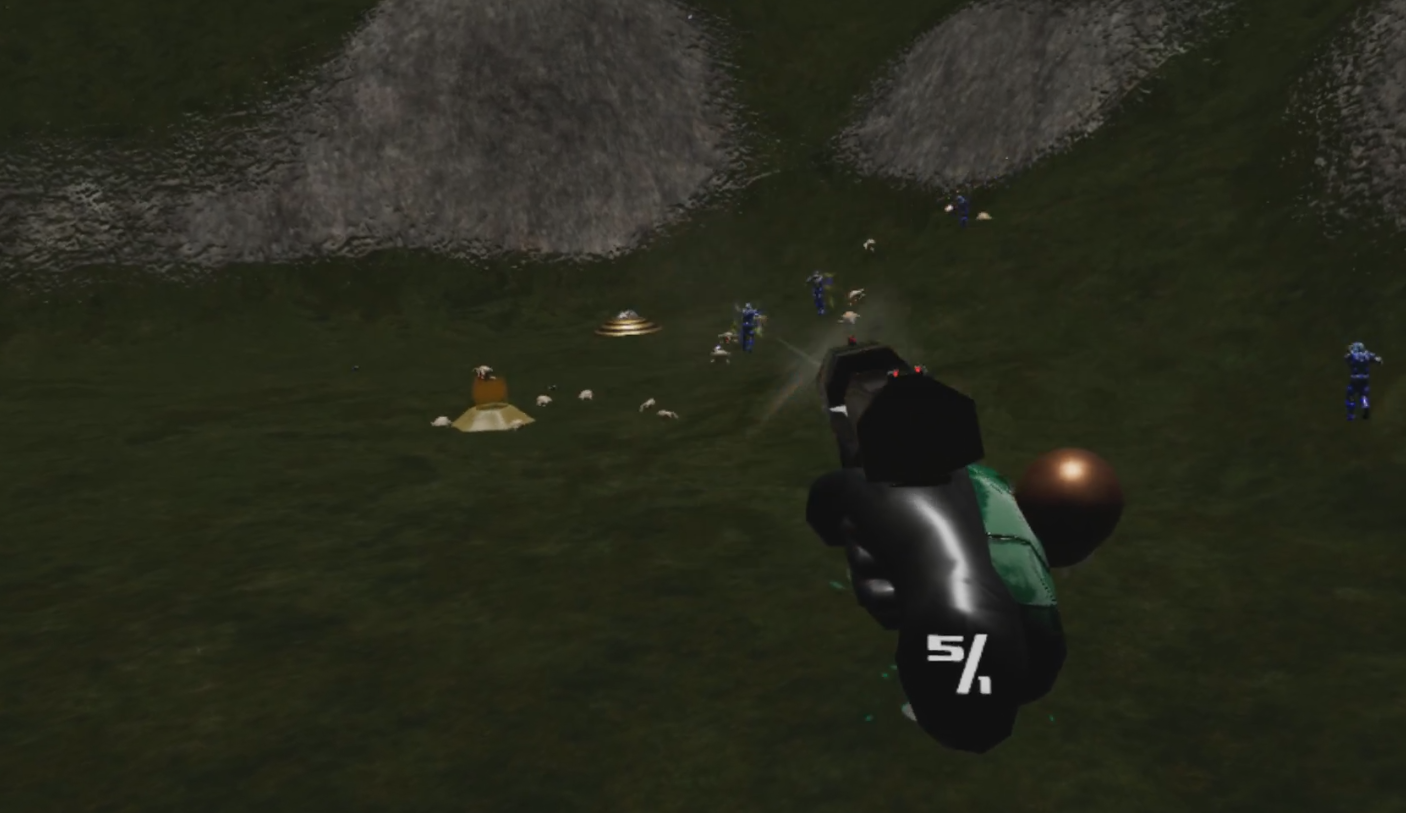
It also includes a few changes that will be in the next update in the main game:
- AI now works in lobby
- Mob emitter placed in lobby
- More weapons placed on lobby
- Post-match timer is now 0 seconds by default instead of 15, so you'll go straight back to the lobby instead of hanging around with broken animations
- Sticky grenade material is (slightly) less ugly