Tonight's build has a fix for the Deep Dwellers not spawning in the Stronghold at the start of the second quest and a change to the way stones work in the world.
Previously a quarried stone would be removed from the world. This new system allows them to return after a short period of time, similar to how trees grow. This reduces the change that Workers set to get stone will have to run far away from the town.
This build also includes some other improvements and fixes:
Updated the NPCs in the Stronghold to clear out their quest flags so you are always directed to the correct NPC to speak with.
Updated the falling leaves on trees to match the color of the tree's leaves.
Removed duplicate trees on the Orc Island.
Fixed a localization bug that made the mouse-over text for Glowberries to read Pure Glowberries. The Glowberries in your town are the regular variety. You can make Pure Glowberries using those and other ingredients at the Infirmary.
Updated the weapon trail for attacks so the trail remains close to the weapon's swing arc. This also solves the issue of the trail sometimes stretching really far off the screen when first attacking.
The Infirmary and Mage Tower will now correctly use the town storage ingredients in addition to your inventory when determining whether you can craft something or not.
Updated the pickaxe system to correctly allow Jade Pickaxes to mine Diamond Ore.
I'm also almost done with the Give a Dog a Bone quest for Nika the Dog that I mentioned in a previous update. Hoping to have that, and some other things, live either Thursday or Friday.
Thank you again everyone for the feedback and support!
-Jonathan "Calandryll" Hanna jon@hammerhelm.com
My Twitter: https://twitter.com/SuperSixStudios
Discord Channel: discord.gg/soedesco
Build 1.7.7 - Special Attack Adjustments
Tonight's build has an adjustment to the way Special Attacks work. In order to hit a monster with an attack it must be in your front arc. However, when using a Special Attack it is possible for a monster to move out of that arc while your character is playing the attack animation. I've changed this so that if the monster is a valid target in your front arc when you start the Special Attack, it will get hit even if it moves. This should greatly reduce missing with Power Attacks.
In addition, I have turned off the "got hit" animation for spell casters while they are actively casting a spell. They will still take damage. Playing the "got hit" animation could result in them flailing the spell wildly. Kinda funny to watch, especially with the mushroomman puke attack, except of course when the spell hits you!
And lastly, I made a change to the Goblin Spellcasters to stop his lightning spell from damaging you if his animation caused the spell to appear to the left or right due to his animation. This happened so fast it you never saw the spell until it was shooting straight ahead and looked like he missed you by a wide margin, but still did damage. This shouldn't happen anymore.
This build also includes some fixes:
The text after finding the Orc flagpole will now appear properly.
After leaving Orc Island the music will revert back to the main island exploration music.
Fixed a bug that caused the Orc Town to fail to reload if you die while outside of the Orc Town. This is due to an optimization as while you can't see the town it is turned off.
Fixed a bug that sometimes caused the Ancient and New quest to appear twice.
Placed blockers on either side of the bridge in the orc cave.
HammerHelm launched out of early access 25 days ago. Today's update is the 26th update. I normally don't keep up that much of an update cadence, but there's been so many great suggestions and feedback that I'm having a blast implementing them!
Some more suggestions that I really like but haven't had a chance to work on yet:
Give a small amount of XP from dungeon and cave spawners rather than only giving the quest XP for clearing it.
A quest for Nika!
Auto-stack potions into your quick bar if that potion is already in a quick slot.
Easier way to find NPCs that you are looking for.
More town management options.
An update to storehouses to allow you to upgrade them and potentially need to place fewer.
Pop-up text for other buildings other than houses.
Add red and orange birch trees as options for the town.
Make imbue gems a bit less dependent on pure randomness.
Just a partial list, definitely more than that too! Note, some of these may take longer to get to than others so don't take this as a priority list. And I have some other things on my own list I want to work on. Mostly just want to give you an idea of what I have on my "to do" list and that I really appreciate the ideas and feedback. :)
-Jonathan "Calandryll" Hanna jon@hammerhelm.com
My Twitter: https://twitter.com/SuperSixStudios
Discord Channel: discord.gg/soedesco
Build 1.7.6 - Build Mode Improvements
Tonight's build includes some updates for Build Mode along with a bunch of other improvements and fixes.
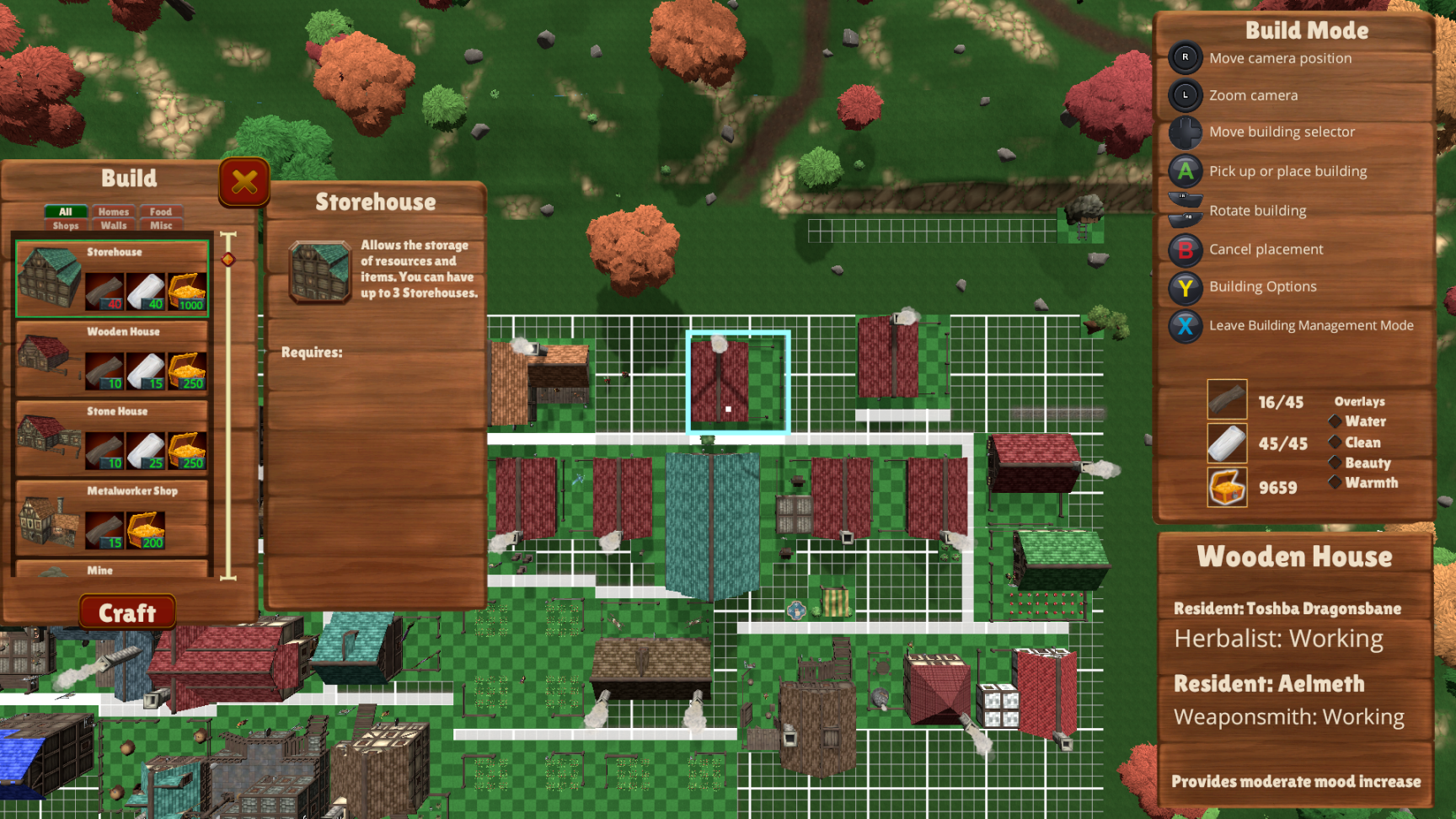
Build mode has been updated to be more controller friendly and make the pop-up information for houses easier to read and less intrusive.
To select a building using a controller you enter Building Management Mode as normal. However, rather than using the d-pad to cycle through buildings, you can now move the camera and whatever is in the middle of the screen will be the target building. When in this mode there is a little white dot in the middle of the screen to make it easier to select the building you want.
The pop-up information for houses has been moved from appearing over the building and now appears under the build mode instructions. The UI overall is larger and easier to read as well. I'll likely be expanding this pop-up to work for other buildings too. Would love to hear what kind of information you'd like to see there for other structures!
You can also now move the camera freely up to the mines and down the fishing piers. Build mode has been updated to disallow buildings to be moved too far off the grid. This reduces the chance of a building being placed off the gird when moving the camera.
This build also includes some other fixes and improvements:
Fixed a bug that caused the Mine buildings to have red footprints even when placed properly.
Fixed a bug that could cause to build mode to fail to close after placing or moving a fishing pier.
Updated the special attack system to not use stamina or the gem if a special attack is out of range and therefore isn't used.
Increased the range of the Power Attacks by a small amount.
Updated the part of the combat system that chooses between Kick and Dash so that it will choose Kick at a slightly longer range.
This range is closer to the melee attack range.
So if you are close enough to hit a monster with your regular attacks, then kick will be chosen as your attack. Dash will be used if farther away.
Updated the Deep Dweller AI to keep him from getting stuck in a run loop and fail to attack.
Fixed a bug that could cause the character to be unable to immediately start attacking after getting back up from being knocked down.
Fixed the roofs of the Weaponsmith and Armorsmith so they hue properly.
Fixed an error with the roof coloring system that could cause it to fail to close.
Thank you again everyone for the feedback, suggestions and the reviews. I really enjoy reading all of your comments and I appreciate that you take the time to post them and help me make this game better and better!
-Jonathan "Calandryll" Hanna jon@hammerhelm.com
My Twitter: https://twitter.com/SuperSixStudios
Discord Channel: discord.gg/soedesco
Build 1.7.5 - Updated Combat
Today's build includes the updated combat system!
Notable changes
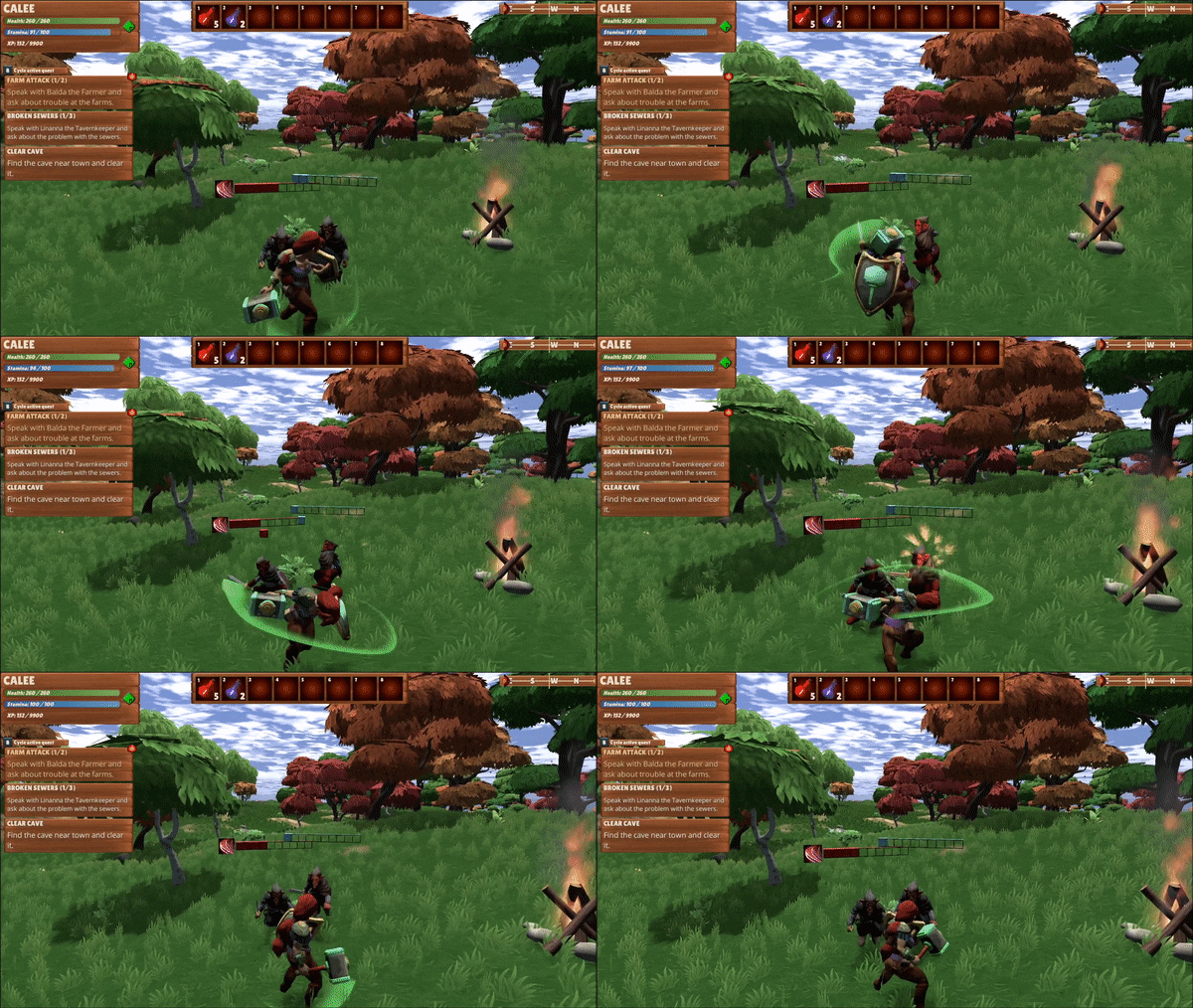
There is no longer a concept of a "target" or auto-facing and you can freely change your character's facing when attacking.
Your attacks can hit and damage any monsters that are in your front arc. This means your regular attacks can hit multiple monsters per attack if you position your character to take advantage of this.
Special attacks that affect one monster, such as Dash Attack and the Sword Power Attack, will hit the monster that is most center to in front of you and in range.
Special attacks such as Shield Break and Confuse will automatically hit the correct monster even if there are more than one in front of you. You don't have to be facing it perfectly. As long as the monster is in your front arc the correct monster will get hit.
Some special attacks have also been updated.
The axe power attack deals extra damage all enemies in your front arc and has a chance to stun the enemies.
The hammer power attack does damage to all nearby enemies and knocks them back. The hammer attack itself does slightly less damage than your normal attack.
The Shield Break special attack can now be used against a monster that has a shield even if it isn't currently blocking.
And some UI updates:
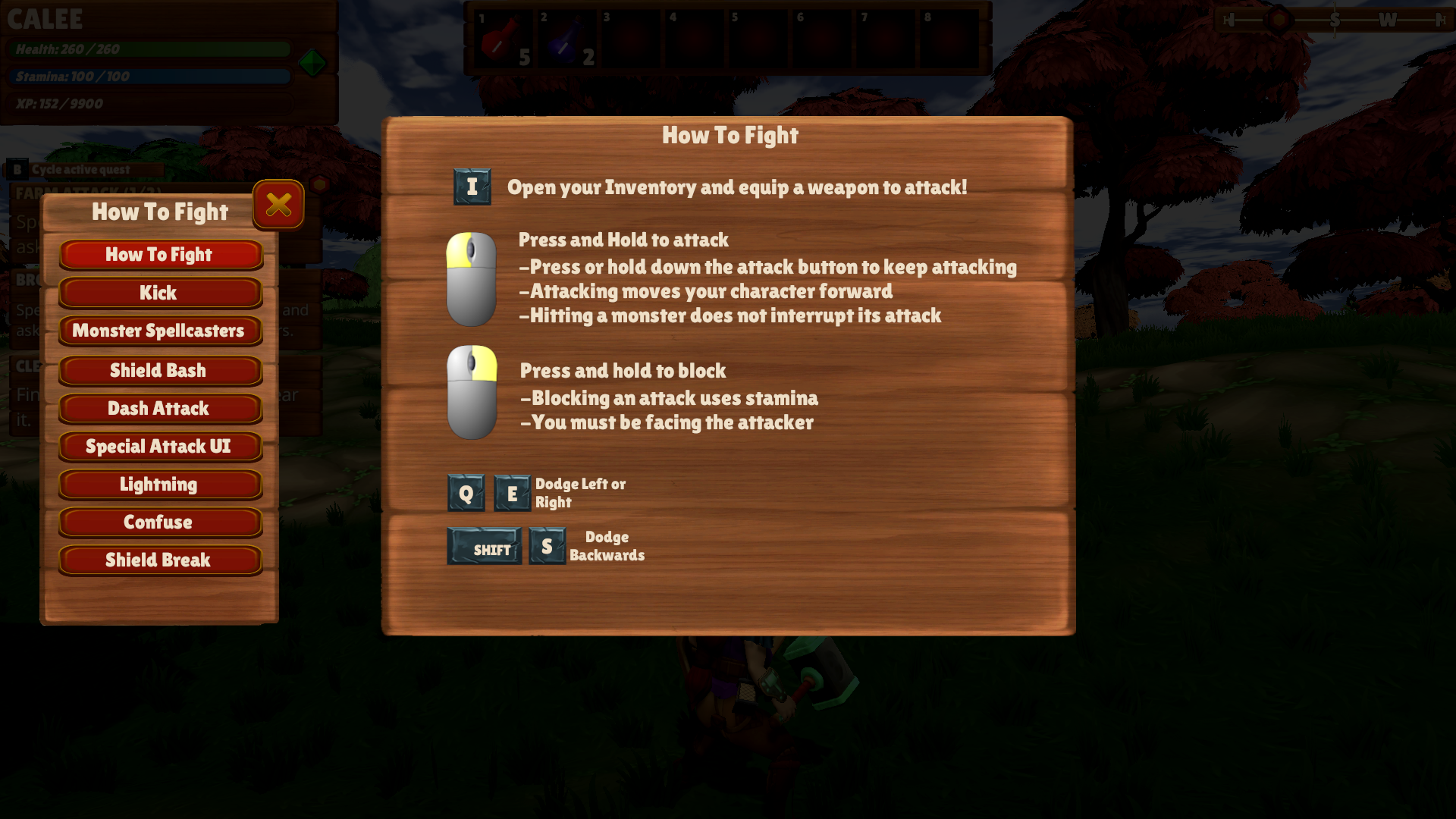
All of the How To Fight UI have been updated to reflect the new system.
You can access the new UI through the ESC menu and pressing the How To Fight button.
The Special Attack UI now displays the WASD keys for each attack rather than the controller d-pad when using keyboard and mouse.
In addition to the combat updates for your character, monsters have also been updated. Previously all monsters scaled with your character as your crafted better equipment. After adjusting based on your "level", monsters could then be weaker, average, or tough based on that.
In the new system, weaker monsters cap out at a certain level and tougher monsters have minimum levels. For example, when you have Jade weapons you will be more likely to encounter a weak Goblin, but also more likely to encounter a tough Orc. Monsters still scale (so they're never 2-hit kills) but the difference between a weak monster and a tough monsters is pretty noticeable. The healthbar colors for weak, average, and tough have also been added to the How To Fight UI.
This update also includes changes to the Mushroommen, who can now be knocked down and can receive buffs from Mushroommen Spellcasters.
If you are used to playing HammerHelm with the auto-lock targeting system this new system may take a bit of getting used to. I still find myself pressing TAB to target a monster even when testing the new system. Old habits. :) But once you get used to it I think you'll find that the system feels a lot better overall.
Thank you everyone for your feedback while the system was on the test branch. I'm looking forward to hearing your further thoughts on it!
-Jonathan "Calandryll" Hanna jon@hammerhelm.com
My Twitter: https://twitter.com/SuperSixStudios
Discord Channel: discord.gg/soedesco
Build 1.7.4 - Combat Test Update UI
Tonight's build includes updates to the combat UI windows and some refinements to the special attacks to make the more reliably hit the correct monster. So confuse will now always hit the monster that has a buff and shield break will always hit the monster with a shield. This assumes that monster is in your front arc.
This update also includes the ability to review all of the How To Fight UI from a button on the ESC menu. When open, you can read the combat information for all aspects of the game.
I have two more aspects of combat that I want to update. The first is the monster level caps and minimums to help upgrading your gear feel more impactful and second is an overall balance pass for stamina use, special attack recharge, and monster hit-points.
My goal is to release this update onto the live branch on Friday evening.
If you'd like to give feedback on the new system before that, you can get the test build by following the below steps:
1. In the Steam Client Library where it lists all of your games, right click on HammerHelm 2. Click Preferences 3. In the window that opens, select the "Betas" Tab 4. Enter the password to download this build - CombatTest2021 - and click Check Code 5. You should get a message that the code is correct 6. Click the drop-down box and select BigUpdateTest
Steam should immediately start a new download with the test client. The new game should be called "HammerHelm [bigupdatetest]". Once the download is complete you can launch the game and you should see "1.7.4" in the title screen.
This build is 100% compatible with current saves. So you can safely use any save you want with this test build.
To get back to the main build:
1. In the Steam Client Library where it lists all of your games, right click on HammerHelm 2. Click Preferences 3. In the window that opens, select the "Betas" Tab 4. Choose “None” from the drop down 5. Steam should then revert back to the main client
Thank you again everyone for the suggestions and feedback!
-Jonathan "Calandryll" Hanna jon@hammerhelm.com
My Twitter: https://twitter.com/SuperSixStudios
Discord Channel: discord.gg/soedesco
Build 1.7.3 - Combat Update Test
Today's build has the completed updates to the combat system. This includes updates to all of the special attacks to allow them to work without needing a specific target. The last thing left to do is to update all of the How To Fight UI and make them available outside of the tutorial.
I would love to get everyone's feedback on how the new system plays and feels!
To get the test build:
1. In the Steam Client Library where it lists all of your games, right click on HammerHelm 2. Click Preferences 3. In the window that opens, select the "Betas" Tab 4. Enter the password to download this build - CombatTest2021 - and click Check Code 5. You should get a message that the code is correct 6. Click the drop-down box and select BigUpdateTest
Steam should immediately start a new download with the test client. The new game should be called "HammerHelm [bigupdatetest]". Once the download is complete you can launch the game and you should see "1.7.3" in the title screen.
This build is 100% compatible with current saves. So you can safely use any save you want with this test build.
To get back to the main build:
1. In the Steam Client Library where it lists all of your games, right click on HammerHelm 2. Click Preferences 3. In the window that opens, select the "Betas" Tab 4. Choose “None” from the drop down 5. Steam should then revert back to the main client
Thank you everyone!
-Jonathan "Calandryll" Hanna jon@hammerhelm.com
My Twitter: https://twitter.com/SuperSixStudios
Discord Channel: discord.gg/soedesco
Build 1.7.2 - Combat Test Updates
This build includes a rather large update to the combat system. Most notably, it removes the entire concept of needing a "target" to fight. Your regular attacks will hit all of the monsters in your front arc, and skills like Kick and the Sword Power Attack will hit whatever monster you are facing.
I'm still testing this with other parts of combat like Confuse and Lightning and against boss monsters, but I wanted to get it on the test branch as soon as possible so I could get your feedback on how the system feels with no target. Other parts of the game that assumed you had a target, such as opening UI, should also work correctly except now they check if monsters are nearby rather than if you have one targeted. The resource tools have also been updated to work without the need for a target.
In addition, the Shield Break skill no longer requires the monster to be blocking. You can use the skill on any monster that has a shield to remove it.
The UI for How To Fight will also be updated to reflect that there is no longer a target.
To get the test build:
1. In the Steam Client Library where it lists all of your games, right click on HammerHelm 2. Click Preferences 3. In the window that opens, select the "Betas" Tab 4. Enter the password to download this build - CombatTest2021 - and click Check Code 5. You should get a message that the code is correct 6. Click the drop-down box and select BigUpdateTest
Steam should immediately start a new download with the test client. The new game should be called "HammerHelm [bigupdatetest]". Once the download is complete you can launch the game and you should see "1.7.2" in the title screen.
This build is 100% compatible with current saves. So you can safely use any save you want with this test build.
To get back to the main build:
1. In the Steam Client Library where it lists all of your games, right click on HammerHelm 2. Click Preferences 3. In the window that opens, select the "Betas" Tab 4. Choose “None” from the drop down 5. Steam should then revert back to the main client
After playing around with the new system I'm really enjoying it and I think it's a big improvement. I hope you do as well!
-Jonathan "Calandryll" Hanna jon@hammerhelm.com
My Twitter: https://twitter.com/SuperSixStudios
Discord Channel: discord.gg/soedesco
Build 1.7.1 - Combat Test Updates
Today's test build includes some additional updates to the combat system.
Enemy Spellcasters are now affected by knockdows and stun.
The block stun skill has been balanced to happen a bit less often.
You will now do damage when using the shield bash skill depending on what kind of shield you have.
Left to do:
Give Spellcasters a way to escape melee.
Adjust knock down times based on what caused the knockdown - kick, shield bash, etc.
Update more special attacks to not require a "target" in order to function
Update shields to be more beneficial based on the what kind of shield it is.
Monsters levels that determine how powerful they can scale, both minimum and maximum.
For now I'm tabling the quick bar for weapons. Played around with it a bit last night and it doesn't feel right. Plus it's easy to open inventory and swap a weapon. I kind of like there to be a bit of risk in doing that anyway. Might revisit it though.
If you'd like to try out the new combat system and offer some feedback, be sure to read the initial announcement as well:
1. In the Steam Client Library where it lists all of your games, right click on HammerHelm 2. Click Preferences 3. In the window that opens, select the "Betas" Tab 4. Enter the password to download this build - CombatTest2021 - and click Check Code 5. You should get a message that the code is correct 6. Click the drop-down box and select BigUpdateTest
Steam should immediately start a new download with the test client. The new game should be called "HammerHelm [bigupdatetest]". Once the download is complete you can launch the game and you should see "1.7.1" in the title screen.
Note this build is 100% compatible with current saves. So you can safely use any save you want with this test build.
To get back to the main build:
1. In the Steam Client Library where it lists all of your games, right click on HammerHelm 2. Click Preferences 3. In the window that opens, select the "Betas" Tab 4. Choose “None” from the drop down 5. Steam should then revert back to the main client
Thanks everyone!
-Jonathan "Calandryll" Hanna jon@hammerhelm.com
My Twitter: https://twitter.com/SuperSixStudios
Discord Channel: discord.gg/soedesco
Test Build 1.7 - Combat Update Test
Since launching out of early access I've received a lot of feedback on the combat system. I've spent the past few days working on some combat improvements and I'm happy with what I have so far and wanted to share it with all of you. I made a build for the test branch so you can try them out if you are interested.
The changes include...
When attacking, you can now hit multiple enemies per swing. As long as they are in your front arc and close enough, you will hit.
The new system still uses a "target" system but for the most part your target doesn't matter other than special attacks like Dash Attack and the Sword Power Attack. I may remove the concept of a "target" entirely.
When testing you should turn Auto-face target off. Being able to change your facing while attacking not only feels better in this new system but also allows you to change your facing to keep multiple enemies in your front arc. If I leave in the concept of a target, I will enable auto-facing as an option for those that still prefer it. For the test I want to see what you all think as I feel it works much better with auto-facing turned off.
The Hammer Power Attack has been updated to knock enemies back. This attack does the slightly smaller amount of damage than the normal attacks to all enemies nearby, even if they are not in your front arc. This knockback doesn't last as long as a Kick or Shield Bash.
The Axe Power Attack does more damage to enemies in your front arc and has a chance to stun them. The damage from this attack has also been increased.
The Sword Power Attack damage has also been increased a bit.
Monsters have more hit points (since you can hit more than one at a time) and also attack a bit more often.
Some other things I am considering that I if I work on, I will add to the test build in the coming days.
Allow you to put weapons in the hotbar so you can quickly switch between them. This would allow you to use your Hammer or Axe against a group of three monsters and then switch to the Sword when down to only one enemy. This also gives you a meaningful reason to craft all three weapon types.
Allow enemy spellcasters to be affected by status effects like the knockbacks and stuns. Maybe add a way for spellcasters to break melee as well. Bosses would likely be immune to these.
Allow better shields to block monster special attacks and potentially block spells.
Increase damage from the Shield Bash skill based on shield.
Having better shields give a small damage reduction benefit when hit by an attack.
Monster levels minimums and maximums. Right now monsters pretty much scale evenly with your equipment. This change would mean eventually lower level monsters like Goblins would cap at a certain number of hit points, while higher level monsters like Elementals and Orcs would have a minimum hit point, meaning they'd be much tougher if you encountered one while using copper, iron, or jade.
For now I'd love to get some feedback on the changes to the core system once you've had a chance to try them out!
If you would like to check out the new combat, you can get it by doing the following:
1. In the Steam Client Library where it lists all of your games, right click on HammerHelm 2. Click Preferences 3. In the window that opens, select the "Betas" Tab 4. Enter the password to download this build - CombatTest2021 - and click Check Code 5. You should get a message that the code is correct 6. Click the drop-down box and select BigUpdateTest
Steam should immediately start a new download with the test client. The new game should be called "HammerHelm [bigupdatetest]". Once the download is complete you can launch the game and you should see "1.7.0" in the title screen.
Note this build is 100% compatible with current saves. So you can safely use any save you want with this test build.
To get back to the main build:
1. In the Steam Client Library where it lists all of your games, right click on HammerHelm 2. Click Preferences 3. In the window that opens, select the "Betas" Tab 4. Choose “None” from the drop down 5. Steam should then revert back to the main client
Thank you everyone!
-Jonathan "Calandryll" Hanna jon@hammerhelm.com
My Twitter: https://twitter.com/SuperSixStudios
Discord Channel: discord.gg/soedesco
Build 1.6.11 - Feedback Improvements and Fixes
Another update tonight with some improvements and fixes based on your posts!
You can now disable double-tab roll in the settings menu. The "disable double-tap roll" checkbox defaults to off. Note this setting is in the settings menu while in the game world.
Your character will not roll while placing furniture even if you have double-tap roll activated. This allows you to make small movements to place the furniture in just the right spot.
Updated the storage system to fix a bug that could cause the game to not allow you to place items in storage chests.
Added the ability to activate a specific controller in the control map screen. If your controller isn't working it's like because the system thinks something else is the actual controller. While in the control mapping screen hold down left-alt and press T and that will open a window allowing you to make your controller the primary input device.
Updating a check on the Deep Dwellers to stop them from jittering.
I made some good progress last night on the combat system update and will continue to work on it tonight. I should have a build ready to test Friday evening.