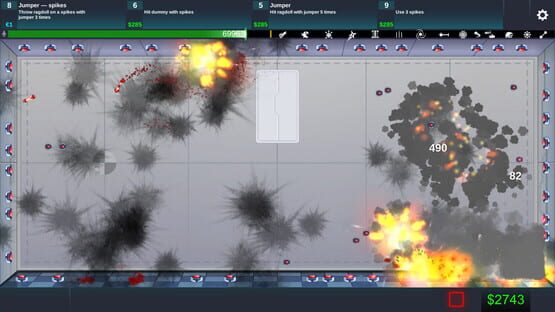

Happy Room
Reset progress and more
Also some gameplay fixes in this update:
- monsters deal 12 damage now, not 20
- piranhas do 2 times more damage
- fixed bug with exploding jumpers
- deathray do more damage
We did not expect such popularity of our game, so thank you all for playing it! We will continue to support and update it.
1.0.3 Update!
- Game progress reset button added!
- fixed bug with only "Half" Steam achievement unlocking
- Also some minor bugs fixed
- Added feature for continuous weapons placement. Just hold mouse down while placing some weapon.
- Added axis lock feature. Hold left shift to place weapons on in horizontal or in vertical lines. Works for central placement.
- Also added Dutch language and fixed German and English, thanks to Twan Schoenmakers and Gabriel Selinschek : )
- Also there is zoom mode, press Z in game. But it is in beta mode, not polished yet.
In next update we will try to add steam workshop for sandbox rooms sharing.
Game ideas for update?
What would you like to see in game update? Just leave a line and we may add it!
Some ideas that have been posted and we thought about:
- game progress reset
- workshop sharing of room setups
- continuous weapons placement while mouse down
- dummy skins / modifications
- Possibility to add delays to each weapon when it will begin to shot / work
- more scenes / custom scenes
- funny dummy hats
- more weapons / custom weapons
- controlling weapon with a mouse, for example crossbow. Aim and shoot when you like.
- locked aim or programmed activations, like for grenade launcher. Aim it at some angle and it will just shoot there.
Suggest your ideas in comments!
Game crash fix!
On windows they are located at: C:\Users\\AppData\LocalLow\Mana Potion Studios\Happy Room\gameSave0182.gd
On Mac:
/Users//Library/Application Support/Mana Potion Studios/Happy Room/gameSave0182.gd
On Linux: /home//.config/unity3d/Mana Potion Studios/Happy Room/gameSave0182.gd
Lunch Happy Room and on this screen:

Send broken save file us on email: mpstudiosfeedback@gmail.com
And then deleted save file and game will start from the beginning.
--------------------------------------------------------------------------------------
Also if achievements are not openeing for you or bug is still here try to logoff from Steam and then login again.
Game is not working? Try debug version!
If game is not working for you, or you have some glitches help us to find and fix them! You can download debug version of a game, here is instruction how to do it:
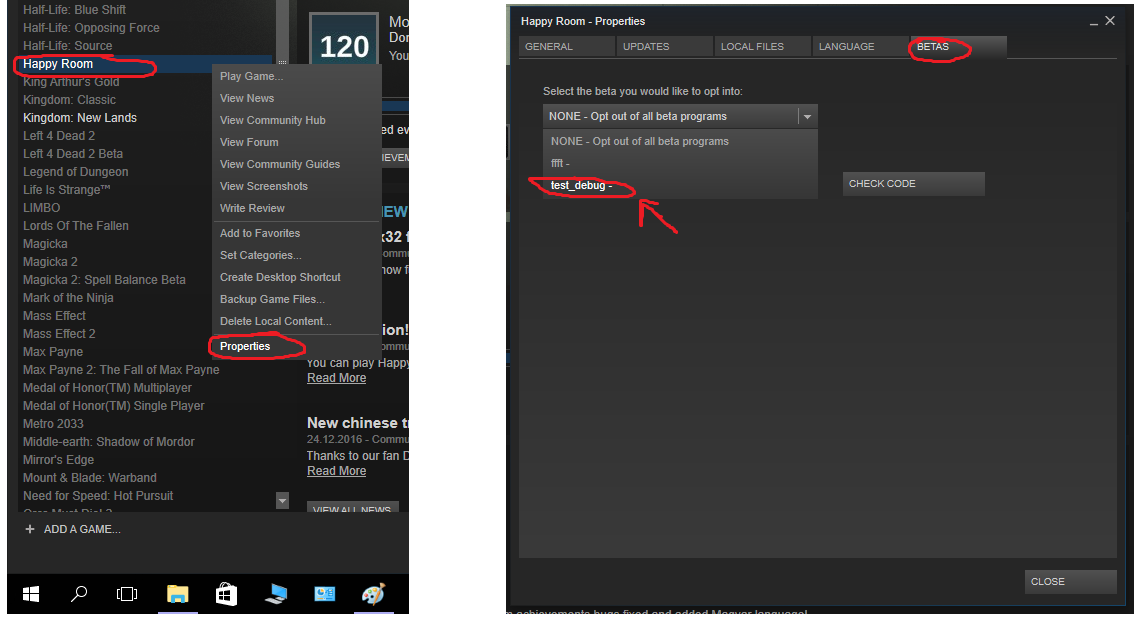
After Steam updated your game version to debug one just repeat what you was doing in release game version. Game will generate log file that is located at: \steamapps\common\Happy Room\Happy Room_Data\output_log.txt. Just send us that file to mpstudiosfeedback@gmail.com so we can check what goes wrong and fix it so you may play game without any problems!
We will mention everyone who will help to fix bugs in special thanks in game : )
Thanks for you patient, we will do our best to fix all bugs!
Windows x32 fix
Linux version!
New chinese translation!
Mac support!
Enjoy : )
Share you thoughts about a game
Let us know do you like it or not? What you think is cool in game and what is not? Maybe you have some ideas about improvement or you just spot a bug?
Share it in game review, let us and other people know more about Happy Room!