As is tradition, we’re releasing the upcoming patch notes for the Avalanche update along with By Blood Alone ahead of the time with release later today.
Undoubtedly there may be some missing items here, and we’ll keep a log of anything we missed in an edited spoiler below the main one.
################################## # Features - By Blood Alone ##################################
- Added Italian Focus Tree including numerous historical, alt history and ideological paths - Added extensive Ethiopian Focus Tree - work with or against the invaders to bring triumph to Africa - Added Swiss Focus tree, and numerous mechanics to balance the favor of the major factions in your vicinity. - Added DMZ, Take Ships, War Reparations and Resource Rights stackables for new peace conference system - Added aircraft designer and dozens of new modules and an overhauled air research tree - Added Unit Medals and Divisional Commander feature, allowing you to award medals to your unit commanders for their valor in action - Added Embargo diplomatic interaction, preventing your enemies from importing your resources if conditions are met - Added over 20 new unit models for Italy, Ethiopia, and Switzerland - Added 67 new plane models for various nations - Added 12 new music tracks themed around Italy, Ethiopia, and Switzerland
################################## # Free Features - Avalanche Update ##################################
- Totally overhauled Peace Conference system, working on a blind-bid premise. - Added customizable order naming scheme with many default historical operations - Added new Air Wing organization scheme comprising static 100 size squadrons - Air Wings can now be grouped into Air Groups - Added Air Theatre UI to manage Air groups and assignments - Air wings on missions that cross multiple air regions can now be intercepted and take damage on their way between targets - Significant rebalance of many aspects of the naval module - War support system overhauled. War support may now be lost from taking casualties, convoy raids, and being bombed - War propaganda will now offset the effects of the above, and cannot be used to gain war support indefinitely - Added new historical branches for the Italian Focus Tree - you are now able to compare stockpiled designs against designs you are building. High intel will allow you to compare foreign designs in the same manner. - you can now view the logistics screen for your allies and subjects
- reduced base ship supremacy, increase max pos penalty - increased submarine visibility - ship module ic cost rebalance, removed reliability reductions, improved rangefinders and radar - reduced naval critical chance, increase damage randomness, increase carrier solo combat time - reduced naval critical chance, increase damage randomness, increase carrier solo combat time - Naval Speed rebalance - added DP Gun Tech line - cruisers can no longer have mixed primary batteries - homing torpedoes now increase hit chance instead of torpedo attack - BB/BC armour now reduces torpedo damage and crit chance /n radar/fire control now modifies hit chance not attack. Rebalanced torpedo module values and added hit chance modifiers - Removed war propaganda against X decisions, made regular war propaganda less restrictive but halved benefit - War support rebalanced. WS from being in defensive war now reduced so +20% from 30%. War propaganda against warmonger decisions now removed. War support now reduced by casualties. Low war support now reduces stability by up to 30% while at war. Propaganda now targets one of the three main WS reductions: convoys sunk, casualties taken, bombing received. base stability factor from being at war reduced to -20% from -30% - Ruler traits granting weekly war support now grant flat war support - Netherlands' War on Pacifism is now no longer possible if Shell Shocked Spectator of the Great War has been removed - Promises of Peace decision removed - Added Starting DP gun tech to ENG,USA,JAP,FRA. \n updated ENG starting ships to have DP guns - Speed adjustments for historical ship OOBs - world tension from capitulation reduced to 25% of previous, world tension from various other sources rebalanced - Max Ace bonus from undersized wings is now 200% (from 1000%), - Increase Rhineland tension generated to 8 - added min clamp to naval spotting with define, added random encounter chance to naval spotting - Raider Doctrines no longer make you harder to hit \n Sonar modules improved - Increase IC cost of sloped armor - A new local modifier has been added to various Indian and Chinese provinces, which adds a factor to the penalties from low supply, for non-core nations. This should make it slightly easier to defend, but can be worked around by improving networks & infra. - World tension is now primarily generated by claim generation and war declaration, and decays slightly faster per instance. - reduced base supply of ports from 15 to 5 - reduced supply per level of port from 5 to 3 - joining an ongoing naval battle positioning penatlies reduced - Armor can now be penetrated by thresholds, each dealing more damage than the last, capping at 100% damage if all armor is penetrated. The number of stages and values can be controlled by defines. - increased the dig in reduction from spy networks from 1 to 5 - reduced suppression of most of the softer occupation laws - compressed variance in troop requirements between occupation laws - Flat branch experience gain from advisors has been moved to come exclusively from branch chiefs. This addresses the inefficiencies associated with stacking your cabinet in favor of a particular branch (most players choose army advisors, while the navy and airforce are left to suffer) - Added a fuel tank module for tanks, and made base fuel hours additive with any bonuses - The consequences of breaking the Washington Naval Treaty are now appropriately less severe - Countries are now more likely to join factions whose faction leader is guaranteeing them if war is declared upon them As part of the new peace conference war participation has been reworked. notably war participation gain from strat bombing and taking casualties has been reduced - Free France now gains claims on all of Vichy France's non-core states (mostly African colonies) to encourage the AI to demand those territories in a peacedeal even if France is not liberated - Logistics strike is now affected by state anti-air buildings. - Increased equipment combat losses from strength, increased attack penalty from low supply slightly - Reduced Ship supremecy Base to 0 from 100 - Yugoslavia tank conversion speed focus now grants 15% up from 5% - Yugoslavian focus 'Invite German Military Mission' now grants a 1 use speed bonus for medium tank hull technology - Yugoslavian focuses 'Tank Conversions' and 'Tank Licenses' now take 35 days, down from 70 - Yugoslavia now has a new 70 day focus for owners of By Blood Alone, granting the use of the 1943 Medal for Bravery, with a tag-unique bonus of 5 max entrenchment - If Bulgaria undergoes a civil war and loses to the revolting faction, also switching to the generic focus tree, the revolting faction will lose the effects of the second national catastrophe (which they would otherwise be unable to remove). - Yugoslavian political advisor traits have been rebalanced, several unique entries added - Yugoslavia can now take a focus to allow the sending of Brigadista volunteers during the SCW. This spirit will be removed upon the culmination of the SCW. - Naval gunnery now undergoes a similar calculation to land combat for determining piercing vs armor mechanics. Critical chance is now graded against how much armor is pierced by the firing gun, and a new top end piercing threshold has been added. This should have the side effect of increasing the damage potential of super heavy caliber guns vs low armor targets when a hit is scored. - MAX_ANTI_AIR_REDUCTION_EFFECT_ON_INCOMING_AIR_DAMAGE increased 0.5>0.75 - increased carreir sortie rate, reduced ai carrier tf capital min value - greatly reduced damage to trains from logistical strikes - somewhat reduced damage to trucks from logistical strikes - reduced land combat org and strength damage from air attacks - Elevated Engineering Corps spirit now provides 20% railway gun bombardment up from 5% - world tension now increases war support by up to 40%, from 30% - Field Hospitals now protect proportionately against war support loss from damage/casualties - air attack and agility factor malus added back to night time - Night flying now incurs up to -50% air attack - changed agility damage reduction to cap sooner and be smaller overall - added damage increase based upon net speed and speed difference - reduced overall damage mod in air combat from 0.3 to 0.2 - Naval modifier: 'Chance to avoid critical hits' no longer increases your chance to be critically hit. - Several focuses and events now use the new embargo mechanics - added ic cost to mechanised and AC variant upgrades - reduce air experience gain from training ################################## # Gameplay ##################################
- Mercenaries and International brigades are now removed at end of war
- added new naval supremacy factor vaĺues for ship achetypes - Implemented Naval supremacy factor value for supremacy calculation - Armored trains now have an anti-air stat and will deal damage to any air wings on logistics strike that are attacking them. - reworked Soviet air regions - Only display the ship refitting speed and cost modifiers when MtG is active. - Convoys no longer counted as carriers when computing screening efficiency - All Air combat modifiers will now apply in sea regions. - Transport plane wings can now carry approx 2 divisions at max load when paradropping
- restructured some script in BFTB on_actions to not run expensive triggers and effects any time a state anywhere in the world changed hands - Fixed an OOS on division_names_group - Ion Antonescu (and his copycats) will not longer randomly crash the game if they are promoted to country leader while using a general ability - Fix cloud saving when there is no more space left on remote storage. Display a warning popup and do not keep a corrupt file. Also display the current available space in save menu - Fix rare CTD when railway guns had no valid move destinations - Fix crash from completing LaR spread communist revolution operations - Ordering a unit to move accross impassable will no longer fail if there is a path around it - Fixed an OOS that could occur when a player hot-joins. - clear pending events window on country tag switch. - Fixed CTD in AI strategy when a leader is removed - The game will no longer CTD if lots of players spam map pings. - Now able to change move command to retreat - Don't recreate attack order if clicking on the attack again - Exiled armies will no longer try to pathfind forever if there's no land path to go home - Naval task forces will no longer get stuck on their way to assigned regions if the path goes through provinces out of their supply range - Fixed game not starting on some Linux installations when the steam runtime is located in a path with spaces - fix crash from carriers without active missions intercepting flyovers
- added new naval support tech folder, rearranged techs - Update world threat UI for tracking values - Fixed some DX11 and OpenGL UI elements being 1 pixel off by making them incorrectly positioned the same way DX9 does - added sub and surface detection to taskforce info - Base stability and war support are now displayed in the tooltip for their respective topbar values - Added kamikaze planes to air combat details - Added unique map counter icons for carrier capable air wings to help distinguish them from land-based air wings. - ENG and RAJ should now make a passing attempt to hold Burma once Japan controls enough of Indochina - Added AI air handling for interception en-route to target, and added several inertia defines to control how twitchy the AI can be with wing reassignment - Added a new AI strategy to upgrade the strategic air importance of a region. German AI should now begin the battle of britain/london blitz once France has fallen, and they are not at war with SOV - AI will make use of the new standard cohesion setting on larger fronts. This has noticeable efficacy of AI orders along large-front operations such as Barbarossa. - All templates will now fall back to the best match if no ai roles were selected due to match_to_count + templates will no longer stack several of the same role - this prevented the AI receiving accurate information about how many of each it wanted to recruit - added defines for chief advisor weight, tweaked AI desire for unti count and added build up weight for hitler - added property for ai ideology desired unit factor, this can be modded - AI no longer prioritizes armored cars ahead of time - Romania should no longer be ceding Bessarabia if it is at war with the USSR - Communist Japan should no longer instantly surrender to MAN - Fixed capping of the reliability value to 100% in the Tech Details view. - naval combat log now correctly displays death reason for ships killed in training accidents or having hit mines - Prevent the bottom right corner graphic on unit counters, that indicate which ideology the unit is associated with while in a civil war, from showing when the unit is not in a civil war. Added a frame for fascism and brightened the neutral graphic. - Added custom display for railway gun effect in the tech info view.
- Treat custom commanders as an array for modding - Removed modifiers navy_refit_speed and navy_refit_ic_cost. Use refit_speed and refit_ic_cost instead; they do the same thing. - Removed modifier equipment_conversion_ic_cost. Use equipment_conversion_speed instead. - Added ImGui view "air" exposing data from the most recent air combat update in a region. - Tweaked and changed define DRAW_DETAILED_CUTOFF to more descriptive DRAW_COUNTRY_NAMES_CUTOFF - Added effects set_occupation_law and set_occupation_law_where_available. - Added support in air_wings OOB for specifying a carrier's name as the key instead of a state ID. The OOB file containing the carrier must be loaded before the file containing the carrier air-wing. - Added 3 new triggers for the new war support maluses, hooked in to propaganda decisions - Added support to trigger occupation_law for checking a country's default occupation law or the occupation law set on a country. - The equipment attribute "type" now overrides the type of the archetype instead of adding to it. - When created and reinforced air sub-units, the equipment must now not only have a matching archetype but also at least one matching type. - Air equipment (including missiles) now define which air missions they can carry out. - Module attribute gui_category now accepts a list of categories. - Added support for selecting variant with version_name in effect create_production_license. If the selection criteria fails to match a variant no license will be created. - Added on-action for force-government peace actions - ships_in_state_ports now accepts scopped variables as arguments for state - Divisional commander rank is now persistent and moddable - Missions and targeted missions, defined as any decision with days_mission_timeout, will no longer evaluate its cancel_trigger and potentially run its cancel_effect once completed but before being removed. - Fix on_add and on_remove in advisor in character database. Now they use properly the character scope. - Fixed issue where any event fired at hour 24 would not have its default option executed when it timed out without the player having selected an option. - Fixed a bug where some modded maps would take too long to load and trigger issues with resource delivery routes - fix _is_ (e.g. is_air_chief) triggers so that it checks if the character not only has an advisor role for the given slot but also checks if the character is hired for it. (similar to is_political_advisor)
- reduced XP cost of Radio II tank module to be in line with the other radios - split up Saudi-Arabian states - split up Quebec into multiple states - split some states in Northern Canada - Split up Siam into 3 different states - Reworked Australian states - split up South-East Asia Airzone and South India Airzone - Reworked Manchurian & Chinese Airzones - Split Iran Airzone into 3 - Reworked Canadian Airzones - Split Arabian peninsula airzone into several zones - fixed an issue where some Manchuko focuses wouldn't display their rewards after being finished - fixed an issue where the US would not gain the full benefit of the Military Construction focus under some circumstances - fixed wrong trait being assigned to US admiral - a small handful of releasable countries were able to get access to vanilla tanks even though NSB was active. This has been fixed. - Hot-reloading AI strategy plans will not crash the game. - Removed the define PORT_STRIKE_ENEMY_SUPERIORITY_LIMIT which was set to above 100% in the base game which in effect disabled the limit. Removed the accompanying modifier enemy_port_superiority_limit. - Soviet coastal defense ships correctly get IC cost reduction from merged naval designers - Removed a redundant (") from the event "Japanese Young Officer Coup" - Changed the spelling from Citroen to Citroën for the U23. Also noticed the same typo for the P107 and changed that spelling as well. - Balanced Latvia's population by reducing the numbers in the state of Vidzeme from 1.52m to 408k and increased the population in the state of Zemgale from 64k to 215k for a more historically accurate representation as noted in AR-29854. - Fixed unknown leader portrait when creating a dynamic country. - Switched out a Chinese flag to a Soviet one in Latvia's Focus Tree "Seek the support of the soviets". - Changed place on a "}" in Germany's "Danubian Expansion" focus so that Romania gets an event and joins Germany's faction after focus completion. - added carrier night traffic modifier +50% to CAG night fighting air spirit - Bulgaria will no longer appoint the wrong advisors on historical - governments in exile can no longer take exiled scientist decisions - Fixed several old event typos - Polish event granting cores on Ukraine and Belarus now correctly grants those cores if Germany accepts - Czech focuses affecting poland or romania will correctly bypass if they are not allowed - The Gordian Knot focus will now bypass if Turkey does not exist
################################## # AI ##################################
- AI should again be able to reprioritize equipment production lines - Added historical AI behavior to the decision, so that Greece won't take this decision if playing on Historical setting, ensuring a-historical AI choices won't be made. - Soviet Union AI will no longer fabricate on Romania before they have completed the appropriate focuses - AI will not be able to hire invisible advisor anymore - Fixed bugs preventing the AI from successfully designing new tanks if the already existing tanks fulfilled certain conditions. - AI will deploy divisions if capped by equipment deficit above threshold - Soviet AI should now build AT divisions - AI Air evaluation now knows how maps work. They previously used a series of colored lights and hand signals. - AI should no longer try to change template of divisions that are cut off - AI micro movements now aware of impassable adjacencies - AI tweak - Greek Anatolian Fascists want to conquer Anatolia
- Canada can no longer choose the "Join Germany" focus if Germany is a puppet. - Danzig and Warsaw can now be controlled by either Germany or one of its allies for "Operation" Weserubung" to be completed. Also added Norway to the bypass criteria. - Fixed Exp icon not changing in Military Deployment View when the training is completed. - Fixed Baltic Artillery Designer not providing the appropriate Artillery production bonus. - Fixed heavy tank icon for the UK - Fixed the tooltip to show when the player have all the necessary states of ALbania by removing the Syrian states from the condition that should not be there. - Fixed adding divisions to a general under a marshal, not updating the marshal's abilities' effects. - Added tooltip log for Ability activation on Marshal level, when there is a overpay because of some generals having the same ability. - Fixed a typo in the name of a Japanese Admiral - Fixed removing divisions from a general under a marshal, not updating the marshal's abilities' effects. - fix case where sometimes naval paths didn't recalculate after region access changed - Laos no longer starts with non-mtg hulls if mtg is enabled - Removed hidden ideas from "Modify Goverment" alert. - Fixed Army Group deslection not deselecting all the selected units. - Fixed wrong amount of trains in logicstics veiw, when there are more trains in sotckpile that are used. - Fixed a bug when using custom game rules where starting with Yugoslavia fragmented would allow YUG to continue existing in West Banat as a single state. - Fixes a bug where Kazimierz Switalksi would be listed as a military officer in the tooltip for 'The Sanation Left' focus in the Polish tree. - Changes conditions for HUN focus 'Demand Referendum' from OR to AND when checking whether AUS exists/is independent. Also cancels focus if AUS no longer exists after starting the focus. - Fix equipment conversion cost accounts for % modifiers and strategic resources. - for advisors portrait, use on which intelligence ledger they are displayed to determine which type of portrait to use (army, navy, civilian). Fallback on army portrait if it's the only provided. - Frame time in ingame profiler will now include the full frame update, not just the GPU rendering part - Somali flags are no longer upside down... - When calculating total trucks needed at country level, take into account all controlled nodes and not just owned ones. - fixed inconsistency with demanded unit types for bulgarian imro decisions, causing them to cancel as soon as started. - Fixed issue where armored trains could become invulnerable to logistics strike if congregating in large numbers. - When in character scope, have [THIS.GetName] return the name of the character and not their country - Fixed autonomy score being given in the wrong Bulgarian event. - The Esti is scandi focus will now correctly annex Scandinavian puppets - Doctrine bonuses to tank max speed will now be taken into account when determining if a tank design's max speed is too low making it invalid. - In the air combat details statistics table, fixed the mix-up of the numbers for our and enemy bombers disrupted. - fixed a doctrine bonus in Portugese focus tree - Prevent damage done to trains from being reset every hour. This made armored trains invulnerable unless enough air wings were assigned to logistics strike to destroy a train in a single game tick. - if a building is offmap, then there should be no construction limit - when changing character portrait with set_portraits, make sure the views displaying portraits are refreshed. - do not reevaluate major status when loading a save - The port strike air mission will no longer prevent all but one airwing from dealing damage per port. - Fix assigned leader portrait not updating if the character is retired or loses the unit leader role via script - Fixed multiple aces being assign to the same wing when random generated. - Fixed an issue with the database loaders where a mod could introduce content without changing game checksum - Fixed air wings experience not splitting correctly after civil war. - Bad Weather Penalty and Night Flying Penalty can now exceed a value of 1.0 (this fixes the soviet airforce national spirit being highly ineffective) - Slightly changed the calculation of air detection to care about the full weather penalty and not just equipment stats on mission types (which are not updated in the same way). Tl;dr - values appropriately show up in the tooltip. - Fixed wrong description in ships_in_state_ports triggers - make sure resource rights are cancelled when the receiver is annexed - Fixed destroyed Anti-Air guns being counted to the Air superiority. - Fixed failure to apply design company equipment bonuses when designing the first variant of a type. - Fixed the defence and movement modifier of Army's Fort Adjuster not being applied. - Fixed wrong breakthrough bonus calculation for Forts on the attacker's side. - Equipment conversion lines will no longer create equipment out of thin air from excess IC when consuming the last remaining equipment to convert from the stockpile. - GiE's can now only happen if an appropriate faction leader is present - allowed_civil_war trigger in characters now has a country + character scope - Fix low base supply alerts triggering for empty air bases - clear pending events window on country tag switch. - Fixed ships getting stuck when the last naval base is captured - Laurel and Hardy now correctly reversed - Made randomizing order names a little less deterministic - Added unit stat "thrust" for use in the plane designer. - Fixed Imgui windows not switching countries when switching countries in game. - Fix some equipment designer tooltips appearing twice - Fixed looking at location without state assert - added fix for turkish democratic heavy tanks messing with bloom - scaled down bfb tanks - Fixed typo in the communist party of Yugoslavia. - Fix typo in basic infantry equipment for Latvia. - fixes for old content with new Arabian states - Use a cheaper algorithm to compute rough distance between countries - fixed up cruisers light medium batteries and catagorie blocking - remove unused Train Prio from supply system. - event chain and updates to adjacency rules to allow for the closing of the suez as part of LoN sanctions - fix crash when invalid state scope is passed to context effect - Fix bug where character traits would sometimes duplicate on level up. - Temp change to sov propaganda - Most sources of weekly war support in modifiers have been replaced with flat war support - PDT - modders can now add achievements in common/achievements. should change nothing if no mod achievements added. Persistence across games not done yet, after closing the game completion status is forgotten. - Fixed missing names for countries and regions. - returned WS to sov idea - added DP guns to usa, jap and fra ships - updated histroy units files for ships, upgraded panzershiff speed - updated fra, usa & jap ship designer template targets. - 'Fixed' soviet anti tank template test, added world tension test - new states for Siberia and Kazakhstan - Upgrade eng strats to naval invade less early and deal with italy before normandy - Ensure mapicons recurvisely hide subelements on update and init, reducing the average number of UI elements to update by an order of magnitude - optimize daily diplomacy update - Fixed issue where Estonia and Latvia would not follow the historical focuses. - broke up Sudan and Khartoum states - Implemented Ascari battalions to replace former regular infantry battalions in colonial divisions. - Focus tree re-arrangement for proper integration of alt-history branches and a better FT layout in general - Fix volunteer action check not getting early out when possible - Adds events and loc to the 'Soviet Aid' focus in the communist branch. Also redirects the player to the anarcho-communist branch if the Soviets don't supply aid. - Fixed assert in equipment designer caused by two GUI elements having the same name designer_role_entry. - adjusted order of UK focuses - Fixed error when hovering over Camelry units due to Camelry battalion missing its text icon. - Add overnight check for Germany dying before 43 - rework of some African states and African air regions - Fixed some inconsistencies in english localization, and one safety criteria for while - Added the ability to allow training locked templates - implement persistence of career profile achievements using cloud storage - people will no longer immediately become spanish when they are sent to spain - Adds events, loc and effects for Soviet Mediation focus. Also some fixes for other focuses and events. - Fix AI trying to pathfind to invalid front provinces or assign units that are busy retreating - added event chains and some other stuff for UK Exile focuses - Fixed issue in Baltic focus (triggers for Finland after Finnish CW) - Fixed UI issue with tooltips on the occupation laws UI. - Added the conversion cost debug information to the ship refit view tooltip. - State supply from population now incurs a penalty factor for occupiers [BALANCE TBC] - Fixed console commands in order to match the corresponding effects - Added some missing dockyards in the history file. Trieste VP value increased from 1 to 3. - added +5 agility base to small airframes across the board - Fixed ship radar 2 AA attack value to be a multiplier and not additive - reduced weight and cost of some CAS modules - reduced cost and weight of some defensive modules - added new portraits for france, and all small idea portraits so far - Fixed null province CTD in railway gun distribution. - added some control variables for ground combat weighting, since the AI seems to have lost any semblance of self-control. - Soviets should no longer justify on Romania before completing the focus Claim in Bessarabia - Ouest du Quebec deserves capital letters. - Fixed China triggering error due to unavailable yet unremovable designer - reduced weight of tank buster I and mine modules - added a few more squadron names for German airwings - added yellow river flood decision for china, tweaked some related scripts - Determined normalization values for evo tank designer - Fix for https://beta.paradoxplaza.com/browse/ - fixed(?) an issue where Chinese factions and Japan could end up in a loop of continuously offering white peaces and getting dragged into the war immediately - Add trigger has_war_with_wargoal_against - mini change to loc for autonomy levels for Germany. Setting supervised state color to Overlord's - Added equipment versions for Non-MTG ships granted via focus in Soviet and Italy - Adding button for selecting random country on new game - Fix bug where armies didn't know their template had changed - achievements for modders - show new icon (icon's frame actually) if it's mod achievements that are allowed - Fix UI putting a glow on ideas the player isn't allowed to change - Fixed weird loc for country-specific tech labels for BB and CA armor - Added effect start_peace_conference - tooltip indentation standardized for country leader trait entries - Fixed CTD when removing character's country leader role in Kaiserreich - a bunch of fixes - Greece being able to complete focus tree, USB and CSA shouldn't be fg/puppet/lib, Australian name fix, Lakes in Canada and Africa in correct states and Air zones, tweaks to ethiopian focus and decisions, and a minor twonk to Italian event chain - added prerequisite ship armour tech to FRA histroy file - Remove CW target when the war is over - Fixed random seed in CreateOperativeLeaderEffect that caused duplicate operatives. - Imports are now loaded correctly from the history files - Puppet effect no longer necessarily cancels wars - Albania will no longer submit if they are in a faction with Yugoslavia, Bulga
Developer Diary | Art & Achievements
Hello, and welcome to this week's Dev Diary! I am HOI’s 2D artist and am the one who makes the little buttons, icons, and whatever gets thrown in my way for you to look at and push on, and today I have gotten the opportunity to talk about my work! So let’s start at the beginning, how does a project start, and how and when do artists get involved?
Being an artist on a project such as Hearts of Iron is not an easy piece of work. You need to be on your toes and ready to adapt to whatever task your colleagues want help to solve. It usually involves a bit of text and a ton of reference material. And to gather all of these things we use a tool called Miro.
It’s essentially an online whiteboard that can be used however fits you and your team best. On our Miro, we separate the features into columns that give you a quick overview of what we need to complete for the upcoming update. The columns are usually divided into Focus trees and Features that are expected to get art during the project. As the project starts it’s not uncommon for the Miro to be a bit empty. A lot of the research for what can be used, artwise, is a pretty heavy task to bite into with all copyrighted photos out there. Our amazing content designers spend quite a lot of time on valuable research, sorting out what is necessary for the game to make sense as well as adding flavour to your gameplay. And yes, this takes a fair amount of development time to gather all this valuable information as well as imagery that will communicate the right thing for you when you play HOI.
As time goes on, more art tasks will fill up the Miro board. So, for an artist at the beginning of a project, it can range from doing some cleanup work on older icons or portraits, starting to work on loading screens, continuing setting up the Miro board for the DLC to their taste or helping with another project that needs some extra art-hands.
But back to BBA and our work there! We already know what kind of art we want to have for each focus tree, it's more the quantity that is a fluctuating number at this point and it's still uncertain how much we can make in-house. I always try to convince my CDs to ask for art to their heart's content because we always prioritise what needs to be done so the things that matter the most get the art it deserves first. When all High Prio art is done, if time allows we continue with Medium and last of course the Low. We also have, for whenever we manage to wrap up art in a timely manner, a special section that is called a “wish-list” or Corner of Shame. It's essentially Low Prio art but stuff that maybe was more of an afterthought or just forgotten for a Feature or a Tree that would be extra sweet if it got some new shiny textures.
Without giving too much away, here's a heavily zoomed-out version of how a Miro board can look like that I as an artist work with. And yes, I was in charge of all the Focus trees and the Plane Designer for this DLC (granted I did not make all the art, we also outsource).
We use a colour code to communicate what's going on on the board! All of them also have a little stamp on them to mark what Prio it has as well as a text section where CDs write what they want to communicate with the icon they request. As you probably can see, there's quite a lot of information that needs to be shared between the departments before art can be worked on. It’s our transparent way to communicate with each other, CD’s can see how much I have done and how much I have left. They can also see my schedule on what I’ll be working with each day. This means that CDs can also ask to get prioritisation over each other if their Focus tree or Feature requires art sooner rather than later and this is constantly brought up and talked about on our syncs together. Communication 👏 is 👏 key!
Here is an example of how a request turns into an icon (that you may or may not already have seen): This is a typical request. It has an in-game name displayed, reference images provided as well as a description of what my CD wants out of the icon. It is also prioritised!
And this is how it ends up looking! Since we have quite the large art-library by now I can quickly iterate on what type of background works the best as well as reuse different layer styles to make the icon feel cohesive and on-style with the rest. I also made sure to hit all the marks from the requests such as;
At least one donkey
The donkey should carry (at least) a supply
Add wheat bundles without overcrowding the icon.
When the icon is in either a conceptual phase (putting the requested items together without rendering it further) or simply put together from our art library, I of course share the progress with the CDs so they can have to say their yay or nay. If I hit or missed the mark with the request if we need to re-think the icon in itself or just a 10/10 beautiful icon, ship it! 🚢 Also, one thing to keep in mind when doing these types of icons is remembering their size. All the things that a CD may want in an icon may not fit in the end or make it more or less unreadable because all the things together will just create noise. That's when we artists step in and “take over” so to say with simplifying without losing the information that the icon should communicate.
This is also a typical request when a CD isn’t 100% sure on what would or could look the best and leaves that up for me to figure out: Icons are requested the same throughout the art process, so name, description, and prio are all there. It's just that this time I didn’t get any reference material and that's perfectly normal!
And this is the result!
I have the silhouette of Africa
Railroad
And industry
And of course, a background to frame it all on
Had I added coins to show off investment I would have crowded the icon. We usually have a rule of max three things in one icon to communicate what's necessary. After three it can start to become muddy. Example of adding coins to this icon to communicate investment:
Immediately crowded
Silhouette of Africa is no longer a focus and is hidden
The coins stealing the show
So the TL;DR of this section is;
Use good Tools for communication, whatever that may be for you and your team. Be honest and transparent with what's going on, what you need to do your part, and when you need it to estimate the time left on the project. CDs do research, CDs request art, Artist look at the requests/ask questions, Artist make art, Artist share art with CDs and so the circle is complete.
Now when you kind of know how artists, or at least I, do work with content and for the project I would also like to share how the loading screen got worked on for BBA!
Ahh shit, here we go again. Yes, I was thinking that we could get a little re-cap on how it is to not just make icons and portraits, but also be flexible and knowledgeable enough to pull off a loading screen. We artists are a jack of many trades so to speak and we do need to be able to adapt to a lot of different types of art tasks that need to be done for a project.
So, how is a loading screen created? It usually always starts with a prompt or a vision from one of either designers or content designers that are heavily involved in the upcoming DLC. Essentially we want the loading screen/splash screen to communicate something in relation to the DLC, this time we want to focus on Italy and planes. Mostly because Italy has been heavily requested and we want to shine a spotlight on the country as well as showcase the plane designer!
The prompt is “Italian and American fighters incoming in a dogfight over Italian landscape”
Cool. Let's go ahead and make some thumbnails then!
Once again several thumbnails are presented for the others to choose from. Typical hierarchy methods are used here, black = most visually interesting, grey = further away and white/light grey = low focus.
The last one, A3+5 was chosen and started to get some more details in a simple greyscale set-up. This time I quickly wanted to take it into colour and started to experiment with what kind of setting looked best.
After going with a more sunset/evening vibe, because it looks more epic, I started to experiment with the range of those colour schemes as well as trying out some different styles. Here you also can see that I had no idea I was painting the wrong plane but that doesn't matter because we are still very early in the process and just trying to find a good mood.
I also noticed that the balancing of the image was off since we need to take into consideration the different kinds of resolutions it's gonna sit on. So to solve this I pushed the whole image down and (thankfully) it was just drawing more sky this time! (still, the wrong plane, don't worry about it)
The render phase is coming up and I’m not gonna lie, I’m not too excited to draw hard surfaces. But luckily we have a fantastic 3D artist on the team that needs to model some planes for the DLC anyway! He was generous enough to pose the plane for me on top of my background and now it's just painting over them a bit to make them blend into the image and look cohesive. (3D render of the planes)
(3D render on top of WIP background)
What's needed now for the next step is to make the planes work together with the background as well as paint more details in the clouds. I also need to add details such as motion blur to make the planes go woosh, which is a dilemma. How much do you paint before the details you put in get lost from said motion blur? Let's find out… the hard way 😌
Along the way, I also realised… what if we tilt the plane some more to have the wing cut through the cloud better. Needless to say, I asked our 3D artist to tilt his model and render a new one which he so kindly did. Looks nice 👌
But back to figure out the BG again. After some back and forth with rendering in and out clouds as well as doing some touchup to the landscape I think I finally landed on something that I was happy with. Adding motion blur, air trails, and a propeller as well as bounce-light and painting in the sky in the plane's window I think I made it work nicely together. And the loading screen is done ✨
And now for something completely different! I was thinking that you guys might be tired of reading about the art process now so I’m just gonna drop a bunch of art stuff for you at this point. Please, enjoy the small selection of what's to come for BBA!
Cute misc icons:
Focus icons:
Portraits: Italy:
Switzerland:
Ethiopia:
Achievements for BBA:
Why yes, we can’t forget about the achievements for BBA now can we? We always think about what type of achievement can be done for each DLC. This time around I hope you guys will have a few laughs and also maybe think “well that's easy” or “oh no… how?”
…and you get a canton, everybody gets a canton! As Switzerland, have 24 states.
I’m not locked in here with you… As Switzerland, declare war on Germany and win.
Swiss Cheese As Switzerland annex 5 states that are not contiguous with each other or Switzerland.
You Shall Not Pass As Switzerland, win a defensive war without ever losing Western Swiss Alps, Eastern Swiss Alps or Ticino.
The Lion that Roared As Ethiopia, without being in a faction, force the Italians to make peace. Again.
The Lion King As Haile Selassie, declare yourself “King of Kings” and control Kenya and Tanzania.
This time for Africa As Ethiopia, found the African Union and have it encompass at least 13 different countries with capitals in Africa.
Crusader Kings IV Take Jerusalem as Ethiopia and move the capital there.
The Red Sea As Ethiopia, go communist and take all the states that border the Red Sea.
Holy, Roman, and an Empire As the Pope, restore Rome.
Pizza Time! As Italy, occupy New York, Chicago and Hawaii.
Collect all the Romes As Italy, continue holding onto the First Rome, and gain the second and third Rome.
Nothing personal, Adolf As Italy, take Austria before the Anschluss and never enter a faction with a fascist Germany (before 1945).
Not today As communist Italy, save Gramsci from the brink of death, make him the leader of Italy and form the Italian National Union.
This time it will stick As any Allied Nation (in faction with a democratic Britain), enforce a peace deal on Germany that disarms the Rhineland and makes it a demilitarized zone.
By Beer Alone As Germany, control Budweis, Tsingtao, and Guinness directly or through a faction member.
By merit alone Promote a Unit Commander to a general, and reach max level.
Snakes on a plane As Brazil, capture Rome with paratroopers.
3D art for BBA:
Of course, we need to show, last but definitely not least, the 3D art that was made for BBA \o/ (some are still WIP 🤫)
T-posing soldiers o7
Cute tanks ❤️
Adorable planes 🛩️
And with that, I’ll wrap up this week's, and last DD for By Blood Alone! Thank you for hanging around for this long, I truly hope you enjoyed getting a peek behind the curtain of a HOI4 production!
/CreamGene
Developer Diary | Tech
Bonjour friends, it’s your favourite Tech Lead again! Last year already I wrote to you in the final weeks leading to the release of the Barbarossa patch, and we draw close to the go-live of the Avalanche patch, here I appear again.
Old Platforms Retirement Plan
Like the future, technology is always in motion. As new platforms arise, olders need to be taken behind the barn and put down.
Don’t worry, we’re not talking about Windows 7 (yet 😉). Despite the release of Windows 11, we have not elected to make a push to Windows 10 since Microsoft’s support for new tech on older releases is still fairly good.
The same cannot be said for Mac and Linux, sadly. And so, starting the new 1.12.0 release, the minimum OS versions will be macOS 10.14 (Mojave) and Ubuntu 20.04 LTS (Focal Fossa). You will still be able to play older HoI versions on older operating systems by rolling back to previous branches, but Avalanche will refuse to start.
Those updates are done in order to introduce new tech to our games (not just HoI) and ensure that all can be built on the same infrastructure within the studio.
New Defaults
Last year we introduced the option to run the game with DirectX11 rather than the venerable DirectX9. After a long period of observation and very few issues observed, we have decided to make it the default.
The first time you start the Paradox Launcher on Avalanche, the game will perform a one-time upgrade of your settings from DirectX9 to DirectX11. New installations will also default to DirectX11.
If you notice any issue due to this change, first, please make a bug report, and then simply go to the settings page and set the renderer back to DirectX9.
Visually the game should look absolutely the same, but internally the tools that come with DirectX11 have helped us find a few sneaky graphical bugs that will be fixed in Avalanche, such as weird white squares appearing on the side of some tank models.
Performance Improvements
This is I bet the bit most of you were waiting for, the usual question of “will the new patch make the game run faster than previous versions?”. And I’m happy to say the answer is yes.
The biggest improvement has been made to the map icons rendering (unit counters, factories, supply hubs, you name it). The number of icons potentially displayed on the map had grown a lot since HoI’s release 6 years ago and the historical algorithm wasn’t cutting it anymore.
For example, here are what the FPS and frame time look like on Avalanche on my work desktop (i7700, NVIDIA GTX 1060, vsync off and 150 fps cap): Avalanche default zoom
And fully zoomed out: Avalanche zoomed out
Finally zoomed back in, but with Speed 5: Avalanche at speed 5
(If you forgot last year’s dev diary, you can pop up the ingame profiler by typing imgui show profiler in the debug console).
Contrast those numbers with the ones from the current live build (Barbarossa 1.11.13): Barbarossa default zoom
Note that Barbarossa denotes rendering performance in “render time” rather than “frame time”, which is only the GPU part, while Avalanche counts both CPU and GPU rendering time, so the numbers look different. Barbarossa zoomed out
Barbarossa at Speed 5
Since PDS games from HoI’s generation tie up rendering and game simulation, this will translate in faster tick speed (on top of a few smaller performance optimizations we added to the simulation itself). Although, to be clear, faster rendering does not translate perfectly in faster game speed. It mostly means a more fluid experience when playing (especially unpaused in Speed 4-5), and then some improvement to the speed of the game simulation.
Speaking of which, I have read and seen a bunch of “guides” to HoI performance over the past months sharing tips & tricks on how to improve the game speed, so let me give you mine: consider disabling VSync in your graphics settings, unless you have a high refresh rate monitor. The way the game simulation waits for rendering to be done to continue, with a slow refresh rate your CPU might end up spending precious time waiting on your monitor VSync which is not ideal. This root of the issue is difficult to address on HoI4 especially with DirectX9, but with DirectX11 becoming the default we will see if there is a way we can address this in the future. No promises though.
Final Thoughts
Last year I had some extra French content to show, but I’m afraid this patch I was a bit short on time to bring you more. Although if you like Tech and History, I recently wrote a technical presentation on how to crack Enigma on a modern computer, with a focus on bringing the works of Marian Rejewski to light (as he and the Polish Cipher Bureau tend to be left aside in favour of Alan Turing and Bletchley Park in many stories). There’s no recording available yet, but I’m scheduled to deliver twice more this year at tech conferences so they’ll be on Youtube eventually.
Speaking of Poland, have you all found my secret event in Barbarossa yet? 😉
That’ll be all for today, but I’ll be happy to answer your questions, tech or otherwise!
Hearts of Iron IV: By Blood Alone | Feature Highlights | #3
Today we go to the drawing board and the planning table as we take a look at the Divisional Command changes as well as the Plane designer with Peter Nicholson and Gabriel Blum.
Pre-Order By Blood Alone today: https://pdxint.at/ByBloodAloneSteam
---------------------------------
Follow us on social media: Twitter - https://pdxint.at/HOITwitter Facebook - https://pdxint.at/HOIFB IG - https://pdxint.at/HOIIG Discord - https://pdxint.at/HOIDiscord Forum - https://pdxint.at/HOIForum Steam - https://pdxint.at/HOISteamCommunity
--------------------------------- Paradox on YouTube: --------------------------------- ParadoxInteractive - http://youtube.com/ParadoxInteractive Trailers, Feature Breakdowns, Dev Diaries, and more.
Paradox Grand Strategy - http://youtube.com/ParadoxGrandStrategy Gameplay of our Grand Strategy Games. CK3, EU4 and HOI4.
Developer Diary | Modding
Greetings all,
Today we have quite a number of items for the dev diary. We’ll be covering some new additions to the career profile system, followed by some new tools coming for modders in the Avalanche update.
To begin with, I’ll hand over to our designer on the career profile:
Hello!
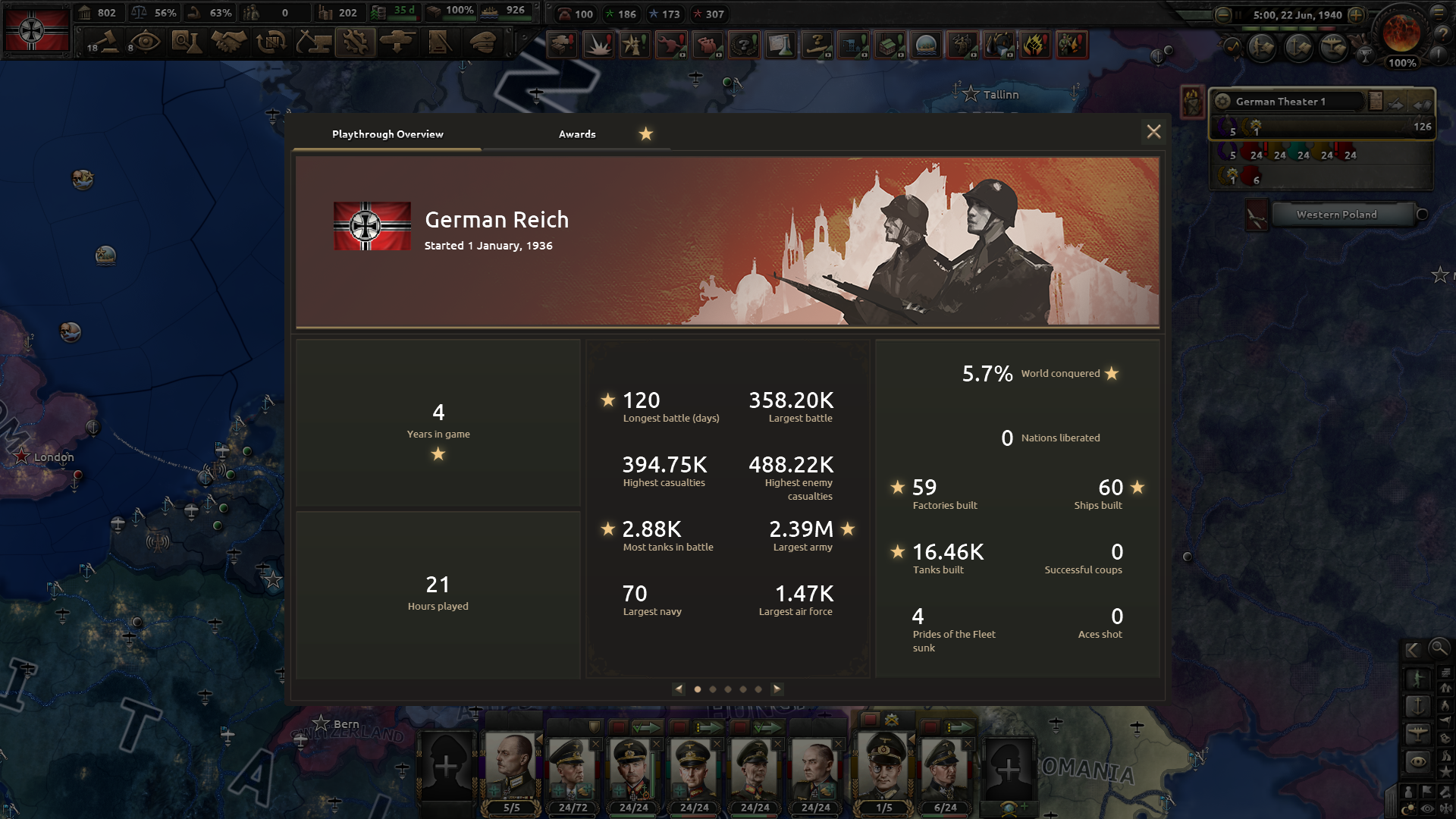
Ingevar here with an update regarding new features coming to the Career Profile. Since the release of Career Profile earlier this year we've been working on the next iteration that will bring more stats, non-ironman achievements, and some profile customization.
Let's look at it in detail.
Playthrough Overview
When BBA is released, every player will find the playthrough overview available in the ESC menu when playing the game.
This familiar window will contain some numbers for your current playthrough, including new stats and awards.
New Stats
We are adding more stats to track combat efficiency like the amount of offensive and defensive battles, the ratio between them, or the ratio of battles versus encircled divisions. We want these stats to be a better depiction of each player's playstyle and will continue to add more, so if you have any suggestions, please tell us in the comments.
Stats for Modded Games
Previously we gathered numbers only from the vanilla version of the game, but now we've added a separate set of data for games played with mods.
Both base game and modded games stats are working in single-player games, at least for now. We are looking into making MP counts as well, so stay tuned for future updates on that topic.
Awards
Awards are medals and ribbons: new kinds of in-game achievement that don't require you to play in Ironman mode.
Medals have three grades: bronze, silver, and gold. Each grade is harder to get than the previous one, with the aim that bronze is something you can get just by playing the game, while gold will require a dedicated effort and might not be achieved from the first try even by the most experienced players.
Ribbons have no grades, but the difficulty is there for most of them.
Awards won't work with most mods, cause you can never predict what the mod changes and therefore if the award required any challenge at all.
At the same time, we know that mods are an essential part of the HoI experience, so together with the base feature, we're introducing support for modded awards. Any modder will be able to use all existing UIs for creating a list of unique awards that can be tracked, awarded in the game, and then displayed in the Career Profile.
Profile Customization
Every grade of medal you get and every ribbon will also award you with some Career Points.
Career Points are used to unlock Profile Pictures.
Some Pictures are unlocked after you get one or two medals, but others will be available only to players who dedicate a substantial amount of effort to getting lots of gold medals.
Friends
All this comes together in the last feature I'd like to show today.
We're adding a Friends list to the game. You'll be able to find it in the main menu when BBA is out.
Friends window will have all your friends from Steam or Xbox and for now will only be used as a shortcut to viewing each other's Career Profiles.
By default, every profile in the game will be viewable by all your friends, but you can choose to make it private, this option will be available right in the Career Profile window.
TL;DR
All these features will be released together with the avalanche update. So any player who has the base game will be able to access Playthrough Overview, Awards, set their Profile Pictures, or view the Friends list.
The story of Career Profile just starts here and we plan to add more awards, stats, and profile customization to the game based on the feedback we get from you. Hope you like this when it's out.
Modding In-Game Achievements
One of our new features for modders is a system to support custom achievements.
The feature aims :
to allow mods to define their own achievements
to display them and their completion status in-game
to save them when a player completes them so that they appear as achieved when starting a new game
Hard limitations :
the achievements will not be displayed on steam (or other stores)
no way to know the completion rate among players
We have joined forces with Red King and their career profile to present those achievements in the prettiest way. Also the new Ribbon system will allow modders to easily illustrate their achievement without any graphic skill ! Of course if you are a master of the 64x64p icon, you can emulate our classic achievement illustration. The Awards screen with mod achievements. Icons or ribbons, the choice is yours.
A sample of script to define achievements
Behind the scenes, these achievements are earned and stored based on the game’s modset. Modifying the modset should clear achievements, but if the modset remains constant, any achievements earned will be persistent to that combination of mods.
Unit Medals and Units
Arheo back now to go over some more details on the script accessibility for our new features.
As mentioned briefly last week, unit medals are being added in BBA. These are fully scriptable, and take a similar form to regular database objects you’ll be used to working with.
Since the modifiers that can be applied via medals take a different path to regular modifiers, the list of possibilities is somewhat shorter than in other modifier scopes.
We’ve added a list of options at the top of the medals file, though we’re open to future suggestions if you find yourselves in need of something new:
You’ll note that the leader modifier is unused in the vanilla game. This modifier will translate over to army generals if the leader is promoted, and exert effects on the entire army.
The one_time_effect field will run an effect in the unit scope, though you should be able to scope to a unit’s owner and run effects on a country from this block.
Working with units is, as previously mentioned, new to script in the avalanche update. For the time being, only army units are accessible through script, though this may be expanded upon in future updates. The following effects will be available to you:
random_country_division every_country_division random_state_division every_state_division reseed_division_commander destroy_unit add_history_entry change_division_template add_unit_medal_to_latest_entry #usually used in combination with add_history_entry, otherwise you may not guarantee a valid entry. add_divisional_commander_xp
The Balance of Power feature is built in a way that makes it extremely flexible, and therefore probably very useful for modders. Any given country can only have one Balance of Power at any given time - but there’s nothing stopping you from having several that you switch between as things evolve.
The definition might seem a bit tricky at first, but that’s only because it is extremely flexible. It starts like this:
This example is from Ethiopia - you set the id of the Balance of Power, the starting position, and the two starting sides. The sides are defined further down, and you can replace them with other pre-defined sides using script. This means you can, instead of changing the entire Balance of Power, just replace one, or both, of the sides should you want to do that instead.
You also define a decision category as the Balance of Power category, meaning that you can script Balance of Power decisions the same way as you would script normal decisions. The will then appear in the Balance of Power UI. So basically anything you can do with decisions, you can do in the Balance of Power UI…
Each side is further divided into ranges with a min and max value, and a set of modifiers that are active when you are in this range. Again, the ranges are customizable, so you can have basically as many or as few as you like (within reason).
As you can see from this example you can also run effects when the range becomes active or when the balance shifts away from it.
You can also set/change the graphics of the side as you like:
What else? Well you have triggers based on the Balance of Power, so you can lock Focuses, decisions, events, or whatever behind the Balance of Power being at a certain level. You can modify the balance either with one off values or with a ticking score. And you can of course remove it altogether.
In all I expect to see some wonderful applications of this in mods going forward.
Peace Conferences
Peace conference modding has now become somewhat simpler, as well as being more consistent with the rest of the game’s scripting standards albeit at the cost of some rather verbose dotscoping chains.
Peace conferences now primarily work on a per-state basis, with the exception of ships and stacked bids (which due to technical limitations are not very accessible to script).
Every turn, each state will be subject to two evaluations for the country from whose perspective you are playing or viewing. The first evaluation will define the bidding cost per action type for a state, and the second will define the ai desire to bid on said state. These two values do not correspond, but are affected by each other.
In the entry above, this cost multiplier will be applied at point of bidding for a country that is either NOT puppeted, or is bidding for itself, to states which are their cores.
You can add categories here which will consolidate their values in the tooltip for that state during a peace conference. This cost multiplier will only work on bids of the ‘take states’ type, but multipliers can be made to affect any combination of bid types if treated as an array.
A state can be subject to multiple cost reductions, which stack multiplicatively.
The evaluation of AI desire works in a very similar way:
Instead of affecting the cost, this affects the ai’s subsequent evaluation of the cost when deciding what to bid on. Here, the AI is subject to a -75% desire to liberate tags that belong to the is_unlikely_country_tag scripted trigger. In short, it means the AI will prefer not to release certain wacky, wonderful tags. AI desire can also be subject to multiple modifier entries, and these will also stack.
The AI evaluates costs with a bucketed per-type approach, rather than simply bidding on the best cost*desire entries. This goes some of the way towards reducing bordergore, and effectively takes a sample of the desire of bids of the same type and target - France for example, would consider all Puppet Switzerland bids to be of the same value to try and avoid leaving holes.
Debugging Tools
We’ve expanded the options in our imgui during By Blood Alone, and now this handy air region tool will be in your hands:
You can access this with the console command imgui show air, followed by selecting an air region. This will give you up-to-date information on the details of the wings present in the area and their efficacy.
—
And that’s all for this week! Next week there will be a break in dev diaries, but tune in in two weeks for a round up on the technical situation and changes coming in the Avalanche update.
/Arheo
Hearts of Iron IV: By Blood Alone | Feature Highlights | #2
Today we take a dive into the various alternative futures that can unfold in the coming expansion! Explore the focus trees for Italy, Switzerland and Ethiopia with Game Director Peter Nicolson & our Hearts of Iron IV development team.
Pre-Order By Blood Alone today: https://pdxint.at/ByBloodAloneSteam
---------------------------------
Follow us on social media: Twitter - https://pdxint.at/HOITwitter Facebook - https://pdxint.at/HOIFB IG - https://pdxint.at/HOIIG Discord - https://pdxint.at/HOIDiscord Forum - https://pdxint.at/HOIForum Steam - https://pdxint.at/HOISteamCommunity
--------------------------------- Paradox on YouTube: --------------------------------- ParadoxInteractive - http://youtube.com/ParadoxInteractive Trailers, Feature Breakdowns, Dev Diaries, and more.
Paradox Grand Strategy - http://youtube.com/ParadoxGrandStrategy Gameplay of our Grand Strategy Games. CK3, EU4 and HOI4.
Developer Diary | Quality of Life Improvements
Greetings all,
Due to a misplaced carrier pigeon, today’s dev diary will not be on modding changes, but will instead focus on a variety of minor and QoL changes coming in the Avalanche patch accompanying By Blood Alone.
This list is by no means exhaustive: we’ll cover the more impactful changes here and still give you plenty of juicy items to discover in the patch notes.
Armor Piercing
Those of you who routinely peruse the forums may have noticed me discussing details on our change to the piercing formula, but it serves to draw attention to it here, in a more visible light.
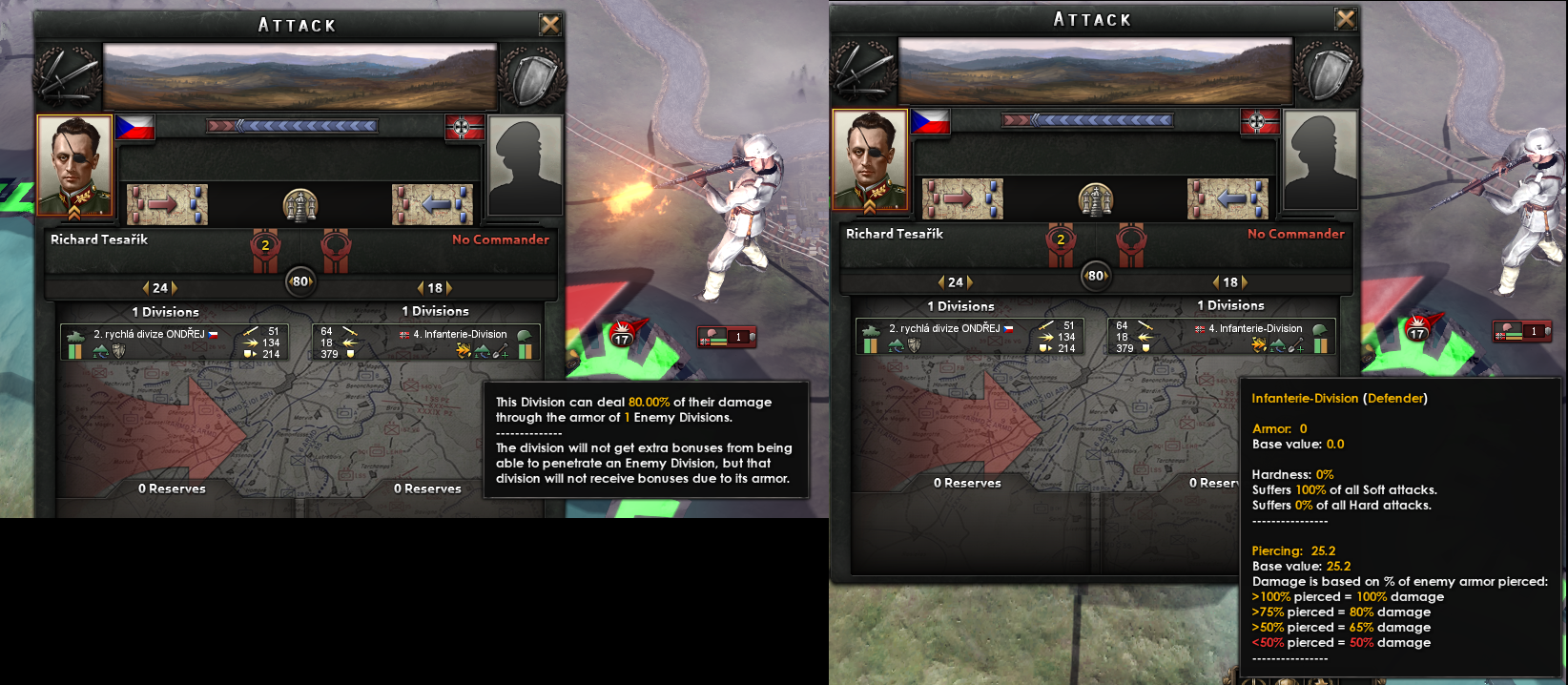
In the Avalanche update, we’re reworking the binary nature of the piercing vs armor calculation to act in a somewhat more realistic way, as well as to make designing your divisions and equipment a little more nuanced.
Prior to BBA, the damage of divisions making attacks against an armored target would be reduced by 50% if their piercing stat was less than the armor value of the target. In BBA, the thresholds described above will be in play.
There have been some minor changes to piercing values on equipment, but we intend to avoid making any major changes here until we see the effect of this change on player habits. Any balance changes will of course be applied in our regular patching schedule.
Piercing also plays an important role in naval combat, and we haven’t forgotten about it here. In naval combat, the piercing vs armor mechanic affects the critical hit chance (simulating penetration hits) of individual naval guns against a target, and we’ve added the following thresholds:
You’ll notice we’ve added an extra threshold here. This goes some of the way towards simulating extreme overmatching, and brings a small extra potential bonus for super heavy guns (assuming you hit what you’re aiming at).
These values can of course be modded, and support the addition of new thresholds for those in need of atypical or more gradual curves.
Design Comparison
The ship, tank, and plane designers now have access to an additional tool when designing equipment:
This comparison window allows you to select a variant to compare against the variant you are designing. The comparison variant does not need to have the same equipment type as the one you are designing, and assists in the creation of specialized variants with a frame of reference. The stats comparison markers are displayed in context to the design you are editing: Here, we’re comparing the German starting heavy tank to the Panzer II light tank.
You can select a comparison variant from among any types you own or have licensed or captured, and for owners of La Resistance from among any countries which you have matched the highest corresponding intelligence tier for.
In short, this gives you a tool with which to plan your designs in order to counter your opponents’ equipment.
War Support
In Avalanche, we’re making some significant changes to war support. Over the course of the game’s lifespan, war support has gradually plummeted in terms of relevance both due to power creep in country content (something we’re starting to take an active interest in addressing in general), and due to the ease of trading in political power thanks to war propaganda.
War support is intended to serve as an abstraction of a population’s willingness and capability to engage in the war effort, on a military and civilian level. As such, war support has one important new effect:
Note we have also improved the tooltip for war support and stability to include the base value plus any changes from events and focuses.
While at war, war support has a scaling negative effect on the stability of a country, simulating the dissatisfaction of the civilian population at the predicament they have been placed in. War support is now something you will need to care about during a war, and further changes have been made to accentuate this:
All sources of ticking war support (weekly) have been removed or changed into flat bonuses.
Taking casualties during war will now contribute to a gradual ticking war support malus replacing the malus that was previously only used by abilities such as Force Attack.
The war support malus from strategic bombing has rebalanced to be in line with the above.
The war support malus from sunk convoys has been rebalanced to be in line with the above
The three components described above are now the main sources of reduced war support while at war, and give you a strategic reason to pace offensives and conduct campaigns in an intelligent manner.
‘Infinite’ war propaganda decisions have now been removed. This was a trivial way to increase war support in the mid-late game, and combined with the availability of political power, resulted in very little meaningful way to reduce a target nation’s war support.
Instead of war propaganda against countries, war support decisions now target one of the three main maluses:
These decisions will offset the maximum negative trend of each of the three negative components, and gradually increase it to a maximum of zero. In short, war support can no longer be arbitrarily increased outside of focuses, events, and unique decisions - it must instead be managed.
As you will note, the base, generic war propaganda decision currently remains, but may only be used to increase war support if below 50%.
This is a significant change we will continue to monitor, but we are happy with the results we’ve seen so far.
Armored Trains and Logistics Strike
Since the release of NSB, we (and many of you) felt that the Logistics Strike air mission was too strong. This is, in part, due to an oversight which did not apply state-level AA disruption effects to it - this has been fixed.
Correspondingly, a further issue with armored trains has been fixed, meaning that they will once again be vulnerable to damage from Logistics Strike, albeit at a much reduced rate compared to other varieties of train.
However, to further balance this out versus the current live version, armored trains have now learned to use their AA guns:
We previously decided against this approach due to the relatively minor impact that armored train AA had on the grander aviation situation in the war, however thanks to the ministrations of one of our excellent coders, we have arrived at a solution whereby armored trains will only inflict damage to planes actively attacking them on a logistics strike mission. You will be able to track this explicitly in the air region details menu:
AI Tank Strategy
You should now notice a somewhat more sensible use of armored divisions by the AI. The AI can now be encouraged to use tank divisions on any particular frontline, and we have added some generic situation triggers to make this happen more regularly.
Note this does not yet translate to using tanks in the same sort of pincer-encirclement that players tend to use. This is a notably non-trivial problem to solve, but is on our wishlist for future investigation.
Allied Logistics
You will now be able to open the logistics menu for subjects and faction members through the diplomacy menu. This gives you a better real-time view of your allies’ equipment situation, and helps plan a better lend-lease strategy:
It goes without saying that any actions usually available through this menu (destroy equipment et al) will be locked for observing countries. While we toyed with the idea of making this available based on intel, this proved to be far too powerful a tool in the wrong hands.
Pre-Order! | Hearts of Iron 4: By Blood Alone
Coming September 27th 2022!
The future of war hangs in the balance. Take to the skies and pen the annals of history in the latest expansion for Hearts of Iron IV - By Blood Alone
We just released patch 1.11.13 for "Barbarossa" on Steam and Microsoft Store. The new checksum is d173. This update introduces the possibility to play multiplayer games across stores (such as Steam and Microsoft Store) using the Nakama network solution already in use in other PDS titles. See the FAQ below for more details.
Saves made with 1.11.12 are expected to be fully compatible with 1.11.13 and you can continue your previous game.
If you discover any bugs in patch 1.11.13, first check the known issues list, and if necessary please report them in the bug report forum as usual.
Nakama Crossplay FAQ
What is Nakama Crossplay?
Nakama is a network solution that is independent of the store you bought the game on (be it Steam or Microsoft Store) and allows you to play with your friends regardless of where they have the game.
Does it replace the current network layer?
Nakama does replace the current solution (PDX MP) on Microsoft Store, but on Steam it is an optional alternative you have to select when launching the game. By default the game will behave exactly like it did in the previous release on Steam.
How does Nakama compare to Steam MP?
First and foremost, Nakama allows you to play across game stores, something our current implementation of Steam MP is unable to do. Secondly, it does not rely on direct connection, meaning it makes it impossible for clients to know the real IP address of the host (and vice versa). This comes at the cost of some extra latency, so depending on where the players are located in given MP session you may experience higher ping than with Steam MP.
How do I enable Nakama MP?
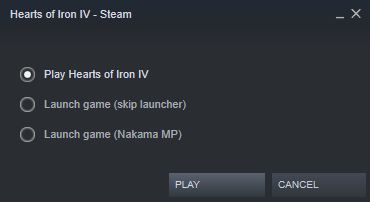
Nakama is always enabled on Microsoft Store. On Steam, you will get prompted to select if you want to start with Steam MP or Nakama MP when launching the game. Starting with the first two options will start the game with Steam MP as usual.
Once in the game, you can tell which version was used by looking at the bottom of the main menu. The letter (S) or (N) after the checksum tells you whether you are using (S)team or (N)akama.
Why does the game ask for a Paradox Account to play with Nakama?
The matchmaking service needs to be able to identify players across game stores, so we cannot effectively use your Steam or Microsoft Store ID. Instead, we rely on your Paradox Account user to be able to host, view and join other players’ games.