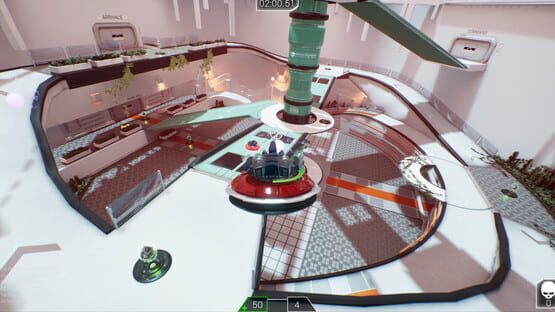
- [CHANGED] If you shoot yourself, you now get -1 life instead of +1 life.
- [CHANGED] You start with 2 lives in Last Man Standing instead of 3.
- [CHANGED] Style of the text announcements
ADDITIONS
- [ADDED] Worker bot: it just flies around the levels, minding it's own business.
If you shoot the worker bot, it will explode and drop a random item!
- [ADDED] Drone ring animation. The drones now have a minor animation when you move around.
- [ADDED] You can now see how many lives your opponent has left in Last Man Standing.
- [ADDED] Winning team or player now highlighted on the end-scoreboard.
- [ADDED] Ingame scoreboard now shows more info: for instance how many invasion drones there are left or which wave you are currently in.
- [ADDED] Ability icons in the HUD. (there were missing icons)
- [ADDED] Extra soundtrack.
- [ADDED] You now see visually (text) when a new wave in Invasion starts.
BUG FIXES
- [FIXED] The obstacle gamemode now resets correctly.
- [FIXED] Rocket launcher SFX now changes accordingly with SFX settings.
- [FIXED] Pickup SFX/Invasion drone shoot SFX are now only hearable in their respective surroundings instead of the entire level.
- [FIXED] Special drones no longer have incorrectly positioned guns.
- [FIXED] Deathray glitch is fixed.
- [FIXED] The gametimer now stops after the match is finished, making it impossible to get more points while the endscore screen is showing.
- [FIXED] The client, in a multiplayer game, now spawns directly with the correct drone.
Update 0.1.0 | 04.06.2018
ONLINE VERSION
CHANGES
- [CHANGED] Complete UI Overhaul
- [CHANGED] Increased maximum player amount per match to 6
ADDITIONS
- [ADDED] Level: Aquarium, with gravity on walls/ceilings
- [ADDED] Mechanic: Energy boost for all drones
- [ADDED] Three whole new GameModes: Invasion, Last Man Standing and Obstacle
- [ADDED] New weapon: ROCKET LAUNCHER
- [ADDED] Individual weapon pickup plates
- [ADDED] A big health and energy pickup
- [ADDED] Small health and energy vials
- [ADDED] Hat - Castle -
- [ADDED] New soundtrack
- [ADDED] Graphics options
- [ADDED] Camera options
- [ADDED] New Particle effects
BUG FIXES
- [FIXED] So many things that it cannot be listed
Patch 0.0.4 | 15.03.2018
You no longer have to opt in or out of the "onlineBeta" branch to be able to play the Offline/Online version!
Instead, every time you now start Hoverloop, Steam will give you a small popup where you can select which version (Offline or Online) you want to launch.
Patch 0.0.3 | 05.03.2018
ONLINE VERSION
The following changes only apply to the Online Version of the game.
This version can be accessed via the Beta tab.
For more information, check the following thread: [FAQ] Online Version and more
CHANGES
- [CHANGED] Design of the garage grid to allow everything to fit on one screen
ADDITIONS
- [ADDED] Support for color and brightness of the materials in the garage.
BUG FIXES
- [FIXED] You will now always have the correct selected drone and custumization options in an online game
Patch 0.0.2 | 07.02.2018
OFFLINE VERSION
This following changes only apply to the Offline Version of the game.
This version can be accessed by simply downloading the game, with no beta selected.
CHANGES
- [CHANGED] The option to add splitscreen players or AI bots is now highlighted
- [CHANGED] The controls chart now displays the correct keyboard control for -reset rotation-
ADDITIONS
- [ADDED] You can now change your mouse/stick sensitivity in-game, a much asked for feature!
BUG FIXES
- [FIXED] The option to inverse your up/down camera rotation now works again
- [FIXED] If you delete splitscreen players that had their garage open, it now deletes their garage as well.
- [FIXED] If you die in TAG, you can now respawn again
- [FIXED] Endscreen of TAG
Hoverloop featured on Xbox channel
That's right!
Hoverloop's trailer has been featured on the official Xbox YouTube channel!
The following changes only apply to the Online Version of the game.
This version can be accessed via the Beta tab.
For more information, check the following thread: [FAQ] Online Version and more
CHANGES
- [CHANGED] Time between each ammo refill in AirHockey got reduced. (3 Seconds -> 1 Second). In addition, we let the weapon reload even if you shoot in the meantime.
This change should still make sure you can't spam shooting, but not limit you too much.
ADDITIONS
- [ADDED] Sound options to the main menu and ingame menu.
You can now adjust Music, Effect, UI and Announcer volume.
- [ADDED] Visual effect on buttons when they are selected.
This should make it eaier for you to see what button you are currently "hovering".
BUG FIXES
- [FIXED] Drone being sometimes invisibile.
This was rather game-breaking, so made sure this shouldn't happen anymore.
- [FIXED] Collision for puck and bullet in both AirHockey levels.
It should now be possible to properly shoot through the gaps.
- [FIXED] Overlap zones that control the automatic doors are no longer blocking bullets by mistake.
- [FIXED] The VR popup at the start of the game shouldn't come up anymore.
OFFLINE VERSION
This following changes only apply to the Offline Version of the game.
This version can be accessed by simply downloading the game, with no beta selected.
CHANGES
- [CHANGED] The rotation in the garage is now facing the camera.
- [CHANGED] Added names to the Dragon and Ninja drones.
ADDITIONS
- [ADDED] Added playernames to splitscreen in garage and in-game.
This should help you to identify yourself easier during battle.
BUG FIXES
- [FIXED] The Obstacle gamemode not properly showing the winner on the endscreen.
- [FIXED] Removed the duplicated playlist in the Tutorial.
- [FIXED] You should no longer respawn at the wrong location in the Tutorial.
- [FIXED] The VR popup at the start of the game shouldn't come up anymore.
Steam Early Access Release
We have just gone to Early Access!
JOIN US ONLINE! To get the Online BETA right-click on Hoverloop in your library and choose properties. Then go to the BETA tab and select the Hoverloop Online BETA. Wait patiently for the launcher to update the game, and join us in the arena!