v0.12.20 Released: Sound & Particle Effect Enhancements, Tweaks, and Fixes
We've made many small improvements that add up to a decent overall effect on the gameplay experience, especially around the audiovisual cues of battle. Hyperwheel Overdrive v0.12.20 also includes various bugfixes and start-up loading optimizations. We've been refining many aspects of the game in the leadup to our crossplay Meta Quest release (no official date yet, but very soon!), which will be welcome many new players into the Hyperwheel Overdrive community.
We have also included a new setting placed somewhere in the menu for a big gameplay feature not yet released... so keen players who look around may find a reference to an upcoming feature ahead of announcement! We hope you figure it out! =)
v0.12.20 (Build 810): June 30, 2022
improved performance during start-up and stage loading (spaced out loading processes)
improved performance when creating new player / vehicle objects
improved performance for various active script components
fixed issue with hands appearing in unnaturally stiff pose until first grab
added network delay to decal & driver suit customizations to limit memory use
adjusted kill messages to use "sniped" verb if kill shot is 550m or more
added 5 seconds to match countdown when it follows a stage change
updated red mist death particle effect (increased visibility)
changed out "bubble" kill message feed sound for more subtle sound
increased vehicle & driver damage sound effect volume & range
added occasional alternate vehicle damage sound effect for full damage shots
added energy shield damage sound effect
set vehicle damage sound effect to play for explosive damage
added warning sound & text to damage message when health / armor is 50 or less
added slight damage delay based on laser blast distance & speed (matches sound to visual)
increased launch distance for Spiked Ball and Seeker Ball
increased default launch power from 20% to 45%
set race starting spawn positions based on previous race's positions
made rocket target detection system select closest target when multiple targets are found
v0.12.19 (Build 789): June 6, 2022
increased resistance for flight pitch steering (restored previous pitch feel)
factored in angular velocity for flight air sound volume in addition to linear velocity
fixed issue with lasers appearing from beside rifle when moving or rotating fast
changed flags to use standard shader and a double-sided mesh
fixed issue with low resolution driver suit textures sometimes being loaded
added "Blue Orange" and "Gold" driver suit colors (unlockable)
lightened up "Blue" driver suit color
implemented dynamic respawn points for Target Shoot challenges
added destruction sounds and animations for targets
fixed blinding glare on some objects like box walls
Bot AI Overhaul, Race Ghosts, and Sky Fortress Updates
Hyperwheel Overdrive v0.12.16 is here! We've undergone a major effort in overhauling our bot AI system and turning it into something that works well enough for most situations in most stages. There is no aspect of our bot AI that was untouched during this work, and the result makes for much more dynamic play when playing with bots only. For example, a bot may use a spring to try to jump over you and shoot you from behind!
They will also attempt to collect green rings in collection challenges, can see player positions when their markers are visible (just like human players), and can vary their combat strategies at close range. The risk-based steering system has also had some big upgrades, which means that the bots can often drive around for awhile in Sky Fortress without being fried by the laser grid (we're working on it! =) ). They will also set targets to distant positions that they've detected are clear of obstructions, and bots flying planes will attempt to steer towards stage region center if they haven't seen another player (or bot) in a long time. The shooting system has been improved, so they will more consistently take shots at other players.
It's awesome watching a bunch of bot planes fly around the Vector Sky Course race track as they weave around each other, sometimes miscalculating a bit and sheering wings off in the process! The beautiful randomness that emerges from state machine AI systems can be a lot of fun, and this further improves the nature of Hyperwheel's sandbox fun on offer.
Another feature that has been requested and we've finally got around to implementing is race ghosts. Your best times will now feature an accompanying recorded ghost of your race. Races that are good enough to hit top 8 on the leaderboards will also have their ghost record submitted so that other players can play against your ghosts, which include your car color, decal, & driver suit customization that you were using when you set your record!
Here's a big list of all the changes since v0.12.12 (the last update we made a proper Steam announcement about): v0.12.16 (Build 751): March 10, 2023
major bot AI updates:
major plane flight improvements
bots now collect green rings with efficient target selection in Collection Challenges
bots now attempt to avoid water if they do not have a boat kit
raycast rates decreased to improve performance
improved power-up selection targeting (choosing power-ups in driving path)
bots will abort item target acquisition early if the item appears to be inaccessible
v0.12.12 Released: LIV & Sim Racing Studio Integration, Unlockable Lists
Hyperwheel Overdrive v0.12.12 has arrived and brings support for two different types of third-party software: LIV (for mixed reality capture), and Sim Racing Studio. The former includes our new LIV Camera Cube feature that lets you drag a cube in 6 different directions for custom camera modes (this only affects your LIV camera). You can control how your viewers see the match as it unfolds. Just remember to tend to your actual driving & shooting as the main priority. =)
The Sim Racing Studio support involves a new setting to expose telemetry data to Sim Racing Studio for potential use with a motion simulator seat... we're excited about the prospect of trying one with Hyperwheel!
We've also added unlockable Golden Ring & Stunt Gap Lists. After all prior unlockable conditions are satisfied, the lists will appear in Free Play, ready to be found. Once you have picked up a list, you can access the list to see which golden rings and stunt gaps you have already collected/landed, and which ones are still to be found/performed. This means that it is now feasible to 100% complete the game.
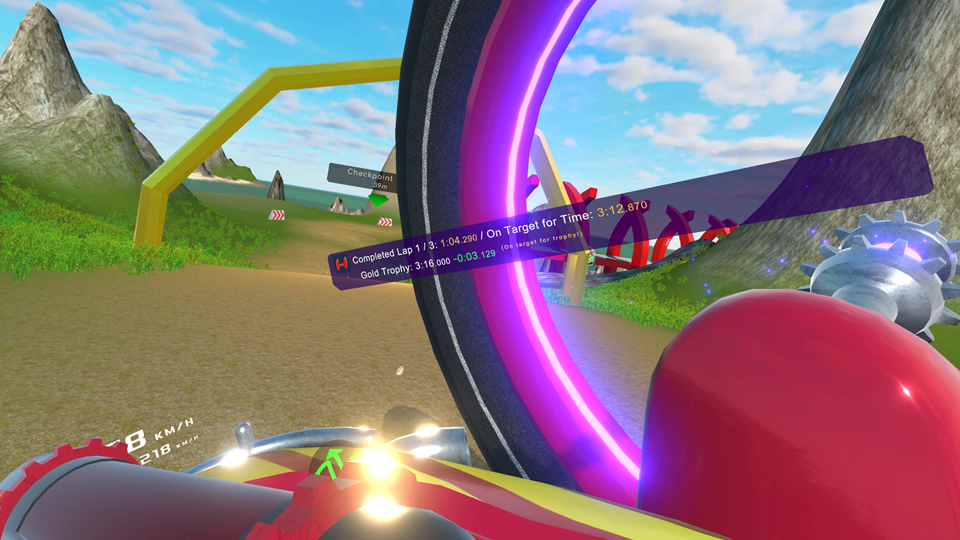
Message feed shows player is racing 3.129 seconds faster than the gold trophy time.
Completing laps in a race now gives detailed information about how your race is stacking up against either the other players (in the case of multiplayer or against bots), the nearest trophy time (if you don't have a gold trophy yet), or your current #1 race time for the track if you're playing single player and already have a gold. It'll even give you an estimated completion time based on current performance after each lap!
We have also refreshed the Hyperwheel Overdrive Demo to include the latest bug fixes, UI revisions, and settings. Invite a friend to try it out! v0.12.12 (Build 702): December 9, 2022
implemented unlockable Golden Ring & Stunt Gap lists for each stage:
collect race trophies for the ring list or stunt trophies for the stunt gaps list
after satisfying prior conditions, find the hidden List in Free Play to unlock list
lists of rings and stunt gaps with captions can be opened from the Progress page
adjusted some unlockable conditions
adjusted some golden rings & stunt gaps in various stages
added some additional stunt gaps to various stages
fixed bug with stunt gaps-based unlockables not evaluating after landing unique stunt gap
fixed bug with stunt gaps not always triggering
exposed telemetry data to Sim Racing Studio API (optional via a General Setting)
fixed UI pointer tooltip position for short tooltip messages
set unlockable panel to show up after trophy panel is closed if both being made active
made power-ups and rings more efficient by taking colliders out of the animation
added race time target difference info logging upon lap completion:
uses leader time if not in first place with multiple players
uses trophy time if player doesn't yet have gold
uses top race time if player already has gold and is in first place
expanded various vehicle decals to underside and/or axle connectors:
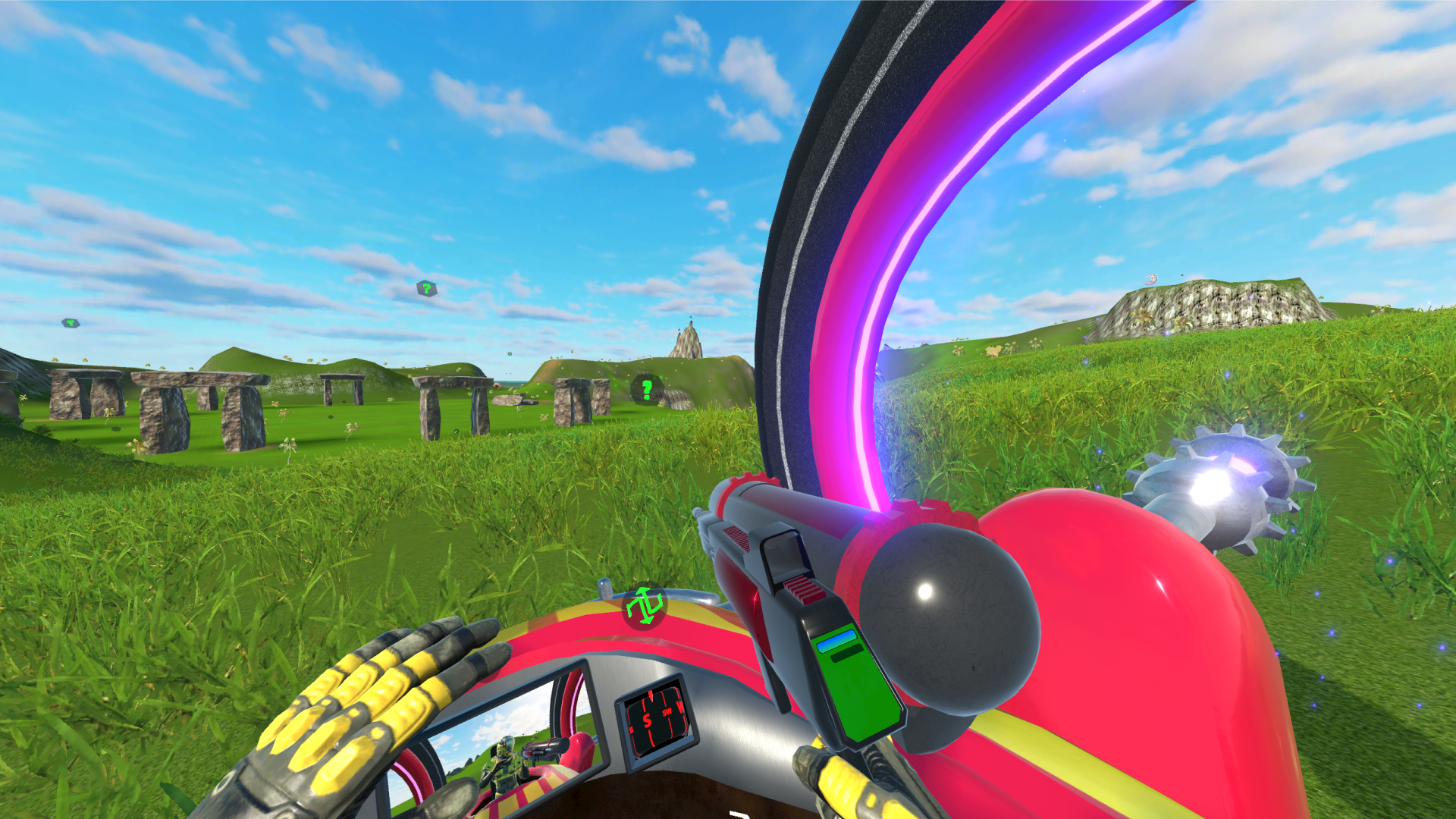
With Hyperwheel Overdrive v0.12.10, we've revamped the car customization UI. Recently, we've also made some big graphical enhancements (to terrain texturing as well as grass/vegetation). As shown below.
As you can see, we've significantly upped the amount of vegetation (while keeping it performant) and also made the terrain textures look better when really close and far away (look at the cliffside off to the right).
The release of v0.12.10 also brings us that much closer to our Meta Quest 2 release, which will contain all content that the Steam / PC version does, which is an important fact because the Quest version will be fully cross-play compatible with the PC version for online play, which we anticipate will help improve the player base a lot. If you're interested in seeing what it looks like on the mobile VR side, we've begun sharing screenshots & videos of the Quest version on our Twitter profile!
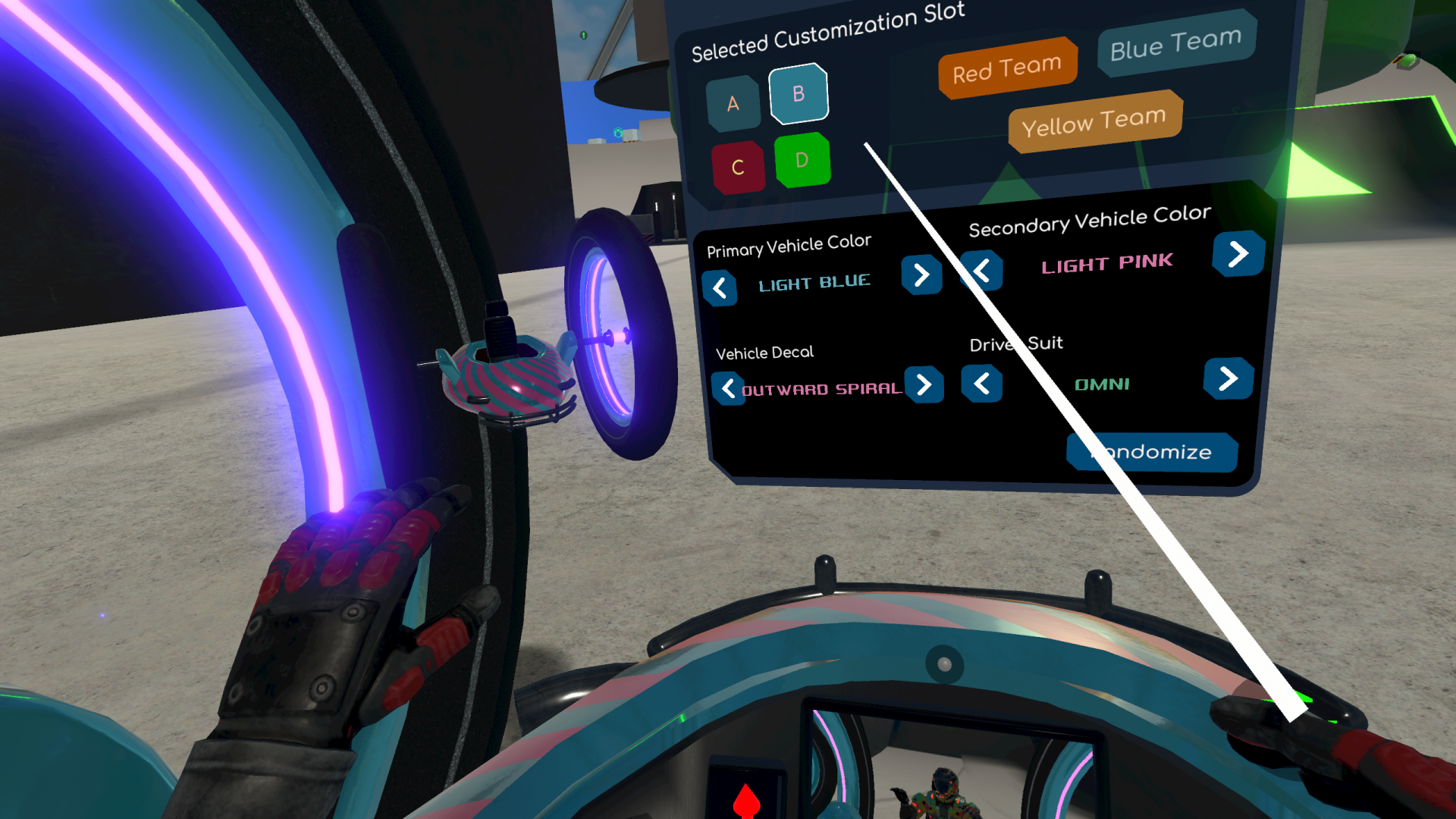
Check out that spiffy new Customize Car & Driver page! We've added a fourth standard slot (in addition to the 3 team-based ones), a 3D display of your car for quick reference, and "Previous" buttons (previously, we only allowed players to cycle to the next option, making to tough to fine-tune color selections). We've also color-coded all customization slots for easy reference. Spiffy indeed!
We've also added a new car/boat/plane combo race track to Flatland. Alright, we've got a pretty big backlog of changes to list for you, our players (although the lists for all v0.12.x versions are available for review in-game as well), so on with it:
v0.12.10 (Build 684): November 18, 2022
updated Oculus SDK to latest version
decreased initial player vehicle spawn time on application start by 2 seconds
increased spectator movement & rotation speed
made spectator movement & rotation less sensitive
added server setting to allow crossplay between latest version & beta when compatible
restored pointer drag functionality for sliders (was switching to analog stick automatically)
restored pointer drag functionality for menu page scrollbars
improved pointer UI drag position accuracy
set analog stick dragging incremental sliders to speed up the rate over time
added new "Screenshot Size" setting with 3 options: 1080p, 1440p, 2160p
overhauled "Customize Car" menu page:
added "Previous" buttons to each selector for easier customization
added Customization Slot D
set slot button colors to be based on chosen primary colors
added "Randomize" button for quick customization
added 3D vehicle display to let players preview changes
vehicle & driver customization changes:
set default color & decal selections for all customization slots for new players
tweaked many existing vehicle colors
renamed and reordered some existing vehicle colors
added "Yellow Green" and "Neon Green" vehicle color options
enforced team colors restrictions on Driver Suits
v0.12.9 (Build 660): November 4, 2022
disabled podium for races & challenges when there is only one player
added delay before opening menu when a player dies and when the match ends
additional improvements to terrain vegetation
fixed rifle position & rotation update smoothness when held with two hands
fixed bugs in match info display on Match menu page for Capture The Flag
fixed match HUD text alignment & color issues
v0.12.8 (Build 646): October 27, 2022
big graphics improvements to terrain & vegetation:
updated terrain textures in Volcanica & HyperCorp Complex
added detail & distance resampling system for terrain textures
updated grass / vegetation system to latest version
increased vegetation density & grass size in Volcanica & HyperCorp Complex
improved grass rendering efficiency (draw calls & pixel fill rate)
restored high tree quality (was using versions intended for upcoming mobile release)
added a "Vegetation Draw Distance" graphics setting
fixed bug that was preventing grass / vegetation rendering
fixed issue with HyperCorp Complex grass being really dark (almost black)
fixed post-processing (bloom / glow) for screenshot camera
v0.12.7 (Build 641): October 21, 2022
added sounds and forces to Sky Fortress engines
fixed bug that caused remote player driver to sometimes stop animating
fixed bug that was preventing player & objective markers from displaying
fixed bug that prevented rotating dynamic objects from rotating for client players
v0.12.6 (Build 625): October 7, 2022
added new Flatland Pro Course race track
updated rifle & launcher model (decreased number of meshes, redesigned launcher)
fixed issue with rifle HUD position sometimes being offset from the rifle
implemented surface splashes and water resistance for standard grenades
Hyperwheel Overdrive Launch, the New Demo, and the Latest Updates!
Hyperwheel Overdrive has moved beyond Early Access to full release on 2022.07.20! We are so excited to have moved beyond Early Access on July 20. The Early Access program was great for helping us refine the product with player feedback, but Hyperwheel has matured significantly over the 28 months since Early Access launch and is now ready to be considered a full-featured game and reviewed as such. Of course, we will continue to improve the game in major ways from here; leaving Early Access should not be taken to mean development is complete. In fact, we have plenty of unpublished Hyperwheel content that we'll be adding to the game going forward, along with stuff we haven't even created yet. We are also working towards an AppLab release which will improve online sessions a lot.
Enjoy the Brand New Demo!
To celebrate our launch, we published a brand new time-unlimited demo that includes all power-ups and vehicle types! There's tons of sandbox fun to be had in the FREE DEMO. Download and play it now if you don't own the game yet! Here's some demo footage:
And the Updates...
Lastly, the v0.12.4 update is live now! In v0.12.3 published on July 19, we made some big improvements to the auto-braking system, allowing players to more smoothly auto-brake and for it to activate at low speeds as well as the usual "when the menu is open" situation. Vert ramp tire traction also got revised a bit. The other big thing with v0.12.3 is the new voice instructions in our revised tutorial system. We also included instructions for the thruster controls which previously wasn't covered in the tutorial system. The rest, plus the new v0.12.4 update, is mostly a bunch of bugfixes of various flavors. Things are now set up great for our next content update! Changelog as usual:
v0.12.4 (Build 567): July 29, 2022
fixed bug that auto-armed recycled grenades when taken from pool
v0.12.2 Released: Vert Ramp Physics Improvements & Xenodome Refresh
The Xenodome, designed mostly in 2019, has had a nice 2022 refresh with improved ramp positions & a new bowl corner ramp in the Southwest corner that lets you drive upside-down. The ramps are set up in a far more functional manner than the original arrangement, and the whole stage has a better flow to it than before as it is now easier to reach the more remote areas like the Upper Plate.
Back in the v0.12.1 update on June 10, we also improved tire traction, especially when driving on terrain... you can hug the hills of Volcanica far better than previously. We have now also implemented a vert ramp guidance system to help the physics engine out on vert ramps; when cars have gone off a totally vertical ramp (quarterpipe), as long as they are within 5 meters of the lip of the ramp, they are subtly guided towards lip alignment so that the landings are likely to be smooth (barring any of the many other things that can happen to prevent that... 🙃). Because it cuts out when a player exits the guidance band, and because it only operates when a ramp is going perfectly parallel with gravity, nothing else in the game is adversely affected. We're still doing some fine-tuning of this new system, but it it working pretty good already.
Lastly, we made some massive reductions in lightmap size for all stages, resulting in a smaller game and less textures to store in memory. This optimization will go a long way in helping our release on Android devices, but is also nice for the PC side; the reductions haven't resulted in noticeable reductions of visuals. Changelog is below, and as always, let us know what you think. Hyperwheel Overdrive just keeps on getting better!
v0.12.2 (Build 558): June 28, 2022
implemented system for subtly guiding car within lip range of vert ramps
major modifications to multiple areas of Xenodome
prevented plane end causing vehicle body gyro system to orient towards last ground angle
massive reductions in lightmap sizes in all stages
v0.12.1 (Build 553): June 10, 2022
corrected issue where not all laser blasts originated from current rifle barrel position
refined tire traction variables to improve terrain & non-terrain driving
updated Xenodome skybox & dome materials
made minor updates to Xenodome geometry
expanded The Flats race track in Xenodome
disabled mesh vertex position compression as it was distorting some big pipe meshes
fixed bug that prevented Seeker Balls from exploding
fixed issue with explosion fireballs not always showing up for explosions
added setting to disable viewing angle checks for deciding whether rearview camera runs
Hyperwheel Overdrive v0.12.0 has taken us quite awhile to get out, but the wait is worth it. This update sets the foundation for the future of Hyperwheel Overdrive on the latest Unity LTS version. We have to do some reworking to get it working for Unity's new XR system, and with that means many big optimizations including the move from single pass to single pass instanced rendering (stereo instancing). There are bunch of other technical improvements under the hood, but rather than bore you with the details, we'll just tell you the highlights, and then include the full changelog item list as always.
Voice Chat Upgraded to Spatial Audio
The voice chat system was hit-and-miss and more often than not during testing evenings, we had to rely on Discord anyway. We've updated the voice chat system and worked through the bugs we were experiencing and now we're left with something that is reliable and sounds pretty great. You can enable or disable voice chat easily, mute yourself, or mute any other player. And in the process of fixing things, we revisited spatial audio. Initially, we tried it, but when a player was 2 kilometers away from another player, they couldn't hear them. It has been reworked to give us the best of both worlds: if a player is more than 100 meters away from another player, their audio source is placed in the direction of the player, but only at that 100 meter max. So there is some volume tapering off by distance, but only to a point. Works pretty slick! We knew the voice chat would have to be fixed up to realize our vision of a great cross-platform play multiplayer experience; Meta AppLab release for Quest 2 isn't far off!
Upgraded SteamVR Inputs
We had some issues with the old implementation. We were using the SteamVR legacy inputs, and the defaults were a bad setup. This has been upgraded and fixed up and we include default profiles for Oculus Touch, Valve Index, and HTC Vive controllers.
Smoother Driving
While there are indeed a ton of comfort settings to help make Hyperwheel Overdrive accessible to any VR player (full artificial rotation locking, etc.), we also wanted to ensure the car experience became not much rougher than the smooth driving offered by the boat. The result is a more rigid suspension system when dealing with inclines (ramps, quarterpipes, & hills) and a suspension system better capable of damping bounce from landings. Lastly, the tires stick a little better to the ground, especially terrain.
Improved UI
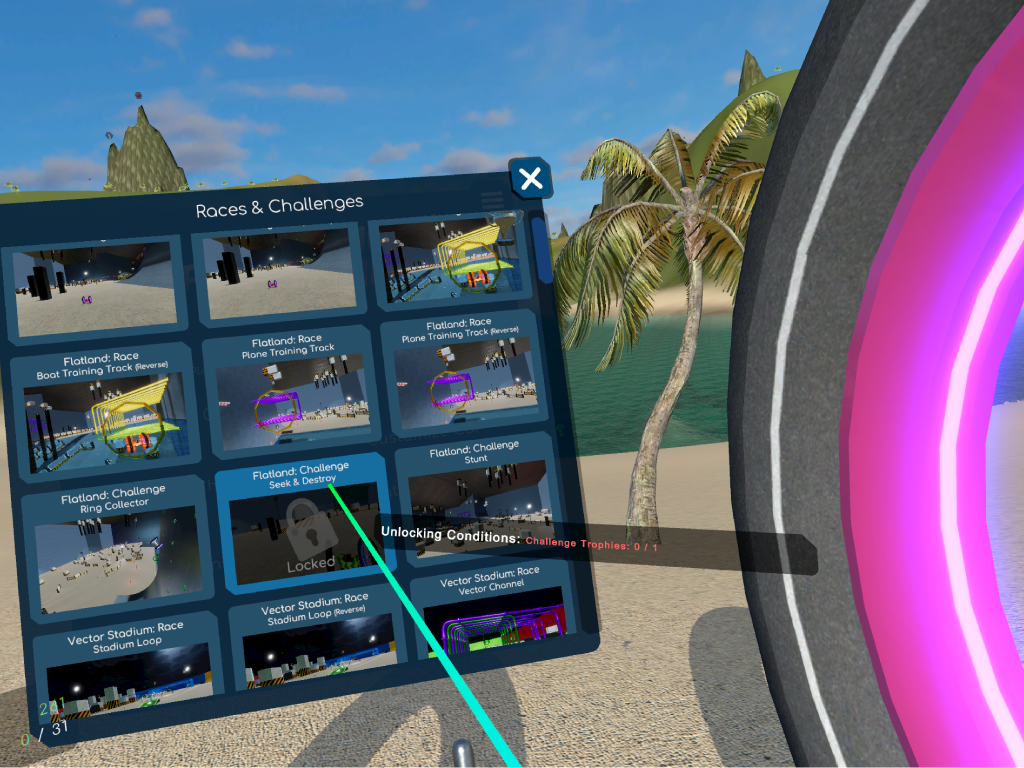
We updated the "Races & Challenges" menu panel to include unlocking conditions for all locked events, and also to show any trophies on the page. When items are selected, the gold, silver, and bronze trophy times are now shown as well. This should make it easier for players to understand progression. There's lots of content to unlock!
Power-up Interaction System Reworked
We squashed many bugs, and a there a number of them that had to do with power-ups and projectiles. The power-up hand interaction system has been reworked to be far more reliable as well as prevent unintended uses of power-ups.
“It's a heap, but give me a couple of weeks and it'll look like a streamlined butterfly...”
We also improved performance in a bunch of different ways. The game runs far more efficiently than it used to, and we already had done a lot to speed things up with v0.11.11. We added object pooling for plane wings, grenades, and rockets, and figured out where we could shut things down that didn't need to be running in the background. Because we've focused quite a bit on getting our Meta Quest 2 builds up to par, performance optimization has been a big focus.
Content?
Yes, of course we have worked on content updates (in addition to the Volcanica stage changes outlined in the changelog below). But it's all being kept in a locked box for now. The v0.12.0 update represents, to us, a modernization of Hyperwheel's software. It took us a long time to get things where it needed to be to move forward. But the stage is now set for a healthy dose of content updates to arrive throughout the v0.12.x series. What will the new content be? New stages? Match types? Hamster ball vehicles? We're not ready to talk about it!
Changelog
v0.12.0 (Build 548): May 31, 2022
upgraded from Unity 2019.4 to 2021.3
upgraded to new Unity XR system
upgraded to new Unity input system
upgraded rendering from Single Pass to Single Pass Instanced (big performance gains)
upgraded voice chat system to latest version & added positional audio
upgraded various other packages to latest versions
upgraded SteamVR and re-implemented SteamVR input for OpenVR
Hyperwheel Overdrive v0.11.7 is here and it's bringing some shiny new bots with it! v0.11.7 comprises the last 2 months of development work, which includes a bunch of fixes and improvements, along with the big bot AI upgrade. No longer does Hyperwheel Overdrive need to rely on online play for some good combat action or competitive racing. We have also added an option to switch from 2 teams to 3 teams for all team-based matches. This means CTF is still an option if you have 3 players in an online session.
The bot updates definitely round out the core gameplay and improve the feel of the overall game. On that note, we will be leaving Early Access for full release very soon!
The new hyperwheel bots are ready to face you down in the latest update. If you don't already have a copy of the game, add it to your wishlist. You won't regret it if made-for-VR car combat & racing is your thing. See you in the Xenodome!
v0.11.7 (Build 433): October 29, 2021
major bot upgrades:
AI steering overhaul; much better dodging of walls & obstacles
added scans for ground drops ahead of wheels
major revisions to risk analysis system
added player detection to sphere scan that was previously used just to detect items
implemented waypoint system to allow bots to race effectively on many tracks
added target searching behaviour when getting shot by a laser
many details added to decision-making about driving instructions & power-ups
multiple power-ups fixed including Spring & Boat
fixed Smasher time limit (it was not being applied to bots)
bots now use thruster controls to straighten out airborne maneuvers
added "Repaint Bot" button to randomize the colors & decal
Yellow Team added: new teams number setting (2 or 3) for all team-based match types
adjusted regions with vehicle mods to automatically give new Boat Kits & Plane Kits
limited custom vehicle mods to a single checkpoint during races
set vehicle mod checkpoints to automatically give new vehicle mods if needed
improved stability of respawns
improved spawn point positions in "Stadium Sky" & "Trident Mountain Range" regions
fixed bug where grounded gyro forces were being applied to vehicles when on their side
added 6 new car colors:
Faded Yellow
Bright Green
Faded Green
Sky Blue
Faded Blue
Light Brown
added 2 new car decals: "V Lines" & "Tiles"
tweaked some existing car colors
fixed bug that prevented Smasher collisions from making sounds
fixed bug with lasers appearing to go through walls and slowed down laser animation
fixed UI bug with object markers displaying in front of menu
fixed additional bug with object markers with display ranges set
fixed bug where match countdown text would sometimes not display
fixed bug where lasers could hit rifle when moving at high speeds
added rocket to launcher end when rocket is the next loaded projectile
moved next projectile icon to top of rifle HUD and placed projectiles 2 & 3 below
added Measuring Units setting with Metric & Imperial options for speeds & distances
removed auto-gyro pitch stabilization setting (supplanted by thruster controls)
fixed power-up bug where a full power boost could break hand interactivity
made "Recover" orient vehicle with ground plane instead of just straight up
v0.11.6 (Build 411): August 25, 2021
implemented auto-thrust secondary function to thruster controls
easy switching between auto & manual thrust; just grab controls for manual
will point in velocity direction according to up direction until vehicle starts falling
when vehicle is falling, it will level out rather than point towards ground
will attempt to align with the ground plane as the ground approaches
adjusted thrusters to kick in gradually over the course of 0.75 seconds
adjusted thrusters to deplete less charge for really small adjustments
improved rotational damping for thrusters
made body gyro system smoother on ramps
improved "Recover" function behaviour (car orientation is now properly maintained)
fixed bug that caused laser grid boundary to get stuck in visible state
Hyperwheel Overdrive updates keep coming and the latest couple bring a bunch of bugfixes (not all listed in changelog) along with some long-planned but never implemented features, like the ability to set custom interactive item positions in your cockpit (power-ups, laser rifle, and thruster controls). There have also been some additional performance optimizations.
[previewyoutube="P5pCMGqwm1w;full"] v0.11.5 (Build 400): August 6, 2021
intro sequence tweaks
fixed third-person camera bugs (UI & follow behaviour)
fixed "Hybrid" perspective setting third-person camera activation
implemented custom inventory item positions including rifle & thruster controls
fixed bug where spectator collider was sometimes disabled in "Free" mode
enforced time limits for server rejoin if player kicked for serious reason
added low-pass audio filter for when player is submerged
v0.11.4 (Build 390): August 1, 2021
more CPU optimizations
fixed bug that caused networked car body to drift from correct orientation
Hyperwheel Overdrive v0.11.2 brings some big performance improvements on the CPU side and adds thrusters for adjusting car rotation in mid-air (with controls that work by picking up a holographic sphere and pointing it where you want to rotate towards). This is a huge game-changer in terms of combat play; airborne players are now quite dangerous as they can face players in the air and rain rockets down on them or just take some shots with their laser rifles!
We also added a new race track to Volcanica called "Island Triathlon Course", which is the only track to feature the car, boat, and plane. Transitions between the boat and plane are particularly fun.
Let us know what you think about the latest update on our Discord! View the full list of v0.11.2 changes below, along with the entries for v0.11.1 as well:
v0.11.2 (Build 373): July 1, 2021
added new thruster system for correcting & stabilizing car rotation in the air
thruster charge is used up and must be recharged by driving or boating
holographic sphere can be grabbed and rotated to control thrusters
thrusters control pitch / yaw / roll car rotation only; they don't adjust trajectory
added 2 yaw thrusters to car & 4 roll / pitch thrusters underneath
new "Thrusters" match modifier controls the availability of thrusters
added "Thrust Penalty" to stunt system
big performance improvements: optimized many scripts including UI & hand interactions
added new "Island Triathlon Course" race track to Volcanica that features all 3 vehicle types
Volcano Pass race track terrain changes
adjusted recover interactable position and fixed flickering bug
fixed bug that prevented Boost Penalty from being updated based on boost time
fixed bug that caused stunt modifiers to get overwritten as stunt HUD is displayed
improved tire traction on terrain
replaced "Flames" car decal and added new "Dots" decal
adjusted Chase matches to allow damage & death from stage hazards
updated Oculus SDK
v0.11.1 (Build 353): June 1, 2021
adjusted trigger throttle input settings to use B button for toggling reverse throttle
adjusted trigger throttle input settings to apply brakes when throttle input is zero
added control setting to toggle the plane's pitch auto-leveling system
fixed bug where player's center position gets moved over time