
- Fixed missiles lifespawn accidentely increased to 200s (they're now back to their default of 20s)
- Floating starmap's deploy buttons can no longer be accidentely clicked on while panning / rotating the view
- Flight assist now tries to maintain the current speed while radial menus are opened
- Fixed crash due to large numbers in network interpolator
- Added a sensor screen transition speed setting in the general options menu (default: 1 second)
- Small sound volumes tweaks
- German strings localization update
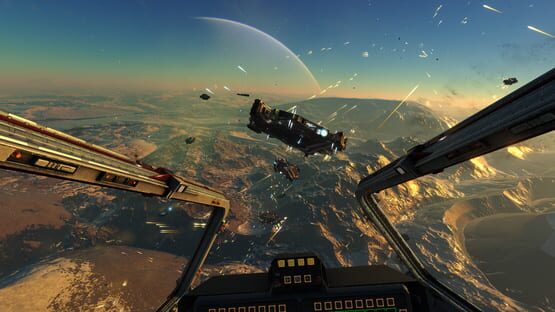
Infinity: Battlescape
Hotfix 0.7.6.1 ( Sunday September 13th 2020 )
Patch 0.7.6.0 Notes
Patch 0.7.6.0 ( Saturday September 12th 2020 )
This is the final patch primarily focusing on the star map and mission screens. It contains a lot of improvements to these screens, including an improved representation of conflict zones or bases under attack. This patch also replaces and introduces a bunch of new sound effects, with more to come later (we'll be revamping the sounds over the coming months, and are also in the process of doubling the amount of musical tracks in game). There is still a lot of work to do related to the UI and menus, however we'll be refocusing our efforts on gameplay starting this next patch, and work on the UI will take the back seat from now on.
Gameplay
- Active mission's objective's location is now automatically pre-selected on HUD upon entering the game
- Fixed ship movement being on hold while menus/UI are opened (this caused players to overshoot or collide with planets in warp)
Audio
- New interceptor thrusters sounds
- New small machine gun and blaster sounds
- New gun and blaster projectiles impact sounds
- New small ship and missiles explosion sounds
- New mk4 (corvette) turret machine guns and blasters sounds
- New shotgun (bomber) sound
- Added sound effects for AMS lasers and rotating turrets sound loop
- Rebalanced volume of various sound effects
- Thruster sounds now have a dynamic pitch based on the ship's angular speed, which should feel more immersive
- Sound effects range and performance optimizations, which should reduce clutter that deteriorated sound quality during large battles
UI / HUD
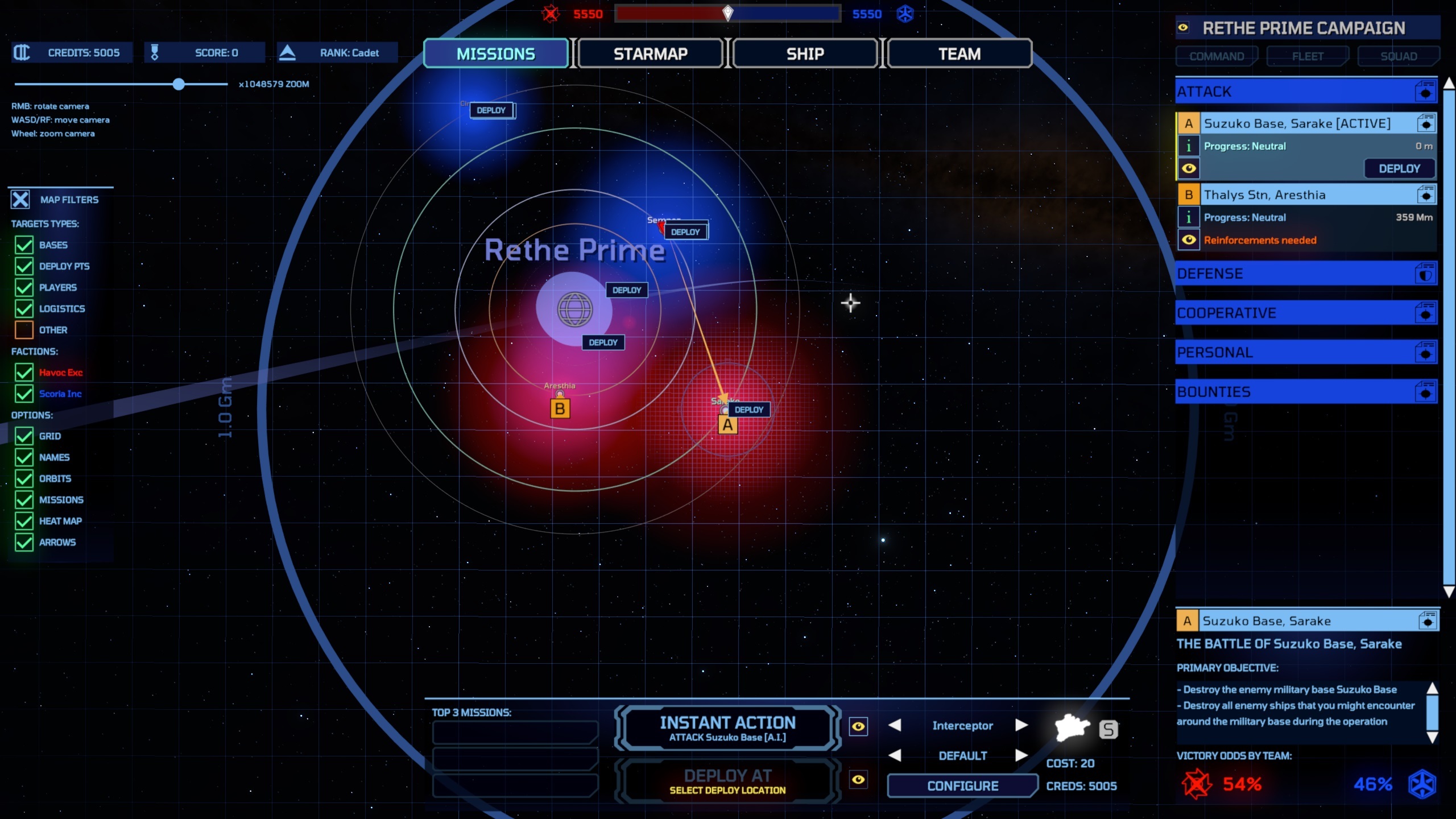
- Added mission symbols (letters: A, B, C etc..) in starmap/mission screen's viewports. Each mission is given its own unique color ( with a different hue and saturation ) to help differenciate missions
- Added quick-deploy buttons floating over the starmap/mission screen's viewports
- Added a panel for filtering and rendering options to the starmap and mission screens. It is now possible to filter the map by entity type (ex.: bases, players, teams, logistics like haulers) etc..
- Added a "heat map" (colored halos around team assets) to map's viewport, which should emphasize areas of conflict (blue for allies, red for enemies, so it turns purple in areas of conflict)
- Added threat/under-attack indicator dots (orange = threat, red = under attack) to map's viewport and entities panel
- Added back "Select on HUD" buttons in mission menu and star map for the selected item in the info panel at the bottom-right
- Added arrows on starmap and mission screens showing the direction between your ship and the closest allied base (blue arrow), or to the selected mission (green or orange arrow)
- Added the selected mission's symbol and objective type to the ship's HUD floating below its target location's icon (this should make it extra obvious to new players to see where their objective is)
- Current mission can now be deselected on mission screen (default: backspace)
- Minor UI tweak: tighter tooltip positionning when opening a tooltip around the screen borders
- Minor UI tweak: checkboxes can be toggle by clicking on the text too (not just the check icon only)
- Minor UI optimization: added screen culling to icons rendering
- UI is now properly refreshed when changing the color theme or the language
- Tweaks to UI style in the mission and starmap screens (ex.: new icons for mission categories, improving coloring coherency, etc..)
- Fixed icons located in the back of the camera appearing on screen as mirrored ghost icons
- Fixed HUD and menu icons to be fully resolution independent
- Selected mission's objective's indicator is now always enabled on the HUD even if not actively selected (before: it was hidden if it was far away)
- Distances in starmap and mission's targets list is now calculated as the distance between the player's ship and the target's (if in game)
- Fixed coherency of mission names + locations in UI
- Top 3 missions in deployment panel now selects the mission in the mission screen and focuses the camera on it instead of starting deployment
- Improved representation of the selected/active mission in the missions panel
- Fixed trade routes not showing up in mission screen
- Fixed trade routes randomly appearing in team screen
- Deployment panel is now also fully available from the ship screen
Assets
- Updated 3 station modules with improved geometry and materials
- Updated map icons to differenciate between planets, moons and asteroids (they now use different icons)
Bugs fixes / Misc
- Fix for the shield visual effect not being played when a projectile bounced off a shield
- Optimization fix for internal cockpits being loaded/attached and updated for all ships and not just the player's ship, which wasted cpu resources for no good reason
Misc
- Increased game's default camera's vertical FOV from 70° to 80° to see more of the cockpit in small ships
- Server admin commands now dump information to the chat box instead of the HUD's info MFD (which was too limited in size)
Patch 0.7.5.0 Notes
Patch 0.7.5.0 ( Wednesday August 5th 2020 )
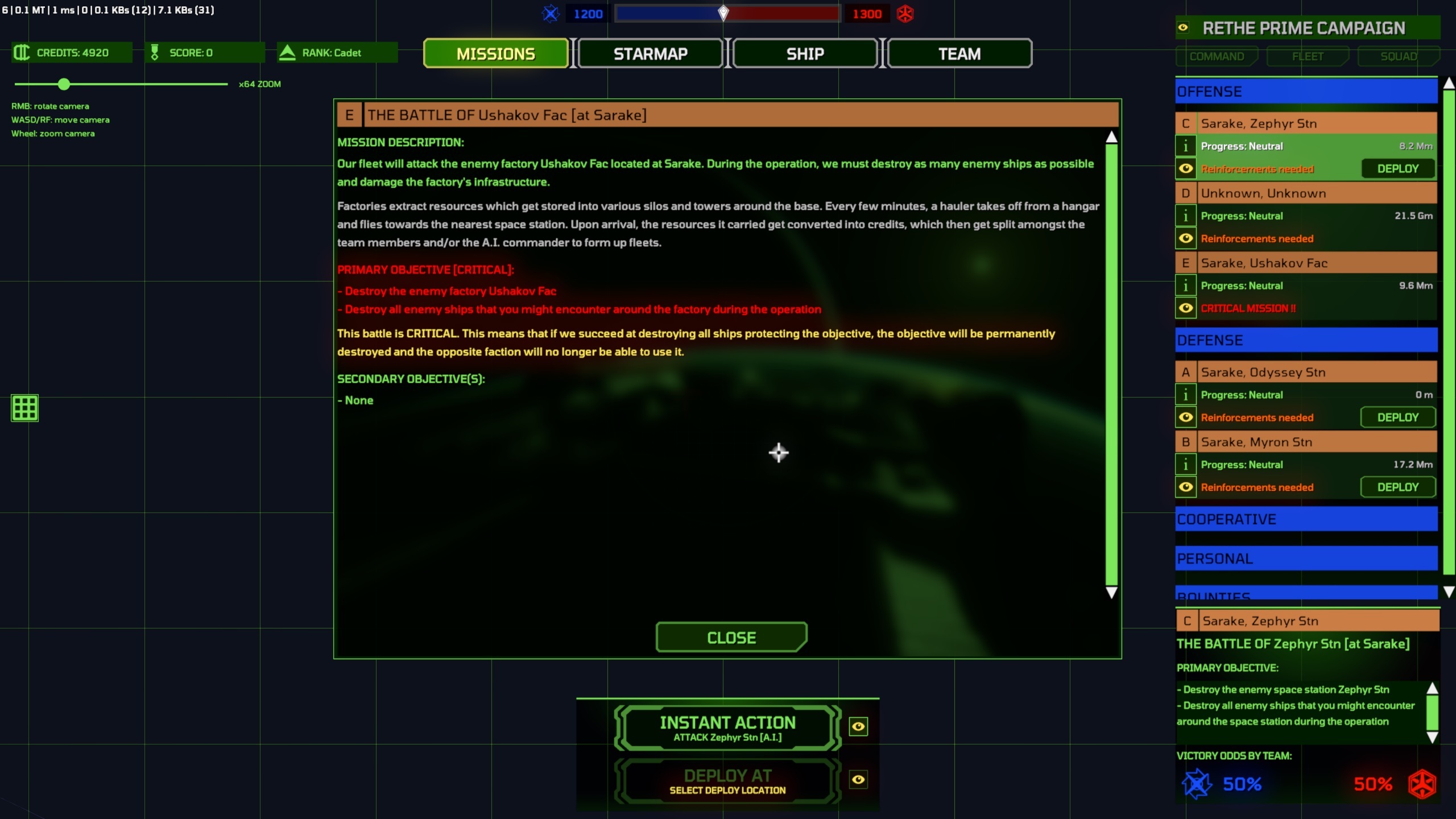
This new patch introduces the new revamped mission screen, which should make objectives more clear to new players. The mission screen now acts in a similar way to the star map, with a 3D viewport showing the stellar system, the planets and the objectives.
The missions are now listed on the right side of the screen and can be selected to get more information about the current status or objectives in the bottom-right info panel. Note that each mission also has an eye icon (to set the camera on it) and an "i"nformation icon, which opens a panel with mission details.
We still have to clean up the 3D viewport itself (make it interactive, improved the text and icons, make it more clear where the objectives and missions are), which will probably be the focus for the next patch, currently scheduled around mid/end august. After that, we'll be refocusing back on gameplay (and particularly, match/battles/missions progression).
Gameplay
- Warp charge duration and warp cooldown is now set per ship instead of being the same for all ships. Interceptors and bombers still need 5 seconds to charge the warp drive, but corvettes and above now charge a bit slower. Large capital ships (cruiser, carrier) charge much slower (10 seconds for the cruiser, 12 seconds for the carrier). The warp cooldown after exiting warp also behaves in the same way: higher cooldown for the bigger ships..
HUD
- Aiming direction dot indicators are now displayed on HUD for gimbal weapons (Note: the HUD was already showing these small dot indicators for turrets, but not gimbal guns. Since the gimbal guns kind of behave like turrets, just with a smaller angle, it made sense to also display the dot indicators for them. It'll also help players to understand why they're sometimes missing ships quickly traversing their view due to the gimbal gun's rotation latency)
- Selected target indicator no longer fades out when too close (Note: the selected target indicator was disappearing when you were getting close to a station or a capital ship, making it impossible to know that you had it selected.. )
UI / Menus improvements
- Revamped the mission tab menu screen. It now has a visual style / layout similar to the star map
- Mission menu is now the first tab, and is also the new default when launching the game, to emphasize its importance for new players
- Destroyed bases are now dimmer in star map's targets list
- Implemented under threat/under attack status (orange or red dots in the right column) in starmap's targets list. Orange dots notify under threat, where a limited number of enemies are gathering around an objective. Red dots notify that the objective is under attack by a large force
- Star map's search filter now updates targets list dynamically based on what's being typed
- Star map target's list now auto-refreshes every 10 seconds while in-game (previously: it only auto-refreshed during respawn, not in game)
- Buttons and various UI text blocks that don't allow multi lines now auto-rescale their text content down when it's too long. This should particularly be helpful to fit some localized strings within their UI block
- Buttons border brightness is now reduced compared to content color (small visual tweak)
Bugs fixes
- Fixed a bug that caused some sounds with a non-standard pitch to get cut short
- Tooltips no longer appears on top of a UI control that has keyboard focus (like an edit text area)
Misc
- Tobii Eye tracking library upgrade to the latest version. Please let us know if you encounter new issues
Patch 0.7.4.0 Notes
Patch 0.7.4.0 ( Monday June 29th 2020 )
This patch contains quality-of-life improvements over the last patch and the new development system. In particular, we have introduced a waiting queue upon deployment if you were trying to spawn at a moving carrier, or if the hangars were busy.
We also have a new countdown mechanism so that players can't abuse the quick-deploy at the same base/battle instantly after dying. A minimum "buffer" of about 30 seconds has been introduced, but the trick here is that this countdown is shared/synchronized by all players trying to deploy at the same location (so they'll spawn in game at the same time).
The help tips system has been revamped, is more contextual and new help tips for beginners have been added.
UI / Menus improvements
- Introduced deployment waiting queue for carriers or busy hangar spawns
- Introduced countdown deployment timer if you try to respawn too quickly at the same location
- Deployment countdown timer is currently set to about 30s and is synchronized for all players waiting to respawn at the same time intervals
- Deploy buttons have been added to the ship selection menu (that way you have to go back to the star map to spawn, which will be important in the future when the ship upgrades/loadouts are added to the ship selection menu)
- More improvements to deploy buttons (they now become disabled if you can't afford the ship cost) + more feedback messages that will tell you exactly why you can't deploy at a given location
- Star map menu now properly sorts listed missions/battles by top-down priority
- Star map's containers in targets list are now collapsible (there's a small arrow on the left of each item, which you can click to (un)collapse the item)
- Added back spectator mode (accessed through RMB contextual menu while selecting a target in map menu)
- Added "select closest deployable base" in the star map's targets list contextual menu (RMB). This will select the deployable base that is the closest to the target you have clicked on
- Updated generic list box and scrollbar arrows buttons icons visual style
- Fixed various issues related to tooltips staying alive after spawning or changing game states
- Fix for sensor screen's base grid reference, which should now properly orientate the grid on the nearest base
- Revamped random help tips. The new system is contextual (ex.: it'll show a tip about using chaffs only when a missile is fired at you). New tips have been introduced, which should help with the basics for new players. The tips now properly display the active keybindings in their text
Bugs fixes / Misc
- Fixed a rare client crash bug happening due some fired projectiles during high network latencies
Patch 0.7.3.0 Notes + Small Dev Update
Patch 0.7.3.0 ( Tuesday June 23th 2020 )
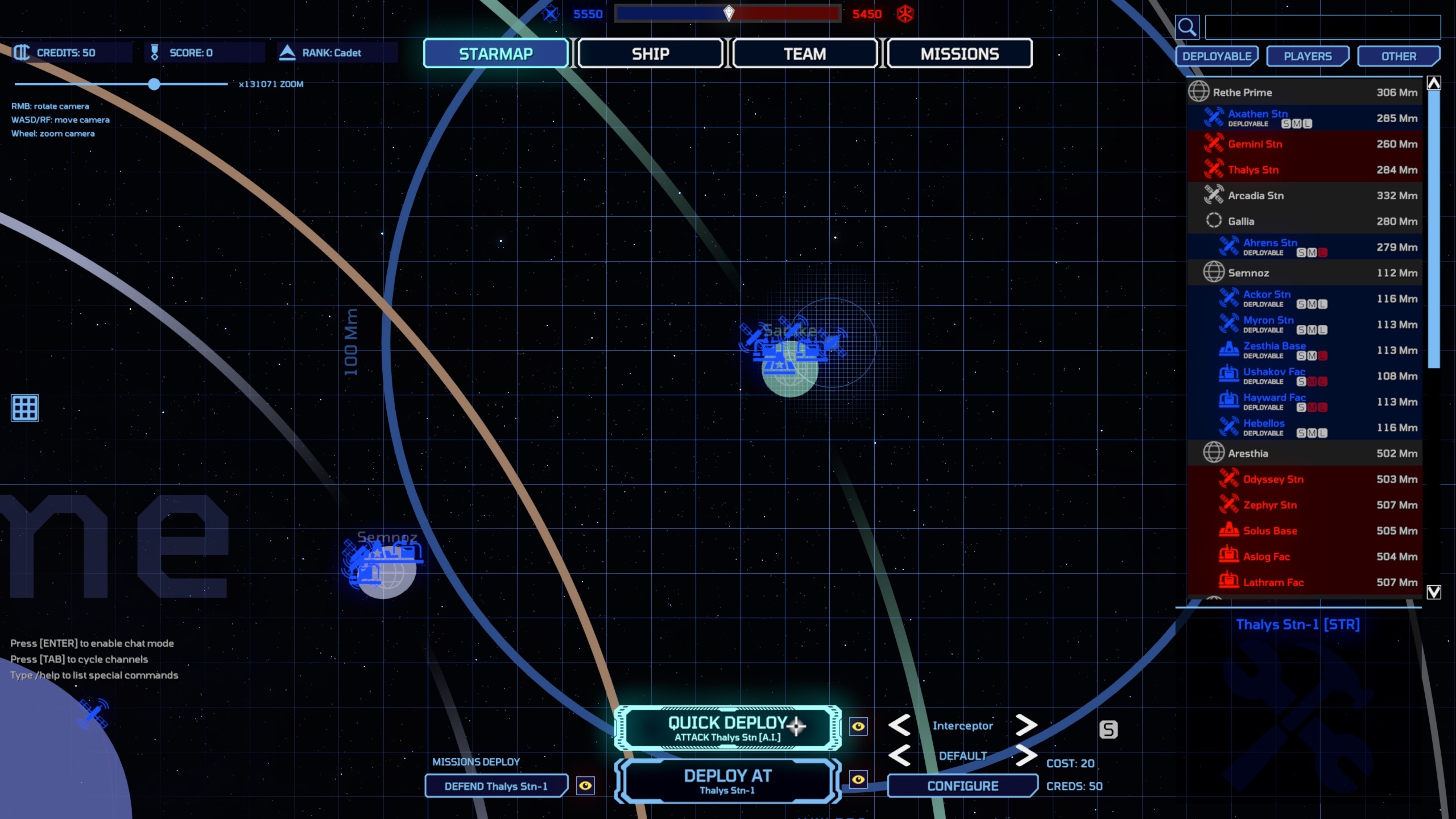
This patch focuses on the first iteration over the star map revamp. A new deployment (aka. spawning) system has been implemented to make it more clear to the players where the deployable bases are and which kind of ships they can spawn.
A "quick deploy" button has been added to get back into the action quickly. This will help to cut down the amount of travelling necessary for attack battles, making it more fair to the attackers versus the defenders that could always respawn instantly at their own base.
The way quick deploy is implemented, if a base or a carrier are available in defense, you'll be spawning there as usual. If however those aren't available, you take over an A.I. ship of the same selected class. The algorithm gives priority to A.Is that are not engaged in combat and undamaged. If the ship you take over is somehow damaged, you'll get a refund proportional to the amount of damage. Note that since the bot had already been paid by the AI commander, the cost you pay for taking over is going back to the team's funds instead of being paid twice.
The patch also contains a second iteration over the new sensor screen tactical overlay (default: tilde key), which now shows arrows to highlight ships attacking each others. Finally, amongst other fixes, we improved Tobii Eye tracker and integrated TrackIR to the game. Feedback on how good/bad the implementation is, is appreciated.
The next patch, due later this week, will most likely be a hotfix with a number of left-over quality-of-life improvements.
Starmap and new deployment/spawn system
- Implemented new deployment (spawn) system with quick deploy and deploy at buttons in the star map
- Cleaned up star map, added ship selector, automatic refresh of targets list, etc..
- Quick deploy allows to take over an AI ship in a battle
- Added high priority missions list quick spawn in the star map;
- Added deployable states and icons to targets list in star map
- Deploying over an AI bot will refund credits proportionally to how the bot is damaged
- Added selected target's info panel to starmap and sensor screen
- Added search filter to starmap's targets list
Sensors overlay tactical screen
- New holographic visual style for the sensors overlay / tactical screen for planetary surfaces, stations or ships
- Arrows are now displayed to show who is attacking who. You can see who's attacking you / who you are attacking, same for your selected target or the ship you're hovering on with the mouse
- It is now possible to click on the sensor screen to select a target, or double-click to recenter the view around it
- Added more options to sensor overlay screen: show MTBs, show vertical lines, trailings length
- Sensor overlay tactical screen will no longer show arrows or vertical lines for far away / invisible targets
General UI / Menus improvements
- Revamping UI visual style with custom buttons
- Added various new icons to the UI
- Mission screen's missions list now automatically refreshes every second
- Fixes for various UI elements not correctly displayed as grayed-out when inactive
- Fixed indicators being displayed behind the camera on the starmap
- Fixed layout issues in missions list
- Fixed "_deleted_" objective names appearing in missions list
- Selecting a mission in the mission menu will now also highlight it on the star map
- Mission menu's missions list is automatically refreshed as soon as a mission or battle gets created or destroyed
Head tracking (Tobii and TrackIR)
- Improvements to Tobii Eye tracking integration
- Added head / gaze tracking settings in controls options menu
- Added option for clear UI (gaze-based highlighting of MFD)
- Tobii eye tracking now supports head position offset/strafing
- TrackIR integration
- Added better error handling for Tobii and TrackIR (if the libraries can't be loaded, an error message will pop up)
Misc
- Temptative fix for server browser pings all being the same on some machines
- Fixed a rare server crash bug when an actor gets deleted at the exact same time a player disconnects
- Updated match victory conditions: carriers are no longer taken into account in team score calculation, preventing a match from ending

Development update
We have quite a bit of work left on the star map and the other in-game menu screens, so it is likely that the next major patch, probably until some time in July, is going to focus on those. The star map now has its new targets list and deployment system, but the viewport / rendering has to be improved, made more coherent ( like the sensors screen ), interactive ( being able to click on it ) and better represent the various points of interests and icons. For example, it is critically important that the star map clearly represents the active missions, or the bases under attack - and it fails at doing that at the moment - so we'll be working on that next.
The other screens are also going to get some updates, but this should go faster. The team tab's screen is probably going to be the most complex one. It'll get a proper leaderboard, showing scores / stats for the players, but also team related stats and information. The idea here is that it'll list all the bases, their status / HP, their recent income, damage take, etc..
Once the UI revamp is over, it'll be time to move on to the more gameplay and match-related items, as mentioned in the last update. What will be coming next is probably the rework of the passive credits redistribution system, the match progression / critical battles, and we'll be looking at starting the work on the AI / mission objectives soon in July, followed by the infamous ship upgrades.
The experimental atmospheric flight model is still coming, although the exact timing is unknown. The tricky part here is making the AIs take into account the atmosphere when flying ( rolling instead of yaw-ing, like in space ), but I think it'll be pretty fun once it's done.
-Flavien Brebion
Patch 0.7.2.0 + Small dev update
Patch 0.7.2.0 ( Saturady May 30th 2020 )
This is a fairly big patch which contains the initial implementation for the new sensor overlay (tactical screen) replacing the old 3D radar zoom.
There are also a number of HUD improvements to make it easier for new players to understand who are enemies and who is currently shooting at you, as the indicators will now flash when an enemy is firing at you.
An important AMS lasers bug was fixed (which caused their DPS to under-perform) and 8 AMS turrets were given to the carrier for defensive purposes.
Finally, we also spent a bit of time to do a new round of improvements for the keybindings and improve the joysticks key detection.
Sensor Overlay
The old "3D radar zoom" (which was previously bound to the 'quote' key, aka. the key left to 1 and above tab on the main keyboard) has been re-implemented as a new screen: the sensor overlay / tactical screen.
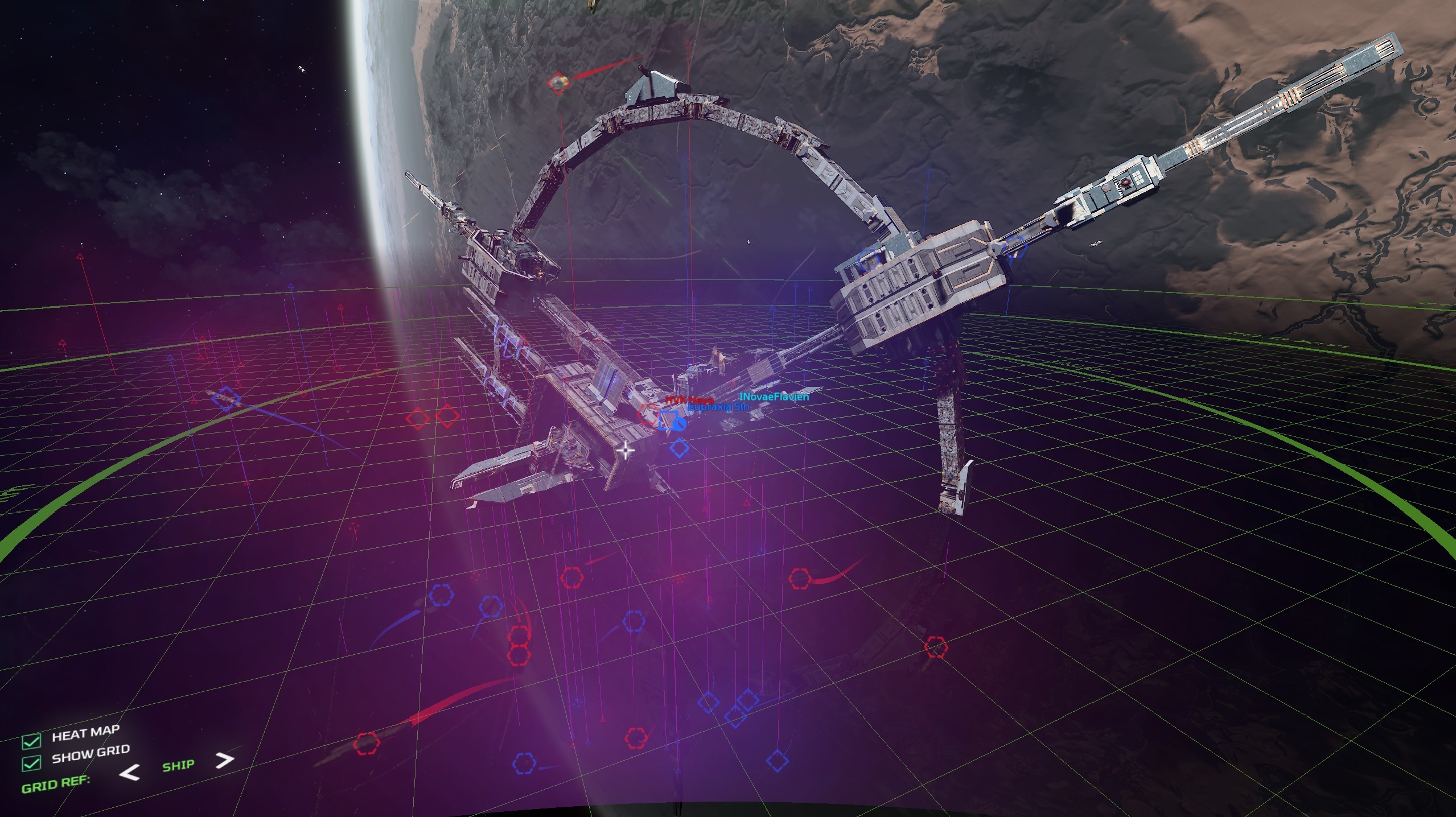
When entering that mode, the camera will zoom out from your ship to about 15 Km (up to 30 Km max), seeing the entire battlefield. A grid is overlayed on top of the screen, showing ships and their indicators, as well as a "heat map" (basically ships are glowing depending on their allied or enemy status) and trailings heind each ship showing their movement. There are options on the bottom-left to toggle these features.
It's also possible to change the frame of reference (by default it's on your ship) to the nearest base or planet (or even the solar system's plane). Your ship's framerate of reference stays centered on your ship even if it's moving, but its orientation is determined by your ship orientation when you enable the sensor overlay and will stay fixed. If you want to synchronize attacks and see the same battlefield view angle than other allied players, it might be better to change it to 'base' or 'planet' (since these will have the same frame of reference, no matter how your own ship is oriented).
While enabled it is possible to left-click drag to translate the camera or right-click to rotate around the origin. You can also hover the mouse over targets, or even select them as usual with T, G or Y/U.
In the future, we'll add more information to that screen, like current velocities, arrows representing who-is-attacking-what, and possibly show in a corner the current target's information (including its name and health/shield status).
If you have more ideas on what you'd like to see on this tactical screen, please let us know as usual, thank you.
New HUD or menus improvements
- Fixed a bug that made the max combat targets slider setting useless, as it still used the max nav' targets instead of the right number. Note: this is a huge bug, which kind of made the decluttering from a few months ago useless as it still displayed a high number of targets in combat. As a reminder, you can change the number of displayed targets (both in navigation or in combat mode) in the general options settings.
- Implemented new glow/highlight effect for high nearby threats (firing at or targetting you) on the radars and ring target arrows. This should make it more obvious when suddenly a nearby ship out of your view starts firing at you
- HUD target ring and radar indicators now blink when firing at the player. Note: the HUD performs fire cone checks to see if you're in the light-of-fire of an enemy firing in your direction
- Updated HUD indicators colors coherency (there were differences in the choice of colors between the 3D viewport, the ring target arrows and the various radars). All the different screens should now show the same icons indicators with the same colors
- Revamped HUD bloom/glow shaders and tweaked color theme: the bloom effect was too agressive and affecting the font's readability. The new bloom is softer and wider and should keep text more readable. The current selected tab in the options menu is now highlighted
- Fixed battle notifications popups showing up in the in-game / tab menus. The popups will now be invisible in menus and update in the background at a slower rate. Popup notification sound can still be heard on menus, so you're aware that something happened
- Moved battle notification popup so that it doesn't cover the top of the HUD
- Weapons MFD now shows a dual arrow icon for auto-aiming/firing weapons instead of the cryptic "*"
- Help tips are now displayed in yellow to be more visible on HUD
- Fixed speed formatting on HUD which caused numbers to be too wide at high/warp speeds (now uses the SI units like distance)
- Fixed HUD power flickering (when engines are damaged) which didn't seem to fade correctly
- Fixed HUD text areas that didn't use the user-selected color theme
- Fixed HUD text areas that didn't fade off when power is down
- Removed top helmet decoration bar when HUD is disabled (F3)
- Removed HUD help screen ( in system menu ) as it is obsolete
- HUD improvements to broken targetting systems and broken sensors (they will now correctly behave, flicker or stop showing up when broken)
- Weapons aiming indicators on HUD are now properly rendered as dots instead of small squares. Note: that's a very small change.. but the weapon aiming dots were rendered as small squares previously. They should now properly show as small dots
- Fixed selection indicator being empty for missiles, torpedoes or mines;
- HUD's missile locking circle now shows as alert color ( instead of normal color ) when it's under cooldown
- Low damage alert is now more reliable and should show up for interceptor shots landing on capital ships
- Added a new chat / comms channel: System, that keeps meta-game information notifications ( like player X killed Y );
- Added a /clear command to clear a chat channel
- Fixed a bug with the chat box text which didn't extend to the full width of the window
- Tweaks to planetary HUD: lowered minimum altitude, no longer displays in external capital ship view, pitch are now based on camera instead of ship orientation
- Fixed a bug preventing previous / next target selection cycling ( Y and U keys ) from working as expected
- Mouse wheel will no longer change target speed while on starmap
Keybindings / Input
- Keybindings options menu now makes it more obvious when devices are unassigned for a given input profile ("no device assigned" message is displayed in orange next to a virtual device). That way new players will instantly see that they need to assign their hardware to the correct entry
- Added a warning dialog if you're starting key detection without having assigned all the virtual devices for the current input profile. That way it'll be more obvious to new players that they need to assign their hardware to the correct entry
- Improved key detection for keybindings and added options to allow key or axis combos. Key combos are allowed by default but axis combos are not. When starting key detection, if multiple axes are touched, the one with the largest movement/value is the one that will get detected
- Small fixes related to XInput and the joystick devices in options menu
- Tweaks to XBox XInput and PS4 input profiles (some buttons were swapped to be more natural and some new buttons were added)
Gameplay
- Fixed a bug with 2+ missiles launched at once, that end up kissing (colliding) each others while tracking the same target, hence exploding in the middle of nowhere before reaching the target. Note: I had a suspicion for this bug for years but it wasn't easy to replicate. I was only able to figure out what was going on recently. The explanation makes sense and is 100% logical so in a way it's not really a bug.. more like an undesired feature..
- Fixed a bug that made the AMS lose their power every second, pulsating for no good reason (which reduces the intended DPS on them). This is a huge one, as it kind of made AMS under-performing, which indirectly made bombers over-performing
- Fixed turrets that could still rotate despite the ship having lost its power
- Carrier now has 8 AMS for defense against torpedoes/mines
- Adjusted capital ships default camera distance in third person mode
- Increased amount of heat generated by bomber's shotgun
- AMS buffs; increased turret turn rates, +50% damage and doubled the visual thickness of the laser beam effect so that it's more visible at a distance
Other bug Fixes
- Fixed tooltips from mission screen staying on screen after closing the game menu
- Fixed a bug with the starmap contextual (right-mouse button) menu that didn't close when tabbing out
- Fixed a bug that reset the throttle speed ( also warp speed ) to zero after apply & saving from the options menu
- Fixed rare random crash bug when playing some visual effects
Misc
- Added debug information to log files to figure out the issue with frozen/duplicated pings in the server browser screen for some users
- The client and servers now support new admin commands to spawn entities for the purpose of enriching community events
Development update
This upcoming month ( June ) we are going to focus on a few things: first of all, the sensor overlay / tactical screen implementation is only at its initial stage; we're going to spend a few extra days to fix bugs and improve it. The idea here is to make the icons clickable to show a little popup / vignette screen in a corner which will highlight the icon on which you've clicked ( or hovering the mouse ). It'll show the usual information: name, status, health / shields, etc..
The other idea is to add more tactical information to this screen. It'd be interesting to show the ship's velocities and maybe arrows that represent what your allies / squad members have selected or are currently targetting.
In a future update ( not any time soon ), probably when we implement the squads management system, this screen will show more information about your squad members. It'll also be the screen where you can assign objectives to your squad members ( if you're the squad captain ), set a beacon / ping, or highlight a special target for others to see.
In June, the other big thing is the star map revamp. We've been working on its new design internally for a while. We want the new star map to better show objectives / bases, highlight which ones are under attack, where the missions are ( without having to go through the mission tab ), where haulers are flying ( so that you know you can attack or escort them ), and show clusters of ships / players / where the action are. There will be some overlap with what we've been doing on the tactical screen recently; for example, we're thinking of using the same "heat map" system to highlight clusters of ships.
June's goal is also to improve the credits redistribution system ( going back to a more passive system ), address some issues with the AI battles flow ( getting ride of non-critical battles which make it feel like you have no impact on the match ), add in-battle sub-objectives ( ex.: corvette getting a message to resupply / repair other ships ), and a first implementation step for battle reports ( statistics showing how well you've been doing in the battle ).
In terms of interface for new players, we want to revamp the help tips system ( adding more to them - you know, the little messages popup up with a help message for new players ) and add a bunch of context-sensitive popup help screens for first-timers.
Finally, we want to experiment with atmospheric flight model changes to better differenciate atmospheric and space flight, so that planetary battles have a different "feel" than space ones.
Needless to say, this is gonna be a busy month and we're not sure how much of this we can accomplish in a month, so it's very possible that some of these will leak into July.
-Flavien Brebion
Community Update #142
Community Update #142
Hey everybody; it's been a while since the last update (we stopped doing them since the launch of the game in Early access due to lack of time) and as per community feedback we'll be resuming the updates from now on in a new format called community updates. Unlike the old weekly updates, they'll be posted more irregularly. The idea is to more or less try to synchronize them with in-game updates / patches, so in terms of frequency you should expect to have one or two per month. We'll also try to post a special community update every quarter that will be a summary of the work done in the past quarter, come back on the state of the project and contains revisions to the roadmap.
This first community update will be more similar to a quarterly update, and since we've had a lot more new players during the Early access launch that aren't necessarily aware of the history of the project or the company, I'd like to start this update with a more general retrospective.
Project retrospective
I-Novae Studios was established by Keith Newton (ex Epic Games developer) and myself (Flavien Brebion) in Q2 2010. Prior to that, I had been working for years in my spare time on a 3D engine able to render full-scale, seamless procedural planets and on an Elite-like space MMO called Infinity: the quest for Earth -often confused with Battlescape- but unfortunately, in an era where crowd-funding didn't exist, it never went past the stage of being a hobby/community project. The company focused its early-2010's efforts on improving our tech and looking for funding for the MMO, without success.
2013-2014: Inception
In 2013, after Kickstarter made crowd-funding popular for video games, we decided that it was time to resume work on a game project; to keep the budget within reach (we'd need millions of dollars for an MMO) we decided to launch a new space game in the Infinity universe: Infinity Battlescape, that would become our first funded project. In many ways, the idea was to take out the action part of the Infinity MMO and focus on it so that we could keep the scope more realistic for a small startup company like us (2 programmers and a handful of artists), and if successful, we'd gradually expand the scope. Around that time I left my regular full-time job to work exclusively for the years to come on Battlescape.
The next two years were mostly focused making the tech game-production ready (including various tools, like a material editor and assets cooker ) while we started pre-production for the game and the various Kickstarter assets.
2015: Kickstarter
In 2015 we focused the company's effort on the Kickstarter itself - that meant recording the actual trailer video, ramping up on marketing, working out our reward tiers and the game's design and pitch. In parallel, I started to work on a tech demo that we could use as a proof-of-concept. This work started in April 2015. The Kickstarter video itself was recorded two months later during a meetup trip to Finland (note that the company is all remote, so we all live in different areas of the world. I'm in Belgium, Keith is in the USA and the artists are in other countries).
The Kickstarter campaign was launched in October 2015 and ended as a success on the 20th of November, raising about $330K USD.
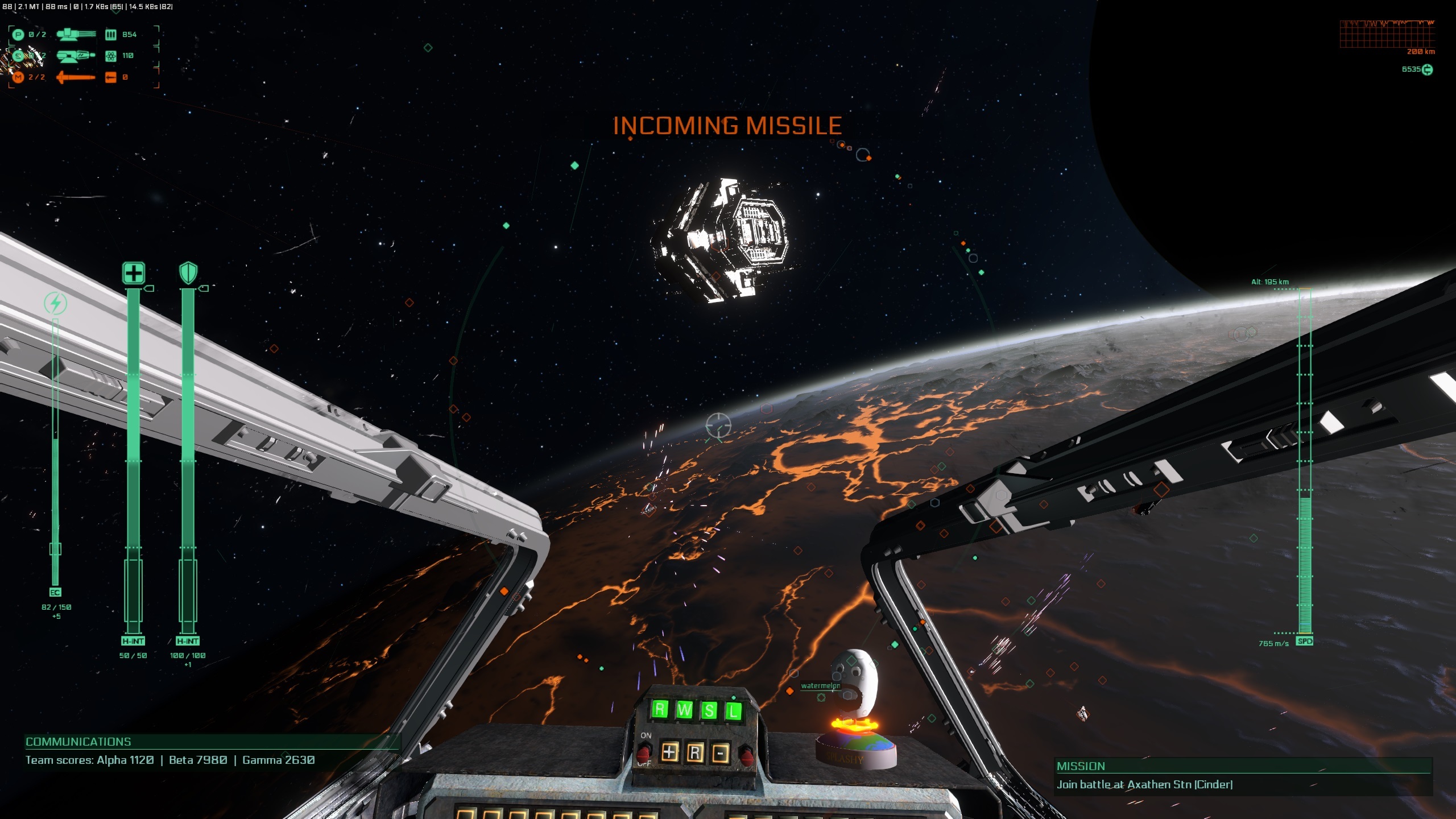
A space battle in orbit of Cinder (2017)
2016-2017: The Dark Ages
Until 2016, you could say work on the game was pre-production and had never been the focus of the company. This changed after we receiving funding from Kickstarter.
2016 and 2017 could retrospectively considered "slow" years. It quickly became clear that our original game design, which was purely PvP focused (it had no PvE elements) wasn't going to work. We expanded the scope of the game to support both PvP and PvE playstyles, which meant introducing AI bots to the game to fill-in for players.
The entire game was rewritten from scratch, as it was originally all client-sided (note that this wasn't an oversight - the KS demo was just a quick'n'dirty implemented proof-of-concept in a few months). It was also around that time that we spent a great amount of efforts into achieving epic space battles (both rendering wise, being able to see hundreds of ships - and network wise, to have so many moving entities consuming only a few dozen KB/s). In terms of gameplay, these two years can be considered the "dark ages" of the project, as there wasn't much gameplay beyond flying around planets and killing other players. There was no big AI battles, no UI / menus and controls remained basic.
2018: Core gameplay loop
If 2016 and 2017 were building up the foundation of the game, one could say 2018 was a transition year mostly focused on establishing a solid core gameplay loop. By 2018, all ships - including capital ships - were playable, but didn't have much going on. We did a lot of work on the weapons systems / automated turrets in 2018, new ship systems (scanning/detection, proximity mines, warp jam), introduced the AI battles, refined the ship's physics and controls, the warping mechanism, the damage model, the (re)spawning system, and of course introduced factories and the haulers/resources/credits systems.
The game was slowly shaping up but was still limited, in terms of content, to roaming around (for scouting or destroying haulers) or participating to battles/destroying objectives.
2019: Early Access
As we entered beta in February 2019, our ships assets were still all untextured and the game didn't have a proper UI or in-game menus. The next few months were spent on texturing all the ships and preparing our promotional content for the Early access launch - which means that for the first time in years, we spent some time (about 2 months) reworking on the visuals.
We introduced new particle effects for weapons, explosions, replaced the old stock soundtrack by an original one, we did the same for many sound effects, and finally started production on the Steam trailer. In parallel we worked on the game to introduce its UI / menu system - including the tab menus (star map, ship selection, leaderboard and missions screen), a new respawn system, the options menu (previously everything was done on the launcher, requiring a restart), keybindings + HOTAS, but even more importantly, the root menus including Steam authentication and server browsing.
We also had to do a lot of hidden backend / infrastructure work, the registration screen, Steam backer rewards and ensuring scalability of the servers, with a lot of network/performance stress testing. All of this put immense pressure on us, as time was running out before the Early access launch date approached, so we had to drop the weekly updates around that time.
The game launched in Early access in end-september 2019. Sales went pretty well especially the first few weeks and started to fall off (which was expected due to our limited marketing budget) but we still raised enough to finish the game to 1.0 release (assuming it doesn't take another 5 years of course) and even expand the scope in a few areas. There are a few things that caught us off-guard though:
- HOTAS / Joysticks support was broken. We hadn't tested them in depth prior to the launch, and a high number of people ended up having trouble with key detection and rebindings for their HOTAS and ended up refunding the game. Since then, we have addressed the problem and HOTAS / keybindings should now work. We are still missing input profiles for various HOTAS, so if you have functional ones please forward them to us so that we can include them into the game for other players, thank you !
- The learning curve: we under-estimated how tough it is for new players to learn the game. As we had been working on it for a number of years we thought the learning curve would not be a major blocker for new players - they'd just take a bit of time to get used to, despite the lack of a tutorial or in-depth explanations - and so we didn't consider this a big problem, which caught us off-guard.
The other major issue, the elephant in the room, which also explains why servers are on low pop, is player (lack of) retention features. Now I want to be perfectly clear that it wasn't a surprise to us as we perfectly knew the game didn't have enough content to keep players hooked for dozens of hours long - hence why we launched in Early access.
This is something we're going to address in the long term as it's a huge amount of work, through multiple ways, by adding new content (ship upgrades should make a huge difference already), more environments (planets, oceans, surface details), more missions / side activities to make the game feel less repetitive and of course, the persistent progression with unlockables (skins, tags, voice lines etc.. ).
2020: Towards full release
After Early access we released a roadmap which contained our plans for the next few months/a year. While most of the items on the list remain valid, the priorities have been changed. The feedback we got from the launch made it clear that we needed to address major issues with the learning curve sooner than later. In our refund reasons, the lack of players on servers is obviously #1, but the "I don't understand what is going on or how to find battles" is actually #2. Retention and lack of content is actually below in the list, because a lot of players currently give up on the game in the first hour and don't even have a chance of experiencing the more advanced content like capital ships gameplay.
Note that the learning curve encapsulates more than just learning the controls. The game currently has a defficiency in terms of feedback - events and things happening in game are not clearly explained; for instance, when one of your bases is under attack by an enemy, nobody on the team gets notified that this base is under attack. This tends to make the game feel chaotic and a lot of players mentioned how they felt like they were not really affecting the outcome of the match. We're looking at addressing all of that in the next few months.

An untextured carrier roaming above the surface of Sarake (2018)
Roadmap update
We have recently completed some huge updates to the game's HUD and the new MFDs. Coming next, we'll be implementing a new sensor overlay tactical screen that will replace the old radar zoom; this screen will be a blend of the old 3D radar and the starmap. The idea here is that once you hold the sensor key, the camera will switch to external mode, smoothly transition off from your ship to the whole battlefield (very quickly, like in a second) and overlay a tactical grid over the 3D view. We are also going to experiment some ideas to highlight the "hot spots" (clusters of ships) as well as various filters. This new sensor overlay screen will be the focus of the next patch, in a week or two.
Afterwards, our focus will shift on to the starmap. There are a lot of things that will be remade or improved. We want to better display the 3D view and grid, avoid the clutter, make it interactive (you'll be able to click on the icons), and make information more condensed and more detailed in the targets list. Many "modes" will be available, to emphasize either the bases (which ones you can spawn at, which ones are under attack), the resources flow (haulers / routes, team icome), hotspots (where action/battles are currently happening) and even where your current mission is located. If you have more ideas about improvements or features that you'd like to see for the starmap, now would be the best time to send us your feedback !
While we aren't going to do a full in-game tutorial just yet (that'll be coming around the 1.0 release around the end of the year or next year), we'll introduce a new serie of context-sensitive help screens, that will pop up for new players. They will contain more detailed explanations about the game's rules, how the star map works, how to find a battle or a mission, what the ship classes do, etc.. We'll also improve our current tooltips system which pops up hints during the game. This should go a long way to make the game more newbie-friendly.
In terms of gameplay, while we still aren't going to do ship upgrades or retention features just yet (we'll probably start on them this summer), there are a number of important changes that we're going to make in the coming months. In the short-term, we're going to add a quick respawn button on the spawn screen that will allow players to jump back into action very quickly (especially in the case of attack battles where a carrier isn't available), with one caveat: they'll take place of one of the AI bots currently in the battle, preferably one that isn't damaged and not currently engaged in combat. This should improve the game's pacing, as it often feels like defenders have an unfair advantage when they can instantly respawn at their base, while the attackers have to spend minutes to fly back into battle. We're also going to make it more clear where you can repair/resupply, as it's been a source of frustration for a lot of players.
There are also a number of changes planned in terms of match and battles progression. Battles currently feel too repetitive and chaotic with seemingly unfair difficulty. We want to spend more time on the AI commander, reorganizing the AI fleets into squads of ships, following formations when possible and having mini-objectives within a battle. These objectives will also apply to players, that will get them rewards if they follow the mission's objectives. Such objectives would range from "go and repair this damaged ship" (if you're in a corvette for example), to escorting/protecting certain ships (ex.: a destroyer, protecting a cruiser from torpedoes) or to disabling some defense turrets or weakened points (interceptor), for example. If you have ideas on battle objectives that you'd like to see in the game, please let us know too.
Finally, we're going to add better battle feedback, in the form of battle reports showing various statistics about how good or bad you did in a battle, how you ranked compared to other players, and once we have retention features later on, these will give you certain awards or unlock rewards.
A number of "smaller" features are also going to get added progressively, but we're still uncertain about their timing; we'll probably try to interleave them between major features. For instance, we'd like
to get the sub-targetting systems or squad management sooner than later. Once summer comes, we'll go full steam ahead on content and retention features. We're currently considering making the hauler playable, at least during a special cargo mission, but it's not set in stone yet so we'll probably work on that during summer.
-Flavien Brebion, I-Novae Studios
Patch 0.7.1.0 Notes
Patch 0.7.1.0 ( Friday May 8th 2020 )
This is a transitional patch that contains a lot of improvements and fixes related to the MFDs (multi-functional displays) and HUD. In particular, it contains new settings options, a fix for the new HUD in wide-screens, the introduction of physical MFDs in cockpits (as well as a revamp of the virtual MFDs and seat positions).
A couple of various improvements are also included, like temporal anti-aliasing (note that the game still defaults to SMAA until we get feedback about TAA and if it's good enough to be made the new default) or the ability to use the numpad keys to set the cockpit view.
The next big item on the upcoming tasks list is sensors overlay - which will be replacing the 'quote' key which was previously bound to 3D radar zoom in. It still needs a few days of work, and will probably become the focus of the next patch.
Note that as per community request we'll be resuming our development updates in a new format (what we previously called "weekly updates", but won't be weekly anymore) and that might be merged with patch notes in the future. We'll also post a quaterly update, with focus on priorities and refreshing the roadmap. We'll post one of those next week.
-The I-Novae team
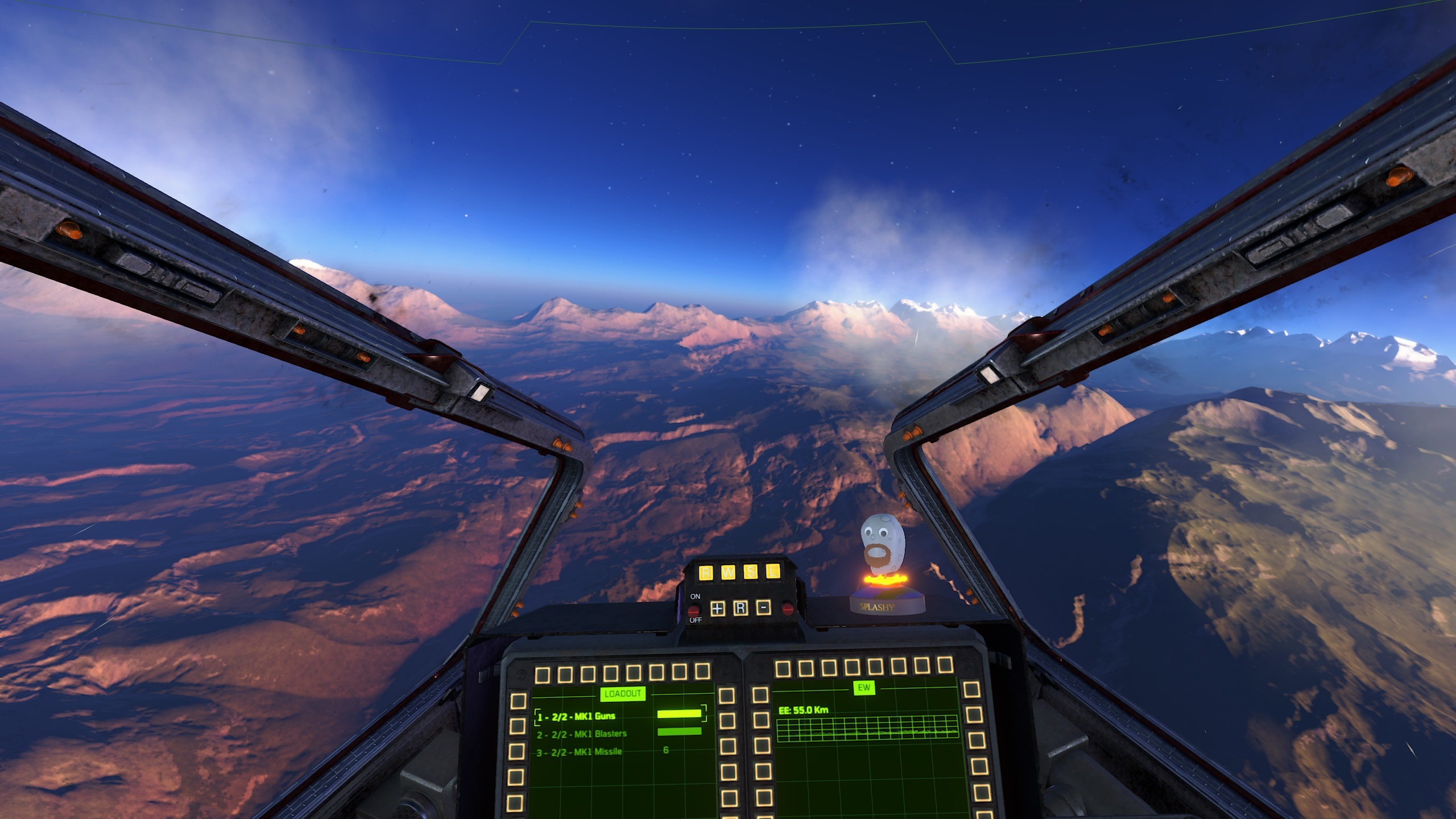


Cockpit physical MFDs
The interceptor, bomber and corvette now all have functional physical MFD screens. As previously, you can edit the layout and which MFD pages go on where by bringing up the MFD layout setup (default: F4). There are 4 screens in the interceptor and bomber (note: some screens are redundant on the bomber's top frame). The corvette has 3 screens. Capital ships do not have cockpits, so they cannot use the physical MFDs systems.
IMPORTANT: the seat positions were tweaked in all cockpits, as well as the camera's vertical field-of-view, that went from 60° to 70°. This allows every ship to display the physical MFDs at the bottom of the screen in the "default" view. Since there could be some overlaps with the HUD's virtual MFDs that some people might have customized in the last patch, we decided to reset the virtual MFDs layout to restart from a "clean" state. This means that if you had customized your vMFDs, you might now have to do it again.
If you do not like the physical MFDs and wish to just use the HUD's virtual ones instead, we introduced seat adjustment offsets in the General -> HUD options menu. You'll find 3 new sliders that control the vertical, front/back offsets as well as the head pitch. Changing the head pitch is currently not recommended, as the crosshair will no longer be centered and gameplay might feel awkward.
Numpad keys can now be used to turn your head in the cockpit (4= left, 5=center, 6=right, 8=up and 2=down). The corners (ex.: up-right) aren't implemented yet
Temporal anti-aliasing
We've introduced a new anti-aliasing method, temporal anti-aliasing (TAA) to the game / engine. The game still defaults to SMAA, however you can enable temporal anti-aliasing in the graphics settings options menu. You'll find a setting to change the "AA method" (it's also now possible to disable anti-aliasing, for those of you that have a low-specs computer and need max performance). There's also a setting for "AA quality", which is dependent on the type of AA method applied. It doesn't do anything for SMAA, but for TAA it changes the number of samples and the application or not of a sharpening filter.
In general, you should find that SMAA gives you minimum anti-aliasing and suffers from a lot of flickering. TAA is much better, but can suffer from ghosting effects (especially when you quickly zoom in or out) and slightly blurs the image (which is why we apply a sharpen filter in post-processing as a counter). TAA is slightly more expensive than SMAA in terms of performance.
Once we gather enough feedback about the quality / performance tradeoffs of TAA, we might make it the default AA method (at least on high-end computers)
HUD fixes and improvements
- Fixed new HUD / MFDs wide-screen layout
- Wide-screen fixes for starmap and ship selection 3D viewport (they didn't use the correct camera's aspect ratio)
- Fixed a potential crash if you died while editing the MFD layouts
- Fixed a bug that still rendered MFDs despite switching the HUD off (F3 key)
- Fixed carrier "player spawn notification" layout for the new HUD. It will now show up as another line in the systems notification MFD
- MFDs now also flickers like the rest of the HUD when the engine / power is partially damaged
- Fixed warp engage warning after exceeding the soft cap speed, which was disappearing too quickly (most players didn't notice it)
- Removed dark, very transparent (it was barely visible ) background over some text MFDs (ex.: objectives MFD)
- Swapped left / right arrows on collapse MFD buttons, which feel more natural
- More shadow outlines around some text in the system notifications or mission MFD
- HUD bottom-screen's decoration lines now only show up when virtual MFDs are present, to avoid cluttering the physical MFDs at the bottom of the screen
- Tweaked (increased a bit) font size, opacity and layout of system notications MFD (the text was too small to be readable sometimes)
New customizable options or settings
- Tweaked graphics settings menu: it is now possible to change quality parameters individually, which will set the global quality level to "custom" automatically, which feels a lot more natural to the user
- Added target hit mark sound effect toggle in the audio options menu
- Added a slider into the HUD settings in the options menu, in order to control the separation between the ship/target info and the center of the screen
- Cockpit seat settings (offets and head pitch) can be customized per ship (see general settings)
- Added a screen shaking slider setting in the graphics options menu
General and bug fixes
- Respawning in a capital ship now defaults to third-person camera
- Increased max camera vertical-FOV from 80 to 100 degrees
- Changed default camera vertical-FOV from 60 to 70 degrees
- Tooltips now have a darker background, bigger font and padding
- Inactive/disabled sliders now appear darker in the menus
- Fixed joystick options window contour that was always displayed in blue, ignoring the current color theme
- You now get a critical hit notification when you destroy an allied ship's weapons by accident
- Fixed a bug that required a restart despite not changing any graphic settings, the first time the user opens the options menu
Misc
- Added new muzzle flash effect for MK6 / MK7 kinetic guns on capital ships
Patch 0.7.0.0 Notes ( virtual HUD MFDs )
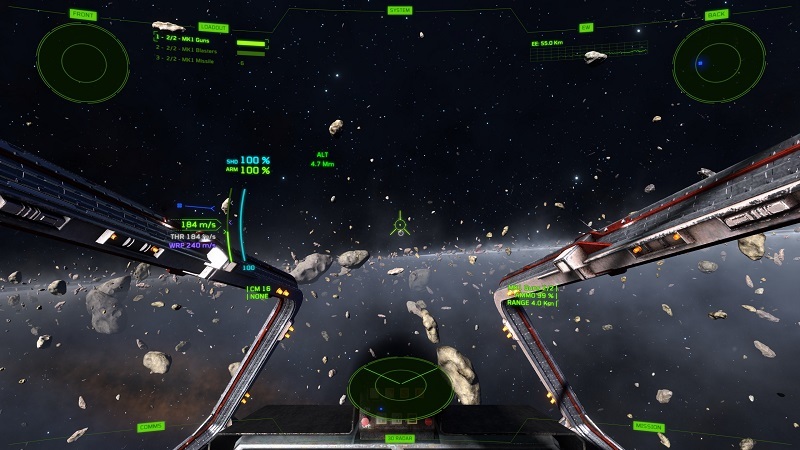
Patch 0.7.0.0 ( Saturday April 25th 2020 )
This is the final patch focusing on the HUD overhaul. It introduces virtual MFDs (multi-functional display) that aim at providing HUD customizations to players. The default MFD layouts have already been changed on all ships.
This patch also includes other UI tweaks, related to the HUD or some star map improvements.
In the next patch we'll be focusing on the star map and a new sensors overlay system, then it will finally be time to move over to more gameplay !
-The I-Novae team

HUD and virtual MFDs
To open the MFD layout setup screen, hit F4 while in-game. The layout provides 14 MFDs, and each one has a button to select the current data page to be displayed in it. Some pages require dual MFDs and aren't available at the left/right sides.
Some pages can be centered on two MFDs in "dual display" mode. When available, an arrow button will be displayed on top or below the MFD screen.
The currently available MFD pages are:
- Loadout (weapons list)
- Target (only displays basic stats at the moment, but this MFD will show a holographic 3D view of the ship in a future patch)
- Communications (chat box)
- Electronic Warfare (EW) (at the moment, only displays energy emissions and detection status)
- Front radar
- Back radar
- 3D radar (spherical radar)
- Mission / objectives
- Squad (not implemented yet)
- System notifications / messages
More pages might be available in the future - if you have feedback on pages you'd like to see, please let us know !
Also of interest: cockpits currently have MFDs that aren't functional, but in the next patch those should be available as working MFDs too.
Note that MFD layouts are persistent (changes are saved automatically) and per ship class. You can transfer MFD layouts from your current ship to another ship in the gameplay settings menu.
UI / HUD changes
- Added a separate slider setting to control the max amount of displayed ring targets ( as opposed to combat targets )
- Fixed cursor hovering which was highlighting all targets within a certain range: now it only highlights the closest target
- HUD text now has a dark outline (instead of a drop shadow)
- Removed helmet deformation effect from root, main and tab menus;
- Fixed "not enough credits" text clipping issue in ship selection screen
- Improvements to star map targets panel: now properly uses team colors; distance text is smaller; added spawnable/unspawnable icons to be more clear on where a player can respawn at
- Added back status icons on top / bottom of the HUD MFD panels
- Improved readability of warning alerts
Bug fixes
- Fixed delta speed (mouse wheel up / down) being inconsistent in warp (it had a different sensitivity when scrolling down and instantly went back to zero)
- Fixed a small bug with HUD speed being sometimes displayed in menus
- Fixed an issue in menu flow that opened an empty spectator menu when you hit escape in the options menu while in spawn
Misc
- Updated in-game Discord link to open the welcome-and-rules channel
Patch 0.6.9.0 Notes
Patch 0.6.9.0 ( Saturday March 21th 2020 )
This patch is the second iteration and overhaul for the HUD. It introduces most of the missing features, including tweaks for the capital ships HUD, a new planetary HUD, a revamp of the targetting indicators, a revamp of the ring radar, a warp tunnel helper to show the path to an objective and a bunch of other HUD tweaks.
Note that some features are experimental. Due to the high amount of HUD changes and tweaks, it is likely that this patch has introduced new bugs and will require further tweaking. Feedback is more than welcome so please let us know on the forums what you like or dislike with the new HUD features. Thank you !
-The I-Novae team
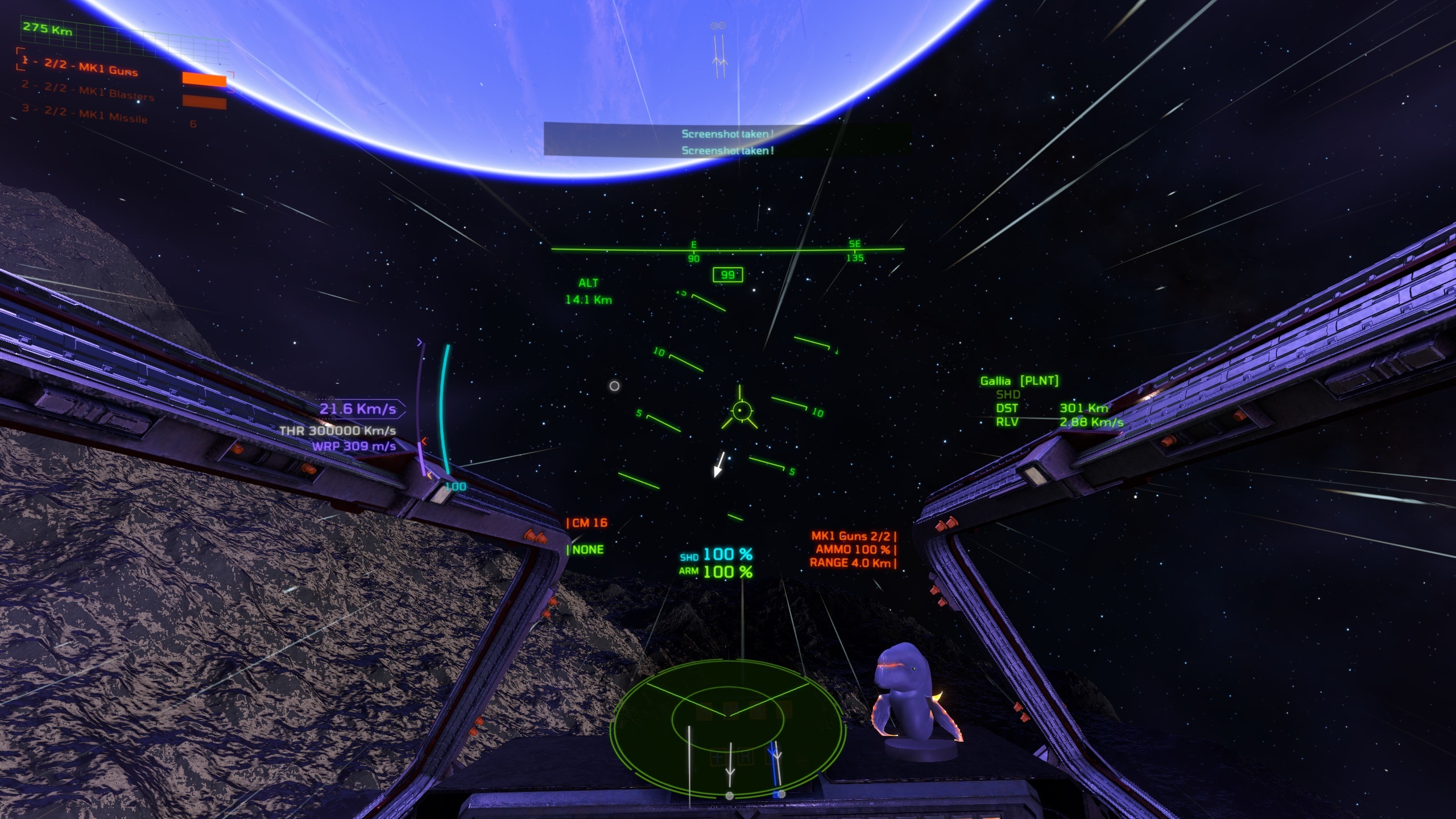
Capital Ships HUD
- Initial implementation for capital ship HUD and tweaks compared to small ships
- Armor / shield points are moved above speed bar and central information has been offset, to avoid covering the ship
- Removed hemispherical radar from capital ship HUD: since capital ships have a free rotating camera, the hemispherical radar wasn't as useful and was covering the ship. With this radar removed, the view is now clear
Planetary HUD
- A planetary HUD now pops up when approaching a planetary surface
- This planetary HUD displays a heading bar (plus the heading angle in degrees, compared to the north pole of the planet) and the pitch angle, compared to the horizon
- Moved altitude meter on the bottom left side of the heading bar
HUD targetting / indicators
- Added an arrow at the HUD center to show the direction / angle of the currently selected target
- Added max target indicators limitation in combat vs navigation modes (+ slider in options menu). This is a major step towards decluttering in large battles
- Removed HUD cycling: the F3 key is now simply toggling on/off the entire HUD. The automatic vs manual HUD modes have been removed
- There is still a concept of combat versus navigation HUD. The simple difference between the two is whether you have a target selected or not. Without a target, you are in navigation mode and the HUD shows more target indicators
- The HUD switches to combat mode when you select a target. It then highlights only the highest priority targets
- Target selection (default key: G) is now taking into account priorities/threats as well as your ship type (ex.: a bomber will prioritize selecting capital ships, while an interceptor will prioritize enemy interceptors and bombers).
Note that the priority/threat formula is experimental and might need future tweaks.
Ring Radar
- Updated ring radar to use the new arrow design. The ring radar shows all the combat mode targets (by default: the 5 highest priority targets)
- Added a slider in options menu to control radius / size of ring radar
Navigation tunnel helper
- Added a navigation tunnel helper towards long-range objective in warp mode
Note that the tunnel display is experimental. In particular, at the moment it is straight. We are still working on generating a tunnel along an orbital curve to avoid planets / massive obstacles
Other HUD Improvements
- Added max weapon range info to HUD
- Increased font size for armor / shield hitpoints display
- Added cursor hovering to highlight targets and display their names (experimental)
Misc
- Strings localization update for German and Russian languages
- More tweaks to HUD color themes