

Instruments of Destruction
Version 0.119 changes
Increased max island blocks + decals to 6000
Increased maximum detail debris settings (Medium is the old High setting)
Added option to change how much large debris is present (Medium is closest to old behavior on most islands)
Added checkbox for Low FPS smoothing (enabled by default aka no change)
Fixed magnets/pistons having reverse controls when placed on opposite sides
Fixed beam placement with PLACE ON HOLD disabled
Lowered volume of attachers (when more than 1)
Lowered volume of laser fire start (when more than 1)
Reduce camera shake from multiple parts creating shakes at the same time
Fixed Mirror mode lasers don't get range set (and delay on bombs/release connectors)
Added advanced option to adjust bomb aerial timer
Added FOV save/load
Locked mouse cursor to the game window
Make power explosions not affect launcher/cannon blast
Make launcher/cannon blast weaker
Fixed disabling shadows removing dust/etc particles
Kinda fixed undo showing controls for beams/ropes
Fixed parts showing as $0 after Undo (and mass/cost totals not being right)
Fixed setting start angle on pivot 90 rotates connector incorrectly
Improved vehicle flipping so it's less crazy (have to push the button more, but it's better overall)
Started changing how island ground data is saved/generated
Version 0.118c changes
* Changed Attacher controls/modes
-- Toggle is the default, works like you'd expect (better version of previous)
-- Normal is available, hold to use the attacher
* Reduced Attacher collision/damage to structures
* Limited range option on lasers (0 = unlimited)
Bug fixes
* Remove unfinished flex beams + ropes if you start doing something else
* Fixed lighting crash (with lots of explosions/etc)
* Removed Laser shadows
* Maybe fxied Undo with beams
* Don't show "controls" for beams/ropes
Vehicle Building Flexibility (and LASERS!)
Last week I mentioned taking a break from editor work to add some new parts or otherwise improve the game side of things. I was just planning on adding a few cool new parts, but the first day of work in that area didn't go as planned. The parts I initially looked into were old ones that I hadn't worked on in a while, and each had some little problems that weren't obvious how to address.
The next day I decided to work on something else instead: Adding the ability to set a starting position for the various pistons, swivels, and pivots in the game. It took a while to work out all the issues, but it become obvious that the possibility space for vehicle and machine designs would be drastically increased.
It was also obvious some new parts would be needed, and the Locked Connector become the Flex Swivel, the Flex Pivot was added, and I began work on the variable length beams (now called Flex Beam and Flex Beam Heavy), something I hadn't planned to add for a while. These new beams allow you to create nearly-arbitrary beams in your vehicles, and they complement the variable angles that are now available from other parts. They reside in the Rope category for now, but they only vaguely work like ropes on the game side of things.
With those two difficult tasks handled, I returned to the parts I'd put to the side, and decided to tackle the previously-named Suction Cup. I ended up going with an extending hook and calling the piece Attacher since that's what it does. You can attach to almost anything, including other parts of your vehicle, the ground, objects like containers, and of course buildings. Attaching to buildings is probably the least useful of those, because you're just as likely to attach to the structure you're aiming for as you are to destroy part of it. The controls for the Attacher are still a work in progress, so expect additional modes and tweaks soon.
That's a good amount of stuff for a big update, but I had to add more thing...
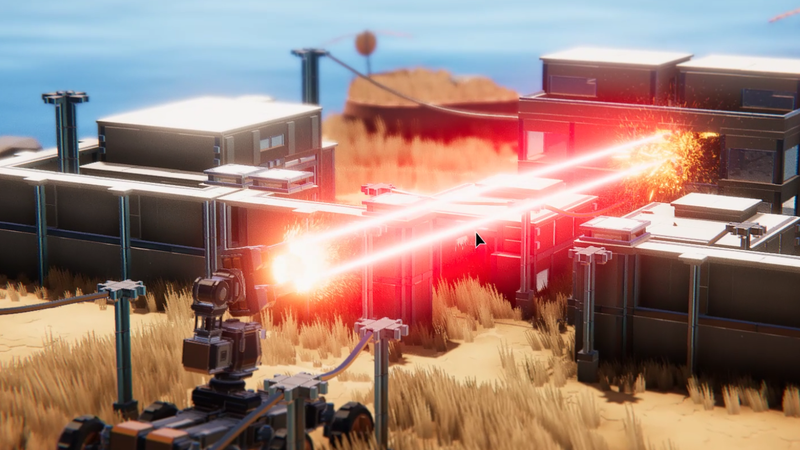
I've never coded a laser weapon before, despite having worked on a lot of action games. I've created a ton of projectile-based weapons, but nothing that instant hits. It wasn't as scary or difficult as I feared it might be, though I did manage to launch the initial version with a bug that would crash the game if you used more than 2 lasers at once. Lasers are not cheap (performance-wise or budget-wise), and they aren't unlocked in the campaign 'til you reach level 20. But they are also pretty unique and very fun to use without requiring high-level vehicle building skills.
So between the Red Laser, Attacher, Flex Beams, and improved functionality/design space for jointed parts, there's a lot more to play with for your vehicle building adventures.
I'll still have one more medium-sized update to do to 0.118 before moving back to island editor work, but I'm anxious to get the editor suite finished so I can focus on expanding the game's content some more. That will mostly consist on new islands, but I expect to add other new features/content to make the Play Mode gameplay more exciting/challenging.
Version 0.118b changelist
* Use raycasts instead of spherecasts for laser (faster, barely changes behavior)
* Fix beam collisions not working
* Fixed part rotation on axis-aligned connectors
* Created default max range for range-of-motion parts
* Fixed rendering of steering wheels with flashing (picking up crystals)
* Saved vehicles now render flex beams
* Saved vehicles now render something for ropes (newly saved vehicles only)
* Added some new tutorial messages:
-- When you first start playing: Here are the controls
-- Map after playing level 1: Challenge mode unlocked
-- Level 2: Can use the same vehicle again
* Localization updates to French and Chinese Simplified
Version 0.118 Changelist (major update)
* Major new part: Red Laser - Overpowered and over-priced
* Major new part: Attacher - Grab anything, including the ground, and hold on
* Major new parts: Flex Beam and Flex Beam Heavy - Connect ANY two connectors with a solid piece (in the Rope Category for now)
* Major new parts: Flex Pivot and Flex Swivel - Adjust the range of motion and starting angles (see next item)
* Major new Advanced Mode feature: Starting position/angle added to most multi-piece parts
* New advanced mode feature: Adjustable range of motion on some multi-piece parts
* Added Recent Parts category: Click on any part to add it to the recent list, remembers up to 16 parts at a time
* Improved player water physics: You can now make hacky boats behave better
* Made it more obvious when you destroy an objective structure
* Reduced issues with too many blocks (very apparent with Sandbox Resort and very destructive vehicles)
* Reduced number of decals that break off when collapses start
* Changed how most destruction sounds were calculated (was a bug in multiple places) - sounds will be louder in general, will continue to tweak over time
* Clear explosions on level start (prevents some exploits/bugs)
SOON-TO-BE FIXED ISSUES:
* Rendering of steering wheels' highlight when collecting crystals is wrong
* Rendering of saved vehicles doesn't show flex beams (or ropes)
Editor Work Continues and WORMS
The previous rope/joint editing made everything about rope editing tedious. It let you edit the data directly (and that works fine for grass and rock generation), but many times you want to abstract that data away and just pick two connections that should have a rope between them. That's what the new editor does, and it's now as easy as dragging from one node to another to create a joint or rope. There's still more to do, particularly in adding more joint types and letting you edit some of the parameters of those joints (such as motor speed, mass of the joints, etc), but it's far better than what existed before.
Getting to this point in the editor has been challenging. There is a lot of data in different places within structures and layouts, and lots of ways to generate/propagate it around. The editor code is a bit of a mess because there are so many things that have to be tracked and updated at different times. That has meant a lot of bugs or broken things. I've fixed a lot of the bugs, though I'm sure there are even more still lurking in the editors.
Not surprisingly, I've been getting burnt out by working on editors for the past few weeks, so I'm going to spend the next update (0.118) working on some new parts and other tweaks that I've been putting off. My brain just needs a little break from so much UI and data management/manipulation work. It's been a while since I added new parts, so I'm sure it'll be nice for everyone to have more stuff to use for vehicles.
WORMS Featured Vehicles
Speaking of vehicles, I recorded myself trying all the new WORMS Featured Vehicle entries, and compiled the honorable mentions and selections into a video. There were a lot of entries this time, and I really appreciate everyone who took the time to enter:
Doing the video took about 3 hours altogether, and I avoided doing voice on purpose because that would have added at least 2 more hours. I'm not sure I'll do videos for future Featured Vehicle Themes, but I thought it was worth trying it once to see the process and results.
I selected 12 vehicles to add to the Featured Vehicles section. I'll be sticking with multiples of 4 wherever possible just because it fits the UI better. In any case, having a longer timeframe seems to work better, so I'll do the same for the next theme as well.
New Featured Theme: SKIDS!
The next theme will be using skids as a main feature of your vehicle. I'm not going to set any limits/budgets on this one, as I don't think it matters as much for Sandbox-style vehicles. I still prefer small/efficient vehicles personally, but I don't think specific requirements are needed. In any case:
Create a vehicle featuring skids. Doesn't have to *not* have wheels, but I will be testing the vehicles on large islands (Aries and Test Island). The deadline will be May 15th.
Version 0.117 Changelist
* Updated a lot of the Variant islands
* Added rope/joint editing for layout editor (Tab -> Rope Mode)
* Added height-based grass/rock filter adjustment
* Made all joint parts (except pistons/etc) have collision between the two halves
* Fixed undo resetting part colors to the first slot
* Added back/cancel button for saving a vehicle
* Changed how sliders/buttons worked a bit (sliders hold onto the mouse, buttons don't)
* Fixed a lot of editor-related bugs (still many more to fix)
(Played all the worm vehicles for the Featured Vehicle section, will have a new video tomorrow)
Version 0.116 Changelist
-- Edit 20+ parameters that determine the grass/rock distribution
-- Some data is not yet available to edit (cutoff modifiers by height)
-- Recommended: Copy/paste data from built-in islands, and customize data after getting both rock and grass copied
* Added music for the editor
* Added more editor sound effects (and adjusted some others)
* Fixed various editor bugs, particularly with copying/pasting too many blocks, or generating too many links.
Structure and Layout Editor enter Beta Phase
These editors are almost entirely brand-new code, as I was only able re-use about 5% of the code from the previous in-Unity editors. Aside from missing some specific data-editing abilities and ground editing stuff (see below), these editors already surpass the previous versions in usability and iteration speed, and I'll be using them for all future content creation.
In terms of stability, I hope they are ok, but there was a good amount of fixes going in for the last few days. Because of the number of file types and places those files can come from, and the ways you can jump from layout editor right into Sandbox mode, there were lots of cases to test/fix. The pain was worth it though, as going straight into the game and back again will make it so much easier to create more detailed and well-designed islands.
Structure mode also has its own testing mode, though it doesn't let you use a vehicle. Instead you can just click on the structure to create explosions just like Distract Mode. I thought that part would be tricky to get in, but it was a breeze compared to Sandbox<->Layout Editor transitions.
The editor is primarily designed for my preferences, so expect lots of text buttons that are always accessible. There's a bit of a learning curve, and I'll be creating a couple intro tutorial videos over the next day. I've tried to maintain some consistency with the build mode shortcuts, but the left mouse button in particular has a lot more functionality than build mode does. Some of that additional functionality will come to build mode, but that's down the road a ways.
Future Editors
After the tutorial videos, I'll be adding more functionality to the current editors, with rope/joint editing and grass/rock generation coming soon (probably this week). Objective editing for non-Sandbox modes will also be coming, though I'm hoping that won't take more than half a day of work.
After those are in, I'll change how ground data is stored and add that editor. The ground editor will be pretty integrated into the layout editor, and you'll be able to switch between layout and ground editing with a button press. That's the last part of creating a fully custom island, and the last editor for a while.
In the far future, other editors may be added to allow additional modifications to the game, but none of the other aspects of the game are as data-driven as the structures/islands/vehicles. Entities and Parts are custom-coded, and editors for those are not planned for 2022. Combining multiple islands into a campaign is also not planned until 2023 at the earliest.
Region settings (lighting/textures) and structure material editing is also not planned. But I will be thinking about how to let you modify the colors of structure materials sooner than later.
Steam Workshop Support
The final phase of adding the editors will be Steam Workshop support. I don't think it'll be hard, but there's a chance the file format will change and I don't want to deal with Steam Workshop until all the editing is sorted. Most likely Workshop support for the current wave of editors will be in by the end of April, but it might be early May.
For those who checked out version 0.114 in the debug branch, here's the changelist from 0.114 to 0.115:
Added update links button
Fixed decal/partial buttons being switched
Fixed material cycling with nothing selected
Add Delete as alternate to X
Add Ctrl+Z as alternate undo (and Ctrl+Shift+Z redo)
Update handle immediately when changing size
Added two new buttons for selecting potential issues
* Non-standard block
* Intersecting blocks
Added outline
Fixed a case (possibly the only one) of default vehicles being wiped when switching islands
Fixed a few other things I can't remember now...
Featured Vehicles: April Fools Edition
There were two main categories of entries: Tiny launchers, and tiny cars. I ended up choosing 2 of each, with one of the launchers being my own, because it was the most efficient design by a decent amount. By "most efficient" I literally mean it achieves the best efficiency (under 5 if you use it right), and it's also the easiest to use. I was hoping someone else would figure out that exact design, but it appears the theme was of little interest, or there wasn't enough time, or both. So it's unlikely I'll do Play-mode focused themes again in the near future.
NEXT THEME: WORMS - April 15th
In the spirit of that, the next Featured Vehicle theme is Worms. By Worms I mean long vehicles with segmented bodies, not the videogame. How the vehicles look and move is the most important judging criteria for this theme, but functionality and controls are also a factor. There's a budget of $200,000, just to keep them reasonably-sized and encourage creativity over excessive part counts.
I'm going with 2 weeks for the deadline this time, and may go longer in future themes (monthly). You can repurpose existing vehicles for this challenge, but once again please use the Featured tag so I can find them easily.
EDITOR PROGRESS REPORT
This week I've finally had time to focus on the Structure Editor, and it's going well overall. The hardest parts were the very beginning (staring with a blank file is daunting), and all the 3D math required for using the mouse to move stuff. The UI system is a bit different from the rest of the game, so that took a bit to get rolling as well.
The basics are working though, so it's now a lot easier to add features and tweak things to work better. There was a decent amount of lower-level code from the previous editor that ended up not being usable, but I'm now to the point where specific structure editing functions can be adapted quickly. I hope to have a version of the editor out next week, though I still have to tackle saving/loading custom ones (currently it just loads built-in structures).
After the structure editor is functional, the layout editor is the second editor I'll get in. It might go quite fast since much of the code can be shared, but it may also get too messy to share as much as I want and require re-organizing a bit. Steam Workshop support for structure/layout/island editors will likely come after all the editors are in, as there are some issues I need to work out...
The biggest unknown in my mind is how to deal with layouts that require structure files that you don't have. I think you'll have to upload any non-built-in structures to the workshop before you can upload a layout with custom structures. That way the layout will have a reference to the structures that others can easily download. It sounds fine now that I'm writing it out, but there are things I could be missing.
Islands (ground) will likely work similar to structures, where you won't be able to upload a layout that has custom ground without uploading the island first. It's also possible I'll change layouts so they include the island data too, and make it easier to copy/paste that data between layouts. In that case the island editing would just be a separate mode within the layout editor. Definitely something that needs a bit more thought, but having fewer files does sound appealing.
As you can tell, I'm kind of figuring out some of the details as I go along. Until next time...
[Version 0.113c was uploaded this morning. It fixes an issue with the Featured Vehicle text not updating because of file caching.]