

Instruments of Destruction
Build 0.104 (March 2nd)
* Added "Full Resolution List" option if you want to use the monitor's resolution list instead of the custom-built one
* Added options to disable gamepad in menus or controls
* Made gamepad right stick work with camera if it's not used by gamepad controls
* Changed default gamepad control layout (still not happy with it, suggestions welcome, send screenshots to luke@radiangames.com)
* Rearranged options menu a bit
* Fixed the Discord button link
* Added 2nd reminder about arrow keys moving things (plus using Shift)
Instruments of Destruction is NOW AVAILABLE!
The current version is 0.103c, but I expect that to change multiple times throughout the rest of the week. I'll be on the lookout for any bugs/problems/issues/etc, so please use the forums to post feedback/bugs/etc. I've been active on them and will continue to be for a long time. There are a few pinned posts to help get you started, and I'll add new ones as needed.
The first large update will be focused on vehicle sharing, but I hope to add more test islands before that update, and may add more showcase vehicles as well in the coming days. New parts are less likely though, as there's plenty to use already. I will be keeping a list, however, so send all your part ideas through the forums or email.
This is the biggest game I've ever launched solo, so it's a nerve-wracking day, but I'm going to try to enjoy it as much as I can. I'll see you on the forums! Happy vehicle building and structure demolishing!
Showcase Vehicle Extravaganza!
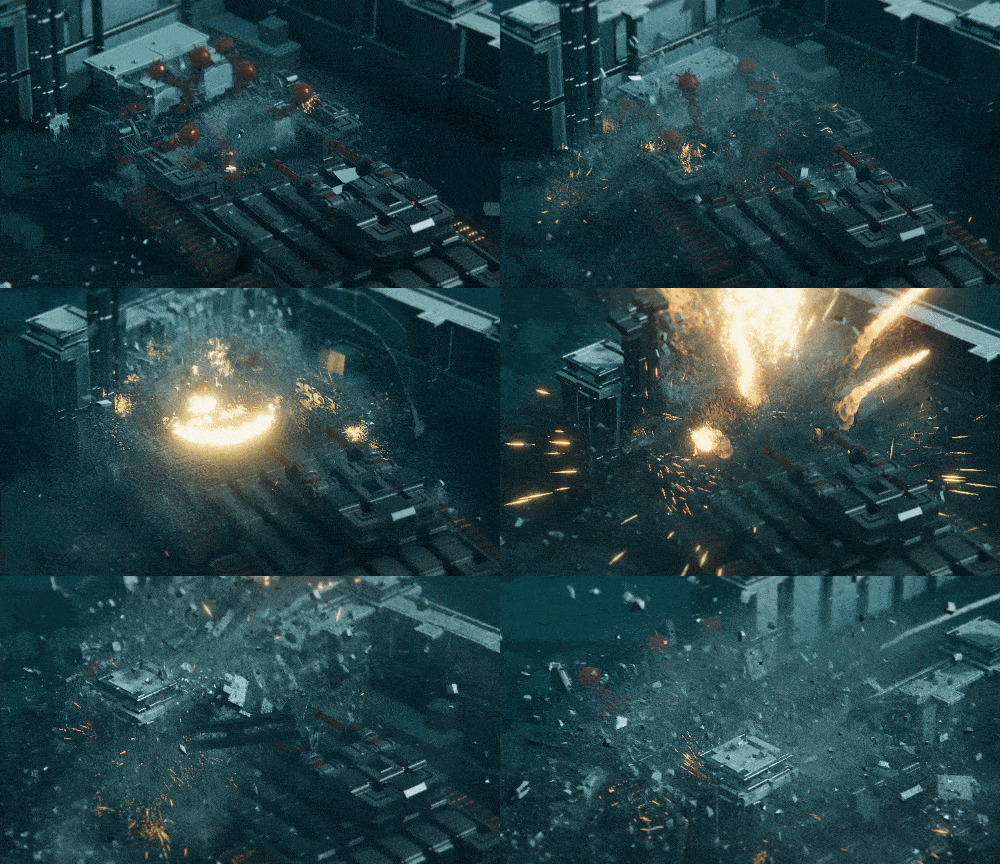
In a game with a fun-to-use vehicle build system, why include so many pre-designed vehicles?
The first reason is that it allows people who have no desire to design vehicles to enjoy the game. You can beat the whole campaign without doing any vehicle building at all. I've been trying to embrace more freedom than I originally planned for the game, and letting you play (or design) the way you want is part of that shift.
The second main reason is that it's not always obvious what certain parts are meant to do, or how to setup certain types of mechanisms. So the vehicles provide a way to show off the various parts and how they can be used. The Challenge vehicles in particular follow this philosophy, as each one must be used at least once, so each one shows off a new part for the first time.
The vehicles also make for a good unlockable item, and having so many included vehicles at launch helps compensate for easy vehicle sharing not being available yet. You can send a vehicle to others if you know where to look for the file, but making it easy to browse custom vehicles online is the first big feature planned after launch.
(Not) Playing It Safe
The game is shipping next week, and this is normally a time when new features and content slow down, but I'm not exactly following that philosophy. It's relatively easy to create and upload new builds of the game, so I'm not going to stress about potentially breaking it for a short while. I'd rather continue adding improvements and new parts and polishing everything I can before launch. The day before launch, I'll slow things down in order to do more testing than usual, but otherwise it's full-steam ahead.
So in the last couple days since finishing the main campaign and doing a full playthrough, I've made some major improvements to how some parts work (such as ropes, swivels, and pistons), then added a bunch of new parts as well. These are mostly variations on previous parts, but each new part adds more potential vehicle designs as well. In fact, I may have to revisit some of the Showcase Vehicles so they can use the new parts/features more effectively.
There will be some at least one completely new part coming by launch as well. That part is the Overdrive, an expensive part which lets you double the speed/strength of attached parts that have variable strength. Much of the raw functionality is in, but it also needs effects work (and some UI work) to make it more noticeable/obvious that it's doing something and how it works. Adding effects and making it more obvious what something is doing is actually one of the more time-consuming aspects of many all-new parts. I hope to also add one more weapon-like part before launch, but the main thing is figuring out which kind of weapon won't require too much particle/sound work. It'll likely be an automatic-firing weapon of some sort (like a helicoper-style missile pod), but I won't know for sure until I try to put it in.
Launch is only a week away and the game is pretty much ready to ship, but it feels like there's still much to potentially do.
Destruction Tech Overview
The primary thing that makes the destruction in Instruments look good is having LOTS of things going on and interacting. The physics/destruction aspect of the game has changed a little bit since last showing the demo in October, but it's pretty much the same game everyone saw back in April of last year. Here's a decent trailer to see the destruction in action from that version of it if you want to see (you can just watch the first 10 seconds or so): https://www.youtube.com/watch?v=3QUNIqaTJfI First let's start with what IS in that trailer, then I'll go over what has been added since then to make it better:
THE CORE DESTRUCTION SYSTEM
At the core, every structure in the game is made out of a bunch of boxes. This is pretty obvious, but I just wanted to state that it's not voxels. The box sizes are pretty limited in the values they use for thickness/size/etc, but that's just for visual (and physics) consistency. In game code, these are called blocks, so I'll keep referring to them as blocks here.
Structures are made up of anywhere from 10 to 500 blocks. Currently, there is a maximum of 2,500 blocks at any time. No island has more than 2,300 to start, because you generate more of them from destruction before the number starts to drop over time.
Each block tracks its own hitpoints, which is based on the material (5 materials) and size. The structure also has a list of "links", which means which blocks touch each other and the ground. When a block takes enough damage, it detaches from the structure.
Once a block detaches, it gets some of its HP back, and can then break into smaller blocks (like Asteroids) based on its size. If it's small enough and loses all it's HP, it breaks into debris pieces that have physics but no HP, and that go away after a certain amount of time, or when we max out on debris.
Note that debris collides with the player/structures/ground, but *not* blocks (or other debris).
There's an option to enable these debris collisions, but it slows down the game quite a bit with lots of destruction going on.
There are also particles that spawn when a block detaches/breaks/etc. Particles are one thing that changed significantly, so I'll come back to them, since all the old particles from before are gone.
Getting back to the structures: After a block or blocks detach, structures will check if they should split into more structures. After a short while, it'll also check if any of the "layers" of blocks is looking especially weak (low HP vs. mass supported). If so, it applies damage to that layer, and a bit of random damage to the layers below/above it, and does the same check again in a moment. 95% of the time this eventually leads to a collapse if it appears weak, but once in a while enough other stuff breaks off to lighten the load and it stabilizes.
There are some more minor details about how collisions are handled/etc, but that's the core system right there, and it hasn't changed since October.
IMPROVEMENTS SINCE OCTOBER
So now we come to everything that's been layered on top in the last 4 months. It's a lot, so I'm just going to make a list, and I will say: Getting this stuff below to all run relatively fast is not easy. Using compute shaders is difficult, because it's easy to break them and hard to tell what is broken. Let's start with one of the most important items:
1) A critical optimization for everything in this list: I use Graphics.DrawXXX calls (with compute buffers) instead of letting Unity draw things with MeshRenderers. GPUs like it when you send them a large chunk of data and tell them to render it all at once, so I do that with everything that I can (that means creating compute buffers with the right data in them). Some parts of the game still render normally (ground, vehicle, trees/tires/etc), but the majority of things are custom-rendered now.
2) Blocks/structures, debris, block-decals, and rebar all render using Graphics.DrawMeshInstancedIndirect. It is much faster rendering using this instead of letting Unity sort out thousands of meshes/objects. And all of these are GameObjects in Unity with physics, so GameObjects aren't the problem. This way is faster because I know exactly what should be instanced/drawn with the same shader, whereas Unity had to sort through thousands of MeshRenderers' materials and figure out how to group them.
3) Blocks and structures are the same thing in drawing, and draw with the same shader whether they're damaged or not. I went through TEN different methods for drawing blocks before I was happy with the results. Mostly the other results ran too slow, or didn't look good enough. There are two meshes of each material type (normal and damaged), and it switches betwen that mesh data per side (based on if was linked to something) while adding some noise for variation.
4) The debris all renders in one pass regardless of material. It's basically a bunch of boxes with some noise. Only blocks render with separate draw calls per material. Once you get smaller it's just some different color/specular/size parameters to make them look different. So glass debris is not transparent at all, it's just pretty shiny and gray.
5) NEW: The block-decals are a totally new system since October. They are basically mini-blocks that you build as part of the structure. They render essentially the same way as debris, but with no noise until they're damaged. They have no collision while on a structure, and use the same collision as debris when they break off. Basically, any thin/tiny block on a structure is superficial until it breaks off, then it's just fancy debris.
6) NEW: Rebar is used for concrete and steel, but the system is general and was used for other materials at one point. It uses the same type of unified-material as block-decals and debris. Rebar has no collision, and only shows up on damaged sides.
7) Ropes didn't change much visually, aside from getting Reflection Probes support, but under the hood the mesh generation is all compute-shader-driven now. Previously they were generated as Unity meshes. GPU code is just way faster, so ropes are much faster. [They were consistently one of the slowest things previously.]
8) Water isn't really any faster than before, but it's now all custom and compute-shader driven and draws to the horizon (or 2-3km, really). The mesh is also interactive now, with the ability to create splashes that ripple away. The only LOD-system is just making the triangles bigger and bigger as you get further from the origin. I may revisit the water sometime, and it's definitely an area where getting away from flat-shaded polygons may be a good idea. That could improve rendering speed, and I may use textures (which I hardly ever use in the game) to create better detail.
9) NEW: The GPU-driven grass system is one of the slowest new systems in the game, particularly on large islands, but it's also one of the most impactful in terms of visuals and game feel. It doesn't affect destruction, but it is affected by it. Grass is rendered in clumps of 3-5 blades, and each clump processes individually in a compute shader. Thanks to a custom z-buffer, the grass can be temporarily flattened by most objects in the game. There are also large impacts from the player, structures, and explosions that send a shockwave across the grass. You can also damage/darken the grass, though that also fades over time (like flattening).
10) NEW: Ground-rocks process entirely on the GPU, and render as simple distorted meshes. They get affected by impacts a little differently and don't use the z-buffer trick that grass does, but they are essentially just a simpler kind of grass.
11) The particle systems in the game are now entirely custom, and process on the GPU. They collide with the world through a custom z-buffer, and they are affected by explosions/etc through an attractor/repulsor function. There are two "point" particle types, dots and streaks. Aside from the rendering shader, they use the same code, but that will eventually change for optimization reasons. They currently use geometry shaders (turns a point into a small mesh), but that may change as well in the future. The dots were rendered as literal pixels for a while, and I liked that look, but it made for a lot of resolution- and world-scaling issues.
Both types are also affected by shadows thanks to some shadowmap code I found in another asset (see below) that I ended up not using. I actually wrote a custom shadow system that used raycasts around the player to shadow them at one point. It was slow and crude but pretty effective. The shadowmap version is just better in everyway, and the shadows help give them volume that wasn't present before. There are around 2 million total of these particles on High, but I'd like to push that higher in the future, and do more to prevent them from visibly popping out of existence in crazy destruction scenarios.
12) There are 5 types of particle meshes, with each one having the same compute shader (for now) but different rendering shader. The debris meshes are probably the most important, as they add a lot of thickness/depth to the destruction. Their z-buffer-powered collision isn't great, but having them bounce off stuff really helps sell the physicality of the world.
That covers the stuff that uses compute shaders or buffers in some way. But that's not all that changed. Here's a few more that helped the game look/feel better:
13) I switched to PBR shaders for almost everything. The biggest impact really came from using a reflection probe to make shiny things feel a lot better and less shiny things feel more grounded. I switched to using a single reflection probe for the entire world for speed reasons (after writing a system to generate a bunch of probes over the islands). Someday I should think about having a reflection probe centered on the player that updates in realtime to make the shiny stuff like wrecking balls look even better.
14) I turned on fog for everything. That helped give the world more depth. Had to update a lot of shaders, but that was relatively easy. Blending the sky/water/fog was a bit trickier but nothing crazy.
15) I wrote multiple depth of field/tilt-shift blur variants. I wanted a bit more control over how it worked with the game, so I spent a decent amount of time enabling, tuning, and optimizing depth of field. It's not even close to being film-quality, and it doesn't really interact with particles well, but it adds some nice realism without being overly expensive.
16) Each region (general island settings for how it looks) now updates a lot more stuff than previously, including the color grading.
17) More interactivity between systems/objects. This mostly means making things generate particles in more situations, or creating attractors/repulsors for particles. I wish I could say I made a general system for impacts/etc, but I didn't. It's all custom per object type, so vehicle parts, structures/blocks, and tires/containers all use separate code paths to generate impact effects/sounds/etc.
17a) More stuff creates camera shakes now, and I tweaked the shake system a decent amount (it was already pretty good before).
18) A more distinct/important example of #17: Debris pieces can create particle trails when they go flying. This is a combination of two systems that required a bit of specific code to work, and it was very important to the feel of destruction.
19) Blocks can now partially break off from collisions. One sub-block--the one furthest from the impact--will stay attached to the structure, while the other 3 blocks go flying. Previously this was not possible, and it helps running into structures feel better.
20) Large structures collapse better, particularly when hitting the ground. If a large structure impacts the ground, it'll now do damage to itself for all blocks that are near the same height as the point of impact.
21) There's a new delayed push after heavy impacts or explosions. Helps sends things flying better (this is very recent, so most footage doesn't show it).
I think that covers most of what changed since October (that affects destruction). I'm probably missing some other things, but the important parts:
* It was a LOT of changes/stuff that added up.
* I wasn't afraid to just throw things out or redo things if they weren't good enough.
STILL NOT DONE
Biggest visual thing that didn't make it in was volumetric effects. I don't use many assets, but I found a great asset while looking into volumetric fog (Volumetric Fog & Mist 2). In the end it didn't interact well with the depth of field or transparent particles, and I might have wanted to create a volumetric smoke/dust system (based on a grid, like most high-end smoke effects) if I switched to using it.
The shadowed fog looked amazing though. I quickly realized it was using the exact method I had wanted to use with my particles (but couldn't figure out the math/functions), so I just adapted that for my purposes and the particles were even better than before. I'm not planning on adding volumetric effects to the game, but there's still more to be improved...
One part of destruction that still really bothers me: Debris pieces from destroyed blocks will often go flying up faster than they should (this predates #21). I've tweaked it a bit, but it's still fairly common for a block to hit the ground and see debris go flying up far faster than you'd expect. Will hopefully be able to tame this soon.
Optimization of the particle systems is something I want to do sooner than later. More particles would mean the effects could scale down less in crazy situations, and pop away far less frequently. I might be able to make it render faster when there are fewer particles.
THE PHYSICS SYSTEM
You'll notice I've barely mentioned the underlying physics system during this. I don't mean to downplay it, but most physics systems are pretty similar in speed/functionality, and don't really affect destruction much. I've been using Unity 2019, PhysX, and the built-in renderer. No cutting-edge stuff like ECS or Jobs or URP/HDRP. The game runs physics at 120hz by default, but you can lower it to 60hz if you need to. Some elements aren't quite as stable/solid-feeling at 60hz but it still works.
As far as what was hard about the physics from a code/design side, most of it has had to do with the vehicle building (getting everything to combine correctly), ropes, and treads. None of that is destruction. I've done some tweaking of global settings to optimize stuff, and I'm always tweaking numbers to make things feel better. Destruction and physics work pretty well together by default, and especially so if you're willing to supplement it with extra tweaks to make it feel better.
For reference, Red Faction Guerrilla (which I worked on for 5 years) used Havok and Teardown is all custom (I had nothing to do with it, but everyone knows it now). The underlying physics system just isn't that important to destruction. It's just a bunch of math functions that should work in a certain way. It's what you put on top of it that matters.
LOTS OF LAYERS
I don't really care about new tech or doing things in a fancy way (I especially hate fancy code). I use what works, and GPUs work really well. I figured out how to use them better than I had before, which let me do more stuff, and I just kept doing more stuff.
Nothing about the destruction system is particularly fancy. It just has a lot of layers that run faster than usual and have been tweaked to work well together.
[If you have any questions, please post publicly I'll answer them below.]
Early Access Release Date: March 2nd, 2022
All the old media is gone from the front page except the thumbnail for the game. The game looks quite a bit different now, as it uses GPU-accelerated interactive grass/rocks as well as PBR shaders for most of the solid objects, structure rendering is far faster, and the particle system rebuilt from scratch. The dust/etc particles get shadows cast on them now, leading to some epic-looking dust clouds as the sun shines through the remains of a half-destroyed structure. Grass and rocks react to your vehicle in very satisfying ways, and structures are more detailed than before. Combine it all and the game now looks a lot nicer.
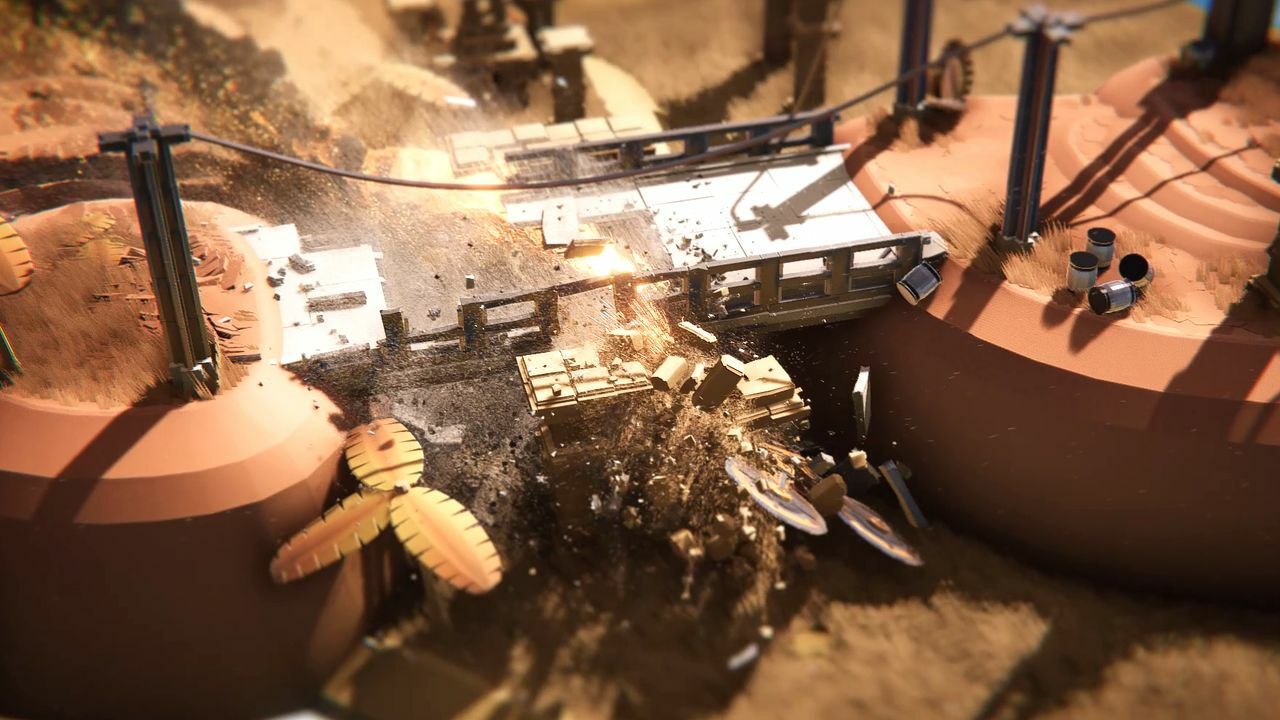
Be sure to check out the trailer with sound on, as there's a new theme song that helps "explain" the game (even though it doesn't need much explanation).
I'll cover more specific game features and what's going into the game ahead of the Early Access launch in next week's update. I expect to make weekly posts from here on out, though I haven't decided if it'll be a consistent day or not. That's all for now.
Polish And Signed Distance Fields
One task that I was unsure about was trying signed distance field rendering for the UI. You probably don't know what that means (there's also a 3D version of them for totally different uses), but it's basically a way to render solid shapes using gradient-ized versions of an image. Here's a part of the original UI texture for the game, and the SDF version below it:
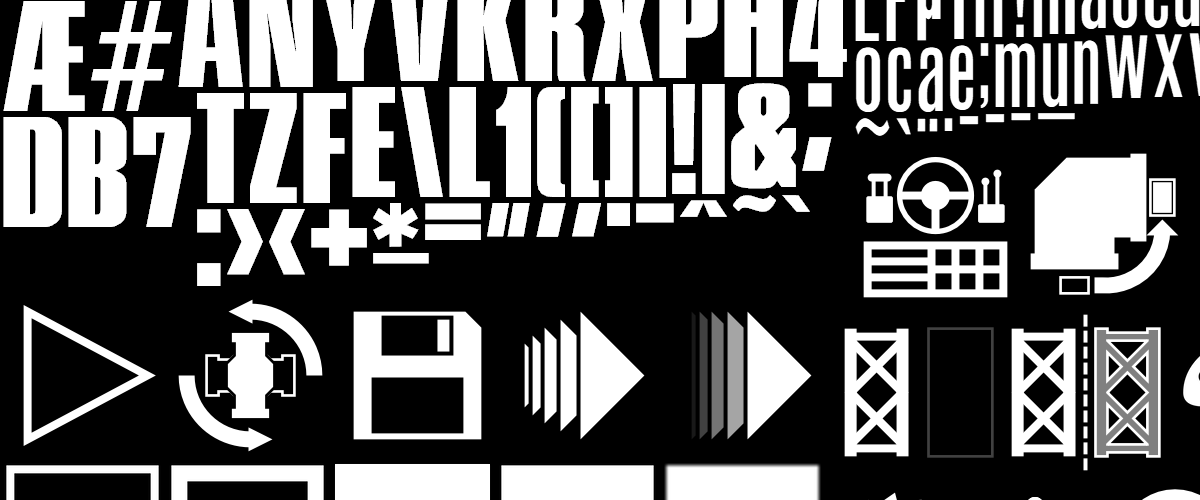

Looking at that and the shader code, which is quite simple overall, it's not clear why it makes it possible to render the UI elements at much higher resolution than the original image, but it does. Here's a cropped shot of some new objective list UI in the game at 1440p:

That text is higher resolution the original text from the UI texture, but it still renders quite clearly, and I can adjust some numbers so it's even sharper. That doesn't seem intuitively possible, yet it works.
Signed distance fields have been around since Half-Life 2, but they're not as commonly used (or discussed) in games as they should be. I've never used them before even though I've worked on plenty of games that would have benefitted from them. I thought it must be tricky to make them work, but it was quite simple. I didn't even need to change how I generate the UI texture. I just take the output of that and run it through a tool in Unity.
In the end, the code was straight-forward to add, and I only had to change one UI element due to the switch to SDFs (it had some color in the texture, but basic SDFs don't). The UI now scales to different resolutions a lot more cleanly, and I can use as much big text as I want. Not a bad deal for a few hours of work and tweaking.
Other than a new island and UI polish, I've also been updating the camera quite a bit, adding a new Distract Mode for the menus (that could be a whole subject for another time, trust me it's very distracting), and adding objectives to every island/mode combination. With the 9 islands each having 3 modes of play, it feels like there's a lot to do in the game. And that's not counting Sandbox Mode. I also added the part cost system and some new objective types in the past couple weeks.
Speaking of objectives, the build requirements (objectives you have to meet to start playing) are generally simpler than the demo. Instead of forcing you to use a certain part/category, unlocked parts are featured in the Challenge Mode vehicle immediately after they are unlocked. Challenge Mode also got a change so that once you complete it, you unlock the ability to build whatever vehicle you want for that Challenge Mode.
Up next, aside from some more UI polish and camera transition smoothing, is getting a simple scoring system in. It'll combine your budget and time to give you a score every time you finish an island (except Sandbox mode). Of course it'll save your best score (and time/budget) for each island/mode combo, so you can keep trying to improve on those if you like. I'll also try setting some goal scores for each combo, but I'm not sure if that kind of thing fits the game or not. Either way it won't take too long, and it's one area where Early Access feedback will help guide how far to take that system.
The Countdown Begins!
I've captured a decent amount of footage for the upcoming trailer, and the trailer is being worked on, but I'm not doing the editing for the first time in a very long time. That means I have less control over the final product, but it's not like I've ever cranked out trailers at a fast pace or with especially high-quality. I'll likely need to capture more footage, and there will be some back-and-forth, but it feels good to not have to spend 2+ weeks of my time solely on a trailer.
More recently, I've been working on the various graphics/detail options, and adding things like a "launcher" that pops up when you first play the game:
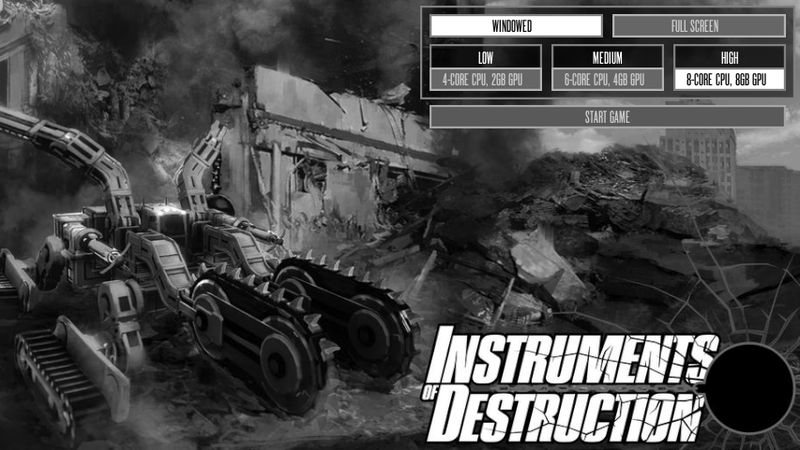
This is just to get things running the first time you start, and you can go in and tweak dozens of settings in-game. You are also free to ignore the recommendations and choose another detail preset.
Even at the Low settings, the game still looks pretty decent, while I capture trailer footage on High. With the change to mostly PBR materials, the game now essentially requires a dedicated graphics card. It will still run on an integrated card, but not well enough to be fun. While the performance on integrated cards is worse, the performance on PCs with dedicated cards is far better, and it's easily tweakable thanks to a large variety of things to tweak/disable/etc.
I've played the game on 4 PCs so far, with a wide range of graphics cards (integrated, GTX 940M, GTX 970, and GTX 2070 Super). The 940 is a pretty bad GPU, to be honest (far worse than a 770), and it does ok with the lowest settings and resolutions of 720p or below. I wouldn't recommend it though, and a 970-like GPU is probably the minimum you'd want for a 1080p 60FPS experience (at low-ish settings). My 2070 Super mostly runs 1440p above 60FPS with High settings. Hitting 120FPS at 1440p will likely require something a bit beefier, and maybe turning down a few settings.
CPU-wise, the game is a little more taxing now because the destruction is a little more detailed, but that's scalable with the physics settings. There's even an extreme setting (that I don't use) if you want all the little debris pieces to collide with each other. Normally they only collide with the ground, player, entities, and structures, which is generally good enough.
Anyway, with these technical issues all sorted, I'll be focusing on gameplay and progression for a couple weeks. I have a good idea of the normal objectives for each of the 8 islands, but need to actually put them in and figure out if I want to add a cost-per-part system. Restricting the vehicles by part counts and weight limits is simple, but not particularly effective at encouraging creativity in the solutions (nor leaderboards/etc, which I want to add eventually).
So anyway, I'll continue posting updates at least every other week, but it's likely the frequency will increase once the release date trailer arrives (in a few weeks hopefully).
Development Update: Early January 2022 Edition
I'll cover the numerous visual upgrades in more detail in a future update, but I'm finally done making changes to the visuals in the gameplay portion of the game. A few build-mode elements still need updating, and the UI may receive some tweaks, but none of the changes will be difficult.
In fact, I'd say nothing that remains to be done is nearly as difficult as the work from the past 3 months. There's still a decent amount of work to be done, and there's some work I'm considering doing before the first EA release that would save time long-term, but delay the game short-term.
Release Date Uncertainty
That uncertain-timeframe work is creating the in-game structure and island editors. There are a couple reasons why I might delay the game to get them in sooner rather than later:
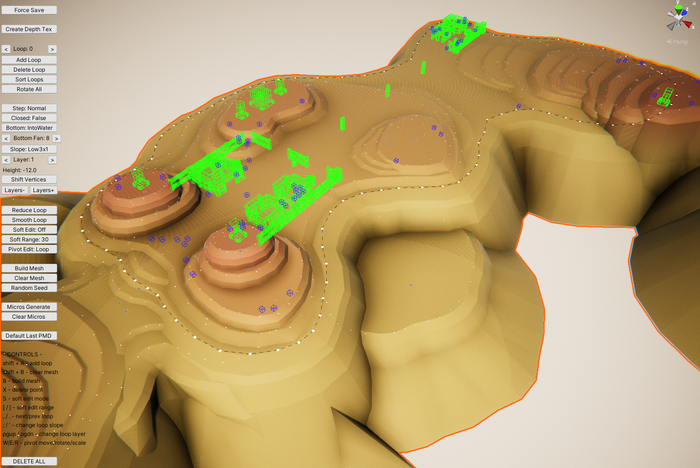
- I can stop using the current scene view editors (aka built on top of Unity's editor framework) and use the in-game editors to finish/polish the current islands and create the final 2 islands for the EA release. The current scene view editors are ok, but the interface for them is pretty hacky, and each one has multiple usability issues that would be solved (or much easier to solve) with an in-game editor. Eventually I'm going to do the work anyway, and it'd save a bit of time long-term because I'll be able to edit islands and structures faster, and I wouldn't have to worry about converting to a slightly different level format after release (which could be a pain). Below you can see what one of those editors look like currently in Unity.
- Devastator, an intense arcade twin-stick shooter I worked on early last year, is nearing release, and it's current planned release window (early February) is very close to when I wanted to release Instruments of Destruction in Early Access. Devastator is being published by 2Awesome Studios on Steam and consoles, and it takes a lot more work/planning to do a multi-platform release than a Steam-only one. I previously had two big titles release on the same day (Speed Demons on Apple Arcade and Inferno 2 on XB1/PS4/Switch), and though it was a cool thing in a way, I don't think it's a benefit to either game to launch close together.
There are some other minor reasons to delay Instruments, and doing so will have very little effect on its long-term success. A delay could even be a benefit due to the feedback-heavy factors involved in game sales and awareness. More wishlists at launch could lead to moderately more sales, while more polish and features could contribute to better reviews, which also leads to moderately more sales, and more sales lead to better featuring on Steam, leading to more sales. That's all theoretical though, and there's no guarantee some other unknown doesn't hurt the launch sales (and a major update helps sales). And really, launch sales don't matter that much with an Early Access game that will be constantly updated and improved for at least a year.
Either way, Devastator's launch window will likely be the deciding factor on when Instruments will launch in Early Access. If Instruments will launch in February, the in-game editors will be the first major update. If Devastator launches in February or Instruments' launch gets pushed back for other reasons, Instruments will very likely launch in April with in-game editors already in.
I'll continue to post development updates every 2 weeks until the game launches in Early Access.