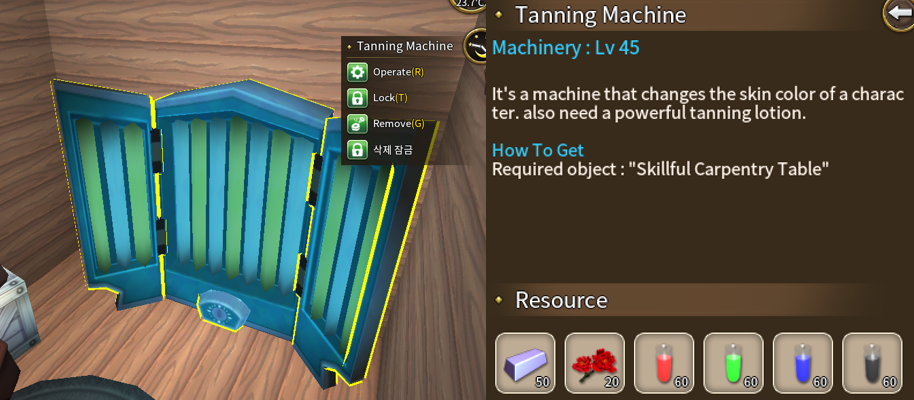
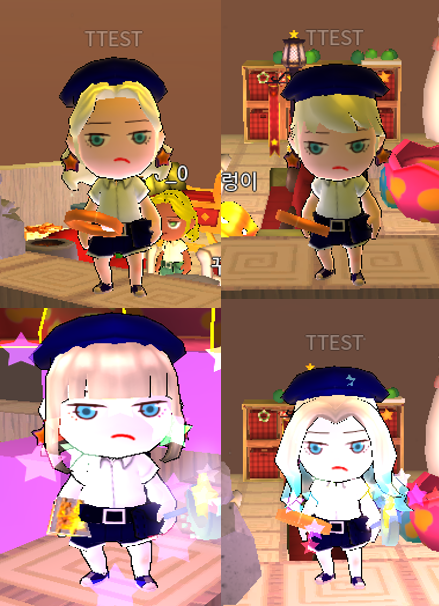
Skin color change Tanning Machine Now you can change the character's skin color to whatever color you want.
Change your skin color to decorate your character with more personality.
It can be crafted at the Skillful Carpentry Table
Powerful Tanning Lotion Tanning lotion is essential to change skin color.
You can buy it at the coin shop.
How to use
Click the tanning machine and press ‘operate’
Select the color you want and tap ‘Change’.
“Powerful Tanning Lotion” is required to change the skin color. If you have a tanning lotion, your character's skin color will change to the color which you select.
If you do not have a “Powerful Tanning Lotion”, you cannot change the skin color of your character.
Shop interior items We've added interior items to make your store more stylish and gorgeous.
In the case of signboards and blackboards, you can write letters like “noticeboard” and Font size is also adjustable.
Coin shop items You can purchase the following items at the coin shop.
Relaxing Massage Bed
Relaxing Footbath Sofa
Urban Counter Desk
Urban Rail Light
Gray Circle Rug
Rectangle Sign Board
Projecting Sign Board
Crafting items The following items can be crafted at the Skillful Carpentry Table
Promotional Black Board
Urban Chair
Fitting Room Curtain
Urban Circle Table
New Photo Frames Three big photo frame have been added.
These can be crafted at the carpentry table
Bronze Square Photo Frame
Silver Square Photo Frame
Golden Square Photo Frame
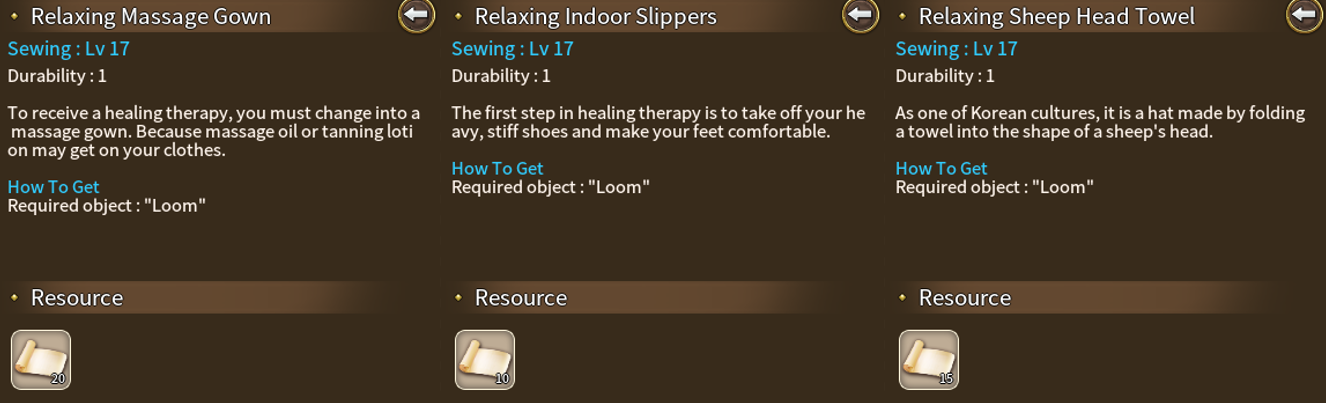
New costume Costumes that match the massage or beauty shop has been added.
These can be crafted at the loom.
Relaxing Massage Gown
Relaxing Indoor Slippers
Relaxing Sheep Head Towel
New earrings Added 4 kinds of earrings to decorate your character.
Coin shop items You can purchase the following items at the coin shop.
Springtime Earrings
Summer Dew Earrings
Crafting items The following items can be crafted at the simple manufacturing table.
Golden Ear piercing
Basic Ear Piercing
New Facial expressions Potion A new potion of facial expression has been added.
Using these potion you can choose your character's eyes and mouths which you want.
You can craft following items at the alchemy table.
Skilled Potion of Eyes
Skilled Potion of Mouth
How to use
Select the Eye or Lips tab at the dressingtable.
Select the eye or mouth shape and color you want, then tap Change.
Skilled Potion of Eyes is used to change the shape of the eyes, and Skilled Potion of Mouth is used to change the shape of the mouth.
New Facial expressions 10 new facial expressions(7 new eyes, 3 new mouth) have been added.
You can decorate your character with more facial expressions.
The new facial expressions can be changed using the following items.
Random Potion of eyes
Random Potion of mouth
Random Potion of sadness eyes
Random Potion of Sadness mouth
New hair 4 kind of new hair are added
You can check and change at the dressing table.
Improved
Dressing table The dressing table has been improved.
You can now change the look of your eyes and mouth as well as your character's hair.
language Item names have been changed.
Potion of random face change (eyes)-> Random Potion of eyes
Potion of random face change (mouth)-> Random Potion of mouth
Potion of sadness eyes-> Random Potion of sadness eyes
Potion of Sadness mouth-> Random Potion of Sadness mouth
Photo Frame Photo Frames have been improved.
You can now enter the url of the image you want, as well as the screenshot url on Steam.
Friends list In your Friends list, you can see a list of friends who have blocked by you. You can also unblock them.
Etc
Resource map Changed to a new resource map.
Update 2019-07-17
Added
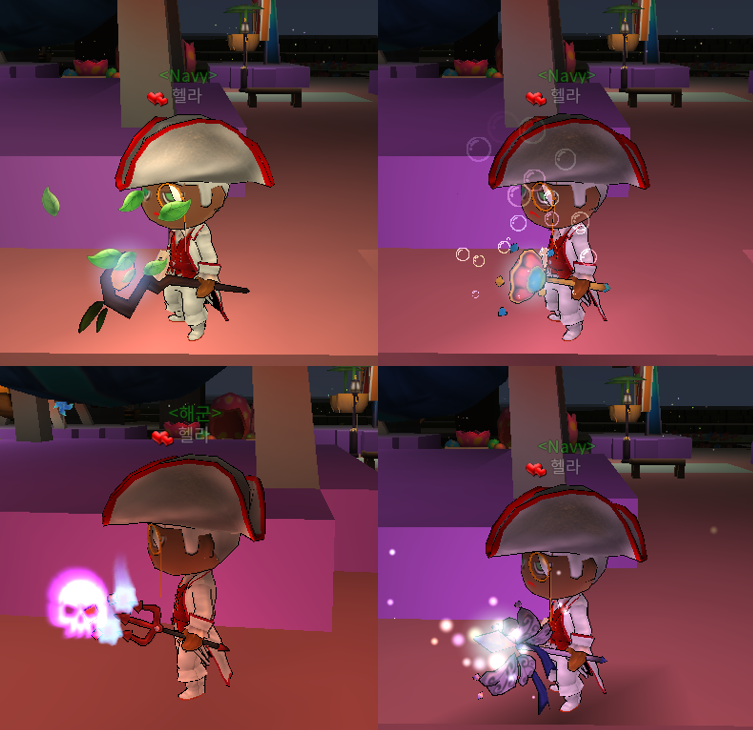
Wand Added 4 wand items to brighten the dark night of Islet.
Mountain Spirit's Wand
Mermaid's Pearl Wand
Fairy's Fancy Wand
Devil's Evil Wand
You can equip wands with more colorful and unique designs.
You can purchase in coin or ledit at the coin shop.
Long tailed-tit Clothes Added two kinds of costumes
Long tailed-tit's Breeze Armor
Long tailed-tit's Santa Hat
They can be purchased in coin or ledit at the store.
Artisan's Title A new title has been added.
You can make it on the Carving Table
Pirate
Navy
Army
Air Force
Mermaid
Sailor
New Function Disable the whisper Now you can block all whispers by checking the option in the options window.
The whisper blocking function blocks whispers that other people send to you, and it is impossible for me to send a whisper to someone else.
Select all items Added Function to select all items in inventory.
Now you can more easily manage your inventory.
Bug fixed
Long-tailed tit ‘Long-tailed tit’ was able to wear the Falcon's Wind Armor and the Falcon's Santa Hat.
‘Long-tailed tit’ can not wear a falcon costume any more.
If ‘Long-tailed tit’ are wearing a falcon costume, you can not reapply it if you remove the falcon costume.
Ranking Reward Fixed an issue that some users did not receive Ranking Reward due to character nicknames.
Improved
Client
The client has been optimized.
Update 2019-07-08
Added
New items have been added for the hot summer.
For those of you who want to go to the sea, we have added items related to pirates who are outlaws of the sea.
Costumes Added the costumes of the outlaws who wandered the sea and the costumes of the watchmen who arrested them.
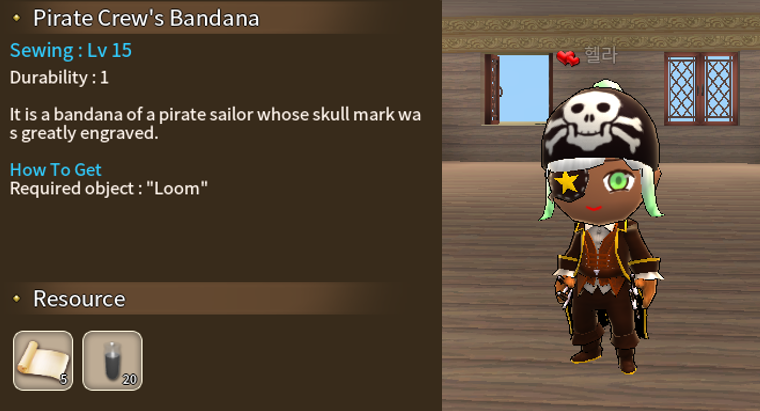
Crafting items Pirate Crew's Bandana
It can be crafted at the loom.
Coin shop item
Pirate King's Uniform
Pirate King's Hat
Pirate King's Boots
Admiral's Uniform
Admiral's Hat
Admiral's Boots
You can purchase in coin or leddit at the shop.
Objects
We also added pirate furniture for long voyages.
Crafting items
Simple Wooden Bridge
Old Cannon
Crew's Old Chair
mate's Steering Wheel,
Topcastle Of Pirate Ship
Medieval Hard Window
The booty of the outlaw
Coin shop item
Pirate King's Sailing Bed.
Admiral's Sailing Bed
Handrail Of Sailing Ship
Corner Handrail Of Sailing Ship
Pirates king's Treasure Lamp
Navy's Cannonball Lamp
Crew's Stall counter
Outdoor Dustbin Items in the dustbin will be removed after 1 hour.(real time)
Items that were placed in the dustbin within 1 hour can be brought back into inventory, and deleted items can not be recovered
It can be crafted at the Skillful Carpentry Table
New animal A new animal has been added.
You can fly on this bird.
White Long-tailed tit
Brown Long-tailed tit
You can purchase in coin or reddit at the coin shop.
Update 2019-06-26
Added
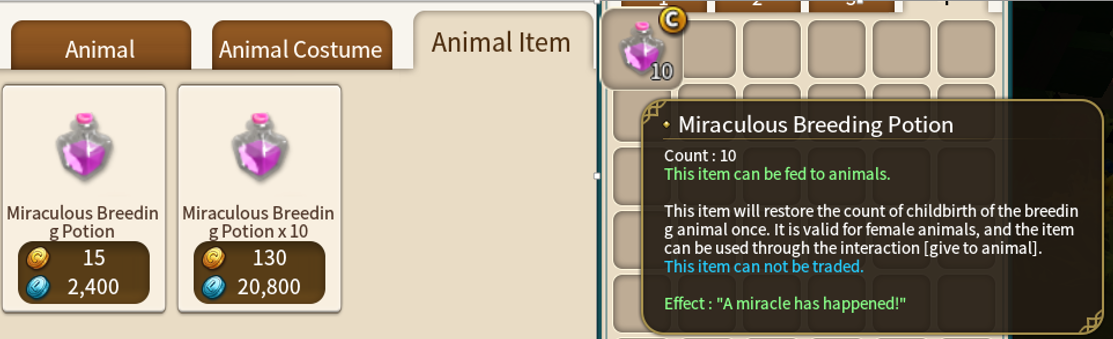
Miraculous Breeding Potion Animal breeding items have been added.
Regardless of the animal species, Increases the number of times an animal can be born by 1.
After clicking on the animal, you can use this potion to the animal through the [Give to animal] interaction.
You can only use it for females.
New hair 4 hairs have been added.
You can change it at the dressing table using the hair change ticket.
Improved
Hair We found a problem with hair disappearing when wearing a helmet, and we fixed it.
Also, some hairs have improved the hair coming out from the hat.
However, in the case of Hair 22, we kept the hair out of hat to maintain the characteristics of hair.
Daily Quest The number of daily quests related to costume production has been reduced.
Bug fixed
Food When the stacked food in the inventory turns into food garbage, there was a problem that the food garbage turned into one.
Title crafting experience Fixed an issue where wrong numbers were entered in Title crafting EXP.
Update 2019-06-17
Added
Title system Title system has been added.
Now you can craft titles and apply titles to your characters.
Also, you can freely arrange 2 titles you have and give your character a unique title.
Existing personal title will be delivered to each owner as title item that can not be produced.
Users who have personal title will already be equipped when they start the game.
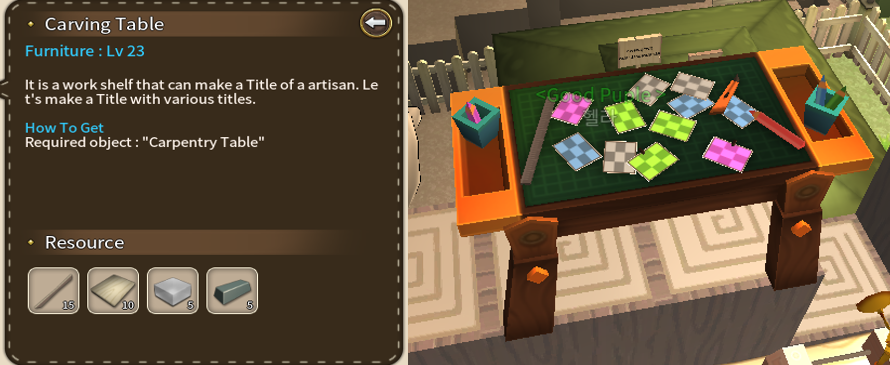
Carving Table It is a production table that can make an Artisan's Title.
It can be made at the Carpentry table
Artisan's Title If you register these in title window, title will be applied.
It can be produced on the ‘Carving Table’ and can be deleted, and traded. Disassembly is not possible.
You can see a list of titles in the item book or Carving Table
Making Title mastery New social mastery has been added.
‘Making Title mastery’ gets experience when making title items on the Carving Table
How to equip the title
Select the Title tab in the Character window. Or, if you click on the title item in the inventory, the title window will appear.
Register your title item by dragging it into the slot of title window.
The name of the title appears in the preview window in the order registered in the slot.
If you want to revert to the previous title, you can use the Revert button to revert to the previously title.
Press the Apply button and it will be applied to the head of the character as shown in the preview window.
However, it is not possible to equip the same tile item at the same time.
Ranking Reward Ranking reward has been added.
When one week's ranking is finalized, you can receive ‘Ranking Reward’ by clicking on the Reward button in the ranking window.
You must receive the ranking reward within two weeks.
You can not get ranking rewards in the total level and the rank of the angler by species.
The fruits of effort This item is required when making ‘Artisan's Title’ items.
You can only acquire by ranking reward.
Bugfixed
Riding together The experience of health mastery has been gained when you ride together.
This has been fixed.
Update 2019-05-22
Added
Marriage You can marry another player.
To be married, you must be a couple with the user who wants to marry.
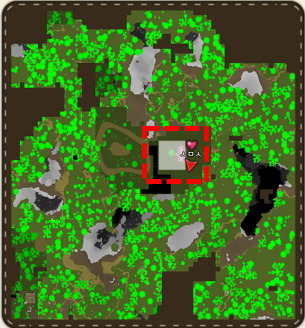
Couple status When a couple is connected to the same map, their position on the map is displayed as a heart.
Also, when they get close to each other, their eyes turn into a heart.
Couples can get ‘Emoticon mastery’ experience when they are connected together.
How to be a couple
Double-click the [Romance Bouquet] in the inventory. And equip it.
click on the user you want to be a couple.
You can not confess if the person you want to confess is already a couple or married.
You can not confess to a divorce penalty user or a blocked user by you or the user blocked you
Press the [Love Confession] button to write the message you want, and then press the check button to confess.
The confession message is displayed on the screen of the user who has received the confession, and accept or reject button appears.
When he/she press the Accept button, the two user become a couple, and the bouquet is disappeared.
If he/she press the reject button, the two user do not become a couple, and the bouquet is disappeared. And a person who confess can not [confess] for five minutes.
Married status When you are married, you get the same effect as a couple. In addition, you can use the ability to move to the location of him/her.
Teleportation If you press the ring button on the main screen, you can move to the position of your spouse.
However, it can only be used in the same map, and you can not use it while your spouse log out or Cooldown is activated.
How to get married
One of the couples wear a [Propose Love Ring].
Click the user you want to marry, then press the [Propose] button.
Write a proposal message in the window that appears, and then click the check button to send a message of proposal.
The proposal message, acceptance button and rejection button appear on the screen of the user who has been proposed.
If the user who has been proposed press the Accept button, the two people will be married and the [Propose Love Ring] will be disappeared.
The ring does not disappear if the proposal is rejected.
Break up If there is a meeting, there is a separation. If you do not like your boy/girl friend or spouse, you can break the relationship.
Separation or divorce requires the consent of the other. If you want to leave without the consent of the other, you need a separation item.
How to break up with consent
Update 2019-04-23
Improved
Block We found the inconvenience of picking and building blocks. It have been improved.
Now the block is placed exactly where you choose, and you can get exactly block which you choose.
Bug fixed
Option In the option window, the trade block and party block was automatically checked.
We solved this problem.
Update 2019-04-02
Added
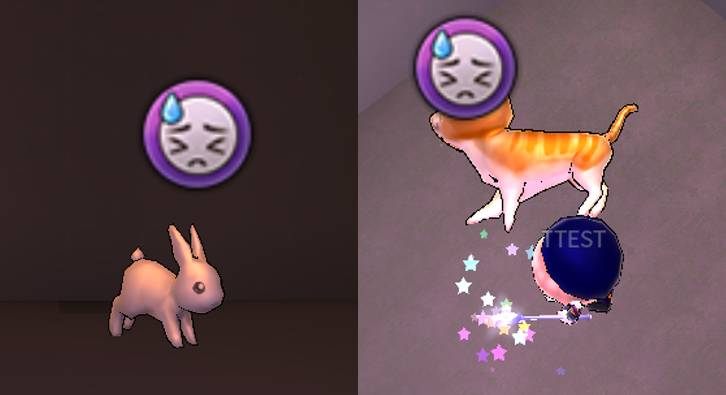
Animal Status warning mark
You can see the status of the animals you are breeding in the field.
If the animal is in bad condition, a violet mark on the head will appear.
The status warning mark is displayed only to your own animal, and the status warning mark disappears when the status is normal, the status warning mark disappears.
New interaction with animal New animal interaction has been added.
You can now feed your animal through [give to animal] interaction.
You can feed animal even if it is not yours.
Animal feed You can use raw meats, crops, weeds and flowers, leaves, and fruits to feed animals.
Food items that are cooked for humans can not be given to animals.
Depending on herbivorous, omnivorous, and carnivorous animals, their food is different.
Herbivores
They can eat crops, weeds, leaves, and fruits except raw meat.
Omnivore
They can eat crops, weeds, leaves, fruits and raw meat except the omnivorous and carnivorous raw meat.
Carnivores
They can eat crops, weeds, leaves, fruits and raw meat except carnivorous raw meat..
Among the crops, pepper, onion, green onion, and garlic are foods that all animals dislike.
How to feed
Prepare food for the animals.
Click Animal, and then click [give to animal] Interaction.
Place the food items that the animal can eat in the empty slot that appears above the head of the animal.
You can give food to the animal by pressing [give].
They do not eat if you give them what they dislike. Also, do not eat when they are full.
Improved
The PC version of Islet Online has improved the way to get block.
Bugfixed
The color code of the animal is displayed normally in the stall.
Update 2019-03-22
Added
New hair Four new hairs have been added.
You can check and change the new hair at the dressing table.
Both male and female characters can be changed to the same design hair.
To change to a newly released hair, you need an item called ‘Hair Change Coupon’.
Item Hair Change Coupon
Hair change coupons can be purchased in coin or ledit at the shop, and you will need this item whenever you change to some hair.
Even if you want to go back to the hair you bought before, hair change coupons are necessary.
Animal Armor Four new animal armor have been added.
It is a special armor for wolves and bears, and the methods you can acquire are different.
Items that can be crafted
Wolf's Simple Armor
Bear's Simple Armor
The above items can be made from a loom and can be dyed in a dye box.
Daily attendance reward item
Wolf's Sharp Armor
Bear's Sharp Armor
The above items can not be obtained by crafting, but can only be acquired through daily attendance reward.
Improved
dressing table & dyeing bathtub UI. The UI of the dressing table and the dyeing bathtub has been improved.
Now you can enter the color code to dye the item.
You can also see the color code of the selected color in the palette.
Server maintenance (2019-03-22) [completed ]
The Server maintenance completed. You can now access the game.
Sorry.
The Server maintenance time is extended. (1 hour)
Server maintenance
Server maintenance is in progress as shown below.
1. Date and Time
March 22, 2019, from 4 pm to 7 pm (KST)
2. Reason
Server migration
During the maintenance, the game will be unavailable.
after server maintenance, We will notice again in this page