Personal twon - Owner can use bombs in owner`s town.
- You can set a respawn point or move to the respawn point in the town information window.
- a noticeboard have been improved to prevent outsiders from using it.
Bug fixes
- Fixed a bug where rankings were not applied.
Improvement
- A window has been added when using potions..
Update 2018-8-31
Added
Personal town Now you can have your personal town..
How to Connect
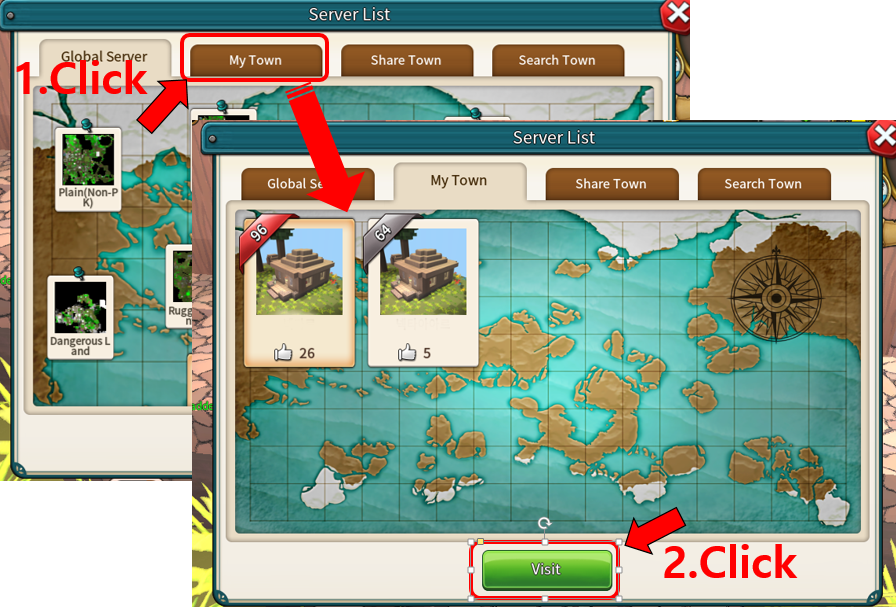
After entering the global server, press N key to display the town list window.
Click on the My Town tab, select a town and click on the Visit button to access your town.
Town setting Press the M key to set the town sharing setting.
Contact List
'Contact list' indicates the users who are currently in my town.
If you click on the user's name, a list [share, kick, block] will be displayed.
If you click 'Share', the user is registered as a sharer in the current town.
You can add it by using the character nickname search. You can see the user who is set as the sharer in the shared list.
If you press 'kick', you can ban the user from your town.
If you press 'Block', you can block the user from accessing your town again.
Blocked users are visible in block list, and you can unblock them.
Sharing settings
This is similar to personal area settings
If "Allow visitors" is checked, not only people who are shared but also all users can visit their town.
However, if you are not registered as a sharer, you can visit but you can only move within the map.
If 'Shared only' is checked, only those registered in Shared list will be able to visit your town.
If your character is registered as a sharer in another user's town, you can check the Share town in the server list window.
Praise When you visit other user's town, you can press the N key to praise the user's town.
Visit other user`s town If you are curious about other users' town, select the Search Town tab and then select or browse for the user you want to visit.
Improved
UI Emergency exit button As you traveled around the field, you was often stuck in a hole. We placed an emergency exit button on the screen. you can easily move to the spawn area by pressing this button.
Friends list The friend list UI has been improved.
You can go directly to your friend's town.
Server List It has been improved.
Event is ended
Summer is over and autumn is coming.
Now you can not make a Hot Summer Random Box, and you can not get the items contained in the box.
Server maintenance has been finished(2018-08-31)
Server checks have been finished.
Now, you can play the game normally.
For more information, please read the update notice (update 2018-08-31).
Server maintenance (2018-08-31)
Server maintenance
There will be update and server check from 4:00 pm(KST) to 5:00 pm(KST) today.
You will not be able to access the global server during server check. However, you can play on the local server.
We apologize for the inconvenience.
Update 2018-7-19
Added
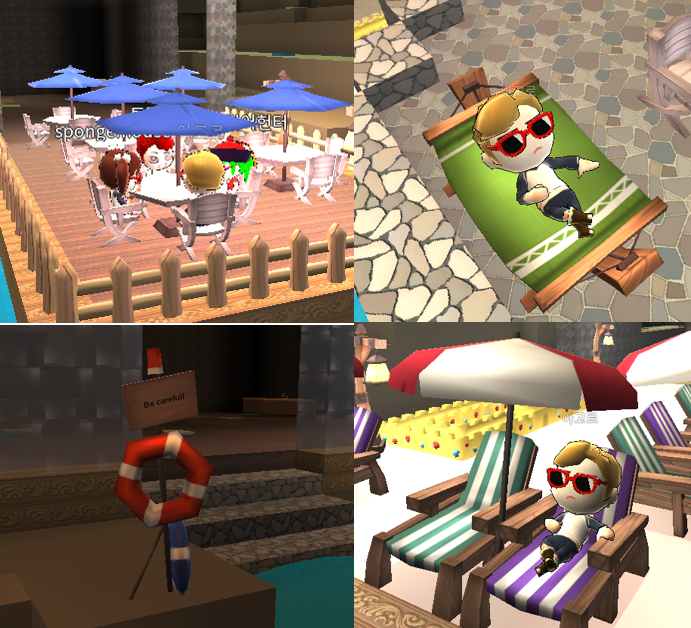
Various summer items have been added.
Hot Summer Random Box You can get the following items in the summer box..
Relax Hammock
Life Guard's LifeTube
Outdoor Table
Sunbed On The Beach
Cafe Terrace
rash guard
Fashionable sunglasses
Hot Summer Random Box is a time-limited item that can be produced by the P key until the end of August
Outdoor Chair You can make it on a Carpentry table
Sand Castle Set It is a box with sand castles and walls, and you can get one at random.
Sand Castle Set has the following items.
Artist's Sand Castle
Small Sand Castle
Long Sand Castle Wall
Sand castle wall
Simple Sand Castle Wall
These items can be placed in the world and assembled like train rails.
It can also be used as a decoration of fish tanks.
You can craft it in the basic crafting window.(P Key)
Loose Sand Castle
It can be placed in the world.
It can also be used as a decoration of fish tanks.
You can craft it in the basic crafting window.(P Key)
Improved
Swimming Mastery Dive time is applied.
Dive time is displayed in the center of the screen when the character dives below the surface.
When the dive time is over and you are in the water, your character's HP is reduced.
As your swimming mastery level increases, your dive time will increase.
Disassembly Disassembly has been improved.
If you succeed in disassembling, you can gain one of the material items or gain additional experience.
Item Book The item book has improved.
After selecting the item icon on the left side of the item book, click the hammer button and you will see a list of items that you can make with that item.
Bugfixed
Disassembly We have confirmed that torches, wall mounted torches, and bonfires are disassembled.
Now these items are not disassembled.
Simple Bug Fixed
Bug fixed
We found an issue that caused an abnormal termination when creating a map on the local server, and sometimes an abnormal termination of the game, and we urgently patched the client to solve this problem.
Sorry and thank you~
Update 2018-7-02
Added
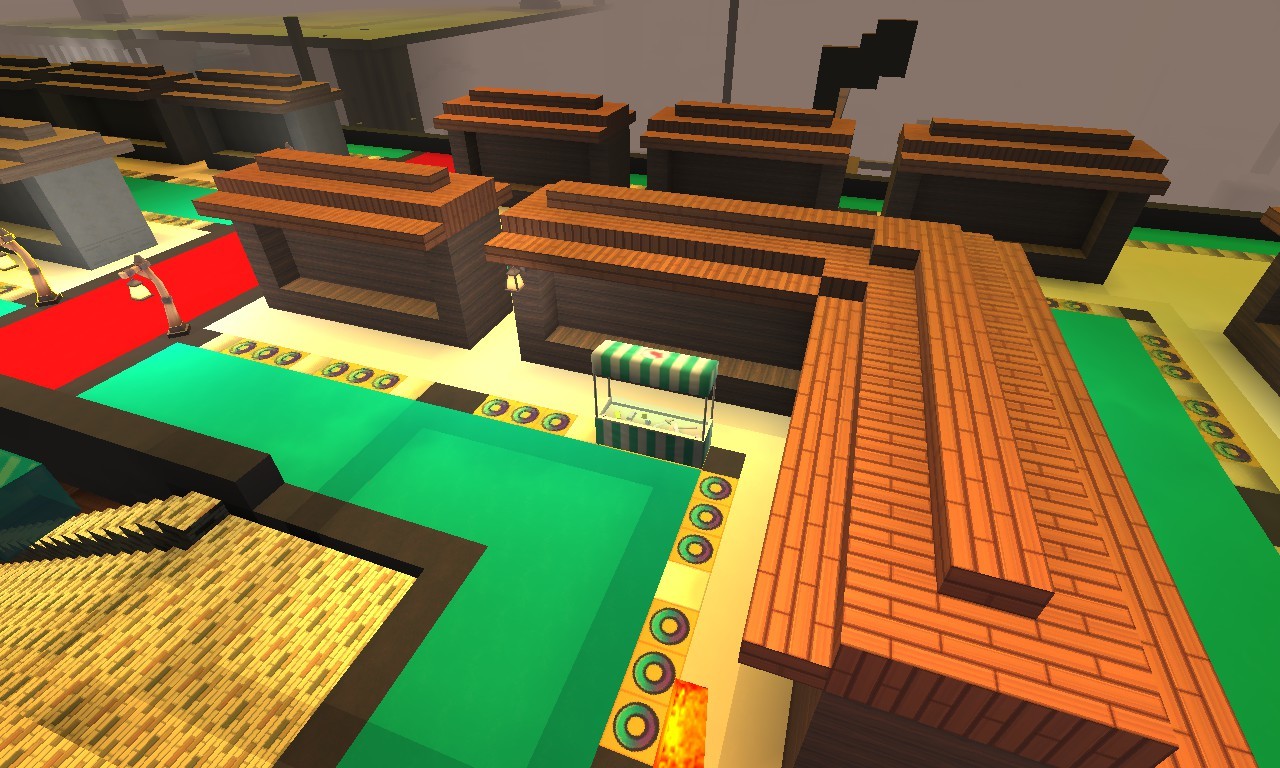
O brick Flat Land's spawn has been changed.
Now you can only set up stalls or objects on ‘O brick’.
You can not set up on the other brick, and dig bricks in Flat Land's spawn area.
PC users can install two objects. And mobile users can install one object
If you do not connect to this map for seven days, the installed objects will be removed and you will find them in mail GUI
This type of spawn area will be applied to Flat Land as well as to other map servers gradually.
Please remove items on the spawn area in advance.
Improved
Animal`s tooltip You can now check the pregnancy of the animals with the item tulips in the inventory.
Bugfixed
Detection We have found a problem that you can detect from oak leaves. Now you can not detect from oak leaves.
Color information When the skin color information of an animal is expressed, the "f" at the beginning is no longer displayed.
Update 2018-6-22
Added
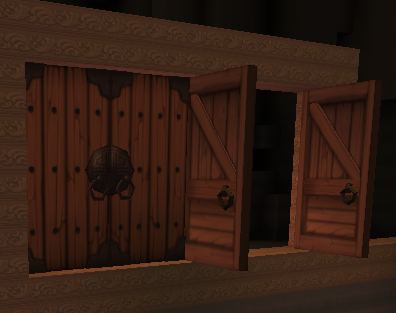
Doors & windows 2 types of Door & 2 types of windows have been added.
1 door and 1 window were used in traditional Korean houses.
Now you will be able to decorate your house more nicely.
These items can be made on Carpentry table.
Now you can dyed objects that are added.
Improved
Weed and flower texture Weeds and flowers have been improved to look more abundant.
GUI Where the object can not be installed, an 'X' appears.
(Not included in the last notice - When you select an animal, an arrow appears.)
Detection It has been improved to make it easier to select when the detection mark is around.
(Only displayed when Magnifier is selected.)
Bugfixed
Character deletion When a character is deleted, the deleted character and the character under the deleted character are deleted.
Attack Fixed a bug that occasionally reduced bricks when attacking animals with bricks.
"Mamera" Thank you for your advice.
Etc.
Resource map 1 Resource map 1 will disappear again today.
Spawn area From today, you can not stack or dig blocks or install objects in the spawn area.
We will soon modify the spawn area.
Update 2018-6-19
Resource map 1
We have been informing that resource map 1 will disappear from June 1.
However, users who did not know this notice have requested an item recovery.
So we will keep Resource Map 1 open again until this Friday.
During this time, you can access resource map 1, but you can not install objects.
Update 2018-6-15
Improved
Daily Quest There has been an improvement in requirements and rewards.
Language Chinese has been improved.
"Greygod" Thank you all the time.
Bugfixed
We found a small problem in the game and solved it.
Animals Fixed that player-owned animals outside the personal area were not attacked.
Thick convex lens Fixed a bug that did not appear in the crafting window.
You can craft it at the simple furnace.
Etc.
Resource map 1 Resource map1 has been disappeared.